
典拠標目の閲覧
書誌標目をブラウズするための概要と手順
メタデータを設定するには、次のいずれかの役割が必要です。
- 目録編集者
- 目録マネージャー
- 目録管理者

Librarians can use this functionality to browse the authority vocabulary using a specific name or subject, even if they are unsure whether it is the preferred term or not.カタログ作成権限を持たない図書館員の場合、典拠レコードの参照は読み取り専用機能です。リポジトリや典拠の検索と同様に、すべてのAlmaロールで自動的に有効になります。
閲覧典拠の見出し
When utilizing Browsing Bibliographic Headings and Browse Authority Headings, the previously selected options from the drop-down menu are retained.Alma upholds the selected "Heading Type", along with the selected "Source Code" and "Vocabulary" for each respective type.
典拠見出しを閲覧には:
- 次のいずれかの方法を使用して、MDエディタで書誌見出しの参照オプションを開きます。
- Select Browse Authority Headings(Resources > Cataloging > Browse Authority Headings).The MD Editor page appears with the authority headings browsing options.
- Open the MD Editor (Resources > Cataloging > Open Metadata Editor), and select Browse Authority Headings in the Search & Browse menu.
- "Family" – If more than one active registry has been configured for your system, use this option to select the preferred registry (such as MARC 21, UNIMARC, or CNMARC) for browsing.
- 次のオプションからブラウズする標目のタイプを選択します。デフォルト(名称)以外の見出しタイプオプションを選択すると、ページが更新され、選択した見出しタイプに適したオプションが表示されます。標目タイプのオプションの説明については、以下の表を参照してください。
Headings Type Options 標目タイプ オプション 名前[ソースコード] - 次のオプションのいずれかを選択します:- 会社名
- [会議名]
- 個人名
- イベント名
- 統一タイトル – このオプションは、browse_headings_use_uniform_title_in_names が trueに設定されている場合に表示されます。See browse_headings_use_uniform_title_in_names for more information.
[単語] - このオプションは、[名称]に複数の単語が定義されている場合に表示されます。[典拠見出しを閲覧]で検索される名称の単語は、典拠名に対してEx Librisが設定した顧客パラメータによって決まります。If more than one Names vocabulary is specified, the vocabularies appear in the drop-down list for this option.このオプションを使用して、典拠見出しをブラウズする際に使用する単語を選択します。[検索値] - 検索する名称の値を入力します。件名 [単語] – ドロップダウンリストで利用可能なオプションから、Library of Congress主題標目やU.S. National Library of Medicine, Medical主題標目などの単語の1つを選択します。ローカルで定義された単語のオプションは、システムで設定したローカルボキャブラリによって異なります。 [ソースコード] - 次のオプションのいずれかを選択します:- [年表用語]
- [ジャンル/形式]
- 地名
- パフォーマンスの媒体
- トピック用語
[検索値] - 検索する値を入力します。 - [ブラウズ]を選択します。結果は次の列に表示されます。
- Column 1 – An icon to indicate whether the authority heading is a preferred () or non-preferred term.
- 列2 – 名前または主題典拠見出し。
- 列3 – 完全な典拠レコードを表示するための[表示]ボタン。
- Column 1 – An icon to indicate whether the authority heading is a preferred (
- リストの前後をブラウズするには、小なり記号または大なり記号(< >)を使用します。ページを前後に移動すると、表示しているページの最初の行が前のページの最後の行として表示されます。
- より詳細に表示したい標目レコードを見つけたら、その行の[表示]を選択します。For bibliographic headings records identified with the authority
 icon, the detail in the split-screen view displays both an Authority tab and a Bibliographic Records tab:
- 典拠タブには、典拠レコードが表示されます。
- The Bibliographic Records tab shows the total number of bibliographic records found in parentheses.From the Bibliographic Records tab, you can view and/or edit the results.While viewing the bibliographic records, when there is more than one page, you can page forward and backward through the bibliographic records using the list page number or Greater Than </Less Than > symbols.
関連する結果
The relevant results based on the browse criteria that you entered, appear in the third row of the results.このように、結果リストには、関連する結果の内容が前後に表示されます。
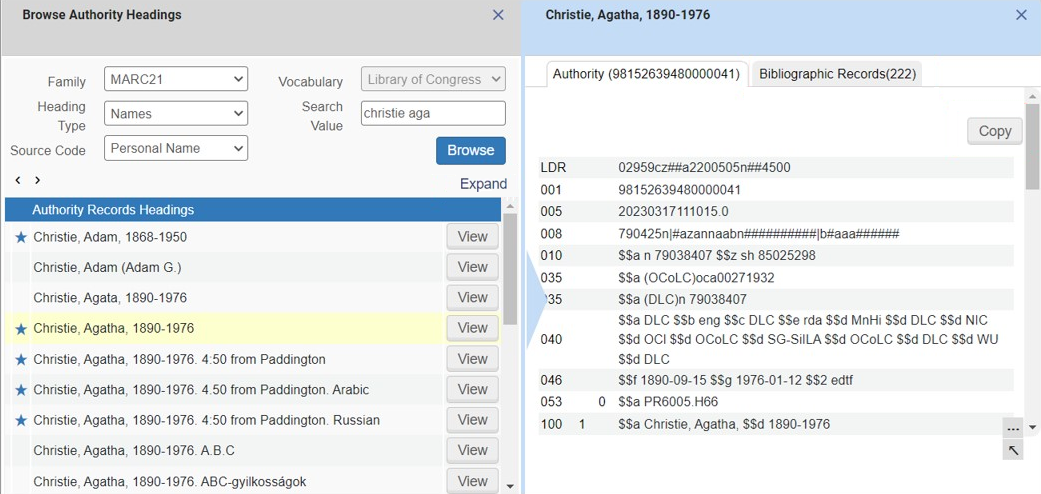
Browse Authority Headings Results List
Page tags: article:topicbrowseproduct:almacontent:DocumentationBrowse Bibliographic HeadingsBibliographic Headings Browselang:english
