
Configuring Other Settings (User Management)
- ユーザー管理者
- 一般システム管理者
You configure various user management customer parameters on the Customer Parameters mapping table located in Configuration Menu > User Management > General > Other Settings in the Network Zone dashboard for central offices with a Network Zone (see Consortia Central Configuration Dashboard).For more information about mapping tables, see Mapping Tables.
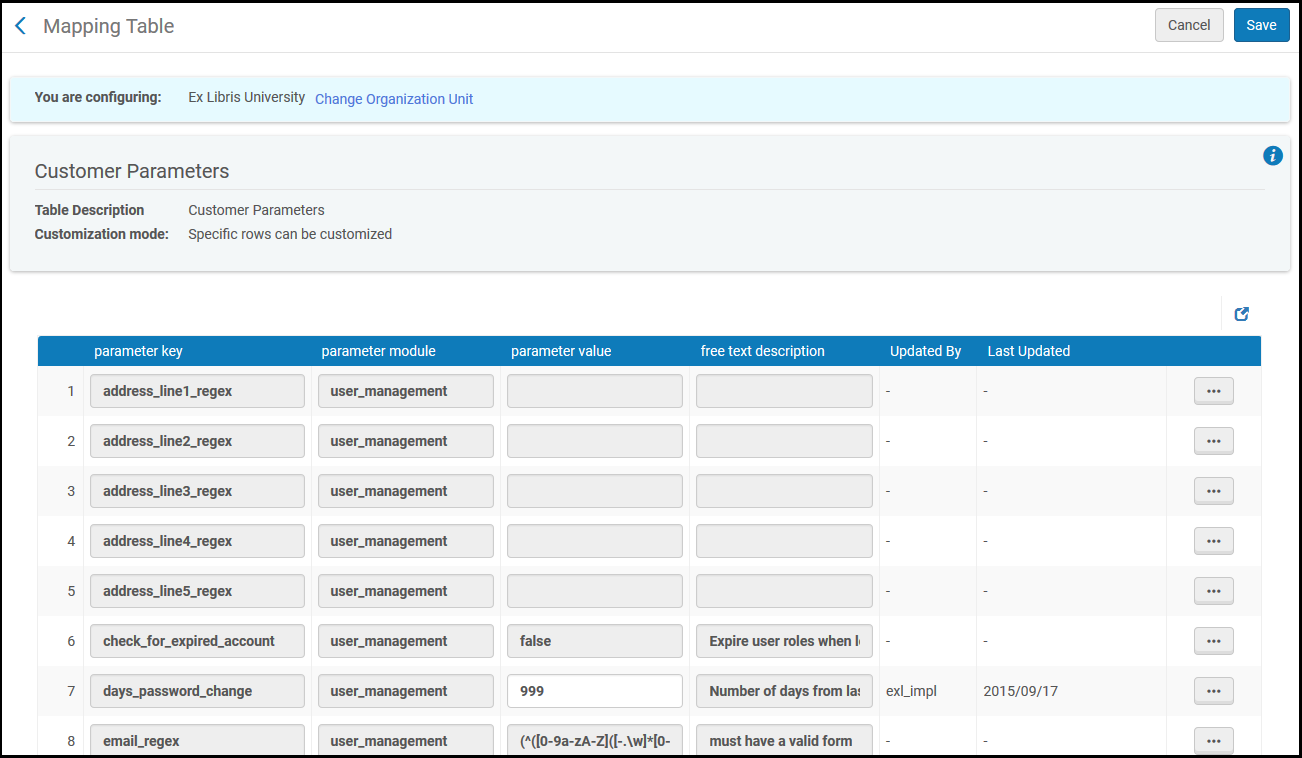
このページで設定できるパラメータを、次のテーブルで説明します。
| パラメータキー | 説明 |
|---|---|
| address_lineX_regex(1行目から5行目) | ユーザーの町名・番地などの1〜5行目の有効なフォーマット。See Adding User Contact Information. |
| add_token_to_prevent_saml_replay_attack | SAML リプレイ攻撃を防止する。If set to true, the SAML login flow initiated by Alma or Primo and redirected back through the IdP will be safeguarded against replay attacks. |
| allow_exl_to_login_as_staff_users | Adds a a checkbox “Allow Ex Libris Simulated Login” to the user records (see Managing Users). |
| ブロック_ユーザー_作成_マルチ_スレッド | For Esploro customers only - see Additional Settings. |
| 集中ユーザー管理実行タスクチェーン検証 | For Esploro customers only - see Additional Settings. |
| check_for_expired_account |
期限切れのユーザーからのユーザーリクエストやリソースシェアリクエストを避けるには、[True]に設定します。Primoではすべてのリクエストオプションが表示されるわけではありません。Almaではリクエストはブロックされます。リソースシェアリクエストに対して、上書きの警告が表示されます。The parameter is set to false by default, which allows patron requests and resource sharing requests from expired patrons. This parameter does not prevent patrons from making the purchase request, even if the check_for_expired_account is set to true. |
| disable_from_address | Set to true to disable the From: address field when you have configured a value for from_address (see below).This prevents users from entering their own email address in place of the one you have set in from_address, when using the Send message > General mail option in a user account.See Editing Users. |
| distribute_user_management_changes_last_run | ネットワークユーザー管理の変更をメンバーに配信ジョブの実行が最後に成功した日付です。See Centrally Managing Configurations in a Network Zone. |
| email_regex | 有効なEメールフォーマット。See Adding User Contact Information. |
| email_regex_display | email_regexが定義されている場合に、Eメールアドレスを入力する際に表示されるメッセージです。 |
|
external_users_with_internal_auth |
Student Information System(SIS)が認証サービスを提供していない教育機関の場合、Almaで外部ユーザーとしてユーザーを作成し、Almaで直接パスワードを割り当てることができるようになりました。この場合、名前、IDなどのすべてのユーザー情報はSISから管理されますが、パスワードはAlmaに保存され、Ex Libris Identity Serviceによって管理されます。 この動作が有効になっている場合、ユーザーを外部から内部に(またはその逆に)変更しても、ユーザーパスワードはリセットされません。ユーザーが外部ユーザーとして使用した既存のパスワードは保持されます。 See Registering Patrons and Mapping User Accounts to Other Systems. |
| from_address | The value used as a default in the From: address for the General mail (User Details > General Information > Send message) you can send while editing a user.See Editing Users.また、上記のdisable_from_addressも参照してください。 |
| fulfillment_network_search_by_all |
IDを入手できないユーザーのために、フルフィルメントネットワークでウォークインサービスを有効にするかどうかを示します。このパラメータは、ユーザーがすでに登録されている機関で有効にする必要があります。 有効な検索条件には、姓、名、またはEメールアドレスが含まれます。検索は完全に一致する必要があります。検索の結果が複数の場合、エラーが返されます。 |
| ライブラリスコープによるユーザー検索の制限 |
true に設定すると、ユーザーがライブラリの範囲内で利用者ロールを持ち、検索スタッフが同じライブラリ範囲内で検索権限を持つロールを持っている場合にのみ、ユーザー アカウントが検索結果に取得されます。デフォルトは[False]です 。 |
| network_users_unique_identifiers |
フルフィルメントネットワークが一意のユーザー識別子を使用するかどうか:
|
| jwt_signature_secret | Used for the social authentication handshake between Primo and Alma (see Using Social Networks for User Authentication for details).Primoで設定された値は、ここで定義された値と一致する必要があります。 |
|
mfa_for_alma_hep |
Ex Libris アイデンティティサービスのMFA (多要素認証) をアクティブ化します。 Possible Values:
See Multi Factor Authentication for more details. |
| network_user_profiles_and_assignment_rules_distribution_members_behavior | ネットワークゾーンのレコードを配信する際にメンバーのユーザープロファイルと割り当てルールについて行われる処理を制御します。有効な値は[削除]と[何もしない]です。削除すると、すべてのローカルレコードが削除されます。When set to None (the default),all previously existing records are left exactly as they were before the distribution. |
| phone_regex | 有効な電話番号のフォーマットです。See Adding User Contact Information. |
| phone_regex_display | phone_regexが定義されている場合に、電話番号を入力する際表示されるメッセージです。 |
| photo_identifier_type | 写真の名前の取得元のユーザー識別子のタイプです(photo_server_urlとともに使用)。The options are: USERNAME (the primary identifier) or a user identifier code; see Viewing Additional User Identifier Types .See Managing User Pictures. |
| photo_server_url |
[ユーザー詳細]ページに表示するユーザーの写真のURLディレクトリです。See Managing User Pictures.
|
| photo_suffix | ユーザーの写真のファイル拡張子(.jpgや.gifなど)。この値が写真のURLに追加されます – この値が定義されていない場合、写真が適切に表示されない場合があります。See Managing User Pictures. |
| pin_number_method | PIN番号生成機能を有効にするには、fourDigit(唯一可能な値)をここで入力します。See the PIN number field in Adding Users. |
| postal_code_regex | 郵便番号の有効なフォーマットです。See Adding User Contact Information.
デフォルトでは、郵便番号は0〜16文字で、入力できるのは数字・大文字・ハイフン・スペースのみです。ピリオドも含めたい場合は、ハイフンの後に\.を追加します。例:[A-Z0-9\-\.]{0,16} |
| postal_code_regex_display | postal_code_regexが定義されている場合に、郵便番号を入力する際表示されるメッセージです。 |
| preferred_identifier | 識別子を1つだけ表示する際、およびユーザーに従って取置き棚にあるアイテムをスキャンする際に使用する識別子コードを入力します。識別子コードは、[ユーザー識別子の種類]ページにリストが表示されます。For more information, see Viewing Additional User Identifier Types . |
| primary_identifier_regex | プライマリ識別子の有効なフォーマットです。Alphanumeric characters in primary identifiers are supported. |
| ユーザーノートにプロフィールを表示 |
true に設定すると、ロール プロファイルを使用してアカウントにロールを添付するときに、ユーザー アカウントにメモが追加されます。デフォルトはfalseです 。 |
| staff_login_ip_address_retention |
AlmaにログインしたユーザーのパブリックIPアドレスの保持期間。デフォルトの期間は90日ですが、保持を防ぐために0を含む任意の数を指定できます。For details, seeStaff Login Report. レポートのデータ保持期間の 90 日間は変更できますが、最大は 90 日間です。それより短い日数は有効ですが、長い日数は有効ではありません。 |
| url_regex | URLの有効なフォーマットです。前に来るプロトコル、有効なドメイン名(2文字または3文字のTLDで無効な文字がない)、および有効なファイルパスが必要です。 |
| use_pincode_for_selfcheck_machine | PrimoのユーザーがセルフチェックマシンのPINコードを更新できるかどうかを決定します。この設定は、セルフチェック機統合プロファイルで[認証が必要]が[はい]に設定されている場合にのみ関係します。See Self-Check Machines. |
| user_audit_retention_period | 入力した整数は、ユーザー監査証跡レコードが保持される期間を日単位で示します。スペースのデフォルト値は、すべてのレコードが保持されることを意味します。See User Audit History. |
| user_restrict_manage_roles_by_scope | When enabled, this restricts the User Manager from adding, removing, or editing roles for users of libraries to which the User Manager does not have access (see Managing User Roles).デフォルトでは、このオプションは有効ではありません。 |
