
Browsing Bibliographic Headings
書誌標目をブラウズするための概要と手順
- 目録編集者
- 目録マネージャー
- 目録管理者
To generally browse Bibliographic Headings:
- 全てのユーザーが書誌見出しを参照できますが、編集はできません。
Almaでは書誌標目をブラウズして、さまざまな目録作成ワークフローをサポートします。著者名、件名、シリーズ、タイトルごとにブラウズすることができます。
For cases when a person appears both as a creator and as a subject (i.e., 'Agatha Christie' might be both the subject and an author), you can select between the below options of mapping the MARC 21 600, 610, 611 and 647 fields: To enable this option in your institutions, go to Configuration Menu > Resources > Cataloging > MARC21 / KORMARC and browse Bib Headings Names / Subjects.For more information, see Configuring Browsing Bib Headings Names / Subjects.
- Names — When browsing bibliographic headings using this option, the 6XX fields appear under Names.
- Subjects — When browsing bibliographic headings using this option, the 6XX fields are not found.
- Names (without MARC21 600/610/611/647) — When browsing using this option, the 6XX fields are not found.Records with headings from a 6XX field and another relevant field will still be found by this option.
- Subjects (with MARC21 600/610/611/647) — When browsing using this option, the 6XX fields appear under Subjects.表示される名前の標目は、標目タイプ「名前」で参照したときに表示される標目です。They belong to the vocabulary determined by the customer parameter set by Ex Libris for authority names.
The Names (without MARC21 600/610/611/647) and Subjects (with MARC21 600/610/611/647) options are available only in the new Metadata Editor.For details about the new MDE, see Usability Improvements.
書誌標目のブラウズ
When utilizing Browsing Bibliographic Headings and Browse Authority Headings, the previously selected options from the drop-down menu are retained.Alma upholds the selected "Heading Type", along with the selected "Source Code" and "Vocabulary" for each respective type.
All users can Browse Bibliographic Headings and view the headings and the records but only authorized users with Cataloging roles can edit.以下で説明する機能の一部は、権限のあるロールを持たないユーザーは使用できないことに注意してください。
- 次のいずれかの方法を使用して、MDエディタで書誌標目の参照オプションを開きます。
- [書誌標目のブラウズ]を選択します([リソース > 目録 > 書誌の標目をブラウズする])。MDエディタページが表示され、書誌標目の参照オプションが表示されます。
- Open the MD Editor (Resources > Cataloging > Open Metadata Editor), and select Browse Bibliographic Headings in the Search & Browse menu.
- ネットワークゾーンのメンバー機関の場合、[ブラウズ]パラメーターを使用して参照する場所を選択します。オプションは、機関レベルでタイトルをブラウズする([機関])か、ネットワークレベルでタイトルをブラウズする([ネットワーク])です。When selecting Institution, the linking information appears for Institution.レコードがネットワークゾーンでリンクされている場合、リンクはネットワークリストの結果にのみ表示されます。The records cached from the network are displayed without linkage information (
 ); names are browsed under the first authority name defined for the institution.
- 次のオプションからブラウズする標目のタイプを選択します。
デフォルト(名称)以外の標目タイプオプションを選択すると、ページが更新され、選択した標目タイプに適したオプションが表示されます。標目タイプのオプションの説明については、以下の表を参照してください。
Headings Type Options 標目タイプ オプション 以下の表には、対応する例外の表が付属しています。For more information, see Configurations That are Not Supported.名前
Family — If more than one active registry has been configured for your system, use this option to select the preferred registry (such as MARC 21, UNIMARC, or CNMARC) for browsing.
Source Code — Select one of the following options:
- 会社名
- [会議名]
- 個人名
- イベント名
- Uniform Title — This option appears when browse_headings_use_uniform_title_in_names is set to true.See その他の設定(リソース管理) for more information.タイトル標目タイプを選択すると、統一タイトルもブラウズできることに注意してください。See Title for more information.
Vocabulary —This options appears when there is more than one vocabulary defined for Names.[書誌の標目をブラウズする]で検索される名称の単語は、典拠名に対してEx Librisが設定した顧客パラメータによって決まります。名称に複数の単語が指定されている場合、このオプションのドロップダウンリストに表示される単語の優先順位は、Ex Librisによって設定されたパラメータで指定された順序によって決まります。このオプションを使用して、書誌の標目をブラウスする際に使用する単語を選択します。See Authority Priorities for more information.
Search Value — Enter a names value for which you want to search.
MARC 21
名称の標目タイプは、次のMARC 21索引フィールド/サブフィールドを使用します。
- 団体名
- 110 a-d、g、n
- 0〜9、e、Eを除くすべての610サブフィールド
- 710 a-d、g、n
- [会議名]
- 111 a-e、g、n
- 数値サブフィールドを除くすべての611サブフィールド
- 711 a-e、g、n
- 個人名
- 100 a-d
- 0〜9、e、Eを除くすべての600サブフィールド
- 700 a-d
[統一タイトル] - 以下のフィールド/サブフィールドは、browse_headings_use_uniform_title_in_names顧客パラメータがtrueに設定されている場合、名前と統一タイトルが選択された状態で閲覧可能であることに注意してください。See その他の設定(リソース管理) for more information.
- 130
- 210 a
- 222 a
- 240 a-g, k-s (Note that the 240 field needs to be configured as an access point as described in Working with the 240 Field and Uniform Title Bibliographic Headings.)
- 242 a、b、n、p
- 245
- 246 a-g、n、p
- 247 a-g、n、p
- 249 c、v(表示時に以下の方法で245と連結:245 data; 249 $a / 249 $v : 249 $b / 249 $c)
- 505 t
- 0〜9、e、Eを除くすべての630サブフィールド
- 710 m-t
- 711 n-p、s、t
- 730
UNIMARC
名称の標目タイプは、次のUNIMARC索引付きフィールド/サブフィールドを使用します:
- 会社名
- 601 第1インジケータ=0 すべて
- 710 first indicator=0 all
- 711 first indicator=0 all
- 712 first indicator=0 all
- 713 first indicator=0 all
- 会議名
- 601 第1インジケータ=1 すべて
- 710 first indicator=1 all
- 711 first indicator=1 all
- 712 first indicator=1 all
- 713 first indicator=1 all
- 個人名
- 700 all
- 701 all
- 702 all
- 703 all
- 統一タイトル
- 500 a,c,d,h
- 501 a
- 506 すべて
- 730 すべて
- 740 all
- 741 all
- 742 all
- 姓
- 602 all
- 720 all
- 721 all
- 722 all
- 723 all
- 商標
- 716 all
Names (without MARC21 600/ 610/ 611 /647) As above. MARC 21
As above, but the MARC 21 indexed fields 600, 610, 611, 647 are not included when browsing this heading type.
UNIMARC
該当なし。
シリーズ Family — If more than one active registry has been configured for your system, use this option to select the preferred registry (such as MARC 21, UNIMARC, or CNMARC) for browsing.
Source Code — Select one of the following options:
- 会社名
- [会議名]
- 個人名
- イベント名
- 統一タイトル
Search Value — Enter a value for which you want to search.
MARC 21
シリーズ標目タイプは、次のMARC 21索引付きフィールド/サブフィールドを使用します。
- 会社名
- 数値サブフィールドを除くすべての810サブフィールド
- [会議名]
- 数値サブフィールドを除くすべての811サブフィールド
- 個人名
- 数値サブフィールドを除くすべての800サブフィールド
- 統一タイトル
- 440 a-z、0-9
- 490 a、l(小文字の 「L」)、v
- 数値サブフィールドを除くすべての830サブフィールド
UNIMARC
シリーズ標目タイプは、次のUNIMARC索引付きフィールド/サブフィールドを使用します。
- 225 a,c,d,e,h,i
- 統一タイトル
- 410 a,c,d,e,h,i
- 411 a,h,i
件名 Vocabulary — Select one of the vocabularies from the available options in the drop-down list such as Library of Congress Subject Headings or U.S. National Library of Medicine, Medical Subject Headings.ローカルで定義された単語のオプションは、システムで設定したローカルボキャブラリによって異なります。 MARC 21書誌レコードにおいて、651フィールドの第2インジケーターが 0(かつ標目タイプに「主題」が選択されている)場合、所属機関で使用されている標目の全範囲を確認するには、「米国議会図書館件名標目表」語彙オプションに加え、「651用米国議会図書館名称典拠レコード」語彙オプションを使用して書誌標目を閲覧する必要があります。Source Code — Select one of the following options:
- [年表用語]
- [ジャンル/形式]
- Geographic Name (see 751 Field for more information)
- [パフォーマンスの媒体]
- トピック用語
- Uncontrolled Subject Terms - only for UNIMARC format.アクティベート化するには、カスタマーサポートにお問い合わせください。
Search Value — Enter a value for which you want to search.
MARC 21 [件名]の標目タイプは、次のMARC 21索引付きフィールド/サブフィールドを使用します。
- [年表用語]
- 数値サブフィールドを除くすべての648サブフィールド
- [ジャンル形式用語]
- 数値サブフィールドを除くすべての655サブフィールド
- 689 0-9、A、Dを除くすべてのサブフィールド(A = fの場合)
- 0〜9、A、D、eを除くすべての689サブフィールド(D = bの場合)
- 地理的名称
- 0〜9、e、Eを除くすべての651サブフィールド
- 0〜9、e、Eを除くすべての751サブフィールド
- 数値サブフィールドを除くすべての752サブフィールド
- [パフォーマンスの媒体]
- 382 a、b、c、d、e、f、g、h
- 分類学的識別
- 754 all subfields except for numeric subfields
- トピック用語
- 0〜9、e、Eを除くすべての650サブフィールド
- 0〜9、e、Eを除くすべての654サブフィールド
- 689 0-9、A、Dを除くすべてのサブフィールド(A = fの場合)
- 0〜9、A、D、eを除くすべての689サブフィールド(D = bの場合)
UNIMARC [件名]の標目タイプは、次のUNIMARC索引付きフィールド/サブフィールドを使用します。
- [ジャンル形式用語]
- 608 すべて
- 616 すべて
- 地理的名称
- 607 a-d,f-z
- 617 a-d,f-z
- トピック用語
- 606 a-d,f-z
- 個人名
- 600 すべて
- 会社名
- 601 第1インジケータ=0 すべて
- 会議名
- 601 第1インジケータ=1 すべて
- 姓
- 氏名/役職
- 604 すべて
- 統一タイトル
- 605 すべて
- 出版地
- 620 a-d,f-z
- 621 a-d,f-z
- 制御されていない主題用語
- 610 第1インジケータ=0 a-d,f-z
- 610 第1インジケータ=1 a-d,f-z
Subjects (with MARC21 600 / 610/ 611/647) As above, but the Source Code contains these options as well:
- 会社名
- [会議名]
- 個人名
- Uniform Title — This option appears when browse_headings_use_uniform_title_in_names is set to true.See その他の設定(リソース管理) for more information.タイトル標目タイプを選択すると、統一タイトルもブラウズできることに注意してください。See Title for more information.
MARC 21
As above, but the Names headings type uses the following MARC 21 indexed fields/subfields:
会社名- 0〜9、e、Eを除くすべての610サブフィールド
- 数値サブフィールドを除くすべての611サブフィールド
- 0〜9、e、Eを除くすべての600サブフィールド
UNIMARC
該当なし。
Title Search Value — Enter a value for which you want to search.
For uniform titles, see その他の設定(リソース管理) for more information.
MARC 21 [タイトル]の標目タイプは、以下にリストされているMARC 21索引付きフィールド/サブフィールドを使用します。browse_headings_use_uniform_title_in_namesユーザーパラメータがfalseに設定されている場合、[タイトル]が選択されていると、次のフィールド/サブフィールドがブラウズ可能であることに注意してください。See その他の設定(リソース管理) for more information.
- 130(統一タイトル)
- 210 a
- 222 a
- 240 a-g, k-s (Note that the 240 field needs to be configured as an access point as described in Working with the 240 Field and Uniform Title Bibliographic Headings.)
- 242 a、b、n、p
- 245
- 246 a-g、n、p
- 247 a-g、n、p
- 249 a、b(表示時に以下の方法で245と連結: 245 data; 249 $a / 249 $v : 249 $b / 249 $c)
- 505 t
- 630(統一タイトル)
- 700 m-p、r-t
- 710 m-t
- 711 n-p、s、t
- 730(統一タイトル)
UNIMARC / CNMARC The Title headings type uses the following UNIMARC and CNMARC indexed fields/subfields:
- 200 a、c、d、e、h、i
代表請求記号/分類 Family — If more than one active registry has been configured for your system, use this option to select the preferred registry (such as MARC 21, UNIMARC, or CNMARC) for browsing. Source Code — Select one of the following options for MARC 21 or UNIMARC:
- LCの請求番号
- 米国国立医学図書館請求番号
- 国立農学図書館請求番号
- ローカル請求番号09X (10の異なるオプション)
- 地理的分類
- カナダで割り当てられた分類番号
- 国際十進分類法番号
- デューイ十進法分類番号
- 追加デューイ十進法分類番号
- その他の分類番号
- 合成された分類番号コンポーネント
- 政府文書分類番号
Source Code — Select one of the following options for CNMARC:
- 中国語書籍分類請求番号
このオプションには特別なASCIIソートが実装されているため、特定の句読点が数字よりも優先されます。
- 中国語図書館分類
- 中国科学院の図書館分類
- その他中国語分類番号
Vocabulary — When Other Classification Number is selected for the Source Code, enter the vocabulary code for the headings that you want to browse.システムは、084 $2に一致する単語コードを探します。
Search Value — Enter a call number or classification value for which you want to search.
MARC 21 請求番号/分類標目タイプは、次のMARC 21索引付きフィールド/サブフィールドを使用します。
- 050a、b
- 052a、b、d
- 055a、b、d
- 060a、b
- 070a、b
- 080a、b、x
- 082a、b、m、q
- 083a、c、m、q、y、z
- 084a、b、q
- 085a、b、c、f、r、s、t、u、v、w、y、z
- 086a, z
- 090a-z、0、1、3、4、5、7、9
- 091a-z、0、1、3、4、5、7、9
- 092a-z、0、1、3、4、5、7、9
- 093a-z、0、1、3、4、5、7、9
- 094a-z、0、1、3、4、5、7、9
- 095a-z、0、1、3、4、5、7、9
- 096a-z、0、1、3、4、5、7、9
- 097a-z、0、1、3、4、5、7、9
- 098a-z、0、1、3、4、5、7、9
- 099a-z、0、1、3、4、5、7、9
UNIMARC The Call Number/Classifications headings type uses the following UNIMARC indexed fields/subfields:
- 国際十進分類法番号
- 675 a
- 議会図書館分類
- 680 a
- デューイ十進法分類番号
- 676 a
- その他分類番号
- 680 a,c
CNMARC 請求番号/分類標目タイプでは、次のCNMARC索引付きフィールド/サブフィールドを使用します。
- 中国語書籍分類請求番号
- 090 a、b
- 905 f
- 905 s
- 中国語図書館分類
- 690 a
- 中国科学院の図書館分類
- 692 a
- その他中国語分類番号
- 694 a
- 696 a
- 名称(デフォルトのオプション)
- シリーズ
- 件名
- タイトル
- 請求番号/分類
- 実行するアクションの参照オプションを完了します。
- [ブラウズ]を選択します。結果は次の列に表示されます。
- Column 1 — An icon to indicate whether the bibliographic subject heading is connected to an authority record.
- Column 2 — The number of bibliographic record headings found for a particular subject, name, series, or title headings row.特定の行で20を超える標目が見つかった場合、この列には20以上が表示されます。
- Column 3 — The bibliographic record headings subject, name, series, or title found.
- Column 4 — A View button for viewing the complete bibliographic record.
閲覧結果の表示に関するさまざまな問題については、以下のセクションを参照してください。 - リストの前後をブラウズするには、小なり記号または大なり記号(< >)を使用します。ページを前後に移動すると、表示しているページの最初の行が前のページの最後の行として表示されます。
- より詳細に表示したい標目レコードを見つけたら、その行の[表示]を選択します。For bibliographic headings records identified with the authority
 icon, the detail in the split-screen view displays both an Authority tab and a Bibliographic Records tab:
- [典拠]タブには、書誌の標目レコードに関連付けられている典拠レコードが表示されます。
- The Bibliographic Records tab shows the total number of bibliographic records found in parentheses.From the Bibliographic Records tab, you can view and/or edit the results.While viewing the bibliographic records, when there is more than one page, you can page forward and backward through the bibliographic records using the list page number or Greater Than </Less Than > symbols.Alternatively, you can select Open in Repository Search to view the results in the repository.
関連する結果
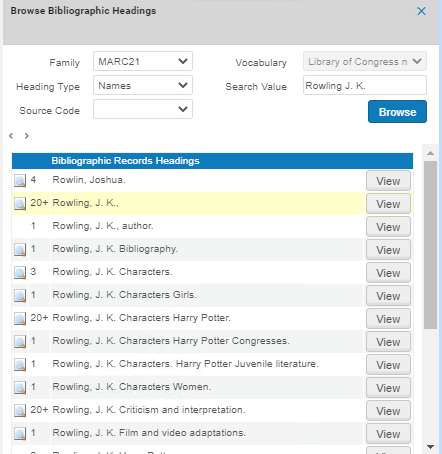
The relevant result, based on the browse criteria that you entered, appears in the second row of the results.このように、結果リストには、関連する結果の内容が前後に表示されます。
サブフィールドのソート順
[書誌レコードの標目]列の結果は、サブフィールドの順序でソートすることができます。For example,650 0 $a Gardening $z England $v Bibliography appears as Gardening England Bibliography:

英語以外の閲覧結果
Browsing CJK Results
CJK(中国語、日本語、韓国語)およびブラウズ結果リストのソートに関するその他の要件に対処するために、書誌レコードインジケータや特殊な非ファイリング文字など、可能なすべてのオプションに従って非ファイリングテキストが削除されます。See Using Non-Filing Markers and Using Non-Filing Indicators in KORMARC for more information.
CJKコンテンツを参照する場合、結果をソートするときに、CJK文字間のすべての句読点は無視されます。Note that with this capability the punctuation marks continue to appear in the display of CJK content.For Hong Kong institutions, Alma also handles TSVCC variants when browsing bibliographic headings (see Hong Kong TSVCC for more information).
すべての機関で、書誌の標目(MDエディタでF3を使用する場合は典拠標目)を参照するために実行される漢字コンテンツのソートは、プライマリソートとして漢字コンテンツをラテン語化けし、必要に応じてセカンダリレベルのソートして、そのソートされた漢字コンテンツを使用して行われます。したがって、同じラテン語エントリが複数ある場合、漢字ソートは同じラテン語エントリを持つレコードのブラウズ順序を決定します。
日本語および韓国語のコンテンツの場合、書誌および典拠標目のブラウズは、すべての機関でCJKソートを使用して処理されます。
詳細については、以下を参照してください。
- Chinese and Korean Characters
- Japanese Characters
- CKJ Punctuation
- Hong Kong TSVCC
Browsing Other Language Results
For institutions that have other language settings (German, Spanish, Polish, Icelandic, Lithuanian), the special language characters are handled in the same manner for browsing bibliographic headings as they are for searching in the Alma repository.詳細については、以下を参照してください。
- German Characters
- Spanish and Catalan Characters
- Polish Characters
- Icelandic Characters
- Lithuanian Characters
Configuring Browsing Bib Headings Names / Subjects
You configure the heading types on the MARC21 / KORMARC - Browse Bib Headings Names / Subjects code table (Configuration > Resources > Cataloging > MARC21 / KORMARC - Browse Bib Headings Names / Subjects).For more information about code tables, see Code Tables.
For Primo VE: if you want to enable update_names_without and update_subjects_with, contact Ex Libris support, as configuration changes are needed.
You can choose to have all four options available, or only part of them.
デフォルト名と機関用に設定された言語の名前を編集できます。

Configuring Browse Bibliographic Headings and Selection Display
Ex Libris supports the ability to configure the display and sorting values for bibliographic headings, so that each institution can define its own mapping, based on the pre-defined mapping provided by Ex Libris out-of-the-box.This helps librarians that are browsing through bibliographic headings to see the information they find relevant for their institution.
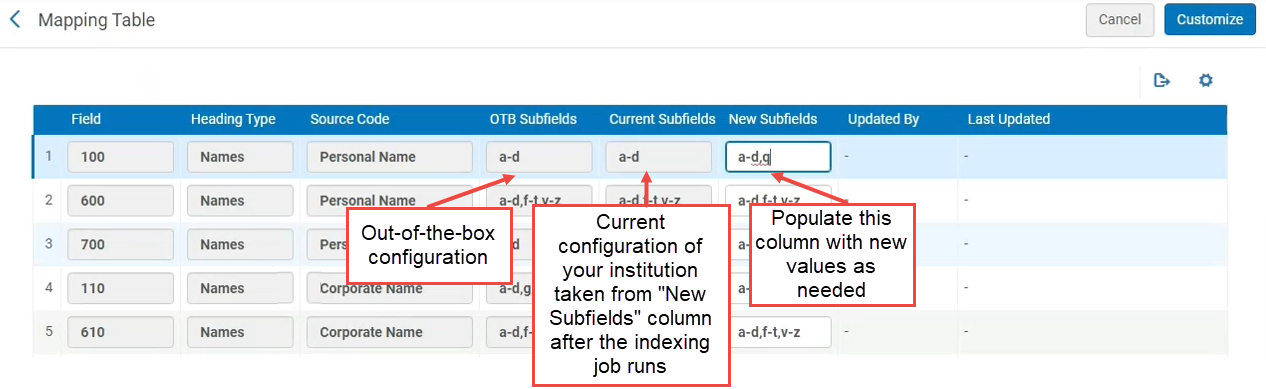
For example, out-of-the-box, the heading type "Names", source code "Personal Name" is mapped to MARC21 field 100 $$a-d.Now institutions can modify that mapping to other subfields, for example to field 100 $$a-d,q.
現在、この機能はMARC21にのみ存在します。今後のリリースでは、UNIMARC/CNMARCプロファイル用にリリースされます。
To support this ability, a new configuration table Bibliographic Headings Display Subfield Mapping was added to the configuration of the bibliographic profiles.This table shows the out-of-the-box values and the mapping that is currently implemented for the institution, and enables the institution to define a new mapping of subfields.
書誌の標目の検索と選択表示の設定
This configuration takes effect only after the indexing job builds the headings.
- Open the Metadata Configuration table (Configuration Menu > Resources > Cataloging > Metadata Configuration).
- 目的の書誌プロファイルのプロファイルリンクを選択します。
- On the Profile Details page, open the Other Settings tab.
- In the Configuration Tables, select the Bibliographic Headings Display Subfield Mapping link.
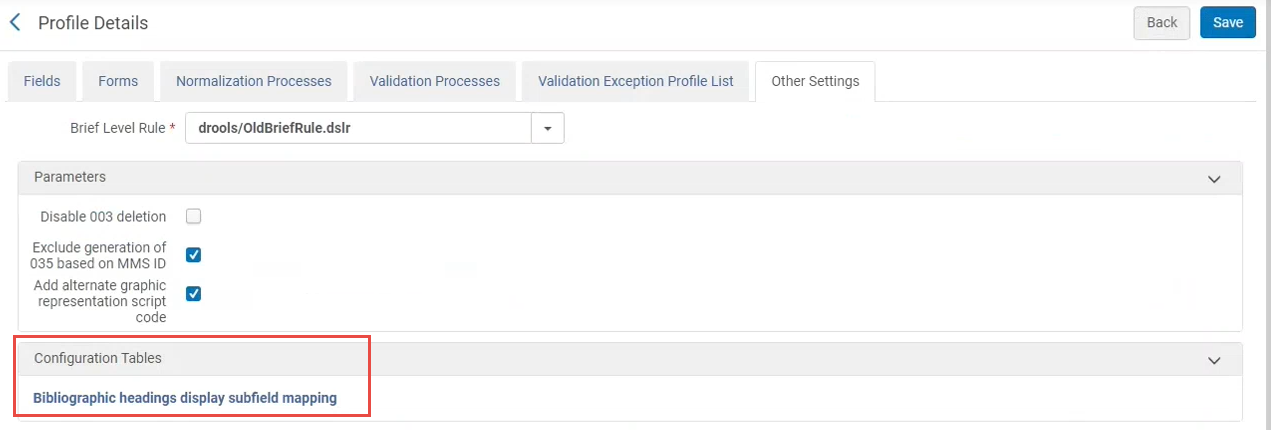
- マッピングテーブルが開きます。It displays out-of-the-box values and the mapping that is currently implemented by the institution.To modify the mapping, enter a list of subfields separated by a comma or by a dash (from-to) in the New Subfields column.Note: In rows where the mapping was not modified, all three columns display the out-of-the-box values.
Configurations That are Not Supported
次のMARC21サブフィールド構成は現在サポートされていません。Even if these fields are configured, they will not appear in F3 in the heading from the bibliographic records tab.
| フィールド | サブフィールド |
|---|---|
| 100 | e |
| 110 | e |
| 111 | j |
| 385 | m |
| 386 | m |
| 600 | e |
| 610 | e |
| 611 | j |
| 630 | e |
| 650 | e |
| 651 | e |
| 654 | e |
| 689 | e、A、B、C |
| 700 | e |
| 7XX | i |
| 710 | e |
| 711 | j |
| 720 | e |
| 751 | e |
| 800 | v |
| 810 | v |
| 811 | v、j |
| 830 | v、x、y、z |
ネットワークゾーンでの書誌の標目の検索と選択表示の設定
The Network Zone central office can define and share the configuration table with all Network Zone members via the Manage Table in Network option (see Centrally Managing Configurations in a Network Zone).
When member institutions view the bibliographic headings in the Network Zone, the headings are according to the setup in the Network Zone.
Page tags: article:topicbrowseproduct:almacontent:DocumentationBrowse Bibliographic HeadingsBibliographic Headings Browselang:english
