
請求番号の所蔵へのマッピング
マッピングルールをカスタマイズするには、次のいずれかの役職が必要です。
- 目録管理者
- 一般システム管理者
For a video on the call number mapping table, watch Call Number Mapping.
請求番号マッピングのマッピングテーブルを使用すると、請求番号情報を書誌レコードから所蔵レコードにマッピングする方法をカスタマイズできます。次の方法では、このマッピングテーブルを使用します。
- MDエディタでの新しい所蔵レコードの保存。いずれかの方法を使用しない限り、請求番号は変更された所蔵レコードにマップされないことに注意してください。
- Running the Update from Bibliographic tool for a new or modified holdings record from the Record Actions menu in the MD Editor.In order to use the Update from Bibliographic feature, the Normalize on Save normalization process (Configuration > Resources > Metadata configuration > MARC21 Holding > Normalization processes) needs to be enabled, and have the "852 field normalization" task first in the list.
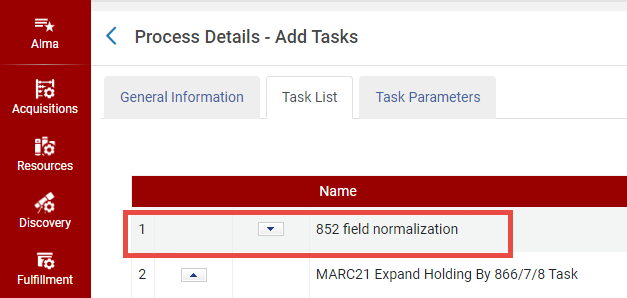
852 Field Normalization
- インポートプロファイルジョブの実行。
- Change Holding Information job (see Manual Jobs and Their Relevant Parameters)
Alma uses the first matching row in the mapping table to map the call number for each record.To determine the matching row, Alma compares each record with each enabled mapping row (starting at the top of the table) and stops checking when a mapping row matches all of the following conditions:
- 所蔵レコードの852フィールドの最初のインジケーターは、マッピングテーブルの[852 Ist Ind]列で指定されたインジケーターと一致します。
- 所蔵レコードの852フィールドの最初のインジケータが7の場合、[852 サブフィールド 2] 列で指定された値は、所蔵レコードの対応する値とも一致する必要があります。
- マッピングレコードの[Bib Field to Copy]列で指定されたMARCタグは、書誌レコードに存在します。
一致する行が見つかった場合、[Bib Field Copy]および[Bib Subfields to Copy]列で指定されたフィールドおよびサブフィールドが、書誌レコードから[852 Subfiled Destination]列で指定された852サブフィールドにコピーされます。すべての条件が満たされない場合、システムはマッピングテーブルの次の行に進みます。
デフォルトでは、マッピングテーブルは次のルールを使用して情報をマッピングします。
- For the 0 indicator, replaces the h and i subfields with the content of the bibliographic record's 090 a and b subfields (respectively).書誌レコードに090フィールドがない場合、代わりに050 aおよびbサブフィールドが使用されます。
- For the 1 indicator, replaces the h and i subfields with the content of the bibliographic record's 082 a and b subfields (respectively).
- For the 2 indicator, replaces the h and i subfields with the content of the bibliographic record's 060 a and b subfields (respectively).
- For the 3 indicator, adds the h and i subfields with the content of the bibliographic record's 086 a and b subfields (respectively).hおよびiサブフィールドがすでに入力されている場合、それらの値はそのままで、置き換えられません。
- 8インジケータの場合、書誌レコードの084 aサブフィールド値を、連結したhサブフィールドに追加します。(hサブフィールドがすでに入力されている場合、その値はそのままです。)また、iサブフィールドを連結した084 bサブフィールド値に置き換えます。
Adding a Call Number Mapping
請求番号マッピング行を追加する方法
- [請求番号マッピング]ページ ([設定メニュー > リソース > 一般 > 請求番号マッピング]) で、次のフィールドに入力します。
- 852 1st Indicator – Enter the value of the first indicator to be matched in the holdings record.Enter the # symbol to indicate that you want a space entered for the first indicator.これは必須フィールドです。
- [Bib Field To Copy] – 書誌レコードから所蔵レコードにマッピングする請求番号を5桁のフィールドを入力します。To specify wildcards, use a question mark (for example,963??).これは必須フィールドです。
- [Bib Subfields To Copy]-[Bib Fields To Copy]で指定されたフィールドから所蔵レコードにコピーするサブフィールドを指定します。複数のサブフィールドは、スペースを使わずにコンマで区切る必要があります。これは必須フィールドです。
- [852 Subfield Destinations] - 所蔵レコードで請求番号がマッピングされる852サブフィールドを入力します。複数のサブフィールドは、スペースを使わずにコンマで区切る必要があります。これは必須フィールドです。
- [説明]– ルールに関する任意の説明を入力します。

請求番号マッピングの入力 - [追加]を選択して、新しいマッピング行を追加します。
- 新しいマッピング行で上下矢印を選択して、ルールがチェックされる順番を変更します。
- [保存]を選択します。
請求番号マッピングの無効化
請求番号マッピング行を無効にする方法
- 有効列を使用して、既存の請求番号マッピングを無効にします。
- [保存]を選択します。
請求番号マッピングの削除
請求番号マッピング行を削除する方法
- 行の[削除]アクションを選択して、不要になったルールを削除します。
- [保存]を選択してください。
