
受入番号の設定
- 目録管理者
- 一般システム管理者
Alma can automatically generate accession numbers in holdings records to identify a resource.You can configure how these numbers are generated.例えば、リソースが取得された年を含む接頭語と、リソース番号 (重複リソースが取得されている場合) を使用したり、配架場所で識別したりできます。
受入番号はデフォルトで1から始まり、追加の受入番号を生成するたびに1ずつ増加します。1以外の初期値をセットすることができます。いくつかの番号をスキップして、新しいシーケンス値をセットすることもできます。これは使用されている最後の値よりも大い必要があります。(For more information, see Editing an Accession Number.)
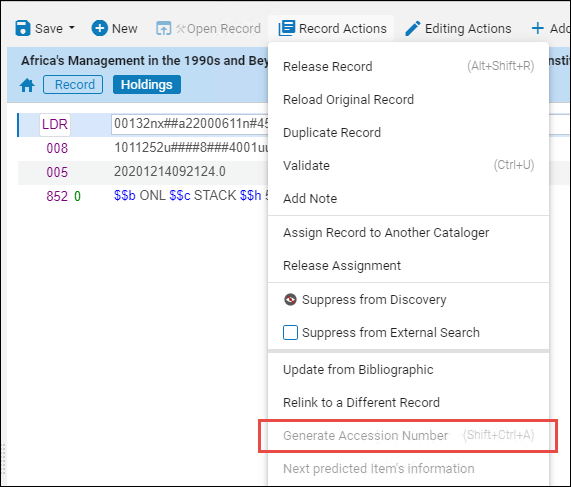
受入番号を設定した後、MD エディタでレコードアクション > 受入番号の生成を選択することで、所蔵レコードの番号が生成されます。
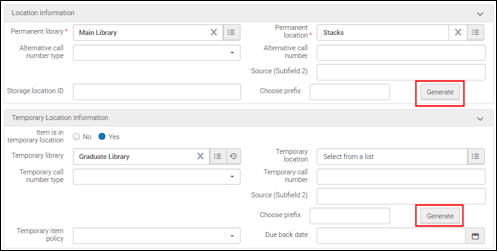
You can also use the Accession Number configuration to define a number sequence for generating alternative and temporary item-level call numbers when editing items on the Physical Item Editor page.See Updating Item-Level Information for more information.
Also, see Physical Inventory - Configuring and using the Accession Number and Inventory Number for more information.
新しい受入番号シーケンスを追加
受入番号を使用するには、受入番号を生成する方法を識別するためにシーケンス設定を定義する必要があります。シーケンス設定は、機関レベル、図書館レベル、および図書館+配架場所レベルで定義することができます。
所蔵レコードに機関レベルのシーケンス設定を実装するには、holdings_accession_number_generation_extendedのユーザーパラメータをinstitutionに設定する必要があります。このパラメーターにinstitutionを指定すると、図書館または図書館 + 場所のフィールドへの入力が必須ではなくなります。これらのフィールドを空白のままにすると、機関レベルのシーケンスを作成していることとなります。See Configuring Other Settings (Resource Management) for more information.
Also, you can implement institution-level sequencing configurations for item records when the item_call_numbers_generate_enable customer parameter is set to true.See Configuring Other Settings (Resource Management) for more information.
- [受入設定]ページ([設定メニュー] > [リソース] > [一般] > [受入番号])で、[新しいシーケンスの作成]を選択し、パラメーターを入力して新しいシーケンスを作成します。
新しいシーケンスを作成 パラメータ 説明 シーケンス名 シーケンス名を入力して、各シーケンス設定を他のシーケンスと区別します。 図書館 図書館レベルのシーケンスにするには、ブラウジングして図書館を選択します。これは設定したシーケンスは、選択した図書館でのみ使用できることを意味します。このパラメータは、次の顧客パラメータがtrueに設定されている場合のオプションです。- item_call_numbers_generate_enable
In addition, for the holdings_accession_number_generation_extended parameter, you need to enter one of the following three values:
- 機関 - 機関のすべてのアイテム/Holレコードで使用される受入番号を生成します
- library – To be used by items/Hol records of the assigned library
- 場所– 割り当てられた図書館 + 場所のアイテム/Holレコードによって使用されます
To make the sequence available at the institution level, select an empty value in the dropdown: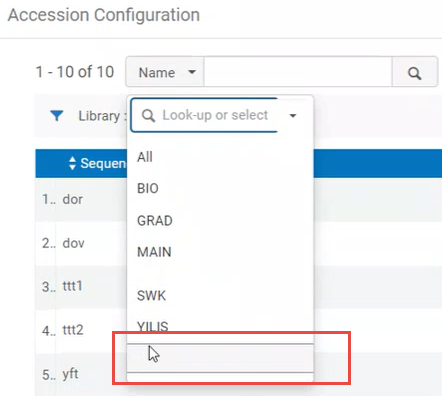
ロケーション ブラウズして図書館という場所を選び、これを場所レベルのシーケンスにします。これは設定したシーケンスは、選択した場所でのみ使用できることを意味します。This parameter is optional when the item_call_numbers_generate_enable customer parameter is set to true:
In addition, for the holdings_accession_number_generation_extended parameter, you need to enter one of the following three values:
- institution — Generate accession numbers to be used by all items/Hol records of the institution
- library — To be used by items/Hol records of the assigned library
- location — To be used by items/Hol records of the assigned library + location
方法 次の方法のいずれかを選択します。 - 接頭語 + シーケンス
- シーケンス + タイムスタンプ
In order to use the Generate and/or Calculate features (see Updating Item-Level Information for more information) for creating alternative and/or temporary item-level call numbers on the Physical Item Editor page, you need to select the Prefix + Sequence option.接頭語 [接頭語 + シーケンス]を選択すると、接頭語を指定して、シーケンスIDをさらに定義することができます。接頭語は、生成されるシーケンス番号の前に付きます。接頭語オプションは、文字、数字、句読点、およびスペースの組み合わせから設定できます。接頭語の直後に追加されるシーケンス番号から接頭語を区切るには、設定で作成する接頭語の末尾にスペースを入力します。技術的な制限により、現在のところ同じ図書館と場所に同じ接頭語を持つ2つのシーケンスを (異なるシーケンス名で) 作成することができますが、これは実行しないことをお勧めします。[接頭語 + シーケンス]で設定された数値シーケンス (接頭語なし)はすべての機関で一度だけ作成する必要があります。 (機関レベルのシーケンス、図書館レベルのシーケンス、または配架場所レベルのシーケンスとして)Even if you define the accession number generation on institution or library level, the mandatory icon will always appear for both settings in the sequence configuration: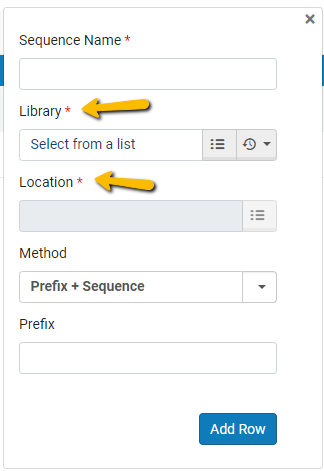
Library and Location are marked as mandatory.ただし、これは無視できます。定義されたレベルに応じてシーケンスを保存できます。
- 行を追加を選択します。このプロセスを必要な回数繰り返して、必要なすべての受入番号シーケンスを作成します。
このページで行ったすべての変更は自動的に保存されます。You receive a message about each saved change: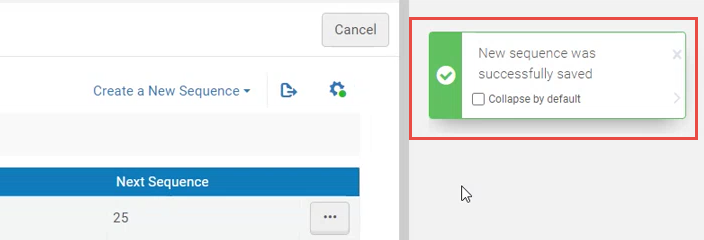
受入番号の編集
The accession number begins by default at 1 and is incremented by 1 each time a new accession number is generated.1以外の初期値を設定できます。You can also skip some numbers and set a new next sequence value, which must be higher than the last one in use.
- [受入設定]ページで、変更するシーケンスの行アクションリストから[次のシーケンス値のセット]を選択します。[次の数値のセット]ダイアログボックスが開きます。
- 使用されている最後の値よりも大きい値を入力します。
このページで行ったすべての変更は自動的に保存されます。
受入番号を削除
受入番号シーケンス設定を削除できます。
- 行アクションリストから削除を選択します。
このページで行ったすべての変更は自動的に保存されます。
受入番号の配置の割り当て
自動生成された受入番号に索引を付けてリポジトリで検索できるようにするには、受入番号をMARCフィールドに割り当てる必要があります。For more information, see the procedure in Editing Physical Locations.
