
取り消し
- Physical Inventory Operator Extended (with Institution-level scope)
取り消しとは、目録からアイテムを削除して、目録が最新であり、実際にコレクションにあるアイテムのみを表すようにするプロセスです。Although withdrawn items do not appear in Alma and are not published to Primo, librarians and staff users can view a historical record of these items in Analytics reports.取り消したアイテムは、アナリティックスでライフサイクル=削除済みと表示されます。
このセクションでは、アイテム(複数のアイテム、またはアイテムのセット)を取り消すために使用される方法について説明します。
Users with the purchasing and receiving operator roles will be able to delete items when editing the PO line.
アイテムリストから1つ以上のアイテムを削除する
- suppressBibWithDeletedHol— If set to true, Alma suppresses bibliographic records whose holdings records are deleted.
- suppressBibWithSuppressedHol— If set to true, Alma suppresses bibliographic records that contain only suppressed holdings records.If set to false, Alma publishes the bibliographic record.
See Configuring Other Settings for more information regarding configuring suppressBibWithSuppressedHol and suppressBibWithDeletedHol
- Search for the item(s) that you want to withdraw (see Searching in Alma).
- 取り消すアイテムを含む検索結果行で、取り消したい[アイテム]を選択します。開始した検索のタイプと目録で利用可能なものに応じて、[アイテム]を選択することで、異なる結果が表示される場合があります。
- [すべてのタイトル]検索または[冊子タイトル]検索を選択し、所蔵レコードが1つしかない場合、[アイテムのリスト]ページに[アイテムの取り消し]が表示されます。For more information about the List of Items page, see Working with the List of Items.
- If you selected an All titles search or a Physical titles search and there are multiple holdings records, you must select View all holdings and select the View Items row action for the specific holdings record (see Working with the List of Holdings) from which you want to withdraw multiple items.
- [冊子]検索を選択し、所蔵レコードのアイテムがひとつだけの場合、まず[冊子エディタ]ページが表示されます。[すべてのアイテムを表示]を選択して、[アイテムのリスト]ページを表示します。
- 次の取り消しアクションのいずれかを処理します。
- 行の[取り消し]アクションを選択し、確認ダイアログボックスで[確認]を選択します。
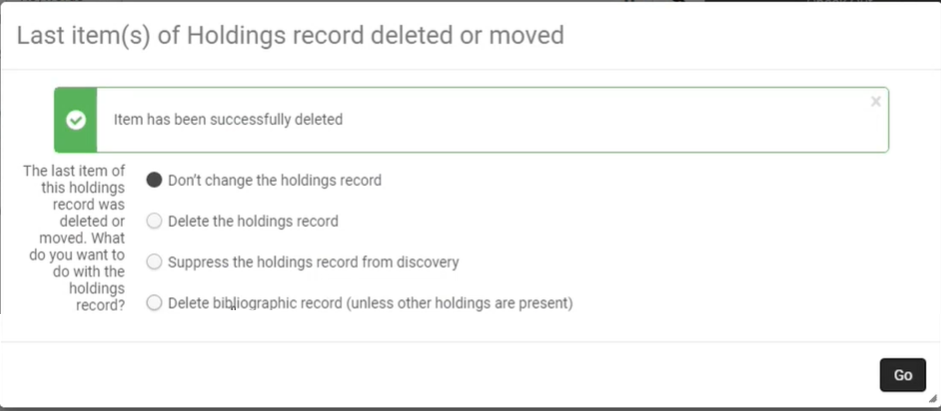 次のオプションのいずれかを選択して、[Go]を選択します。
- Don't change the holdings record— Select if you do not want to withdraw or suppress the holdings record.
- Delete the holdings record— Select to withdraw the holdings record.
- Suppress the holdings record from discovery— Select if you do not want to withdraw the holdings record, but you want to prevent the record from appearing in Primo or an external discovery system.
- Delete bibliographic records (unless other holdings are present)— Select to delete the bibliographic record with which the item is associated, if the bibliographic record has no other holdings.この場合、所蔵レコードとアイテムが関連付けられている書誌レコードの両方が削除されます。機関ゾーンで書誌レコードを削除し、それを保持するコンソーシアムの最後の図書館である場合、そのレコードはネットワークゾーンで自動的に削除されます。If you do not want it to be deleted automatically in the Network Zone, set the delete_nz_bib_without_inventory parameter (Configuration > Resources > General > Other Settings) to false(see Configuring Other Settings (Resource Management)).
- Use the checkbox column to select one or more items and select Manage Selected > Withdraw items.現在、このオプションは、所蔵レコードが1つしかない場合にのみ表示されます。
- 行の[取り消し]アクションを選択し、確認ダイアログボックスで[確認]を選択します。
Items that are marked as Committed to Retain are not deleted.For more information, see Retention Information.
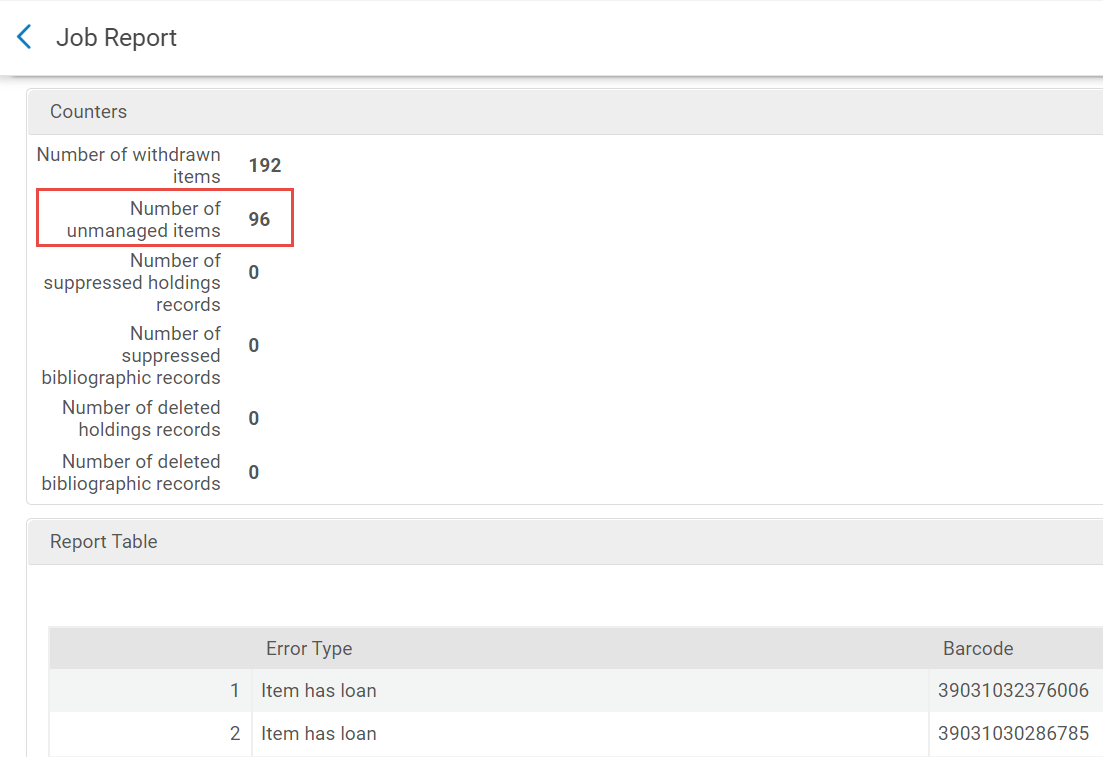
In a Job Report, items not deleted appear in the Counters section under Number of unmanaged items.
Withdrawing an Item from the Repository Search
For the items search, see Withdrawing One or More Items from the Items List.
For the items section in the physical holdings and title searches:
If the withdrawn item belongs to a holdings record that has no other items, you are prompted to choose how to handle the holdings record and the bibliographic record if it does not have any other inventory.Select one of the following options and then select Withdraw:
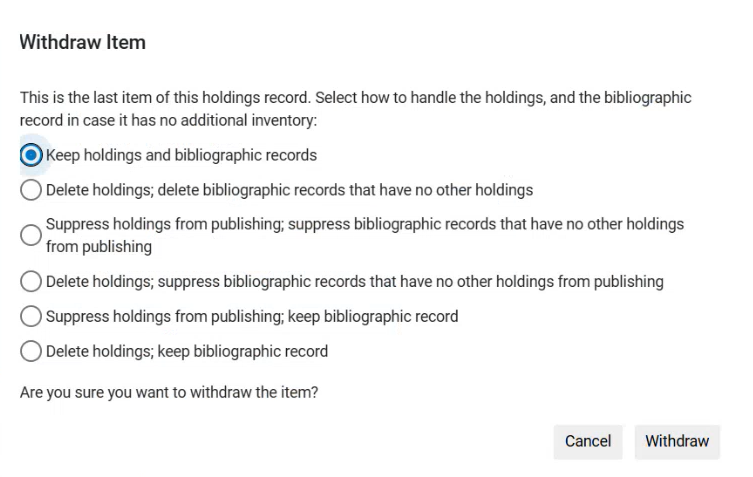
- Keep holdings and bibliographic records— Select if you do not want to delete or suppress the holdings record.
- Suppress holdings from publishing; suppress bibliographic records that have no other holdings from publishing— Select if you do not want to delete the holdings record, but you want to prevent both the holdings and the bibliographic record from appearing in Primo or an external discovery system.
- Delete holdings; suppress bibliographic records that have no other holdings from publishing— Select if you want to delete the holdings record, but you do not want to delete the bibliographic record, only to prevent it from appearing in Primo or an external discovery system.
- Suppress holdings from publishing; keep bibliographic record— Select if you do not want to withdraw the holdings record, but you want to prevent it from appearing in Primo or an external discovery system, without impacting the bibliographic record.
- Delete holdings; keep bibliographic record— Select if you want to delete the holdings record, without impacting the bibliographic record.
アイテムのセットを取り消し
アイテムの取り消しジョブを実行することにより、冊子タイトルまたは冊子セットのいずれかからアイテムを取り消すことができます。For more information, see Running Manual Jobs on Defined Sets.
