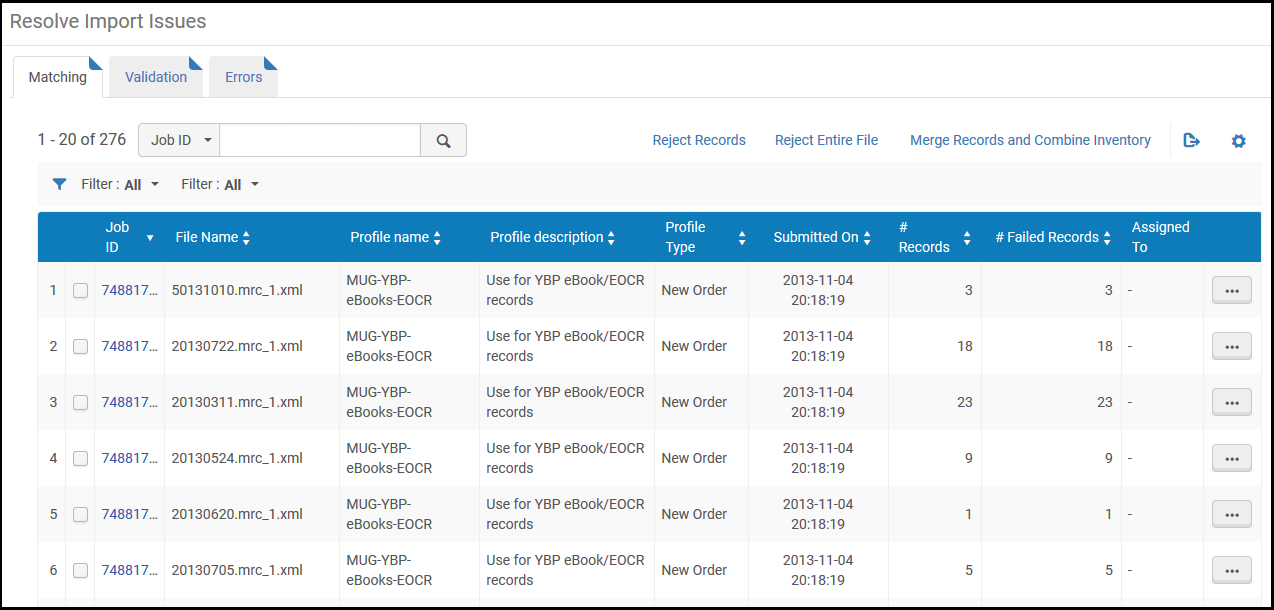
[一致] – インポートされたレコードがデータベース内の既存のレコードと一致した場合。When this occurs, the issue is resolved according to the Match profile configured during import profile creation (see Configuring/Editing an Import Profile: Match Profile).
For details on resolving matching records, see Resolving Matching Issues.
Validation – During the import process, the imported records are checked according to the validation task chain selected during import profile creation (see Creating/Editing an Import Profile: General Profile Information).チェックで生じた問題が警告ではなくエラーとして存在すると判断された場合、ファイルは[インポートの問題を解決する]ページの[検証]タブに送信されます。問題がエラーであるか警告であるかは、プロファイル作成中に選択された重要度プロファイルに従って決定されます。For information on configuring validation exception (severity) profiles, see Working with Validation Exception Profiles.
For details on viewing error records, see Viewing Import Errors.
次の表は、[インポートの問題を解決する]ページにアクセスするさまざまな方法について説明しています。
インポートの問題を解決する
パス
プロファイルタイプ
役職
[取得] > [インポート ] > [インポート問題の解決]
[インポート問題の解決]ページ。
新規発注、インベント更新
購入オペレーター/マネージャー
[リソース] > [インポート] > [インポート問題の解決]
[インポート問題の解決]ページ。
リポジトリ、権限、初期権限、デジタル、収集、検出
目録マネージャー/管理者、リポジトリ管理者
一致問題を解決する
インポートされたレコードがデータベース内の既存のレコードと一致すると、一致の食い違いが発生します。When this occurs, the issue is resolved according to the Match profile handling method configured in the import profile (see Creating/Editing an Import Profile: General Profile Information).次の処理オプションをが利用可能です:
[手動] – ファイルは[インポートの問題を解決する]ページの[一致]タブに送信され、そこで問題を解決できます。For details, see Editing Matching Records.
[インポートの問題を解決する]ページ([受入 > インポート > インポートの問題を解決する]または[リソース > インポート > インポートの問題を解決する])で[一致]タブを選択し、表示したいインポートジョブを確認します。(See Types of Import Profiles for information regarding the profile types that appear.)
You can also access this page with pre-defined filters by selecting one of the following tasks in the Task List in the persistent menu (see Tasks in the Task List)
ひとつのインポートジョブで複数のファイルに重複する一致レコードが複数ある場合にレコードを統合し、目録を統合するには、[インポートの問題を解決する]ページで、単一のインポートジョブからファイルを選択し、[レコードの統合と目録の統合]を選択します。See Merging Records and Combining Inventory for more information.
一致するレコードが複数ある場合、[インポートレコードの一致]ページが表示されます。The left panel of the page displays the Imported Record Details, and the right panel displays the Matched Records in your catalog.インポートレコードの一致ページ
To edit the records within the import file that match existing Alma records, on the Resolve Import Issues page, select Edit in the row actions list.The Handle Matching page opens.
オペレーターがインポートの問題に取り組むと、その問題がオペレーターに割り当てられます。
一致するレコードを編集する方法
[一致の処理]ページで、一致を処理するレコードの行アクションリストでレコードIDリンクまたは[一致を表示]を選択します。See Viewing Matching Import File Records for details.追加のアクションは、[並べて一致]ページまたは[インポートレコードの一致]ページに表示されます。
[一致の処理]ページで[インポートの承認]を選択すると、レコードを表示せずにインポートを承認することができます。レコードはインポートされますが、既存のレコードと重複する場合があります。For information on monitoring imports, see Monitor and View Import Jobs.
[並べて一致]ページまたは[インポートレコードの一致]ページで、次のようなアクションを選択します。
[インポート] – レコードをインポートしますが、既存のレコードと重複する場合があります。
[インポートしない] - 新しいレコードを破棄します。
[統合] – プロファイル設定で選択されたオプションに従ってレコードを統合します。このレコードについて実行したすべてのリンキング履歴(添付された発注明細など)は、保持されます。For details on configuring import profiles, see Managing Import Profiles.削除マークが付けられたレコードをインポートする場合のように、このオプションを実行できない場合は、この機能を使用できないことに注意してください。
New records might fail to import when multiple matching duplicate records exist in the Alma database.To handle these records, you can configure the "Merge Records and Combine Inventory for Multi-Match" section in the import profile (see Creating/Editing an Import Profile: Match Profile).これにより、レコードをインポートするときに、レコードを統合して目録を組み合わせることができます。
When a file was produced using an import profile configured for "Merge Records and Combine Inventory for Multi-Match", then the action Merge Records and Combine Inventory is available for the file on the Resolve Import Issues page.If the import job that you ran was large and resulted in multiple files appearing on the Resolve Import Issues page, select the checkbox at the beginning of each row for these files and select Merge Records and Combine Inventory in the page actions list.
レコードの統合と目録を統合する方法
On the Resolve Import Issues page (Resources > Import > Resolve Import Issues), locate the file(s) containing the duplicate records that you want to resolve in order to import a new record.
Select Merge Records and Combine Inventory in the row actions list for the file, OR Select multiple files from the same import job and select Merge Records and Combine Inventory in the page actions list.
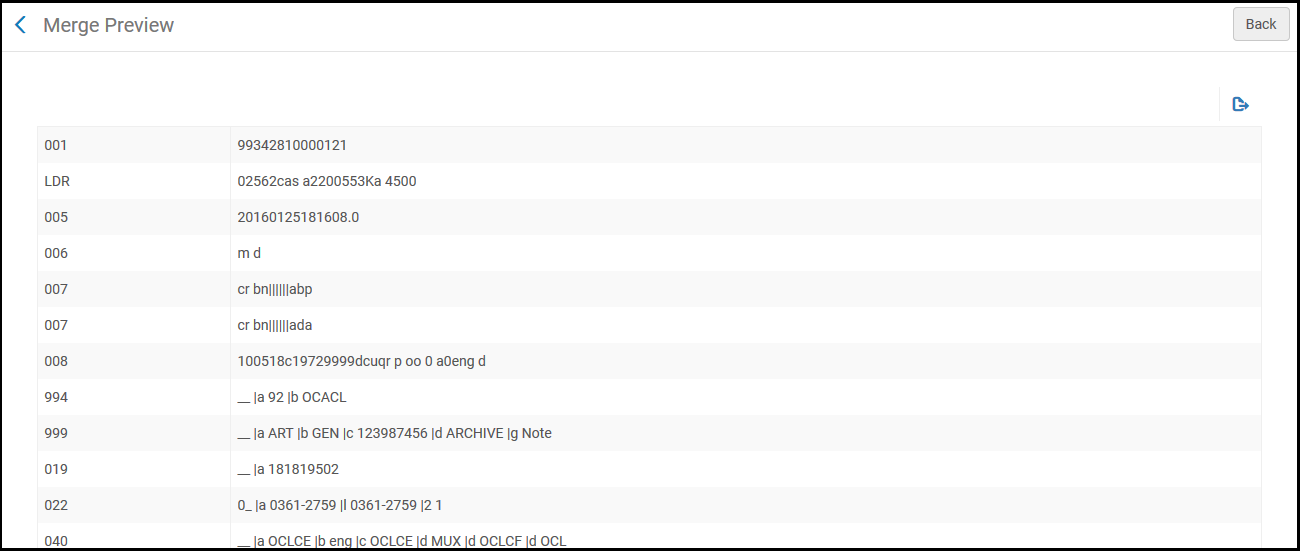
The confirmation message displays the settings that you selected in the import profile (that generated this failed import file).You can Preview the changes in Excel format,Cancel your request, or Submit the job to resolve the issues.
Each set of duplicate records is identified by a group number.For each group, the Operation column identifies the preferred record and the records to be merged with this preferred record.When the merge is complete, only one record will remain in the Alma database.This record will be merged with the new record that you are importing (unless you selected the Suppress or Keep it options in the import profile).
複数一致する重複レコードの変更プレビュー
[操作]列に「無視」として識別されるレコードがいくつかある場合もあります。This may occur when the record was suppressed or if there was a lapse in time between running the original import job and working with the Resolved Import Issues page, and some records may no longer exist.
続行する準備ができたら、[送信]を選択します。統合ジョブが実行されます。For more information, see Viewing Running Jobs and Viewing Scheduled Jobs.
To view the report details, select the link for Merge records and combine inventory report i n the job reports.他の複数一致レポートと同様に、このレポートには優先レコードとセカンダリ(統合された)レコードが表示されます。[メッセージ]列のセカンダリ(統合された)レコードのメッセージには、優先レコードと統合された物的アイテム、ポートフォリオ、注文明細などの数が表示されます。レコードの統合と目録の統合レポート
検証の問題を解決
Imported records are validated according to the validation task chain defined in the import profile (see Managing Import Profiles).
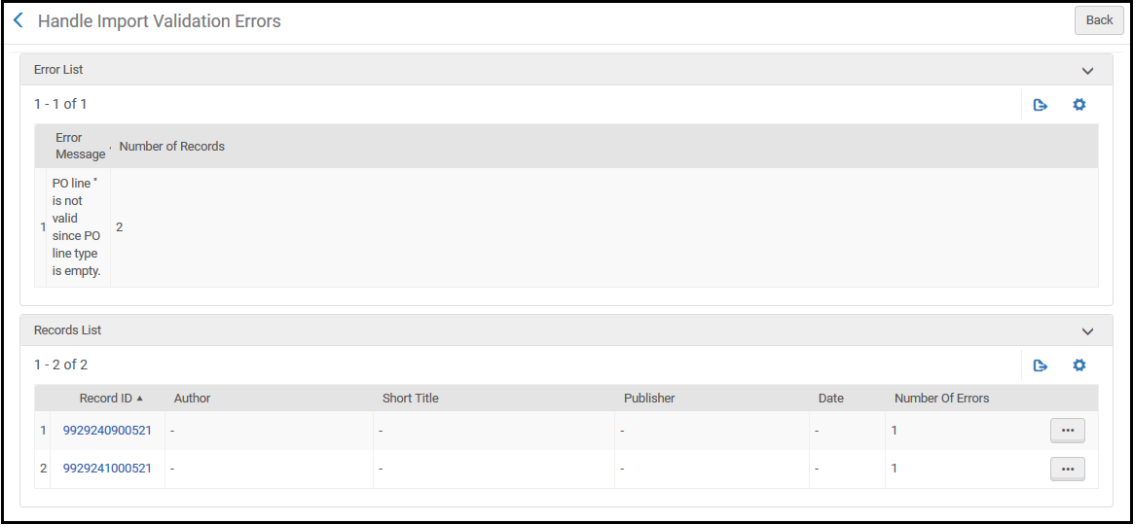
[インポート検証エラーの解決]ページの、関連するインポートファイルの行アクションリストで[編集]を選択します。[インポート検証エラーの処理]ページが表示されます。See Viewing Import File Records With Validation Errors.ページを編集すると、追加のアクションが表示されます。
View Errors(row actions list) – See Viewing Import File Records With Validation Errors.
インポートエラーを表示
[インポートエラーを解決する]ページには、インポートプロセス中に発生した予期しないエラーを含むインポートジョブが一覧表示されます。これらのエラーには、レコードの照合または検証に関連しないファイルデータの問題も含まれます。See the Monitor and View Imports page and Monitor and View Import Jobs for more details.