
Library Mobile 2024 November Release Notes
Developments
App Settings - Complexity Requirements for End-User Passwords
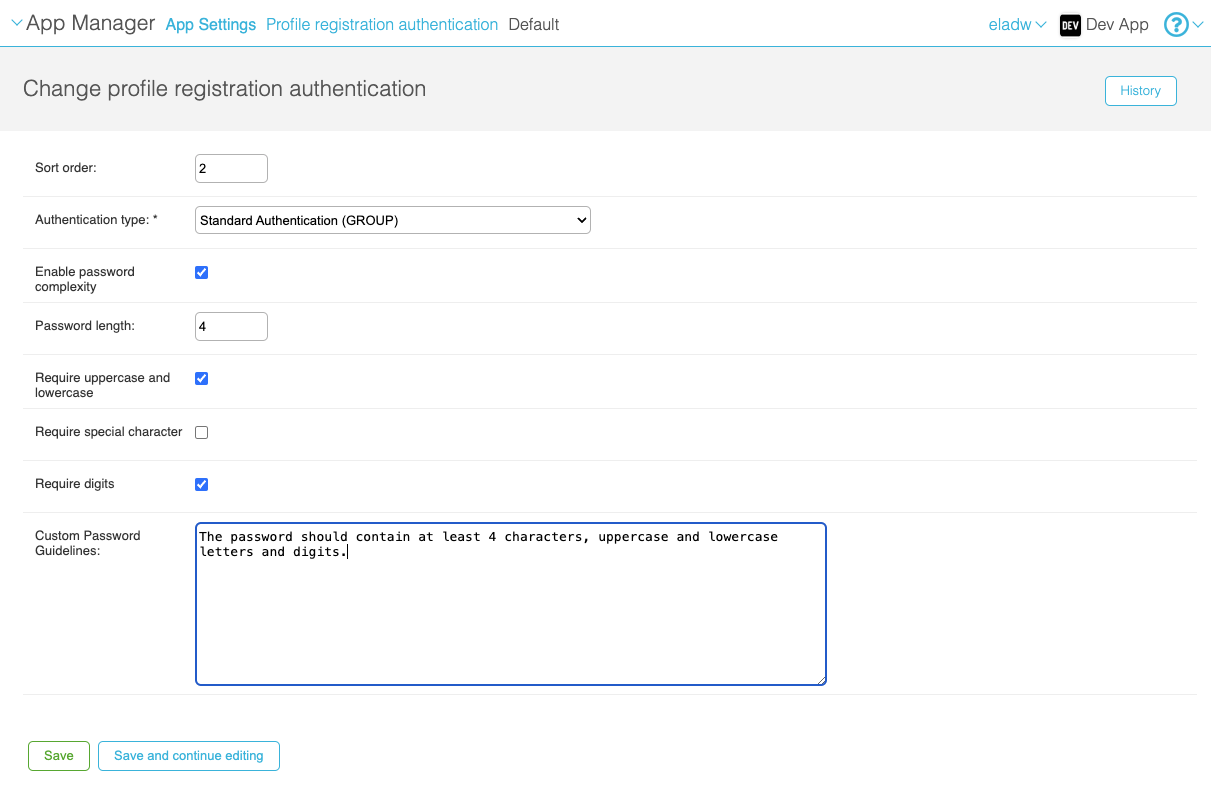
Standard authentication can now be configured to require that passwords meet certain requirements, such as a minimum number of characters and/or the inclusion of uppercase and lowercase letters. These requirements are configured per profile group, and must be met by end-users when they create a login password for the app.
For more information, see Managing Users.
Authentication - Support for CAS
Token-based authentication via CAS is now supported. To configure this option, create an integration profile for it in the App Manager at App Settings > Integration Profiles > Add integration profile. For additional information, see Configuring Integration Profiles.
Accessibility - Addition of Accessible Mechanism for Arranging Tiles
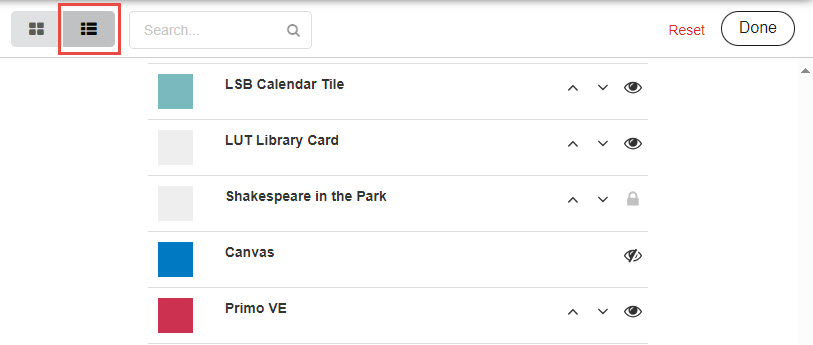
In the end-user app, the List view of the Arrange feature has been revamped to provide a more accessible mechanism for changing the order in which tiles appear on the desktop. Previously, the only way to rearrange the tiles was to drag and drop them, in Grid view. Now, up and down arrows are included in List view, in the rows of each of the tiles. Selecting one of these arrows moves its tile up or down by one row at a time.
As a further enhancement of the List view, the other icons have been replaced. Users can now choose to hide tiles, or to display tiles that were previously hidden, by selecting or
 , respectively. Tiles that cannot be hidden are identified with a Lock icon (
 ).
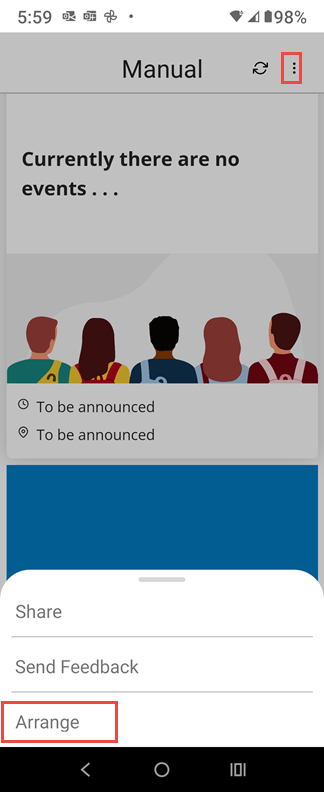
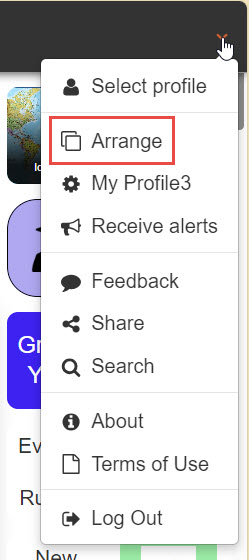
The Arrange option can be opened in mobile devices by selecting to open the bottom menu, and then selecting Arrange. In the Web app, it can be opened from the main menu.
Accessibility - Improved Icons
As part of our efforts to improve the accessibility of the campusM app, the appearance of the icons in the menu bar at the bottom of the screen has been modified. The icon in the menu bar of the currently selected tab is now in a brighter blue and the image is filled in rather than outlined (e.g., instead of
 ), making it easier for the visually impaired to distinguish it from the icons of the tabs that are not selected (which are in black and outlined - e.g.,
 ).
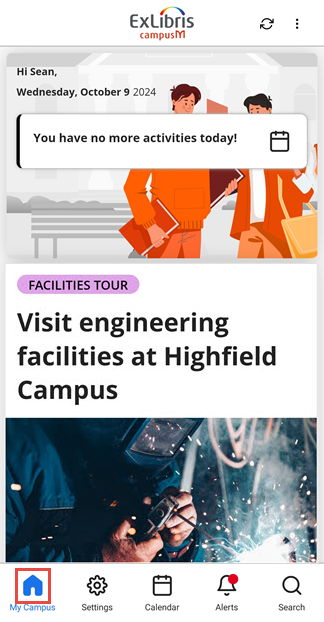
The entire set of icons now looks like this:
| Icon - Tab Not Selected | Icon - Tab Selected |
|---|---|

|

|

|

|

|

|
 (with new-
notification indicator) |
 (with new-
notification indicator) |

|

|
Analytics - Monthly Hits Table
Previously, the Monthly Hits table in the Pages subject area only included data about pages that were accessed at least ten times during the month. This behavior has been changed. There is no longer a minimum number of hits required in order for a page to be included in the results. Any page that was accessed at least once during the month is included.
Bug Fixes
| SF number | Platform | Description |
|---|---|---|
| N/A | All | When users of screen readers navigated through the tiles, they were not always notified of the number of alerts that were present. This was problematic for blind and visually impaired users, who would not have known that they had unread content within the app. This was fixed by adding ARIA attributes to the relevant types of tiles. |
| N/A | All | Accessibility labels were added to the Add Image button of My Profile and the Filter by Dates button of Events. |
| N/A | All | In the My Profiles page, multiple Edit buttons may be present, for the various categories of notification groups as well as the user photo. The descriptions of the Edit buttons were improved in order to enable blind and visually impaired users to identify what each button related to. |
| N/A | All |
In the Notifications page, multiple Delete buttons may be present, for each of the notifications. The descriptions of the Delete buttons were improved in order to enable blind and visually impaired users to identify which notification each button related to. |
| N/A | iOS |
In the Notifications page, certain components did not have accessibility labels as they should have. The missing labels were added. |
| N/A | All |
In the Manage Alerts page, the contrast in toggle switches was improved by switching to a darker gray. |
| N/A | All |
In order to improve accessibility, in the Maps page, two buttons were converted into tabs, and accessibility labels were added to them. |
| 07136440, 07185537, 07245801, 07267258 | React Native |
In certain cases, end-users were unable to subscribe to notification groups. This was fixed. |
| 07272037 | All |
In multilingual environments, in some cases labels were not translated when they should have been. This was fixed. |
| 07499732 | iOS |
The end-user app froze when a large number of local notifications were received. This was fixed. |
| 07222840 | React Native |
Previously, when a user selected a push notification, they were taken to the app homepage. This was fixed; now, when a user selects a push notification, they are taken to the Alerts page. |
| N/A | React Native |
The search function did not work correctly for Nested tiles. When a Nested tile was found, selecting it in the search results did not take the user to the tile. In addition, the components of Nested tiles were not found at all. This was fixed. |
