
Library Mobile 2024 April Release Notes
Developments
Event Product Integrations - Support for JSON Imports
Events can now be imported via REST API in JSON format. This can be configured in the App Manager, in the Product Integrations module, in the settings of the Events Instance, under JSON Events.
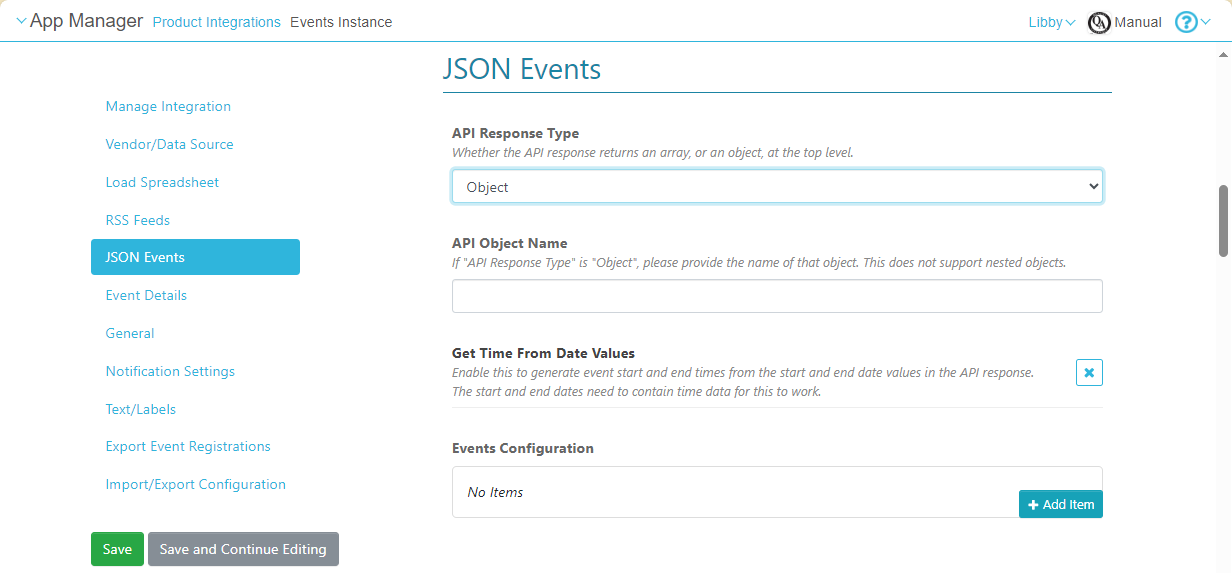
Settings for JSON Event Imports
Although JSON supports nested objects, only top-level attributes can currently be imported.
For more information, see Events.
Map Display Enhancements in Position Pages
React Native Platform
In React Native versions of the app, the following enhancements have been implemented in the map displays in Position pages:
- An About tab has been added to the page, and is the default tab that opens when the end-user selects a position in the app. When this tab is open, only the location of that position is marked on the map, in order to reduce clutter. By default, the name of the position is displayed in the About tab. However, if the Note field of the position contains text, this text is displayed in the About tab, rather than the name of the position. All marked locations continue to appear in the map when the Around Here tab is selected.
- Actions that appear in Actions tabs can have icons identifying their types.
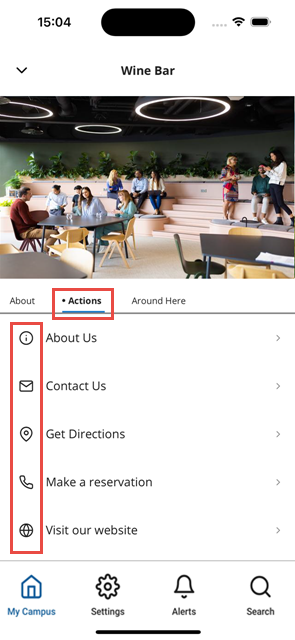 Icons Identifying Actions in the Actions Tab of a Position Page
For more information, see Adding Maps and Locations to Services and Feature Focus – Maps.
Bug Fixes
| SF number | Platform | Description |
|---|---|---|
| N/A | Mobile |
|
| N/A | React Native | The customer logo was not displayed at the top of the app. This was fixed. |
| N/A | React Native | When a large number of notifications were received, it was not possible to scroll all the way down to the bottom of the list. This was fixed. |
| N/A | React Native | When the Arrange option was selected from the Actions(three dots) menu, the app did not respond. This was fixed. |
