
Database Maintenance
To access this section, select 4 Database maintenance from the main menu. The Database menu is displayed:
|
Database 1 Show database status 2 CHECK MySQL tables 3 REPAIR MySQL tables 4 ANALYZE MySQL tables 5 OPTIMIZE MySQL tables 6 Create a snapshot of the database 7 Export 8 Import 9 Drop indices 10 Create indices 11 Copy database to a different instance 12 Export local database information (used for copy- single-instance to another server) 13 Import local instance database information (used for copy-single-instance to another server) 14 Clean local instance database information 15 Remove local duplicate objects |
Show Database Status
This option is used to view general information about the current instance's database (record count and disk space per table) and information about the MySQL server's workload. When first selected, the program displays a table such as the following:
|
+-----------------------------+------------+----------------------+ | Table | Row count | Disk space (MB) | | | | data/index | +--------------------------------+------------+-------------------+ | AZ_EXTRA_INFO | 83 | 0.16 | 0.00 | | AZ_FILTER | 98 | 0.02 | 0.01 | | AZ_LETTER_GROUP | 83 | 0.00 | 0.00 | | AZ_TITLE | 83 | 0.01 | 0.01 | | AZ_TITLE_SEARCH | 311 | 0.01 | 0.04 | | CACHE | 9 | 0.97 | 0.01 | | CATEGORY_SUBCATEGORY_TEMP | 0 | 0.00 | 0.00 | | CONTROL | 478 | 0.03 | 0.04 | | INSTITUTE | 6 | 0.00 | 0.01 | | INSTITUTE_IP | 1 | 0.00 | 0.00 | | INTERNAL_LOCK_OBJECT | 0 | 0.00 | 0.00 | | INTERNAL_LOCK_OBJECT_PORTFOLIO| 0 | 0.00 | 0.00 | | INTERNAL_TS_AUDIT | 0 | 0.00 | 0.00 | | JOURNAL_SUBSCRIPTION | 0 | 0.00 | 0.00 | | KB_AUTHORS | 0 | 0.00 | 0.00 | | KB_OBJECTS | 0 | 0.00 | 0.00 | | KB_TITLE | 0 | 0.00 | 0.00 | | LCL_CAT | 21 | 0.00 | 0.00 | | LCL_CAT_ASSIGN | 1 | 0.00 | 0.00 | | LCL_CAT_ASSIGN_REPORT | 0 | 0.00 | 0.00 | | LCL_CAT_SUBCAT | 394 | 0.02 | 0.01 | | LCL_LINKING_PARAMETERS | 0 | 0.00 | 0.00 | | LCL_LINKING_PARAMETERS_REPORT | 0 | 0.00 | 0.00 | | LCL_MULTILANGUAGE | 0 | 0.00 | 0.00 | | LCL_OBJECT_IDENTIFIERS | 0 | 0.00 | 0.00 | | LCL_OBJECT_IDENTIFIERS_REPORT | 0 | 0.00 | 0.00 | | LCL_OBJECT_PORTFOLIO_INVENTORY | 6 | 0.00 | 0.00 | | LCL_OBJECT_PORTFOLIO_INVENTORY_REPORT| 1 | 0.00 | 0.00 | | LCL_OBJECT_PORTFOLIO_LINKING_INFO | 2 | 0.00 | 0.00 | | LCL_OBJECT_PORTFOLIO_LINKING_INFO_REPORT|2 | 0.00 | 0.00 | | LCL_SERVICE_INVENTORY | 7 | 0.00 | 0.00 | | LCL_SERVICE_INVENTORY_REPORT | 0 | 0.00 | 0.00 | | LCL_SERVICE_LINKING_INFO | 4 | 0.00 | 0.00 | | LCL_SERVICE_LINKING_INFO_REPORT | 0 | 0.00 | 0.00 | | LCL_SOURCE_LINKING_INFO | 0 | 0.00 | 0.00 | | LCL_SOURCE_SERVICE_INVENTORY | 0 | 0.00 | 0.00 | | LCL_SOURCE_SERVICE_INVENTORY_REPORT | 0 | 0.00 | 0.00 | | LCL_SUBCAT | 360 | 0.02 | 0.01 | | LCL_TARGET_INVENTORY | 4 | 0.00 | 0.00 | | LCL_TARGET_INVENTORY_REPORT | 2 | 0.00 | 0.00 | | LCL_TARGET_LINKING_INFO | 0 | 0.00 | 0.00 | | LCL_TARGET_LINKING_INFO_REPORT | 1 | 0.00 | 0.00| | LCL_TITLE | 0 | 0.00 | 0.00 | | LCL_TITLE_KEYS | 0 | 0.00 | 0.00 | | LCL_TITLE_REPORT | 0 | 0.00 | 0.00 | | LCL_TRANS_CAT | 0 | 0.00 | 0.00 | | LCL_TRANS_SUBCAT | 0 | 0.00 | 0.00 | |
|
| OAI_REPOSITORY | 0 | 0.00 | 0.00 | | OBJECT_PROFILE | 0 | 0.00 | 0.00 | | OPI_RANK | 0 | 0.00 | 0.00 | | PROFILE | 0 | 0.00 | 0.00 | | RAPID_SERVICE_INDICATOR | 3328 | 0.16 | 0.17 | | RAPID_SERVICE_INDICATOR_TEMP | 3348 | 0.49 | 0.09 | | SFX_REQUEST | 435 | 3.45 | 0.02 | | STAT_OBJECT | 135 | 0.06 | 0.00 | | STAT_OBJECT_OFFLINE | 0 | 0.00 | 0.00 | | STAT_REPEATABLES | 90 | 0.00 | 0.00 | | STAT_REPEATABLES_OFFLINE | 0 | 0.00 | 0.00 | | STAT_TARGET_SERVICE | 356 | 0.02 | 0.02 | | STAT_TARGET_SERVICE_OFFLINE | 0 | 0.00 | 0.00 | | SYNONYM | 4 | 0.00 | 0.00 | | TI_RANK | 0 | 0.00 | 0.00 | | TSI_RANK | 0 | 0.00 | 0.00 | | USERS | 1 | 0.00 | 0.00 | | VERDE_LOCAL | 0 | 0.00 | 0.00 | | X_WIZ_OP | 0 | 0.00 | 0.00 | | X_WIZ_TS | 0 | 0.00 | 0.00 | | X_WIZ_TSA | 0 | 0.00 | 0.00 | | test | 1 | 0.00 | 0.00 | +------------------------------+-----------+----------------------+ |
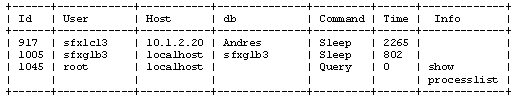
After displaying the database table listing, the program asks if you want to see the server information (database process listing). If you answer yes, you are prompted for the password of the MySQL root user. The server information corresponds to the top program in Linux and the prstat program in Solaris. It shows all the connections, queries, and any other process that is running on the MySQL server (including other instances). (In some installations this information may be considered sensitive. That is why the MySQL root password is required.)
The database process listing is similar to the following example:
CHECK MySQL Tables
This option checks for errors in the MySQL database tables. These errors are usually discrepancies between the binary files, in-memory data, and indices that may occur after an abrupt server power-off or improper process termination. This option detects problems in the tables but does not fix them. Run this option on the sfxglb41 and local instance databases according to the schedule described in Maintenance Task Checklist. If errors are discovered, run the REPAIR_TABLE script to fix them. (For more information, see The table_maintenance.pl Script .) The advantage of this option is that it runs much faster than option 3 REPAIR MySQL Tables, described below. It is recommended to run this option on a regular (at least monthly) basis.
REPAIR MySQL Tables
This option fixes any errors found in the MySQL database tables. This option locks the current instance's database tables, making the sfxmenu.cgi script(and all other database-dependent CGI scripts) temporarily unavailable.
- It is strongly recommended that you back up the database before starting this process.
- The process needs to run uninterrupted until it finishes. Stopping the process corrupts the database.
ANALYZE MySQL Tables
This option analyzes and stores the key distribution for a table. During the analysis, the table is locked with a read-only lock, so that it is not able to be updated during the operation. Message type results can be status, error, info, or warning. If the table has not changed since it was last analyzed, the message text reads Table is already up to date and the table is not analyzed.
OPTIMIZE MySQL Tables
This option is useful when large parts of a table have been deleted. You can use this option to reclaim the unused space and to defragment the data file. This option repairs some row problems and sorts the indices. During the optimization, the table is locked so that no data can be written to it.
Create a Snapshot of the Database
This option creates a binary replica of the working database. It copies all the files that correspond to the current instance's database. This option:
- Prompts the user for a path in which to place the snapshot
- Creates a directory inside the specified path
- Creates inside the new directory two files for each table in the database — one for the data itself and another one for the indices
For example, if you are running the option as the sfxlcl41 user (and instance) and specify /other/snapshots as the directory in which to place the snapshot, the program creates a directory called sfx_myinstance inside /other/snapshots and in that location places the files <TABLE>MYD and <TABLE>MYI, where <TABLE>corresponds to each one of the tables in the database.
Export, Import, Drop Indices, Create Indices
It is possible to export and import database tables (or the complete database) using options 7 Export and 8 Import. Options 9 Drop indices and 10 Createindices allow dropping and creating of database indices.
Copy Database to a Different Instance
If you are using the sfxtst41 instance as a staging instance in the SFX environment, periodically copy the sfxtst41 database to the production instance sfxlcl41. This option copies all tables relevant for local data settings from an origin database to a destination database.
Note that while copying the database from the source to the destination instance, the destination instance is down. All SFX functionality in this instance (including the SFX menu, A-Z List, and SFX Admin Utility) are inaccessible. Before starting the copying process, shut down the apache server of the destination instance.
Before you use this option, make sure that you have a backup of the database that you want to replace. (For more information, see SFX Backup and Recovery .) This is not necessary for cloud customers (where backups are part of Ex Libris server maintenance).
It is recommended not to use the Copy Database to a Different Instance option if the destination instance has been set up for SFX-Verde publishing and harvesting. The changes in the destination instance as part of the copying process are not included in the publishing process, causing SFX and Verde to no longer be synchronized.
If the Copy Database to a Different Instance option must be used for a destination instance set up for SFX-Verde publishing and harvesting, do the following:
- Verify that publishing has been completed. (It is recommended to manually run the publishing process to make sure it is completed successfully).
- Select the 2Configure Sfx->Verde Publishing option from 12 Verde Publishing in the Server Admin Utility and enter n to disable Verde bulk creation.
- Select the 11 Copy Database to a Different Instance option from 4 Database maintenance in the Server Admin Utility.
During the copy database process, the database triggers for the destination instance are disabled. (They are enabled again after the process has been completed). Afterwards, a complete build of the RSI and A-Z indexes need to be performed, since these indexes are not part of the copy database process.
- Publishing to Verde may be enabled again, but only if the necessary changes have been made in Verde to ensure that SFX and Verde are synchronized. This is done by performing the initial localization step.
For more information about changing the SFX-Verde publishing harvesting setup, refer to the SFX-Verde Interoperability Guide.
In the following example, sfxtst41 is copied to sfxlcl41.
- Create a backup of sfxlcl41.
- Shut down apache of the sfxlcl41 instance. (For more information on how to stop the instance apache, see Start/Stop Services.)
- Log on as sfxglb41.
- Type da.
- Type ./server_admin_util.
- Select 4 Database Maintenance and then 11 Copy Database to a Different Instance.
- Enter the names of the instances you want to work with and the MySQL passwords for the instances. (Bold text is typed by the user.)
|
What will be the source instance?sfxtst41 Enter MySQL password for sfxtst41: What will be the destination instance? sfxlcl41 Enter MySQL password for sfxlcl41? |
The program verifies the information you have entered and checks the origin database for records with a problematic internal ID range. If such records are found, the program changes the ID range of these records when it copies the data to ensure that the internal IDs in the destination database have the correct ID range.
After ID verification, the following is displayed:
|
About to delete data from sfxlcl42 and sfxlcl42 records in global instance.
Press |
- Press ENTER. The following is displayed:
|
Deleting local records from global DB...done! Deleting local records from local DB...done! Reset prefix for sfxlcl42 DB...done! About to copy data from sfxtst41 to sfxlcl41
Press |
After you press enter the tables from sfxtst41 are exported to sfxlcl41 and the prefixes are reset for sfxlcl41. The procedure creates a report.
If the destination directory already exists, the following error message is displayed:
|
ERROR: There is already a directory '/exlibris/sfx_ver/sfx4_1/tmp/db_copy'. Please remove this directory. To do this, type rm -rf /exlibris/sfx_ver/sfx4_1/tmp/db_copy |
- If this message is displayed, remove the directory, and rerun the copy database tool.
The tables from sfxtst41 are exported to sfxlcl41 and the indices are recreated for sfxlcl41. A report is produced as the procedure runs.
- Start apache of the sfxlcl41 instance. (For more information on how to start the instance apache, see Start/Stop Services .)
- When the procedure is completed, verify that the tables were copied correctly. In your browser, enter the URL of the sfxlcl41 instance SFXAdmin interface:
|
http://<sfx_server>:<port>/sfxadmin/sfxlcl41 |
Export Local Database Information
This option exports all records created and owned by the local instance from the sfxglb41 database. This option has been developed to allow the copying of a single instance from one installation to another. This procedure is only available for Ex Libris support staff.
Import Local Instance Database Information
This option imports all of the records created and owned by a specific instance to the sfxglb41 database, using the export file created with the Export Local Database Information option. This option has been developed to allow the copying of a single instance from one installation to another. This procedure is only available for Ex Libris support staff.
Clean Local Instance Database Information
This option removes all localizations for one specific instance, from both the sfxglb41 and local instance database schema. It can be run only as the sfxglb41 user.
- This option should only be used if you want to completely erase all localizations stored in the database – including statistics – and start with a completely clean SFX instance. Use extreme caution, as you are not able to undo this process.
- The USERS and CONTROL tables are not cleaned.
To access this section, select 14 Clean local instance database information (only by sfxglb41) from the Database menu. The following is displayed:
|
Please provide instance name: SST05 Table list created. Cleaning local data in global tables... Finished. Fixing sequence numbers for global tables... Finished Cleaning local data in local tables... Finished. |
Remove Local Duplicate Objects
This option checks the locally created objects in all the local instances for duplicates using the same mechanism as described in the Database Cleaning for New Objects section of the SFX General User’s Guide. It can be run only as the sfxglb41 user.
After running this option, reports on this process are available in the Revision Reports section of the SFX Admin Center, with the same revision release number as the last KBDB that was applied on the SFX installation, except the last two digits are 99 instead of 00. So for example, if 20112700 is the last revision applied, 20112799 is the release number of the revision reports.
The revision number is listed in the Server Admin Utility output:
|
Process finished. Reports can be found in SFXAdmin > Revision Reports > Revision 20112799 which started at: 20110714161513 |
Other Database Maintenance Options
The following other database maintenance options are available:
Copying Instances in Cron Jobs
It is possible to set up a cron job to copy a database from one instance to another. The program is located at:
exlibris/sfx_ver/sfx4_1/<instance> /admin/database/copy_db.pl
The following table describes the options available to configure the cron job:
The program works in cron only if it is scheduled by the root or the destination instance user. In all other cases, the program prompts for the destination user's UNIX password when resetting prefix IDs. The program works in cron only if the destination Apache is down during the database copy process. Therefore, perform the following when scheduling the database copy process:
- Shut down the destination instance apache.
- Run the copy database program.
- Start the destination instance apache.
- Log on as the destination user.
- Create a file to stop the instance apache, for example:
|
/exlibris/sfx_ver/sfx4_1/tmp/apachecron_stop |
The file should contain one line with following apachectl command:
|
apachectl stop |
- Create a file to start the instance apache for example with the following name and location:
|
/exlibris/sfx_ver/sfx4_1/tmp/apachecron_start |
The file should contain one line with following apachectl command:
|
apachectl start |
- Edit the crontab:
|
crontab -e |
- Add the scheduled build similar to the one listed in example below using the following syntax:
|
<scheduling time/date/frequency> csh <apache_stop_file>;bin/tcsh -c 'source /exlibris/sfx_ver/sfx4_1/<destination_instance>/home/.cshrc;/exlibris/sfx_ver/sfx4_1/<destination_instance>/admin/database/copy_db.pl --dborig=<source_instance> --usrorig=<source_instance> --pwdorig=<source_db_password> --dbdest=<destination_instance> --usrdest=<destination_instance> --pwddest=<destination_db_password> --noverbose --no_user_prompt';csh <apache_start_file> |
The text should be all in one line and without hard returns. Make sure the source and destination instance names are specified correctly and the path and file names for the apache commands match the files created in steps 2 and 3.
In the example below, sfxtst41 is the destination instance and sfxlcl41 is the source instance:
|
16 12 * * 01 csh /exlibris/sfx_ver/sfx4_1/tmp/apachecron_stop;/bin/tcsh -c 'source /exlibris/sfx_ver/sfx4_1/sfxtst41/home/.cshrc;/exlibris/sfx_ver/sfx4_1/sfxtst41/admin/database/copy_db.pl --dborig=sfxlcl41 --usrorig=sfxlcl41 --pwdorig=xxxx --dbdest=sfxtst41 --usrdest=sfxtst41 --pwddest=xxxx --noverbose --no_user_prompt';csh /exlibris/sfx_ver/sfx4_1/tmp/apachecron_start |
For more information on cron jobs, including the structure of the scheduling time/date definition, see http://en.wikipedia.org/wiki/Cron.
The table_maintenance.pl Script
The script used for the Check, Repair, Analyze, and Optimize MySQL Tables options may be used separately from the Server Admin Utility and can be included in an SFX server's crontab (using the no interactive option). The script is located at:
/exlibris/sfx_ver/sfx4_1/
Run the script. The following is displayed:
|
Usage: ./table_maintenance.pl [options] [--table=..., --table=...] [--alltables] [--op=check|repair|analyze|optimize,...] Options: --help print this help content --logfile indicate location of output log --extended performs a more extensive (lengthy) check or repair --quick check/repair only the table indexes --nointeractive skip confirmation prompts and only print non-error output to the log --alltables runs the operation on all the SFX tables --table specify a table to operate on; can be repeated for more tables --op specify what operation to run; options are check, repair, optimize and analyze; more than one --op is allowed Example: ./table_maintenance.pl --table=TITLE --table=ISSN --op=check --quick --logfile=/exlibris/sfx_ver/sfx4_1/sfxlcl41/logs/checktable.log |
- When using the script with the Check operation, make sure the script is run on sfxglb41 and all local instance databases according to the schedule described in Maintenance Task Checklist.
- If you want to add this to your crontab, you need to modify the form of the command slightly so that SFX environment variables get loaded before the table_maintenance.pl script is run. The command in the crontab looks like the following:
/bin/tcsh -c 'source /exlibris/sfx_ver/sfx4_1/<instance_name>/home/.cshrc; /exlibris/sfx_ver/sfx4_1/<instance_name>/admin/database/table_maintenance.pl [options, etc.]'
