
Backdating a Checkin Date
To use Check In from a wireless device, you must be assigned permission 254 (Circa Checkin). To backdate an item's checkin date, you must be assigned permission 096 (Override check-in date). See Permissions Used by Sierra for more information.
To backdate the item's checkin date using Circa's Check In function:
- At Circa's Check In screen, choose the Backdate button. Circa displays the Select backdate screen. For example:
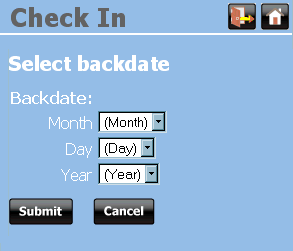
- Choose a new checkin date from the drop-down lists.
- Choose Submit. Circa displays the Check In screen.
- To check items in using the backdated checkin date, continue the Check In process.
