
Configuring Other Settings
To configure general parameters, you must have the following role:
- General System Administrator
Overview
You can configure general Alma parameters on the institution level only.
Network zone administrators can view and configure the settings only through the Consortia Central Configuration Dashboard.
You configure parameters on the Customer Parameters mapping table (Configuration Menu > General > General Configuration > Other Settings). For more information about mapping tables, see Mapping Tables.
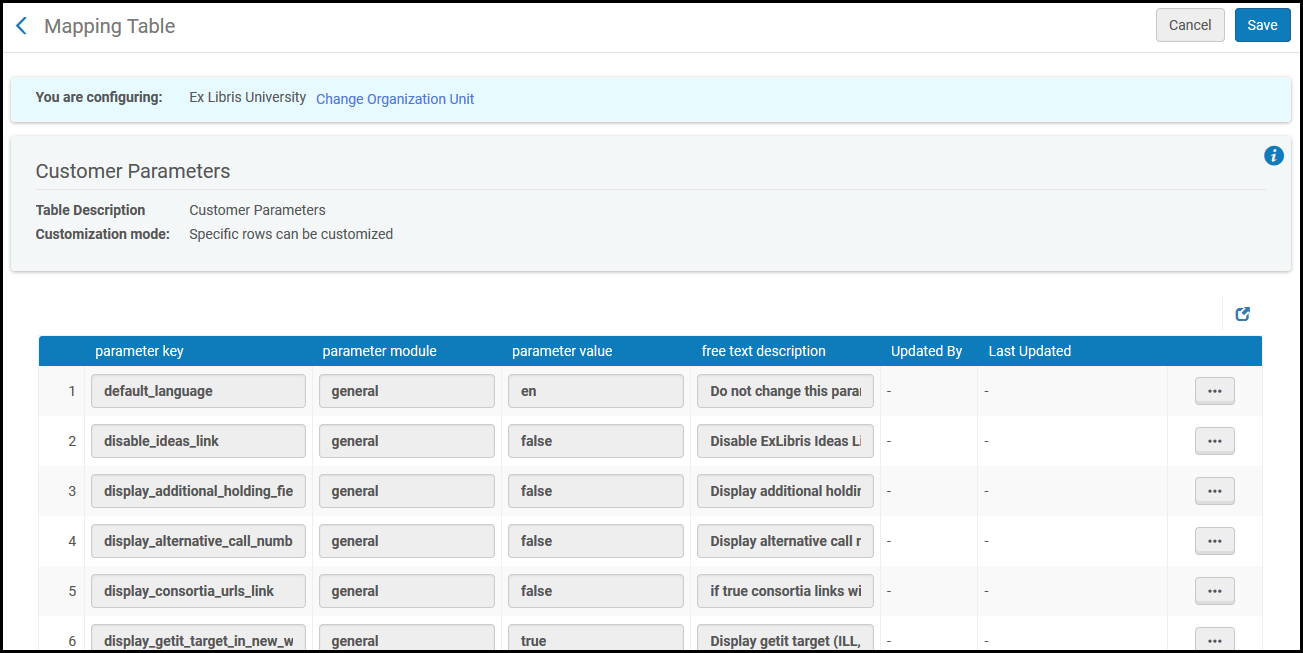
Customer Parameters
You can edit the parameters on this page, as follows:
| Parameter Key | Parameter Value |
|---|---|
|
campus |
Not for use. |
|
default_language |
The default language of the user. The default value should not be edited. |
| detailed_creator_and_modifier_for_api_changes | When true, adds API Key Name to Modifier and Creator. This parameter does not impact the transactions triggered by payment—they are assigned to the Circulation desk and not to a user, so the name of the API key is not assigned. |
| detailed_creator_and_modifier_for_job_changes |
When true, the User ID is added to "System" in Alma entities that the job updated. For example, when the user John_Branson runs a manual job, instead of "System" appearing in the Physical Item Editor Modified-By field, Alma displays "John_Branson (System)". This feature only applies to non-scheduled manual Jobs where Run Now was selected or scheduled jobs where the Run option was used.
|
|
disable_ideas_link |
Enable (true) or disable (false) the Suggest an Idea link in the persistent menu. See The Persistent Menu. |
|
display_additional_holding_fields_in_getit |
When set to true, displays additional holdings information on the Get It tab in Primo/Primo VE. For more information, see the respective document for your environment:
|
|
display_alternative_call_number_in_getit |
When set to true, displays the alternative call number information on the Get It tab in Primo. Alternative call number = item call number |
|
display_consortia_urls_link |
When set to true, the Change Institutions drop-down list appears when viewing/choosing your current location, allowing you to switch institutions in a collaborative network. See Switching Between Institutions. |
|
display_full_user_name_in_more_info |
When set to true, the full user name is displayed for the operator information displayed in information pop-up windows. When set to false (default), the primary ID is shown. |
|
display_getit_target_in_new_window |
When set to true, displays the Get It target in a new dialog box. |
|
display_isbn_13_in_predefined_result |
When set to true, it displays the 13 digit ISBN number on the PO line description and PO line list. When set to false, the standard 10 digit ISBN number is displayed in all places. See Manually Creating a PO Line. |
|
display_viewit_target_in_new_window |
When set to true, displays the View It target in a new dialog box. |
|
email_contact |
Not in use. |
|
email_contact_us |
The email addresses (in a format such as mailto:helpdesk@university.edu) or URL (http://...) to which the Contact Us link is directed. For more information, see Configuring Letter Labels. |
|
email_deposit_contact |
Not in use. |
|
email_deposit_sender |
Not in use. |
|
email_my_account |
The email addresses (in a format such as mailto:helpdesk@university.edu) or URL (http://...) to which the My Account link is directed. For more information, see Configuring Letter Labels. |
|
email_sender |
Not in use. |
|
enable_new_walk_me |
See GuideMe Frequently Asked Questions (FAQ). |
| encode_rss_link | Resolves the duplicated ampersand sign that encodes the data for specific customers. To resolve the issue, the parameter needs to be set to "False". By default, it is set to "True". |
|
font_for_special_characters |
This customer parameter is used for customers with special characters in their languages. We changed the font from Roboto to Calibri to support it. |
|
force_location_selection_on_login |
When set to true, the system will open a dialog box during logon, requiring staff users to specify their physical location. Otherwise, the system will automatically set the physical location to the user's last specified location. |
| include_plain_text_in_emails (New for February 2026) | When set to true, this includes plain text on top of the HTML version for users with plain-text email clients. |
|
include_recipient_name_in_email_address |
When set to true, includes the receiver's name in the email address in emails sent from Alma. This may decrease the chances of having the email count as spam when it enters the recipients inbox. |
| limit_login_redirects | When set to true, redirects after a login process will be limited to sites within Ex Libris cloud and to exceptions configured in the 'Redirection Allowed List' mapping table. |
|
multi_campus_inventory_management |
When set to true, displays the Inventory Network Groups link in the configuration menu; see Configuring Distributed Access to Electronic Resources. Before implementing this feature, consult with Ex Libris. |
|
open_consortia_link_options |
Controls what happens when switching institutions (see Switching Between Institutions):
|
|
page_size |
The number of records to show in all of the lists in the system. Maximum is 20. |
| pgp_key_expiry_days | Configure an expiration time for the public key when working with encrypted files in FTP-based integrations. For example, to expire after a year, configure 365. If left blank, it doesn't expire. |
|
primo_patron_info_updatable |
When set to true, it allows users to update their patron information from Primo. |
|
primo_pds_url |
The URL that Alma uses to get bor-info from PDS when getting a View It/Get It request from Primo. It must be the same URL as the one Primo uses to call PDS (or Primo's authentication gateway). For more information, see Identify Patrons to Provide Relevant Services. |
|
primo_service_page_url |
Determines the base URL that is used to receive a service page direct link to the title when using the Alma Service Page APIs. For more information on this service, see https://developers.exlibrisgroup.com/alma/integrations/discovery/services_page. |
|
primo_test_pds_url |
Enables Alma to work with two different PDS systems. If the Primo View It/Get It template is configured to env_type=test, Alma uses the test PDS. For more information, see Delivery Subsystem. |
|
publishing_base_url |
For information on this parameter, see the Retrieve Bib Record API documentation on the Developer Network. This parameter should be in the following format: http://<primo server host: port>/openurl/<primo_institution_code>/<primo_view_code>? |
|
retrieve_services_from_NZ |
(For members of a collaborative network implementing a Network Zone) When set to true, any OpenURL request to the Alma Link Resolver consults the Network Zone to resolve electronic services for resources that are managed in the Network Zone and available for the institution. See Link Resolver for Consortia. |
|
rss_discovery_url |
The URL of the discovery system (such as Primo), set at the institution level. For details, see RSS Publishing. |
|
smsDateFormat |
Not in use. |
|
standard_sandbox_override_link |
Configure the URL of your Standard Alma Sandbox instance. To configure, enter the full path (including Protocol) of an override link for the Standard Sandbox of your institution.Note: This is not required, and will not work, for customers with Premium Sandbox. |
|
system_time_format |
Set the time format (without dates) for time displays throughout the Alma user interface. Use the following characters, separated by blanks, commas, hyphens or colons:
For example:
|
| temp_enable_feedback_tool | Enable the new UX feedback tool. |
|
truncate_decimal_fraction_amount |
Enter one or more three-letter currency codes for the currencies that should not appear with a decimal point/decimal point value. For example, if you do not want decimal points/decimal point values to appear for the Japanese Yen or Korean Won, enter the following: JPY,KRW With this parameter configured, the following cases do not display decimal points/decimal point values:
The following out-of-the-box letters check for the truncate-decimal_fraction_amount configuration:
Note that if you have manually edited any of these files to include additional price, fine, and/or cost information, you can either restore the letters; or you can manually modify these letters to not display decimal points/decimal point values. This can be achieved by adding syntax such as the following: <xsl:value-of select="substring-before(fee, '.')">
There is a known issue where fine and fee information appears on the Overview tab for My Library Card when this customer parameter is configured. This will be fixed in a future release.
The following areas continue to display decimal points/decimal point values even when you customize the truncate_decimal_fraction_amount customer parameter:
Note that Analytics provides an option to hide decimal point values by using the Column Properties setting.
Note that Excel provides an option to hide decimal point values by using the Format Cells setting.
|
|
view_historical_loans_in_primo |
Enables historical loan information to be sent to Primo. For more information, see Displaying Historical Loans in Primo. |
