
Alma August 2024 Release Notes
August 2024 Feature Release Highlights
Upcoming Issues to Note
Update for Upload Electronic Holdings from Taylor & Francis (Journals)
Please be informed that the current upload electronic holdings from T&F journals, which operates with the CZ collection: Taylor & Francis Current Access (CZ collection ID:611000000000002216), will be undergoing significant change: The existing collection has been identified as problematic due to its lack of comprehensive title coverage necessary for the auto holdings integration.
Effective from the August 2024 release, the integration will transition to use a new, dedicated collection: Taylor & Francis Journals Auto-Holdings Collection (CZ Collection ID: 615400000000000635).
To continue benefiting from the integration post-August 2024 release, institutions will need to activate the new Taylor & Francis Journals Auto-Holdings Collection (CZ Collection ID: 615400000000000635). For those wishing to retain acquisition details such as PO lines and licenses associated with the titles, it is recommended to employ the Move electronic portfolio information job. This will facilitate the transfer of PO lines and licenses to the new Taylor & Francis Journals Auto-Holdings Collection.
For more information, see Taylor & Francis Journals Auto-holdings Functionality.
Features
NERS: Communication with Partners
August 2024 Fulfillment and Resource SharingURM-229984
 NERS Enhancement (ID #8558)
It is now possible to email a partner directly from the borrowing and lending task list requests. This option eases workflows, such as when a lender wants to convey limitations, a borrowing library wants to ask a question, or for any type of messages such as a thank you note. These messages are saved in the request for future reference.
Correspondence can be initiated using the Send email to partner action or from the Start Communication button on the Communications tab.
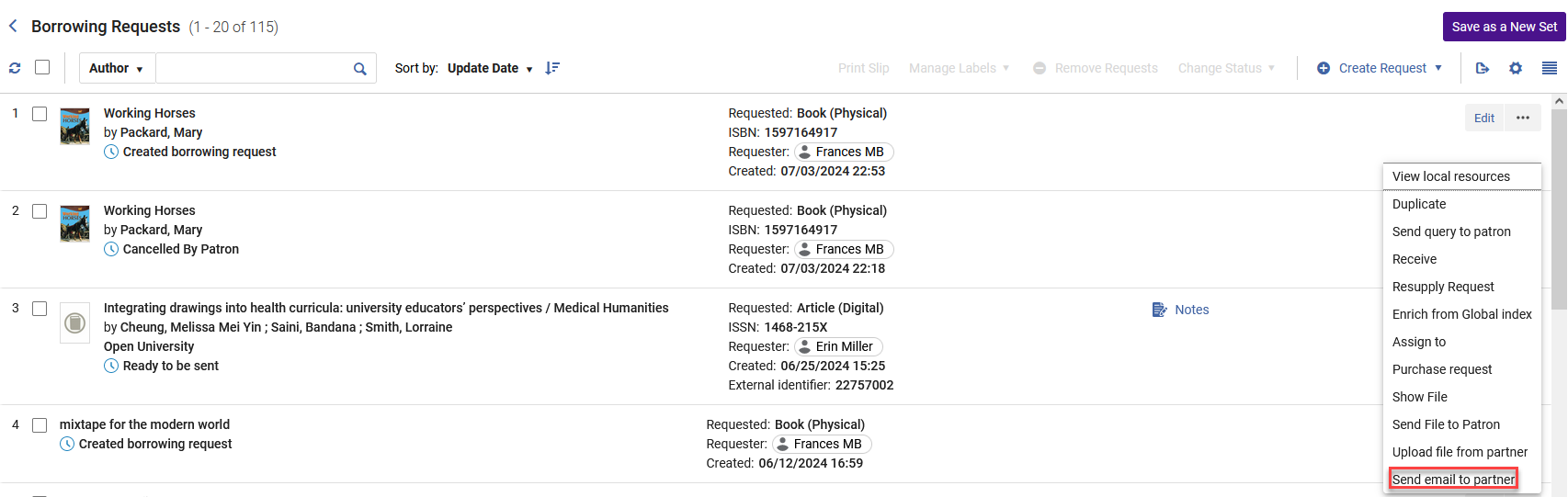
After selecting Send Email, the partner receives the Resource Sharing Conversation Letter and a Communications notification is added to request indicating that this request contains correspondence with the partner.

For more information, see Communicating with Partners.
Convert Borrowing Request Type
August 2024 Fulfillment and Resource Sharing
 IdeaExchangeURM-219331
It is now possible to convert a resource sharing request type from Book to Article and vice versa using the Convert Request Type action from the available actions for the request. This action is available for the following statuses:
- Request created
- Ready to send
- Locate failed
- Rejected
- Resubmit
- Expired
- Recalled
- Pending approval
- Reject
- Bad citation
- Local holding
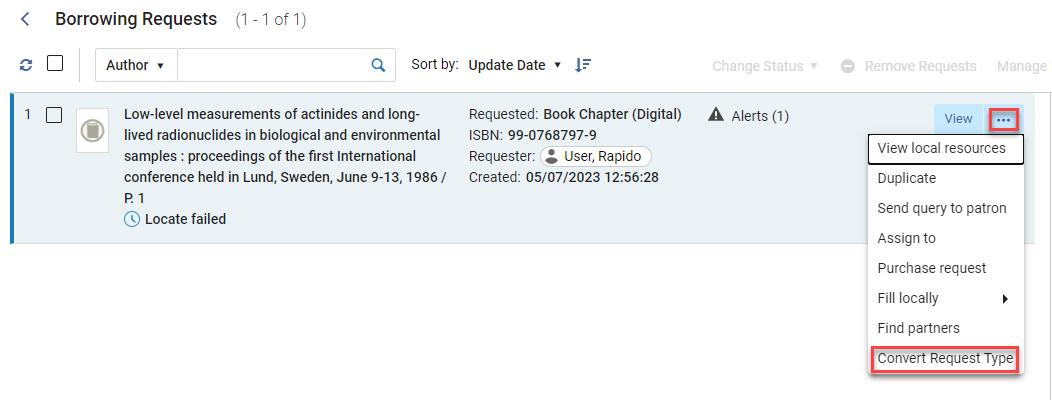
Once this action is selected, you can select the type of request to convert to and add the required information (such as pages or chapter numbers when converting to a book chapter).
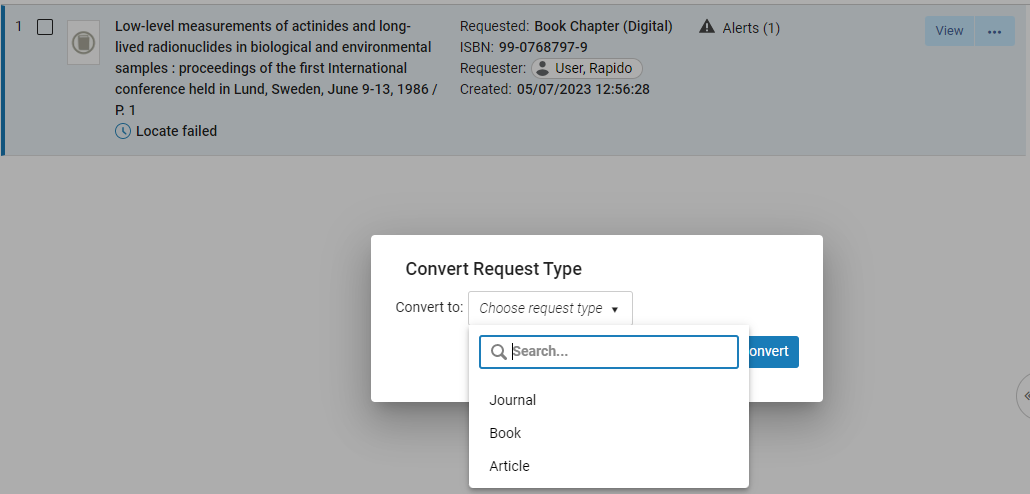
Once converted, the Request type change is logged in the History and the lending request partner is recalculated.
For more information, see Converting a Borrowing Request Type.
Option to Bulk Remove 'Transit For Reshelving' Status
August 2024Fulfillment and Resource Sharing
NERS Enhancement (ID 8338) URM-195265
The Change Physical items information job can now be set to remove the Transit For Reshelving status from items. This makes it easy to correct the status of items that are incorrectly marked as in transit.

For more information see Manual Jobs.
Exclude Non-Workdays Days from Expiry Period
August 2024Fulfillment and Resource SharingURM-217277
Resource Sharing request expiry is currently managed by The Expiry Time (days) that is defined on the partner record (borrower side) and a job that runs (on the lender side) that expires unhandled requests. To prevent lending requests from expiring during non-workdays, Alma now enables you to set days to exclude from the expiry period calculation (Configuration > Resource Sharing > Configuration > Resource Sharing Working Days).

For more information see Basic Resource Sharing Configurations.
Resupply Request for Document Delivery
August 2024Fulfillment and Resource SharingURM-209011
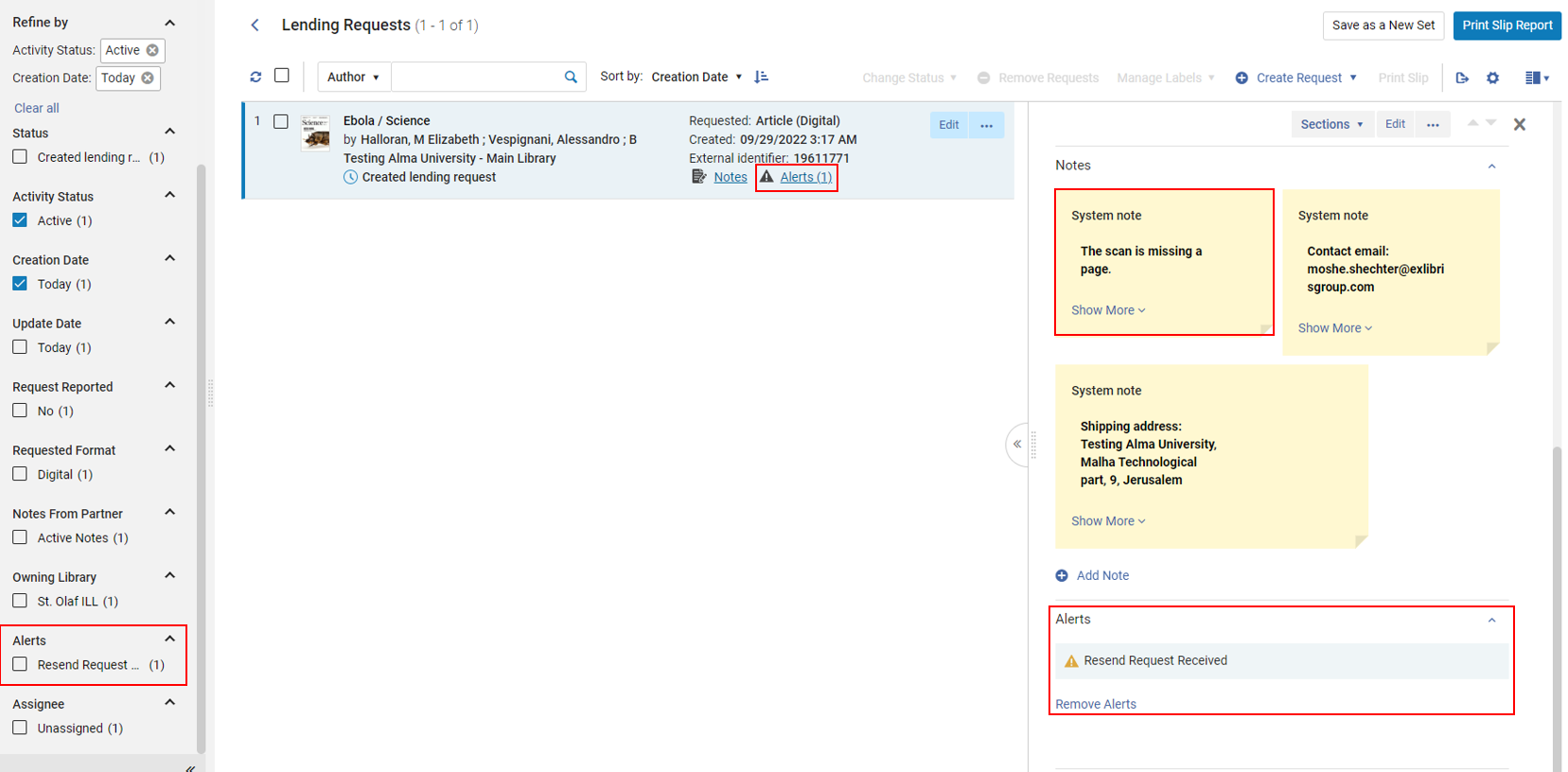
For document deliveries, after a request is completed, Alma enables the borrower to request a refill for a RapidILL request in case the original request was not properly received. This is done by using the Resupply Request action. This action is available for completed Rapid ILL requests. It reopens the request on the borrower's side and notifies the lender about the resupply request.
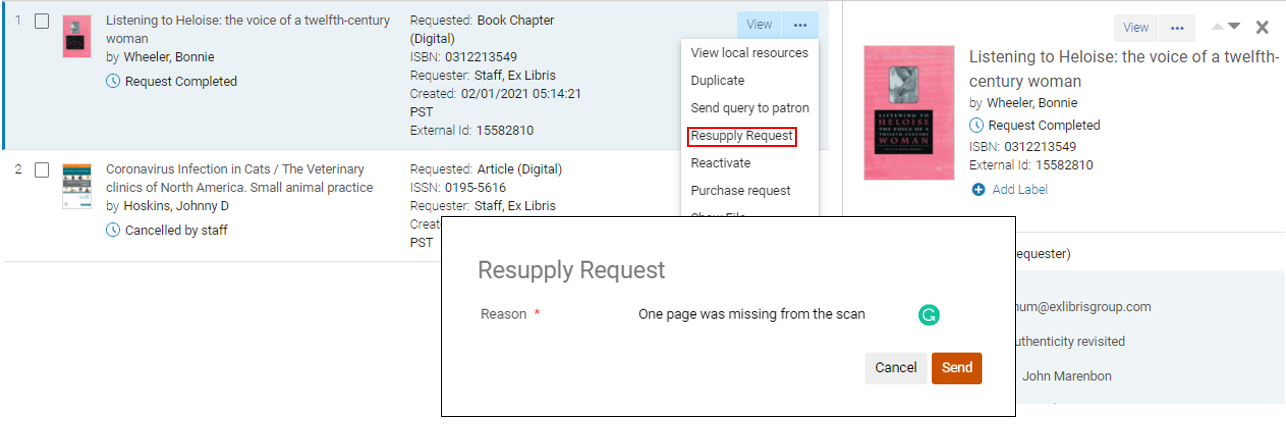
In addition, the RapidILL lender receives an alert and a note to resupply the request.
For more information see Managing Borrowing Requests.
FRBR Keys for Bibframe to Include URIs (IDs)
August 2024 Linked OpenDataURM-219481
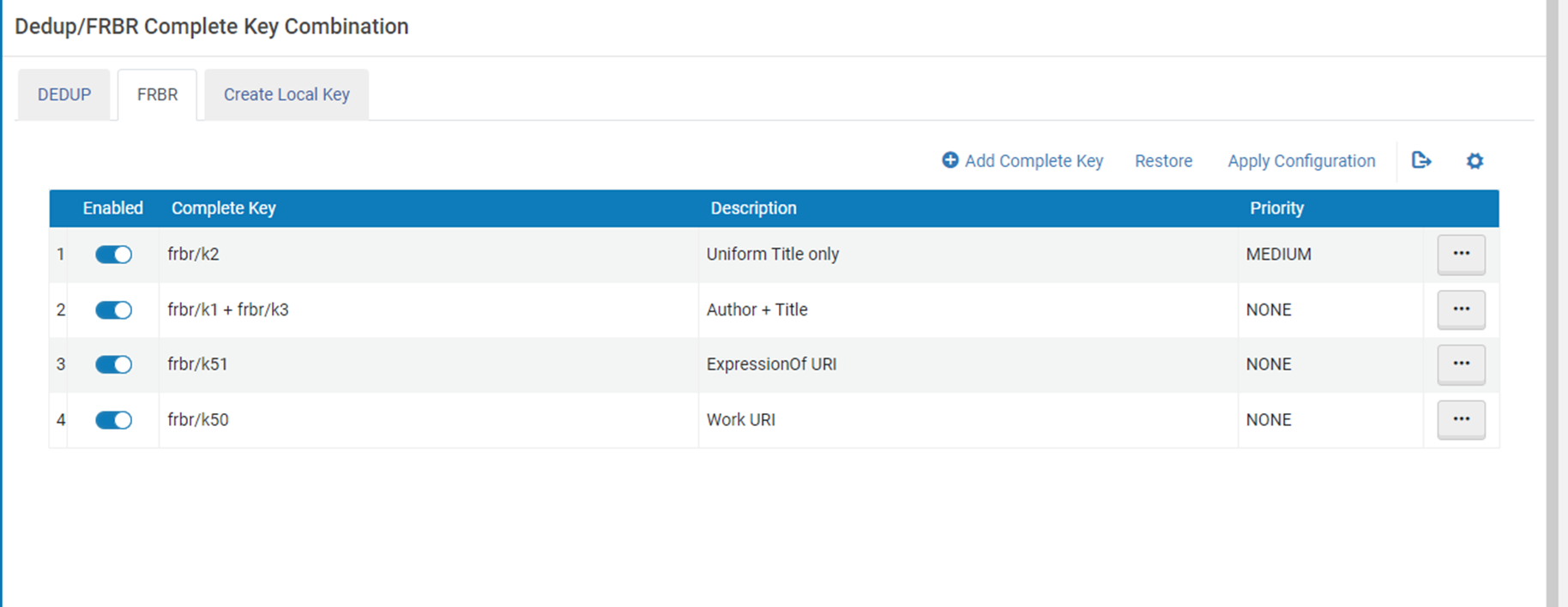
FRBR keys, currently composed of text fields, are now expanded to include URIs (IDs) for BIBFRAME records as part of their matching criteria. This enhancement introduces URIs as a new match point, enabling more accurate grouping of instances. When instances share the same work URI or the works share the same expression of URI, they are assigned the same FRBR key, ensuring consistent grouping.
For more information, see Configuring the Dedup and FRBR Complete Keys in Primo VE and Understanding the Dedup and FRBR Processes (Primo VE).
Contributor Page in Metadata Editor
August 2024 Linked OpenDataURM-212158
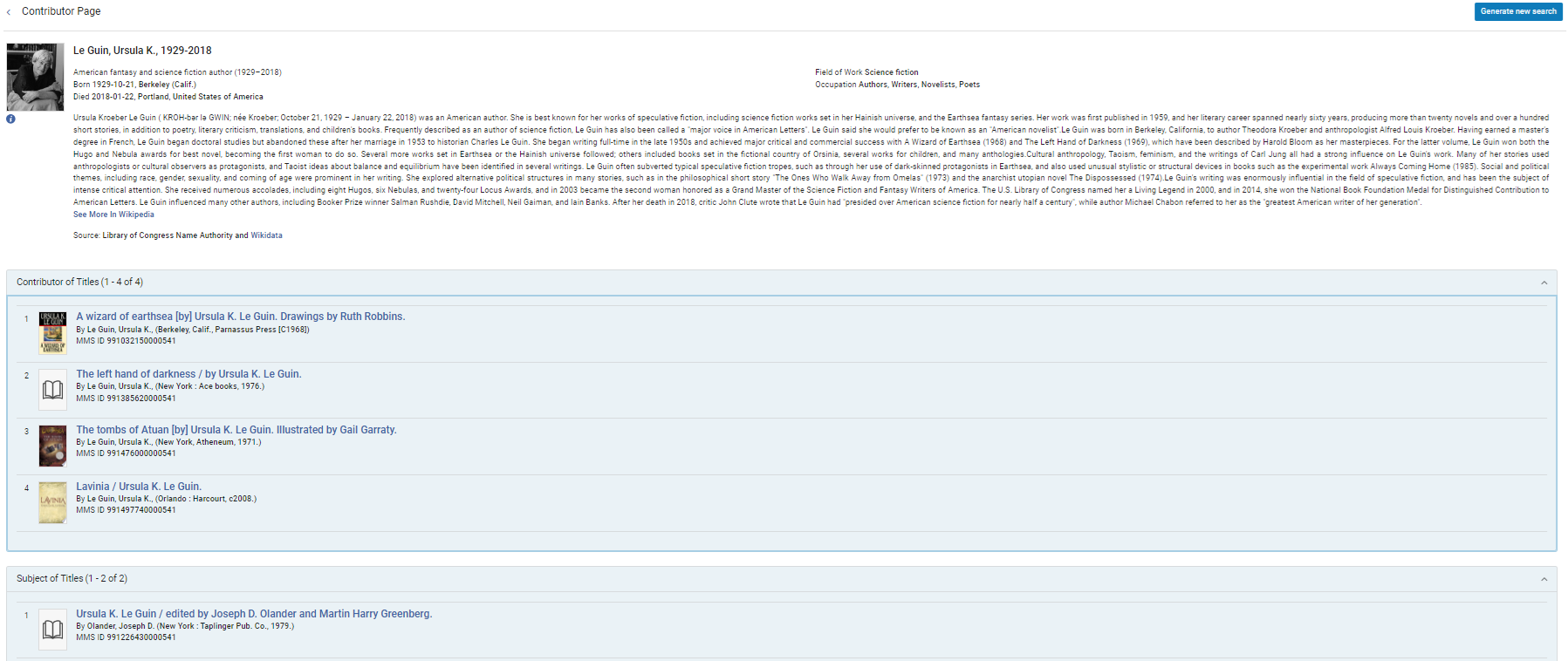
Alma enhances the Metadata Editor with linked open data functionalities by adding a Contributor Page to assist catalogers in identifying the correct authority for MARC records. Users are given the option (when available) within the Authority tab to view the Contributor Page. This page assists catalogers in identifying the correct authority for MARC records and displays detailed information from both external resources (Wikidata and Wikipedia) and the local catalog. This information can assist catalogers in selecting the correct authority record to link to when using authority selection. Catalogers can navigate from the Metadata Editor to a full-page view of the Contributor Page and back to the Metadata Editor.
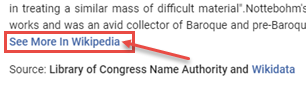
If the description in the Contributor Page exceeds 10 rows, a link labeled "See More in Wikipedia" is displayed.
Full support for generating a new search based on the ID of the authority will be fully functional after the November 2024 indexing.
For more information, see:
- View Contributor Page
- Recording:Linked Data in Alma - Alma 2024 Roadmap Webinar Series (June 4, 2024)
- PPT Presentation:The Linked Data Info Card.pptx
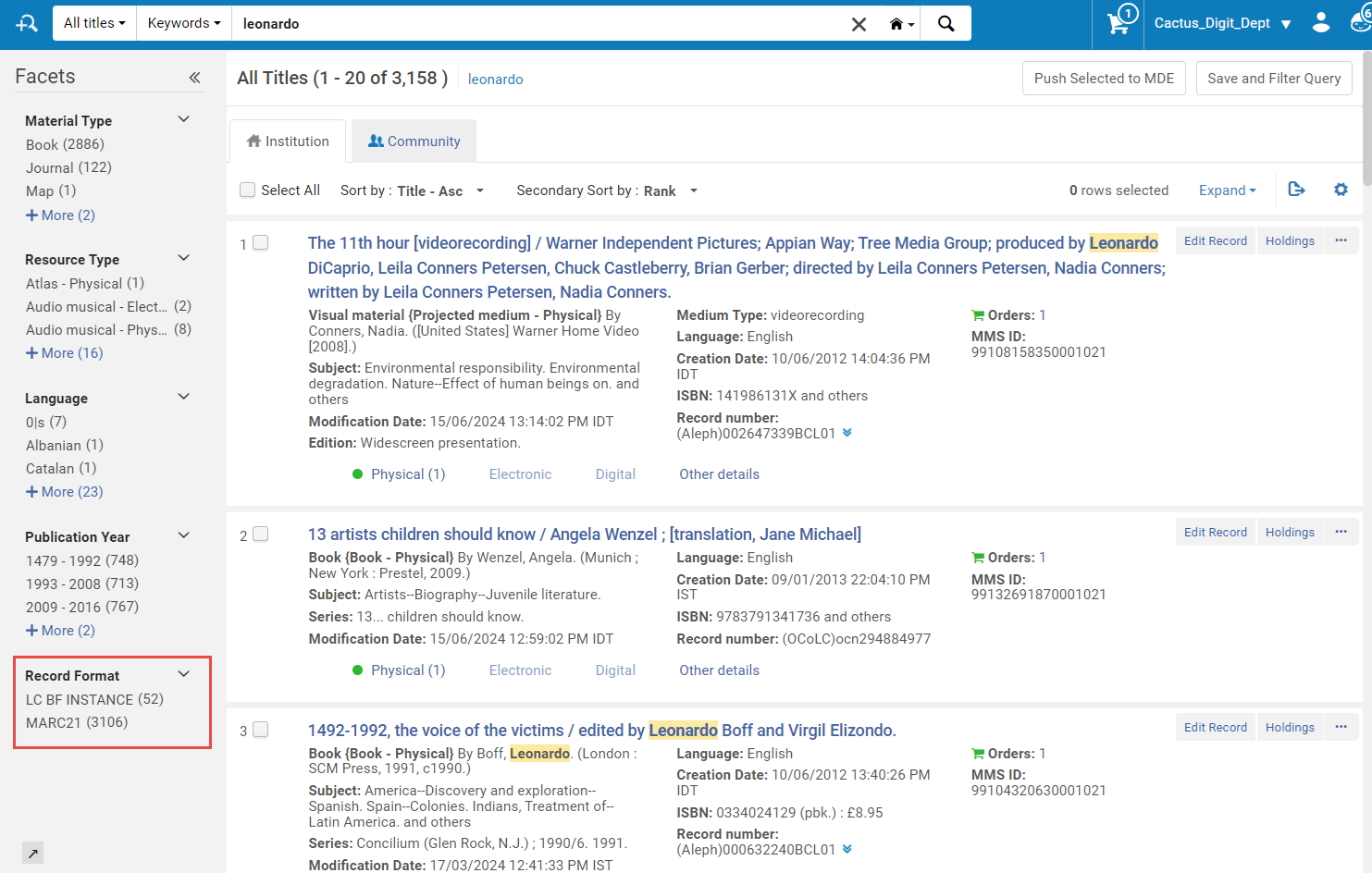
Record Format Facet for Enhanced Repository Search
August 2024 Linked OpenDataURM-207443
The repository search functionality has been enhanced with the addition of a new record format facet. This feature enables users to filter search results by record format, encompassing all titles, whether physical, electronic, or digital.
Record Format Facet displays only when an institution has more than one record format activated.
For more information, see Filtering Search Results.
Brief Record Ratings Now Support BIBFRAME Records
August 2024 Linked OpenDataURM-223504
Brief record ratings now support BIBFRAME records, utilizing the same drools created for MARC records within each institution. Users do not need to create new rules specifically for BIBFRAME, as the existing MARC rules are seamlessly applied to BIBFRAME records.
For more information, see Working with Brief Record Levels.
Include Deleted Holdings When Publishing Deleted Bibliographic Record to OCLC
August 2024 MetadataManagementURM-141420
Previously, when a bibliographic record was deleted, the "Publish bibliographic record (DataSync) to OCLC" profile included the deleted record without its holdings. Institutions can now customize this profile to include all deleted holdings of the bibliographic record in the published file. This facilitates OCLC in matching their OCLC symbols and processing the deletion. To enable this feature, institutions can set the customer parameter "oclc_add_hol_to_deleted_bib" to "true". If this parameter is set to true, the published deleted bibliographic record will also include all of its deleted holdings, regardless of when they were deleted. This ensures that all the bibliographic record's holdings are indeed removed from the external system (this functionality has been confirmed with OCLC). The included holdings data will adhere to the mapping specified in the "Map holdings fields into Bib record" table. This feature is particularly beneficial for libraries utilizing the OCLC publishing profile rather than the general publishing profile when publishing to OCLC.
For more information, see Publishing to OCLC.
New Fields Available to Display in the Physical Items Search Results
August 2024 MetadataManagementURM-198797
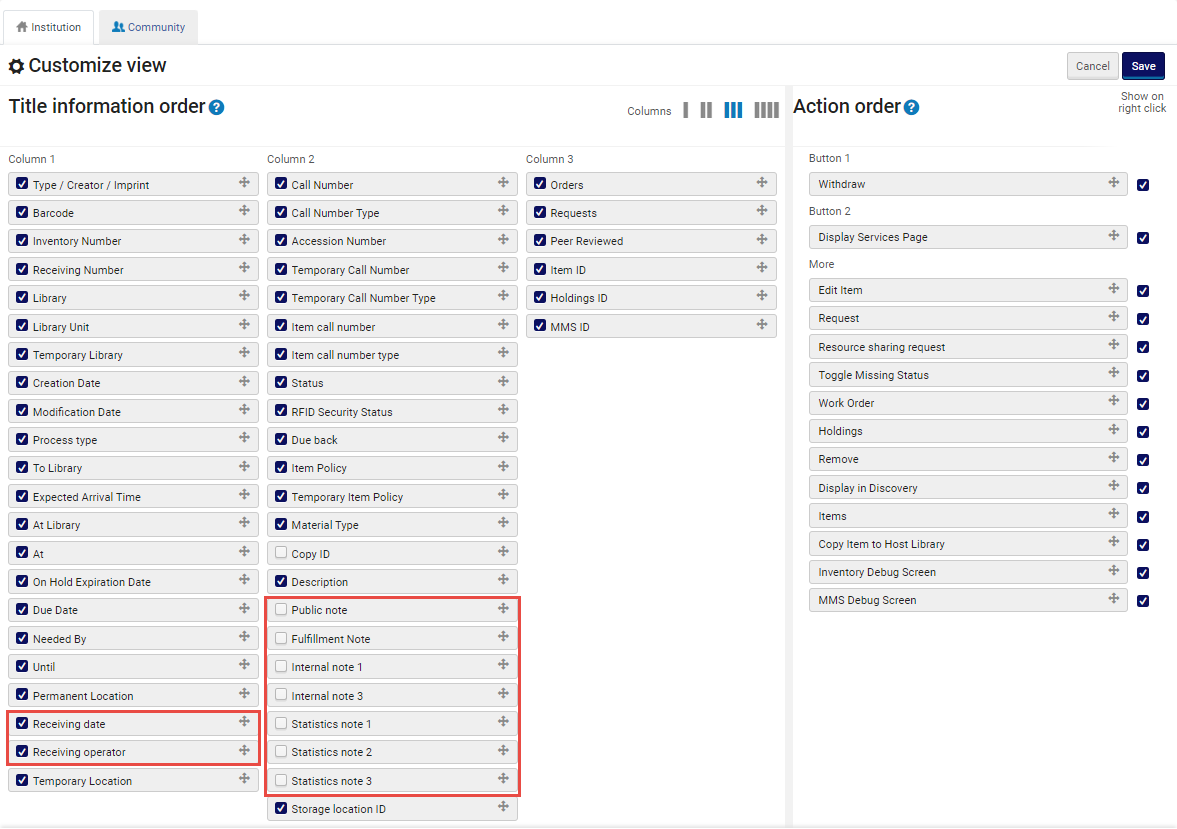
The following fields are now available to activate in the physical items search configuration:
- Public note
- Fulfillment note
- Internal notes
- Statistics notes
- Receiving date
- Receiving operator
This is especially useful to operators who need to scan this information for multiple items, saving them the need to go into each item. To activate these fields, click the gear ( ) icon at the top right corner of the search results, and select the fields to add to your results.
For more information, see Customizing the Search Results Record Fields.
Enhanced "See also" Navigation in the Authorities Search
August 2024 MetadataManagementURM-211860
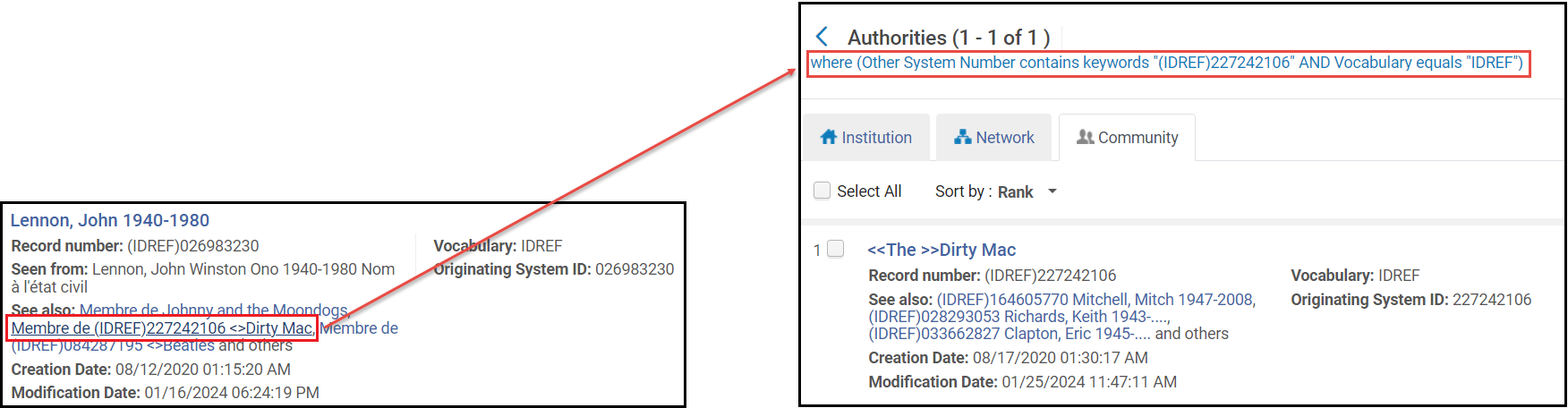
When an authority record has a 5XX field mentioning a related authority, the authorities search results contains a link to easily search for that term. If the authority vocabulary does not base these pointers on authority ID, clicking on the "See also" link generates a search for the term entered in the 5XX field. This search was enhanced to give more accurate results, by making the following changes:
- Change the search operator from "contains keywords" to "equals", to improve the accuracy of the retrieved results.
- Limit the search by originating system, so that only authorities from the same system as the authority record the search originated from will be retrieved.
- Before, the entire 5XX field was included in the search, often resulting in not finding the relevant authority. Now, only subfields indexed for search in the relevant source code (subject, personal name, corporate name, and so forth) within the 5XX field are included in the search. Information irrelevant for the search (for example, relationship information for personal name) is excluded, streamlining the results.
Institutions that prefer the previous keyword-based “See also” search behavior (for example, who work mostly with vocabularies where doing a fuzzy match is more desirable), can select to opt out of the new system by setting the customer parameter aut_see_also_link to ‘false' to retain the old behavior.
For more information, see Performing Actions on the Repository Search Results Page > See also.
ACTL Enhancement for Consortia Members
August 2024 Metadata Management
IdeaExchangeURM-100576
The Authority Control Task List (ACTL) now includes a new filter for Network Zone linked records to be used by the Consortia members. Some consortia members update all BIBs from the Network Zone and do not want to view the Network Zone records in the Institution Zone. To support this and still enable other consortia members to show these records, a new filter is added to facets labeled Linked to Network Zone in addition to the existing facet Linked to Community Zone.
For more information, see Working with the Authority Control Task List > Facets.
Creating Multiple Items for a Holdings Record Using Item Templates
August 2024 Physical Resource Management
IdeaExchangeURM-219470
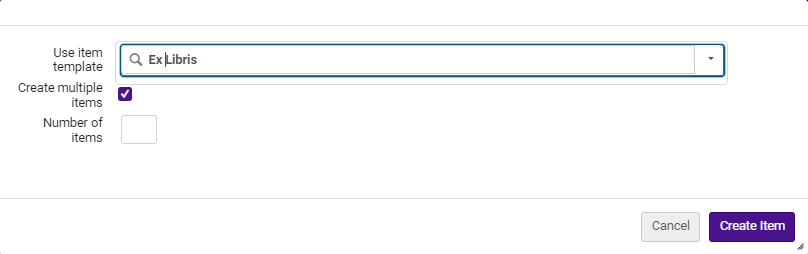
In Alma's ongoing effort to streamline physical resource management, users can now add multiple items to a holdings record using "Add item from template" and specifying the desired quantity. This initiates a process that generates multiple items within the holdings record, pre-filled based on the selected item template.
When using a barcode sequence, the system verifies the current sequence during each item creation to maintain barcode uniqueness. Consequently, barcodes may not appear sequential if other items are simultaneously created using the same sequence within the institution.
This feature significantly benefits physical inventory operators managing multiple copies of the same book, eliminating the need for individual additions. It complements other bulk item creation tools in Alma, such as import profiles and the "Item Creator by Excel" CloudApp introduced earlier this year. This CloudApp facilitates the creation of new physical items from Excel files, ideal for scenarios involving multiple holdings or titles, varied enumeration/chronology fields, or when item data is provided in Excel format (e.g., from vendors).
For more information, see Working with the List of Items.
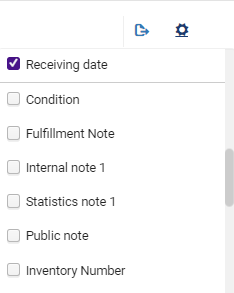
New Columns Available to Display in the Physical Items List Table
August 2024 Physical ResourceManagementURM-218705
The following columns are now available to activate in the physical items list table:
- Condition
- Public note
- Fulfillment note
- Internal note 1
- Statistics note 1
This enhancement is particularly beneficial for operators who need to quickly scan information across multiple items, eliminating the need to access each item individually. To activate these fields, select the gear () icon at the top right corner of the table and select the columns you want to include in your results.
For more information, see Working with Table Columns.
DARA Recommendation to Use Upload Electronic Holdings Integration with All Relevant Provider(s)
August 2024Electronic ResourceManagementURM-219461
DARA now recommends the use of upload integration for all relevant providers' electronic holdings. When an institution has active collections with a vendor that supports upload electronic holdings integration but lacks an integration profile with an active schedule, a recommendation is generated. If this recommendation has expired without being implemented or dismissed, it will be regenerated after three months. Notifications inform institutions about the availability of the upload electronic holdings integration relevant to their data, allowing them to configure the integration and eliminate the need for manual portfolio management.
For more information see DARA – Data Analysis Recommendation Assistant.
Upload Electronic Holdings from Taylor & Francis (Journals) Now Uses a Dedicated Electronic Collection
August 2024 Electronic ResourceManagementURM-222774
Background: The Taylor & Francis Journals Autoholdings integration was initially launched in February 2024, utilizing the existing Alma Community Zone journals collection:Taylor & Francis Current Content Access (CZ Collection ID: 611000000000002216).
Since its release, there have been reports of missing content and variations in coverage dates, which were duly investigated in collaboration with Taylor & Francis. It was discovered that approximately 1000 titles, including previous editions, perpetual content no longer offered for sale, and content with a non-"current” coverage, were not included in the "Current Content Access" collection.
Transition to New Collection: After extensive discussions and analysis, it has been decided that a new, dedicated Community Zone collection will be utilized for the Taylor & Francis Journals Autoholdings functionality. The new collection: "Taylor & Francis Journals Auto-Holdings Collection" (CZ collection id: 615400000000000635), includes the complete journals title list. This collection will be regularly updated to ensure accurate coverage of all institutional titles. The provider is committed to keeping this collection full of all the titles that an institution might have access to, regardless of their nature.
Effective Date: Commencing from the August 2024 release, the integration of Taylor & Francis Journals auto-holdings will now exclusively use the new "Taylor & Francis Journals Auto-Holdings Collection" (CZ Collection ID: 615400000000000635).
This change aims to enhance the accuracy and completeness of your journal holdings data and avoid the need to perform manual actions.
What do you need to do? To continue benefiting from the integration post-August 2024 release, you need to activate the new Taylor & Francis Journals Auto-Holdings Collection (CZ Collection ID: 615400000000000635). For those wishing to retain acquisition details such as PO lines and licenses associated with the titles, it is recommended to employ the Move electronic portfolio information job. This will facilitate the transfer of PO lines and licenses to the new Taylor & Francis Journals Auto-Holdings Collection.
For more information on the transition to a new dedicated collection and the required actions, see:Taylor & Francis Journals Auto-holdings Functionality.
For general information on the autoholdings integration, see:
IPv6 Now Supported for IP Range Access Rights
August 2024 Digital Resource ManagementURM-216207
IP Addresses using the IPv6 format are now supported when configuring access rights for digital representations according to IP range.
For more information, see Access Rights Policies for Digital Objects.
Order It! Now Supported When Third-party Cookies are Blocked in the Browser
August 2024AcquisitionsURM-218938
In Q3 of 2024, the Chrome browser's default third party cookies will be changed to be automatically blocked (see Third Party Cookie Deprecation).
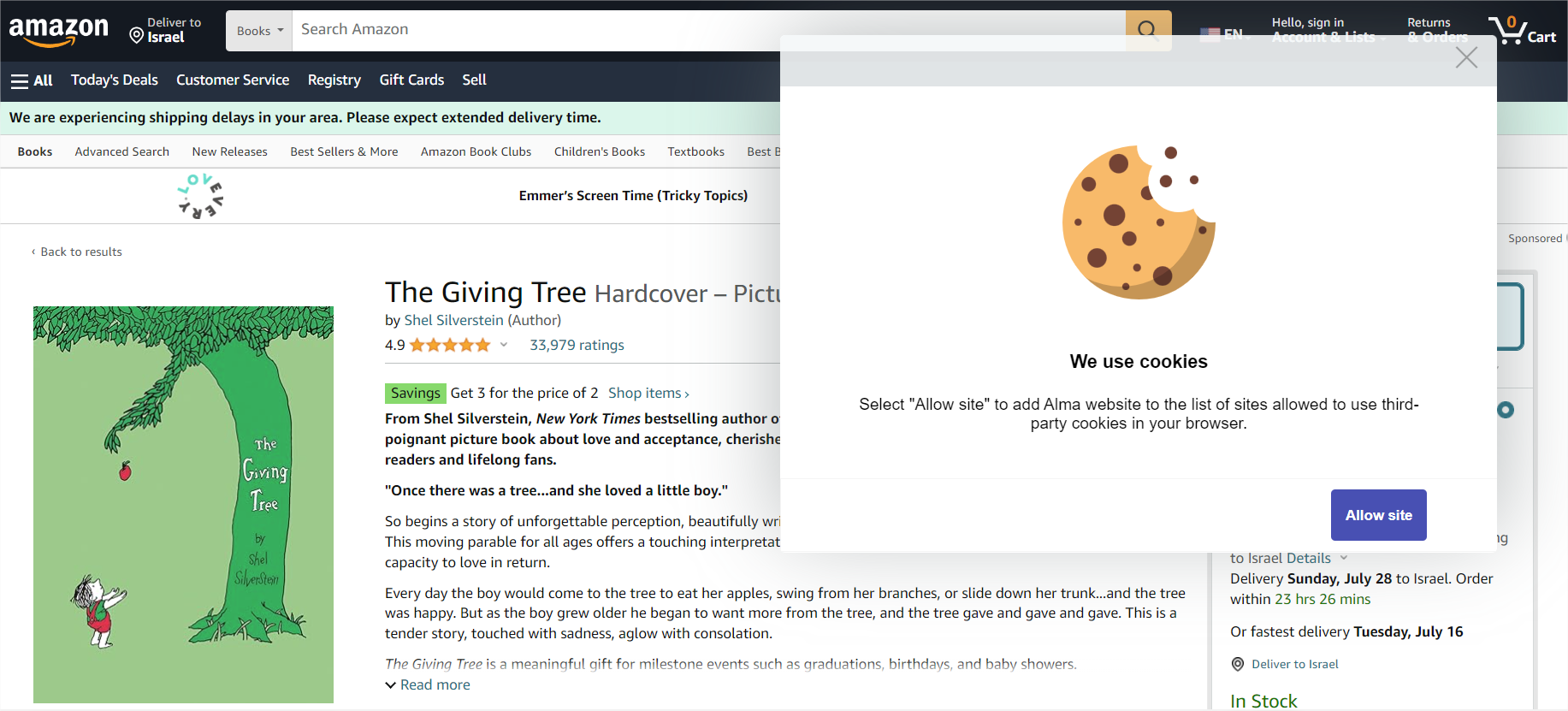
Order It! uses third-party cookies in order to support single sign in. Now, when third-party cookies are blocked in the browser, Order It! will notify the user that the Alma website needs to be added to the list of allowed sites to use third-party cookies. After the site is added, Order It! will be loaded as expected. This functionality will apply to all supported browsers.
For more information see Ordering with the Order It! Plugin.
Summary Bar Added to the Funds Section in the PO Line
August 2024AcquisitionsURM-214064
A summary bar was added to the Pricing and Funding section in the PO line, indicating the total sum and the funding coverage percentage.
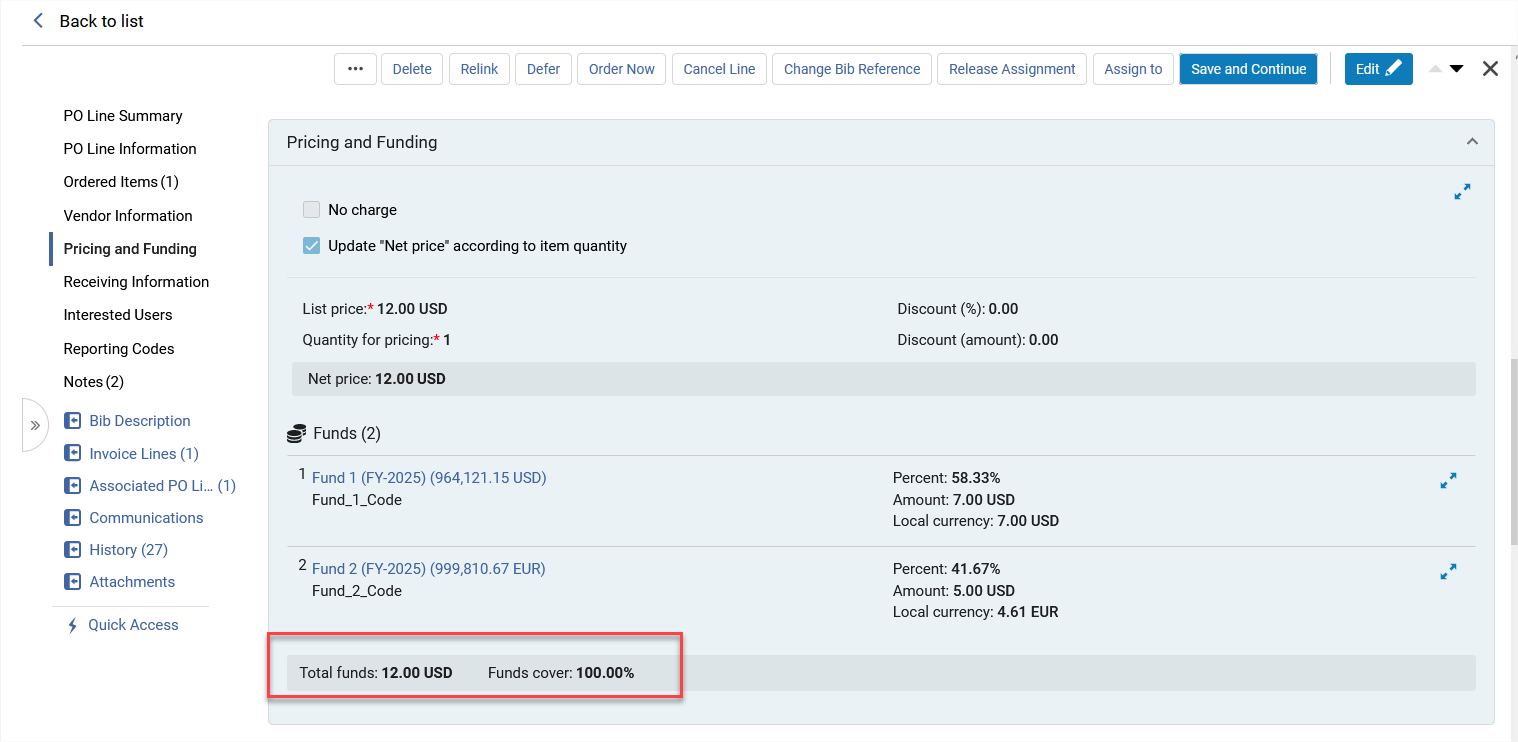
In addition, some minor display modifications were done to the entire Pricing and Funding Information section.
For more information see Pricing and Funding.
New Fields Added to the "Update PO Lines Information" Job
August 2024Acquisitions
Idea ExchangeURM-207493
Nineteen new fields were added to the Update PO Lines Information job. In addition, the job form is now divided into sections, allowing to easily locate the required field/s to update.
This job only performs allowed updates on the selected PO lines. When trying to update a field on a PO line that cannot be updated, for example, adding a renewal note to a one time PO line, this field will not be updated and an error will be displayed in the job report.
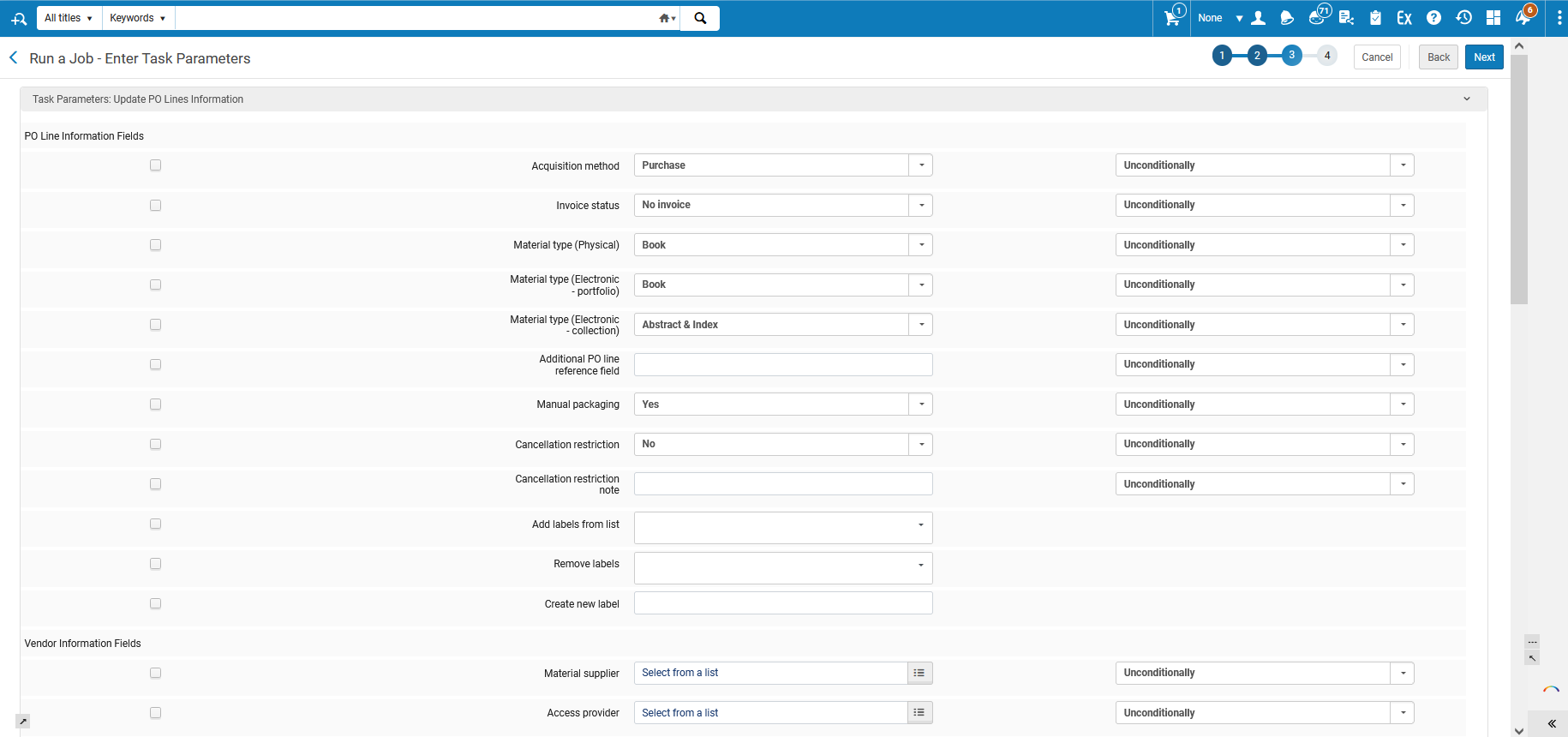
The list of new fields is as follows:
- Additional PO line reference field
- Cancellation Restriction
- Cancellation Restriction Note
- Add labels from list
- Remove labels
- Create new label
- Reclaim interval
- Subscription interval
- Note to vendor
- Vendor reference number type
- Routing during receiving
- Binding during receiving
- Activation note
- Renewal date
- Subscription from
- Subscription to
- Renewal reminder period (days)
- Renewal note
- Internal note
For more information see Manual Jobs and Configuring Processes.
PO Line Description and Creator Fields Added to Transactions Tab
August 2024Acquisitions
Idea ExchangeURM-94500
The PO Line Description and Creator fields were added to the Transactions tab for Funds and Ledgers.
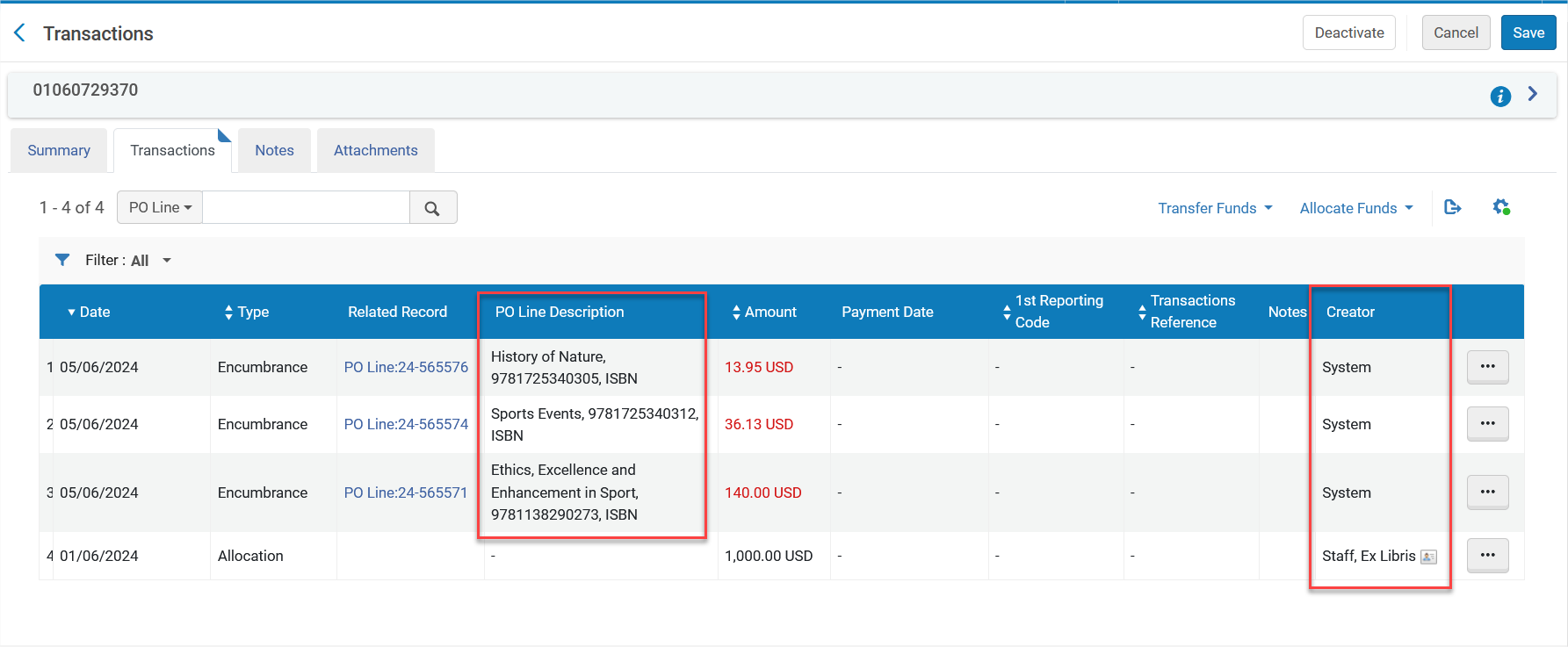
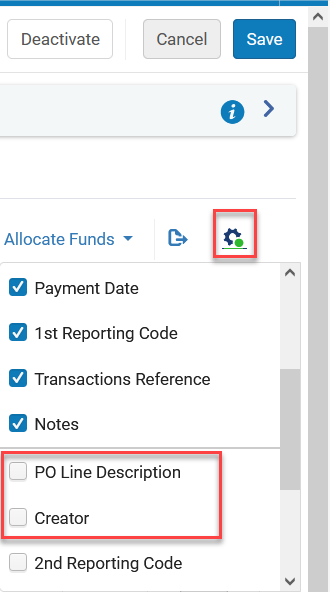
To enable their display, check both fields in the table customization menu.
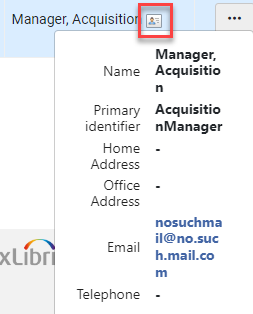
- The user card of the Creator field will only be displayed for transactions done after this development was released.
For more information see Managing Funds and Ledgers.
Open Access Workflows: New PO line Types for Article Processing Charges (APC)
August 2024AcquisitionsURM-196578
A growing number of publisher agreements present possibilities for open access publication. Furthermore, some institutions assign libraries the task of supervising allocated funds for covering article and book processing charges related to open access publication.
It is now possible to create PO lines for Article Processing Charges (APC), using 2 new PO line types:
- Article Processing Charges (APC) – One Time
- Article Processing Charges (APC) – Subscription
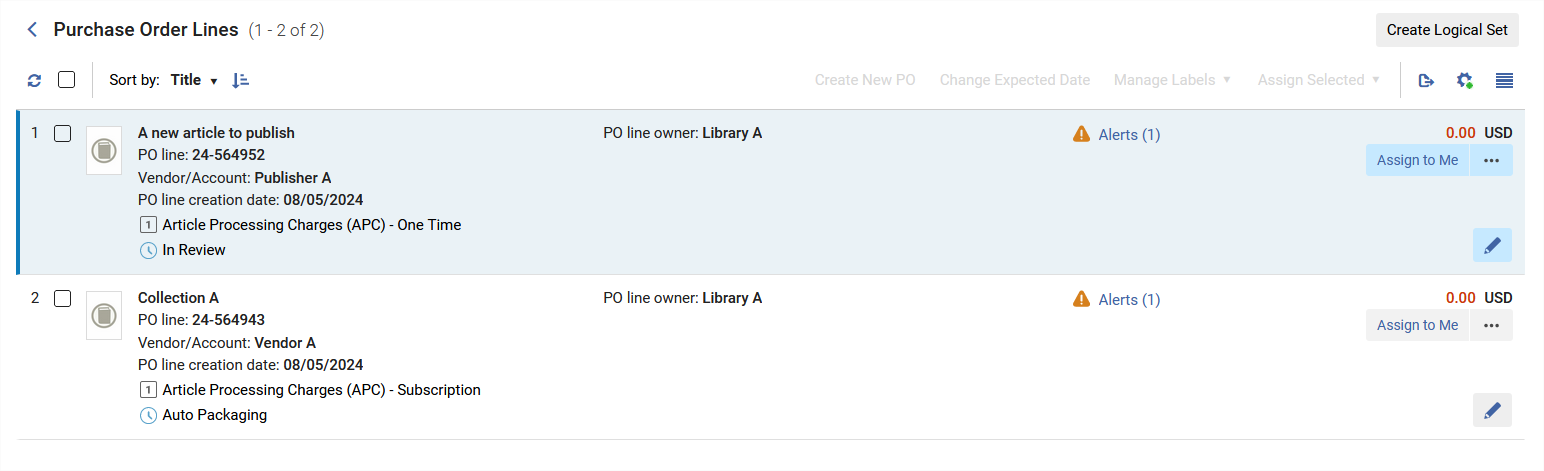
The new PO line types are without inventory, as they represent the request to publish articles. It is possible to link such PO lines to the vendor for which the request to publish is being processed, and to link to the relevant license. It is possible to record the price and funding.
This information is available in Analytics and can be used by institutions for understanding the amount spent on open access publications.
Additional open access elements, such as transformative agreement, will be added to Alma in the coming releases.
For more information see Enabling/Disabling PO Line Types and PO Line Types and Statuses.
Copy PO Line Price to Replacement Cost
August 2024Acquisitions
Idea ExchangeURM-103945
An option was added to copy the PO line price to the item's Replacement cost field.

The price is copied upon PO line creation, change of PO line price and addition or removal of items in the PO line.
In addition, an option was added to add or reduce an amount from the PO Line price when being copied.

For more information see Configuring Other Settings and Working with Items.
Support for Continuous PO Lines in Receive Existing Items API
August 2024AcquisitionsURM-130401
The Receive an Existing Item API now supports receiving items of continuous PO lines. The same parameters should be used as for receiving items of one time PO lines. For more information see the Developer Network.
Handling of Half/Full-Width Japanese Romanized Characters
August 2024 CollaborativeNetworksURM-221444
Alma now supports the transliteration of Japanese half/full-width Romanized characters. For more information, see Working with CJK Transliterations in Cataloging.
New Consortia Central Configuration Dashboard
August 2024 CollaborativeNetworksURM-218334
The new Consortia Central Configuration Dashboard enhances the experience of Consortia Central Office operators responsible for managing Consortia members' configurations. The dashboard provides easy access to all Consortia members' configurations within the Network Zone, eliminating the need to log in to each member individually. It facilitates the management of members' configurations when the Central Office acts on behalf of a member and allows the distribution of Network Zone configurations to Consortia members, ensuring unified configurations across all or selected members.
This feature is exclusively relevant to an Alma Network Zone.
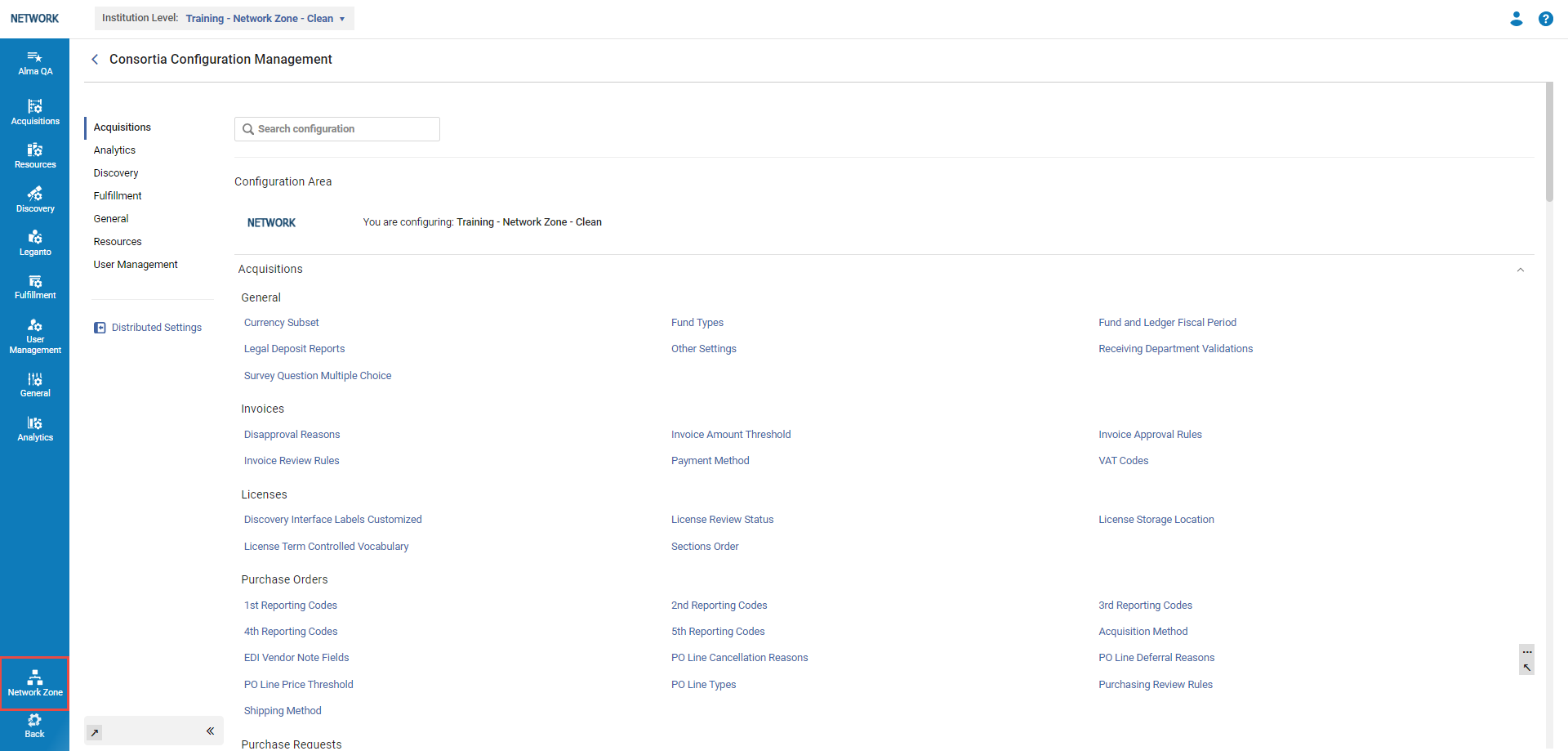
Enable Cloud App Activation per Role
August 2024User Experience, Accessibility & Infrastructure
Idea ExchangeURM-134916
The Cloud App configuration now includes two new options for controlling the usage of cloud apps in the institution. The administrator can configure one, both or neither of these options.
- The administrator can configure cloud apps to be available for activation only by users with the relevant role/s required by that cloud app.
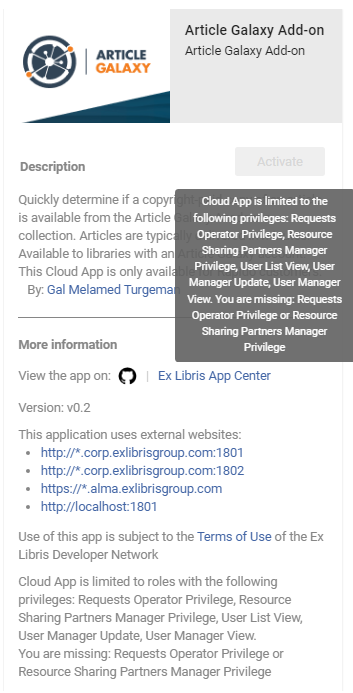 Cloud Apps Tooltip
 - The administrator can control which users can activate and use cloud apps by giving specific users the new Cloud App Operator role.
For more information see Configuring Cloud Apps.
Configuration of CSP (Content Security Policy) Headers
August 2024User Experience, Accessibility & Infrastructure
Idea ExchangeURM-215020
There are five new CSP headers that you can enable and configure for allowed domains.
- script-src
- form-action
- frame-src
- connect-src
- base-uri
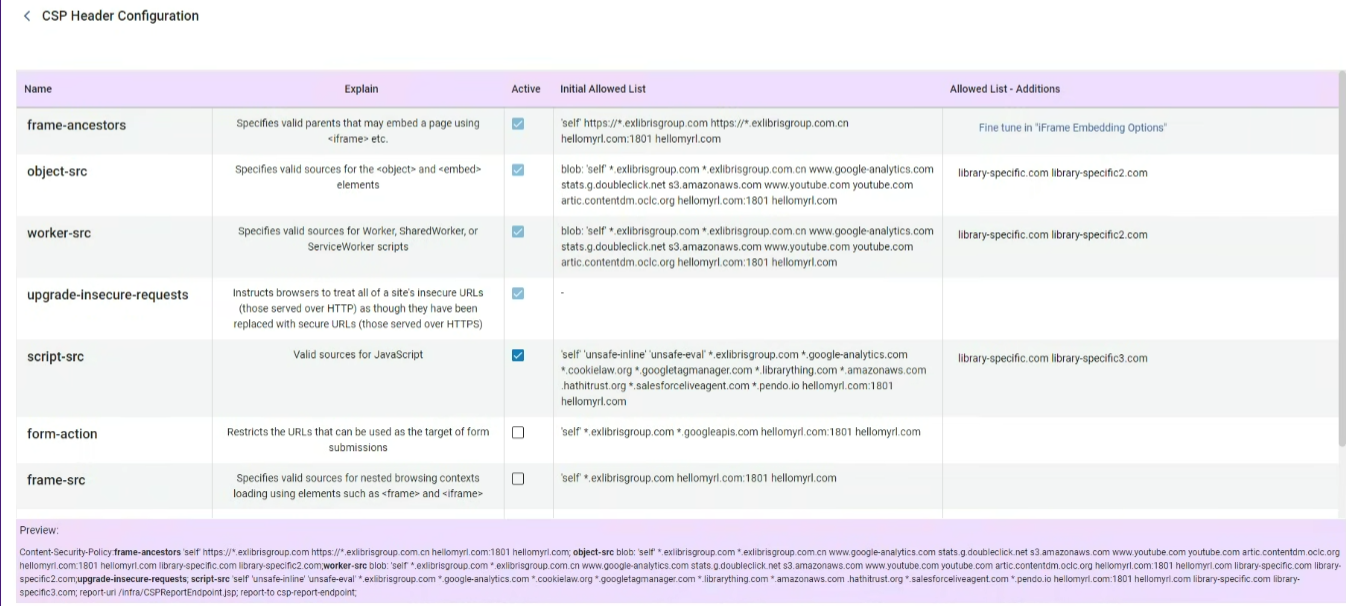
For more information see CSP Header Configuration.
New Design for Active Facets
August 2024User Experience, Accessibility &InfrastructureURM-221053
The UI for active facets was redesigned for better clarity and efficiency in narrowing down and viewing the search results. This applies to PO lines, resource sharing requests, sets and relevant searches such as Physical holdings.
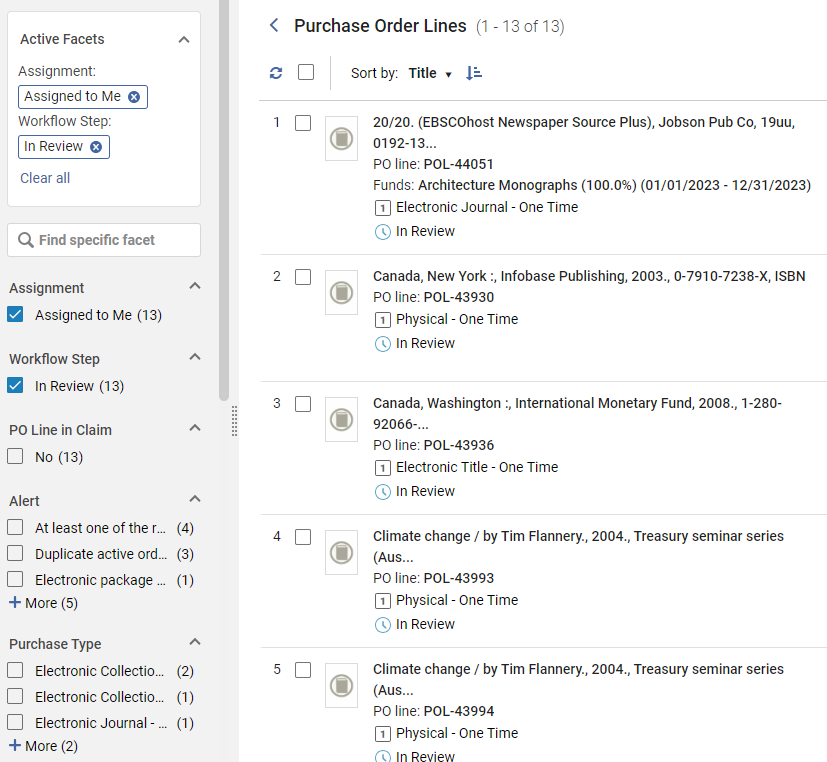
For more information see Facets.
Indication of Active Facets in Collapsed Panel
August 2024User Experience, Accessibility &Infrastructure
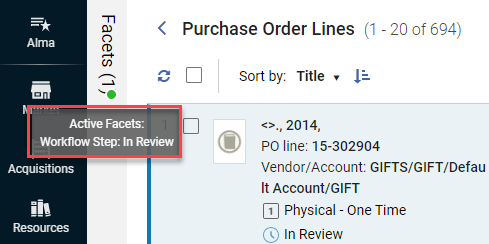
URM-217686 The collapsed facets panel now indicates the existence and the number of active facets. This applies to PO lines, resource sharing requests, sets and relevant searches such as Physical holdings.
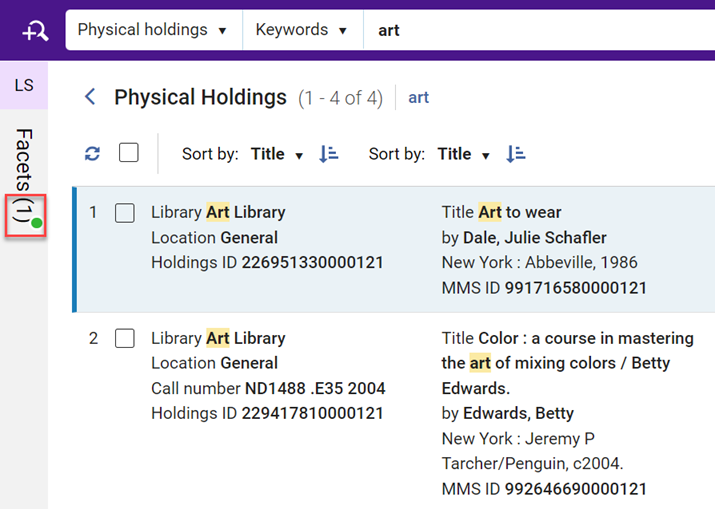
If you hover over the collapsed facets bar, a tooltip displays the selected facets.
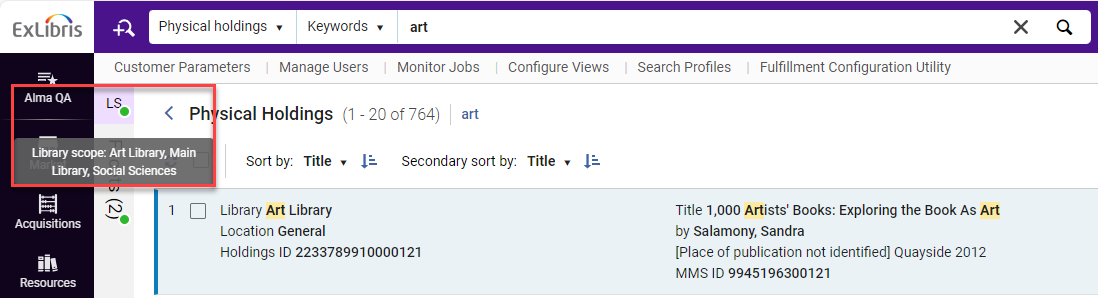
An indicator and tooltip also appear for Library Scope (LS) in relevant search results such as Physical holdings.
 For more information see Facets.
Green Dot in Filters
August 2024User Experience, Accessibility &Infrastructure
When a non-default filter is selected, a green dot appears next to the filter icon to indicate that the results displayed on the page are not the default ones (for example My Sets instead of All sets). This is useful for sticky filters - when the user accesses a page that has a non-default filter selected, they will get a visual cue that the that a non-default filter is selected.

In addition, the Clear All button was added to clear all the filters and set them back to the default.

This applies to PO lines, patron services and sets. For more information see Layout 2022.
Arrangement of Header Icons in Responsive Mode
August 2024User Experience, Accessibility &Infrastructure
The icons in the header were updated to adapt in a more responsive way when resizing the page.
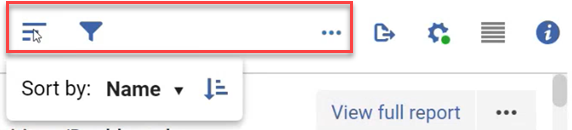
For more information see Task List.
User Level Configuration of Alma Color Scheme
August 2024User Experience, Accessibility & Infrastructure
IdeaExchangeURM-140556
The Alma Color Scheme can now be configured on the user level, not just the institutional level. Users will be able for example to select a different color scheme for Production and for Sandbox, for easy differentiation between them.
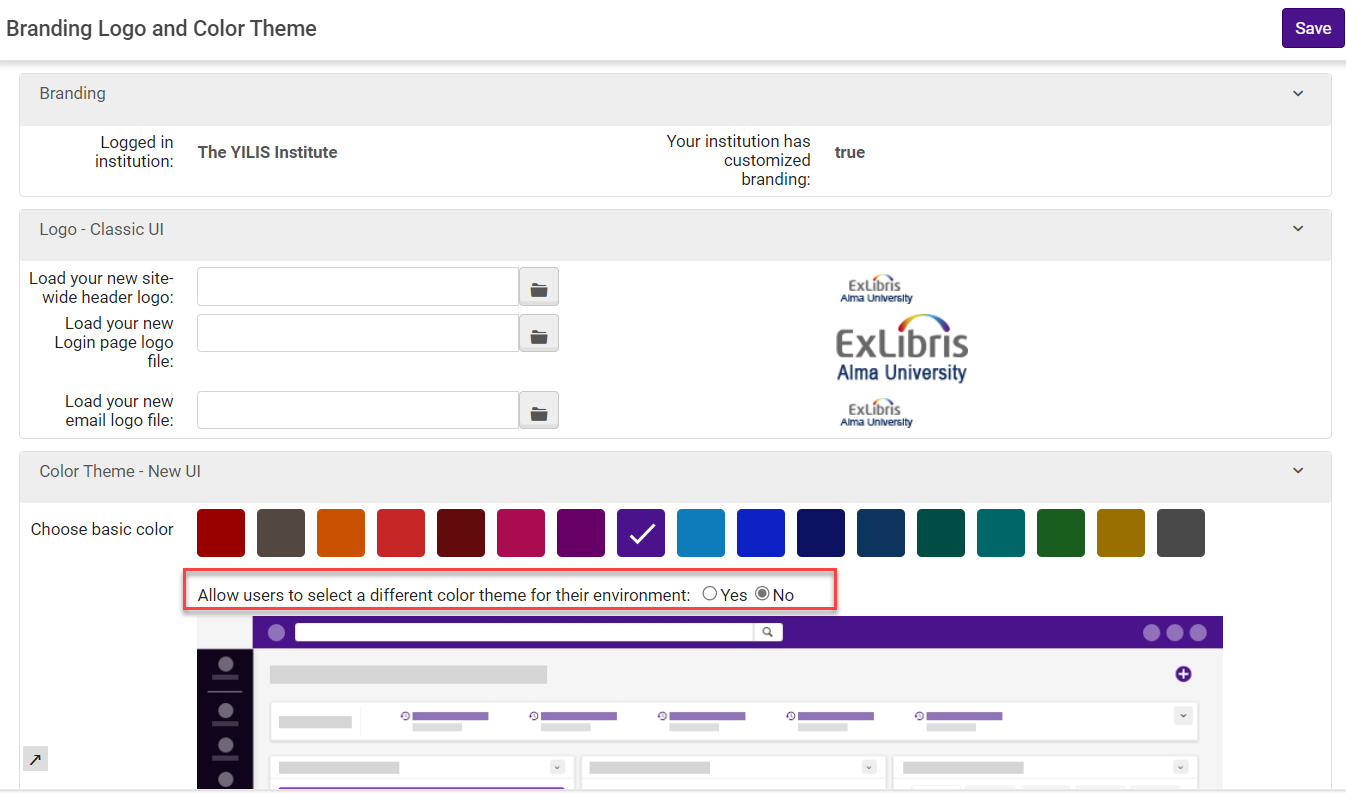
For more information see User Interface Settings.
Display Related Requests for Libraries
August 2024User Experience, Accessibility &Infrastructure
You can now view the request/s related to a specific library. This is useful for example when the user wants to delete a library, and they need to first handle the related requests. This tool is available at Configuration > General > Add a Library or Edit Library Information > Libraries.
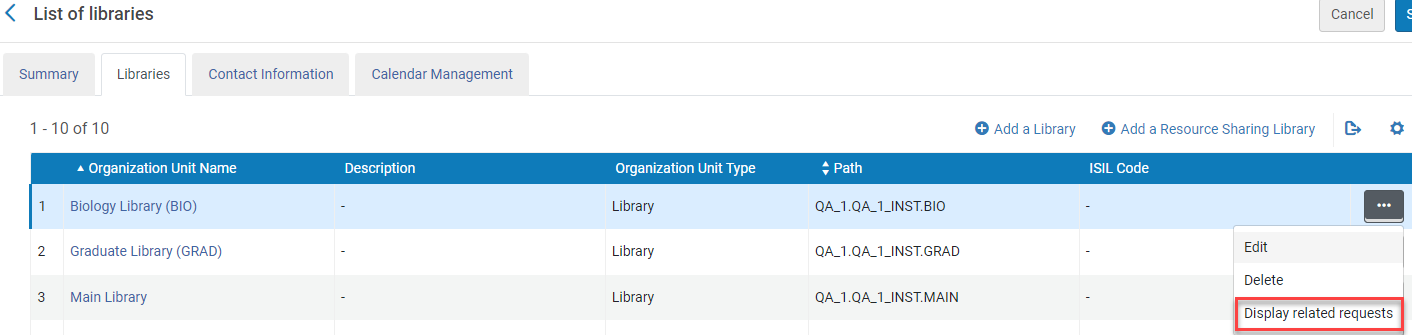
For more information see Configuring the Institution and Its Libraries.
Next Year Option For Calendars
August 2024User Experience, Accessibility & Infrastructure
Idea Exchange
The Next Year button was added to all calendars where future dates are available, for example when creating or updating an invoice line..
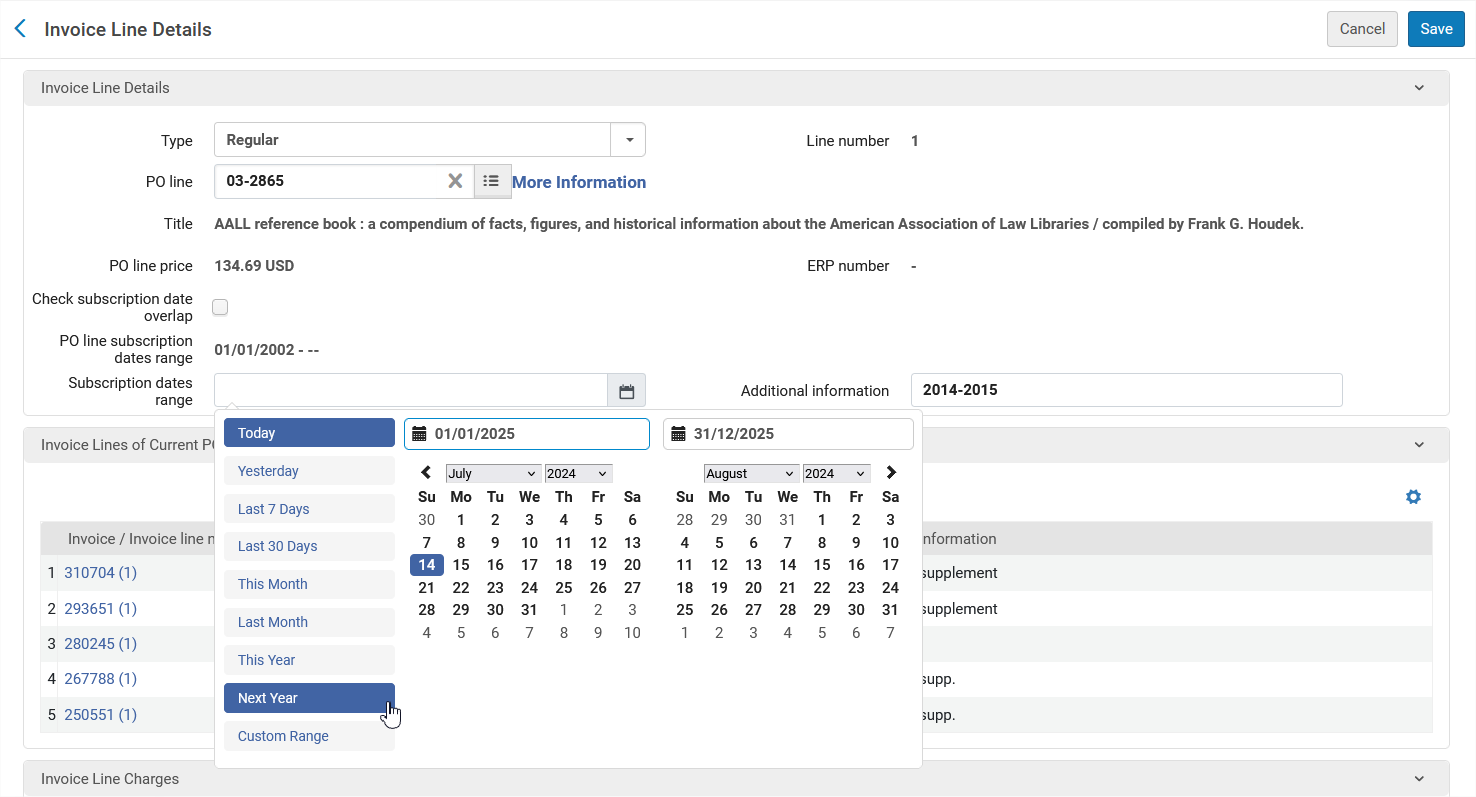
Search Sets by User Name
August 2024User Experience, Accessibility &InfrastructureURM-208685
In the Created by option for searching in sets, the user name (First name or Last name) is now included in the search results. This is in addition to the user Primary Identifier that was already supported.
Truncated searches are supported so that users can use an asterisk ( * ) wildcard character to search for a string that begins with the searched characters. For example, search for “gr*” to search for “green” along with “grady”.
For more information see Managing Search Queries and Sets.
Improve UX Usability of Advanced Search
August 2024User Experience, Accessibility & Infrastructure
Idea ExchangeURM-218935
When adding a rule in the advanced search using a mouse, the focus now moves automatically from the + button to the search box of the first field in the new rule , saving the user the extra click . For keyboard users the focus remains on the + button as required by accessibility guidelines.
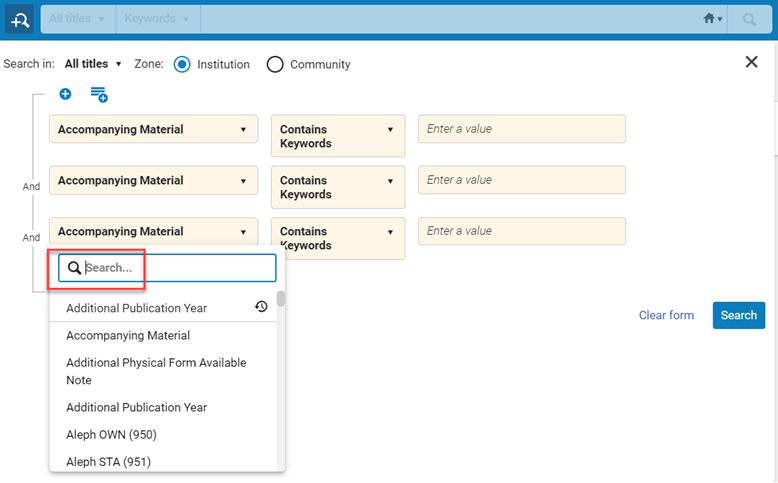
For more information on using the advanced search see Searching in Alma.
Recent Searches Support All Search Types
August 2024User Experience, Accessibility &Infrastructure
Idea ExchangeURM-209506URM-200920
The Simple and Advanced search now support recent searches for all search types, including for example Order Lines, Holdings, Users, Licenses, Reading Lists, Requests, etc.
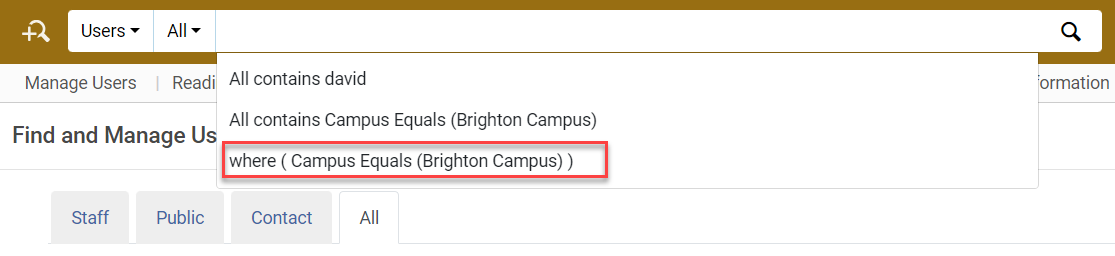
For more information see Searching in Alma.
Open ID Connect in Base64
August 2024User Experience, Accessibility &InfrastructureURM-216877
You can now configure your Open ID Connect authentication protocol to encode the state parameter in Base64 instead of using URL-encoding.
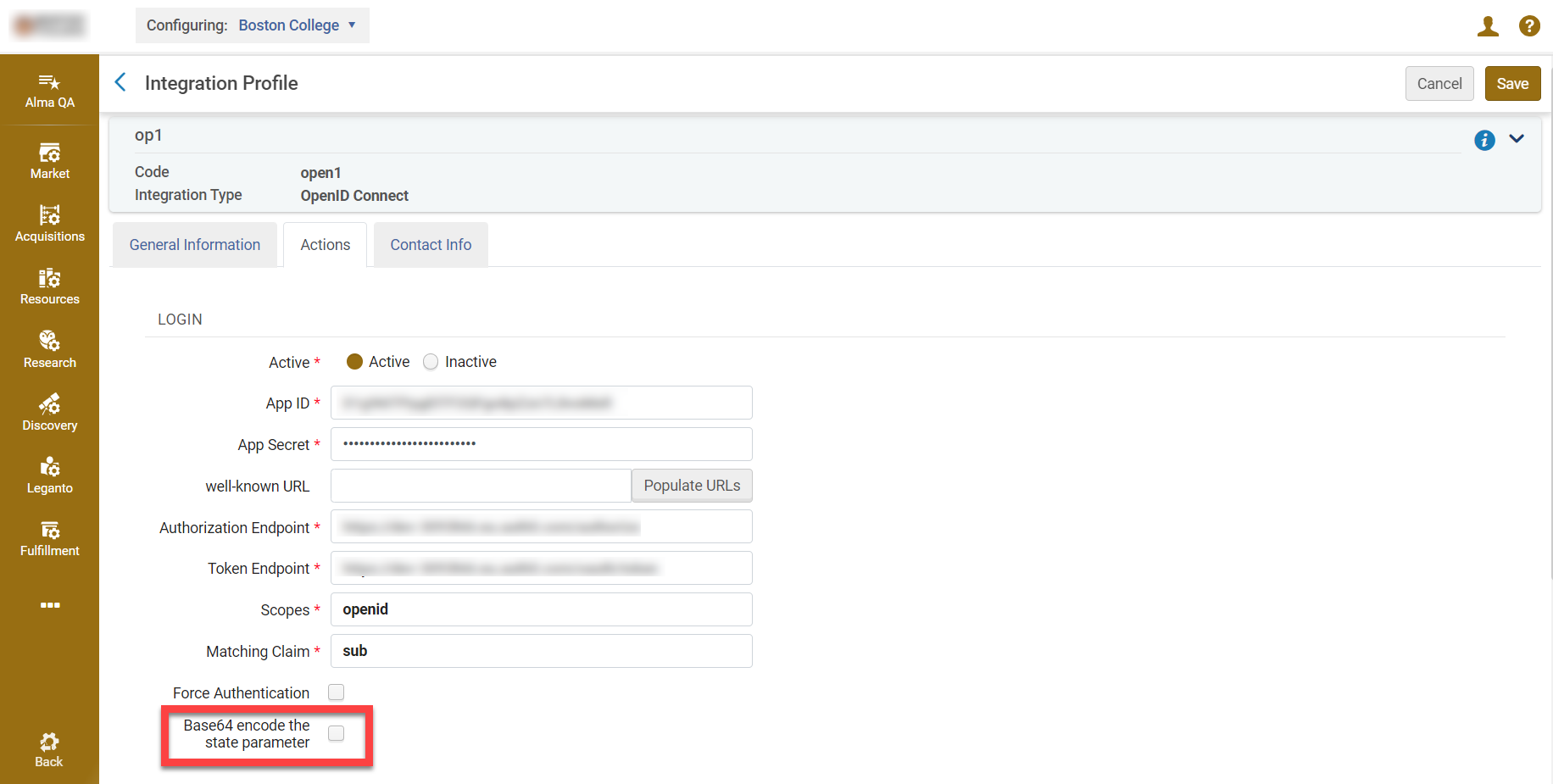
For more information see OpenID Connect and the Developer Network.
Enhanced Role Selection for Analytics Objects
August 2024 Analytics and InsightsURM-207691
The feature to select the roles that have access to an analytics object was enhanced. You can now open a dialog box and select the roles with which you want to share the analytics object . The roles are categorized to make it easier to find specific roles. You can select all of the roles in the category or select specific roles within a category.
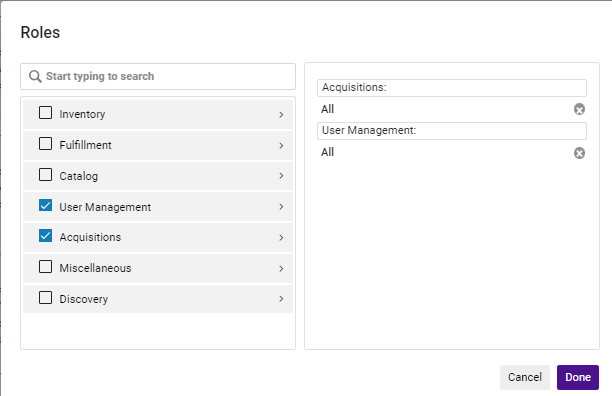
For more information, see Sharing Analytics Objects with Other Users.
Pin Analytics Objects to Selected Roles and Users
August 2024 Analytics and InsightsURM-221997
You can now configure analytics objects to be pinned for all users and roles for whom the object is shared. Previously, users had to pin the objects themselves. By allowing administrators to pin shared analytics objects, this enhancement provides greater control and sharing capabilities. Additionally, it saves the user from having to pin objects themselves that the administrator believes are valuable.
To support this feature, the new Pinned to Selected Roles / Users toggle was added to the Analytics Object List page:

When this option is set to active, the object is marked as pinned in the Analytics Object List and appears under the Analytics menu for all users and roles for whom the object is shared. The user can unpin an object that was pinned by the administrator.
Under the Analytics menu, there are now two sections for pinned objects:
- My Pinned Analytics – the objects that the user pinned
- Analytics Pinned by Admin – the objects that were pinned by an administrator by selecting the Pinned to Selected Roles / Users toggle
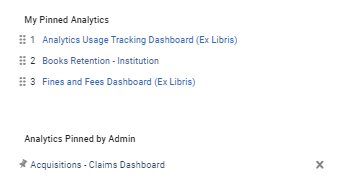
For the objects pinned by the administrator, you can select the Pin icon to move it to the My Pinned Analytics list or select the X to delete the object from the list.
For more information, see Working with Analytics Objects and Navigating Analytics.
Support Multi-Factor Authentication (MFA)
August 2024APIURM-217161
It is now possible to configure Alma to recommend (or enforce) the use of multi-factor authentication (MFA). In addition to the regular user and password screen, the user will receive an email with a login link.
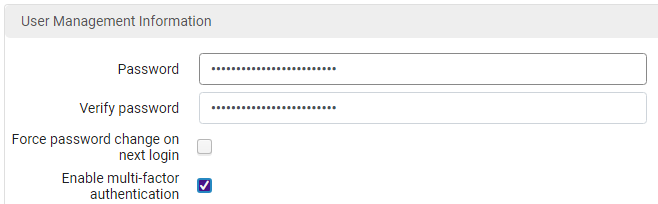
For more information see User Management.
Additional Enhancements
- September 2024 Analytics and InsightsURM-223485 The labels for the Statistical Categories fields 1-9 were renamed, in all subject areas in which these fields appear, by adding a leading zero to the number. So, for example,Statistical Category 1 was renamed to Statistical Category 01. This change was done to enable sorting the field names properly.
- September 2024 Analytics and InsightsURM-222088 The IdP Service In Use and Failed Authentication fields were removed from every location in which they appear, since they are no longer used in Alma.
- September 2024 Analytics and InsightsURM-216751 The ACRL & IPEDS Dashboard was enhanced with the following improvements:
- The text on several of the tabs was expanded to provide more information regarding the reports to help you configure the parameters according to your needs.
- The Bibliographic Details Material Type fields available for the reports under the Library Collection Number of Titles (Physical) and Library Collection Number of Titles (Electronic) tabs now displays a default value as appropriate for each report.
Review the available prompts and filter options according to your reporting criteria. Consider your local system settings, configurations, cataloging practices, and product usage to determine the best selection of options. This will help you avoid any duplications.For more information, see Industry Standard Reports and Dashboards.
- September 2024 Analytics and InsightsURM-225168 The following enhancements were implemented for the Inventory dashboards:
- To the Physical Books Deselection dashboard:
- The text of the Documentation tab now displays completely without the need to scroll.
- Filters were added to the Electronic Inventory with P tab for classifications and publisher.
- The Normalized Call Number field was added to the following tabs:
- Titles with Multiple Copies
- No Loans
- No Loans Past 5 Years
- Loan Ratio
- Physical items with E
- To improve the performance of the Physical Books Deselection dashboard and the Physical Books Retention dashboard (which are data-heavy dashboards):
- Filters are now set to include the selected criteria by default.
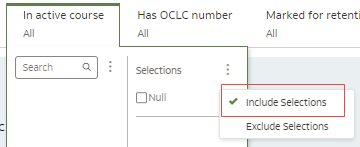 Include Selected Criteria
 - Auto Apply filters is now set to Off by default. This means that filters you set are not applied until you select Apply.
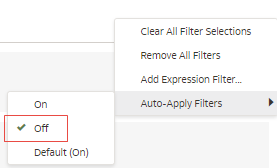 Auto Apply Filters
 - Brushing, where if you select one part of a table or visualization on the first tab, data in other tables that is relevant is highlighted, is no longer available.
- For filters, the Limit Values by option is now set to None by default. This ignores Limit Values set to Default for all filters and displays all selection values. It preserves the selection value limitations for any filters with Limit Values preferences set to Auto or <Filter Name>.
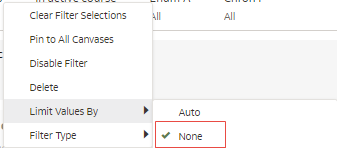 Limit Values by None
- Filters are now set to include the selected criteria by default.
- To the Physical Books Deselection dashboard:
- September 2024 Analytics and InsightsURM-225501 The Num of Days Accessed: Dashboards/Workbooks per User field was added to Analytics Usage Tracking > Usage Tracking Measures. It displays the number of days that a user accessed the dashboard/workbook.
For more information, see Num of Days Accessed: Dashboards/Workbooks per User.
- September 2024 Analytics and InsightsURM-203366 The Analytics Tracking Dashboard was enhanced with the following developments:
- The Dashboard/Workbook Path field was added to the Report Details section on the Report Details canvas.
- The Dashboard/Workbook Path field was added to the Number of Errors per Report section on the Failed Reports tab.
- The Query Trend - last 2 years report on the Overview tab was renamed to Query Trend to better reflect that the time-frame displayed is configurable.
- The date format of the Data updated as of field was improved for clarity.
- September 2024 Analytics and InsightsURM-228329 The Electronic Collection Material Type field previously located under E-Inventory > Portfolio Details for Consortia Members > --Electronic Collection was renamed to Portfolio Material Type (Code) and is now located under the --Portfolio dimension.
Resolved Issues
| SF number | Area | Description |
|---|---|---|
| 07168566 | Acquisitions | A purged user was counted as an Interested User in PO Lines for Analytics. This was fixed. |
| 07145681 07152882 07172232 07135810 | Acquisitions | There were SAML authentication issues for Order It! in Firefox. This was fixed. |
| 07115545 | Acquisitions | The Public Access Model field did not update when adding an additional PO line with the “License Upgrade” type. This was fixed. |
| 07171455 | Acquisitions | Permanently deleted licenses were not fully removed from electronic collections. This was fixed. |
| 07124285 | Acquisitions | Access models were not assigned to electronic portfolios when the PO line was created via a template. This was fixed. |
| 06964885 | Acquisitions | The 5th Reporting Code field still appeared in PO lines with the new UI layout after the table and PO lines were cleared. This was fixed. |
| 06908832 | Acquisitions | Non-Alma user roles appeared in the "Role" drop-down list in the Find and Manage Users page. This was fixed. |
| 07197768 07177012 | Acquisitions | Incorrect information was displayed for purchase requests in review in the unassigned task list. This was fixed. |
| 07119727 | Acquisitions | The "Last Updated By" value did not change when making changes to a purchase request. This was fixed. |
| 06987302 | Acquisitions | After accessing the Manage Purchase Requests task list from the Tasks menu and performing an All Titles search, the action buttons did not appear in the results list. This was fixed. |
| 07091827 | Acquisitions | The Receiving Operator Limited role was not able to view the interested user information pop-up in PO lines. This was fixed. |
| 06954811 07057261 | Acquisitions | When creating a PO line of type "Electronic Book – One Time", the Material Type field in the PO line was empty. This was fixed. |
| 07132334 | Acquisitions | Invoice payment information fields were editable when accessed from the Receive New Material page for users who did not have the relevant privileges. This was fixed. |
| 07199522 07019897 07127512 07031705 07037606 07119183 07173984 07119286 07100611 07087367 07188659 07026860 07053600 07060439 | Acquisitions | Invoices with the Closed status could not be saved when editing the payment information fields. This was fixed. |
| 07057300 | Acquisitions | When creating a new PO line using a template that contained a license value, the license was not copied to the created portfolio. This was fixed. |
| 07061990 07044918 07173070 07136580 | Acquisitions | When an item with an illegal character ("&" or "%") in the title was saved and received from the Item Editor, an error was displayed. This was fixed. |
| 07139528 | Acquisitions | The information for "No. of Units Arrived" and "No. of Units Ordered" in the PO Line Claim Letter was incorrect. This was fixed. |
| 07038720 06959295 06994478 06975268 06804366 06598627 06896712 06992532 06802446 06783438 07021464 07116778 07206746 | Acquisitions | Some PO line claiming jobs completed with errors, but there were no details regarding the reasons for these errors. This was fixed. |
| 07097234 | Acquisitions | The information in SUSHI COUNTER reports was incorrect in some cases after selecting Delete All in the Usage Data tab. This was fixed. |
| 06909019 | Acquisitions | The Interested User field was not populated in PO lines when loaded through EOD with the user email address. This was fixed. |
| 07102401 | Analytics and Insights | The values of Available for Group, Available for Group Members, and Available for Resource Type fields under E-Inventory > Portfolio and E-Inventory > Portfolio Details for Consortia Members > Portfolio were not accurate. This was fixed. |
| 07038280 | Analytics and Insights | The values of Available for Group and Available for Group Members fields in the E-Inventory subject area were not accurate. This was fixed. |
| 07151558 07212296 07194995 07149539 07182383 07123124 07147464 | Analytics and Insights | When the Leganto - Monthly CRL report and the Leganto - Monthly RL report were sent as Excel files by email, the files did not display any data. This was fixed. |
| 07119726 | Analytics and Insights | The Purchase Requests (Analytics) > Purchase Request Details > Modification Details field was removed as it does not display meaningful data. |
| 07079965 06709400 06846976 | Analytics and Insights | In the Analytics Object List, if you viewed the preview of an Alma Analytics report and then tried viewing the preview of a Primo Analytics report, it did not open. This was fixed. |
| 07016039 06983047 07081169 07008988 07116856 07127326 07156538 07058413 06953796 07099738 | Analytics and Insights | When using the Microsoft Edge browser, clicking View Full Report did not work. This was fixed. |
| 07104000 | APIs | When the MARC 260 or 264 field contained multiple $a subfields, the NACSIS record was populated with multiple <pub> fields. This was fixed. |
| 07037646 | APIs | The Loan By Item Information API returned an INTERNAL_SERVER_ERROR. This was fixed. |
| 06732443 06767091 06814972 | APIs | In some cases, orders that received an invoice were incorrectly marked as "Waiting for Invoice". This was fixed. |
| 07180265 | Digital Resource Management | Files would not upload. This was fixed. |
| 07179872 | Digital Resource Management | Although the Digital Viewer right pane is configured to show the same fields as the Details section of the full record display, the ISBN prefix did not appear in the Digital Viewer. This was fixed. |
| 07168977 | Digital Resource Management | Files displayed in the Internet Archive Book Reader viewer could be downloaded even when downloading was not allowed. This was fixed. |
| 07166105 | Digital Resource Management | In the Add Representation Form, the configured default value was not displayed properly. This was fixed. |
| 07053138 | Digital Resource Management | The interface language changed to Hebrew after selecting Deliver for a representation. This was fixed. |
| 07178817 | Digital Resource Management | When viewing DC field information in the Metadata Editor, the error message "301 Moved Permanently" was displayed. This was fixed. |
| 07138223 | Electronic Resource Management | An error that occurred when moving some portfolios to a different electronic collection was fixed. |
| 06993149 | Electronic Resource Management | The Inventory tab in All Titles searches displayed the old name for a collection even though the collection name had been updated in the Community Zone. This issue was fixed, and the collection now displays the correct new public name. |
| 07109010 | Fulfillment and Resource Sharing | It was not possible to remove the "Do you need help?" button from the Deposit login menu. This was fixed. |
| 06507025 | Fulfillment and Resource Sharing | When sending a Loan Receipt after renewing a loan, the 'old_due_date' field in the XML of the FulLoanReceiptLetter was empty. This was fixed. |
| 07138224 | Fulfillment and Resource Sharing | In some cases, testing a connection for the Locate profile timed out unexpectedly. This was fixed. |
| 07041721 | Fulfillment and Resource Sharing | The pickup location appeared even when the Pickup Location field was removed from the request form. This was fixed. |
| 06880000 | Fulfillment and Resource Sharing | In some cases, not all lending requests were displayed in the Lending task list. This was fixed. |
| 06489811 | Fulfillment and Resource Sharing | After using an alternative pickup location when creating a non-returnable ILL request, the alternative address was reset to the owner's library when editing the request. This was fixed. |
| 06493894 07012717 07030120 06706084 06661180 06901719 06723618 07103997 07130092 06762904 06942751 06468567 | Fulfillment and Resource Sharing | In some cases, selecting "Show File" on a borrowing request did not open the associated file. This was fixed. |
| 06923917 | Fulfillment and Resource Sharing | In a specific case, in the Network Activity tab, the 'Call Number' on 'Patron Loans' and 'Managed By' on 'Patron Requests' fields were shown as blank. This was fixed. |
| 07171014 07077370 07112073 | Fulfillment and Resource Sharing | In some cases, when sending a borrowing request for an article, the month and day were missing from the article information. This was fixed. |
| 06687335 | Fulfillment and Resource Sharing | Previously, requests with the word "to" in the Pages field were not processed correctly. This was fixed. |
| 07081290 07044151 | Fulfillment and Resource Sharing | In some cases, the borrowing request System Control Number was not populated with the OCLC number, which caused requests to fail. This was fixed. |
| 07161666 | Metadata Management | Google Scholar profile email addresses were limited to 40 characters, which was not sufficient. This was fixed and the limit is now 100 characters. |
| 07179803 | Metadata Management | A scheduled Export Bibliographic Records job, in some cases, did not include record updates since the previous run. This was fixed. |
| 07175289 | Metadata Management | In the German UI, the "Order" button was missing for an electronic collection in the Network tab. This was fixed. |
| 06961435 | Metadata Management | In a search results list, when a record had an alternate title, clicking it to view the record and then using the Back button caused an exception. This was fixed, and the Back button now works as expected. |
| 07117040 | Metadata Management | In normalization rules, the correctDuplicateFields action did not work as expected in all cases. This was fixed. |
| 06881973 06816127 06941766 06911195 06914675 | Metadata Management | In the Metadata Editor, the "Merge & Combine" action sometimes displayed the error "An error has occurred, please try again later and contact the system administrator". A second attempt worked successfully. This was fixed. |
| 06936393 | Metadata Management | Adding a local extension for a restricted tag beginning with "6" failed and displayed an error. This was fixed, and local extensions are now supported for all restricted fields as expected. |
| 06684580 | Metadata Management | When opening a holdings record in the Metadata Editor, moving from subfield $a to $b in field 852 caused subfield $c to be cleared. This was fixed. |
| 06921051 | Metadata Management | When linking a field in the Metadata Editor to an authority record using F3, subfield $6 from the authority record was incorrectly copied to the bibliographic field. This was fixed and subfield $6 is no longer copied. |
| 07193422 | Metadata Management | The UNIMARC Bibliographic 7XX4-OTB vocabulary was not visible in the Metadata Configuration page. This was fixed, and the vocabulary is now available when assigning controlled vocabulary to a UNIMARC bibliographic field. |
| 07077526 | Metadata Management | NACSIS > Alma: Publication field mapping was corrected. When the NACSIS PUBP field (place of publication) contains a " ; " delimiter, each value is now mapped to a separate MARC publication subfield as expected. |
| 07077397 | Metadata Management | NACSIS-CAT Export required a mapping change between MARC 264$a and the NACSIS PUBF field. This was fixed by adding mapping from MARC 264 indicator 2 to the NACSIS PUBF field. |
| 07077392 | Metadata Management | NACSIS-CAT Import required a mapping change between the NACSIS PUBF field and MARC 264$a. This was fixed by updating the mapping to use MARC 264 and adding support for mapping the NACSIS PUBF field to MARC 264 indicator 2. |
| N/A | Metadata Management | CJK punctuation characters are now removed when searching the NACSIS catalog. |
| N/A | Metadata Management | Journal Holdings in the NACSIS Cloud App could contain large amounts of data, making information difficult to view. This was improved by limiting the holdings display to 30 characters. |
| 07153014 | Physical Resource Management | When a PO line template was selected while creating a new PO line, the PO line template appeared in the "Recently Used" section of Physical Item templates in the item editor. This was fixed so that only item templates are displayed under "Recently Used". |
| 07127303 07127508 07123325 07167373 | Physical Resource Management | List of Items > Manage Selected > Change Holding: In some cases, after selecting the target holdings record, the items list was not refreshed, making it appear that the action had not completed successfully. This was caused by background indexing. The issue was fixed so that records with up to 100 items are indexed immediately and the list is refreshed automatically. For records with more than 100 items, indexing continues in the background and a message informs users that they may need to refresh the Items List. |
| 07175760 | Physical Resource Management | For users who could edit items only in a specific library, the "Save And Toggle Missing Status" button was displayed for items outside their scope. This was fixed and the button is now displayed only when the user has the appropriate role for the item's library. |
| 07091173 | Physical Resource Management | In the Metadata Editor, when editing a holdings record and generating an accession number, a repeated subfield $x in holdings field 852 was removed or corrupted. This was fixed. |
| 06969022 | User Experience, Accessibility & Infrastructure | In a Fulfillment Network, when creating a request in Primo, campus names of pickup locations in other institutions were not translated. This was fixed. |
| 06983574 05308915 | User Experience, Accessibility & Infrastructure | When using the "Update/Notify Users" job to change a user from Internal to External and vice versa, no record of the change appeared in the user's History tab. This was fixed. |
| 07043134 07053781 | User Experience, Accessibility & Infrastructure | In Analytics Objects, when trying to share an object with a user or add a subscriber, the user could not be found in the dropdown list when searching with a space. This was fixed. |
| 06990226 | User Experience, Accessibility & Infrastructure | For consortia members, restoring letter labels restored translations to out-of-the-box values instead of values from the Network Zone. This was fixed. |
| 07010037 06985124 06977816 06741012 | User Experience, Accessibility & Infrastructure | Email notification changes were not saved for Discovery import profiles. This was fixed. |
| 06560703 06881423 | User Experience, Accessibility & Infrastructure | For email notifications in Scheduled Jobs, in some cases the configured email addresses or users were not saved. This was fixed. |
| 06349580 06787615 06471243 06464032 07079019 | User Experience, Accessibility & Infrastructure | The report showed only IDs of the relevant institution. This was fixed. |
| 06989718 06670869 06985090 | User Experience, Accessibility & Infrastructure | The Analytics-based Recommendations job generates recommendations based on Analytics reports. If the Analytics reports contained more than 1,000 results, the job generated only 30 recommendations. This was fixed. |
