
Alma September 2024 Release Notes
Features
New Modified Primary Representation Usage Type Now Available
September 2024 Digital Resource ManagementURM-223577
When creating or editing a representation, you can use the Usage Type field to indicate the type and purpose of the representation. The new Modified Primary representation usage type is now available. It indicates that the representation is a modified version of the primary representation for the purpose of either replacing the primary representation or to stand as an equal representation to the primary representation.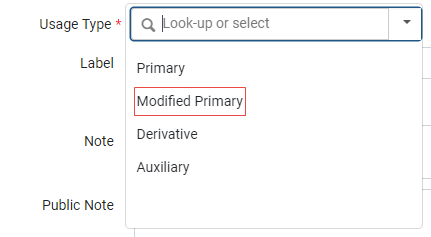
For more information, see Adding Representations.
Indexing of PO Lines After Vendor/Invoice Update Now Done in the Background
September 2024 AcquisitionsURM-230026
Some vendor/invoice updates require re-indexing of all the related PO lines. In the past this was done online, immediately after the change in the vendor/invoice. However, this caused a performance issue when there were many PO lines related to the vendor or the invoice. With the September release, the indexing of PO lines following a vendor update is done by a background job. For invoice updates, a threshold of 10 was defined. If there are up to 10 related PO lines, they are indexed immediately. If there are more, they are indexed by a background job. The triggered indexing job appears in the Monitor Jobs page. The user that made the updates which triggered this re-indexing appears as the operator. In the November release, similar logic will be added to fund changes that require re-indexing of the related PO lines. For more information see Reviewing Invoices and Managing Vendors.Additional Enhancements
- September 2024 Analytics and InsightsURM-223485 The labels for the Statistical Categories fields 1-9 were renamed, in all subject areas in which these fields appear, by adding a leading zero to the number. So, for example,Statistical Category 1 was renamed to Statistical Category 01. This change was done to enable sorting the field names properly.
- September 2024 Analytics and InsightsURM-222088 The IdP Service In Use and Failed Authentication fields were removed from every location in which they appear, since they are no longer used in Alma.
- September 2024 Analytics and InsightsURM-216751 The ACRL & IPEDS Dashboard was enhanced with the following improvements:
- The text on several of the tabs was expanded to provide more information regarding the reports to help you configure the parameters according to your needs.
- The Bibliographic Details Material Type fields available for the reports under the Library Collection Number of Titles (Physical) and Library Collection Number of Titles (Electronic) tabs now displays a default value as appropriate for each report.
Review the available prompts and filter options according to your reporting criteria. Consider your local system settings, configurations, cataloging practices, and product usage to determine the best selection of options. This will help you avoid any duplications.For more information, see Industry Standard Reports and Dashboards.
- September 2024 Analytics and InsightsURM-225168 The following enhancements were implemented for the Inventory dashboards:
- To the Physical Books Deselection dashboard:
- The text of the Documentation tab now displays completely without the need to scroll.
- Filters were added to the Electronic Inventory with P tab for classifications and publisher.
- The Normalized Call Number field was added to the following tabs:
- Titles with Multiple Copies
- No Loans
- No Loans Past 5 Years
- Loan Ratio
- Physical items with E
- To improve the performance of the Physical Books Deselection dashboard and the Physical Books Retention dashboard (which are data-heavy dashboards):
- Filters are now set to include the selected criteria by default.
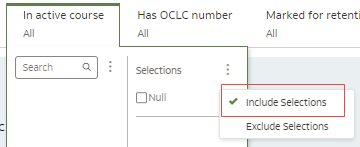 Include Selected Criteria
 - Auto Apply filters is now set to Off by default. This means that filters you set are not applied until you select Apply.
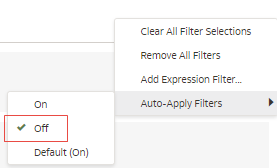 Auto Apply Filters
 - Brushing, where if you select one part of a table or visualization on the first tab, data in other tables that is relevant is highlighted, is no longer available.
- For filters, the Limit Values by option is now set to None by default. This ignores Limit Values set to Default for all filters and displays all selection values. It preserves the selection value limitations for any filters with Limit Values preferences set to Auto or <Filter Name>.
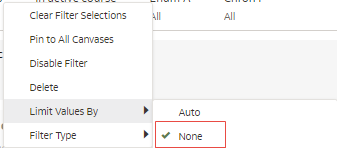 Limit Values by None
- Filters are now set to include the selected criteria by default.
- To the Physical Books Deselection dashboard:
- September 2024 Analytics and InsightsURM-225501 The Num of Days Accessed: Dashboards/Workbooks per User field was added to Analytics Usage Tracking > Usage Tracking Measures. It displays the number of days that a user accessed the dashboard/workbook.
For more information, see Num of Days Accessed: Dashboards/Workbooks per User.
- September 2024 Analytics and InsightsURM-203366 The Analytics Tracking Dashboard was enhanced with the following developments:
- The Dashboard/Workbook Path field was added to the Report Details section on the Report Details canvas.
- The Dashboard/Workbook Path field was added to the Number of Errors per Report section on the Failed Reports tab.
- The Query Trend - last 2 years report on the Overview tab was renamed to Query Trend to better reflect that the time-frame displayed is configurable.
- The date format of the Data updated as of field was improved for clarity.
- September 2024 Analytics and InsightsURM-228329 The Electronic Collection Material Type field previously located under E-Inventory > Portfolio Details for Consortia Members > --Electronic Collection was renamed to Portfolio Material Type (Code) and is now located under the --Portfolio dimension.
Resolved Issues
| SF number | Area | Description |
|---|---|---|
| 07181061 | Acquisitions | Some PO Lines hang up when attempting to view the Invoice Lines attached to the POL. This was fixed. |
| 07173997 | Acquisitions | When a PO had a high number of PO lines, sometimes when trying to "approve and send" the PO stayed in approval and PO lines were not advanced to the "sent" status. This was fixed. |
| 07057223 | Acquisitions | When changing a vendor for physical standing orders the items were not transferred to the new PO line (from the closed one). This was fixed. |
| 07036611 | Acquisitions | When a PO had a high number of PO lines, sometimes when trying to "approve and send" the PO stayed in approval and the PO lines were not advanced to the "sent" status. This was fixed. |
| 07211647 | Acquisitions | In an already created Invoice the Explicit Ratio values were added via a Rest Invoice API, but the Expenditure Transaction was not updated with the new Explicit Ratio values. This was fixed. |
| 07158435 | Acquisitions | The sort in the invoice line funding section was not working. This was fixed. |
| 07063891 | Acquisitions | Electronic collections were not listed in the Inventory tab for licenses with more than one page. This was fixed. |
| 06922800 07153788 | Acquisitions | An error displayed when selecting the Analysis tab for a specific trial. This was fixed. |
| 07178262 | Analytics and Insights | LC classification codes were missing in Analytics. This was fixed. |
| 06990538 07066355 07237823 07193821 | Analytics and Insights | In the Change Physical Items Information job, when setting an items status to "Missing", an event was created, but the "PROCESS_TYPE" element of the event was empty instead of "MISSING". Additionally, when marking an item as "MISSING" with the "Save and Toggle Missing" button in the item editor or the "Toggle Missing Status" action in the Physical Items search results list, no process type change event was created. This was fixed so that for each of these actions, a "MISSING" event is created. |
| 06924359 | APIs | It was not possible to delete a contributed XSL in some cases. This was fixed. |
| 07221187 | APIs | It was not possible to add a sub-collection via API if the main collection was suppressed. This was fixed. |
| 07138134 | APIs | When using detailed_creator_and_modifier_for_api_changes to register the API-key name as the creator/modifier of changes, it was not always registered correctly in the item history tab. This was fixed. |
| 07183552 07178261 | APIs | For the Retrieve PO lines API, results were not sorted correctly when ordered by created_date. This was fixed, and now order by created_date is sorted according to the input direction that is defaulted to "desc" if the order by is created_date. |
| 07198195 | Digital Resource Management | Access rights with time limits are not enforced for PDF files opened in representation mode in the Digital Viewer. The user is not automatically logged out of the display after the time is over. This was fixed. |
| 07211900 | Electronic Resource Management | The access to download the KBART serials holdings file was denied by Taylor and Francis. This was fixed by Taylor and Francis. |
| 07196027 | Electronic Resource Management | Extended Export was exporting only one service. This was fixed; it exports both services now. |
| 06479819 06695852 | Electronic Resource Management | Execute for getNotActivatedPortfoliosInAutoActiveServices generated an Oops error instead of results. This was fixed. |
| 07167079 06906842 07204566 | Electronic Resource Management | When the input file for the portfolio loader was very large, not all portfolios were activated. This was fixed. |
| 06694046 | Electronic Resource Management | Portfolio loader did not handle URL type. This was fixed, and now when populating URL or PARSER_PARAMETERS, the portfolio loader selects the URL type based on the column populated with a non-empty value. |
| 06600879 | Electronic Resource Management | The portfolio loader previously overwrote the parser program with Bulk::Bulk when the URL column was populated in the input file, instead of using the service's existing parser. This was fixed, and now the parser program will no longer be overridden and will correctly use the service's designated parser. |
| 06509630 06893762 | Electronic Resource Management | Portfolio loader did not handle URL type. This was fixed, and now when populating the URL or PARSER_PARAMETERS, the portfolio loader selects the URL type based on the column populated with a non-empty value. |
| 07166115 | Electronic Resource Management | Add Titles from Manage Collection UI: It was not possible to add titles that were already assigned to a collection in the hierarchy. This was fixed. |
| 06977090 | Fulfillment and Resource Sharing | License terms were not displayed on the Download Electronic Resource page from a lending request. This was fixed. |
| 06814930 | Fulfillment and Resource Sharing | When creating a lending request, partners with certain umlauts could not be selected as "Supplied To" partners. This was fixed. |
| 06746682 | Fulfillment and Resource Sharing | In some cases, requests with an external ID that included a "+" failed during the shipping process. This was fixed. |
| 07033388 | Fulfillment and Resource Sharing | Alma responded with an "OK" to the creation of ISO18626 lending requests, even if the operation failed. This was fixed, and now the "messageStatus" is populated with "error" and the "errorData" section has error information added to it. |
| 07007412 | Fulfillment and Resource Sharing | Rapido workflow profiles were added to non-Rapido customers. This was fixed, and the non-Rapido workflow profiles were removed from non-Rapido customers. |
| 06764363 | Fulfillment and Resource Sharing | The barcode was not visible in the Quick View (for example, brief record view) in some cases. This was fixed. |
| 07111298 | Fulfillment and Resource Sharing | Loan anonymization failed for loans whose items were deleted. This was fixed. |
| 06947909 | Metadata Management | In the Metadata Editor, saving a record as a draft automatically reset its cataloger level to 00. This was fixed. |
| 07076109 | Metadata Management | Bibliographic headings were sometimes not linked to authorities via F3 when the customer parameter unimarc_uniform_title_headings_split was set to true. This was fixed. |
| 06914687 | Metadata Management | In the Metadata Editor, when a record was opened with the cursor on the last line, if that line was removed after enhancing the record, the record was no longer editable. This was fixed. |
| 06467734 | Metadata Management | When tag 800 has subfield $f followed by subfield $v or $s, the punctuation rules automatically added a space and a semicolon between the two subfields, which broke the link between the bibliographic and authority record. This was fixed. |
| 07086560 07056771 | Metadata Management | The Resolve Import Issues Handle Matching page for import did not show any records. This was fixed. |
| 06877674 | Metadata Management | The holdings call number was not indexed when the holdings record was created by the Update Inventory import profile. This was fixed. |
| 07162899 07119912 | Metadata Management | CNMARC record facets displayed the English value for the Rare - Physical format. This was fixed to show the translated format. |
| 07171558 | Physical Resource Management | A scheduled "Withdraw Physical Items" job was handling the same items repeatedly. This was fixed. |
| 07208585 | Physical Resource Management | Physical Item Editor page: in some cases, entries in the "Process Type" field that should have been available according to the item's holdings library were missing. This was fixed. |
| 07172939 | Physical Resource Management | When a physical item template name contained a special character (such as # or %), creating physical items from this template in the Metadata Editor did not work properly. This was fixed. |
| 07169978 | Physical Resource Management | When using the "Change Physical Items Information" job to change an item's location, a newly created holdings record generated an incorrect call number from bibliographic field 090. This was fixed so that subfield mappings are handled correctly (for example, 090 $a→852 $h and 090 $b→852 $i). |
| 07137228 | Physical Resource Management | Physical Item Editor: when an item (the last item in a holdings record) was moved to another location, the holdings record was deleted without warning. This was fixed. A warning message now informs users that the holdings record will be deleted if no items remain. |
| 06511135 06810379 | Physical Resource Management | When changing the permanent location of items with the "Change Physical Items Information" job, extra spaces were added to call number subfields in holdings field 852 (for example, $h and $i). This was fixed. |
| 06735833 06825792 06516246 | Physical Resource Management | Records with field 777 did not always show both "Get It" and "View It" links to related records. Sometimes only "View It" was displayed. This was fixed. |
| 06969022 | User Experience, Accessibility & Infrastructure | In a Fulfillment Network, when creating a request in Primo, campus names of pickup locations in other institutions were not translated. This was fixed. |
| 07201283 | User Experience, Accessibility & Infrastructure | Users with only the Read-Only Letter Administrator role were not able to view details for a letter configuration. This was fixed. |
| 07196298 07196440 07202008 | User Experience, Accessibility & Infrastructure | Multiple emails about the expiration of SAML certificates were sent to users. This was fixed. |
| 07139831 07226983 07216955 07195849 | User Experience, Accessibility & Infrastructure | The ERP Export job failed with an "invalid privatekey" error when using the ECDSA key type, even though "Test FTP" was successful. This was fixed. |
| 07197686 | User Experience, Accessibility & Infrastructure | Manage Widgets were not translatable. This was fixed. |
| 07178122 | User Experience, Accessibility & Infrastructure | Sometimes, editing one portfolio opened a different portfolio for editing for a specific user. This was fixed. |
| 06923130 | User Experience, Accessibility & Infrastructure | For widgets, the Remove button still appeared after being pressed a second time. This was fixed. |
| 07227952 07219600 07236075 | User Experience, Accessibility & Infrastructure | Login-via-email failed when used to log in to Alma. This was fixed. |
| 07199903 | User Experience, Accessibility & Infrastructure | The filter label in the User Details section was not translated. This was fixed. |
| 07203470 | User Experience, Accessibility & Infrastructure | When searching for a KORMARC record with resource type = "Rare Book" and the language set to Korean, the resource type was displayed in English. This was fixed, and the Korean translation is now shown. |
| 06999447 | User Experience, Accessibility & Infrastructure | The "Call Number Type" drop-down was not translated into non-English languages. This was fixed. |
