
Alma November 2024 Release Notes
Features
Introducing the New Title Search Experience
Metadata Management URM 174471
Updated - November 14, 2024: This was postponed to the December release.
Alma's repository search is upgraded with new UI concepts, resulting in faster, simpler searches and streamlined workflows, saving time and boosting productivity - starting with the title searches. The new search offers more actions that can be performed directly from the search and enhanced navigation options, bringing your workflows into the search page and enabling you to perform them while in the original search context. Introducing a new approach to loading the search results, the new search offers improved search performance and a gradual loading, showing information as soon as it is available and adding more details as they become ready and enabling users to start working faster.
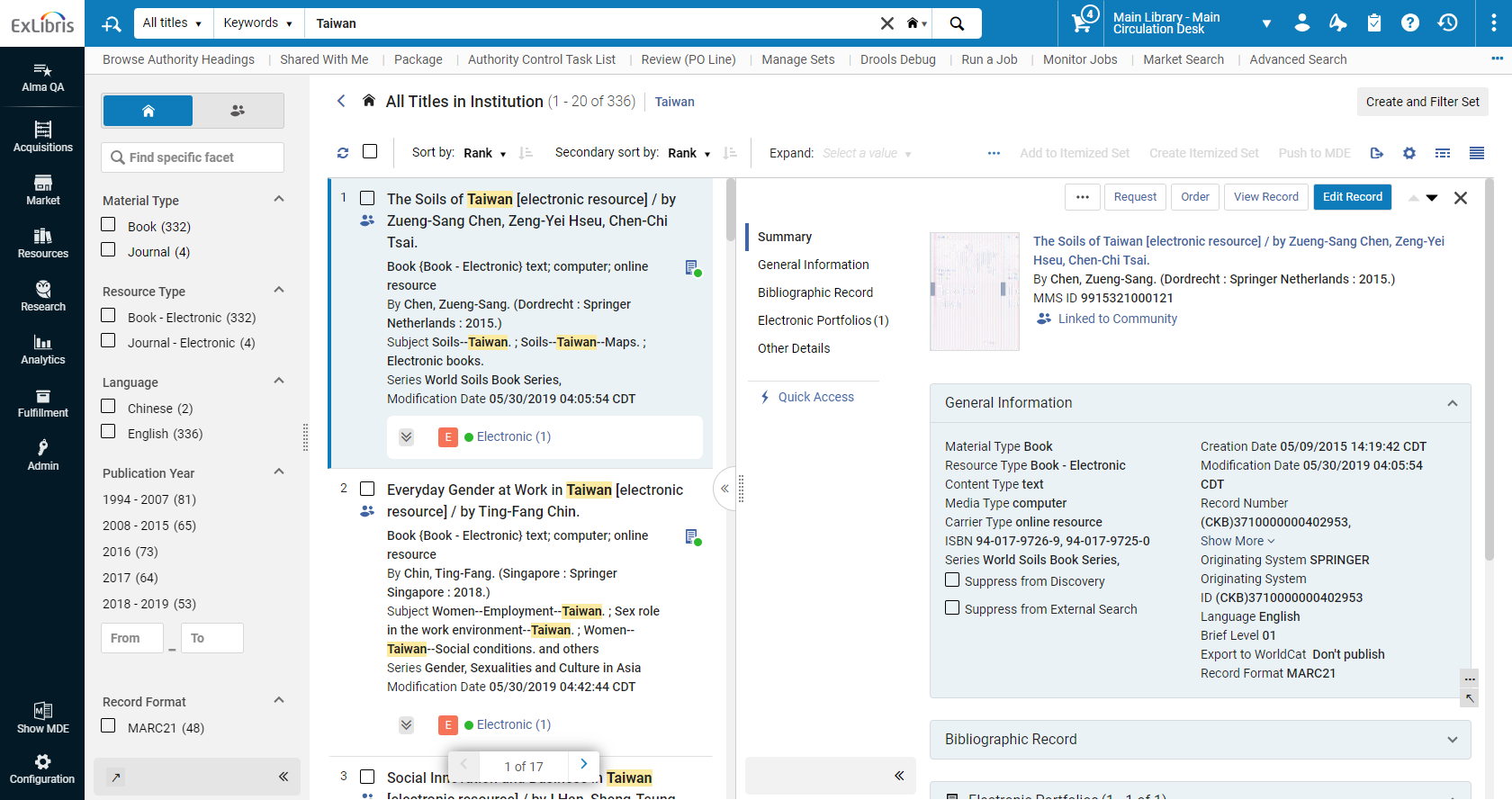
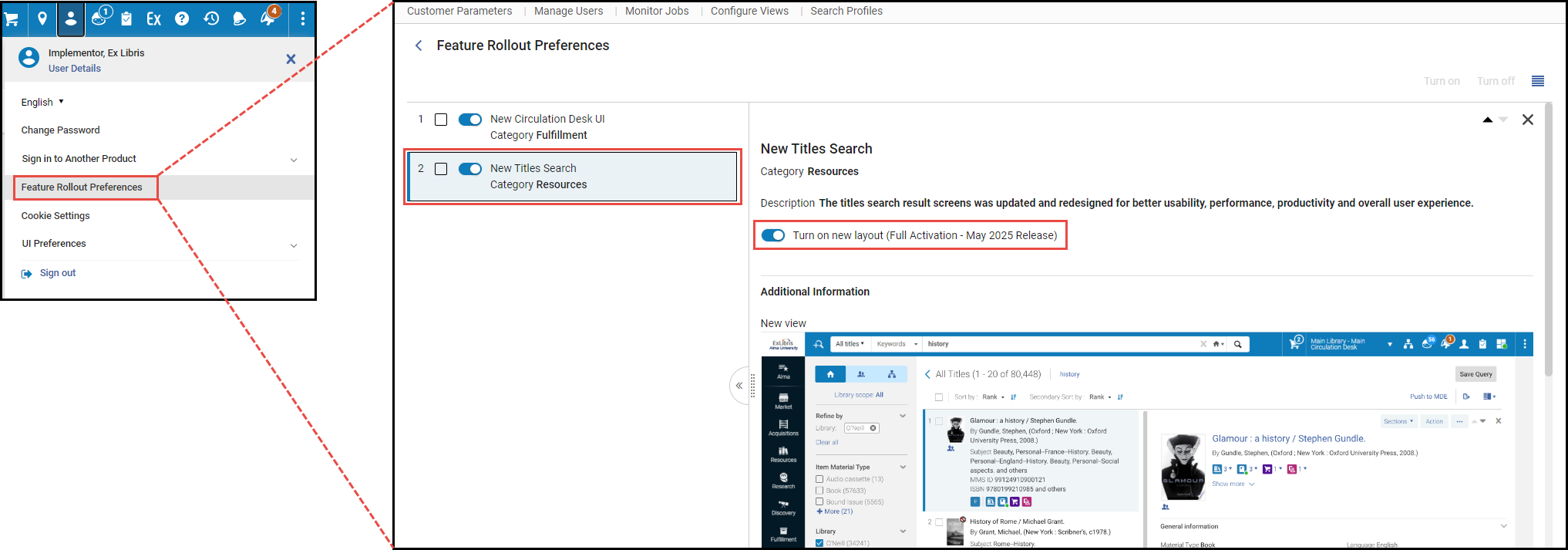
To turn on the new title searches, click on your user icon ( ) in Alma's persistent bar, select Feature Rollout Preferences, and activate the New Title Search toggle. For information on the coming search experience, see Introduction to the New Title Search Experience.
Manage Patron Services New UI
Fulfillment and Resource Sharing URM 163294
The Manage Patron Services UI was completely redesigned, in order to leverage new layout capabilities to support a more streamlined workflow at the circulation desk. The new circulation desk design improves the efficiency of the circulation desk staff's work. The new design and underlying technology make the work at the desk quicker and more efficient, reducing the work load of the library staff and perhaps even more importantly, reducing the time it takes for an end user to receive the required service at the desk.
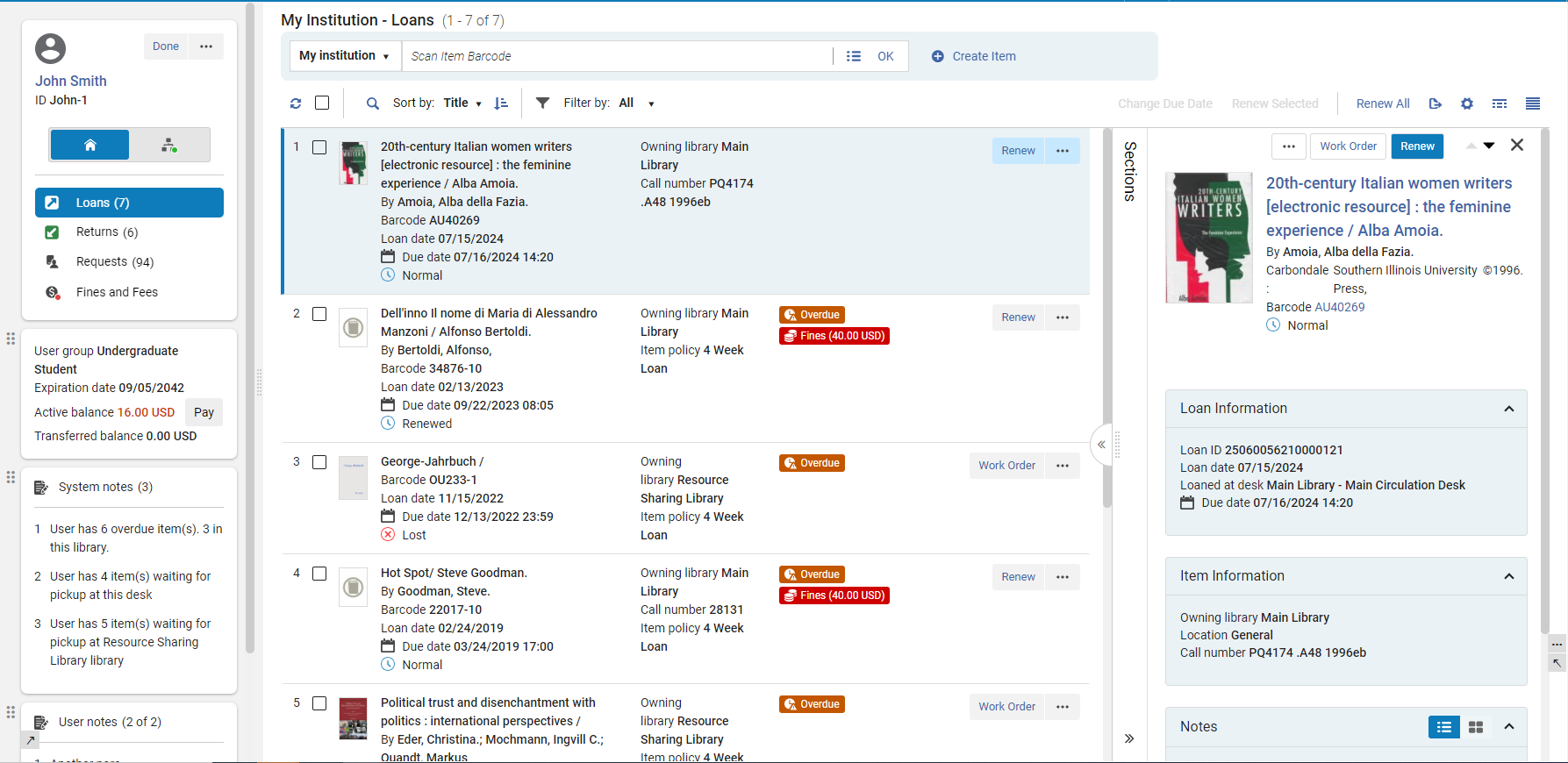
To turn on the new Manage Patron Services UI, click on your user icon () in Alma's persistent bar, select Feature Rollout Preferences, and activate the New Circulation Desk UI toggle. For a webinar showing the new functionality, see The New Manage Patron Services Page Circulation Desk.
Automatic Loan Renew Notice
Fulfillment and Resource Sharing
 IdeaExchange
It is now possible to configure the system to send notices to patrons when loans get automatically updated by the automatic renew process. This enables users to have earlier awareness of the due back date , and not only when they receive a courtesy reminder before the due date.

For more information see Configuring Alma Letters.
Manually Set Patron Role Expiry in Circulation Desk
Fulfillment and Resource Sharing
Circulation desk staff can manually override the patron role expiry date that is calculated by the Patron Role Renewal Period policy in the User Registration Rules. This makes it possible for circulation desk staff to easily manage patron roles, without requiring excessive user management roles.
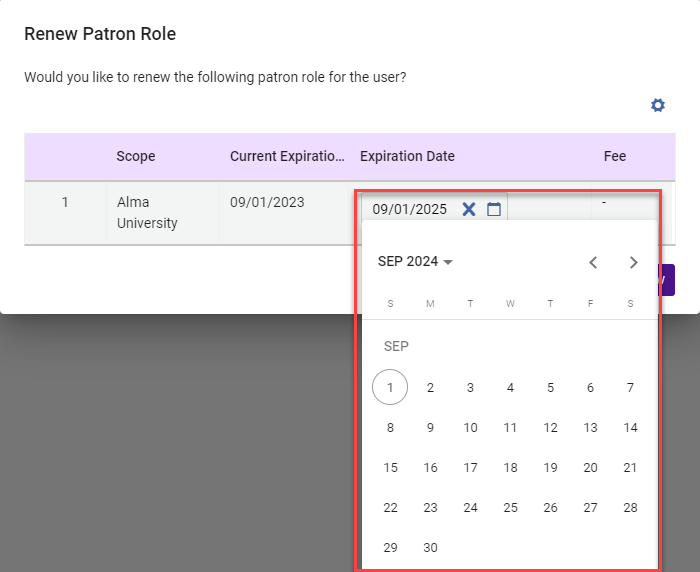
Activating this option requires enabling a user privilege. To activate the privilege, please contact Ex Libris support. Note that this feature is available in the new Manage Patron Services UI. For more information see Renewing the Patron Role.
Patron Notification Letter when Hold Shelf Expiry Date is Updated
Fulfillment and Resource Sharing
IdeaExchange
The system can be set up to notify patrons when the expiry date of an item on hold shelf is changed. This enables patrons to be aware of changes in the hold shelf period that were implemented by the library staff.
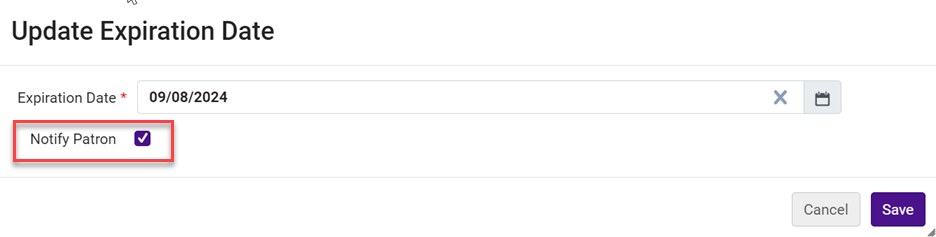
For more information see Updating the Expiry Date for Requests and Letters.
Digital Requests for Partners Without Email Address Alert
Fulfillment and Resource Sharing
Idea ExchangeURM-228265
When a lender ships a digital request for borrower who is an ISO partner, and the borrower email address is not supplied, an alert is now added to the lending request indicating that the borrower does not have an email address.
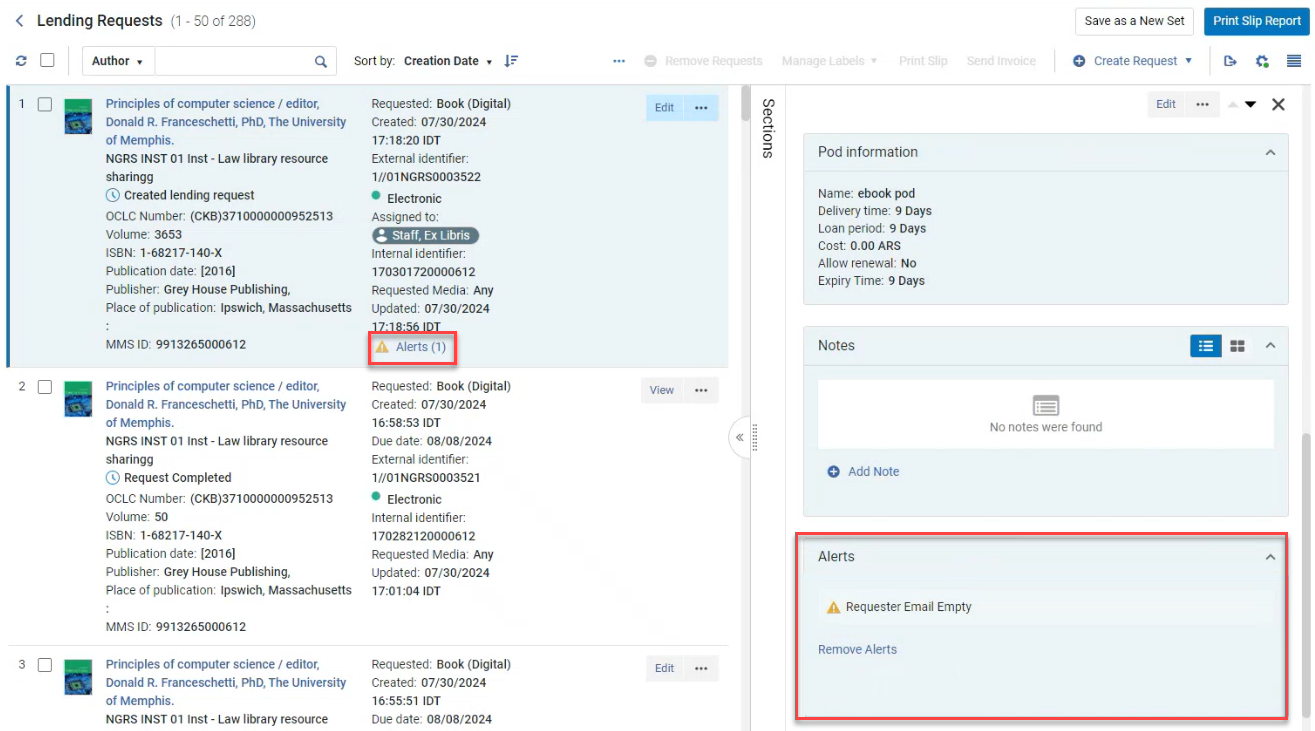
Additionally, when an ISO digital request is shipped without an email address, an error is generated informing the lender that the request can only be fulfilled if the requester has an email address.
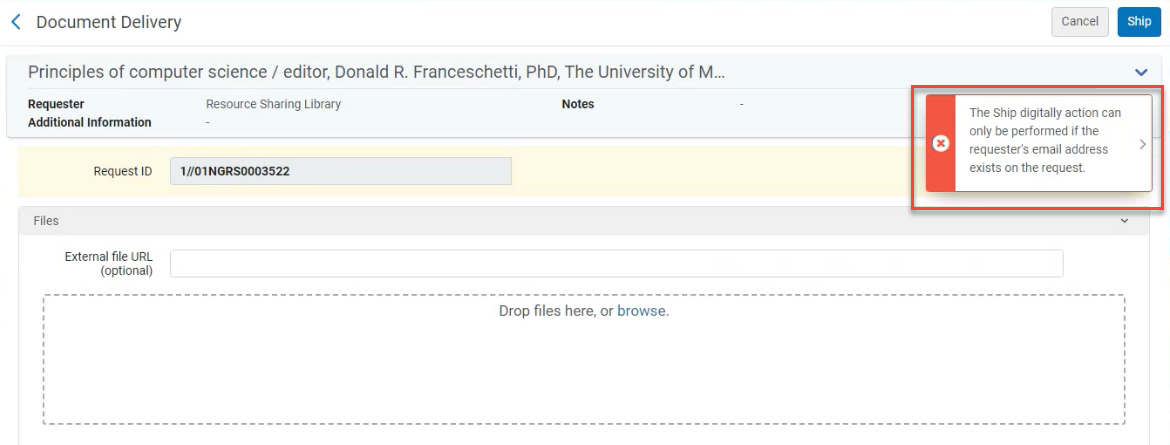
For more information, see Digital Requests Without Email Address Alert.
Override Local Holding Setting
Fulfillment and Resource Sharing URM-228264
RapidILL checks for self ownership, and requests identified as owned receive the local holding status. When the checkbox Ignore Local Holding(Fulfillment > Resource Sharing > Partners > Parameters tab) is checked, libraries skip this self ownership check by RapidILL.
This configuration may be of particular interest to libraries using the Sending Borrowing Request Rules (Fulfillment Configuration > Resource Sharing > Sending Borrowing Request Rules) to stop requests from being automatically sent, if locally owned. In that case, if the request is manually sent via Rapid then rechecking for local ownership via Rapid may be redundant, and can therefore be prevented using this new option.
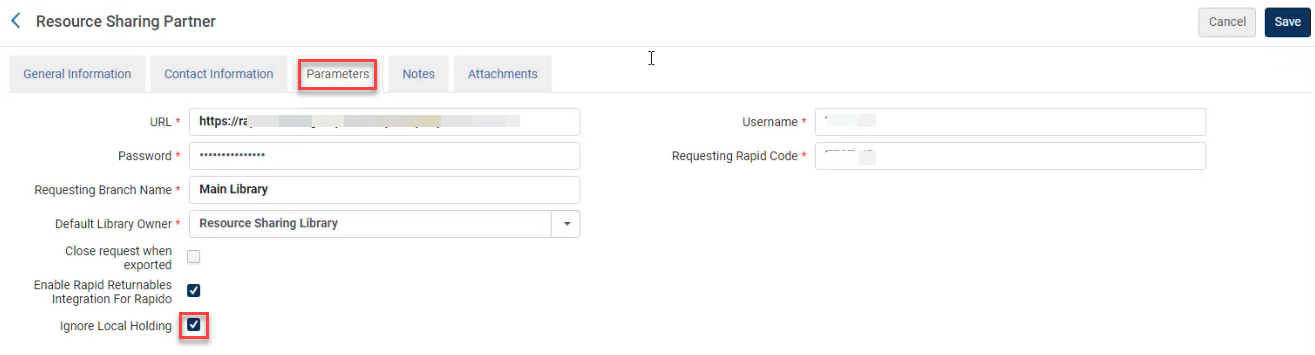
For more information, see Override Local Holding Setting.
Transfer Library Pickup Location into ILLiad
Fulfillment and Resource Sharing
The borrower request information that is pushed to ILLiad using the API integration, can now include the ID of the pickup location and its name in the API ShippingOptions field. To implement this option, please contact Ex Libris support.
The pickuplocationname is limited to 50 characters.
Library Inheritance of Calendar from Institution
Fulfillment and Resource Sharing
It is now possible to define standard opening hours at the institution level. The institution level opening hours will be inherited by all libraries. A library may create its own standard opening hours. Note that Alma takes the hours from the library and the institution and applies the earliest opening time and the latest closing time.
For more information, see Configuring the Institution and its Libraries.
Block Same Day Booking
Fulfillment and Resource Sharing URM-224731
You can now configure Alma to block same day booking if the booking resolution is set to days. This is done by setting the allow_same_day_booking parameter.
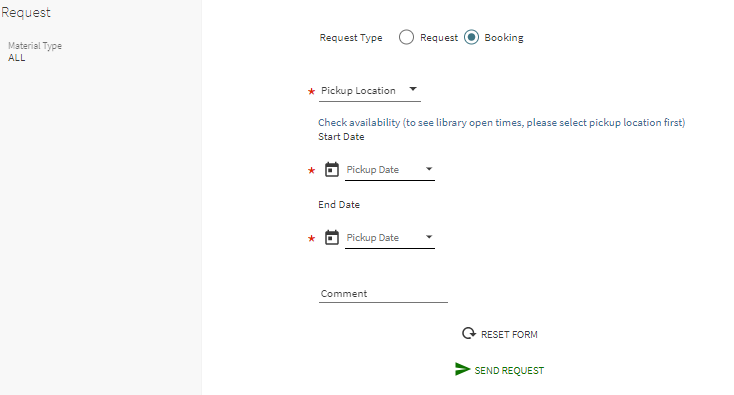
For more information see Configuring Physical Fulfillment.
Conditional Automatic Forwarding of Document Delivery
Fulfillment and Resource Sharing
Borrowers can set up rules which determine whether a digitally received resource sharing request should be automatically shared with the requesting patron, or wait for library staff handling before being forwarded to the requesting patron. For example, the document may require to be processed to increase its accessibility for a requester that requires increased accessibility.
This enables the library to better service patrons that require special handling of digital files.
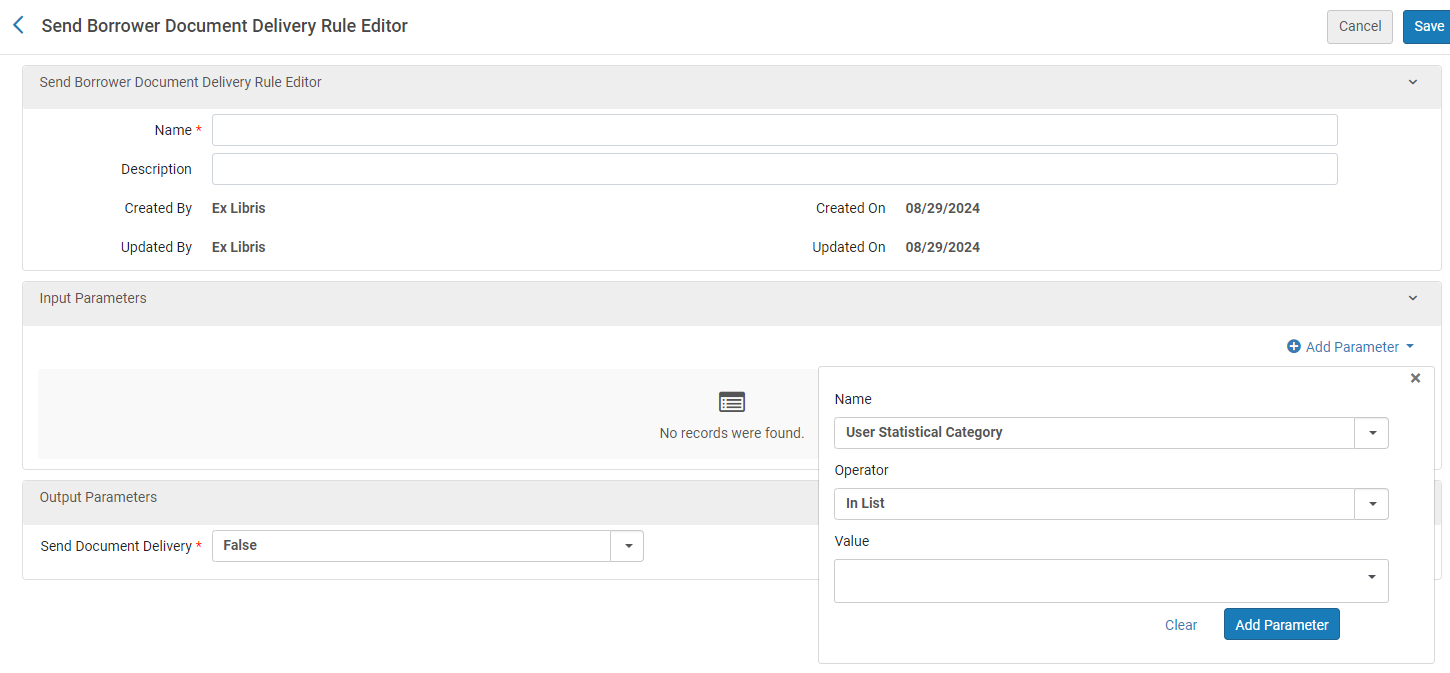
The borrower_document_delivery_send_automatically parameter (Configuration > Fulfillment > General > Other Settings) to determine whether the email to the patron is sent automatically when a document is received on the borrower side is, now obsolete. For customers that have already configured this parameter in the past, the document delivery rules described below will be automatically set up to preserve the previous behaviour.
The Output Parameter for the default document delivery rule (Fulfillment > Resource Sharing > Send Borrower Document Delivery Rules) is True by default. When set to False, emails are not forwarded automatically. The parameter can be applied by User Group or User Statistical Category.
This functionality is not relevant for URLs sent from a lending request. When a lender fills a request using a URL link, the URL is either sent directly to the patron or directly to the library based on the institution's borrowing configurations.
For more information see Advanced Resource Sharing Configurations and Peer to Peer Resource Sharing.
Alma Integration with the NACSIS-ILL System
Fulfillment and Resource Sharing
Alma now supports a full integration of NACSIS-ILL for resource sharing. The workflows are integrated into Alma so that all relevant capabilities required by the NACSIS-ILL operators using Alma are available in the system.
This includes the following:
- Creation of new NACSIS borrowing/lending requests
- Synchronization of NACSIS requests
- Reflection of NACSIS statuses on Alma requests in addition to other relevant NACSIS information such as member information, offset indication, etc.
- Full support of NACSIS actions based on the NACSIS request status
- Support for NACSIS shipping costs
- and more...
For more information see Integration with NACSIS-ILL.
Browse Shelf Listing Enhancements
Metadata Management
IdeaExchangeURM-208882
When browsing for call number, the following enhancements are introduced:
- Author information is displayed in the browse results to help libraries that use this data for adding call number cutters.
- Call number auto-population also works for local 09X fields.
- Read-only access was added, so that all users can now browse shelf listings (similar to browse bib and authority headings).
This completes the cycle of improvements made to Browse Shelf Listing during 2024.
For more information, see Browsing the Shelf Listing.
Linking to Authority Via Dropdown Menu in Metadata Editor
Metadata Management
 NERS Enhancement (ID #8819) URM-219468
A new action labeled Open Authority Headings has been added to the "Editing Actions" menu in the Metadata Editor. This feature enables users to access the lookup functionality previously available through the F3 key, making it particularly beneficial for catalogers who do not use function keys.
The Open Authority Headings action becomes available when the cataloger is in a field that supports the F3 function. It opens the same lookup for that field as the F3 key, displaying identical data (including vocabularies, headings, field indicators, etc.) and offering the same functionality, such as viewing and selecting headings.
For more information, see Metadata Editor Menu and Toolbar Options > Editing Actions Menu.
Searching Bibliographic Records by Language Code
Metadata Management URM-229395
Alma's "Language" search index, that enables users to select a language in the MARC Code List for Languages and search their catalog for records that contain its MARC code, does not support searching by other language codes from different sources that may appear in MARC 21 "041" field. A new search index, "Language code", was added to enable users to search the code directly as it appears in the record, so that non-MARC codes can be used to find bibliographic records. This new index will be fully available after the semi-annual indexing is completed.
For more information, see MARC 21 Search Indexes.
MARC 21 Preferred Term Correction Can Flip Headings with Cross-Reference in Different Field
Metadata Management URM-91227
Updated - October 31, 2024 - Alma's preferred term correction previously did not handle cases where a bibliographic heading linked to an authority record via a cross-reference, but the preferred and non-preferred terms were in different fields (for instance, the preferred term in authority field 130 and cross-reference in 410). With this enhancement, libraries can configure Alma to correct bibliographic headings based on authority cross-references, updating them to the preferred term and changing the field tag in the bibliographic record accordingly (such as, from 610 to 630).
This feature improves cataloging automation, efficiency, and ensures bibliographic data stays aligned with authority records' preferred terms.
Additional Information:
To enable this functionality in your institution, input the vocabulary codes for the relevant authority vocabularies into the customer parameter authority_ptc_ignore_suffix, separated by commas.
When a bibliographic field is updated to an X30 field, the non-filing indicators in the bibliographic record will be adjusted based on the linked authority record. According to MARC21 standards, the 1st indicator of authority field 130 (Nonfiling characters) will be copied to the 2nd indicator of the X30 bibliographic field.
Once enabled, headings updated by this new behavior appear in the Authority Control Task List under a new report type, “Preferred Term Correction - Bib Heading updated and tag modified,” enabling catalogers to review and make further updates as necessary (such as, adjusting indicators).
Fields that have an Alternate Graphic Representation and their linked 880 fields will stay as is even when their corresponding vocabulary is flagged to be handled. They will not be corrected by the preferred term and the field tag will remain unchanged. Handling for these fields will be added in a future release.
For more information, see Managing Preferred Term Correction.
For more information on the report type, see Using the Authority Control Task List.
For more information on the customer parameter, see Configuring Other Settings (Resource Management).
Introducing the New AI Metadata Assistant in Preview Mode
Metadata Management URM-229688
Since the announcement of our upcoming AI Metadata Assistant—an AI tool integrated into the Metadata Editor that generates metadata suggestions to assist catalogers in creating and enhancing bibliographic records—we've received many requests for early access to test its functionality. While we couldn't accommodate all requests, we greatly appreciate the community's enthusiasm for this feature and its willingness to collaborate with us in testing and improving it. We value the diverse perspectives of our cataloging community and the valuable feedback they provide.
As a result, we have decided to enable Phase I of the AI Metadata Assistant in Preview Mode for all Alma environments as part of the November release, allowing administrators to activate it at their discretion.
The Preview Mode is not the final version of the AI Metadata Assistant! It is an initial mode designed to give libraries an opportunity to experience metadata enrichment and contribute to the feedback process.
Further improvements to the workflow and the generated metadata are expected in upcoming releases, but libraries are encouraged to explore the feature in their Sandbox or Production environments to get an initial sense of its capabilities. We welcome your feedback, which can be submitted via the AI feedback button in the MD Editor when working on a draft created or enriched by AI.
Phase I of the AI Metadata Assistant supports English-language MARC 21 records using LC subjects. For more details on how to enable this feature, how it works, and our planned enhancements, please refer to the AI Metadata Assistant in the MD Editor page.
Updates to MARC21 Profile
Metadata Management URM-182857
MARC21 update No. 38 (June 2024), includes changes resulting from proposals that were considered by the MARC 21 community since the publication of Update No. 37 (December 2023).
Bibliographic Heading Linking Updates Following the Semi-Annual Re-indexing
Metadata Management URM-229260
We would like to update that as part of the semi-annual re-indexing in November, we will be doing a quality check on bib headings linked to authority records, to validate that they are properly linked. Following this validation, some headings may need to be re-checked by Alma's automated "Authorities - Link BIB Headings" job for a matching authority.
What you might see following the re-indexing in your environment:
- The "Authorities - Link BIB Headings" job may run on larger numbers than usual.
- If a matching authority is found for these headings in the linking job, the "Authorities - Preferred Term Correction" job may run on a larger number as well.
- The Authority Control Task List may show a larger number of bibliographic headings handled by these jobs.
Improved Handling of Bibliographic Records Upon Physical Holdings' Relink or Deletion
Physical Resource Management URM-229232
The holdings relinking behavior was aligned with other inventory deletion, so that the operator can select how to handle the bibliographic record if it has no remaining inventory. This is helpful for efficiently maintaining the catalog.
For more information, see Working with Holdings Records.
Automatic Upload of Electronic Holdings from Elsevier is Now Based on Unique ID
Electronic Resource Management URM-223856
With the November 2024 release, Elsevier autoholdings transitions from ISSN/ISBN matching to a unique key matching approach. This change aims to reduce multi-match situations and enhance the autoholdings process.
Future releases will extend this approach to additional providers.
For more information, see Upload Electronic Holdings from Elsevier.
Enhancements to the Upload Electronic Holdings Job Reports
Electronic Resource Management
IdeaExchangeURM-221890
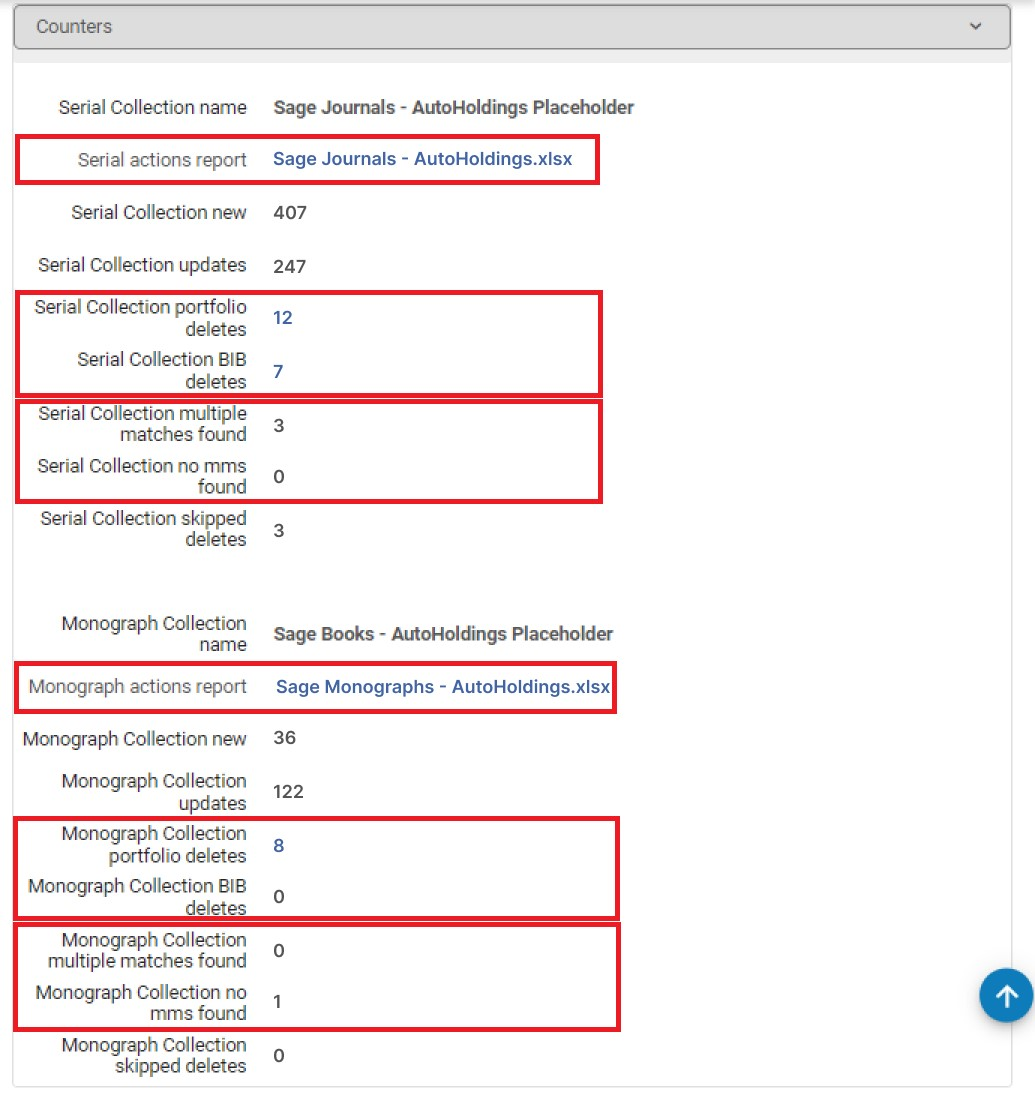
Enhancements have been made to the Upload Electronic Holdings job reports, applicable to all autoholding integrations except ProQuest Ebook Central:
-
Multimatch and missing MMS errors that were previously only available within the report's Excel file are now displayed in the report summary.
-
The autoholding job report now includes a link to view portfolios and bibliographic records deleted by the job.
For more information, see Monitoring the Upload Electronic Holdings Job.
Update URL Suffix Using "Change Electronic Portfolio/Collection Information" Jobs
Electronic Resource Management
IdeaExchangeURM-227878
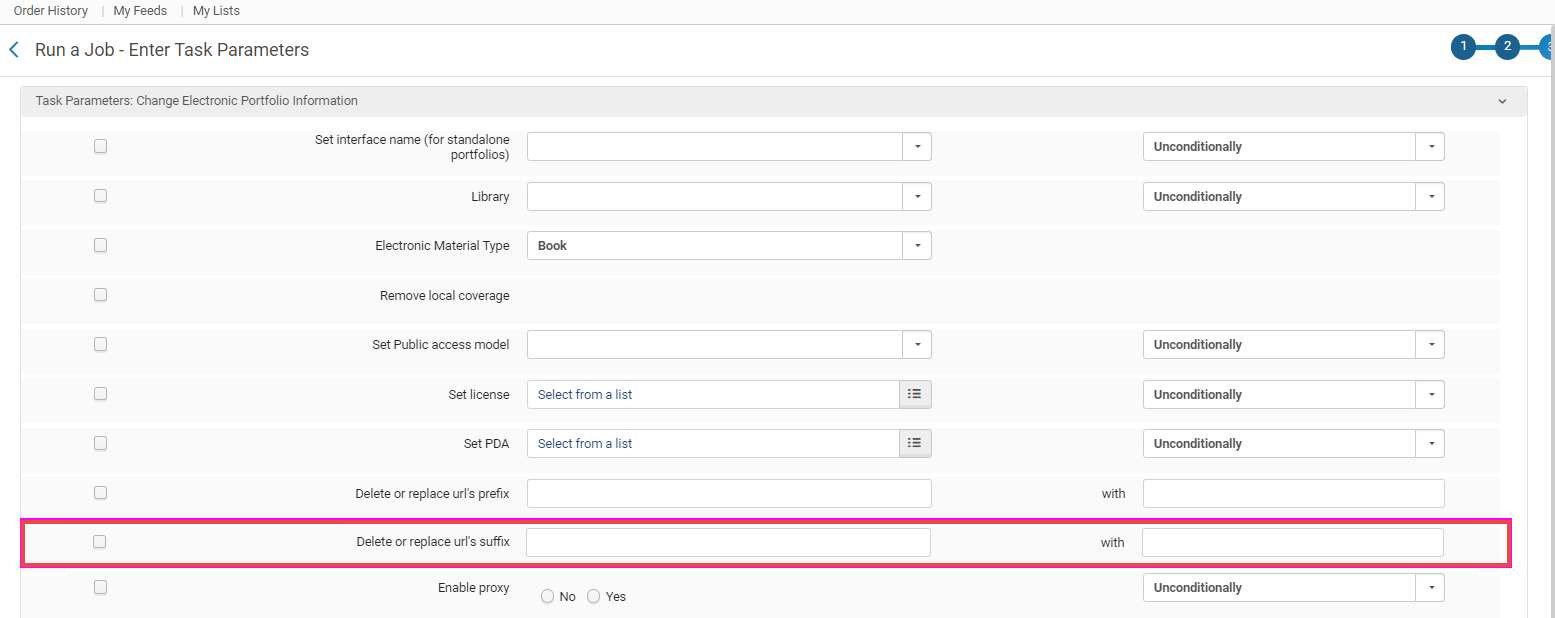
A new feature has been added to the "Change Electronic Portfolio Information" and "Change Electronic Collection Information" jobs, enabling bulk editing of static URL suffixes. Users can now add, delete, or replace suffixes, such as for logging users into a provider's platform. The updated URL will be applied to the 'Static URL (override)' field.
This enhancement streamlines the process of bulk editing static URLs.
Alma restricts the simultaneous use of prefix and suffix parameters in the "Change Electronic Portfolio Information" and the "Change Electronic Collection Information" jobs. To modify both, separate runs of the job are required.
For more information, see Manual Jobs.
Possibility to Define Linking Parser Parameters for Database Collections in Collection Level to be Used by CDI Direct Linking
Electronic Resource Management URM-227498
Some providers require customized URLs for accessing their content, which include special credentials. Previously, linking parameters for collections with portfolios were configured at the service level. With this new development, institutions can now define linking parameters at the collection level for database-type collections. These linking parameters are used by CDI direct linking to the database. Note that only database collections that were defined this way in the Community Zone can be configured, and only the Community Zone defined linking parameters can be set.
The Community Zone will gradually add relevant linking parameters for database collections, with an initial focus on Gale and ProQuest collections.
Notifications about new database collections with available linking parameters will be provided through content release notes and the Community Zone update task list.
For more information, see:
- Configuring Parser Parameters for E-Resources
- Managing Electronic Resources > Linking Parser Parameters
- How to Update a Linking Parser Parameter
Select DC Field to Validate Matching
Digital Resource Management URM-223826
The Dc Bib Find Matches Validation Task checks if there are any duplications with existing Dublin Core titles. Under the Task Parameters for this task, the DC Field and Search Index drop-down list is now available that allows you to configure the task to check for duplications either by matching the dc:identifier field or the dc:title field.
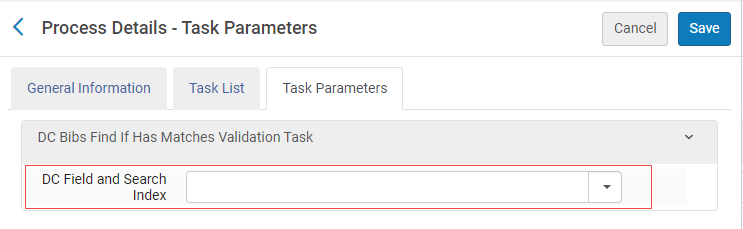
Not selecting any value does not check for duplications.
Lookup Field Now Available for Forms
Digital Resource ManagementURM-223944
You can now add the Lookup field to forms for Adding a Representation and Staff Mediated Deposit.
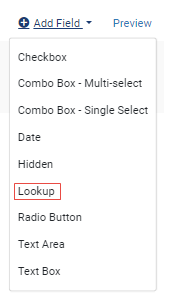
Lookup fields display results as you type and also have a button you can select to open a page with all of the options.
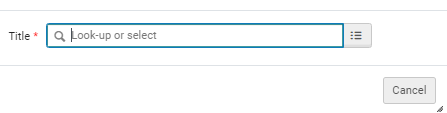
For more information on Forms, see Working with Forms.
Open Access Workflows: New License Type for Transformative Agreements
Acquisitions URM-226501
A growing number of publisher agreements present possibilities for open access publication. Furthermore, some institutions assign libraries the task of supervising allocated funds for covering article and book processing charges related to open access publication.
It is now possible to create a license representing a "transformative agreement". This license contains all the license fields available for other license types, as well as the ability to indicate the number of tokens, and to mark whether the license is limited, or “unlimited”.
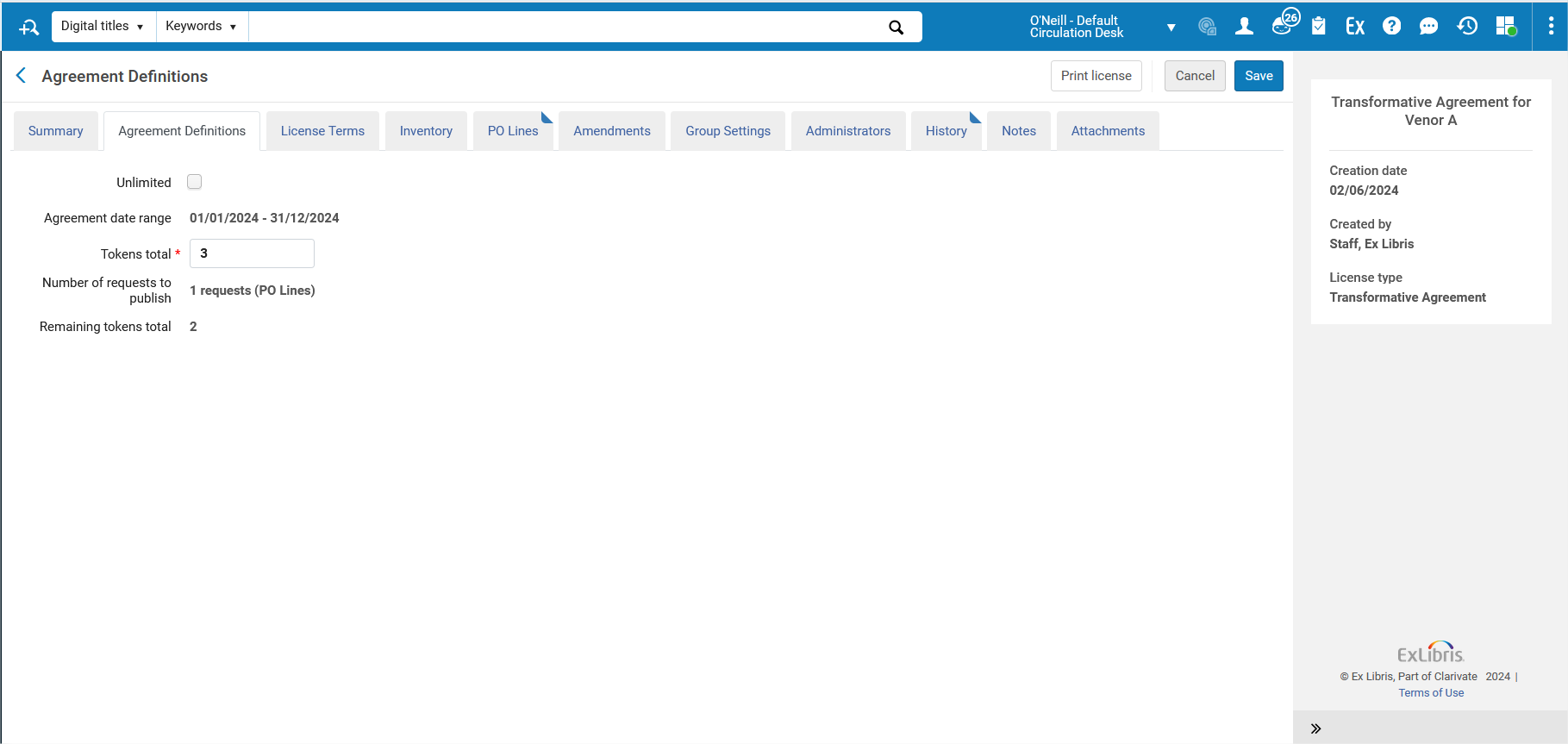
This allows institutions to keep track of their open access workflows, and to identify if they utilize all the tokens. Future negotiations with providers will benefit from this information.
For more details, see:
- Open Access Workflows Theme
- Open Access - Best Practices
PO Line Approver ID is Available in Analytics
Acquisitions URM-184205
The PO Line Approver ID is now saved in the Alma DB and is available in Analytics.
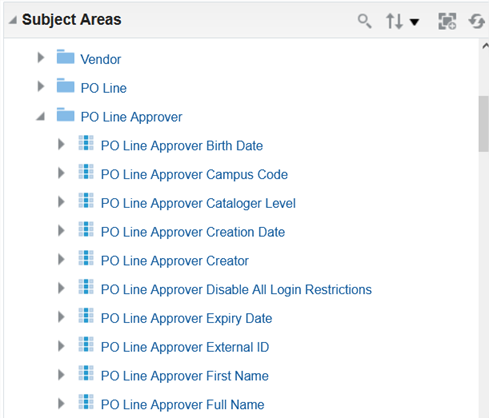
A PO line is considered approved when its PO is approved, in the following scenarios:
-
When approving PO's from the Approve Orders page using the Approve and send action.
-
When the institution is not working with the Approval Rules, the PO is considered approved when it is sent:
-
When selecting Save and continue for a PO in review.
-
When using the Order Now action from the PO line.
-
The approver is the user who clicked the action.
- For PO's which are sent automatically by Alma, the PO Line Approver will be "System". This happens when the "PO Lines - Packaging" job creates the PO and sends it out, when using integration with ERP, and in some cases in EOD.
- The approval data will be shown from the release date and onwards.
For more information see PO Line Approver for Analytics and Approving and Sending POs.
"Report Tax" Invoice Supported when Paying with API
Acquisitions URM-229791
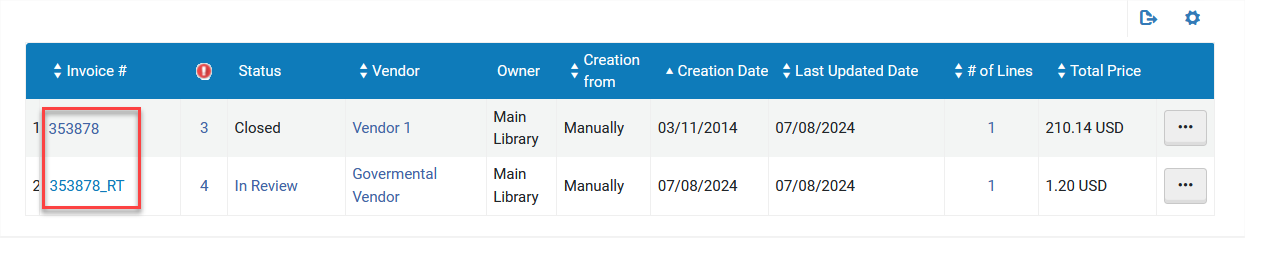
It is now possible to create an _RT invoice for VAT handling when marking an invoice in the "waiting for payment" status as “paid” using the invoice service API.
POST /almaws/v1/acq/invoices/{invoice id}?op=paid& create_rt_invoice=true
An _RT invoice will be created when the following conditions exist:
- The report_tax field is true in the supplied payload. If this field is not supplied in the payload, the data on the invoice will be checked by Alma.
- The institution has an associated governmental vendor.
For more information see the Developer Network.
"Available for" Field Added to Summary Funds
Acquisitions
The Available for field is now displayed for summary funds. The summary fund's “Available for” will be inherited from its related ledger. Also, any allocated fund that is linked with a summary fund will now inherit the “Available for” values from the summary fund. This allows for better flexibility in defining the funds hierarchy, and enables using the Fund ledger view by available for privilege for both allocated and summary funds. When this privilege is enabled for a user with a fund related role, scoped to a specific library, they will be able to view funds of all types, that are owned by the institution and available for the user's library.
Existing summary funds appear with the identical “available for” as their parent.
For more information see Managing Funds and Ledgers and Managing User Roles.
Match Records Created by PDA with Existing Portfolios in CZ
Acquisitions
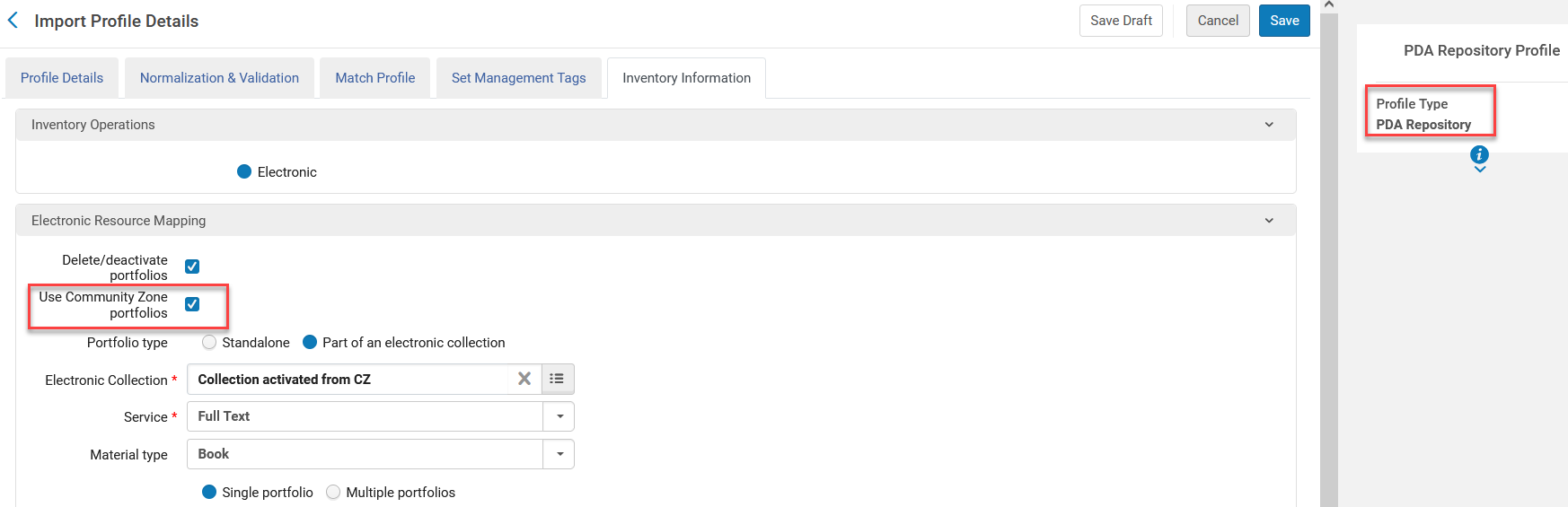
The Use Community Zone portfolios field was added to the Inventory Information tab of the PDA Repository import profile. This enables the matching of records created by PDA with existing portfolios in the Community Zone (CZ). This enables users to utilize CZ data when using the PDA Repository profile.
For more information see Managing Import Profiles and Patron Driven Acquisitions.
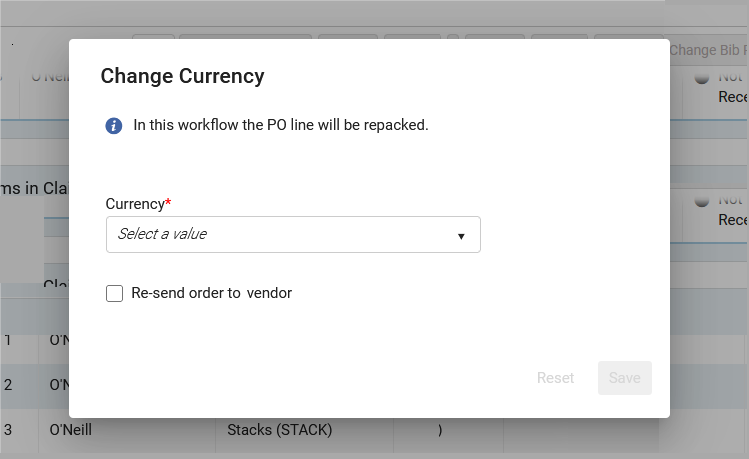
Change Currency in Packaged PO Lines
Acquisitions
Idea Exchange
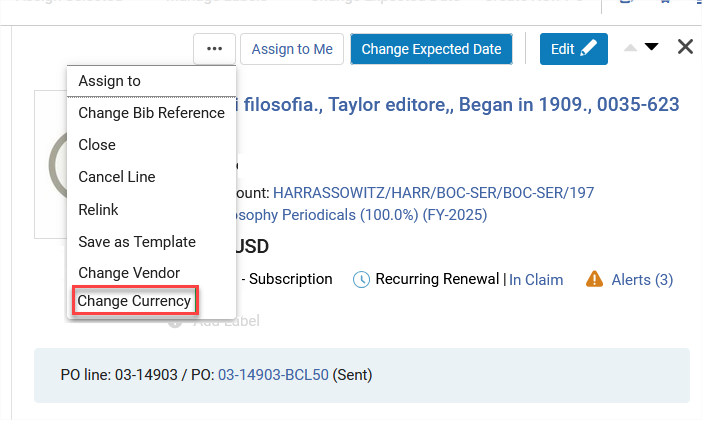
Users can now change the currency of PO lines that were packaged, in the following workflow steps:
- Ready
- Sent
- Waiting for Manual Renewal
- Recurring Renewal
- Waiting for Invoice
Consortia Authority Control Task List Enhancement
Collaborative Networks
IdeaExchangeURM-225170
The enhanced Consortia Authority Control Task List now includes the reporting of record changes processed in the Network Zone at the Institution Zone level, enabling corrections or modifications of such records and pushing them to the entire Consortia members' Authority Control Task List. This enhancement improves the experience for Consortia member catalogers working with authorities by reflecting Network Zone linked records reporting in each Institution Zone Authority Control Task List. When one Consortia member corrects a Bibliographic record based on such reporting, this action is reflected in all Consortia members' Authority Control Task List, ensuring that authority catalogers do not need to duplicate the same work across different institutions.
Impact: This enhancement significantly streamlines the authority control process for member institutions, by reducing duplication of effort and enhancing collaboration. It allows members to view both Network Zone linked records and local authority control records, providing a comprehensive view of authority control efforts. Overall, the enhanced Consortia Authority Control Task List improves efficiency, consistency, and accuracy in authority control across the consortia, making it easier for catalogers to manage their responsibilities.
This new feature is only relevant to a member of the consortia (an institution that is part of a Network Zone).
For more information, see Using the Authority Control Task List.
Network Zone Managed Electronic Resources - Library/Campus Level
Collaborative Networks
IdeaExchangeURM-227490
Previously, central office operators could manage electronic resources in the Network Zone and make them available either to the entire network or to specific member Institution Zones (IZ). With this new feature, central office operators can now allocate electronic resources to specific libraries or campuses within a member Institution Zone.
Upon setting the new customer parameter nz_multi_campus_members to true in the Network Zone institution,Inventory network groups in the network zone can include libraries and campuses from within member institutions:
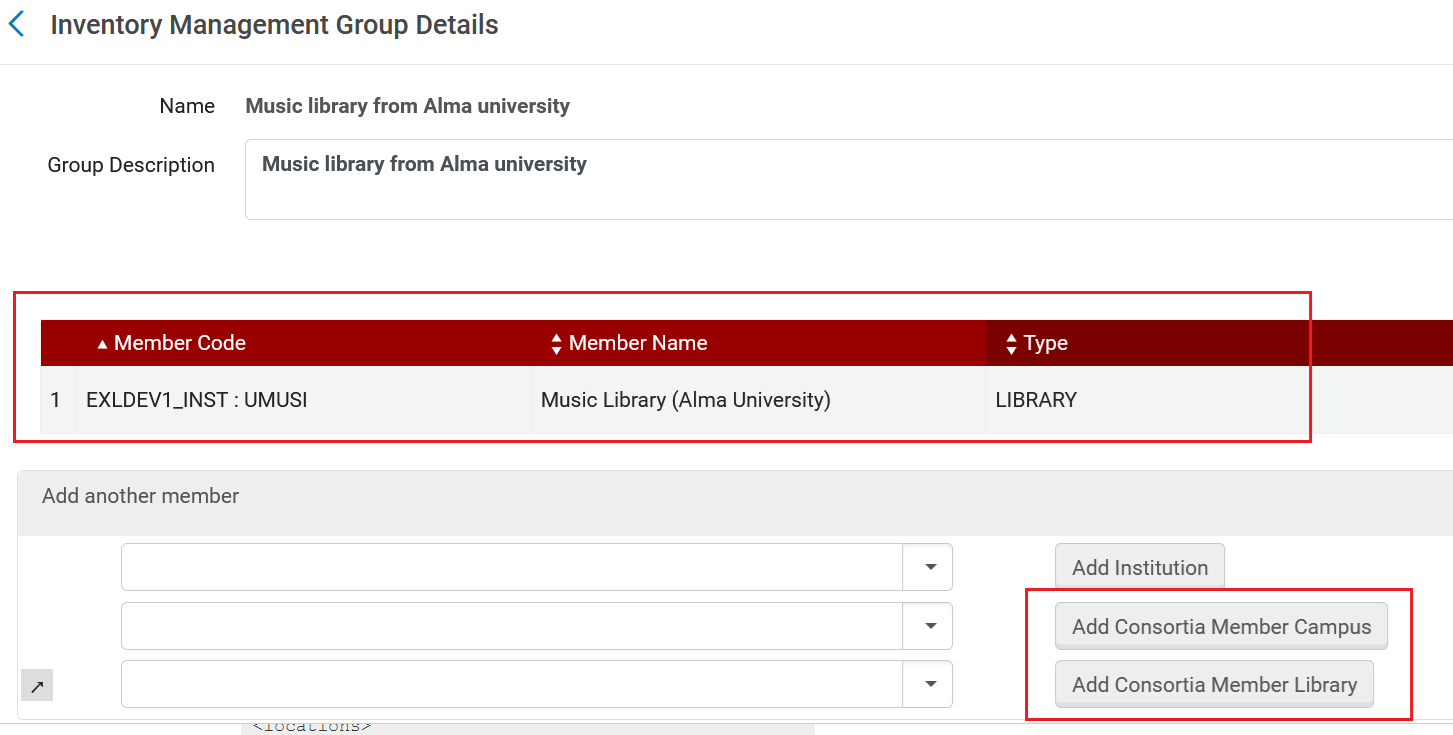
Upon defining Network Zone electronic resources as "Available for" a group with libraries/campuses, these resources are available for these libraries/campuses, but not to others.
This enhancement improves efficiency by enabling centralized management of electronic resources for individual libraries or campuses within the member Institution Zone, benefiting institutions that require separate management for their libraries or campuses.
For more information, see Configuring Distributed Access to Electronic Resources from the Network Zone.
User Update API Restricted for Library Scope
User Experience, Accessibility &Infrastructure
The User Update API is now restricted in the case where the API key scope is set to a library. In this case, the User Update API will not be able to add/remove/edit roles in other libraries. For more information see Users and Fulfillment in the Developer Network.
Enhanced Library-Specific Role Management for User Management in Alma UI
User Experience, Accessibility & Infrastructure URM-229484
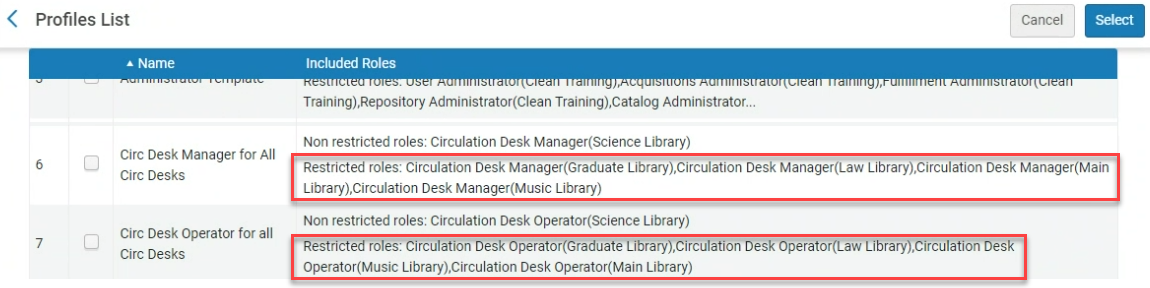
The User Manager functionality was enhanced to enforce restrictions based on user manager role(s) library/ies scope. This prevents unauthorized User Managers from adding, removing, or editing roles for libraries to which they do not have access.
By ensuring that only authorized modifications can be made, this update significantly reduces the risk of unauthorized access and role changes, thereby protecting sensitive library data. This functionality also applies when adding roles through user profiles.
For more information see User Roles.
UX Improvements to the Manage Sets Page
User Experience, Accessibility & Infrastructure URM-225800
A number of UX improvements were implemented on the Manage Sets page. These include:
-
Labels - Enable users to add or remove labels for sets.
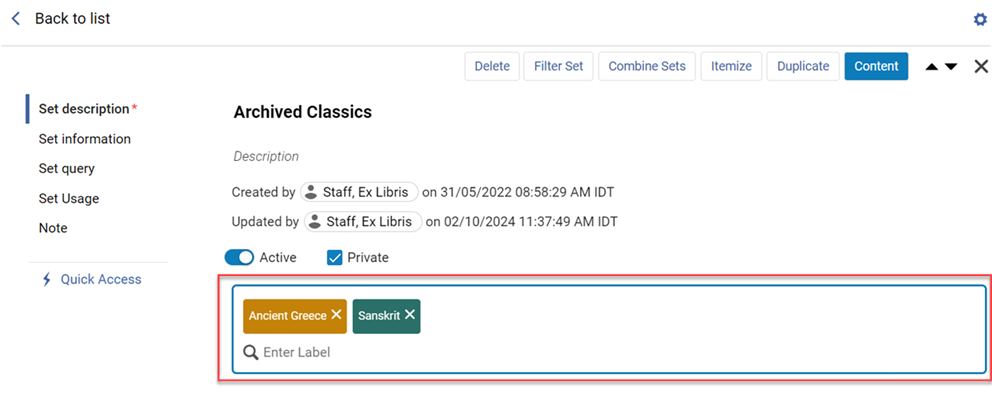
Users can also now facet the sets list according to the existing labels, and see the labels in the list as badges.
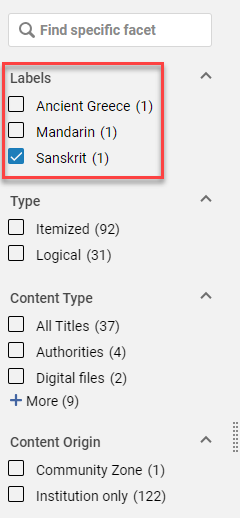
For more information see Managing Labels in Alma.
-
Sliding Panel - When combining sets, the pickup field for selecting the set to combine with now opens in a sliding panel.
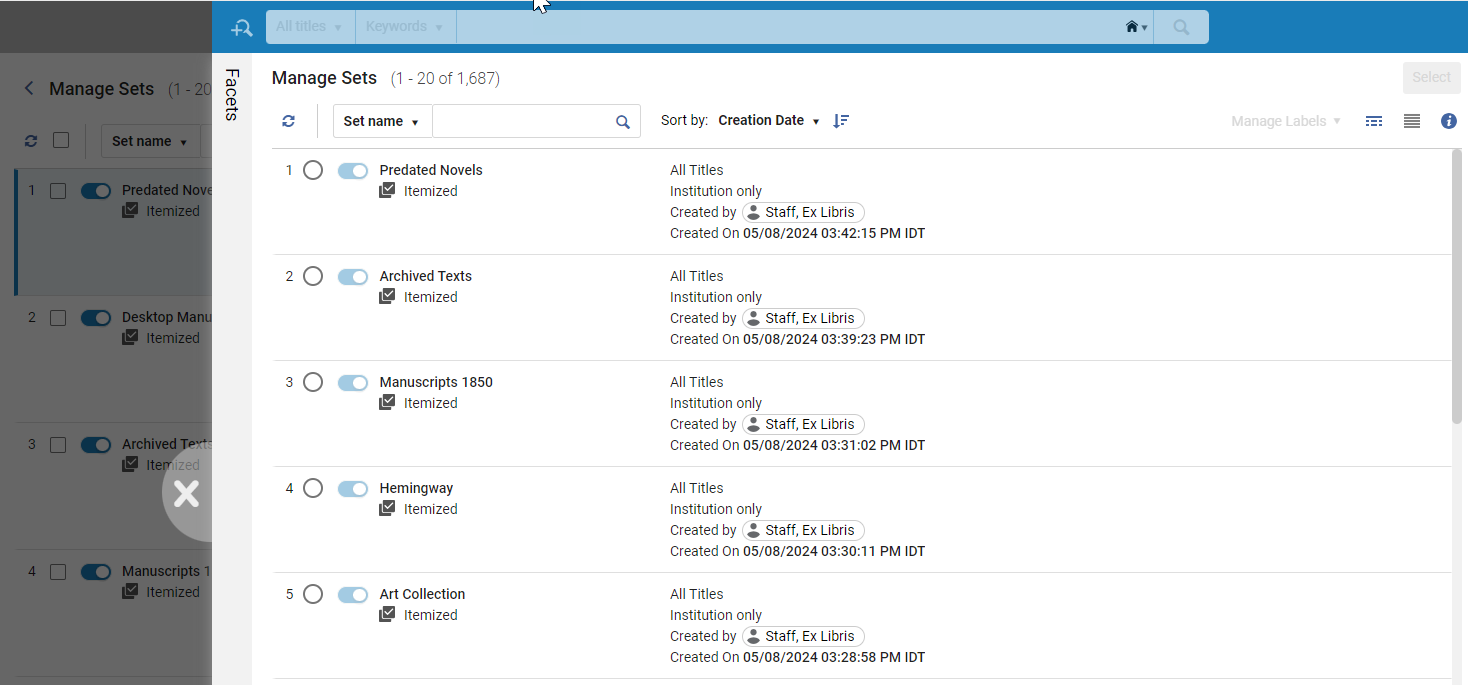
For more information see Combining Sets.
-
Exclude Facets - Users can now exclude facets in the Manage Sets page and also save the facets setup for future use, making it easy to reapply it in a single click.
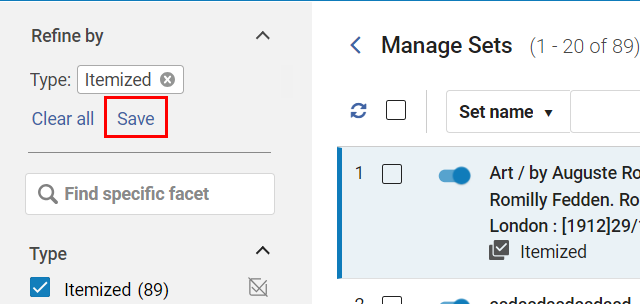
For more information see Facets.
Set Usage Section in the Manage Sets Page
User Experience, Accessibility & Infrastructure URM-216897
Updated - November 26, 2024- The 'Set Usage' section in the Manage Sets page has been removed due to internal performance considerations. Further updates on its potential reinstatement will be provided in future releases.
Feature Promotion in Alma
User Experience, Accessibility & Infrastructure
A new Feature Promotion functionality was added to increase awareness of specific new features in Alma and improve the user experience. For example, in November, two major features are being promoted, i.e., the New Circulation Desk UI and the New Titles Search Experience. The Feature Promotion only notifies the user about the promoted features. However, the user can still access the functionality via the regular path, regardless whether the feature promotion is enabled or not.
The Feature Promotion functionality will be available on the Production environment, and not on Sandbox.
The Feature Promotion is auto-triggered from the home page or in the relevant context (for example when accessing the old Circulation Desk UI in November).
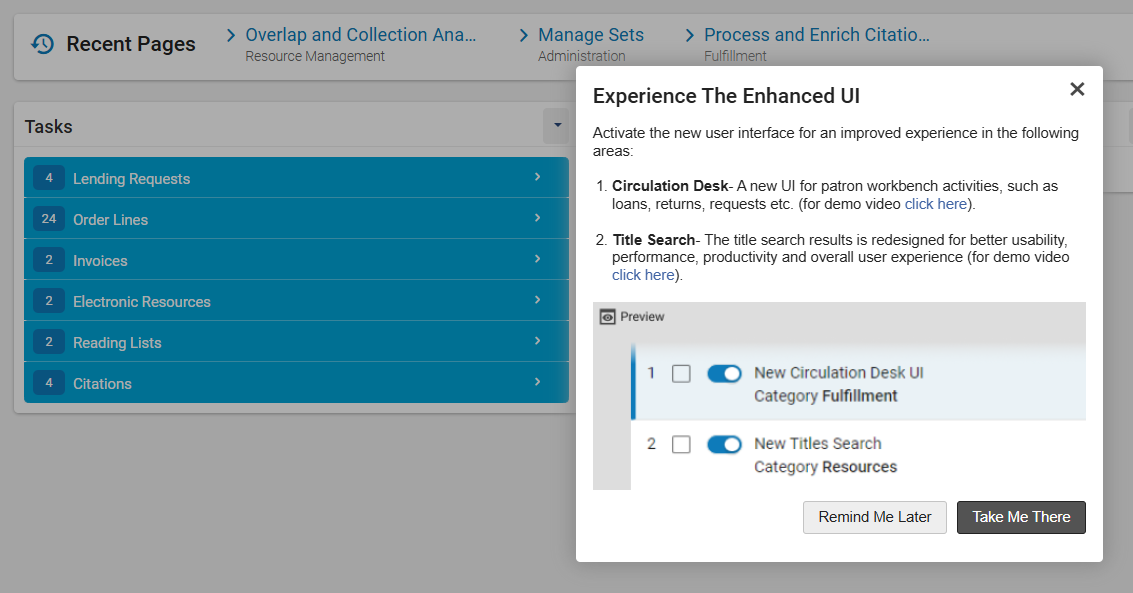
The following options are available:
- Cancel button (X) - Exit the dialog box (will not show up again).
- Remind Me Later - Exit the dialog box and invoke it again one day later.
- Take Me There - Takes the user to the relevant feature.
Notice: Once engaging with the feature promotion by either clicking the (X) or the Take Me There, the feature promotion popup will not show up again.
The following is required for the Feature Promotion to appear:
- The institution enabled Digital Adoption (Configuration > General > General Configuration > Digital Adoption).
- The user allowed functional cookies, either upon login or from the Cookie Preference Center (User icon
 > Cookie Settings).
 - The user has the Enable Tips option switched on (User icon > Enable Tips). This is enabled by default. The user can switch this off to prevent the notifications from appearing.
For more information see User Menu.
Restrict Integration Profile for User API
User Experience, Accessibility & Infrastructure URM-216897
A user API key with library-scope restrictions is now not able to add/remove/edit roles in other libraries.
For more information see the Developer Network.
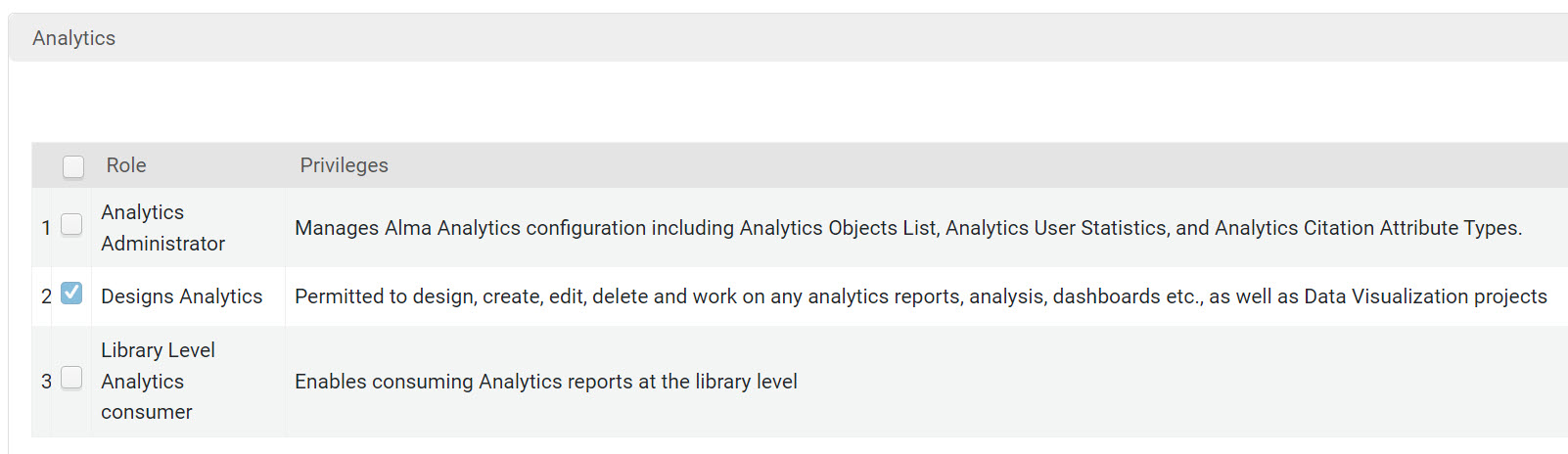
New Analytics User Roles Category
Analytics and Insights URM-217276
When adding roles to user accounts, the Analytics roles now are located under the Analytics category and not under Miscellaneous as was the case previously:
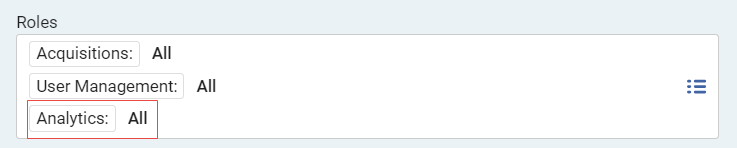
The Analytics role category also appears when adding roles to an Analytics Object:
New Limited Design Analytics Roles for Users and System Usage
Analytics and Insights URM-217288
Access to the following subject areas was removed from the limited design analytics roles for Acquisitions, Fulfillment, and Resources and assigned to two new limited user roles:
- Users
- Analytics Objects
- Analytics Usage Tracking
- System Events
- DARA
- API Usage
The following new limited user roles are now available:
- Designs Analytics – System Usage: limits access to Analytics Objects, Analytics Usage Tracking, System Events, DARA, and API Usage subject areas. Includes Titles, Local Authorities, Benchmark and External Vendor data. Allows write access to analytics reports, analyses, dashboards, DV projects, etc.
- Designs Analytics – Users: limits access to Users subject area. Includes Titles, Local Authorities, Benchmark, and External Vendor data. Allows write access to analytics reports, analyses, dashboards, DV projects, etc.
- Because of the change to the existing limited roles, users previously assigned these roles will lose access to several areas with this release. To allow access to these areas, the users must be assigned additional roles.
- Limited roles that do not allow access to patron user data still allow access to staff user data. For example, borrower details are not accessible, but loan operator details are.
- To enable these roles, set the support_partial_analytics_designer parameter (Configuration > Analytics > General Configuration > Other Settings) to true.
For more information on Design Analytics roles, see Design Analytics Roles.
Shared Users Notifications Now Available
Analytics and Insights URM-224924
You can now configure Alma to receive a notification when an analytics object is shared with you. This feature is configured under the new Analytics area under the notifications icon :
: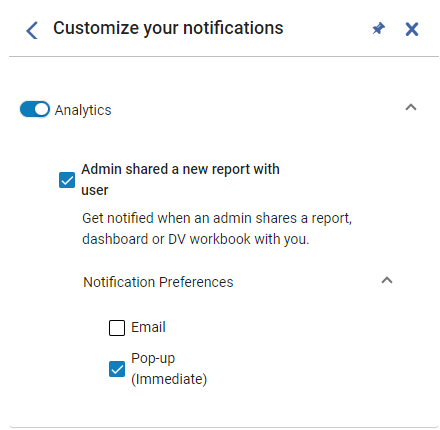
Select Admin shared a new report with user to have notifications sent to you when an administrator shares a report, dashboard, or data visualization workbook with you.
Under Notification Preferences, select the method that you want to receive the notification:Email,Pop-up, or both.
For more information, see Real-Time Notifications.
Customer Activation of Springshare Integration Profile
Analytics and Insights URM-226528
It is no longer necessary to request from Ex Libris Support to activate and run the Springshare Integration Profile. Customers are now able to activate and run the integration profile on their own. For more information, see Springshare Integration.
Table View Now Available for Analytics Objects
Analytics and Insights URM-218293
You can now display the Analytics Object List, the Shared with Me page, and the Out-of-the-Box Analytics page in Table View. To display these pages in Table View, select the Table View icon at the top right of the page:
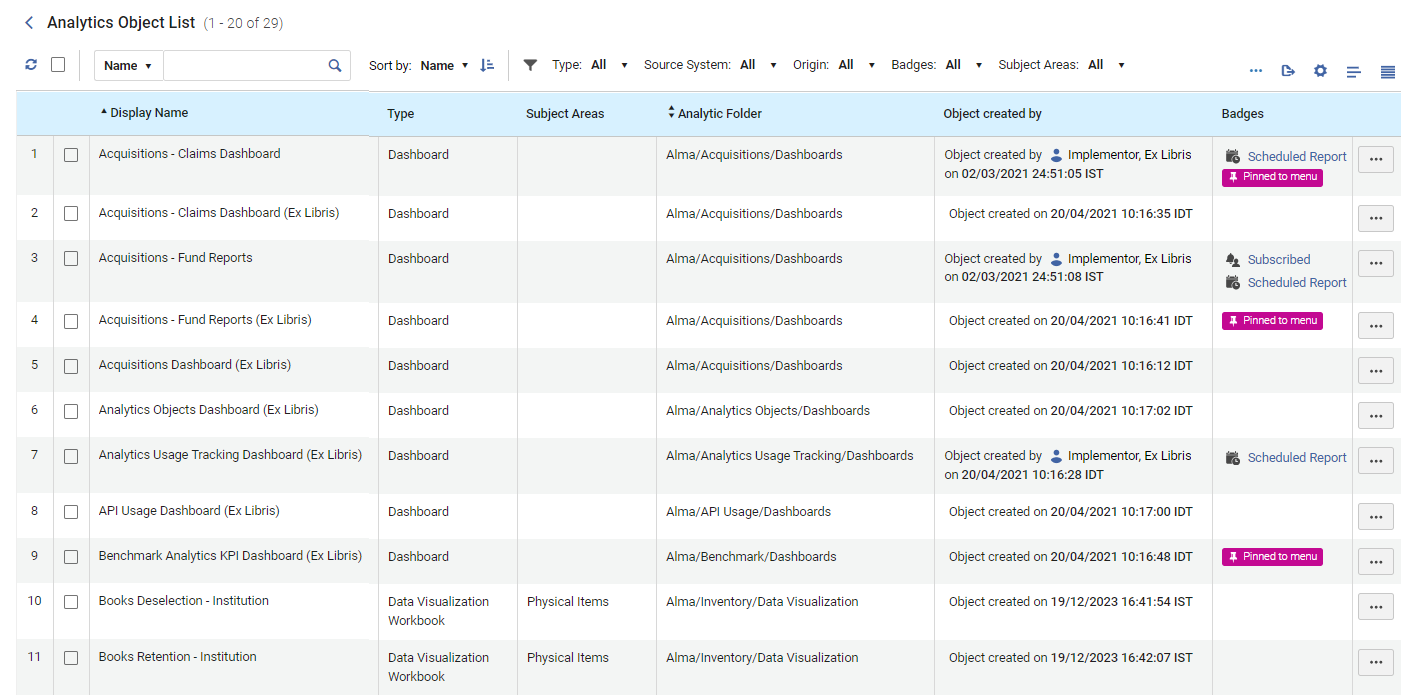
From this view, you can view the analytics object information in a clear and organized format.
For more information on the Analytics Object List, see Working with Analytics Objects.
Support for OpenID Connect Logout
API
It is now possible to configure a Logout URL in the OpenID Connect Integration Profile to which Alma and Primo will redirect after logging out.
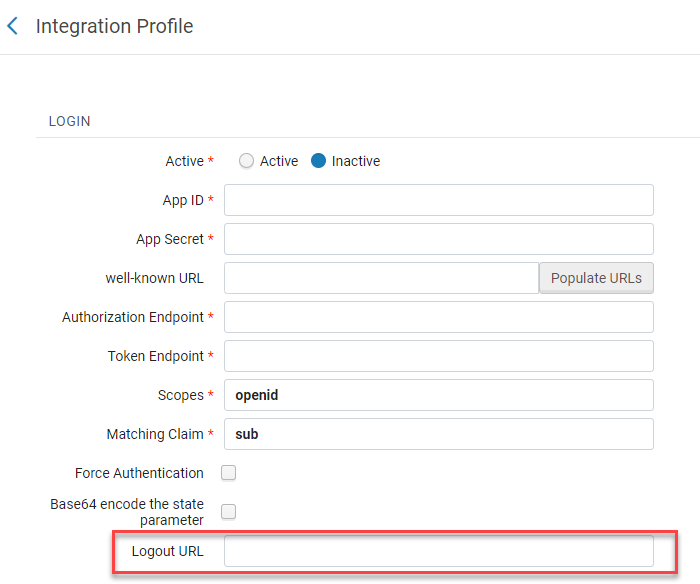
For more information see Creating an OpenID Connect Integration Profile.
Send Email Using MS Graph APIs
API URM-222696
Since Microsoft deprecated Basic Auth for SMTP, Alma now supports sending emails by calling Microsoft Graph APIs. A new option of ‘Send using MS Graph API' was added to the Mail-Handling integration profile, enabling the institution to configure the Mail Handling integration profile to send emails using MS Graph API.
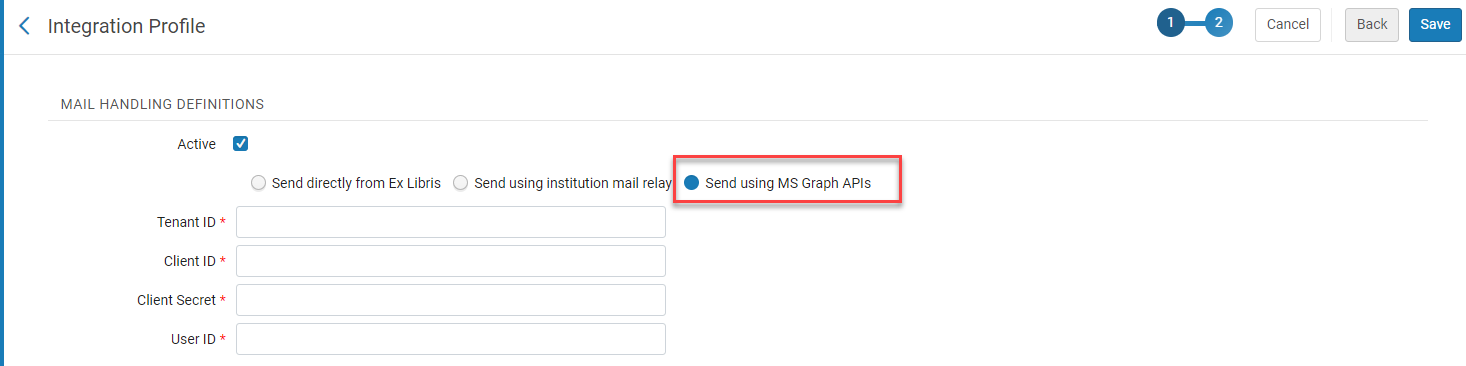
For more information see Configuring Alma Letters.
Five New Optional CSP Header Directives
API URM-226455
Five new optional CSP (Content Security Policy) header directives were added to the CSP Header Configuration page:
- style-src
- img-src
- font-src
- child-src
- default-src
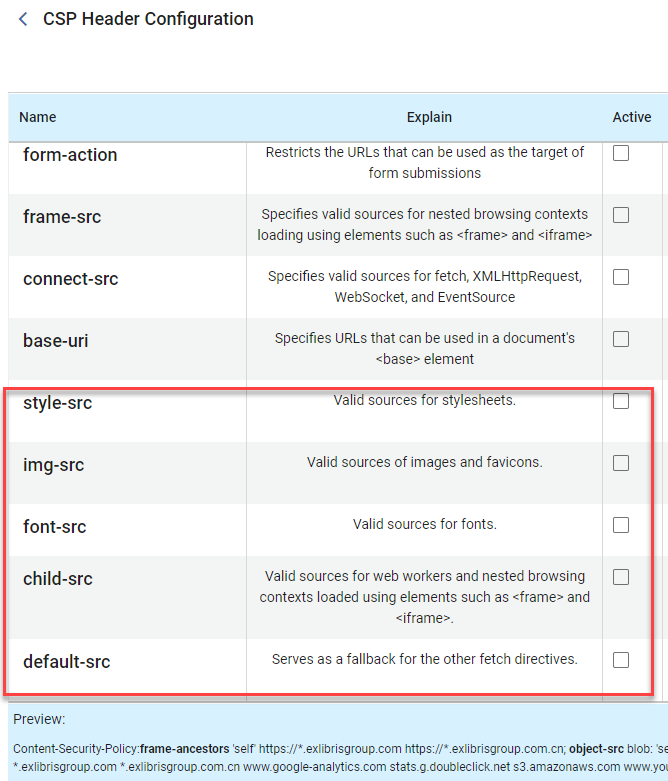
For more information see Security.
Support for Linking Parameters and HAN Proxy Licenses in API
API URM-227224
Linking parameters are now supported in API calls for E-services (at both service and group settings levels) and for database-type E-collections with defined parser parameters. Additionally, HAN proxy licenses (depending on the 'han_proxy_multi_license' customer parameter) are now supported in API calls for E-services.
This development enables the retrieval and editing of these fields via API. Users should ensure they begin with a GET request and use its payload as the basis for PUT requests to prevent unintended changes.
For more information, see the following documentation in the Developer Network:
- Rest Electronic Collection
- Rest Electronic Service
- Rest Group Settings
- Rest HANS Proxy Licenses
- Rest Linking Parameters
Additional Enhancements
- Linked Open Data URM-227621 The Linked Data enrichment configuration now prevents the activation of multiple URI structures for the same vocabulary code. If an attempt is made to activate more than one URI structure, an error message is displayed. For more information, see Linked Data Enrichment Configuration.
- Metadata Management URM-226848 When editing a community record, the alert pop-up is now updated at the community's request. The alert now reads: "You are about to update a Community record. Your edits will affect all Alma customers. Do you still want to save these changes?". For more information, see Editing Community Zone Bibliographic Records.
- Metadata Management URM-230056 When working in the new titles search UX, record customization now enables adding NAL (National Agricultural Library) call numbers to the displayed metadata in the search results. For more information, see Customizing the Display of Records.
- Electronic Resource Management URM-230089 The JSTOR autoholdings process now incorporates a verification step to ensure the completeness of KBART files retrieved from the publisher. This enhancement prevents the accidental removal of holdings due to incomplete data. If a partial file is detected, the system will automatically retry the process. This update mitigates the risk of updating the JSTOR autoholdings collection based on incomplete information. Future plans include expanding this verification process to additional content providers. For more information, see Upload Electronic Book Holdings from JSTOR.
- Acquisitions URM-225296 Three additional fields are now supported in the Legal Deposit Claim Letter: Material type, MMS ID and Frequency. In order to see them, they need to be added to the letter XSL.
- Acquisitions URM-217761 An option to search the currency dropdown field appears when there are five or more currencies. This appears in the PO line edit form, as well as in the PO line Change Currency action.
- Acquisitions URM-230026 Amazon.jp was added to the list of supported platforms for Order It! See Ordering from Amazon with the Order It! Plugin for more information.
- Acquisitions URM-230026 Some fund updates require re-indexing of all the related PO lines. In the past this was done online, immediately after the change in the fund. However, this caused a performance issue when there were many PO lines related to the fund. Now, for fund updates, a threshold of 10 is defined. If there are up to 10 related PO lines, they are indexed immediately. If there are more, they are indexed by a background job. The triggered indexing job appears in the Monitor Jobs page. The user that made the updates which triggered this re-indexing appears as the operator. In addition, a message is now displayed when the indexing job is triggered for funds, invoices and vendors.
- Analytics and Insights / Collaborative Networks URM-229657 The following enhancements were done in the Portfolio Details for Consortia Members folder located in the E-Inventory subject area to support consortia members and networks with analyzing Network Zone e-resources together with institution e-resources:
- The Electronic Collection Type Description field was added to E-Inventory > Portfolio Details for Consortia Members > Electronic Collection. It describes the electronic collection type, either Database, Aggregator Package, or Selective Package.
- The Electronic Collection MMS ID field was added to E-Inventory > Portfolio Details for Consortia Members > Electronic Collection. It displays the MMS ID of the collection.
- The Material Type field (E-Inventory > Portfolio Details for Consortia Members > Portfolio) was renamed to Portfolio Material Type Description to better describe the functionality of this field.
- The Electronic Collection Type field (E-Inventory > Portfolio Details for Consortia Members > Electronic Collection) was marked as To Be Deprecated as this field is not functional.
- Analytics and InsightsURM-225420 The following fields were added to a new Edition Simplified folder to the Bibliographic Details dimension in all subject areas in which it appears. These fields allow you to differentiate between editions of the same title for reporting purposes:
- Edition Simplified (Combined) – the values of the Edition Simplified (Num) and Edition Simplified (Text) fields
- Edition Simplified (Num) – the number of the edition found in the MARC 250 field, simplified
- Edition Simplified (Text) – the text of the edition found in the MARC 250 field, simplified
These fields do not display all of the edition information in the bibliographic record and are only a tool for comparison and reporting - Analytics and InsightsURM-223432 The following two fields relating to Transformative Agreements were added to the Licenses subject area in a new Agreement Definitions folder:
- Transformative Agreement Tokens Total – the number of articles that can be published in the agreement period
- Transformative Agreement Unlimited – indicates if the transformative agreement has a limited or unlimited number of articles that can be published in a year
- Analytics and InsightsURM-227355 The Created with AI and Enriched with AI fields were added the Bibliographic Details dimension in all subject areas in which it appears. These fields indicate if the bibliographic record of the resource was created or enriched with the AI Assistant.
In addition. the Num of Titles Created with AI and Num of Titles Enriched with AI fields were added to Titles > Titles Measures. They indicate the number of titles created or enriched with the AI Assistant.
- Analytics and InsightsURM-225971 The following fields were added to Titles > Titles Details regarding item retention:
- Has Item Committed to Retain – indicates (Yes/No) if the title has at least one item that was marked as Committed to Retain
- Item Retention Reasons – the reason selected for retaining the item. If there is more than one item with a retention reason, the reasons are concatenated.
- Analytics and InsightsURM-229401 The prompts of the ACRL/IPEDS dashboard were enhanced so that when a value is selected for one prompt in a tab only relevant values can be selected in the other prompts. This enhancement was implemented for the following tabs:
- Library Number of Titles (Physical)
- Library Number of Titles (Electronic)
- Volume Count
- Analytics and InsightsURM-229833 The Has W1 field was added to The Other Classifications > NLM Classifications dimension in all subject areas in which it appears. When a bibliographic record has two values in the 060 field, one containing the code W1 and another with a different code, the second code is the one that appears in the NLM Classification Code analytics field. To indicate that the record also contains a W1 value, the W1 analytics field displays Yes. The presence of the W1 code in the bibliographic record indicates that the item is a journal.
- Analytics and InsightsURM-231772 For POs sent automatically by Alma, the value in the PO Line Approver Primary Identifier field (Funds Expenditure > PO Line Approver) is System.The approval data is displayed for automatic POs sent from the November release date and later.
- Analytics and InsightsURM-218315 The Rialto Analytics folder located under Alma was removed as it now exists under the Shared Folder along with Alma.
Resolved Issues
| SF number | Area | Description |
|---|---|---|
| 07760634 07760485 07760461 07760263 07756349 | Release Update: Metadata Management | Call number sorting in the Browse Shelf Listing was incorrect. This was fixed. |
| 07756410 07756404 07756393 07756332 07756335 | Release Update: Metadata Management | Logical sets were not working with the new All Titles Search. This was fixed. |
| 07758749 07758667 07758528 07758158 07758015 07757239 07756629 07756375 | Release Update: Fulfillment and Resource Sharing | The pickup locations list in Resource Sharing were not displayed. This was fixed. |
| 07201084 | Acquisitions | The 'Additional' physical material types showed the code value in the PO lines search facet. This was fixed. |
| 07499130 07218509 07185005 07226500 07182037 07202246 07201983 07251245 07496559 | Acquisitions | When searching some PO Lines created by an API, an Opps error was returned. This was fixed. |
| 07168566 | Acquisitions | Purged Users were counted as Interested Users in PO Lines for Analytics. This was fixed. |
| 07150642 07694716 07138400 07170864 | Acquisitions | Recent history for associated PO lines was not working. This was fixed. |
| 07237813 | Acquisitions | Purchase order lines were not correctly displayed in the new Portugal-Portuguese translated UI. This was fixed. |
| 06977291 | Acquisitions | The uploaded files section from the Usage data tab did not show all the files for the TAYLOR & FRANCIS GROUP LLC vendor. This was fixed. |
| 07188725 07120076 07200125 07199258 07017214 | Acquisitions | Material type in ordered items was not updated when saving PO lines created from a template. This was fixed. |
| 07097913 07155314 | Acquisitions | Duplicate emails for the same order were sent to the vendor. This was fixed. |
| 06860959 | Acquisitions | The icons for ordered collections in PO lines did not match when performing a search for collections. This was fixed. |
| 07244299 | Acquisitions | In a specific case, there was a discrepancy on the exchange rate of a closed order. This was fixed. |
| 07132292 | Acquisitions | Invoices attached to a specific PO Line could not be closed. This was fixed. |
| 07224692 | Acquisitions | The "Vendor"."Preferred Email" field appeared in the UI but not in the analytics DB. This was fixed. Note that this fix does not affect old, invalid records. The fix only applies after the email is saved again. |
| 07227737 | Acquisitions | A vendor account still appeared in the recent vendors selection list for PO lines after being deleted. This was fixed. |
| 07164961 | Acquisitions | The Update PO Lines Information - Advanced job failed for bulk operations. This was fixed. |
| 07225352 | Analytics and Insights | In the Analytics Object List, the "Object created by" field did not display the correct information. This was fixed. |
| 07194418 | Analytics and Insights | In Analytics > Funds Expenditure, the vendor contact information (preferred email, preferred address, preferred phone) was taken from the vendor account. This was fixed, and now vendor information is taken from the vendor information in Alma. |
| 07220233 | APIs | The API GET-code-table failed when retrieving an empty code-table. This was fixed. |
| 07183552 07178261 | APIs | For the Retrieve PO lines API, results were not sorted correctly when ordered by created_date. This was fixed. |
| 07175782 07004098 | APIs | For the requested resources API, sometimes items from other locations were shown that were not from the requested library. This was fixed and now only the items from the requested libraries are shown in the task list. |
| 06694839 | APIs | The API documentation of bib record creation by using an import profile has been updated to note that only the bibliographic record part of the input is processed according to the import profile (that is, if holdings and items data is also included in the input XML, it is not processed by the import). |
| 07260546 | APIs | Sending API requests from a Cloud App with the "lang" parameter sometimes changed the UI's language. This was fixed. |
| 07490790 | APIs | Links from Cloud Apps to Support or More-Info did not work. This was fixed. |
| 07267114 | Digital Resource Management | When returning an audio digital file early by selecting the “Return Early” button, the audio in the file continued playing in the viewer. This was fixed. |
| 07166132 | Digital Resource Management | Empty DC records were imported to Alma during the MD Import job. This was fixed. |
| 07053138 | Digital Resource Management | The interface language changes to Hebrew after selecting Deliver for a representation. This was fixed. |
| 07493235 | Electronic Resource Management | Upload the electronic holdings job for ProQuest failed with an internal error. This was fixed. |
| 07190345 | Electronic Resource Management | The sorting options of the columns in the CDI tab inside the Collection Editor was not working. This was fixed by removing the sorting options. |
| 07222385 | Electronic Resource Management | For some titles, the Portfolio List was not reachable through the "All Titles" search results (NZ tab). This was fixed. Now the portfolio list displays correctly. |
| 07243886 | Electronic Resource Management | Overlap analysis report name was not limited and could cause an error in saving the draft if the name exceeds 200 characters. This was fixed and the report name is limited to 200 characters. |
| 07232571 07259127 | Electronic Resource Management | Ovid upload e-holdings job fails if the password contains special characters. This was fixed and now the password is encoded. |
| 06903781 | ||
| 06959449 | Fulfillment and Resource Sharing | When duplicating a fulfillment unit rule in a specific case, the policy appeared as 'not listed' and could not be changed (conditions could not be added to the rule). This was fixed. |
| 06963600 07157120 | Fulfillment and Resource Sharing | In a specific case, the load desk/department operators export function did not export all operators who had roles with multiple circulation desks as parameters. This was fixed. |
| 06967900 | Fulfillment and Resource Sharing | An item temporary location label was not translated into Spanish. This was fixed. |
| 07175517 | Fulfillment and Resource Sharing | The Borrower ID filter in the Fulfillment Activity History tab returned the wrong results. This was fixed. |
| 07190812 | Fulfillment and Resource Sharing | When the "Create physical item work orders" job was run, the priority of population requests was always set to "Medium". This was fixed, and the priority now depends on the 'Configuring Request Type Priorities'. |
| 07047422 | Fulfillment and Resource Sharing | The /notification_data/request/request_type_display was empty in the XML of the Ful Transit Slip Letter. This was fixed, and it now contains the correct value. |
| 06944594 | Fulfillment and Resource Sharing | When attempting to create multiple requests on items under the same title for the same patron, Alma blocks the second request, unless the requests have different description/volume, etc. Previously, in this case, the failure message was "Patron has active request for selected item". To make the message more accurate, it was changed to "Patron has active request for selected title". For serial titles, the message was changed to: "Patron has active request for selected title. Note that specifying a different description/volume etc., if possible, may enable creating the request.". |
| 07077091 07188788 | Fulfillment and Resource Sharing | Auto rejected resource sharing lending requests were still exported to external systems. This was fixed. |
| 06843305 | Fulfillment and Resource Sharing | In some cases, overdue notices were not sent if the resource sharing borrowing request was renewed or recalled. This was fixed. |
| 06947029 | Fulfillment and Resource Sharing | In some cases, the Due date was set back incorrectly when trying to renew a lending request. This was fixed. |
| 07722702 07724368 07725144 07722603 | Fulfillment and Resource Sharing | Before this fix, trying to connect to the Libris Resource Sharing system caused an Authentication error because of new API Key requirement. Libraries working with Libris need to configure the API key in the integration profile. |
| 6681253 | Fulfillment and Resource Sharing | Previously, loans with a "Returned by patron" status were incorrectly renewed by the ISO RenewResponseskip renewal. This was fixed. |
| 07262971 | Fulfillment and Resource Sharing | Previously, items that included instructor tags displayed an extra space in student view. This was fixed. |
| 07268289 07165691 07231159 | Fulfillment and Resource Sharing | Previously, when faceting a logical set by Course Year, the results were not saved. This was fixed. |
| 07220195 | Fulfillment and Resource Sharing | In some cases, labels in the UILegantoNewLables table (Configuration > Leganto > General > Labels - New UI) were missing the More Actions option. This was fixed. |
| 06892073 | Collaborative Networks | In fulfillment network loans for the Active Hold Shelf, the "Preferred Identifier" field displayed the primary identifier of a linked account rather than the local primary identifier of the user's home institution. This was updated, and the "Preferred Identifier" label was changed to "Remote Patron Identifier" when there is no local request. |
| 06832522 | Collaborative Networks | Some concurrent processes created duplicate CZ-linked titles in Network Zone institutions. The process which caused these duplicates was fixed. Any existing duplicates should be merged either by using the Duplicate Title Analysis and Merge Records and Combine Inventory processes or by Support using internal tools. |
| 07122824 | Metadata Management | When deleting a Network Zone record with its last inventory, the NZ record was not deleted when linked to a Community Zone record. This was fixed. A new customer parameter 'enable_deletion_of_linked_nz_record_from_cz_without_inventory' ('false' by default) was added. When set to 'true', deleting the last inventory of an NZ record linked to the CZ when the NZ record is not held by another Institution Zone's, also deletes the NZ record. |
| 07227728 | Metadata Management | Even after configuring "Run once" for the job "Republish a set of Bibliographic records to Primo", it still ran multiple times. This was fixed. |
| 07021802 | Metadata Management | Network general publishing profiles (where the "Publish the entire repository" option is not selected) did not republish bibliographic records when a consortia member bibliographic record was unlinked from a Network record and the member record was linked directly to the Network record. (The Network record was republished if the member record was linked with a Community record to the Network record). This has been fixed. |
| 07265599 | Metadata Management | Scheduled manual jobs displayed an incorrect number of events in some cases. This was fixed. |
| 07133631 | Metadata Management | Physical Holdings search: Searching by the title index "OCLC Control Number (035a)" with the "Is Empty" or "Is Not Empty" operators did not work properly. This was fixed. |
| 07174107 07182859 | Metadata Management | The "Is Free" display value was always 'No' regardless of the "Is Free" filter setting. This was fixed and the "Is Free" column now accurately displays "Yes" or "No" based on the filter. |
| 07097237 | Metadata Management | When searching for a bibliographic record created on a specific date by using the "MMS Creation Date (Title)" index, records created on the next day were retrieved in some cases (especially for customers in the Asia-Pacific time zone). This was fixed. For this fix to take effect, full inventory indexing should be run. |
| 07221805 | Metadata Management | When browsing bibliographic headings, selecting the "Open in Repository Search" button on the "Bibliographic Records (nn)" tab, did not display any results when the search value (which is also the heading text) contained the "=" (equals) sign. This was fixed. |
| 07220106 07150979 06879735 | Metadata Management | Multiple bib headings for the same authority record were found in browse bib headings. The November-December 2024 full inventory indexing will resolve this. |
| 07168518 | Metadata Management | The Browse Shelf Listing for call numbers that contained special characters (such as umlaut) were not sorted properly. This was fixed. |
| 05767812 05835863 05311740 05330440 | Metadata Management | When searching in Alma's repository search, facet counters showed an approximation that was sometimes inaccurate. This was fixed for the new search UX, and will be resolved as the search types move to the new search. |
| 06718352 | Metadata Management | OpenURL field rft.part allowed only a word character ("^\w+$") so a "space" failed to register the field to the context object. This was fixed and now the field accepts any character complying with the regular expression ("^.*$"). |
| 07187049 07152331 07229295 | Metadata Management | When the Customer Parameter authority_linking_strategy = id, F3 "Headings from bibliographic records" was not displaying the bibliographic records containing the unauthorized headings. This was fixed. |
| 07157835 | Metadata Management | When the load.balancer.cz and load.balancer.cz.master are different, each time a Community Zone record was saved in the MetaData Editor, a pop-up displayed: "An external process has changed the original record". This is fixed. |
| 07038230 | Metadata Management | In some cases, clicking the "Search bibliographic records matching this value" button from authority records search results did not provide any bibliographic record results. This was fixed. For this fix to take effect, full inventory indexing should be run. |
| 06891329 07002225 07034433 | Metadata Management | In a record, selecting an authority using F3 added a duplicate subfield 0 when the URI of the authority was already present. This was fixed so that now, if the URI is already in the field, it is no longer added again. |
| 06665347 | Metadata Management | MARC21 Field 711 does not link to Local Authority but can be manually linked to another vocabulary. This was fixed. MARC21 field 655 with 2nd indicator 5 (Canadian Subject Headings) now has a bibliographic heading. It is browsable in the list of bibliographic headings and authority-controlled. |
| 06632551 | Metadata Management | The "Search bibliographic records matching this value" search failed when the authority record's direct ID was of a format that included certain "word break" characters, because the search was directed against a keyword index instead of "exact match". This has been fixed when the customer parameter is active. |
| 07687669 07221842 | Metadata Management | Imported numbers in bibliographic records are displayed as a decimal number with many positions after the decimal point. This was fixed. |
| 06260764 07062091 07127937 | Metadata Management | The "Unique OCLC Identifier Match Method" in the Repository Import Profile failed to match records. This was fixed. |
| 07247545 | Metadata Management | UNIMARC to MARC conversion - There was no support of multiple subfields 'c' for fields 710/711/712. This was fixed by concatenating all subfields 'c' with '#' delimiter. |
| 07216979 | Metadata Management | When the SBN bibliographic alignment job imported records linked to the records in the alignment job results, it included classification records in the list of linked authority records to import. Since SBN classification records are not in the same format as SBN authority records, this led to validation errors in the job report. This was fixed by filtering out classification records from the list of linked records to import. |
| 07500359 | Physical Resource Management | When clicking the "Items" action of an entry in the Physical Items search results, the user is directed to the Physical Item editor page if the holdings record contains only one item. If the user is not authorized to edit items in the holdings library, the item editor opens in "View" mode. However, when selecting the "View all items" link on the right-hand side panel of the item editor, and then selecting "Back" in the Items List that opens, the item editor opens in edit mode, although the user is not authorized to edit the item. This was fixed. |
| 07196589 | Physical Resource Management | Scheduled normalization jobs were processing the same records repeatedly. This was fixed. |
| 07118301 | Physical Resource Management | When the customer parameter "holdings_accession_number_generation_extended" is set to "library", and an accession sequence is defined on the library level, the "Generate Accession Number" action in the MD Editor fails with the error message "Accession sequence is not defined for xxx library and yyy location" while editing a holdings record containing a library ($b) and location ($c). This was fixed. Note that this is relevant only when generating an accession number, in the MD Editor, for a physical location for which the "Accession Placement" field has been defined. |
| 06865878 07201830 | Physical Resource Management | Several instances of the import job for the profile "LD - CroBar receiving - update inventory" were completed with errors for larger files. Most of the files failed in additional services processing. Smaller files were imported correctly. This was fixed. |
| 06802042 | Physical Resource Management | When viewing a single holdings record from the Holdings action of an item in the Physical Items search results, the Edit and Relink buttons were not displayed. This was fixed. Note that the visibility of these buttons depends on the user having the relevant privileges in the library's scope. |
| 07132793 | User Experience, Accessibility & Infrastructure | The Export to Bursar job exported duplicated fines/fees for users with multiple identifiers of the same type. This was fixed. |
| 06958910 | User Experience, Accessibility & Infrastructure | If a fee was waived after it was already exported to Bursar, Alma updated the Bursar system about the change only if the waive was done through the UI, but not if it was done through an API. This was fixed. |
| 07702458 07078325 | User Experience, Accessibility & Infrastructure | In a specific case, the User Purge Records job failed to handle proxy users. This was fixed. |
| 07489904 07708813 07686066 | User Experience, Accessibility & Infrastructure | When activating MFA for Alma, some users could not log in to Primo VE and Leganto. This was fixed. |
| 07655901 | User Experience, Accessibility & Infrastructure | SAML login requests sometimes included end-of-line characters in the signature, resulting in an error in some IdPs. This was fixed. |
| 07408134 | User Experience, Accessibility & Infrastructure | Some entries of the organization unit in the database included the ID of a library for institutions. This was fixed. |
| 07042440 06946584 06330794 | User Experience, Accessibility & Infrastructure | The "Successful Login" event was logged not only for Alma logins but also for Primo VE, Esploro, and Leganto logins. This was fixed. |
| 06222341 | User Experience, Accessibility & Infrastructure | When exporting lists from Alma (for example from search results), the exported file only contains the first 100,000 items. A tooltip was added to make this clear. |
| 07487896 | User Experience, Accessibility & Infrastructure | The Saved Searches Letter, "Send example by mail", did not use the subject from the XML. This was fixed. |
| 07228896 | User Experience, Accessibility & Infrastructure | The "Real-Time Notification Job Finished" letter contained a broken link. This was fixed. |
| 07135057 | User Experience, Accessibility & Infrastructure | The Icelandic alphabet did not sort correctly in the receiving workbench. This was fixed. |
| 06867876 06871238 | User Experience, Accessibility & Infrastructure | The confirmation message for payment of specific fees was not translated. This was fixed. |
| 07250614 | User Experience, Accessibility & Infrastructure | For Deposit Forms, checkboxes could be set as mandatory fields. This was fixed. |
| 07257143 | User Experience, Accessibility & Infrastructure | Cloud Apps were not showing in Esploro if Alma's 'Show Cloud Apps only for users with the role Cloud App operator' was checked. This was fixed. |
