
Alma May 2024 Release Notes
May 2024 Feature Release Highlights
Upcoming Issues to Note
Updated Documentation for Analytics Tables
As part of an ongoing project and in alignment with the Analytics Community of Practice, Ex Libris is currently enriching the documentation of several analytics field tables each month with additional information. This initiative aims to assist and support users in comprehending how our Alma data is presented within the realm of Analytics fields. For this month, the following tables within the Funds Expenditure subject area have been updated:
Within the Purchase Requests subject area, the following tables have been updated:
Features
BIBFRAME Support
May 2024 Linked OpenData
Alma is a multi-format system that supports BIBFRAME Works and Instances. Records in this format are seamlessly integrated into Alma's workflows, including resource management, acquisition, fulfillment, and discovery support. For detailed insights into Alma's capabilities for managing BIBFRAME records across its diverse sections and functionalities, see BIBFRAME Support.
Filtering for History in User Details
May 2024Fulfillment and Resource SharingURM-URM-195403
User history that is accessed from the History tab of the User Details page, is now filtered by default to show changes from the last 30 days. Additional filtering options are for 7 days, one year, or an unfiltered view.
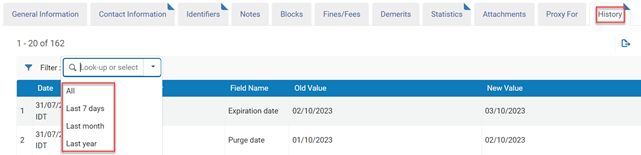
For more information see Viewing Changes to the History Tab.
Lender not Assigned if Locate Fails
May 2024Fulfillment and Resource SharingURM-203326
This release introduces the rs_do_not_send_request_when_locate_fails configuration option, enhancing borrowing partner management. Should a borrower face technical issues locating a resource at the lender (for example, connection problems), this functionality automatically removes the lending partner from the borrowing rota to streamline the process.

For more information see Locating Items for Resource Sharing.
Define whether Fees are Automatically Moved to the Patron
May 2024Fulfillment and Resource SharingURM-203321
Previously, when borrowing institution marked an item as lost, the request was changed to lost communicated and no fines and fees were applied to the lost loan. The lender received a message regarding the lost item, and they had to manually send a message with the fines and fees that would be applied to the borrowing institution. The borrowing institution had to manually add the fines and fees to the patron. Now, the borrowing library can set this this automatically based on the loan terms of use (TOU), by using the rs_use_tou_for_lost_item parameter.

For more information see Managing Lost Loans and Lost Workflow Action.
Improved Facets in Borrowing and Lending List
May 2024 Fulfillment and Resource Sharing
 IdeaExchangeURM-170011
A number of improvements were implemented for facets in the borrowing and lending lists. These include a search feature to find facets in the list, the ability to customize facets and also to exclude facet values in the borrowing and lending lists.
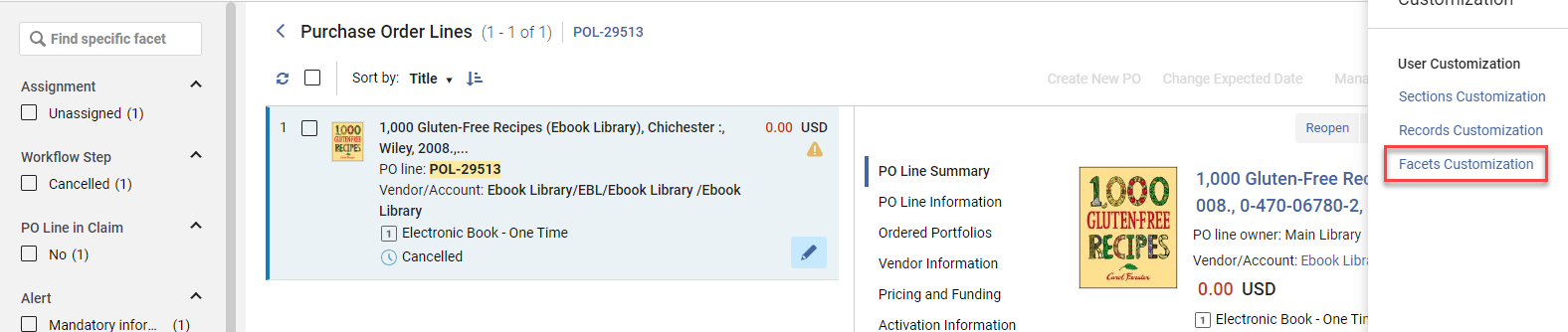
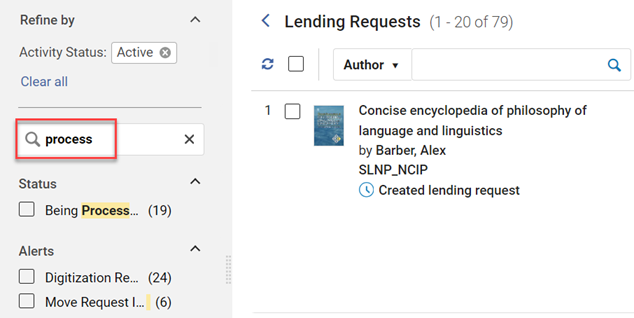
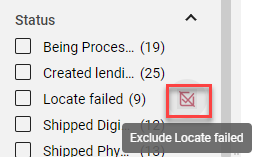
For more information see Facets.
ISO 18626 Peer to Peer Communication with Tipasa/WS ILL
May 2024Fulfillment and Resource Sharing
It is now possible to set a Tipasa or WS ILL partner as a peer to peer partner using the ISO18626 setup.
Setting the Tipasa/WS ILL requires setting up the partner record in Alma with:
- The partner's symbol in the Symbol field
- The OCLC server URL
- An API Key provided by OCLC. Please contact OCLC to obtain this key.
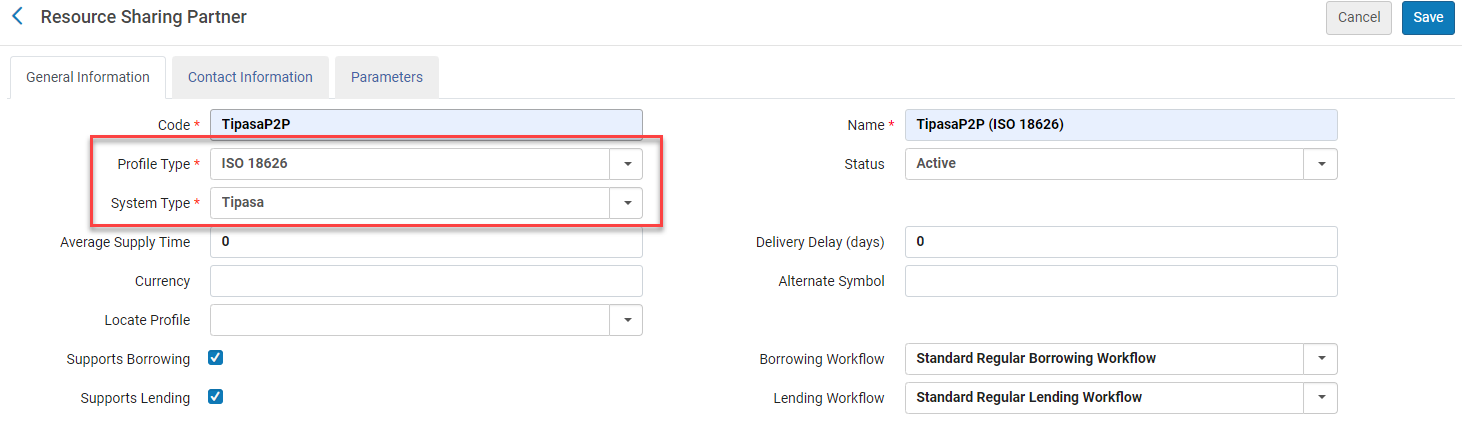
For more information see Tipasa, WorldShare ILL, and Relais Parameters.
Auto Renewal After Due Date
May 2024Fulfillment and Resource Sharing
 NERS Enhancement (ID# 8345) URM-194910
It is now possible to auto renew loans for which the block has been removed, even if the block was removed after the due date.
For more information see Configuring Fulfillment Jobs.
Configure Translation of Letters Available for Patron Opt-In/Out in Primo
May 2024Fulfillment and Resource SharingURM-URM-211923
Libraries that enable patrons to use Primo to select letters for opt-in/out can now configure and translate the letter names.
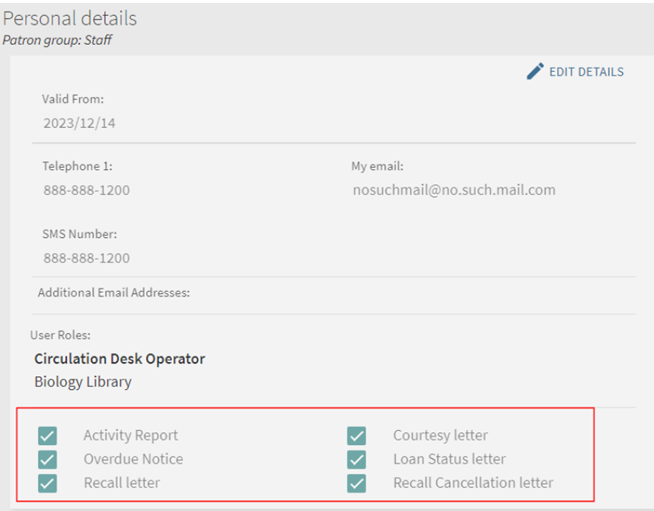
For more information see:
- Configuring Display Labels for Library Notices Opt-In for Primo VE
- Configuring Display Labels for Library Notices Opt-In for Primo
- Configuring Library Notices Opt-In
Homosaurus Vocabulary Added to the AlmaRefine Cloud App
May 2024 Linked OpenDataURM-183109
Alma has now added the linked data Homosaurus vocabulary to the AlmaRefine cloud app. This now makes it possible to reconcile against the vocabulary in Alma using AlmaRefine.
For more information on the Homosaurus vocabulary, click here.
For more information on the AlmaRefine cloud app, click here.
For a blog on "How to use the Alma Refine cloud app for service Homosaurus", click here.
Linked Open Data Enrichment Configuration
May 2024 Linked OpenDataURM-215775
Organizations have the capability to customize linked data enrichment for MARC records. They have the flexibility to select the authorities they wish to enrich and designate the appropriate subfield ($0 / $1). Additionally, they can opt to incorporate VIAF URIs and include supplementary authorities for enrichment, such as local authorities supporting URIs. This feature empowers institutions to exercise enhanced control over the linked data enrichment process for MARC records.
For more information, see Linked Data Enrichment Configuration.
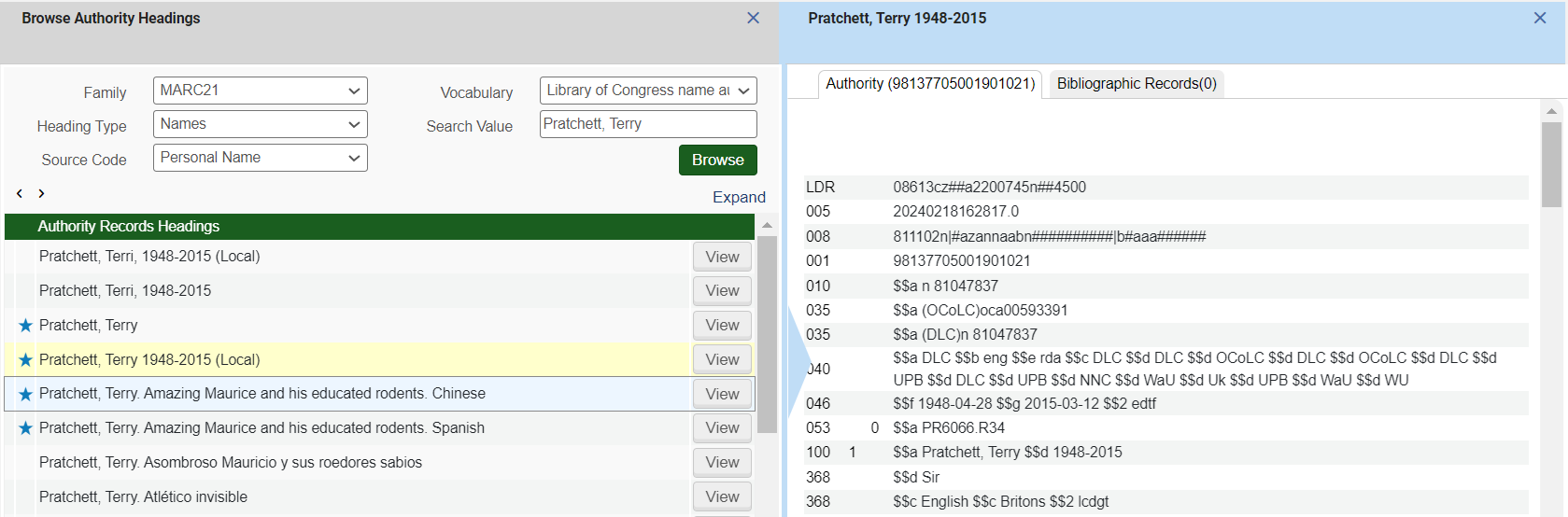
Local Authority Indication in Browse Authority Headings
May 2024 MetadataManagementURM-204302
Libraries that manage local authority records as part of a global vocabulary can now see if an authority record is a local record they've created. This is useful when libraries want to identify and maintain their overriding local authority records, as authority vocabularies change.
For more information, see Adding a Local Authority Definition.
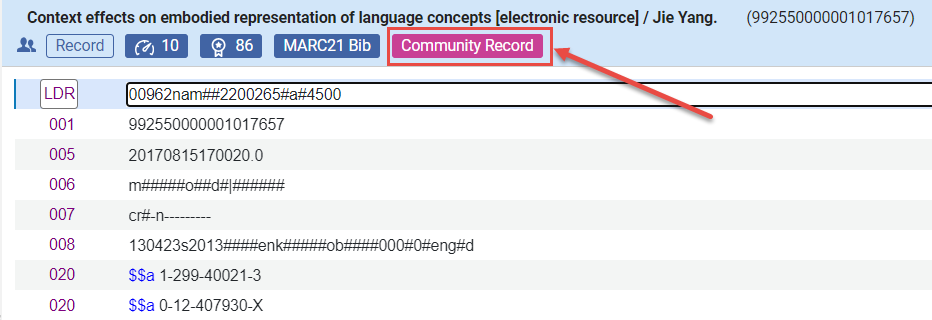
Prominent Indication When Editing a Community Record
May 2024 MetadataManagementURM-164667
The Metadata Editor now prominently highlights when a record being edited is a Community Zone record. Additionally, a warning message has been incorporated to alert users before saving changes that could affect the community. This precautionary measure is implemented to prevent librarians from inadvertently modifying a community record when their intention is to manage local information exclusively.
For more information, see Editing Community Zone Bibliographic Records.
Search by Standard Number in External Search Resources
May 2024 Metadata Management
IdeaExchange
A new field,Standard Number, is available for searching in Alma External Search Resources. For more information, see Working with Search Resources in the MD Editor.
Searching by Standard Number in External Search Resources depends on whether the Standard Number field is supported by the system that manages the search target.
Metadata Management Index Updates
New Authority Search Indexes by 885 Field
IdeaExchange
New Source of Description Note Search Index
Semi-Annual Re-indexing
- Retrieval of LOD Enriched MARC Record, see here.
- BIBFRAME Records Are Now Supported in the SRU as a New Record Schema, see here.
- Indexing the Full Call Number for Search and Browse, see here.
- New Source of Description Note Search Index, see here.
- New Authority Search Indexes by 885 Field, see here.
- New "General Note" Advanced Search Option Added to the Electronic Collection Search, see here.
Creating Record Versions for Changes in a Record's Management Tag
May 2024 Metadata Management
IdeaExchangeURM-211334
(Updated September 12, 2024) Previously, management tags like "Suppressed from discovery" were not logged in record versions, making it impossible to track when or by whom a record was suppressed or unsuppressed. With the recent update, this information will be recorded and visible in record versions. Whenever a record's management tag changes, a new version will be generated, displaying the previous tag value. Restoring a previous version will only affect the metadata, not other information on the versions page, such as cataloging level or management tags.
Record versions created before this update have null values for all management tags. The values for management tags will only be recorded when the record undergoes any subsequent update. Therefore, in the version created for that update, it may seem as though the user initiating the first update post-release "updated" the management tags to their existing values.
Record versions for Record's Management Tags are available only for showing changes that were locally done. For seeing locally done changes for Community Zone records, select View Versions of Original Record.
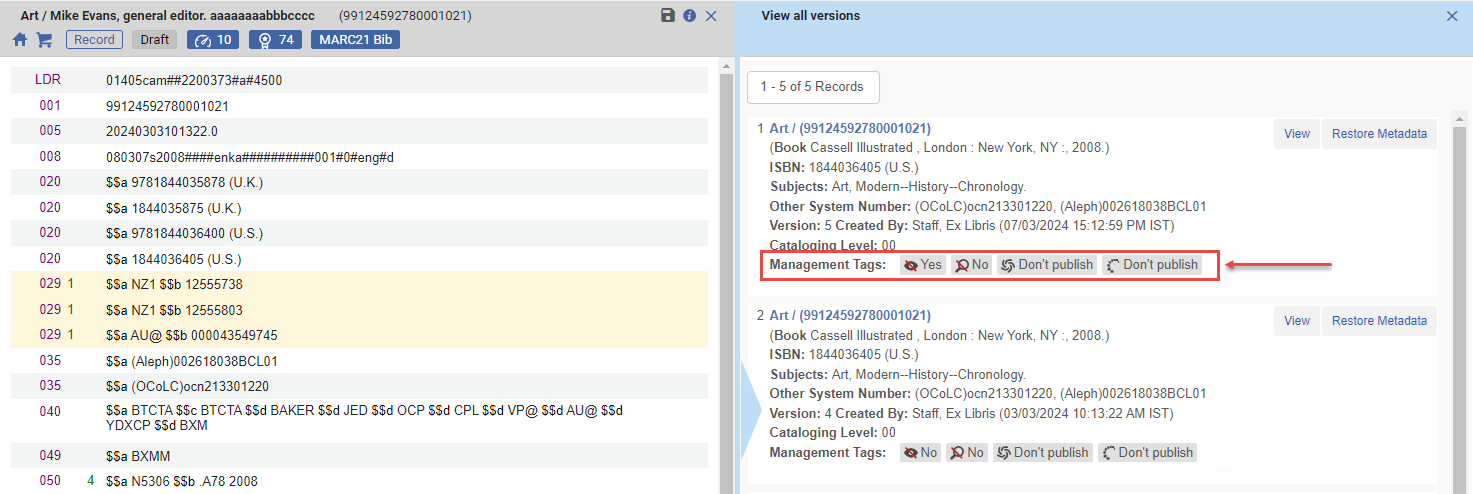
For more information, see Working with Records > View Versions.
Indexing the Full Call Number for Search and Browse
May 2024 Metadata Management
IdeaExchangeURM-39930
Previously, only the first part of the bibliographic call number ($$a or $$h) was used for searching and browsing. Following this enhancement:
- Additional details appear upon accessing the browse shelf listing from a MARC21 or KORMARC bibliographic record. The Call Number editing field is automatically filled with the information from $a and $b in fields 050, 055, 060, 070, 080, 082, 084, and with the information from $h and $i in field 852. In cases where multiple instances of the same subfield are present, the first occurrence will be utilized unless the cursor is positioned on a different occurrence, in which case that one is utilized.
- After the semi-annual indexing process, data from the $b subfield of the following specified fields are included in the call number search indexes within the repository search:
- LC call number: 050, 055, 090
- Universal Decimal Class Number: 080
- Dewey Decimal Class Number: 082, 092
- Other Classification Number: 084
This feature is beneficial for librarians seeking to search for the complete call number, rather than solely focusing on the classification segment. For more information, see:
Search Titles by the Originating System ID of the Authority Record Linked to Their Bibliographic Headings
May 2024 MetadataManagementURM-216767
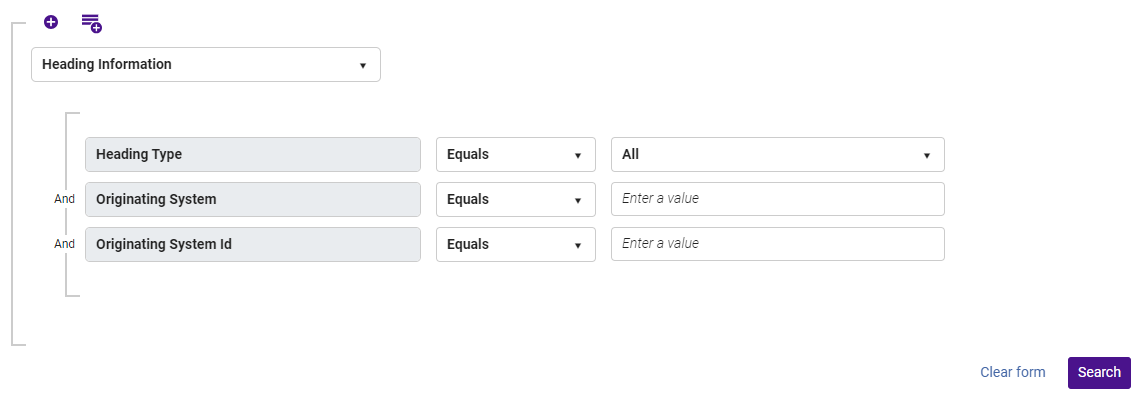
The functionality of the "Heading Information" search has been expanded to enable searching for bibliographic records based on their heading information linked to a specific authority record. A new option, "All", has been included in the Heading Type drop-down menu. When selected, users are prompted to specify the authority record's Originating System and Originating System ID. This enhancement enables users to retrieve all bibliographic records with headings linked to the specified authority record, irrespective of the heading type.
For more information, see Searching in Alma > Search Fields > Heading Information.
Updates to MARC21 Profile
May 2024 MetadataManagementURM-181219
MARC21 update No. 37, December 2023 is now available for bibliographic, holdings, and authority profiles.
Physical Item Templates
May 2024 Physical Resource Management
IdeaExchangeURM-195373
Alma enables users to save an existing physical item as a template and utilize it when manually creating new physical items to pre-fill fields such as notes, item policy, material type, temporary location, and so forth.
The template will encompass all the item's details except for Barcode, Inventory number, Pattern information, Process type, At (request department), Item call number prefix/suffix, and Temporary call number prefix.
Adding a new item from a template is accessible in a holdings' items list and during the editing of a holdings record in the Metadata editor. The new item will open as a draft, enabling the operator to make necessary adjustments before saving.
Note that content indicators on the tabs only appear after the item is saved, not in draft mode.
Furthermore, you can select a template to use in the Add Physical Item quick cataloging form, that automatically populates the item created by that form with the template's data.
Once an operator selects a template to work with, Alma remembers the selection for the user, reducing the need to select a template repeatedly, unless there's a change in the types of items being created.
This functionality is particularly beneficial for physical inventory operators who frequently create similar items, streamlining the item creation process and enhancing efficiency.
For more information:
- Quick Cataloging - use an item template when manually adding a physical item, see Working with Items > Adding a Physical Item to an Existing Title.
- Item List - manually adding an item from the holdings' items list and applying a template, see Working with Items > Working with the List of Items.
- Metadata Editor - add an item record to the holdings record by using a template, see Add Item from Template.
Option to Disable the Link Resolver Usage Indication in Search Results and in the Overlap Analysis Tool
May 2024 Electronic ResourceManagementURM-209451URM-209448
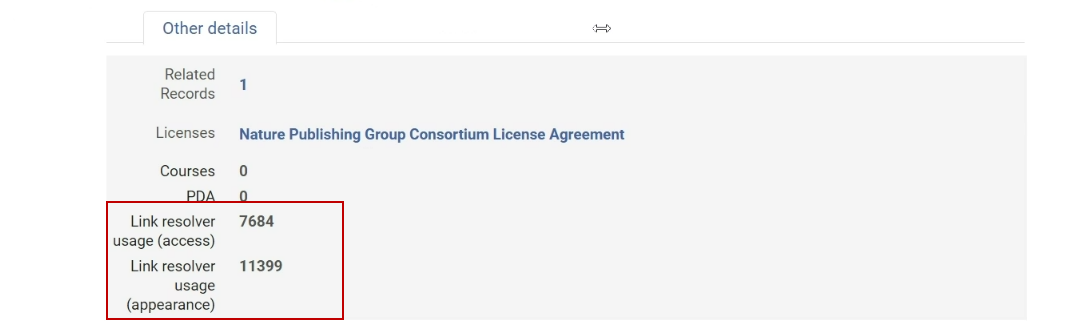
Alma has added a customer parameter (allow_link_resolver_usage_indications) in Configuration > Resources > Other settings that allows users to disable the Link Resolver Usage indication in search results and in the Overlap Analysis tool. The default value for the customer parameter is set to true. When set to true, data about "link resolver usage" indication in search results and the Overlap Analysis tool is available. When set to false, data about "link resolver usage" in search results and the Overlap Analysis tool willnotbe available.
For more information, see:
- For customer parameter information, see Configuring Other Settings (Resource Management).
- For a general description on the way Link Resolver Usage is calculated, see Link Resolver Usage.

Automatic Upload Electronic Holdings Updates
Automatic Upload Electronic Holdings from JSTOR (Books)
Automatic Upload Electronic Holdings from Preselect
IdeaExchangeURM-202178
Automatic Upload of Electronic Holdings from Project Muse Now Includes Gratis Content
Automatic Upload of Electronic Holdings from Taylor & Francis is Now Based on Unique ID
New General Note Advanced Search Option Added to the Electronic Collection Search
May 2024 Electronic Resource Management
IdeaExchange
This feature will be gradually available during the release as it requires indexing of the collections and services. The search indexes will appear but the result may not reflect the actual status during the first few days of the release.
Two new advanced search options were added to the Electronic Collection Advanced search option:
- Notes tab - General Notes (Electronic Collection)
- Notes tab - General Notes (Service)
These two new options enable users to locate text populated within the "General Notes" section (under the "Notes" tab) for both Electronic Collection and Service.
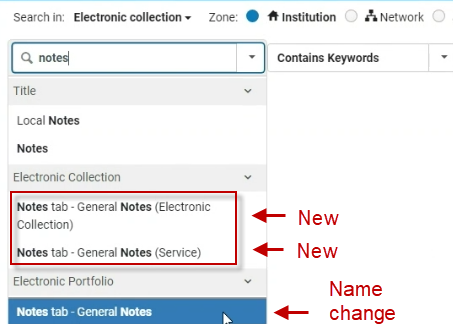
The name of the existing "Notes tab" search index, which resides under the Electronic portfolio advanced search, was modified to "Notes tab - General Notes" to be consistent with the two new search indexes. This name change has no other implications and the search index will keep functioning as it did.
For more information, see Search Indexes > Electronic Collections.
Digital Titles No Longer Require Collections
May 2024 Digital Resource ManagementURM-212011
The requirement for digital titles to be part of a collection is now optional. If you want your institution to be able to create and maintain digital titles without them being part of a collection, contact Ex Libris Support to enable this feature.
MODS Schema Now Available for Metadata Forms
May 2024 Digital Resource Management
Idea ExchangeURM-209197 URM-109801
Forms consists of a template of fields to be used when creating digital titles. You can now create forms based on the MODS metadata schema. For more information, see Working with Forms.
Multi-Language Captions Now Available
May 2024 Digital Resource Management
Idea ExchangeURM-207635 URM-212941
- The Captions Management dialog box that appears when selecting Captions for a video file was enhanced. It now allows the uploading of multiple caption files and a drop-down list of languages, so you can assign a language to the captions file.
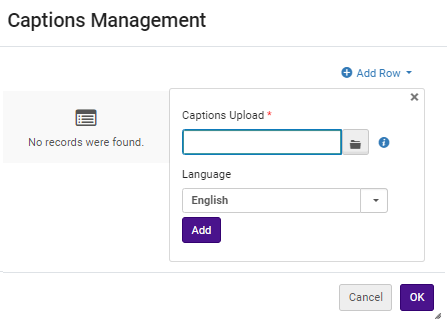 Captions ManagementYou can configure only one captions file per language.
 - When adding files to a representation, you can include multiple files with different language extensions, such as captions.vtt.en,captions.vtt.fr, and so on. Alma allows you to select from the various caption languages in the supported viewers.
- The Digital Viewer and Universal Viewer support multi-language captions. When viewing a video file, select the language of the captions you want by selecting the closed captions icon at the bottom of the viewer.
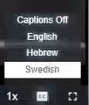 Captions Language
For more information, see Managing Digital Files from the Digital Representation Resource Editor and The New Digital Viewer.
Quick Ordering from Amazon
May 2024AcquisitionsURM-203472
Previously, when ordering a resource from Amazon, users needed to access Alma in order to record the order information. Now with the new Order It! browser add-on, the user can easily create the order automatically in Alma directly from Amazon.

.png)
Permanently Delete Licenses in Alma
May 2024Acquisitions
IdeaExchangeURM-213464
From now, the Delete action will permanently delete a license from Alma. In addition, the Deactivate action was added, enabling the user to keep such licenses in the list, with the new "Inactive" status. The Activate action was added to licenses in the Inactive status, enabling users to quickly set the license to the Active status. Previously deleted licenses which up until today had the "Deleted" status, will now have the "Inactive" status.

If a shared license was distributed to members and was then deleted in in the network institution, it will be 'detached' from the network institution and will continue to be managed locally in the member institution. For more information, see Managing Licenses and Amendments.
The delete license API will continue to function as today by default. The only difference is that instead of setting licenses to the “Deleted” status it will change them to “Inactive”. A new query parameter was added: <permanent delete>. It is set to false by default. When true, it permanently deletes the license from Alma. For more information, see the Developer Network.
Improvement to Usage Report Performance
May 2024AcquisitionsURM-138440
COUNTER files are now manually loaded by a background job in order to improve the performance and avoid timeouts.
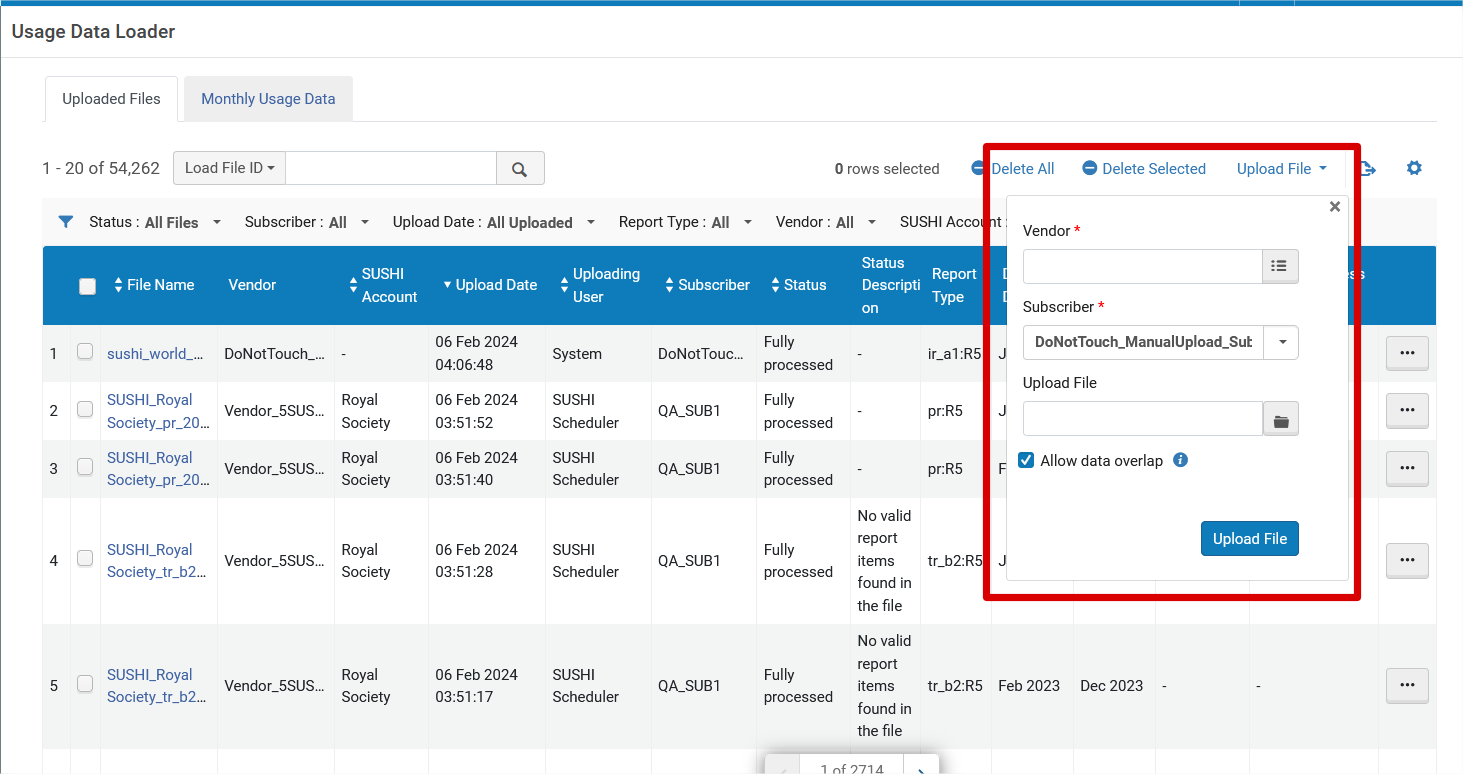
In addition, the Allow data overlap checkbox was added to give users more flexibility for handling cases of overlap between data in the system and in the uploaded file. When checked, existing data in the system will be overwritten with data from the uploaded file. When not checked, if there is data duplication, the entire file will be ignored i.e., it will not be uploaded. For more information see Managing COUNTER-Compliant Usage Data.
Enhancements for Sending POL Information with EDIs
May 2024Acquisitions
IdeaExchangeURM-100434
When sending the Quantity for pricing for electronic PO Lines, instead of sending the value of 1 by default, the actual quantity in the PO line is sent. In addition, in the EDI Vendor Note Fields drop down list, the Access Model now appears as an option that can be selected for sending with the EDI.
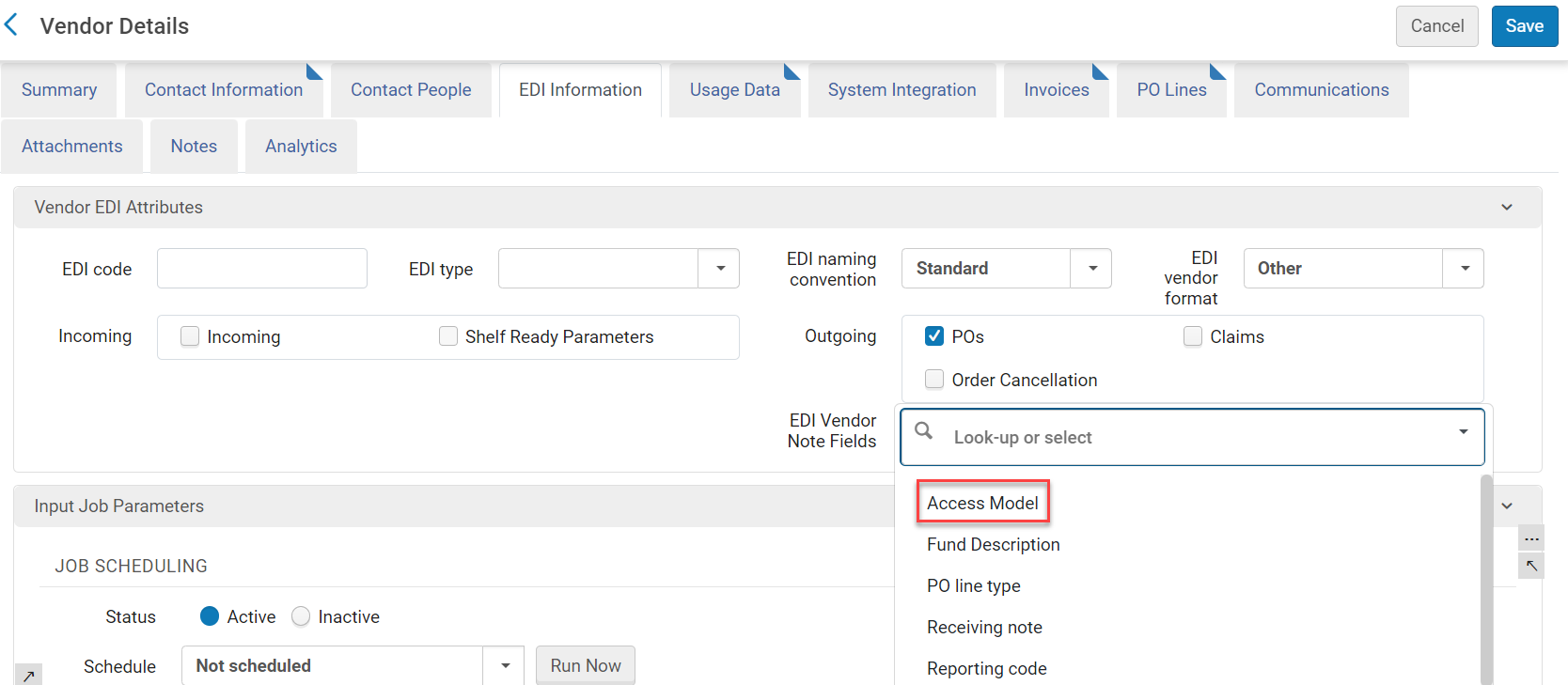
For more information on working with EDI in acquisitions see Electronic Data Interchange.
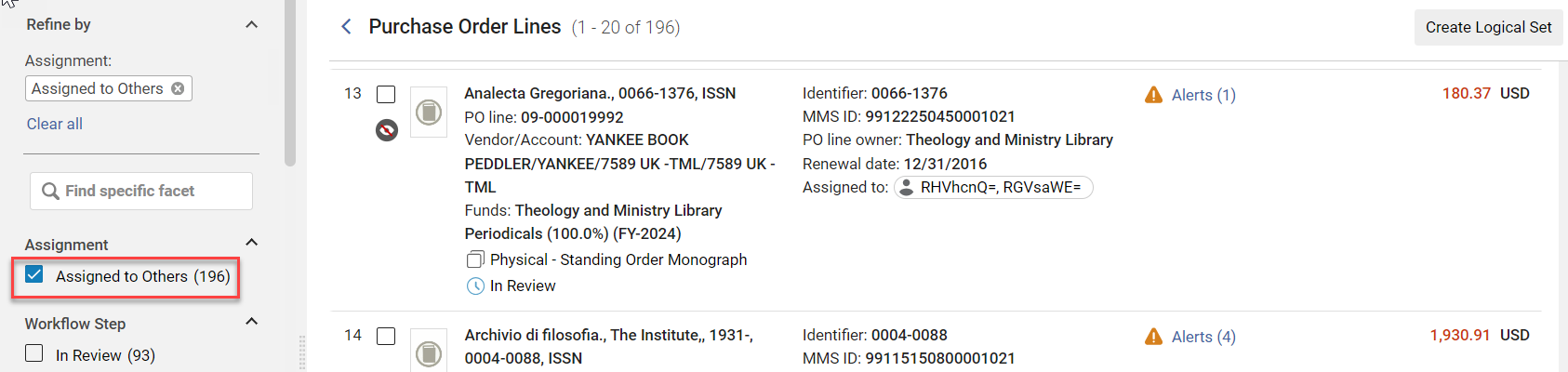
View PO Lines that are Assigned to Others
May 2024AcquisitionsURM-213185
Users with the Purchasing Operator role can now view PO Lines that are assigned to others. Note that users with this role will not be able to edit or take any action on such orders - only viewing is enabled.
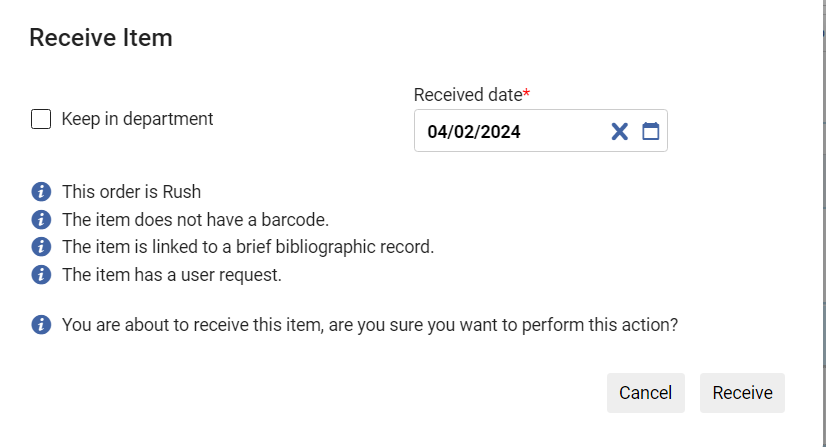
Enhancements when Receiving from PO Line
May 2024AcquisitionsURM-212992
When performing the Receive action in the PO line for Ordered Items, in the dialog box that appears, the receiving alerts now display.
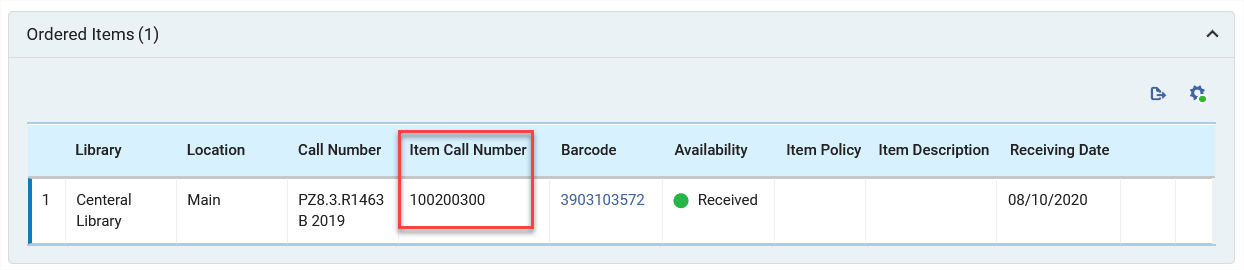
In addition, the Item Call Number field was added to the Ordered Items table (disabled by default).
For more information see Receiving Physical Material.
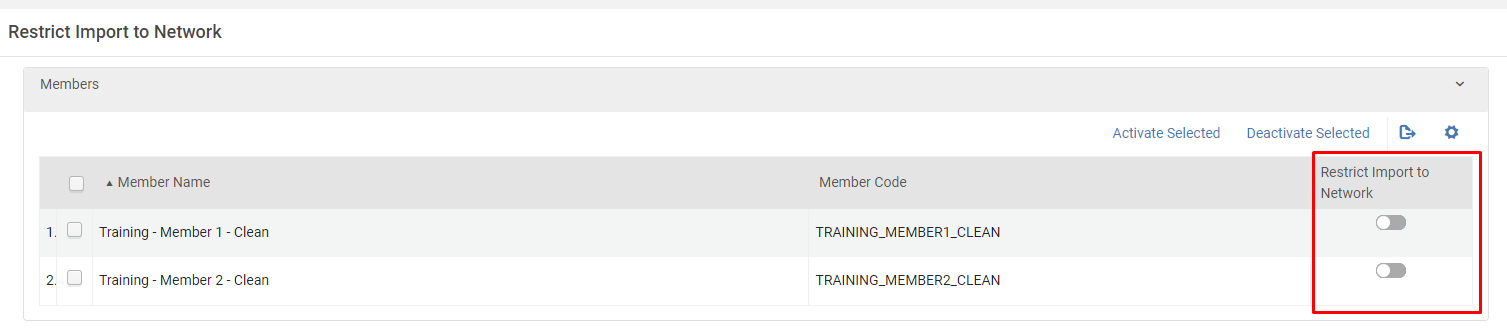
Consortia Import Permission Per Member
May 2024 Collaborative Networks
The Consortia administrator now can control which member can import records into the Network Zone repository. For more information, see Selecting Where to Create New Bibliographic Records.
Restrict Deletion of Network Zone Bibliographic Records with Related Records and/or Local Extensions
May 2024 CollaborativeNetworksURM-211595
The Consortia central office holds the authority to manage the deletion of Network Zone Bibliographic records and decide what would be the behavior in various cases. For example, when the records have related records and/or local extensions, the deletion of such records can be either blocked or a warning message is triggered to the operator.
For more information, see Restrict Deletion of Network Zone Bibliographic Records with Related Records and/or Local Extensions.
Support Parallel Work in Multiple Tabs in Internet-Browser
May 2024 User Experience, Accessibility &InfrastructureURM-203319
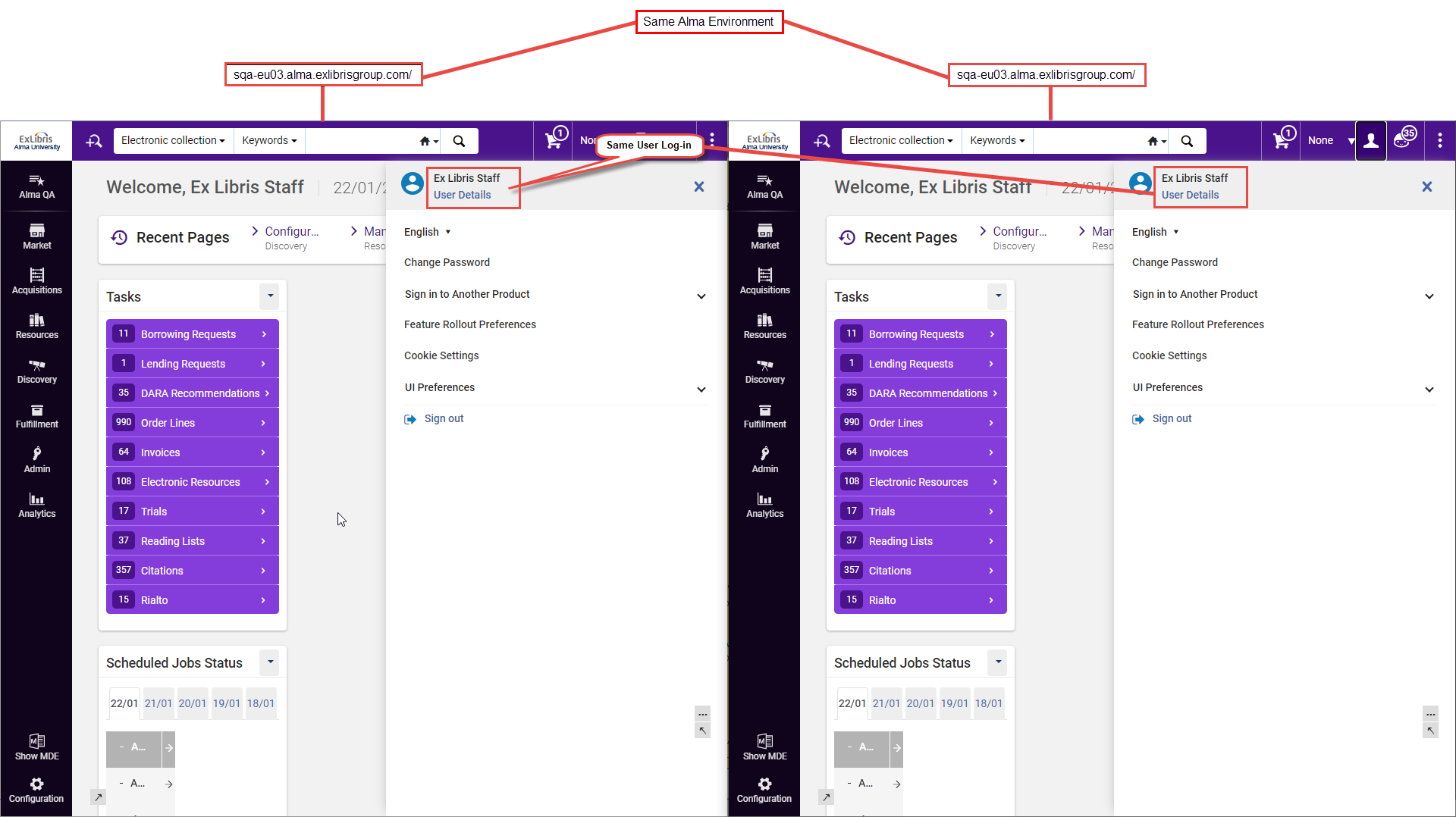
Alma introduces a new feature that enables users to open and login to the same Alma environment through multiple tabs. This improvement enhances productivity and efficiency by enabling users to simultaneously work on multiple workflows, for example, open records in distinct internet browser tabs, facilitating seamless copying of information between tabs and performing various tasks or workflows concurrently.
With the multi-tab capability, each browser tab is assigned a random ID, serving as a unique suffix for the corresponding session entries. This advancement facilitates the simultaneous operation of the same Alma session across multiple internet browser tabs. A user can now open and login to the same Alma environment in two or more tabs and work concurrently without one tab impacting the others.
- Multiple tabs functionality ONLY works if multiple browser tabs are opened for the same:
- Alma environment
- Logged-in user account
- An Alma session opened from "Open in a new tab", e.g. Opening a new tab in the browser by right-clicking a function in the Alma UI and selecting "Open in a new tab" will not work. Users will receive a "block" message.
- Trying to sign in as different users of the same institution simultaneously from the same internet browser (through different tabs of the internet browser on the same computer) – will not work (the last signed-in user will override the user in the other tab(s)).
For more information, see Alma Environment Multi Tabs.
Scheduling Support for Manual Jobs (Run a Job)
May 2024 User Experience, Accessibility & Infrastructure
IdeaExchange
NERS Enhancement (ID #8373)
Manual tasks necessitate the direct intervention of a user for execution. Tasks may need to be performed at a later time, potentially during the evening or even at night. Similarly, there is a demand for clients to schedule routine job runs, whether on a weekly, monthly, or other recurring basis.
When scheduling a manual job, the scheduled time is the time where the job run is triggered, and the actual run may start later (depending on system resources).
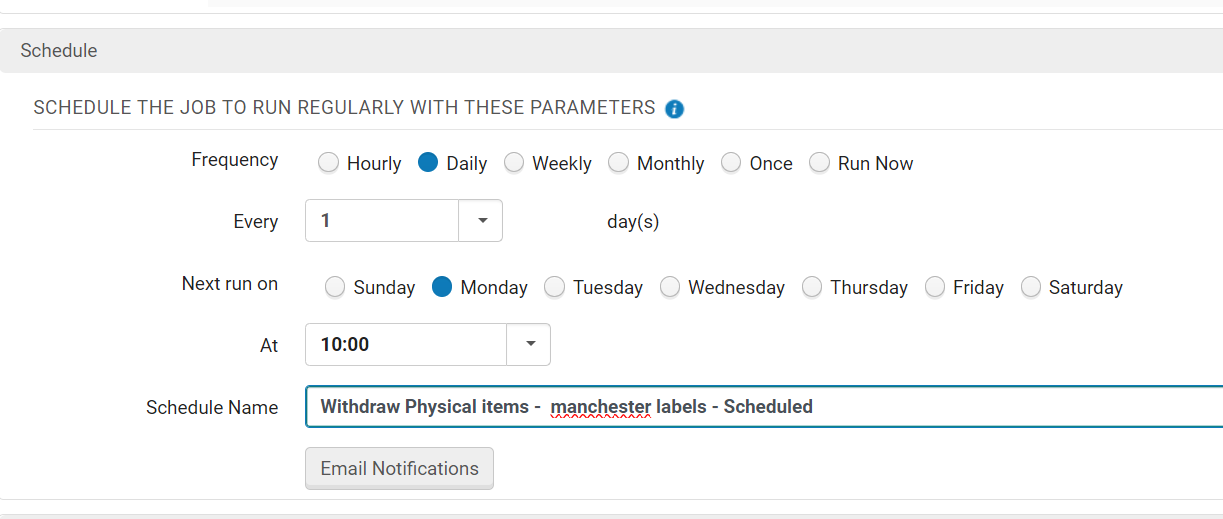
Alma now implements a new scheduler that users can proactively schedule jobs, whether they are periodic tasks or one-time operations. This feature enables jobs to be executed automatically, accommodating scenarios where tasks need to be performed outside regular working hours or when a staff member is unavailable to execute them manually. This scheduling enhancement is applied to all manual jobs that can be run via Admin > Manage Jobs and Sets > Run a Job. The Schedule form has been added to the last step of the 'Run a Job' wizard. For more information on the Schedule section of the 'Run a Job' wizard, see Manual Jobs.
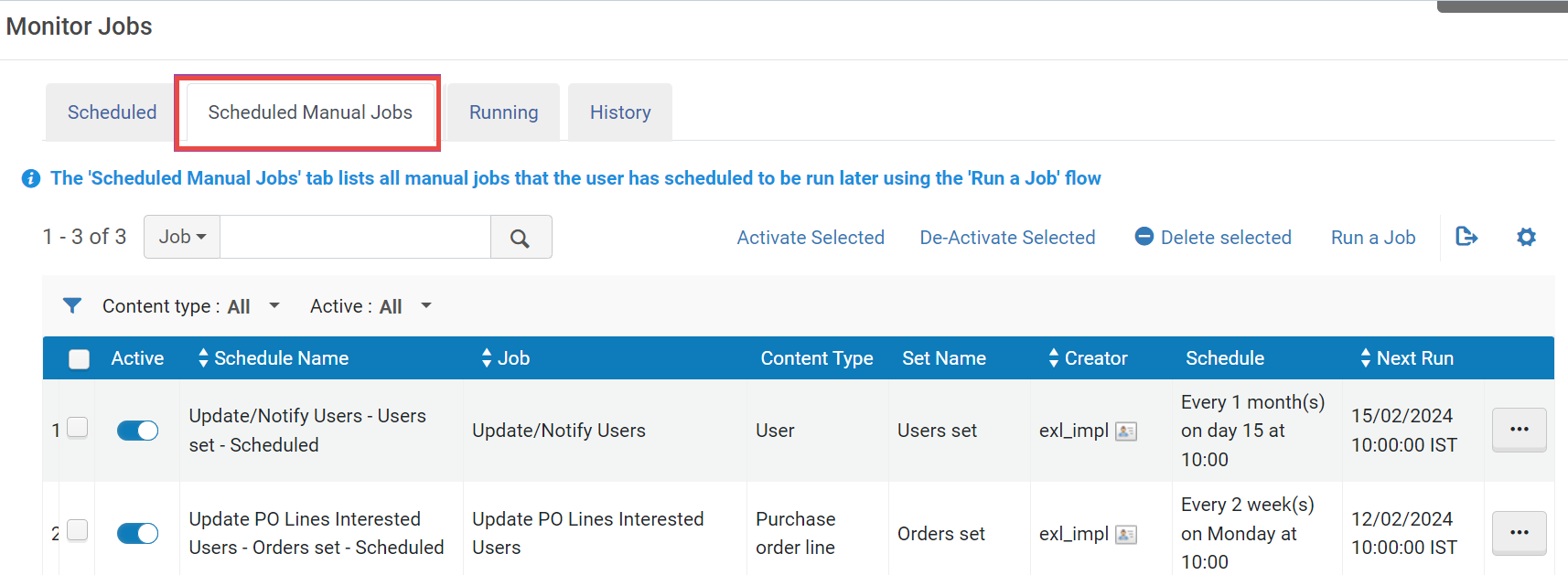
The scheduled manual jobs are displayed in the newly added Scheduled Manual Jobs tab (Admin > Manage Jobs and Sets > Monitor Jobs > Scheduled Manual Jobs). This list enables users to manage the scheduled jobs, edit the schedule, delete the schedule and so forth. For more information on the Scheduled Manual Jobs tab, see Scheduled Jobs.
Sorting of Facets
May 2024 User Experience, Accessibility &InfrastructureURM-212789
Alma introduces alphabetical sorting for facets, providing enhanced organization.
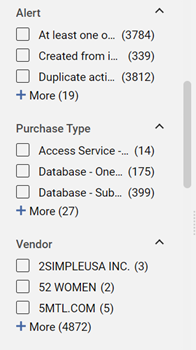
Notably, the unified PO Lines list maintains its existing sorting for specific facets.
- Workflow step
- Creation date
- Sent date
- Renewal date
- Reporting code
Additionally, the "Library" facet within the physical holdings search retains its current configuration, ensuring that institutions configured to showcase their library first will continue to experience this feature as before.
For more information see Using Facets to Refine Search Results.
"Hebrew Fuzzy Search" Added to Alma Menu Search Bar
May 2024 User Experience, Accessibility &InfrastructureURM-209810
Expanding the functionality of the Alma search menu to include "smart" search capabilities in Hebrew. Historically, this feature has exclusively supported English. However, beginning in May 2024, it will also be extended to the Hebrew interface. Consequently, the search functionality will now offer suggestions for synonyms, interchangeable terms, and even assist with simple spelling errors. This improvement enhances user navigation, simplifying the process of locating items within the Alma Hebrew search menu.
Manage Sets Updates
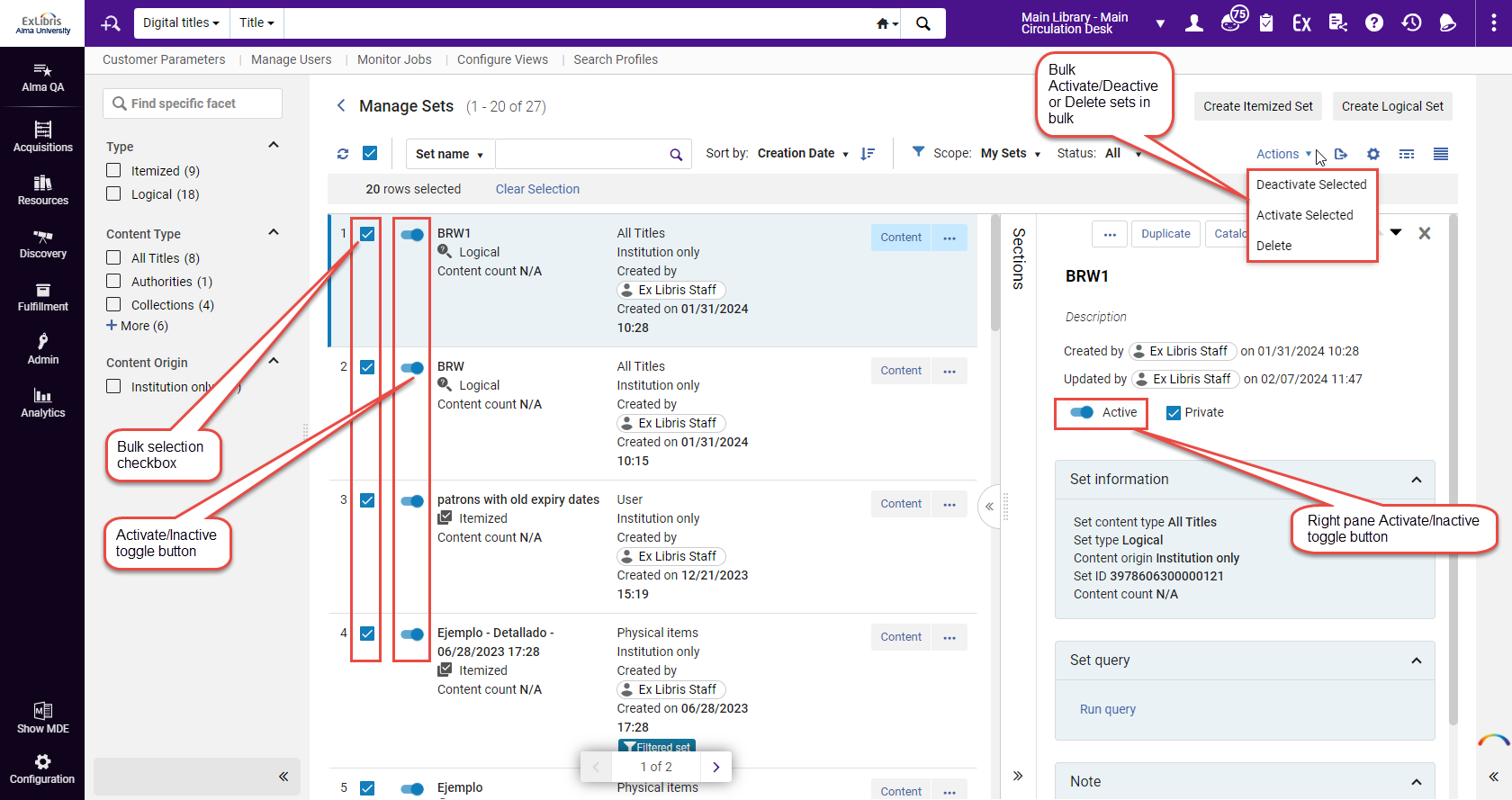
Manage Sets - Toggle Active/Inactive Set in Record View and Bulk Action
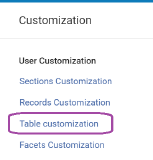
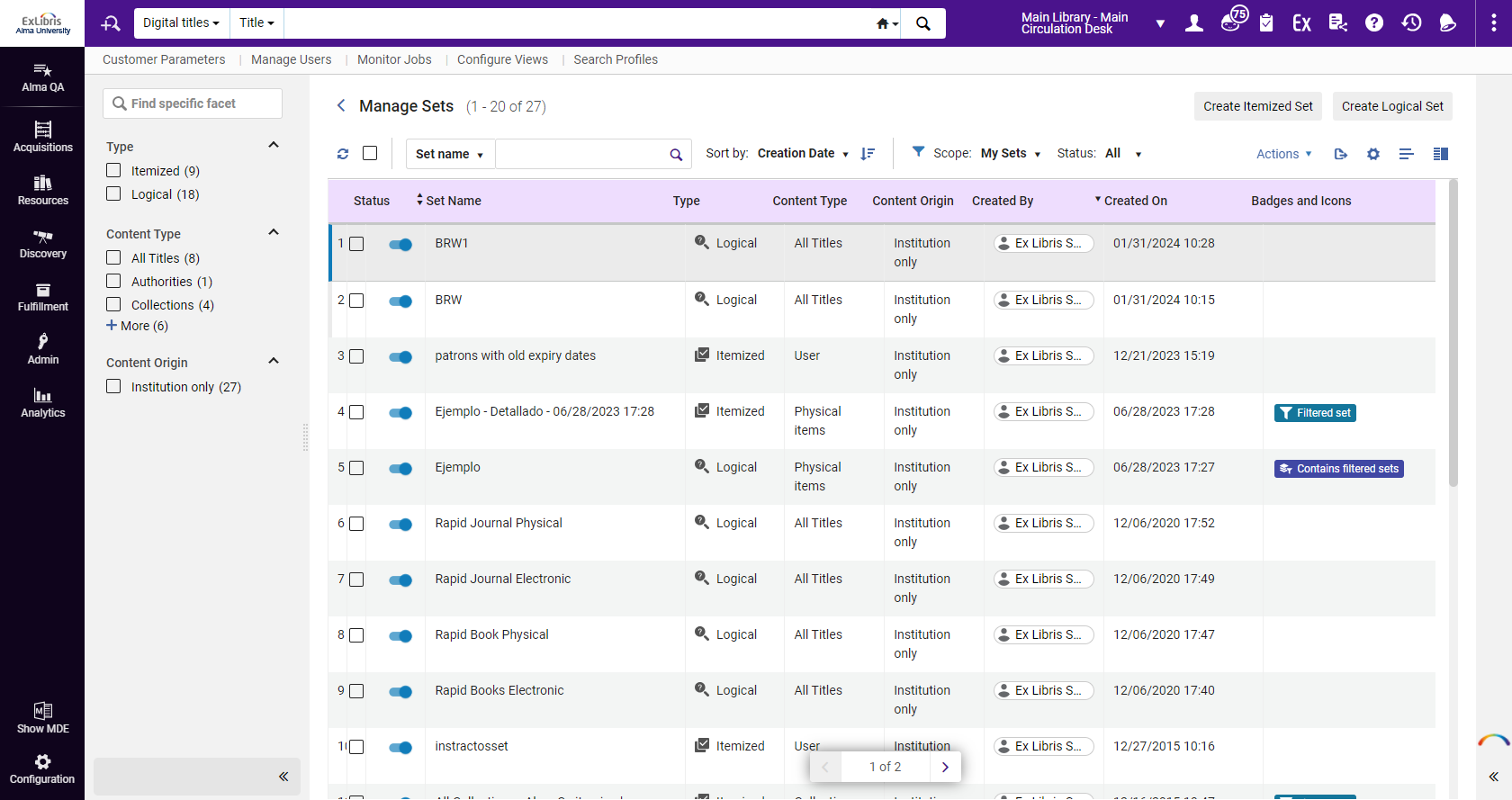
Manage Sets - Implement Grid Table View
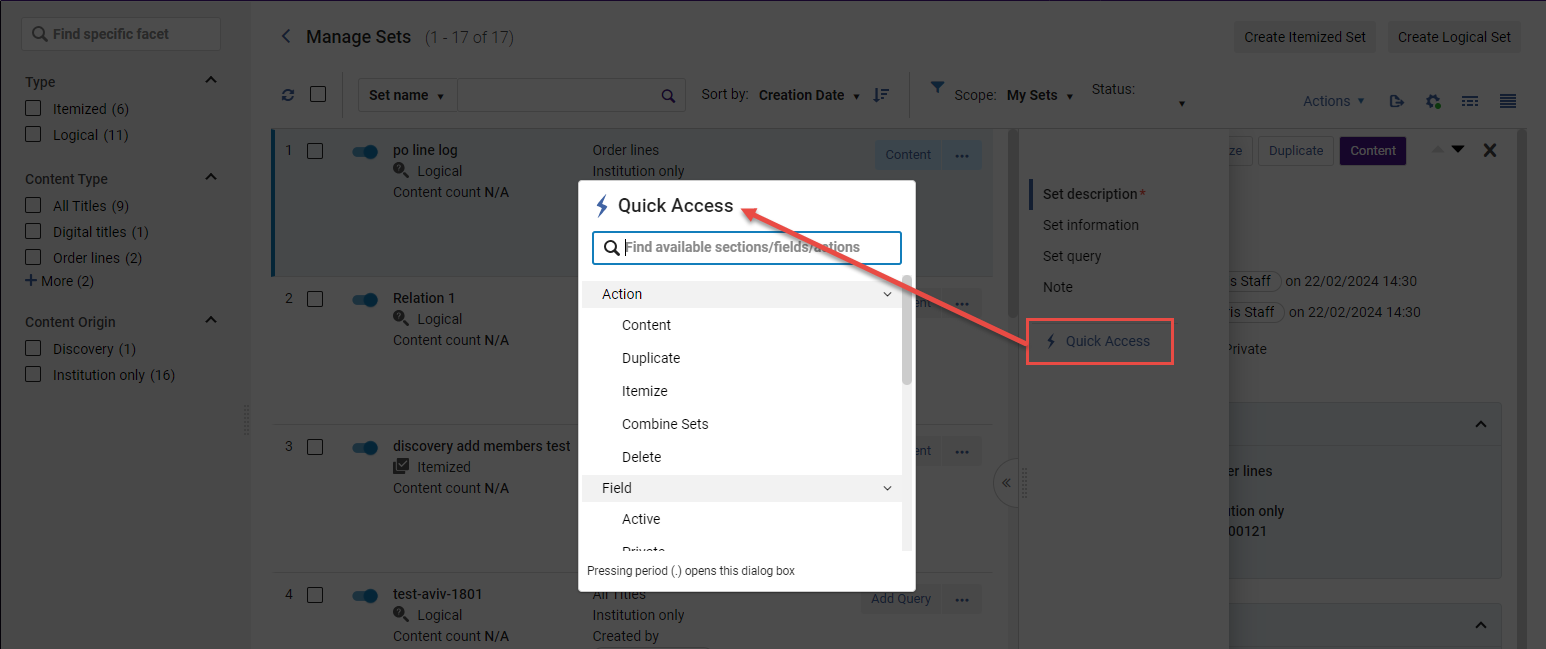
Manage Sets - Implement Quick Access
The Quick Access functionality will be gradually implemented in additional list pages that support the side-by-side mode.
- By utilizing the keyboard shortcut (period '.') or
- By selecting the last link labeled "Quick Access" situated below the sections links in the side menu section.
Support for OpenID Connect for Authentication Self Registration
May 2024 User Experience, Accessibility &InfrastructureURM-114271
OIDC based authentication facilitates self-registration, driven by the settings configured in the integration profile. This includes ongoing support for self-registration and updates using this authentication method.
For more information, see OpenID Connect in the Developers Network.
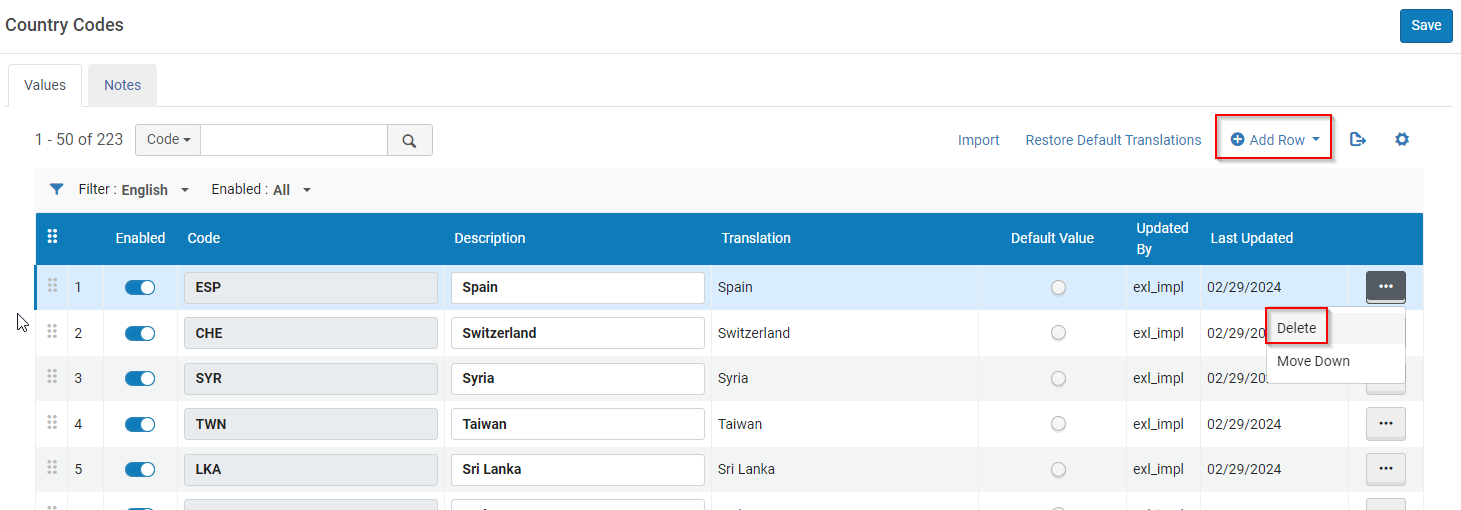
Add Countries to Country List
May 2024User Experience, Accessibility &InfrastructureURM-173972
Institutions can now add or remove countries from the country list. For more information, see Countries.
Support Filter by Enabled/Disabled Rows in Mapping and Code Tables
May 2024 User Experience, Accessibility &InfrastructureURM-207724
Alma introduces a new "Enabled" filter in all relevant Mapping and Code Tables that incorporate enabled/disabled fields. The filter enables users to display All, Enabled (Yes) or Disabled (No) values. When filtering a table list, only lines within the relevant scope will be displayed. For instance, If the list is currently filtered by 'Disabled' and the user enables a line, the list will refresh to remove the recently enabled line. The same applies vice-versa if the list is filtered by 'Enabled'.
For more information, see Code Tables and Mapping Tables.
Springshare Integration with Alma
May 2024 Analytics and InsightsURM-215113
Alma Analytics now offers integration with Springshare Gate Counts and Reference data. This allows you to display LibInsights information in Alma Analytics reports.
To support this feature, the following enhancements were made:
- The new Springshare Integration Profile is now available to enable Alma to import data from the Springshare API.
- The new Import Data from Springshare job is available that imports the data from Springshare when the integration profile is configured.
- In Alma Analytics:
- The new External Vendor Data subject area is now available, which allows you to create reports that display information imported from Springshare LibInsights concerning Gate Counts and References. For more information, see External Vendor Data.
- The Library Services to Individuals and Gate Counts tabs were added to the ACRL and IPEDS dashboard. They display reports of the number of library services provided to patrons by method and the number of individuals entering or leaving the library, respectively. For more information, see ACRL and IPEDS Dashboard.
For more information concerning Springshare Integration with Alma, see Springshare Integration.
New Limited Design Analytics Roles
May 2024 Analytics and InsightsURM-209647
New design analytics roles are now available that give the user access to specific subject areas only. With these roles, administrators can limit users to view only the subject areas that are within their responsibility. All reports, both those in the catalog and those in the Shared with me area, are visible to users with the limited roles, but only ones in the subject areas to which they have access run successfully.
The new roles are the following:
- Designs Analytics – Fulfillment: limits access to the API Usage, Analytics Objects, Analytics Usage Tracking, Borrowing Requests, Course Reserves, DARA, Fines and Fees, Fulfillment, Lending Requests, Local Authorities, Requests, Resource Sharing, System Events, Title, and Users subject areas.
- Designs Analytics – Resources: limits access to the Analytics Objects, Analytics Usage Tracking, API Usage, DARA, Digital Inventory, Digital Usage, Digital Waitlist, E-Inventory, Licenses, Link Resolver Usage, Local Authorities, Physical Items Historical Events, Physical Items, System Events, Title, and Users subject areas.
- Designs Analytics – Acquisition: limits access to the Purchase Requests, Analytics Objects, Analytics Usage Tracking, API Usage, DARA, Funds Expenditure, Local Authorities, System Events, Title, Usage Data (COUNTER), and Users subject areas.
For more information on Design Analytics roles, see Design Analytics Roles.
Limited Anonymization of Report Details
May 2024 Analytics and InsightsSF: 06983322URM-215334
Report details can be anonymized to protect patrons' privacy. Besides the option for anonymization of all user details, there is now an option to anonymize all user details, except for the following which remain visible in reports. This hides patron information while leaving information regarding library staff activities visible.
The following fields in the Users subject area:
- User Details > First Name
- User Details > Last Name
- User Details > Primary Identifier
- Email > Email
The fields in the following dimensions:
- Analytics Objects > Created by
- Analytics Usage Tracking > User Details
- Borrowing Requests > Assigned to
- Course Reserves > Librarian
- DARA > Assigned to
- DARA > Modified by
- E-Inventory > Electronic Collection PO Line Approver
- E-Inventory > Portfolio PO Line Approver
- Fines and Fees > Staff Operator Details
- Fulfillment > Loan Operator Details
- Fulfillment > Return Operator Details
- Funds Expenditure > PO Line Approver
- Lending Requests > Assigned to
- Physical Items > PO Line Approver
- Physical items > Receiving Operator
- Purchase Requests > PO Line Approver
- Purchase Requests > Purchase Request Approver
- Purchase Requests > Purchase Request Assigned To
- Purchase Requests > Purchase Request Creator
- Purchase Requests > Purchase Request Modified By
For more information, see Anonymizing Analytics Report Details.
Resolved Issues
| SF number | Area | Description |
|---|---|---|
| 07079140 06985607 | Acquisitions | The Quantity for pricing was not updated when adding or removing items. This was fixed and now the quantity and price are updated correctly. |
| 07038127 07005788 07045509 07043408 07043313 06985334 | Acquisitions | In the PO Line Task List, sometimes the recent selection was not displayed. Now, when searching (and choosing) a vendor (in the vendor list box), it is always displayed in the recent vendors selection list. |
| 06971575 | Acquisitions | The deferred POL "Reminder date is arrived" alert was not added to the Alerts facet list. This was fixed. |
| 07010143 07010619 07038664 07026191 06936882 07079112 07013730 | Acquisitions | When saving a POL displayed the access model Save Confirmation message every time, even when it was unnecessary. Now, if the access model of the PO line's portfolio/s is/are the same as the access model on the PO line, there is no redundant warning. |
| 06902905 | Acquisitions | When viewing a purchase request and selecting Cancel, the mode of the back page was wrong (pickup instead of edit). This caused lists to be in pickup mode without an option to edit. This was fixed. |
| 06648512 | Acquisitions | Users could not approve and order from purchase requests. The problem occurred when the default acquisition method was disabled (there was no indication and nothing happened). This was fixed, and now there is a message indicating that "The default Acquisition Method is invalid or disabled, the PO line was not created.". |
| 06988448 07079774 07038818 06894229 06860274 | Acquisitions | For PO lines, selecting the back arrow would bring the user to a blank page. This was fixed. |
| 07018659 07012413 | Acquisitions | Updating the Expected receipt date did not seem to update the Reclaim date. This was fixed and now when the Expected receipt date is updated and the PO Line has a reclaim interval greater than zero, the notification claiming date (a.k.a Reclaim date) is calculated. If the calculated date is after the current reclaim date, it is updated on the PO line. |
| 06931046 06950657 | Acquisitions | The PO Line Aggregated Claim Letter had the wrong number of items received. This was fixed. |
| 06979956 | Acquisitions | When the collection of a trial had an override URL, the URL was not populated on the trial and was not passed to the participant email. This was fixed. |
| 06922800 | Acquisitions | Changing the survey language to Traditional Chinese caused an error message to display. This was fixed. |
| 07115388 07038544 06815133 06953980 06928654 07051841 07102553 07026120 07076306 | Acquisitions | In the new UI, after saving an order, there was a difference between fund and net price. The problem occurred when there were three or more digits after the decimal point, and specifically when the third digit was 5 (there was a wrong rounding of the sum). This was fixed. |
| 06888145 | Acquisitions | Saving a vendor record when updating libraries did not retain the changes. This happened because the status of the vendor account was "Inactive" (therefore the save failed). This was fixed, and now a message is displayed: "Active vendors must have at least one active vendor account. Please add a vendor account or change the Vendor status to inactive.". |
| 06870478 | Acquisitions | In certain cases the EDI load job report said that nothing was processed even though records had been successfully processed. Prints were added to the log in order to follow up if this issue occurs again. |
| 06855613 | Acquisitions | The EDI - Load Files job completed successfully but invoices were not correctly created. This was fixed. |
| 06964231 06980346 07108617 06931466 06900879 06970004 06877808 07037561 06968052 07022938 07034763 06979030 07080305 07005257 06905699 06961047 06874387 07013300 | Acquisitions | The SUSHI harvesting job completed with failures. The handling of the vendor's response was fixed to handle responses with error codes only (without a report header structure). |
| 06711398 07034931 06966708 | Analytics and Insights | Usage data from several SUSHI files did not appear in Analytics. This was fixed. |
| 06636635 | Analytics and Insights | In the Digital Waitlist subject area, time fields displayed dates and not times, and the Internal Request ID field incorrectly contained commas. This was fixed. |
| 06704422 06630398 06630391 06796056 06568285 06630370 06647362 06627251 06737107 06704504 06627085 06865123 06704447 06682460 06553683 06704460 06627076 06788480 06811546 06553830 06704635 06627230 06704536 06704764 06720035 06720132 06719836 06682513 06553690 06796047 06627249 06630302 06627303 06570196 06553699 06796051 06704432 06552521 06719971 06720142 06553996 06647292 06877951 06630583 06736968 06570208 06629098 06797041 | Analytics and Insights | When exporting an analytics report in any format, the error message "Server is busy. Please retry after some time." was displayed. This was fixed by making a change in the configurations. |
| 06944165 | Analytics and Insights | Primo Analytics objects were not found by Primo VE users when searching for objects from the Main Analytics Menu. This was fixed. |
| 07049227 07039545 | APIs | The Update Portfolio API did not work when used with JSON. This was fixed. |
| 06966867 | Digital Resource Management | Menu options were displayed in English although the interface language was configured for Spanish on the Alma Mobile App. This was fixed. |
| 06948986 | Electronic Resource Management | Ovid upload electronic holdings job did not delete portfolios from the collection when the subscription ended. This was fixed and now the portfolios are deleted. |
| 06690430 07013096 06928291 06949354 | Electronic Resource Management | In certain instances when an Upload Electronic Holdings task was restarted midway through the job, portfolios were activated multiple times. This was fixed. |
| 06940460 07027171 06745344 | Electronic Resource Management | The Upload Electronic Holdings uses the ISSN to match records from the KBART file to the records in the Community Zone. There are instances in the Community Zone that a single collection has two identical portfolios and the only difference is their coverage. When Alma attempts to match the KBART files with these identical portfolios, it detects matching ISSNs and skips them due to multiple matches. This was fixed and now Alma uses the vendor's unique identifier for the record and activates the relevant portfolio. |
| 07133337 07136255 07136376 07137722 07138507 07138876 07139134 07139205 07141050 07147554 | Electronic Resource Management | The Synchronize Changes from CZ were failing to get updates in EU03 and EU04 due to Network overload. This was fixed. |
| 06993356 06980338 | Fulfillment and Resource Sharing | When opening the Resource Sharing form for a title that only existed in the NZ, and the General Electronic Services Bib Fields Enrichment mapping in the IZ was customized, the form did not auto-populate. This was fixed. |
| 06366844 | Fulfillment and Resource Sharing | The edit option was available for Transit For Reshelving requests when coming from the Place in Queue link. This was fixed. |
| 06684433 | Fulfillment and Resource Sharing | Previously, the quick print dialog did not work as expected when shipping multiple items. This was fixed. |
| 06783317 | Fulfillment and Resource Sharing | When accessing Rapido from Firefox, the fields in the Request form were not wide enough to display all of the entered information. This was fixed. |
| 06755495 | Fulfillment and Resource Sharing | Previously, the ‘Requested Media’ field was not always displayed in the ‘Request Information’ section on the Borrowing Requests Resource Sharing task list. This was fixed. |
| 06390023 06631176 | Fulfillment and Resource Sharing | Previously, when a lending request with an MMS_ID from the Network Zone was sent from RapidILL, Alma rejected the request. This was fixed. Now Alma correctly creates lending requests with Network Zone MMS_IDs. |
| 06991449 | Fulfillment and Resource Sharing | When updating a Display Logic Rule and running the Distribute Fulfillment Network Configuration Changes, in some cases the job added another display logic rule to the member instead of updating the existing rule. This was fixed. |
| 06918107 | Fulfillment and Resource Sharing | The agree to copyright terms checkbox was removed from the lending task list side pane. |
| 05316811 | Fulfillment and Resource Sharing | Previously, renewing overdue lending requests were rejected, and the status was changed to Received by partner rather than Overdue request. This was fixed. |
| 06973040 | Fulfillment and Resource Sharing | Previously, the locate citation order was displayed according to rank rather than by publication date. This was fixed. |
| 06946260 | Fulfillment and Resource Sharing | In some cases, changes to citations were not saved when working on reading lists. This was fixed. |
| 07013442 | Metadata Management | Publishing to OCLC (LHRS / DataSync): Values entered to the profiles followed by a space were not trimmed. As a result, published files' names included spaces. This was fixed and now every input to the profile is trimmed. |
| 06927319 06994815 07092291 | Metadata Management | General Publishing with electronic inventory enrichment that included a static URL output was missing the static URL for some portfolios. This was fixed. |
| 06809019 | Metadata Management | In the 'Change Physical Items Information' job, the report was not generated for a set of less than 10,000 records. This was because a job with fewer than 10,000 items might have resulted in changes exceeding 10,000. If the number of updates exceeded 10,000, the report would not have been generated. The old message 'The report was not generated due to the number of records required to be calculated' has been updated to 'The report was not generated due to the number of updates required to be calculated'. |
| 06545654 | Metadata Management | When searching Primo for items that are available in other member institutions and their own library does not hold a copy, if the record is part of a series and has a 830$w pointing to the series-record which is available in the IZ, an error "Requested resource/s temporarily unavailable" is displayed. This was fixed. Now, the search results are displayed with the related record inventory. |
| 06719324 | Metadata Management | Digital Object Identifier (DOI) augmentation for Book Chapters did not retrieve the correct Chapter Titles or Authors. This was fixed. |
| 07013275 | Metadata Management | Metadata Editor: Catalogers from an Institution Zone can delete Network Zone bibliographic records (without a warning) even though they have portfolios in the Network Zone. This was fixed. |
| 07047842 06797477 | Metadata Management | Metadata Editor > KORMARC: Field '007' required updating (field to be changed from Kit to Old book, and subfield "y" to be added). This was resolved and the updates were made. |
| 07027458 | Metadata Management | The configuration process for an OAI Import Profile, including connecting and editing, failed to function properly for certain sources. This was fixed. |
| 07026958 | Metadata Management | Metadata Editor: A Network Zone record could not be deleted from a member when this member has local extensions. This was fixed. |
| 06970437 | Metadata Management | When CNMARC is enabled in the Active Registry, some of the facets for Resource Type are duplicated. This was fixed. |
| 07014562 | Metadata Management | MARC21: List of countries in field 008, positions 15–17, had wrong Japanese translations and wrong English names. This was fixed by changing the country name description for codes 'xn' and 'sq'. |
| 07010745 07019835 07034942 07043260 07050720 07127746 | Metadata Management | Import from Sudoc: Sometimes the imported records were created without the '003' field and with an incorrect '035' field. This was fixed. |
| 07121683 07090923 | User Experience, Accessibility & Infrastructure | The "Users restricted for editing" setup was not working. This was fixed. |
| 07060570 | User Experience, Accessibility & Infrastructure | The link to the status page in the Alma login page is an HTTP link. This was fixed and the link is now HTTPS. |
| 07047180 | User Experience, Accessibility & Infrastructure | After opening an Analytics page via SAML, it was not possible to access the Alma home page and users were directed back to the Analytics pages. This was fixed. |
| 06990226 | User Experience, Accessibility & Infrastructure | For consortia members, restoring letter labels restored translations to OTB values instead of values from the Ntework Zone. This was fixed. |
| 06802260 | User Experience, Accessibility & Infrastructure | On occasion, resource-sharing lending requests print slips created slips with the wrong font. This was fixed. |
| 06914092 | User Experience, Accessibility & Infrastructure | In the All Titles Staff Search > View Record, the "field" name shifts to the next line when the on-screen resolution changes. This was fixed. |
| 07000069 | User Experience, Accessibility & Infrastructure | The scheduling options in the Analytics object list cannot be translated. This was fixed and scheduling options are now translated to the user's language. |
| User Experience, Accessibility & Infrastructure | Resolution Description: The User Statistics section (Configuration > General > Feature Rollout Configuration) page does not count the users correctly. This was fixed. Now the statistics are counted according to users (that can see and use the Feature Rollout functionality) who have the appropriate role/s that are define by the feature/development that is using the Feature-Rollout functionality (that is, either if they are STAFF, PUBLIC or CONTACT). | |
| 06762236 | User Experience, Accessibility & Infrastructure | When selecting the "collapse by default" checkbox on the portfolio creation notification, the next notification still pops out. This was fixed and the pop-up is now collapsed. |
| 07055315 | User Experience, Accessibility & Infrastructure | Institution "Names" are not translated for pickup institutions in Fulfillment Networks. This was fixed and now Names are translated. |
| 07044899 | User Experience, Accessibility & Infrastructure | There were issues in the German UI: Calendar pop-up did not open and the Alma home page did not load. This was fixed. |
| 06891184 07116868 06827070 06586791 06937432 | User Experience, Accessibility & Infrastructure | Updating translations for the Institution name and description was not saved in some cases. This was fixed. |
| 06989718 06670869 06985090 | User Experience, Accessibility & Infrastructure | The Generate Recommendations Based on Analytics Reports job did not run properly. This was fixed. |
| 05322319 05319240 06826866 06533384 06654450 06992306 06473503 07013117 06644802 06827070 06976577 06287140 06446587 06607546 06604525 06632724 05308745 06661962 05308702 06527416 06586791 06684289 06690909 06704004 | User Experience, Accessibility & Infrastructure | In Primo VE, on some APDs, certain library names were displayed in English instead of the selected language. This was fixed and the library names now appear in the selected language. |
| 05313963 05315446 06228097 06311277 06423387 06640824 06876926 | User Experience, Accessibility & Infrastructure | When a PO line was paid with multiple funds and an invoice created, the exported Excel invoice only contained the first fund. This was fixed and exported Excel invoices now contain all funds that were drawn from. |
| N/A | User Experience, Accessibility & Infrastructure | For searches using the new Alma UX, the RFID button did not appear in the page persistent search. This was fixed and the RFID button now appears. |
