
Alma February 2024 Release Notes
Alma February 2024 Feature Release Highlights
Upcoming Issues to Note
Discontinuation of Support for Alma Mobile Version 1
Starting with the April release, support for Alma Mobile Version 1 will be discontinued.
Action Required: To ensure a seamless transition and continued access to the latest features, we recommend that you delete the original "Alma Mobile" app from your devices. Instead, we encourage you to install the new and improved "Alma Mobile 2" by following the links below:
- AppStore:Alma Mobile 2 on AppStore
- Google Play:Alma Mobile 2 on Google Play
Updated Documentation for Analytics Tables
As part of an ongoing project and in alignment with the Analytics Community of Practice, Ex Libris is currently enriching the documentation of several analytics field tables each month with additional information. This initiative aims to assist and support users in comprehending how our Alma data is presented within the realm of Analytics fields. For this month, the following tables within the Funds Expenditure subject area have been updated:
Features
Lending Requests Returned to Temporary Location
February 2024Fulfillment and Resource SharingURM-159646
Items that are shipped for fulfilling a resource sharing lending request are moved to a temporary location. If, before shipping, the item was already in a temporary location then, when returned, the item would revert back to the permanent location (instead of the previous temporary location). Now, the item will revert back to the previous temporary location.
For more information see Temporary Location Information.
Hold Shelf Policy for Resource Sharing Requests
February 2024Fulfillment and Resource Sharing
 Idea ExchangeURM-93313
To prevent items from sitting on hold shelves for extended periods of time, Alma now enables you to configure if the maximum time for an item to remain on a hold shelf before being returned to the lending library should be based on:
- Due Date for the request
- Circulation Desk Hold Shelf Expiration Time

For more information see Managing the Hold Shelf.
Display User's Loan Due Date in Borrowing Request Page
February 2024Fulfillment and Resource Sharing
 NERS Enhancement (ID #8125)URM-191486
You can now display the Due Date of the loan associated with the borrowing request.

You can configure this in the Records Customization page.
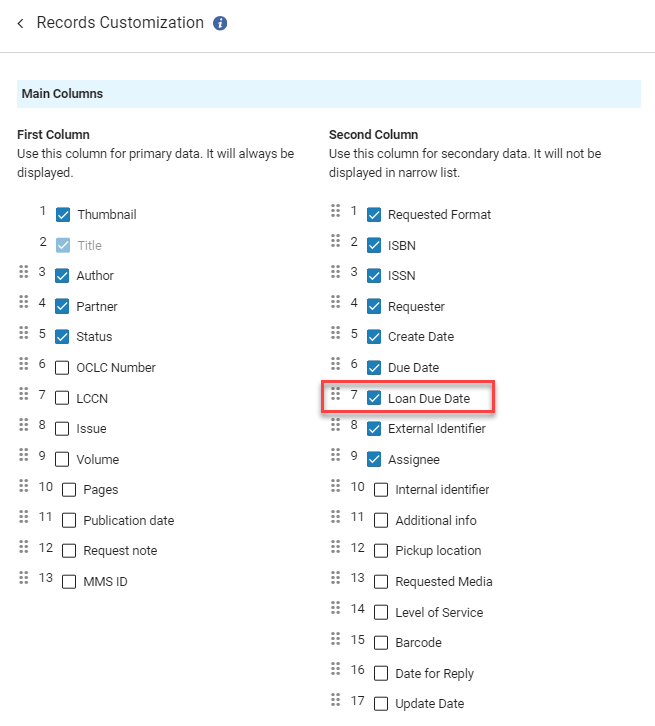
For more information see Customizing the Record Display.
Sort Lending Resource Sharing Requests by Location
February 2024Fulfillment and Resource SharingURM-203325
To efficiently organize your lending requests, you can now sort lending requests by location. After selecting Sort by: Shelving Location, when printing pickup slips, the pickup slips are printed in order by shelving location.
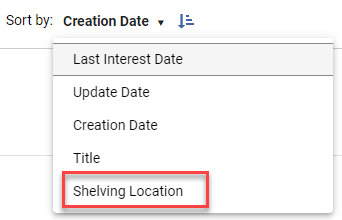
This is only relevant for requests that have not yet shipped.
For more information about working with lending requests see Managing Lending Requests.
Support for Visiting Patrons Functionality Using the Inn-Reach D2IR API
February 2024Fulfillment and Resource SharingURM-198254
It is now possible to integrate Alma with Inn-Reach using version 3 of the D2IR API. This will enable using Alma and Inn-Reach in an integrated manner for supporting the Visiting Patrons workflow, in addition to the classic resource sharing requesting workflow.
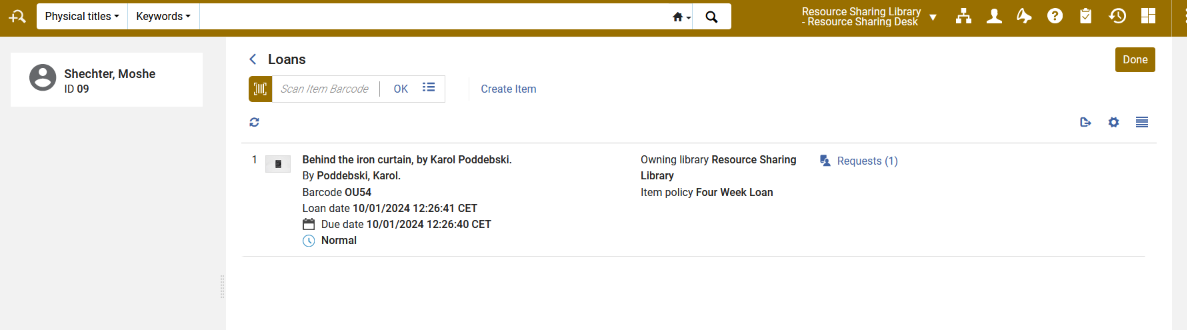
For more information see InnReach API Implementation Guide.
Support Pickup Location for InnReach Requests
February 2024Fulfillment and Resource SharingURM-202218
Alma now supports Pickup Location for InnReach requests. When a new borrowing request is created via the D2IR V3 call, the pickupLocation element is parsed. The information is used to identify the requested Alma pickup location. The location reported by InnReach must be a valid Alma location.
If there is no match to an existing location then the default pickup location of the owning Resource Sharing library is used (as is the case today).
For more information see InnReach API Implementation Guide.
Borrowing Task List — Print Slip in Bulk
February 2024Fulfillment and Resource Sharing
IdeaExchange-203318
The Print Slip bulk action enables the library staff to reprint received or returned slips in bulk. When multiple borrowing requests are selected, selecting Print Slip reprints all the slips.
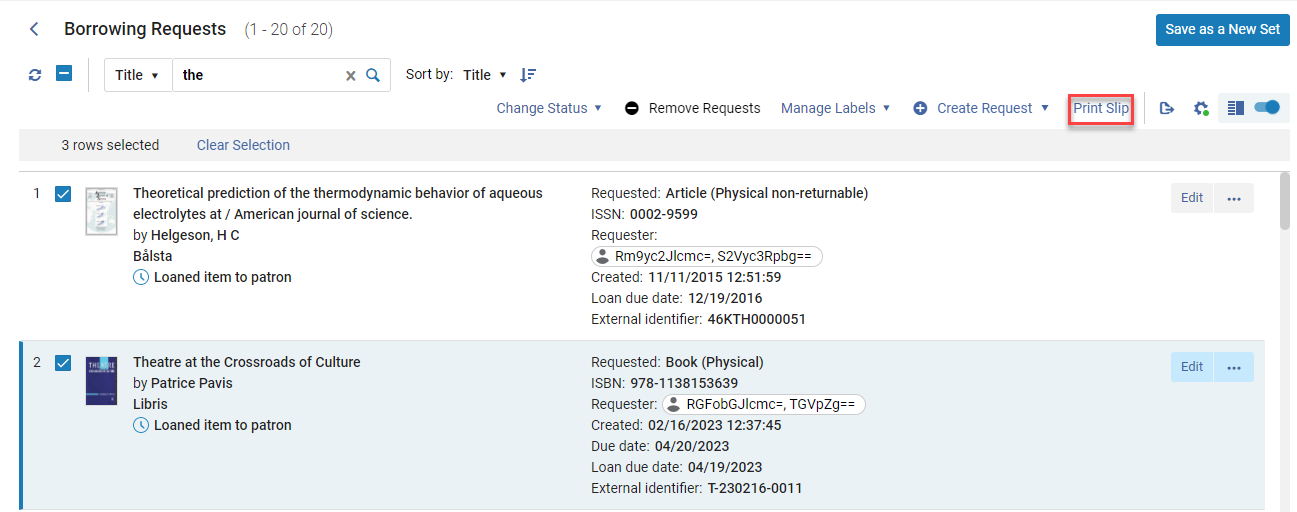
For requests that were not received, no print slip is printed. For requests that were received but not yet returned, the Resource Sharing Receive Slip Letter is printed. For requests that were returned, the Resource Sharing Return Slip Letter is printed. When multiple items are selected, all slips that were received/returned are printed and a message appears indicating which slips were printed successfully and which slips could not be printed.
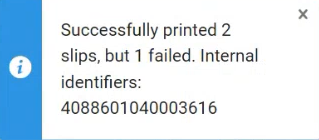
For more information see Managing Borrowing Requests.
Dismiss/Activate Notes Action in Right Pane of Resource Sharing Task Lists
February 2024Fulfillment and Resource Sharing
URM-181532
Both the borrowing and the lending resource sharing task lists now allow dismissing or activating notes from within the right pane of the task list. This makes it easier to manage the request notes without having to navigate to the full Edit form.
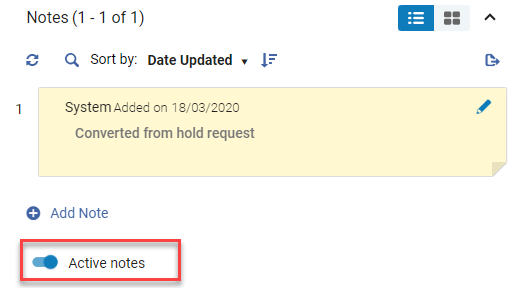
For more information about working with notes see Managing Notes
Conditional Terms of Use for Digital Requests
February 2024Fulfillment and Resource Sharing
Lenders that provide a document delivery service can now indicate whether the supplied document can be made available to the patron in digital form, or whether the digital content requires manual handling by the borrowing staff, such as printing a physical copy that can be shared with the patron as a non-returnable physical copy. This new option enhances copyright control by enabling the lender to specify to the borrower that the document cannot be shared with the patron. As a lender, you can enable the relevant terms from Configuration > Fulfillment > Resource Sharing > Shipping Terms of Use. By default, only the NONE term is enabled.
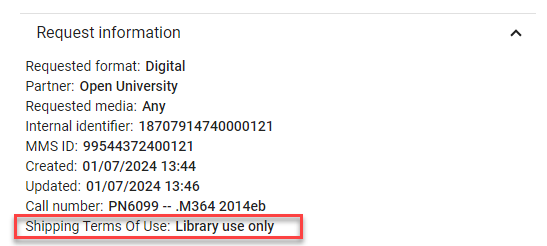
When the message is received on the borrower side and a term of use is selected by the lender, an alert is added to the request indicating that the request has a loan condition. The received digital file is not automatically forwarded to the patron, and the borrower request remains in a Shipped Digitally status.
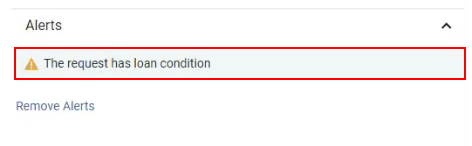
In addition, the Shipping Terms Of Use condition appears in the Request information on the right pane.
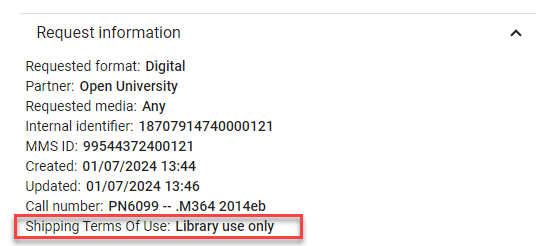
For more information see Delivering Digitized Items Using the Document Delivery Page.
Resource Sharing Off Time Updates
February 2024Fulfillment and Resource SharingURM-209399
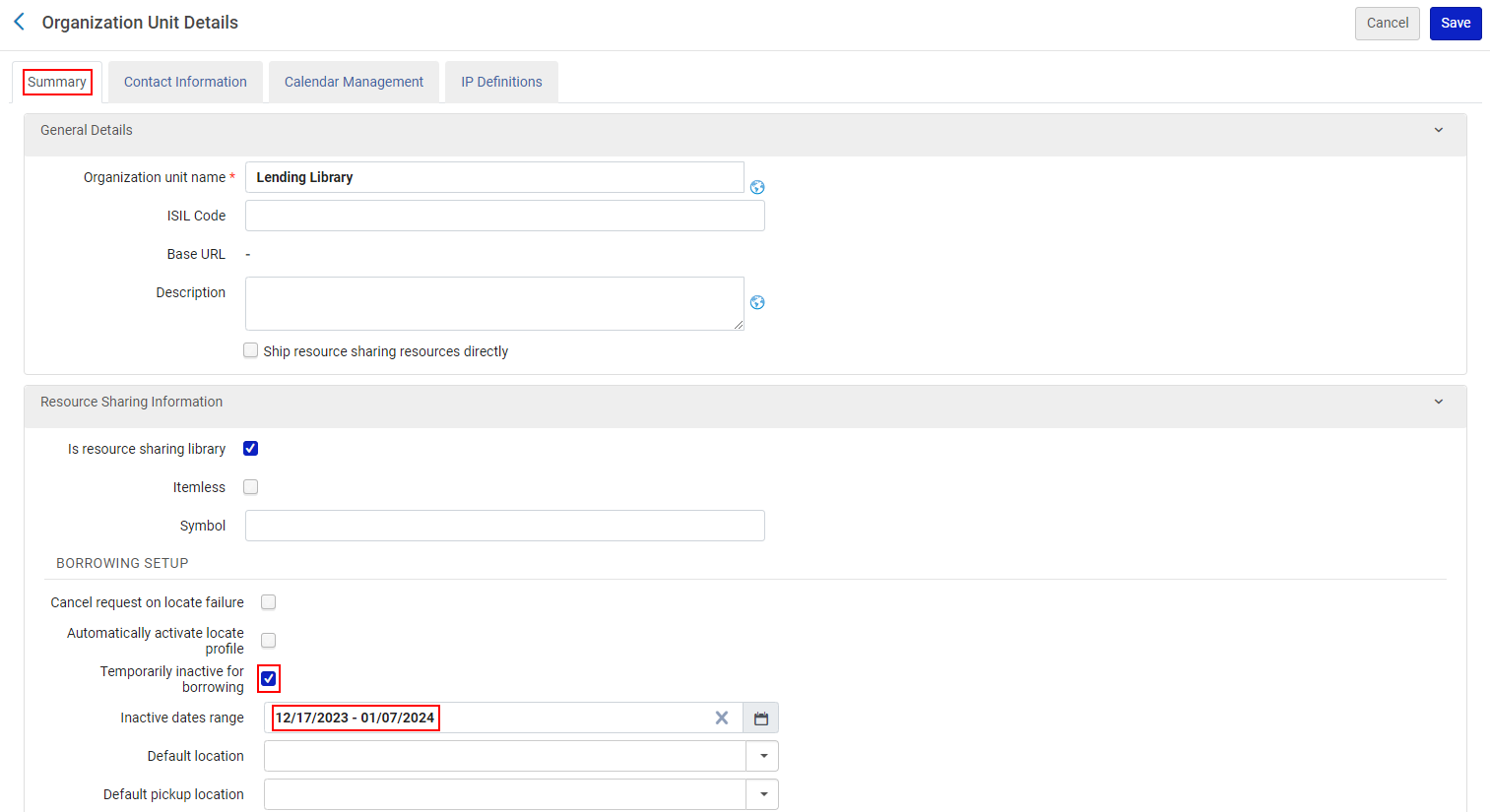
Previously, Rapid users needed to update both Alma and RapidILL when setting their library off times. Now, when the parameter rs_update_rapid_with_lending_offtime(Configuration > Fulfillment > General > Other Settings) is set to true (default false), when updating the resource sharing library's Inactive dates range in Alma (Configuration > General > Libraries > Add a Library or Edit Library Information > Summary tab > check Temporarily inactive for lending), the date range in RapidILL is automatically updated with the data configured in Alma.
- The start date must be less than one year in the future.
- The duration cannot be longer than 30 days.
- Setting this configuration to true means that the configured inactive dates override the dates submitted using RapidILL webpages.
- The temporarily inactive checkbox remains selected after the date range until it is manually deselected.
Linked Open Data Enrichment for IdRef Authorities
February 2024 Linked Open Data
IdeaExchangeURM-203688
The Linked Open Data enrichment process for bibliographic records that are linked to IdRef authorities now also generate URIs to the IdRef authority records. This enables libraries that work with IdRef authorities to benefit from their Linked Open Data capabilities. For more information, see Using Linked Open Data While Working with Bibliographic Records.
Retrieval of LOD Enriched MARC Record
February 2024Linked Open DataURM-201791
Retrieval of a MARC record with Linked Open Data enrichment is now supported using the Bib GET API
For more information see the Developer Network.
BIBFRAME Records Are Now Supported in the SRU as a New Record Schema
February 2024 Linked OpenDataURM-209099
The SRU protocol facilitates the search for a BIBFRAME instance, whether it is sought after as a BIBFRAME record or as a converted MARC record. Users can search for BIBFRAME records in the same manner as they do for other record types. BIBFRAME records seamlessly integrate into existing workflows and are treated as converted MARC records. This support for BIBFRAME enables the integration of Alma search with other automated systems, facilitating processes such as inter-library loan, copy cataloging, and selection.
For more information, see:SRU documentation in the Ex Libris Developers Network.
Read-Only Browse Bibliographic Headings Access
February 2024 MetadataManagementURM-198798
Previously, only users with roles permitting work in the Metadata Editor could access Browse Bib Headings. Now, a read-only Browse Bib Headings is accessible to all users, much like the repository search feature, offering greater access to the library's repository. This enhancement proves beneficial for users seeking to view a list of records by title, author, or subject, even without precise search terms for retrieval.
For more information, see Browsing Bibliographic Headings.
Repository Import - Limit Match of Bibliographic Records to a Specific Electronic Collection
February 2024 Metadata Management
IdeaExchangeURM-96415
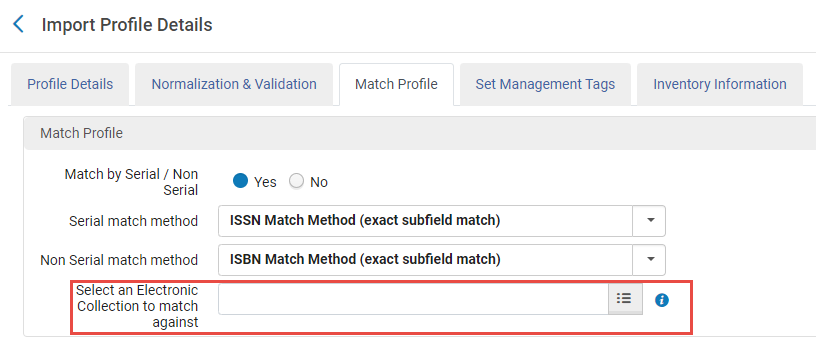
Alma now facilitates targeted matching of incoming repositories specifically to a chosen electronic collection and not the entire catalog. This ensures avoidance of multiple match events, enhancing data accuracy, and simplifying management processes.
For more information, see Creating/Editing an Import Profile: Match Profile.
Option to Publish Entire Bibliographic Records Repository
February 2024 MetadataManagementURM-207520
Institutions now can efficiently export the complete content of their bibliographic records through a newly introduced general publishing option. This enables users to customize pertinent publishing profiles that encompass the entire repository. This option is activated by a new checkbox,Publish the entire repository in the General Profile configuration page.
This option is relevant only for bibliographic-level publishing.
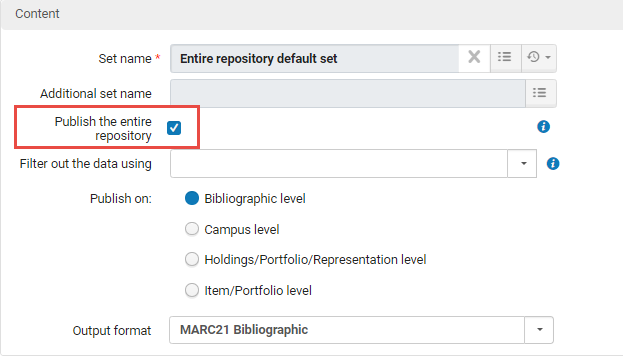
For more information, see Creating a General Publishing Profile.
Filtering Holdings Sets Using Indication Rules
February 2024 MetadataManagementURM-176970
Alma users can now apply indication rules to filter collections of holdings records either during the process of saving a holdings search or by utilizing the "Filter Set" feature on the Manage Sets page. Additionally, when generating indication rules through a form, it is now feasible to create rules based on the metadata of holdings records. This functionality proves especially beneficial for libraries aiming to refine their holdings sets using metadata not included in the search indexes.
For more information, see Creating a Form-Based Indication Rule.
Exporting Bibliographic Rank in the General Publishing Profile
February 2024 MetadataManagementURM-189997
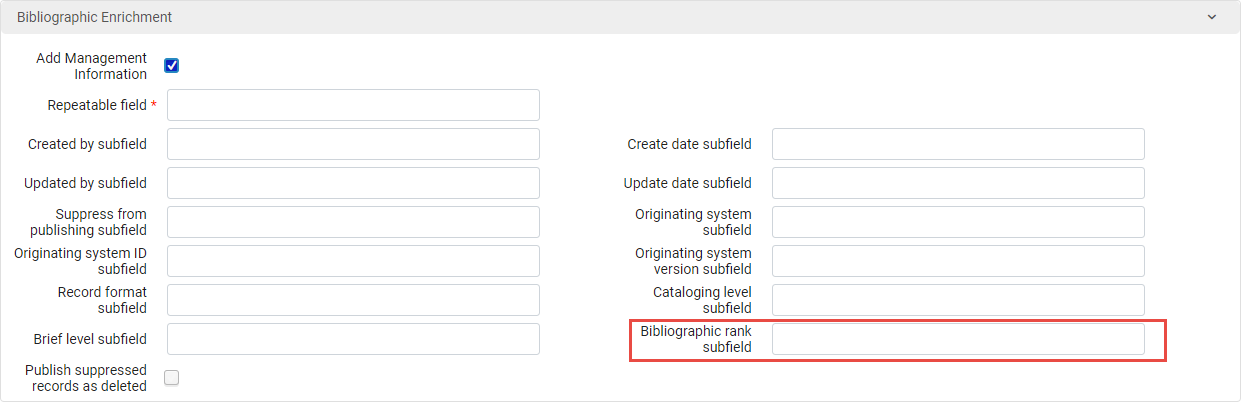
Within the General Publishing Profile, there is now a feature allowing the inclusion of the Bibliographic Rank as part of bibliographic enrichment. To enable this, mark the "Add Management Information" checkbox, provide the repeatable field where you want the enrichment placed (if not already configured), and indicate the subfield for inclusion of the bibliographic rank.
For more information on the bibliographic rank, see Bibliographic Ranking in Metadata Editor.
For more information on the general publishing profile, see Publishing and Inventory Enrichment (General Publishing).
Deletion of Community Zone Originated Records
February 2024 Metadata Management
IdeaExchangeURM-210338
Previously, users were able to remove a Network Zone bibliographic record from their institution tab, given that the record is created within the network zone or has a "Held by" indication. However, deleting a record that originated from the community zone was not enabled. Users are now able to delete a Network Zone bibliographic record from the Institution/Network tab, even if the record has its origins in the Community Zone.
For more information, see Deleting Bibliographic Records.
New Save and Receive Action Added to Item Editor
February 2024 Physical Resource Management
NERS Enhancement (ID #6669)URM-206228
A recently introduced functionality, the Save and Receive action, has been incorporated into the "Physical Item Editor" page in Alma. This action will be accessible under the following conditions:
-
Users possessing Receiving Operator/Receiving Manager roles for the owning library of the Purchase Order (PO) line, and/or users with Receiving Operator/Receiving Manager roles for a library designated as "acquire for" the owning library of the PO line.
-
When the "Receiving date" field is unfilled, and the "PO line" field is populated.
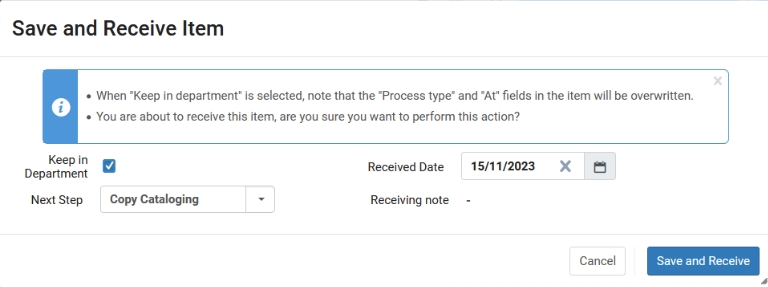
This feature enables users to work on an item (in the Item Editor), save and receive the item in a single action. Upon selecting Save and Receive, a dialogue window is displayed enabling users to fill in the receiving date and choose whether to keep in department.
The department listed under "Currently At" directly impacts the ability to save and receive the item; an error occurs if the user is not in the correct department. Furthermore, the values shown in the "Next step" field within the dialogue window correspond to the "Currently At" department.
For more information, see Updating Item-Level Information.
Configurable Physical Item Condition
February 2024 Physical Resource Management
IdeaExchangeURM-208272
Libraries now can customize the selection of physical conditions available for describing items in the physical item condition field. This feature proves beneficial for libraries seeking a more diverse range of terms to accurately depict the physical condition of their items.
For more information, see Configuring Physical Item Condition.
Pre Release Indication for Upcoming Community Zone Collections
February 2024 Electronic ResourceManagementURM-209420
This will be released gradually during March 2024.
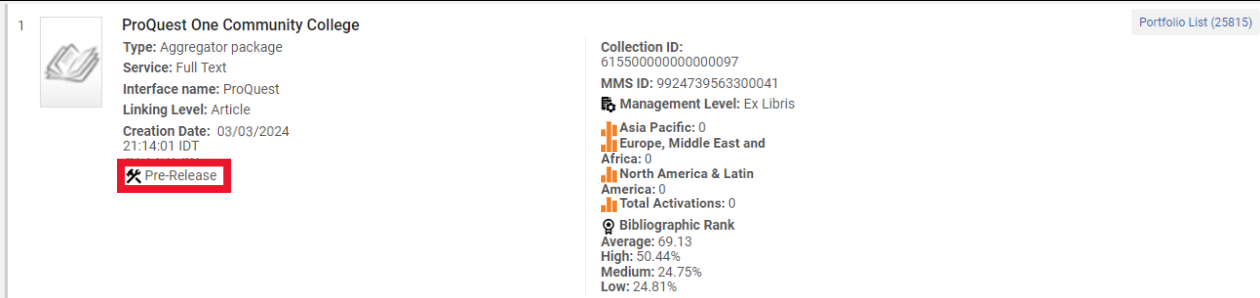
A new Pre Release indication is now displayed for Electronic Collections that are currently in the process of being added to the Community Zone by the Ex Libris content team. This proactive feature enables customers to stay informed about the most recent content additions, eliminating the necessity to contact Ex Libris or provider support teams for updates.
- The Pre Release indicator only appears for Community Zone Electronic Collections.
- For Electronic Collections that are Pre Release, all actions other than the "Portfolio list" are disabled.
- All Community Zone Portfolios under "Pre Release Electronic collections" also have a "Pre Release" indication and will have their actions disabled.
- Community Zone Titles that only have Pre Release portfolios associated with it also have the "Pre Release" indication and will have their actions disabled.
For more information, see Contributing to the Community Zone – Local Electronic Collections.
Automatic Upload Electronic Holdings from Taylor & Francis (Journals)
February 2024 Electronic ResourceManagementURM-208959
Libraries can now easily update their holdings for Taylor & Francis J ournals through the Automatic Upload of Electronic Holdings feature. When activated, this process automatically downloads a file with your holdings information from the Taylor & Francis platform in a standardized format, and then updates your holdings in the Taylor & Francis collection. This integration eliminates the need for manual updates when the Taylor & Francis side makes changes.
Obtaining the token ID for the Journals integration will be available in the Taylor & Francis site from February 13.
The following Community Zone collections should be activated in order to utilize the automated process for journals:
- (Journals) - Taylor & Francis Current Content Access (Community Zone Collection ID = 611000000000002216)
- All portfolios that are updated from the various upload electronic holdings integrations modify the portfolio as "Available".
- All portfolios are activated from the Community Zone.
- A portfolio that is not found in the Community Zone, will not be created locally. The job only activates matching portfolios from the Community Zone.

For more information, see Upload Electronic Holdings from Taylor and Francis.
Collection-Level Access Model Setting
February 2024 Electronic Resource Management
IdeaExchangeURM-209130
Users now have the capability to establish an access model at the collection level, with all portfolios within that collection automatically adopting it. This functionality is especially advantageous for libraries employing auto-activated collections, ensuring that each new addition seamlessly inherits the access model.
This empowers users to define and oversee access models at the collection level, promoting a consistent and efficient approach to portfolio discovery.
For institutions that have the "Ebook Central Perpetual, DDA and Subscription Titles" Collection activated from the Community Zone and have the "Upload Electronic Holdings" integration enabled with "ProQuest Ebook Central", the new "Electronic Collection Access Model" field will be disabled.
For more information, see Managing Electronic Resources.
Overlap Analysis Tool Now Presents Link Resolver Usage Data as Part of the Report
February 2024 Electronic ResourceManagementURM-49550
The Overlap Analysis reports have been updated with the addition of two new columns:
- Link resolver usage (access)
- Link resolver usage (appearances)

Dedicated columns have been incorporated into Electronic Portfolios within the report to showcase the Link Resolver usage of each portfolio. This data mirrors the information available in Alma analytics and can be accessed from the Alma UI under portfolio search results in the "Other details" section.
The "Analysis information" tab in the Excel report generated through the overlap analysis has been improved to display usage range information, consistently covering the past 12 months.
This enhanced information is valuable for librarians as it provides insights into the portfolio's usage, aiding in the assessment of its overall value.
If a portfolio has no associated usage, irrespective of whether it is from the Community Zone or any other portfolio, the report will display N/A as the indication.

For more information, see Overlap and Collection Analysis Reports.
Master Usage Type Renamed to Primary
February 2024 Digital Resource ManagementURM-206020
As part of our continuous efforts to promote Diversity, Equity, and Inclusion and to remove any unintentional bias from our system, the digital representation Usage Type of Primary is now supported when using a CSV file to import the metadata for digital bibliographic records as well as in APIs and when using the SRU protocol. Note that Master is still a supported value for backward compatibility purposes.
OAI MODS Now Supported for Remote Digital Repositories
February 2024 Digital Resource Management
Idea ExchangeURM-204771
OAI MODS format is now supported for importing digital bibliographic records from remote digital repositories. To support this enhancement, the following changes were made:
- When configuring a remote digital repository (Configuration > Resources > Record Import > Remote Digital Repositories), OAI MODS is now available as a format. Note that you must select Other for the remote system type for this option to be available:Remote Digital Repository Details - Format MODS
For more information, see Managing Remote Digital Repositories.
- When configuring a digital import profile (Resources > Import > Manage Import Profiles) and selecting a remote digital repository instance with OAI MODS configured as the format, the Source format and Target format fields are filled in with OAI MODS:Import Profile Details for MODS Remote Repository
Digital Viewer Now Supports ePub
February 2024 Digital Resource Management
Idea ExchangeURM-197712
The Digital Viewer now supports the display of files in ePub format.
Collection Type Now Changeable
February 2024 Digital Resource ManagementURM-206360
You can now change the collection type of a collection from logical to fixed-list and from fixed-list to logical. You can do this by selecting or clearing the Logical Collection checkbox when editing a collection. (Previously, this was non-editable.) When a logical collection is changed to a fixed-list one, the titles in the collection are changed to a fixed list and are no longer updated. When a fixed-list collection is changed to a logical one, you must add a logical set to the collection. A job updates the titles of the collection according to the set.
For more information on Collections, see Managing Collections.
Update Record Identifier with MMSID Task for MODS Now Available
February 2024 Digital Resource ManagementURM-206477
The new Update Record Identifier with MMSID normalization task is now available to add to processes for the MODS metadata schema (Resources > Cataloging > Metadata Configuration > MODS > Add Process > Add Task):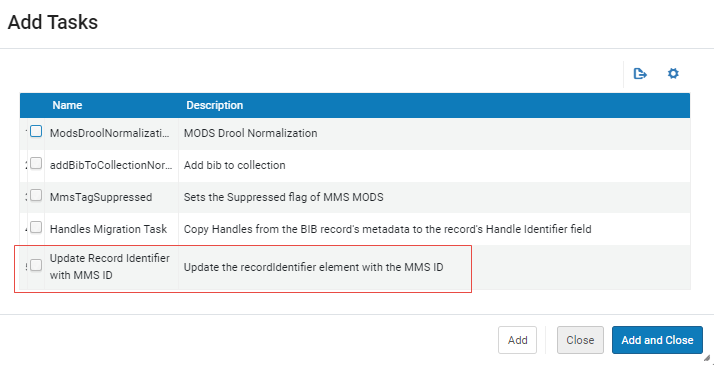
The task updates the recordIdentifier element with the Alma MMS ID.
When adding this task to a process, an option is available to record the change in the recordinfoNote element under the recordIdentifier element.
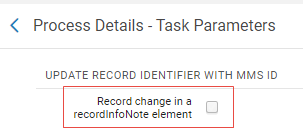
Select the checkbox to have the change recorded as a note in the MODS record.
For more information on MODS normalization processes, see Working with MODS Fields, Normalization, and Validation.
Download All Files in Representation
February 2024 Digital Resource ManagementURM-197776
You can now download all of the files of a representation with one action. To support this feature, a Download All link was added to the Digital Representation Resource Editor.
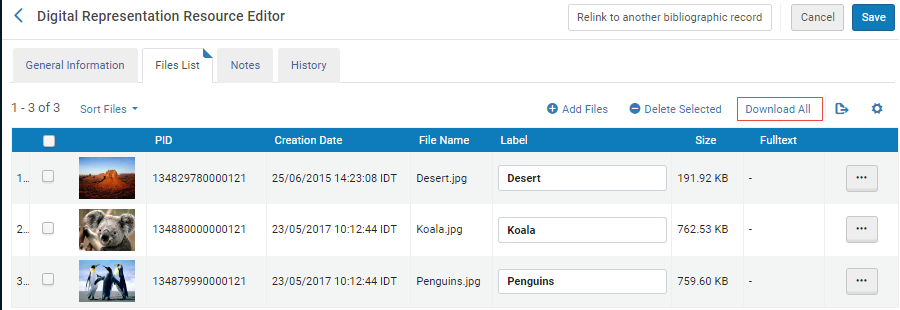
Selecting the Download All link saves the files of the representation to a zip file on your computer. If the total download size is very large, the new Download Digital Files job runs and downloads the files to an external server. (You can monitor the job from Admin > Manage Jobs and Sets > Monitor Jobs.) When the job finishes, you are sent an email with a link to download the files.
MODS Enhancements
February 2024 Digital Resource ManagementURM-209971 URM-210047
The following enhancements were made to the Alma and Primo search and display fields for MODS records:
- Update to Alma search keywords:
- <physicalDescription><form> is searchable under the title's Other Physical Details keyword.
- <physicalDescription><digitalOrigin> , <originInfo><dateOther> , <originInfo><dateCaptured> without iso8601 encoding,<language><languageTerm> with attribute type equals text is searchable under the title's Notes keyword.
- <language><languageTerm> with attribute type equals code is searchable under the title's Language keyword.
- <identifier> with a type attribute value that is not already mapped today (for example, not isbn, issn, ismn) is searchable under the title's Standard Number keyword. The type attribute value is searchable under the Standard Number Source keyword.
- <location><holdingSimple><copyInformation><sublocation> is searchable under the title's Sublocation keyword.
- <relatedItem><location><url> is searchable under the title's Electronic Location and Note keyword.<location><url> is already searchable.
- Update to Primo display:
- <location><url> and <relatedItem><location><url> elements are displayed under the Links section in Primo.
- <physicalDescription><form> and <physicalDescription><interentMediaType> are displayed under the title's Physical Description / Format field.
- <language><languageTerm> with attribute type equals code is displayed under the title's Language field.
- Update to Primo search:
- <language><languageTerm> with attribute type equals code is searchable under the title's Language keyword.
- <originInfo><dateOther> , <originInfo><dateCaptured> without iso8601 encoding,<identifier> with a type attribute value that is not already mapped today (for example, not isbn, issn, ismn) is searchable under the title's General keyword
- For display and indexing purposes, in Alma and Primo, a colon is added to the bibliographic title between the <title> element and the <subtitle> element.
Rollout of the New Layout for the PO Lines Task List
February 2024Acquisitions
The new, next-generation, Alma UI design is available for the PO Lines task list. In this release, the new UI is automatically set as the default for all users, with no option to opt out.
For a general overview of the new PO Lines task list, see New Unified PO Line Task List. See also Searching for PO Lines - New Layout;Managing PO Lines - New Layout.
For more information see the New Unified PO Line Task List in the Alma 2023 Roadmap Webinar Series.
There is a known issue with saving a faceted PO lines list as a logical set with the following facets:
- Owner
- Assigned user
- Vendor account ID
- Creation date
- Sent date
- Renewal date
The issue will be corrected as part of the March 2024 release. Until then, we recommend to base logical sets on advanced search query results and not on facets.
Improvement to the New Layout for PO Lines
February 2024AcquisitionsURM-209514
Some improvements were implemented to the new layout for PO Lines.
- The existing Material Supplier and Fund fields were enhanced to allow users to select the value from a list which opens in a sliding panel. This is in addition to the existing option of selecting a value from the dropdown menu or typing the name of the vendor/fund.
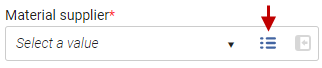
The Change Vendor dialog box will not have the option to select a vendor from a list within a sliding panel.
-
There is now a default action in the confirmation pop up when selecting Save or Save and Continue. This saves the user from having to explicitly select the common action.
-
Changes in the PO line (such as change of material type) are now reflected in the related inventory. This is similar to the behaviour in the old layout.
-
Save and Continue is now considered to be a main action and appears more prominently on the right hand side with the institution theme color.
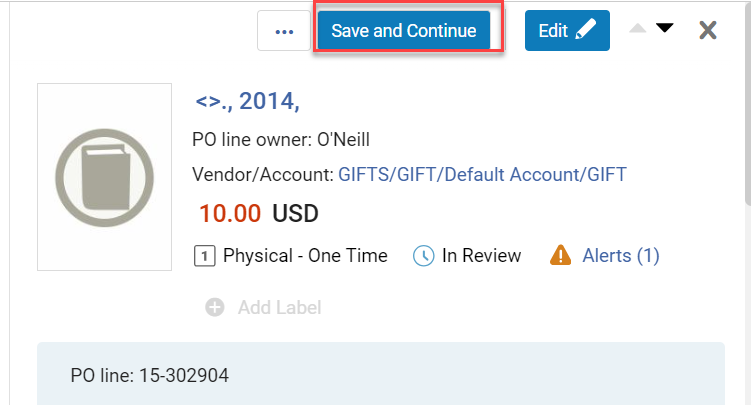
For more information see Editing PO Lines.
Enable Users to Keep in Department when Receiving Items from a PO Line
February 2024AcquisitionsURM-207294
When performing the Receive action in the PO line for Ordered Items, a dialog box now appears enabling users to update the receiving information.
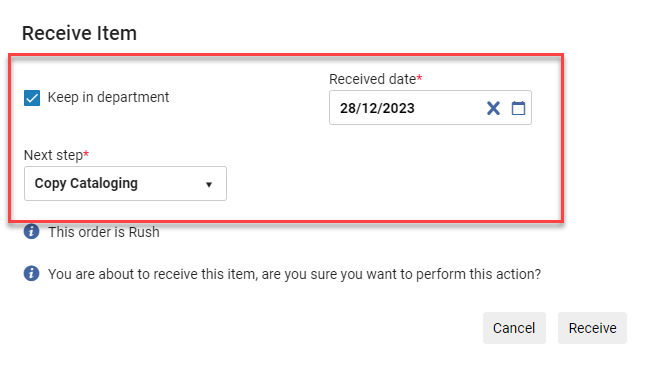
For more information see Receiving Physical Material.
The department listed under Currently At directly impacts the ability to receive the item from the PO line; an error occurs if the user is not in the correct department. Furthermore, the values shown in the Next step field in the dialogue window correspond to the Currently At department.
Bulk Deletion of COUNTER Reports
February 2024Acquisitions
Idea Exchange-99582
Previously when deleting COUNTER reports, users needed to delete them one by one. Now, before deleting COUNTER reports, users have an option to select multiple reports for deletion. In addition, the Select All and Delete All options were added.
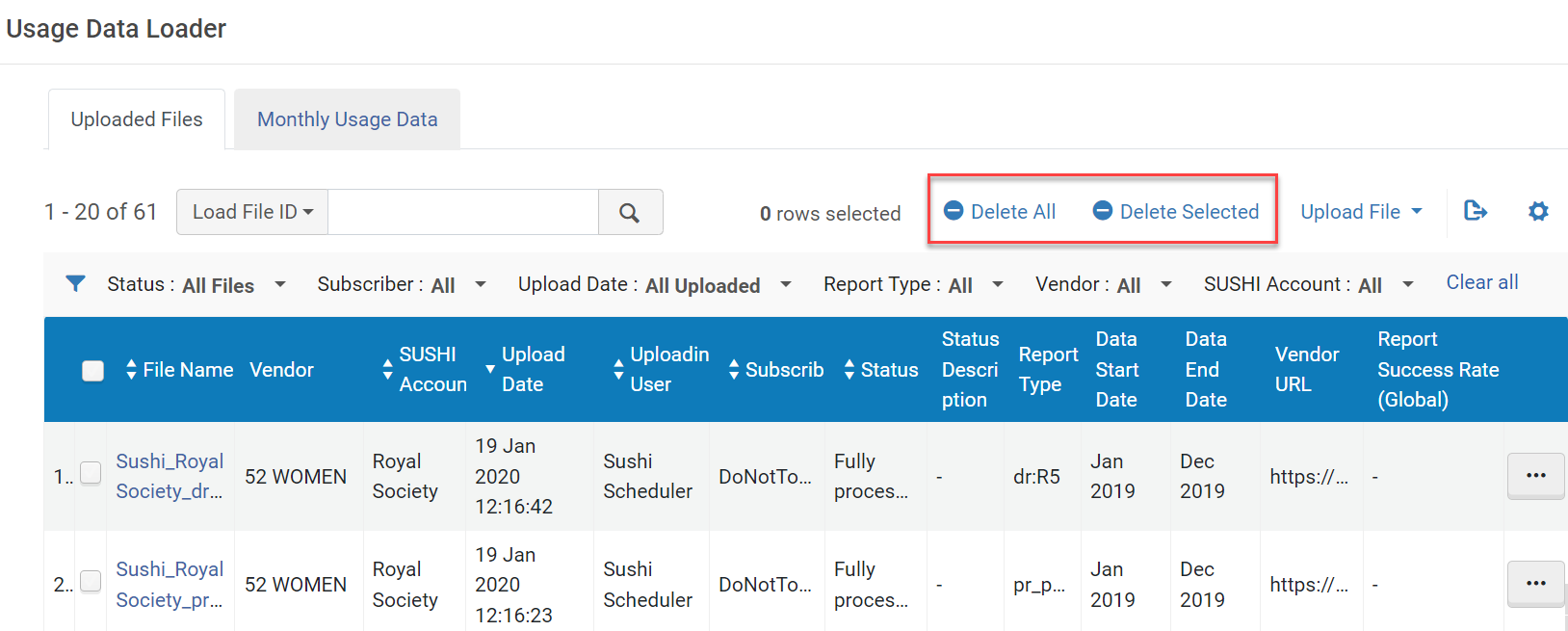
This functionality is only available to the Usage Data Operator role.
For more information see Manually Uploading and Deleting COUNTER Data.
Receiving Workbench - New System Event (Webhook) for Receiving Continuous Materials
February 2024AcquisitionsURM-180458
Alma Integration Profile type "Webhooks" (Configuration > General > Integration Profiles) was enhanced with a new event. This event is called Receive - continuous PO line.
When selected, an event will be triggered in the following cases:
- From the receiving workbench select the Continuous tab and then the Manage items screen. Then select Receive in the row actions menu. As a result, an event is sent for the selected item.
- From the receiving workbench select the Continuous tab and then the Manage items screen. Select multiple items and then Save & Receive in the row actions menu. As a result, an event is sent for each item which was selected.
- From the receiving workbench select the Continuous tab and then the Manage items screen. Select Receive new items.
An event upon receiving will only be triggered for an item received from the Receiving WB in the Continuous tab. The One-Time tab will not trigger an event when an item is received.
For more information see Webhooks.
Top Right Menu in Alma Now Supports 'Alt' Keyboard Shortcuts and Voice Dictation Software
February 2024 User Experience, Accessibility &InfrastructureURM-191122
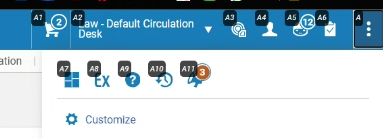
Users can enhance accessibility by utilizing the 'Alt' shortcut mechanism or voice dictation software to interact with the top right menu icons. By pressing the 'Alt' key, the menu displays shortcut options, enabling users to navigate and select functions without relying extensively on mouse input.
For more information, see Global Alma Hot Keys.
For information on the keyboard shortcuts available in the MD Editor, seeMetadata Editor Menu and Toolbar Options.
Letters Configuration - Easy Selection of Letter Example XML File
February 2024 User Experience, Accessibility &InfrastructureURM-206136
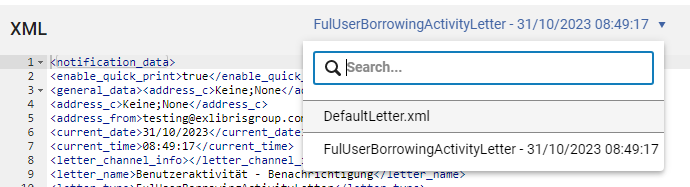
Previously, users had to navigate to the Letter Examples side-pane, choose the desired XML by selecting the corresponding radio button, and then click Save to pick another XML letter file for testing the XSL. Now, a new dropdown has been introduced above the XML editor, displaying all available example letters XML files. Users can effortlessly switch between files by selecting an option from this dropdown. Upon selection, the XML editor content is replaced with the information from the chosen file, and the letter preview is automatically refreshed.
For more information, see Using Example Letters for Testing.
Manage Sets List Now Customizable
February 2024 User Experience, Accessibility &InfrastructureURM-204678
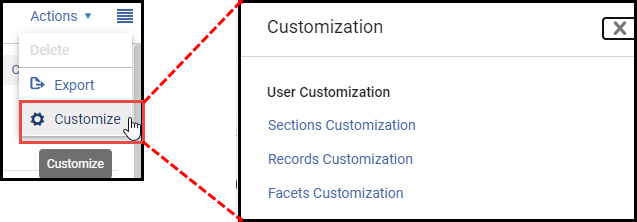
Users now have the option to personalize various aspects of the Manage Sets List. This includes determining the sequence and appearance of sections and facets, as well as customizing the display of records. To begin customizing the Manage Sets List, simply select the customization icon ( ) located at the top right corner of the page. This provides you with a range of options that enable you to configure the sections within the edit view, select the elements visible in the record view, and select the facets that are available for the list.
For more information, see Manage Sets List Customization.
Information Icon - Aria Label Enhancement
February 2024 User Experience, Accessibility &InfrastructureURM-201538
Alma now enhances the PopOver component (Information icon ) to enable support for both Click and Esc commands. When hovering over the icon, the text "More information" is revealed. Clicking the component displays more descriptive text on the focused are in the UI. Deactivating the component can be achieved by selecting the Tab button, selecting the Close icon (
) in the text box or clicking outside the text area. For more information, see Info Icon.
Real-Time Notification Upon Job Completion
February 2024 User Experience, Accessibility &InfrastructureURM-203453
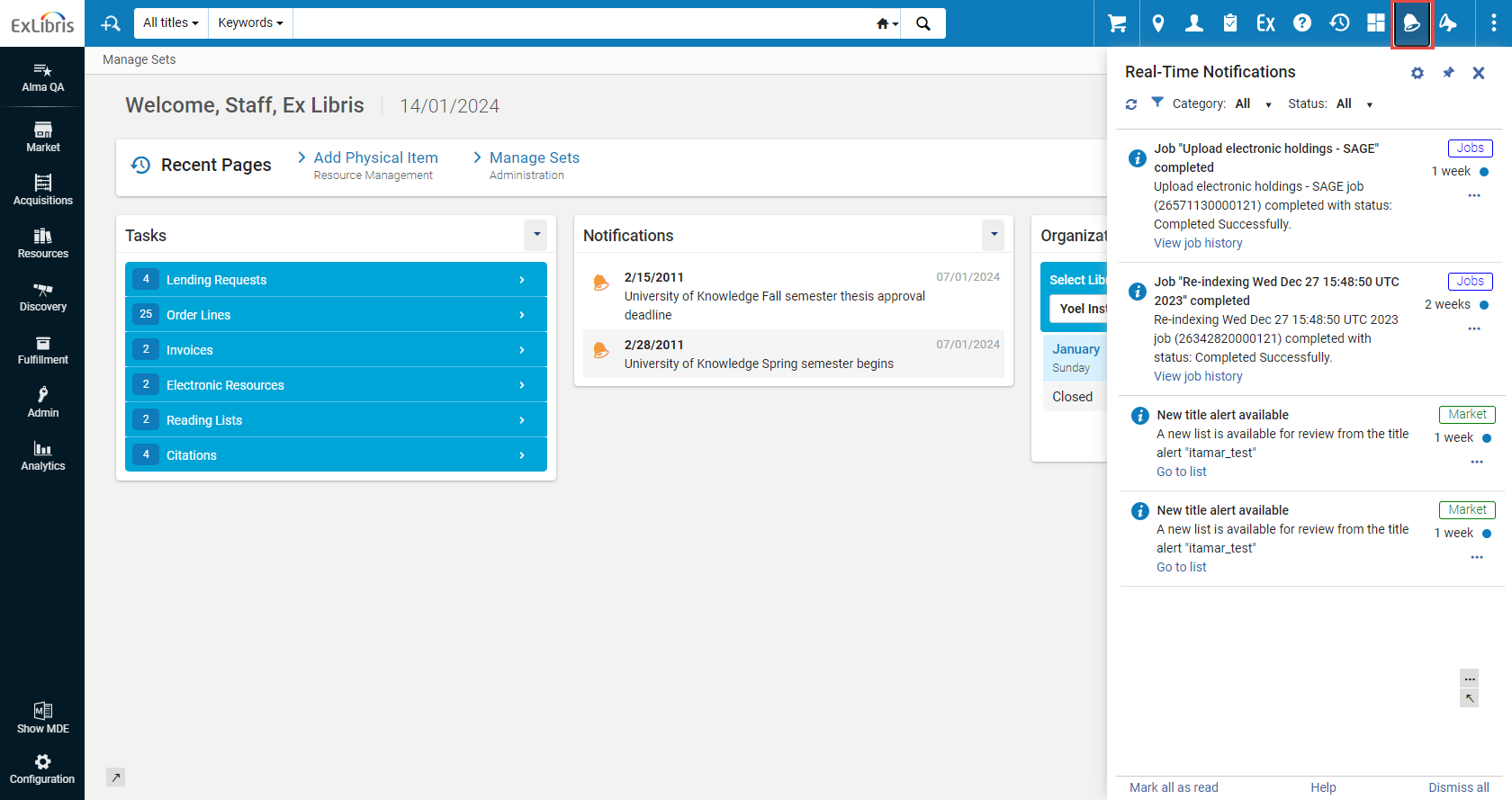
Upon completion of a job initiated from the UI, a popup notification appears. Furthermore, all such notifications are accessible through the notification icon ( ) on the top menu bar. Rather than repeatedly refreshing the page while awaiting job completion, you can engage in other activities, and a notification will appear regardless of your location in the UI.
For more information, see Real-Time Notifications.
Enable Filters Selection to be Sticky Cross Sessions
February 2024 User Experience, Accessibility &InfrastructureURM-207164
Previously in the Alma UI, scope filters were automatically defined by default. Consequently, every time a user visits an Alma page that was previously viewed and set with the defined filters would need to re-set the filters because the page reverted to the default settings.
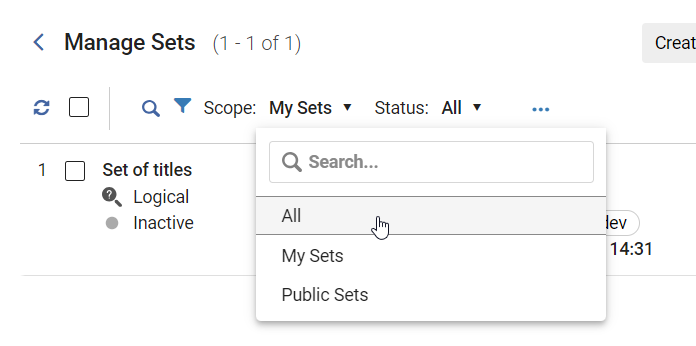
To address this, Alma now enables users to define filters based on their preferences. By making the filter sticky, the recurring need to manually re-select the defined filter settings of a viewed page is eliminated.
The sticky filter feature has been implemented in the Manage Sets UI. The Scope filter, for example, is automatically saved so that the previously viewed filter settings are sticky and are saved when users re-visit the page.
For more information, see Managing Search Queries and Sets > Filtering Sets.
Customization Improvement of the New Layouts Lists
February 2024 User Experience, Accessibility &InfrastructureURM-207364
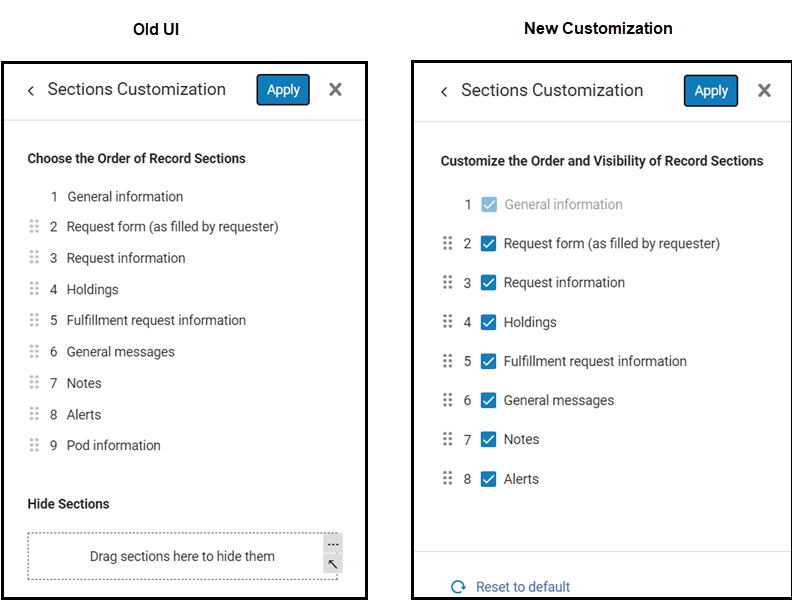
The enhancement of the latest layout lists now offers improved customization. Users are no longer required to manually drag and drop entries to conceal them. Instead, checkboxes are provided, enabling users to easily select and hide entries within the new layout lists. One instance of this improvement is found in the customization of sections for Lending Requests.
For more information, see Lists and Tables in Alma.
Recommendation for Mail Relay and Support DomainKeys Identified Mail (DKIM)
February 2024 User Experience, Accessibility & Infrastructure
NERS Enhancement (ID #8197)URM-193518
(Updated: February 22, 2024) The best practice and recommended approach is to move over to your own institutional mail relay.
Gmail and Yahoo announced that emails lacking DKIM signatures may be flagged as spam.
DKIM support is applicable to all email service providers and not just subject to Gmail and Yahoo.
DKIM, or DomainKeys Identified Mail, serves as an email authentication method specifically designed to identify fraudulent sender addresses in emails, addressing the issue of email spoofing.
It is strongly recommended to configure DKIM, especially for institutions sending emails to Gmail and Yahoo addresses. Additional email service providers are expected to follow up with similar practice in the near future.
The following instructions are relevant for institutions that have configured the Mail-Handling integration profile to utilize "Send directly from Ex Libris" while using their own domain, at the 'SMTP EnvelopeFrom address' field (as opposed to the @exlibrisgroup.com address):
Institutions that use Ex Libris's mail relay and wish to continue using it, should configure DKIM to ensure their emails remain trusted and mitigate the risk of your emails being treated as spam.
Once the DKIM functionality is activated for your institution, the Mail-Handling Integration-Profile will include support for DKIM digital signatures in outgoing emails. Configuration instructions can be found here.
If your institution cannot undertake any of the above, please reconfigure your Mail-Handling integration profile to "Send directly from Ex Libris" and set the 'SMTP EnvelopeFrom address' field to <your_user>@exlibrisgroup.com
For more information, see:
SAML and CAS Now Available as Authentication Methods for Analytics Reports
February 2024 Analytics and InsightsSF: 06718285 06718883 06793209URM-197777
You can now configure Analytics to use SAML and CAS as authentication methods when accessing the report URL from analytics objects. To configure SAML or CAS as the authentication method, set the analytics_auth_method parameter (Configuration > Analytics > General Configuration > Other Settings) to SAML or CAS.
Configure Custom HTTP Header to be Sent with Webhook Requests
February 2024APISF:06892033URM-207227
Users can now optionally configure a custom HTTP header to be sent with each webhook request. The header name and value should be separated by “:”

For more information see Webhooks.
View Full Workbook in Analytics Link Added to DV Homepage
February 2024 Analytics and InsightsURM-209864
When a Data Visualization dashboard is added as the Alma homepage, only one tab of the dashboard is displayed. To display the full DV workbook, a new View Full Workbook in Analytics link was added to the bottom of the homepage. Selecting the link opens the DV dashboard within Alma Analytics, allowing access to all of the workbook tabs.
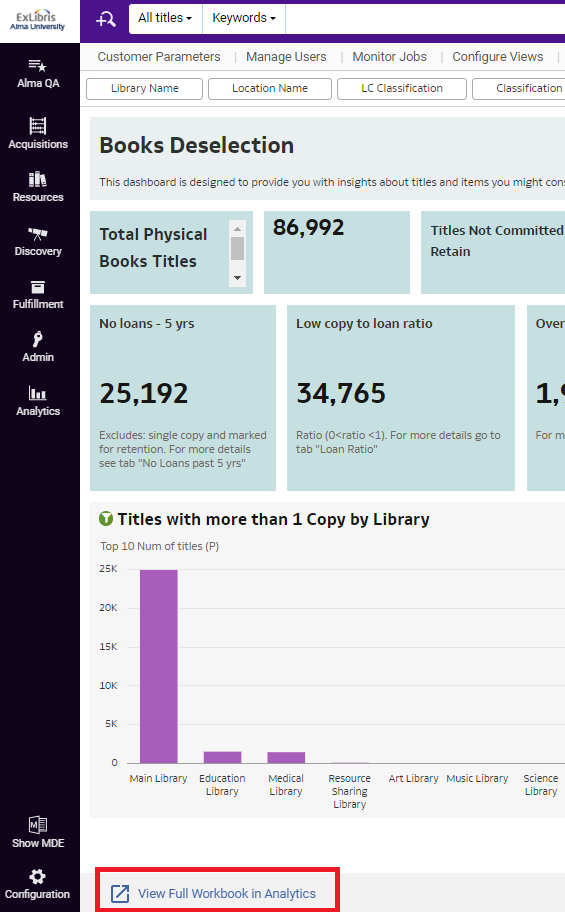
For more information on configuring a Data Visualization dashboard as the Alma homepage, see To select a data visualization (DV) workbook to be displayed as the Alma homepage.
Physical Books Retention and Physical Books Deselection Dashboards Now Available
February 2024 Analytics and InsightsURM-211100
The Physical Books Retention and Physical Books Deselection data visualization dashboards are now available under theAlma > Inventory folder. These dashboards provide collection managers with insights on the uniqueness and redundancy of the physical book items in the institution. The dashboards display visualizations of physical book data according to different cross-sections such as classifications, libraries, and marked for retention. In addition, there are tabular reports for in-depth analysis.
- Physical Books Retention
The Physical Books Retention dashboard is designed to provide insight about single book items in the institution and possible actions they require. For example, identifying items that must be committed to retain by the library holding them. Data is derived from Physical Items, Titles, and Fulfillment subject areas.
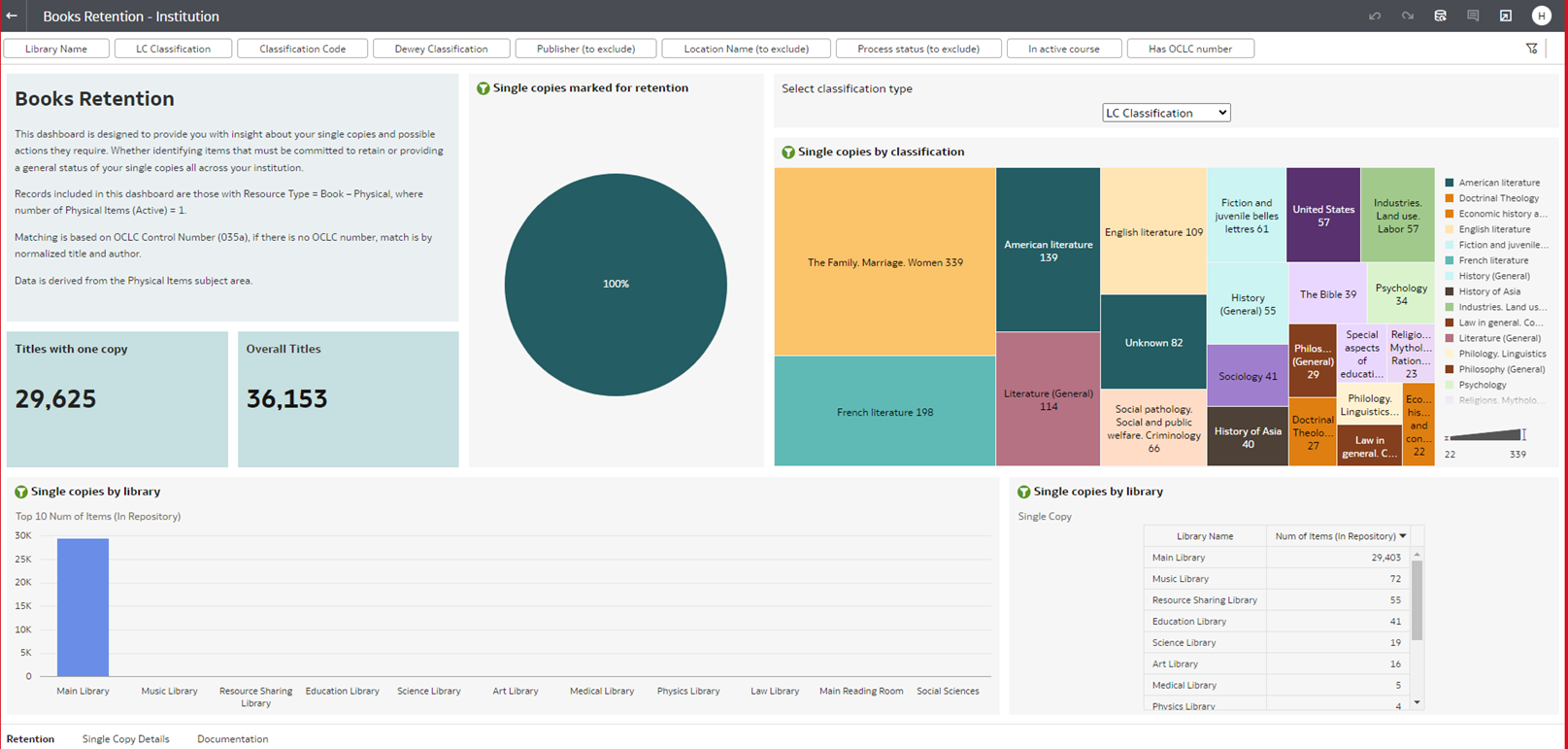 Physical Books Retention
 - Physical Books Deselection
The Physical Books Deselection dashboard is designed to provide insights about items you may want to deselecting due to low usage or alternative ways to receive the title. Data is derived from the Physical Items, Titles, and Fulfillment subject areas.
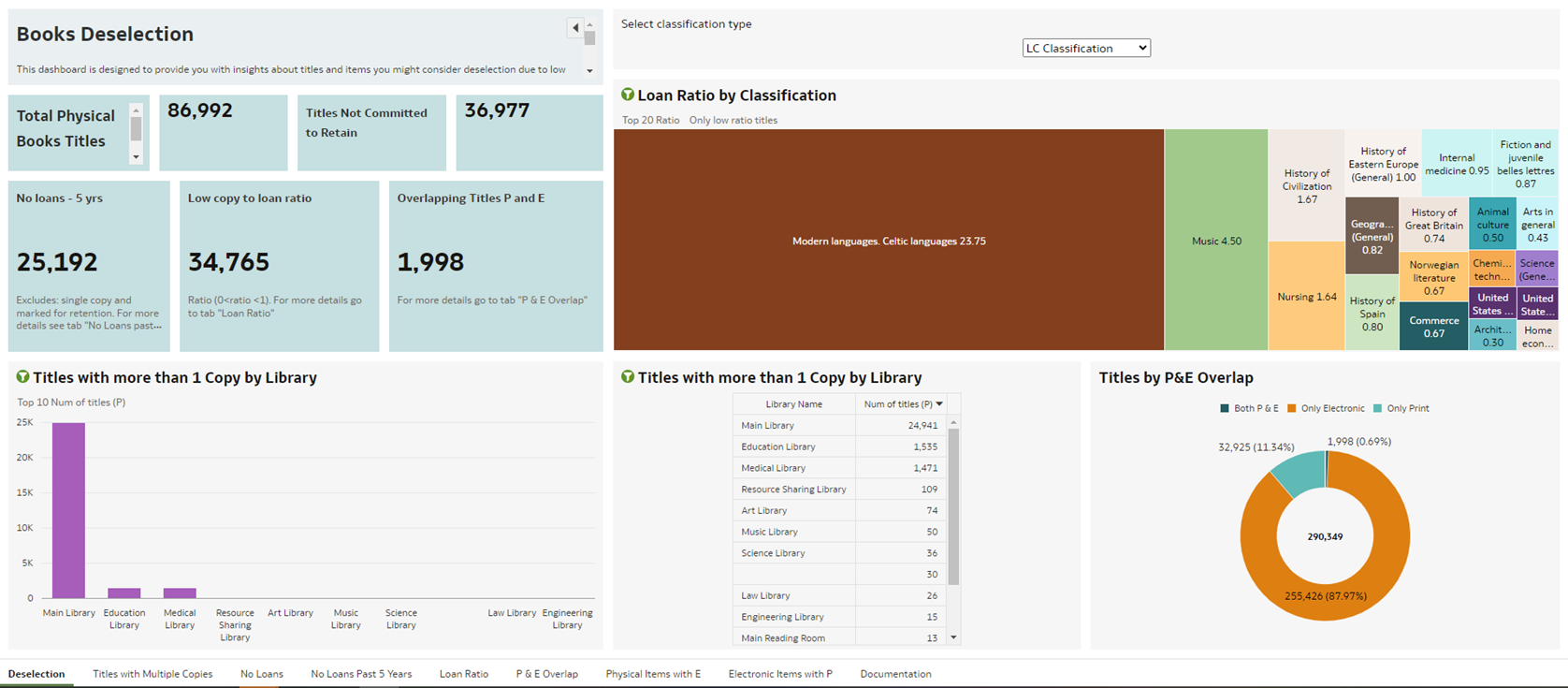 Physical Books Deselection
For documentation on the dashboards, see the Documentation tab of each dashboard as well as the information on each individual report tab.
These dashboards were added as out-of-the-box objects to the Alma menu for the following roles: Analytics Administrator, Designs Analytics, General System Administrator, Physical Inventory Operator, and Physical Inventory Operator extended.
Additional Enhancements
-
February 2024 Linked Open Data
The Linked Data enrichment process applied to bibliographic records connected to FAST authorities is revised to the URI format to align with the entity URI structure. The format now follows this pattern: http://id.worldcat.org/fast/XXXXX. For more information, see Linked Data in the Developer Network. -
February 2024 Linked Open Data
Support for BIBFRAME records extends to their publication as part of general publishing. Users can leverage BIBFRAME works and instances held in Alma for use in external systems as required. For more information, see Publishing and Inventory Enrichment (General Publishing).
-
February 2024 Metadata Management
The SBN "Italian Union Catalogue (Servizio Bibliotecario Nazionale)" redirection mechanism is enhanced to support the handling of Bibliographic related records. For more information, see SBN Redirection (Fusione) -
February 2024 Digital Resource Management
You can now display an image in Full View when viewing images with the Digital Viewer on a mobile device in portrait orientation. To display an image in Full View, select the Full View icon or tap the image.
-
February 2024 Analytics and Insights
The following fields were added to E-Inventory > Portfolio Details for Consortia Members > Institution to align it with the fields located under the Institution dimension available in every subject area:-
Institution Address Line 1
-
Institution City
-
Institution State Province
-
Institution Country
-
Institution Postal Code
-
Institution Timezone
-
Data Available As Of
-
Data Updated As Of
-
-
February 2024 Analytics and Insights
The ACRL and IPEDS dashboard was updated to reflect the changes made to the guidelines for 2024. -
February 2024 Fulfillment and Resource Sharing SF: 06918869
Libraries can now configure what happens when a purchase request is relinked to a new MMS ID. When a purchase request is linked to a citation, and the purchase request is then relinked to a different MMS ID, when the parameter purchase_request_relink_citation (Configuration > Fulfillment > General > Other Settings) is set to true (default), the citation is linked to the new MMS ID. When the parameter is set to false, the citation remains linked to the original MMS ID.
If the original MMS ID had an associated copyright record, the copyright is cancelled and not applied to the newly linked MMS ID, and an alert is added indicating that the copyright was cancelled.
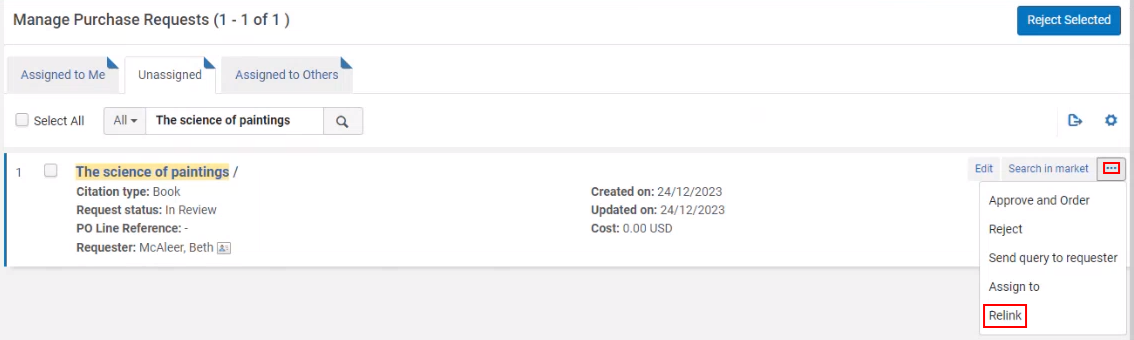
For more information, see Creating Requests for Citations.
February 2024 Fulfillment and Resource Sharing
Excel files are now supported in the course loader (Configuration > General > External Integrations > Integration Profiles) directory, in addition to .csv.

For more information, see Configuring Course Loading.
-
February 2024 Fulfillment and Resource Sharing
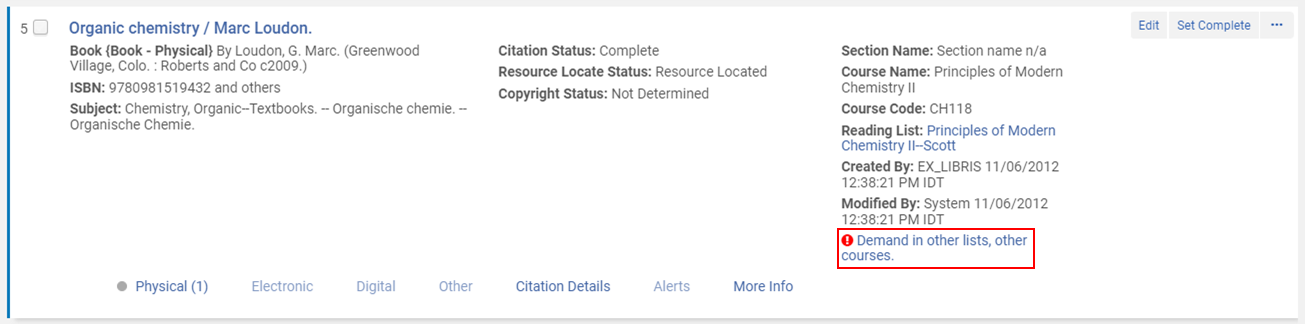
When configured, archived lists can be included in the Demand in other lists calculation that enables library staff to see which reading lists or courses utilize the same resource when reviewing and processing citations. When the parameter demand_in_other_lists_include archived_lists (Configuration > Fulfillment > General > Other Settings) is set to true (default false), archived lists are included in the Demand in other lists calculation and are displayed in the This Record In Other Lists table. When set to false, citations associated with at least one archived list are excluded from the Demand in other lists calculation.
For more information, see Configuring Other Settings (Fulfillment).
Resolved Issues
| SF number | Area | Description |
|---|---|---|
| 06856983 06941132 | Acquisitions | After deleting PO Lines, the list did not refresh automatically. This was fixed. |
| 06860134 06957562 06950279 06858390 06959022 | Acquisitions | Exporting itemized sets to Excel did not work. This was fixed. |
| 06754687 | Acquisitions | In the New Order Import Profile, selected Interested User options were cleared when Scheduler status was activated. This was fixed, and the Interested User checkboxes now remain selected even when fields in another tab are updated. |
| 06906368 | Acquisitions | PO Lines marked as "No Charge" were incorrectly assigned the status "Waiting for Invoice." This was fixed, and No Charge PO Lines are now closed after receipt or activation. |
| 06922937 | Acquisitions | Selecting certain PO Line facets returned libraries that were outside the scope of the user's role. This was fixed. |
| 06941890 | Acquisitions | In the new PO Line layout, changes to the Material Type were not copied to associated items. This was fixed. |
| 06900098 06976949 06985620 06987622 06976246 07011743 06972222 06957366 06978536 | Acquisitions | In the new Acquisitions layout, removing the subscription interval set the field to null instead of 0. This was fixed for that field and other vendor information fields as well. |
| 07013678 07009543 07003504 07005155 07000664 | Acquisitions | When the license on a PO Line was not changed, it incorrectly overwrote the resource license. This was fixed. Now, only explicit license changes on the PO Line override the resource license. |
| 06924048 06973031 | Acquisitions | In the new PO Line layout, Reporting Codes were displayed in alphabetical order instead of the configured order. This was fixed. |
| 06918957 06952161 06960746 | Acquisitions | In the new Acquisitions layout, an error occurred when using a template for an order without inventory. This was fixed. Templates must still match the PO Line type. |
| 06949405 06960553 06960570 | Acquisitions | In the new PO Line layout, several display and messaging issues occurred, including problems with the Save and Continue button, Deferral Reminder, and Deferring Reason fields. These were fixed. |
| 05310951 05317919 06656854 | Acquisitions | When sending an EDI Order, the error "EDI File Created Empty" could appear. Additional logging was added to help identify the cause when the issue occurs. |
| 06866241 | Acquisitions | New Order imports sometimes created duplicate orders and multiple copies for the same title. This was fixed. |
| 06906912 | Acquisitions | In the new PO Line layout, activation status calculations were incorrect, displaying "Not Activated" instead of "Active." This was fixed. |
| 06956063 06959041 | Acquisitions | In the new Acquisitions layout, PO Lines were automatically assigned to the current user after relinking. This was fixed. |
| 06960968 | Acquisitions | POs could be created with trailing or leading spaces in the PO number, causing EDI file transmission failures. This was fixed, and spaces are now trimmed before saving. |
| 06794699 06943594 06648178 06645510 06799215 | Acquisitions | When creating an invoice from a PO, the Search by Title option was not available. This was fixed. Searching by title remains unavailable when "All" is selected as the search criterion. |
| 06733671 | Acquisitions | In the PO Line Aggregated Claim Letter, when all claimed PO Lines belonged to the same library, the institution address was displayed instead of the library's preferred address. This was fixed. |
| 06970282 06954681 06968974 | Acquisitions | In the Fund Editor, Expended and Encumbered balances were not displayed as clickable links when the form was opened in view mode. This was fixed. |
| 06905126 | Acquisitions | Vendor Accounts did not display the institution name. This was fixed. |
| 06870478 | Acquisitions | In certain cases, the EDI Load Job report stated that nothing was processed even though records had been processed successfully. Additional logging was added to support troubleshooting. |
| 06275266 06564712 06621140 06573671 06638644 06963135 | Acquisitions | Weekly and daily prediction patterns did not correctly calculate subsequent cycles. The first cycle displayed properly, but subsequent cycles showed information from the previous cycle. This was fixed. |
| 06885535 | Analytics and Insights | Patron deposits appeared as created by System in Analytics in the Digital Inventory subject area, and the patron information was missing. This was fixed and the patron details now appear. |
| 06700562 | Analytics and Insights | The default data format for the Object ID in the Analytics Objects subject area inserted a comma as a thousands separator. This was fixed, and the separator no longer appears. |
| 06842785 | Analytics and Insights | Export from the Analytics Object List and Shared with Me in the new Analytics layout failed in some cases. This was fixed. |
| 06951833 | Analytics and Insights | The Digital Inventory > Digital File Size (In Bytes) field was stored as plain text (VARCHAR) instead of as a numeric field. This was fixed. |
| 06697526 | Analytics and Insights | In the Analytics Object List, the time zone for the "Object Created By" and "Object Modified By" fields was not configured for the customer and always displayed GMT. This was fixed, and the date fields now reflect the customer's configured time zone. |
| N/A | Analytics and Insights | Infrastructure improvements were made to enhance overall Analytics performance, with an emphasis on the Network Zone. If performance decreases or reports are negatively affected, contact Ex Libris Support. |
| 06889649 06999447 06878268 | Fulfillment and Resource Sharing | The list of Call Number Types was not displayed in the Create Request tab. This was fixed. |
| 06684433 06762570 06965903 06730805 06708573 06847405 06681627 06947566 06956077 06731941 | Fulfillment and Resource Sharing | In some cases, the Quick Print dialog window for the Resource Sharing Shipping Slip Letter was not displayed as expected. This was fixed. |
| 06782142 | Fulfillment and Resource Sharing | The Reshelve Without Transit rules between locations within the same library did not work when scanning in an item that was already in transit. This was fixed. |
| 06510599 06657234 | Fulfillment and Resource Sharing | In some cases, an error message ("Could not send message: Failed to process message") appeared for an FSU request in Ready to Be Sent status. This was fixed. |
| 06493894 06706084 06661180 06901719 06723618 06762904 06942751 06468567 | Fulfillment and Resource Sharing | In some cases, selecting "Show File" on a borrowing request did not open the associated file. This was fixed. |
| 06762029 06719009 06746060 06874839 06932465 06505299 06763320 06486736 | Fulfillment and Resource Sharing | In some cases, borrowing requests had duplicate active partners, causing issues such as lending libraries receiving duplicate requests. This was fixed. |
| 06931268 06834652 | Fulfillment and Resource Sharing | The title information enriched from PubMed differed from the actual title. This was fixed. |
| 06680840 06708573 06681627 06690682 | Fulfillment and Resource Sharing | When a print slip was sent by email, the print slip did not open even though a success message was displayed. This was fixed. |
| 06822506 | Fulfillment and Resource Sharing | In some cases, when calculating items for serial multi-volume holdings, an error occurred when printing all items in letters. This was fixed. |
| 06879314 | Fulfillment and Resource Sharing | In some cases, when users shared the same pod, a duplicate partner was created. This was fixed. |
| 06929751 | Fulfillment and Resource Sharing | In some cases, when a request was assigned to a lender but could not be received successfully, no error was generated. This was fixed. |
| 06978810 | Fulfillment and Resource Sharing | The Rapido Expand search option in Advanced Search did not work. This was fixed. |
| 06865878 | Metadata Management | The Update Inventory import profile failed with a "File Failed" error during Additional Services Processing. This was fixed and files are now imported correctly. |
| 6298838 06566483 | Metadata Management | Performance was slow when saving a new item for titles containing approximately 2,000 items. This issue cannot be resolved, and no performance improvements are available for creating new items under holdings records with more than 2,000 items. |
| 06701845 | Metadata Management | When a holdings record was deleted, the HOLDING_MODIFICATION_DATE field in the corresponding INVENTORY_HOLDING record was not updated. This was fixed by including the modification date data. |
| 06699207 | Metadata Management | When using the Portfolio Loader to create a local portfolio linked to a Community Zone bibliographic record, the electronic material type was not applied correctly. This was fixed, and the electronic material type is now taken from the input file as documented. |
| 06873294 | Metadata Management | Opening a Universal Viewer URL with a specified position or file caused the viewer to revert to the first file automatically. This was fixed, and file and position information are now retained. |
| 06835505 05306392 | Metadata Management | Collection-related search indexes were sometimes built incorrectly for bibliographic records that belonged to both a collection and an electronic collection with portfolios. This was fixed. |
| 06807914 | Metadata Management | The Inventory Remote Storage Update job only processed items modified since the end of the previous run. As a result, items modified during job execution could be missed. This was fixed, and the job now processes items modified since the start time of the previous run. |
| 06879954 | Metadata Management | When combining sets in the new UI, recently used sets were not available for selection. This was fixed, and recent values are now available in the Manage Sets Merge dialog. |
| 07003427 | Metadata Management | The Creator column was missing from Excel exports in the new Manage Sets user experience. This was fixed and the column is now included. |
| 06708845 | Metadata Management | Browse Bibliographic Headings > Open in Repository Search did not work for headings containing asterisks (*). This was fixed. |
| 06644396 | Metadata Management | Dynamic URLs configured with the REPLACE action did not function correctly. This was fixed and the REPLACE action now works as expected. |
| 06720661 | Metadata Management | For Holdings Records using Update from Bibliographic, Alma incorrectly selected the first matching bibliographic field instead of the field with the correct $$2 value. This was fixed so that the correct bibliographic field is selected. |
| 06776098 | Metadata Management | In KORMARC, adding field 041 $$k generated an incorrect validation warning. This was fixed and 041 $$k was added to the metadata profile. |
| 06797477 | Metadata Management | Metadata Editor support for KORMARC Leader Position 7 was updated. The requested correction was implemented and 041 $$k was added to the metadata profile. |
| 06835597 | Metadata Management | Normalization rules that tested for # or space characters did not run correctly on imported records. This was fixed and normalization now works as expected. |
| 06700868 | Metadata Management | For UNIMARC authority records, non-filing text was not removed from certain non-preferred authority headings, causing linked bibliographic headings to appear as partial matches. This was fixed by normalizing the headings consistently so that full matches are identified correctly. |
| 06813234 | Metadata Management | The Authorities Preferred Term Correction job duplicated subfield $$e in MARC fields 711 and 880. This was fixed. To enable the fix, set the customer parameter "preferred_term_correction_dont_duplicate_711_sub_e" to "true". |
| 06797757 | Metadata Management | The Authority Record Copy pop-up in Alma was not translated into Spanish. This was fixed and translations are now available. |
| 06855072 06892524 | Metadata Management | Import jobs configured with "Single Match" and "Do Not Add" found records correctly but did not display them in the Matches Found preview. This was fixed, and matched records now appear in Report > Matches Found > Preview Records. |
| 06630824 | Metadata Management | UNIMARC Authority records displayed an incorrect value in field 100 position 25. This was fixed and position 25 was removed from the UNIMARC Authority field definition. |
| 06768464 | User Experience, Accessibility & Infrastructure | The default search option under Resources > Import > Import Profiles was changed from Profile Description to Profile Name. |
| 06824195 06642135 | User Experience, Accessibility & Infrastructure | Including a "$" character in a block description caused an error on the History tab. This was fixed. |
| 06766884 06781864 | User Experience, Accessibility & Infrastructure | Multi-select fields were not displayed in the search results header for advanced user searches. This was fixed. |
| 05553980 06624418 | User Experience, Accessibility & Infrastructure | In EDI invoice lines viewed in View mode, HTML <br> tags were displayed. This was fixed and the tags are no longer shown. |
| 06859929 | User Experience, Accessibility & Infrastructure | Letter subjects were not translated when sending a Letter Example from the XSL Edit page. This was fixed. |
| 06971955 06520653 | User Experience, Accessibility & Infrastructure | License term values were not translated when using the Catalan UI in Primo VE. This was fixed by adding the LicenseTermsPermittedProhibited code table to the TranslationData mapping table. |
| 05539323 05469450 05310992 | User Experience, Accessibility & Infrastructure | IdP-initiated single logout did not work because SAML logout responses returned a partial logout status. This was fixed. |
| 06893190 06944377 | User Experience, Accessibility & Infrastructure | Scheduling for the "Notifications - Send Periodic Fulfillment Activity Report" job was recalculated each time the Fulfillment Jobs Configuration page was opened. This was fixed. |
| 06897174 06904867 06964447 | User Experience, Accessibility & Infrastructure | The "Overlap and Collection Analysis" job sometimes failed during the finalization stage because the notification email could not be sent to the initiating user. This was fixed. |
| 06877671 | User Experience, Accessibility & Infrastructure | Local fields were not displayed in the Alma Viewer for DC records. This was fixed, and local fields now appear correctly in the Alma Viewer. |
| 06696033 06773525 06853099 06869112 | Fulfillment and Resource Sharing | In some cases, when a request was changed from digital to physical, the request status incorrectly changed to "Returned Item to Partner". This was fixed. |
| 06848438 | Fulfillment and Resource Sharing | In some cases, lending requests displayed the first value from the "Requested Media" drop-down list instead of a blank value. This was fixed. |
| 06746793 | Fulfillment and Resource Sharing | In some cases, when an item was received at a Circulation Desk, the wrong Pickup Location was displayed in the right pane. This was fixed. |
| 06802260 | Fulfillment and Resource Sharing | In some cases, the wrong font was used on printed slips. This was fixed. |
| 06587987 06844403 | Fulfillment and Resource Sharing | In some cases, when selecting a location in the Create Move Request dialog box, the loan was not recalled and the Ship Physically request was created with a status of "Pickup From Shelf" instead of "Place in Queue:1". This was fixed. |
| 06486736 06505299 | Fulfillment and Resource Sharing | In some cases, lending libraries received duplicate requests. This was fixed. |
| 06656516 | Fulfillment and Resource Sharing | When Alma responded to an NCIP P2P RequestItem message, some response fields were returned in the wrong order. This was fixed, and the Language field now appears after BibliographicLevel. |
| 06656516 | Fulfillment and Resource Sharing | When sending a request to an NCIP P2P partner, volume, issue, chapter, and part information was incorrectly sent in the Ext element. This was fixed, and the information is now sent within the ItemNote element. |
