
Cambiar moneda en líneas de orden de compra
You can change the currency of PO lines that were packaged, in the in the following workflow steps:
- Preparado
- Enviado
- Esperando renovación manual
- Renovación recurrente
- En espera de factura
The Change Currency action is only available when viewing PO lines (not when editing).
Para cambiar la moneda:
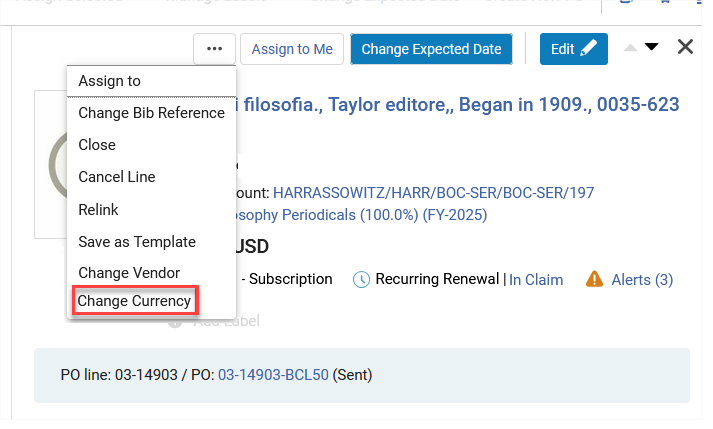
- Select the Change Currency action in the PO line.
- In the Currency field select the new currency.
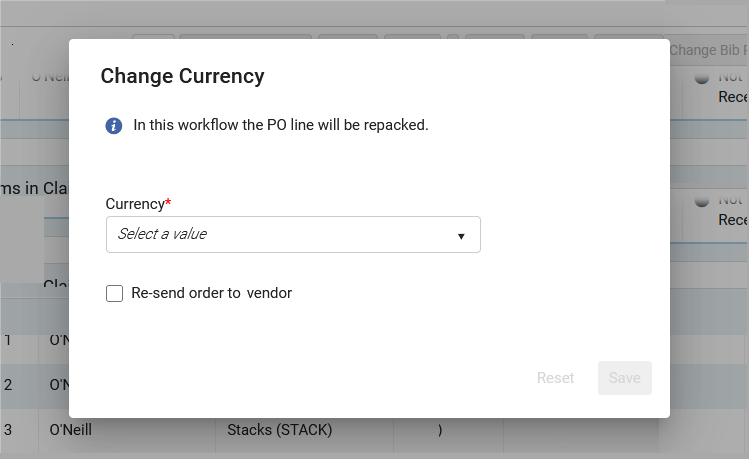
- Selecting Re-send order to vendor sends the new PO to the vendor. The Re-send order to vendor field will not display for PO lines with the workflow step "Ready", and when the Acquisitions method does not include sending the order to the vendor as part of the workflow (for example, "Purchase at Vendor System").
- Select Save. La línea de orden de compra se elimina de la orden de compra original. Si esta es la única línea de la orden de compra, esta se elimina. Selecting Reset restores the currency to the original value. El estado de la línea de orden de compra cambia a Agrupación manual/Agrupación automática y avanza por el flujo de trabajo de compras.
- La lista de monedas disponibles coincide con las monedas disponibles para el proveedor seleccionado de la línea de orden de compra.
- When Re-send order to vendor is not selected, the PO line will be moved to Manual Packaging or Auto Packaging, but when packaged into a PO it will not be sent to the vendor.
Page tags: article:topicproduct:almacontent:Documentationlang:english
