
Examinar encabezados de autoridad
Overview and instructions for browsing bibliographic headings
Para configurar metadatos, se debe tener uno de los siguientes roles:
- Catalogador
- Gerente de catálogo
- Administrador de catalogación

Librarians can use this functionality to browse the authority vocabulary using a specific name or subject, even if they are unsure whether it is the preferred term or not. Para los bibliotecarios sin privilegios de catalogación, la búsqueda de registros de autoridad es una función de solo lectura. Se activa automáticamente en todos los roles de Alma, de forma similar a las búsquedas de repositorios y autoridades.
Navegar por encabezados de autoridad
When utilizing Browsing Bibliographic Headings and Browse Authority Headings, the previously selected options from the drop-down menu are retained. Alma upholds the selected "Heading Type", along with the selected "Source Code" and "Vocabulary" for each respective type.
Para navegar por encabezados de autoridad:
- Abra las opciones de navegación por encabezados bibliográficos en el Editor MD utilizando uno de los siguientes métodos:
- Select Browse Authority Headings(Resources > Cataloging > Browse Authority Headings). The MD Editor page appears with the authority headings browsing options.
- Open the MD Editor (Resources > Cataloging > Open Metadata Editor), and select Browse Authority Headings in the Search & Browse menu.
- "Family" – If more than one active registry has been configured for your system, use this option to select the preferred registry (such as MARC 21, UNIMARC, or CNMARC) for browsing.
- Seleccione el tipo de encabezados para navegar por las siguientes opciones:Cuando selecciona una opción de tipo de encabezado, la página se actualiza para mostrar las opciones apropiadas para el tipo de encabezado seleccionado. Consultar la tabla que aparece debajo para ver una descripción los tipos de encabezados.
Opciones de tipo de encabezado Tipo de encabezado Notas NombresSource Code – Select one of the following options:- Nombre corporativo
- Nombre de la reunión
- Nombre personal
- Nombre del evento
- Uniform Title – This option appears when browse_headings_use_uniform_title_in_names is set to true. See browse_headings_use_uniform_title_in_names for more information.
Vocabulary – This options appears when there is more than one vocabulary defined for Names. Los vocabularios de Nombres que se buscan para Navegar por encabezados de autoridad son determinados por el parámetro de cliente establecido por Ex Libris para nombres de autoridad. If more than one Names vocabulary is specified, the vocabularies appear in the drop-down list for this option. Use esta opción para seleccionar el vocabulario que desea utilizar para navegar por encabezados de autoridad.Search Value – Enter a names value for which you want to search.Temas Vocabulary – Select one of the vocabularies from the available options in the drop-down list such as Library of Congress Subject Headings or U.S. National Library of Medicine, Medical Subject Headings. Las opciones para vocabularios definidos localmente varían según qué vocabularios locales haya configurado en su sistema. Source Code – Select one of the following options:- Período cronológico
- Género/Forma
- Nombre geográfico
- Medio de ejecución
- Término de materia
Search Value – Enter a value for which you want to search. - Select Browse. Los resultados aparecen en las siguientes columnas:
- Column 1 – An icon to indicate whether the authority heading is a preferred () or non-preferred term.
- Columna 2 - El nombre o el encabezado de autoridad de la materia.
- Column 3 – A View button for viewing the complete authority record.
- Column 1 – An icon to indicate whether the authority heading is a preferred (
- Usar los símbolos mayor/menor que (< >) para navegar la lista hacia atrás y hacia delante. Al pasar de página, la primera fila de la página actual aparece como la última fila de la página anterior.
- When you have located a headings record that you want to view in more detail, select View for that row. For bibliographic headings records identified with the authority
 icon, the detail in the split-screen view displays both an Authority tab and a Bibliographic Records tab:
- The Authority tab presents the authority record.
- The Bibliographic Records tab shows the total number of bibliographic records found in parentheses. From the Bibliographic Records tab, you can view and/or edit the results. While viewing the bibliographic records, when there is more than one page, you can page forward and backward through the bibliographic records using the list page number or Greater Than </Less Than > symbols.
Resultados relevantes
The relevant results based on the browse criteria that you entered, appear in the third row of the results. De esta forma, la lista de resultados muestra lo que aparece antes y después del resultado relevante:
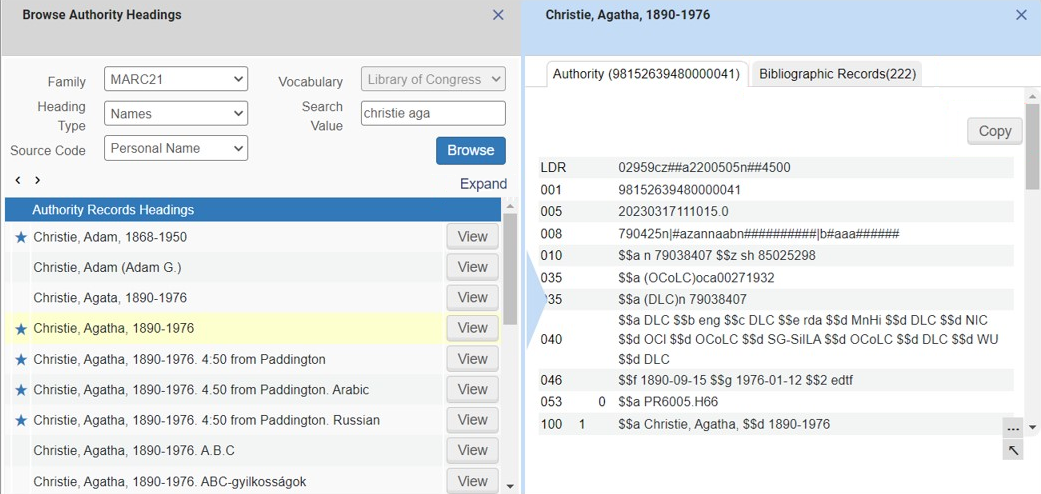
Browse Authority Headings Results List
Page tags: article:topicbrowseproduct:almacontent:DocumentationBrowse Bibliographic HeadingsBibliographic Headings Browselang:english
