
Browsing Bibliographic Headings
Overview and instructions for browsing bibliographic headings
- Catalogador
- Gerente de catálogo
- Administrador de catalogación
To generally browse Bibliographic Headings:
- All users can browse Bibliographic Headings, but can not edit.
Alma permite navegar por encabezados bibliográficos para dar soporte a varios flujos de trabajo de catalogación. Se puede navegar por autor, nombre, materia, serie y título.
For cases when a person appears both as a creator and as a subject (i.e., 'Agatha Christie' might be both the subject and an author), you can select between the below options of mapping the MARC 21 600, 610, 611 and 647 fields: To enable this option in your institutions, go to Configuration Menu > Resources > Cataloging > MARC21 / KORMARC and browse Bib Headings Names / Subjects. For more information, see Configuring Browsing Bib Headings Names / Subjects.
- Names — When browsing bibliographic headings using this option, the 6XX fields appear under Names.
- Subjects — When browsing bibliographic headings using this option, the 6XX fields are not found.
- Names (without MARC21 600/610/611/647) — When browsing using this option, the 6XX fields are not found. De todos modos, esta opción encontrará los registros con encabezados de un campo 6XX y otro campo relevante.
- Subjects (with MARC21 600/610/611/647) — When browsing using this option, the 6XX fields appear under Subjects. Los encabezados de los nombres que aparecen son los que aparecen cuando se navega con el tipo de encabezado "Nombres". They belong to the vocabulary determined by the customer parameter set by Ex Libris for authority names.
The Names (without MARC21 600/610/611/647) and Subjects (with MARC21 600/610/611/647) options are available only in the new Metadata Editor. For details about the new MDE, see Usability Improvements.
Navegar por encabezados bibliográficos
When utilizing Browsing Bibliographic Headings and Browse Authority Headings, the previously selected options from the drop-down menu are retained. Alma upholds the selected "Heading Type", along with the selected "Source Code" and "Vocabulary" for each respective type.
All users can Browse Bibliographic Headings and view the headings and the records but only authorized users with Cataloging roles can edit. Tenga en cuenta que algunas de las funciones que se describen a continuación no están disponibles para usuarios sin roles autorizados.
- Abrir las opciones de navegación por encabezados bibliográficos en el Editor MD utilizando uno de los siguientes métodos:
- Select Browse Bibliographic Headings (Resources > Cataloging > Browse Bibliographic Headings). La página del Editor MD aparecerá con las opciones de navegación por encabezados bibliográficos.
- Open the MD Editor (Resources > Cataloging > Open Metadata Editor), and select Browse Bibliographic Headings in the Search & Browse menu.
- For member institutions in a Network Zone, select where you would like to browse using the Browse In parameter. The options are to browse the titles at the institution level (Institution) or browse the titles at the Network level (Network). When selecting Institution, the linking information appears for Institution. Si los registros están enlazados en la Zona de Red, el enlace solo se muestra en los resultados de la lista de Red. The records cached from the network are displayed without linkage information (
 ); names are browsed under the first authority name defined for the institution.
- Seleccione el tipo de encabezados para navegar por las siguientes opciones:
Cuando se selecciona una opción de tipo de encabezado distinta a la opción por defecto (Nombres), la página se actualiza para mostrar las opciones apropiadas para el tipo de encabezado seleccionado. Consultar la tabla que aparece debajo para ver una descripción los tipos de encabezados.
Opciones de tipo de encabezado Tipo de encabezado Notas La siguiente tabla va acompañada de una tabla de excepciones. For more information, see Configurations That are Not Supported.Nombres
Family — If more than one active registry has been configured for your system, use this option to select the preferred registry (such as MARC 21, UNIMARC, or CNMARC) for browsing.
Source Code — Select one of the following options:
- Nombre corporativo
- Nombre de la reunión
- Nombre personal
- Nombre del evento
- Uniform Title — This option appears when browse_headings_use_uniform_title_in_names is set to true. See Configurar otros ajustes (Gestión de recursos) for more information. Téngase en cuenta que los títulos uniformes también se pueden navegar al seleccionar el tipo de encabezado Título. See Title for more information.
Vocabulary —This options appears when there is more than one vocabulary defined for Names. Los nombres de vocabulario buscados en Navegar por encabezados bibliográficos son determinados por el parámetro de cliente establecido por Ex Libris para nombres de autoridad. Si se especifica más de un nombre de vocabulario, la prioridad de los vocabularios que aparecen en la lista desplegable de esta opción será determinada por el orden especificado en el parámetro establecido por Ex Libris. Usar esta opción para seleccionar el vocabulario que se quiere usar para navegar por encabezados bibliográficos. See Authority Priorities for more information.
Search Value — Enter a names value for which you want to search.
MARC 21
El tipo de encabezado Nombres utiliza los siguientes campos/subcampos indexados por MARC 21:
- Nombre corporativo
- 110 a-d, g, n
- 610 todos los subcampos menos 0-9, e, E
- 710 a-d, g, n
- Nombre de la reunión
- 111 a-e, g, n
- 611 todos los subcampos excepto subcampos numéricos
- 711 a-e, g, n
- Nombre personal
- 100 a-d
- 600 todos los subcampos menos 0-9, e, E
- 700 a-d
Uniform Title - Note that the following fields/subfields are browsable with Names and Uniform Title selected when the browse_headings_use_uniform_title_in_names customer parameter is set to true. See Configurar otros ajustes (Gestión de recursos) for more information.
- 130
- 210 a
- 222 a
- 240 a-g, k-s (Note that the 240 field needs to be configured as an access point as described in Working with the 240 Field and Uniform Title Bibliographic Headings.)
- 242 a, b, n, p
- 245
- 246 a-g, n, p
- 247 a-g, n, p
- 249 c, v (concatenated with the 245 in the following manner when displayed: 245 data; 249 $a / 249 $v : 249 $b / 249 $c)
- 505 t
- 630 todos los subcampos menos 0-9, e, E
- 710 m-t
- 711 n-p, s, t
- 730
UNIMARC
El tipo de encabezado Nombres utiliza los siguientes campos/subcampos indexados por UNIMARC:
- Nombre corporativo
- 601 primer indicador=0 todo
- 710 first indicator=0 all
- 711 first indicator=0 all
- 712 first indicator=0 all
- 713 first indicator=0 all
- Nombre de la reunión
- 601 primer indicador=1 todo
- 710 first indicator=1 all
- 711 first indicator=1 all
- 712 first indicator=1 all
- 713 first indicator=1 all
- Nombre personal
- 700 all
- 701 all
- 702 all
- 703 all
- Título uniforme
- 500 a,c,d,h
- 501 a
- 506 todo
- 730 todo
- 740 all
- 741 all
- 742 all
- Nombre de familia
- 602 all
- 720 all
- 721 all
- 722 all
- 723 all
- Marca registrada
- 716 all
Names (without MARC21 600/ 610/ 611 /647) Como se mencionó anteriormente. MARC 21
As above, but the MARC 21 indexed fields 600, 610, 611, 647 are not included when browsing this heading type.
UNIMARC
N/A
Colección Family — If more than one active registry has been configured for your system, use this option to select the preferred registry (such as MARC 21, UNIMARC, or CNMARC) for browsing.
Source Code — Select one of the following options:
- Nombre corporativo
- Nombre de la reunión
- Nombre personal
- Nombre del evento
- Título uniforme
Search Value — Enter a value for which you want to search.
MARC 21
El tipo de encabezado Series utiliza los siguientes campos/subcampos indexados por MARC 21:
- Nombre corporativo
- 810 todos los subcampos excepto subcampos numéricos
- Nombre de la reunión
- 811 todos los subcampos excepto subcampos numéricos
- Nombre personal
- 800 todos los subcampo excepto subcampos numéricos
- Título uniforme
- 440 a-z, 0-9
- 490 a, l ("L" en minúsculas), v
- 830 todos los subcampo excepto subcampos numéricos
UNIMARC
El tipo de encabezado Series utiliza los siguientes campos/subcampos indexados por UNIMARC:
- 225 a,c,d,e,h,i
- Título uniforme
- 410 a,c,d,e,h,i
- 411 a,h,i
Temas Vocabulary — Select one of the vocabularies from the available options in the drop-down list such as Library of Congress Subject Headings or U.S. National Library of Medicine, Medical Subject Headings. Las opciones para vocabularios definidos localmente varían según qué vocabularios locales haya configurado en su sistema. For MARC 21 bibliographic records that contain the 651 field with a second indicator of 0 (and Subjects is selected for the Heading Type), you must browse bibliographic headings using the Library of Congress name authority records for 651 Vocabulary option in addition to the Library of Congress Subject Headings Vocabulary option to see the full range of headings used in your institution.Source Code — Select one of the following options:
- Período cronológico
- Género/Forma
- Geographic Name (see 751 Field for more information)
- Medio de ejecución
- Término de materia
- Uncontrolled Subject Terms - only for UNIMARC format. Para activarlo, póngase en contacto con el servicio de atención al cliente.
Search Value — Enter a value for which you want to search.
MARC 21 El tipo de encabezado Materias utiliza los siguientes campos/subcampos indexados por MARC 21:
- Período cronológico
- 648 todos los subcampos excepto subcampos numéricos
- Periodo de formulario de género
- 655 todos los subcampos excepto subcampos numéricos
- 689 todos los subcampos menos 0-9, A, D (cuando A=f)
- 689 todos los subcampos menos 0-9, A, D, e (cuando D=b)
- Nombre geográfico
- 651 todos los subcampos menos 0-9, e, E
- 751 todos los subcampos menos 0-9, e, E
- 752 todos los subcampos excepto subcampos numéricos
- Medio de ejecución
- 382 a, b, c, d, e, f, g, h
- Identificación taxonómica
- 754 all subfields except for numeric subfields
- Término de materia
- 650 todos los subcampos menos 0-9, e, E
- 654 todos los subcampos menos 0-9, e, E
- 689 todos los subcampos menos 0-9, A, D (cuando A=f)
- 689 todos los subcampos menos 0-9, A, D, e (cuando D=b)
UNIMARC El tipo de encabezado Materias utiliza los siguientes campos/subcampos indexados por UNIMARC:
- Periodo de formulario de género
- 608 todo
- 616 todo
- Nombre geográfico
- 607 a-d,f-z
- 617 a-d,f-z
- Término de materia
- 606 a-d,f-z
- Nombre personal
- 600 todo
- Nombre corporativo
- 601 primer indicador=0 todo
- Nombre de la reunión
- 601 primer indicador=1 todo
- Nombre de familia
- Nombre/título
- 604 todo
- Título uniforme
- 605 todo
- Lugar de publicación
- 620 a-d,f-z
- 621 a-d,f-z
- Condiciones de materias no controladas
- 610 primer indicador=0 a-d,f-z
- 610 primer indicador=1 a-d,f-z
Materias (con MARC21 600/610/611/647) As above, but the Source Code contains these options as well:
- Nombre corporativo
- Nombre de la reunión
- Nombre personal
- Uniform Title — This option appears when browse_headings_use_uniform_title_in_names is set to true. See Configurar otros ajustes (Gestión de recursos) for more information. Téngase en cuenta que los títulos uniformes también se pueden navegar al seleccionar el tipo de encabezado Título. See Title for more information.
MARC 21
As above, but the Names headings type uses the following MARC 21 indexed fields/subfields:
Nombre corporativo- 610 todos los subcampos menos 0-9, e, E
- 611 todos los subcampos excepto subcampos numéricos
- 600 todos los subcampos menos 0-9, e, E
UNIMARC
N/A
Title Search Value — Enter a value for which you want to search.
For uniform titles, see Configurar otros ajustes (Gestión de recursos) for more information.
MARC 21 El tipo de encabezado Título utiliza los campos/subcampos indexados MARC 21 que se indican a continuación: Note that the following fields/subfields are browsable with Title selected when the browse_headings_use_uniform_title_in_names customer parameter is set to false. See Configurar otros ajustes (Gestión de recursos) for more information.
- 130 (títulos uniformes)
- 210 a
- 222 a
- 240 a-g, k-s (Note that the 240 field needs to be configured as an access point as described in Working with the 240 Field and Uniform Title Bibliographic Headings.)
- 242 a, b, n, p
- 245
- 246 a-g, n, p
- 247 a-g, n, p
- 249 a, b (concatenated with the 245 in the following manner when displayed: 245 data; 249 $a / 249 $v : 249 $b / 249 $c)
- 505 t
- 630 (títulos uniformes)
- 700 m-p, r-t
- 710 m-t
- 711 n-p, s, t
- 730 (títulos uniformes)
UNIMARC / CNMARC The Title headings type uses the following UNIMARC and CNMARC indexed fields/subfields:
- 200 a,c,d,e,h,i
Clasificación/Clasificaciones Family — If more than one active registry has been configured for your system, use this option to select the preferred registry (such as MARC 21, UNIMARC, or CNMARC) for browsing. Source Code — Select one of the following options for MARC 21 or UNIMARC:
- Signatura de la Biblioteca del Congreso
- Signatura de la Biblioteca Nacional de Medicina
- Signatura de la Biblioteca Nacional Agrícola
- Clasificación Local 09X (diez opciones diferentes)
- Clasificación geográfica
- Números de clasificación asignados en Canadá
- Número de clasificación decimal universal
- Número de clasificación decimal de Dewey
- Número de clasificación decimal Dewey adicional
- Otro número de clasificación
- Componentes del número de clasificación sintetizado
- Número de clasificación de documentos gubernamentales
Source Code — Select one of the following options for CNMARC:
- Signatura de clasificación de libro chino
Se implementa un orden ASCII especial para esta opción, para que ciertos signos de puntuación se prioricen con respecto a los dígitos.
- Clasificación de la biblioteca china
- Clasificación de la biblioteca de la academia de las ciencias de China
- Otro número de clasificación chino
Vocabulary — When Other Classification Number is selected for the Source Code, enter the vocabulary code for the headings that you want to browse. El sistema busca un código de vocabulario coincidente en el 084 $2.
Search Value — Enter a call number or classification value for which you want to search.
MARC 21 El tipo de encabezado Clasificación/Clasificaciones utiliza los siguientes campos/subcampos indexados por MARC 21:
- 050 a, b
- 052 a, b, d
- 055 a, b, d
- 060 a, b
- 070 a, b
- 080 a, b, x
- 082 a, b, m, q
- 083 a, c, m, q, y, z
- 084 a, b, q
- 085 a, b, c, f, r, s, t, u, v, w, y, z
- 086 a, z
- 090 a-z, 0, 1, 3, 4, 5, 7, 9
- 091 a-z, 0, 1, 3, 4, 5, 7, 9
- 092 a-z, 0, 1, 3, 4, 5, 7, 9
- 093 a-z, 0, 1, 3, 4, 5, 7, 9
- 094 a-z, 0, 1, 3, 4, 5, 7, 9
- 095 a-z, 0, 1, 3, 4, 5, 7, 9
- 096 a-z, 0, 1, 3, 4, 5, 7, 9
- 097 a-z, 0, 1, 3, 4, 5, 7, 9
- 098 a-z, 0, 1, 3, 4, 5, 7, 9
- 099 a-z, 0, 1, 3, 4, 5, 7, 9
UNIMARC The Call Number/Classifications headings type uses the following UNIMARC indexed fields/subfields:
- Número de clasificación decimal universal
- 675 a
- Número de clasificación de la Library of Congress
- 680 a
- Número de clasificación decimal de Dewey
- 676 a
- Otro número de clasificación
- 680 a,c
CNMARC El tipo de encabezado Clasificación/Clasificaciones utiliza los siguientes campos/subcampos indexados por CNMARC:
- Signatura de clasificación de libro chino
- 090 a, b
- 905 f
- 905 s
- Clasificación de la biblioteca china
- 690 a
- Clasificación de la biblioteca de la academia de las ciencias de China
- 692 a
- Otro número de clasificación chino
- 694 a
- 696 a
- Nombres (opción por defecto)
- Colección
- Materia
- Título
- Clasificación/Clasificaciones
- Complete las opciones de navegación para la acción que quiere realizar.
- Select Browse. Los resultados aparecen en las siguientes columnas:
- Column 1 — An icon to indicate whether the bibliographic subject heading is connected to an authority record.
- Column 2 — The number of bibliographic record headings found for a particular subject, name, series, or title headings row. Si se encuentran más de 20 encabezados en una fila en particular, la columna mostrará 20+.
- Column 3 — The bibliographic record headings subject, name, series, or title found.
- Column 4 — A View button for viewing the complete bibliographic record.
Para conocer varios temas relativos al despliegue de los resultados de navegación, véanse las secciones a continuación. - Usar los símbolos mayor/menor que (< >) para navegar la lista hacia atrás y hacia delante. Al pasar de página, la primera fila de la página actual aparece como la última fila de la página anterior.
- When you have located a headings record that you want to view in more detail, select View for that row. For bibliographic headings records identified with the authority
 icon, the detail in the split-screen view displays both an Authority tab and a Bibliographic Records tab:
- The Authority tab presents the authority record that is associated with the bibliographic headings record.
- The Bibliographic Records tab shows the total number of bibliographic records found in parentheses. From the Bibliographic Records tab, you can view and/or edit the results. While viewing the bibliographic records, when there is more than one page, you can page forward and backward through the bibliographic records using the list page number or Greater Than </Less Than > symbols. Alternatively, you can select Open in Repository Search to view the results in the repository.
Resultados relevantes
The relevant result, based on the browse criteria that you entered, appears in the second row of the results. De esta forma, la lista de resultados muestra lo que aparece antes y después del resultado relevante:
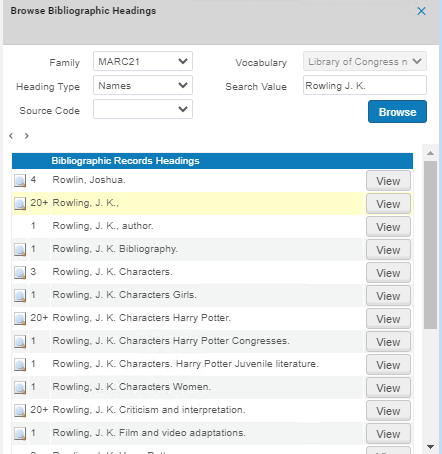
Orden del subcampo
Los resultados de la columna Encabezados de registros bibliográficos se ordenan por subcampo. For example,650 0 $a Gardening $z England $v Bibliography appears as Gardening England Bibliography:

Resultados de navegación que no son en inglés
Browsing CJK Results
Para abordar los requisitos CJK (chino, japonés y coreano) y otros requisitos para ordenar la lista de resultados, se elimina el texto sin completar según todas las opciones posibles como los indicadores de registros bibliográficos y caracteres especiales sin completar. See Using Non-Filing Markers and Using Non-Filing Indicators in KORMARC for more information.
Al navegar por contenido de CJK, todos los signos de puntuación entre los caracteres CJK se ignoran al ordenar los resultados. Note that with this capability the punctuation marks continue to appear in the display of CJK content. For Hong Kong institutions, Alma also handles TSVCC variants when browsing bibliographic headings (see Hong Kong TSVCC for more information).
Para todas las instituciones, se realizará el orden del contenido Hanzi para Navegar por encabezados bibliográficos (y encabezados de autoridad al usar F3 en el Editor MD) al transliterar el contenido Hanzi a latín para el orden primario y, cuando sea necesario, utilizando el orden de contenido Hanzi para el segundo nivel de orden. Así, cuando existe más de una entrada idéntica en Latín, el orden Hanzi determinará el orden de navegación de los registros que tienen la misma entrada en Latín.
Para contenido japonés y coreano, la navegación de encabezados bibliográficos y de autoridad será gestionada utilizando un orden CJK para todas las instituciones.
Para más información, véase:
- Chinese and Korean Characters
- Japanese Characters
- CKJ Punctuation
- Hong Kong TSVCC
Browsing Other Language Results
For institutions that have other language settings (German, Spanish, Polish, Icelandic, Lithuanian), the special language characters are handled in the same manner for browsing bibliographic headings as they are for searching in the Alma repository. Para más información, véase:
- German Characters
- Spanish and Catalan Characters
- Polish Characters
- Icelandic Characters
- Lithuanian Characters
Configuring Browsing Bib Headings Names / Subjects
You configure the heading types on the MARC21 / KORMARC - Browse Bib Headings Names / Subjects code table (Configuration > Resources > Cataloging > MARC21 / KORMARC - Browse Bib Headings Names / Subjects). For more information about code tables, see Code Tables.
For Primo VE: if you want to enable update_names_without and update_subjects_with, contact Ex Libris support, as configuration changes are needed.
You can choose to have all four options available, or only part of them.
Se pueden editar los nombres por defecto y los nombres de los idiomas configurados para su institución.

Configuring Browse Bibliographic Headings and Selection Display
Ex Libris supports the ability to configure the display and sorting values for bibliographic headings, so that each institution can define its own mapping, based on the pre-defined mapping provided by Ex Libris out-of-the-box. This helps librarians that are browsing through bibliographic headings to see the information they find relevant for their institution.
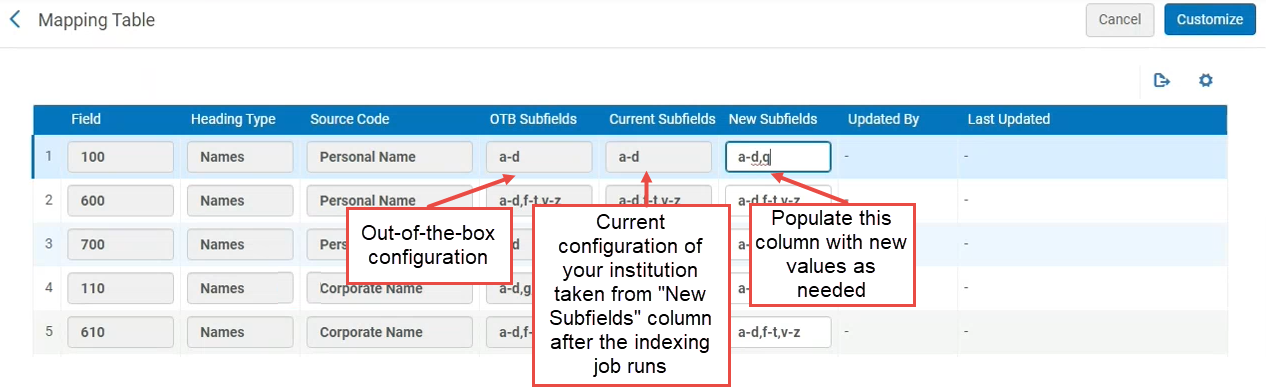
For example, out-of-the-box, the heading type "Names", source code "Personal Name" is mapped to MARC21 field 100 $$a-d. Now institutions can modify that mapping to other subfields, for example to field 100 $$a-d,q.
Actualmente, esta funcionalidad existe para MARC21 solamente. Se lanzará para perfiles UNIMARC/CNMARC en las próximas versiones.
To support this ability, a new configuration table Bibliographic Headings Display Subfield Mapping was added to the configuration of the bibliographic profiles. This table shows the out-of-the-box values and the mapping that is currently implemented for the institution, and enables the institution to define a new mapping of subfields.
Configurar Navegar encabezados bibliográficos y Despliegue de selección
This configuration takes effect only after the indexing job builds the headings.
- Open the Metadata Configuration table (Configuration Menu > Resources > Cataloging > Metadata Configuration).
- Seleccionar el enlace del perfil para el perfil bibliográfico deseado.
- On the Profile Details page, open the Other Settings tab.
- In the Configuration Tables, select the Bibliographic Headings Display Subfield Mapping link.
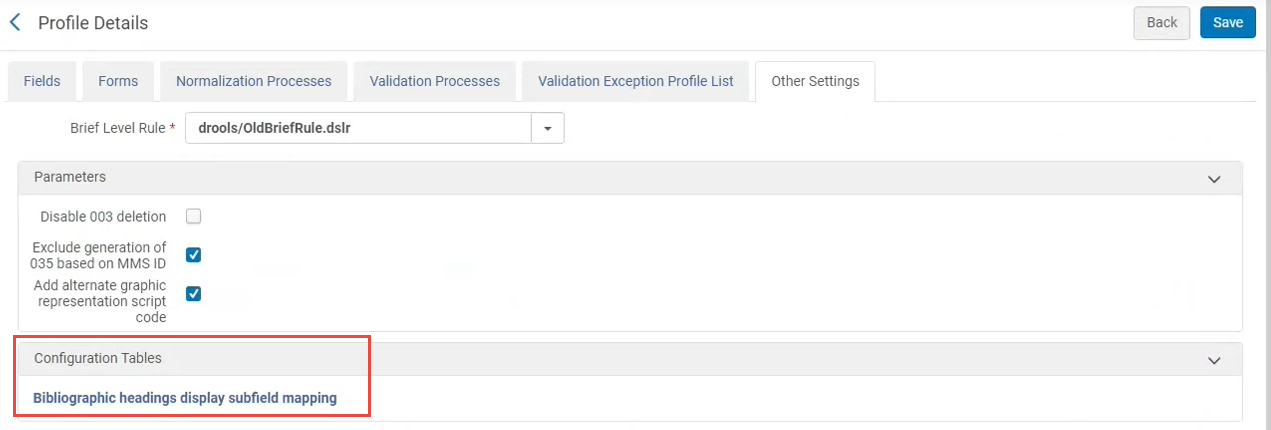
- Se abre la tabla de mapeo. It displays out-of-the-box values and the mapping that is currently implemented by the institution. To modify the mapping, enter a list of subfields separated by a comma or by a dash (from-to) in the New Subfields column.Note: In rows where the mapping was not modified, all three columns display the out-of-the-box values.
Configurations That are Not Supported
Las siguientes configuraciones de los subcampos MARC21 no son compatibles actualmente. Even if these fields are configured, they will not appear in F3 in the heading from the bibliographic records tab.
| Field | Subfields |
|---|---|
| 100 | e |
| 110 | e |
| 111 | j |
| 385 | m |
| 386 | m |
| 600 | e |
| 610 | e |
| 611 | j |
| 630 | e |
| 650 | e |
| 651 | e |
| 654 | e |
| 689 | e, A, B, C |
| 700 | e |
| 7XX | i |
| 710 | e |
| 711 | j |
| 720 | e |
| 751 | e |
| 800 | v |
| 810 | v |
| 811 | v, j |
| 830 | v, x, y, z |
Configurar Navegar encabezados bibliográficos y Despliegue de selección en una Zona de red
The Network Zone central office can define and share the configuration table with all Network Zone members via the Manage Table in Network option (see Centrally Managing Configurations in a Network Zone).
When member institutions view the bibliographic headings in the Network Zone, the headings are according to the setup in the Network Zone.
Page tags: article:topicbrowseproduct:almacontent:DocumentationBrowse Bibliographic HeadingsBibliographic Headings Browselang:english
