
Privilegios de catalogación
This page provides an overview of cataloging privileges and instructions for configuring permissions levels, assigning permission levels to users, assigning cataloging levels to individual records and a set of records, and searching for records by cataloging level.
- Editor MD
- Importación de metadatos (los registros nuevos se importan con el nivel más bajo)
- Catalogación rápida
- Normalización/gestión del conjunto (asignación de tareas por lotes de un nivel de código a un conjunto de registros)
Creating Cataloging Permission Levels
- Asegurarse de que el personal de Ex Libris ha habilitado los permisos de catalogación para su institución/consorcio.
- On the Cataloger Permission Level code table (Configuration Menu > Resources > Cataloging > Cataloger Permission Level), select Add Row to add levels.Changing the 'Default' value in the Cataloger Permission Level table is not supported. El valor por defecto sigue siendo el nivel 00 mientras exista.

Tabla de código Nivel de permiso del catalogador - When you are done, select Customize.In a collaborative network, after the Network Zone administrator has completed entering the cataloging permission levels, the changes can be distributed to the member institutions by selecting Manage Table in Network and Save and Distribute. Esta acción envía una tarea para distribuir estos ajustes a las instituciones miembro. In a member institution, these distributed settings appear where the cataloging levels are used such as the MD Editor (see Using Cataloging Permission Levels in the MD Editor) and user management (see Assigning Cataloging Permission Levels). Tenga en cuenta que los niveles de permiso de catalogación para una institución que sea miembro de la Zona de Red solo se pueden activar en esta.


Guardar y distribuir los niveles de permiso de catalogación
Assigning Cataloging Permission Levels
- Access the user records that you want to update (Admin > User Management > Manage Users).
- Select Edit from the row actions for the user record that you want to update. Aparecerá la página Detalles de usuario.
- Select the level from the Cataloger level drop down list.

- Select Save.
Using Cataloging Permission Levels in the MD Editor
If your cataloging permission level is lower than the cataloging level assigned to the record, you can only view the record and perform a set of limited functions (see below). However, in a collaborative network, you can add and remove local fields, even with a lower cataloging permission level than the cataloging level assigned to the record in the Network catalog.
-
Open a bibliographic record in the MD Editor (Resources > Cataloging > Open Metadata Editor). El Editor MD muestra el nivel actual de catalogación. Any user assigned this or higher cataloging level can edit the record. Además, puede cambiar el nivel de catalogación del registro. You can set any cataloging level equal to or below your cataloging level as the cataloging level for the record.
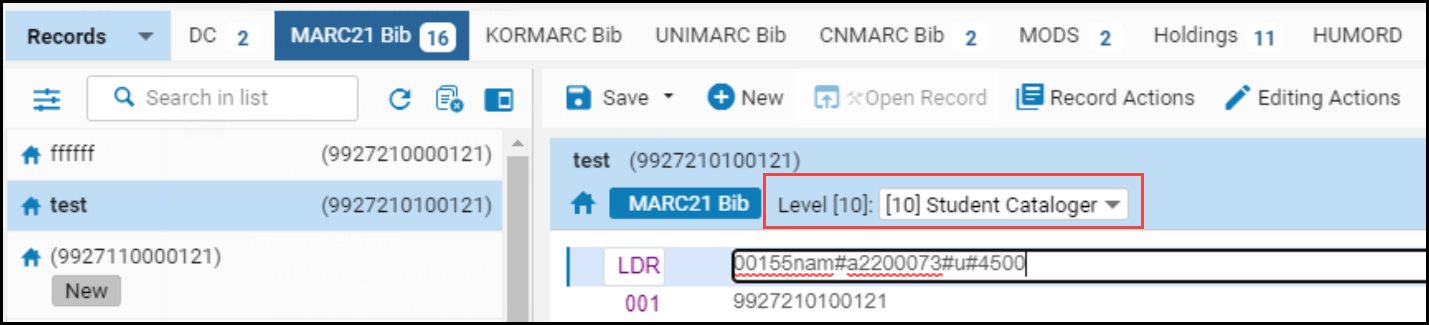 Niveles de permiso de catalogación en el Editor MD
- Seleccione un nuevo nivel de catalogación para el registro de la lista desplegable.
- Select Save. El nivel de catalogación actual de un registro se actualiza para reflejar su cambio.
| Para mostrar en el menú desplegable: | Acción: |
|---|---|
| Su nivel de permisos de catalogación. | Set the use_record_cataloging_level_by_default customer parameter to False (default). |
| El nivel de catalogación actual del registro. | Set the use_record_cataloging_level_by_default customer parameter to True. Cuando esto está establecido en Verdadero, se requiere una acción explícita de su parte para cambiar el nivel de catalogación a un nivel diferente. Si se están realizando cambios de registro que no afectan al nivel de catalogación, es posible que se prefiera esta opción. See use_record_cataloging_level_by_default for more information. |
| El nivel de catalogación que seleccionó más recientemente para un registro. | Set the cataloging_level_user_preferences customer parameter to True. |
Working in the MD Editor with Cataloger Privileges Lower than the Bibliographic Record

- Add holdings
- Create PO line
- Suppress from Discovery
- Suppress from External Search
- Set Management Tags
- View versions
- Browse bibliographic headings
- View notes
- View inventory
- Add holdings
- Create PO line
- Suppress from Discovery
- Suppress from External Search
- Set Management Tags
- View versions
- Browse bibliographic headings
- View notes
- View inventory
- All of the above, except Suppress from Discovery, Suppress from External Search and Set Management Tags
- Add local fields (and Save options)
- Copy to Catalog
- Share with Network
When the customer parameter use_record_cataloging_level_by_default is set to True, the record's level is defaulted to basic level (00) when the record is copied to catalog or shared with Network.
Buscar registros utilizando el nivel de catalogación
- Select
 Advanced Search.
- Select Title from the drop-down list.
- Select Cataloger Level from the expanded drop-down list.
 Búsqueda avanzada del nivel de catalogación
- Select Add Conditions.
- Seleccionar sus criterios del nivel de catalogación.

Criterios de búsqueda del nivel de catalogación - Select Go. Los resultados de la búsqueda muestran una lista de registros que tienen asignado un nivel de catalogación que coincide con los criterios que se han seleccionado.
Asignar niveles de catalogación a un conjunto de registros
- Nivel de catalogación de conjunto de registros Bib
- Ajustar nivel de catalogación de registros de autoridad
Establecer las preferencias del usuario del nivel de catalogación
Page tags: article:topicproduct:almacontent:Documentationlang:englishcataloger permission levelcataloger levelcatalog record levelcataloger privilegecatalog level search
