
Flusso di lavoro di valutazione
Questa pagina fornisce una panoramica del flusso di lavoro di valutazione in Alma, dalla ricezione dell'offerta dal Fornitore fino all'acquisto. For a detailed look at the workflow see Getting the Most Out of Alma - Trials and Evaluations. For a description on how to manage trials in Alma see Managing Trials. For information on the overall purchasing workflow see Purchasing Workflow. For an overview of working with acquisitions in Alma, including links to relevant sections such as Infrastructure, Invoicing, Configuration, etc., see Introduction to Acquisitions.
For a general overview of evaluating and analyzing content for acquisitions, see Best Practice Toolkit: Evaluate and Analyze Content for Acquisition.
Quando un Fornitore offre nuovo materiale elettronico all'istituzione per la valutazione, o si riceve una richiesta da un membro dell'istituzione per far valutare del materiale elettronico, è possibile eseguire una trial per valutare il materiale.
In Alma, una valutazione è il flusso di utilizzo e valutazione del materiale. Un trial è un'istanza del flusso di lavoro di valutazione.
Di seguito è riportato un esempio di flusso che regola il modo in cui viene gestita la valutazione di una Linea d'ordine (POL), dal momento in cui viene creata per la valutazione al momento in cui viene presa la decisione se acquistare il materiale elettronico.
L'utente che esegue ciascuna delle fasi del flusso deve avere il ruolo appropriato (operatore di prova/responsabile di prova o operatore degli acquisti) per eseguire questi passaggi:
- Trial Operator/Trial Manager— Manages the trial
- Purchasing Operator— Manages the PO
A seconda della decisione amministrativa della tua istituzione, a un utente possono essere assegnati entrambi i ruoli, nel qual caso tutti i passaggi del flusso di lavoro (eccetto il passaggio 5 sotto) vengono eseguiti dallo stesso utente. Il passaggio 5 nel flusso è eseguito dai partecipanti al trial.
La valutazione si applica solo alla collezione elettronica del tipo pacchetto, Database e ai portafogli.
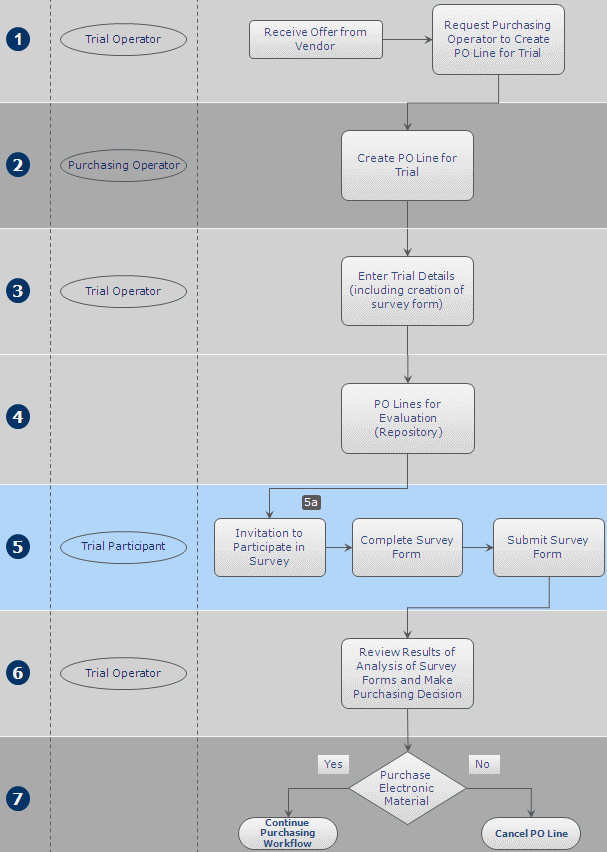
Di seguito è riportata una descrizione dettagliata dei passaggi all'interno di questo flusso di lavoro (con i numeri corrispondenti ai numeri nel diagramma):
- La valutazione inizia quando un fornitore offre nuovo materiale elettronico all'istituzione per la valutazione o quando una richiesta viene ricevuta da un membro dell'istituzione per far valutare il materiale elettronico. Queste richieste vengono inoltrate all'operatore di prova che a sua volta invia una richiesta all'operatore degli acquisti per creare una nuova riga di ordine d'acquisto per la valutazione.
- The Purchasing Operator searches for the relevant e-resource in the Community Zone and manually creates a new PO line for it (see Manually Creating a PO Line). Dopo aver inserito tutte le informazioni sulla linea PO, l'operatore addetto agli acquisti seleziona una delle seguenti opzioni:
- Save and Request Evaluation – The Purchasing Operator selects this if their user account does not also have the Trial Operator role. Questa opzione è disponibile solo se la linea d'ordine è assegnata all'utente. The PO line's status changes to Under Evaluation and the PO line moves to the Manage Trials page with the status Requested, where the Trial Operator can access it and continue with step 3 below.
- Salva e avvia il trial – L\'operatore di acquisto può selezionare questa opzione se il suo account Utente dispone anche del Ruolo di operatore di trial e desidera avviare il trial. Questa opzione è disponibile solo se la linea d'ordine è assegnata all'utente. The PO line's status changes to Under Evaluation and the Trial Details page opens in a sliding panel (step 3).
Una Linea d'ordine (POL) con lo stato Under valutazione può essere modificata solo nella pagina gestione Trials da un Utente con il Ruolo operatore trial. - The Trial Operator enters additional information about the trial (see Managing Trials). When the information is complete, the trial's status changes to Draft and the PO line continues with step 4 in the workflow.
- Tutte le linee PO che sono state normalizzate e convalidate e sono pronte per l'inizio del trial vengono memorizzate in un archivio, in attesa del passaggio successivo nel flusso.
- I partecipanti al trial ricevono notifiche sul trial e compilano e inviano il modulo del sondaggio.For notifications to be sent, the Trials – Start and Notify Participants job must be marked as Active on the Monitor Jobs page – see Viewing All Scheduled Jobs. The notification sent is the Trial Letter and can be configured, see Letter Types.
- Se il trial è privato, i partecipanti ricevono un invito via email a partecipare al trial.
- Se il trial è pubblico, puoi pubblicare i dettagli del trial (ad esempio sul sito web interno o tramite email) e invitare i membri dell'istituzione a partecipare. The URL for the trial uses the path in the Participant Page URL field on the Summary tab of the Trial Details page, as follows:https://<Alma domain>/<participant page url>. Anyone with the URL can participate in the trial.
- Il trial è terminato. The Trial Operator evaluates the results of the survey and makes a decision as to whether to purchase the material (see Analyzing Trial Results).
- The purchasing decision taken by the Trial Operator in the previous step of the workflow is implemented. If the decision is to purchase the material, the PO line continues in the regular PO line workflow described in step 2 of the Purchasing Workflow. If the decision is not to purchase the material, the Purchasing Operator cancels the PO line (see Closing, Reopening, and Relinking PO Lines). Note that a trial must be deleted before any associated PO lines can be cancelled (see Managing Trials).
Page tags: article:topicevaluationproduct:almacontent:Documentationlang:englishtrialevaluation workflowtrial workflowstart trialrequest evaluation
