
Prelievi
- Physical Inventory Operator Extended (with Institution-level scope)
Un ritiro è il processo di eliminazione di copie dal catalogo per garantire che il catalogo sia aggiornato e rappresenti solo le copie effettivamente presenti nella collezione. Although withdrawn items do not appear in Alma and are not published to Primo, librarians and staff users can view a historical record of these items in Analytics reports. Le copie ritirate appaiono come Lifecycle = Deleted in Analytics.
Questa sezione descrive i metodi utilizzati per ritirare copia (una o più copie, oppure un set di copie).
Users with the purchasing and receiving operator roles will be able to delete items when editing the PO line.
Withdrawing One or More Items from the Items List
- suppressBibWithDeletedHol— If set to true, Alma suppresses bibliographic records whose holdings records are deleted.
- suppressBibWithSuppressedHol— If set to true, Alma suppresses bibliographic records that contain only suppressed holdings records. If set to false, Alma publishes the bibliographic record.
See Configuring Other Settings for more information regarding configuring suppressBibWithSuppressedHol and suppressBibWithDeletedHol
- Search for the item(s) that you want to withdraw (see Searching in Alma).
- Nella riga dei risultati della ricerca contenente la/le copia/e che desidera ritirare, selezioni copia.A seconda del tipo di ricerca avviata e di ciò che è disponibile nel Suo inventario, selezionando copia potrebbero essere visualizzati risultati diversi.
- Se ha selezionato una ricerca Tutti i titoli o una ricerca Titolo fisico e c'è un solo record di possesso, la pagina Elenco delle copie appare con Ritira copia. For more information about the List of Items page, see Working with the List of Items.
- If you selected an All titles search or a Physical titles search and there are multiple holdings records, you must select View all holdings and select the View Items row action for the specific holdings record (see Working with the List of Holdings) from which you want to withdraw multiple items.
- Se avete selezionato una ricerca di copia fisica e il record di holding contiene una singola copia, viene visualizzata per prima la pagina Editor di copia fisica. Selezioni Visualizza tutte le copie per visualizzare la pagina Elenco delle copie.
- Esegua una delle seguenti azioni di prelievo:
- Selezionare l'azione di riga Ritirare e selezionare Conferma nella finestra di dialogo di conferma.
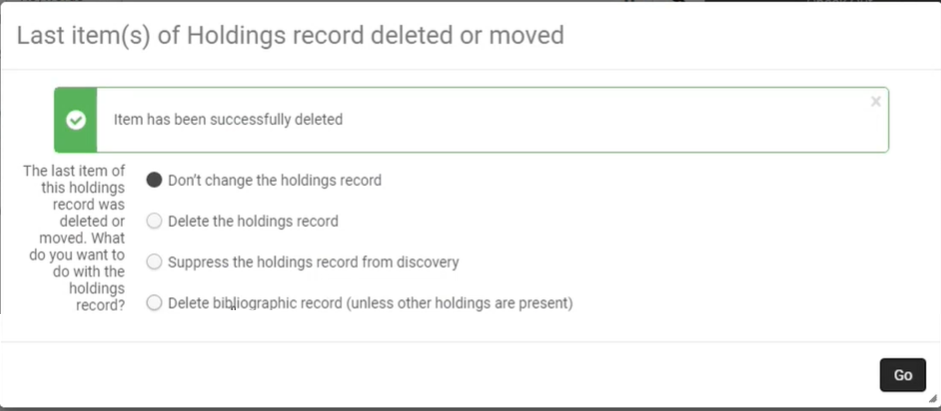 Selezionare una delle seguenti opzioni e quindi selezionare Vai.
- Don't change the holdings record— Select if you do not want to withdraw or suppress the holdings record.
- Delete the holdings record— Select to withdraw the holdings record.
- Suppress the holdings record from discovery— Select if you do not want to withdraw the holdings record, but you want to prevent the record from appearing in Primo or an external discovery system.
- Delete bibliographic records (unless other holdings are present)— Select to delete the bibliographic record with which the item is associated, if the bibliographic record has no other holdings. In this case, both the holdings record and the bibliographic record with which the item is associated are deleted.Se elimina un record bibliografico nella Institution Zone e Lei è l'ultima biblioteca del consorzio a possederlo, il record bibliografico viene automaticamente eliminato nella Network Zone. If you do not want it to be deleted automatically in the Network Zone, set the delete_nz_bib_without_inventory parameter (Configuration > Resources > General > Other Settings) to false(see Configuring Other Settings (Resource Management)).
- Use the checkbox column to select one or more items and select Manage Selected > Withdraw items.Attualmente questa opzione viene visualizzata solo quando è presente un singolo record di holding.
- Selezionare l'azione di riga Ritirare e selezionare Conferma nella finestra di dialogo di conferma.
Le copie contrassegnate come Assegnata a conservazione non vengono eliminate. For more information, see Retention Information.
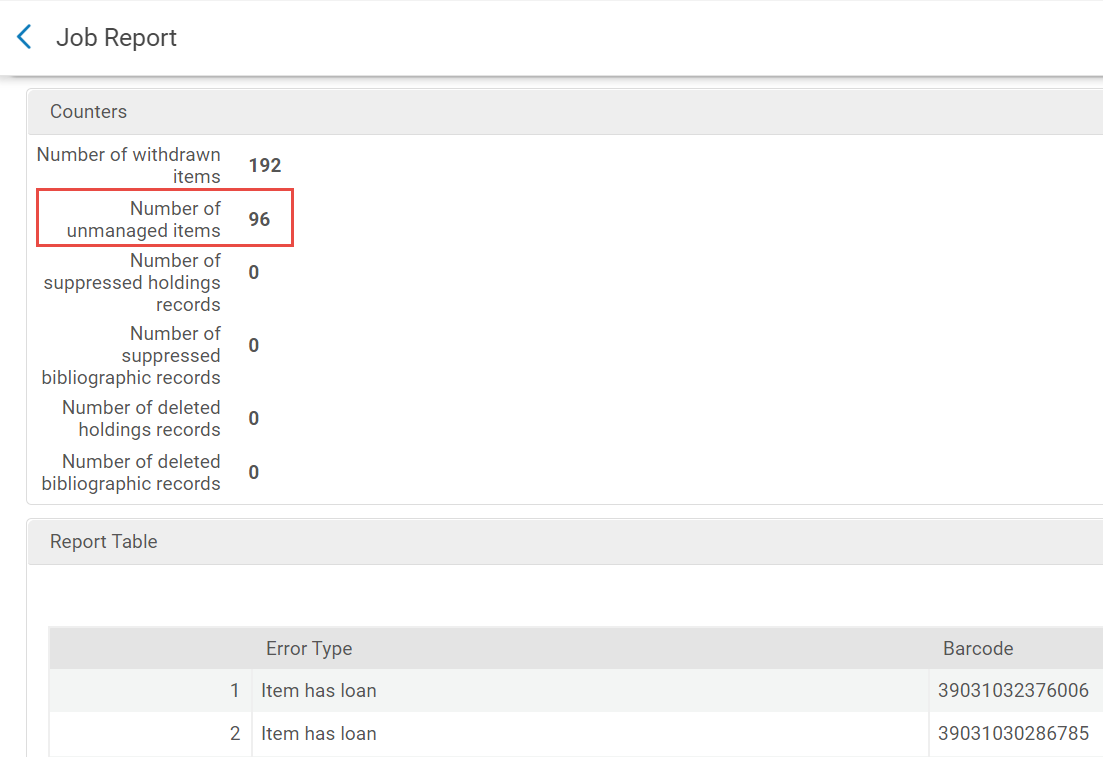
In a Job Report, items not deleted appear in the Counters section under Number of unmanaged items.
Withdrawing an Item from the Repository Search
For the items search, see Withdrawing One or More Items from the Items List.
For the items section in the physical holdings and title searches:
If the withdrawn item belongs to a holdings record that has no other items, you are prompted to choose how to handle the holdings record and the bibliographic record if it does not have any other inventory. Select one of the following options and then select Withdraw:
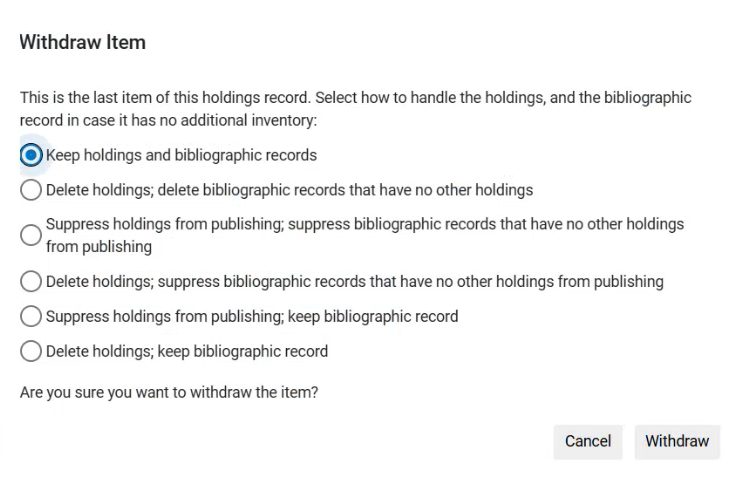
- Keep holdings and bibliographic records— Select if you do not want to delete or suppress the holdings record.
- Suppress holdings from publishing; suppress bibliographic records that have no other holdings from publishing— Select if you do not want to delete the holdings record, but you want to prevent both the holdings and the bibliographic record from appearing in Primo or an external discovery system.
- Delete holdings; suppress bibliographic records that have no other holdings from publishing— Select if you want to delete the holdings record, but you do not want to delete the bibliographic record, only to prevent it from appearing in Primo or an external discovery system.
- Suppress holdings from publishing; keep bibliographic record— Select if you do not want to withdraw the holdings record, but you want to prevent it from appearing in Primo or an external discovery system, without impacting the bibliographic record.
- Delete holdings; keep bibliographic record— Select if you want to delete the holdings record, without impacting the bibliographic record.
Withdrawing Sets of Items
È possibile ritirare copia da un Titolo fisico o da un Set di copia fisica eseguendo il lavoro Ritiro copia fisica. For more information, see Running Manual Jobs on Defined Sets.
