
Alma AIアシスタント – 受入資金と元帳
- You must have a General System Administrator or an Acquisitions Administrator role to enable the Alma AI Assistant.
- You must have the Fund/Ledger Manager role at the institution scope to use the Alma AI Assistant.
Alma AIアシスタントとは何ですか?
The Alma AI Assistant is an initiative that leverages advanced technologies to support Alma staff users in their day-to-day work.Alma AIアシスタントは、直感的で自然な言語によるコミュニケーションが取れるように設計されており、スタッフがAlma内でより手軽に疑問について質問し、回答を受け取れるようになっています。
Alma AIアシスタントの最初の重点領域は、受入 - 資金と元帳です。Staff users with the Fund/Ledger Manager role (from the institution level) can ask questions about their institution’s funds and ledgers and receive immediate, natural-language responses.AI Alma AIアシスタントは、会話による質問を処理し、質問に回答するのに必要な関連データを生成するために、大規模言語モデル生成AIを使用します。
一般的に、Alma AIアシスタントの使用は一般的なAIチャットと似ています:
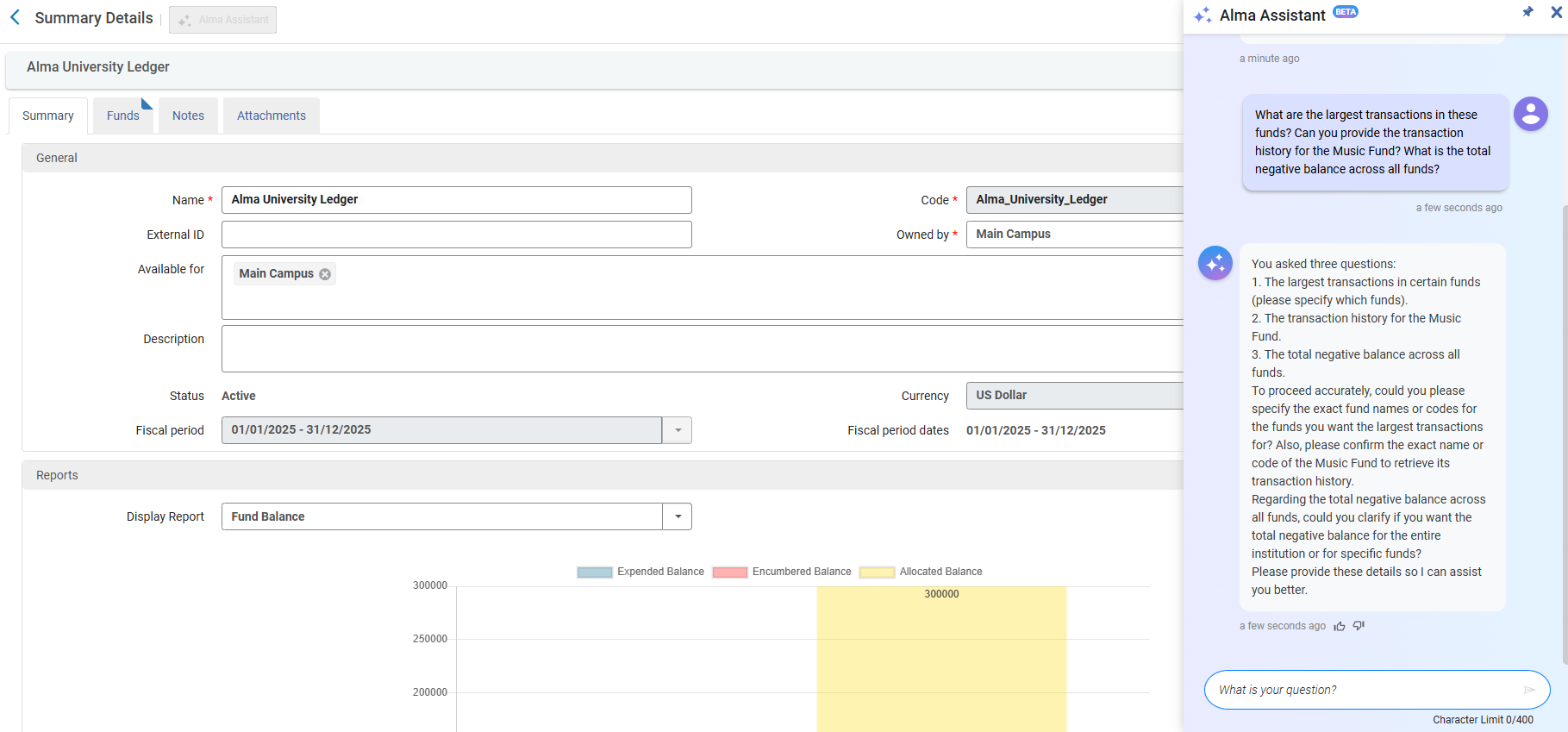
Watch the Alma AI Assistant – Funds and Ledgers video (3:20 minutes).
Preview Mode (Beta)
この種の機能は、試験的かつ進化を続ける性質を持つため、今後フィードバックループを拡大したいと考えています。Therefore, as part of the February 2026 release, we are introducing the Alma AI Assistant in Preview Mode (beta) across all Alma environments.管理者は独自の判断でこの機能を有効にすることができます。
現段階では、Alma AIアシスタントは英語での会話に対応しています。資金、元帳、および関連データ(報告コード、資金タイプなど)に関する質問に回答できます。また、「支出がない資金はどれか」といった、資金取引に関する質問にも回答できます。ただし、発注明細や請求書に関する情報は提供できず、リンク付きのIDのみが返されます。
特定の資金について質問した場合、アシスタントは、Almaで資金データを確認するために使用できるリンクを提供します:
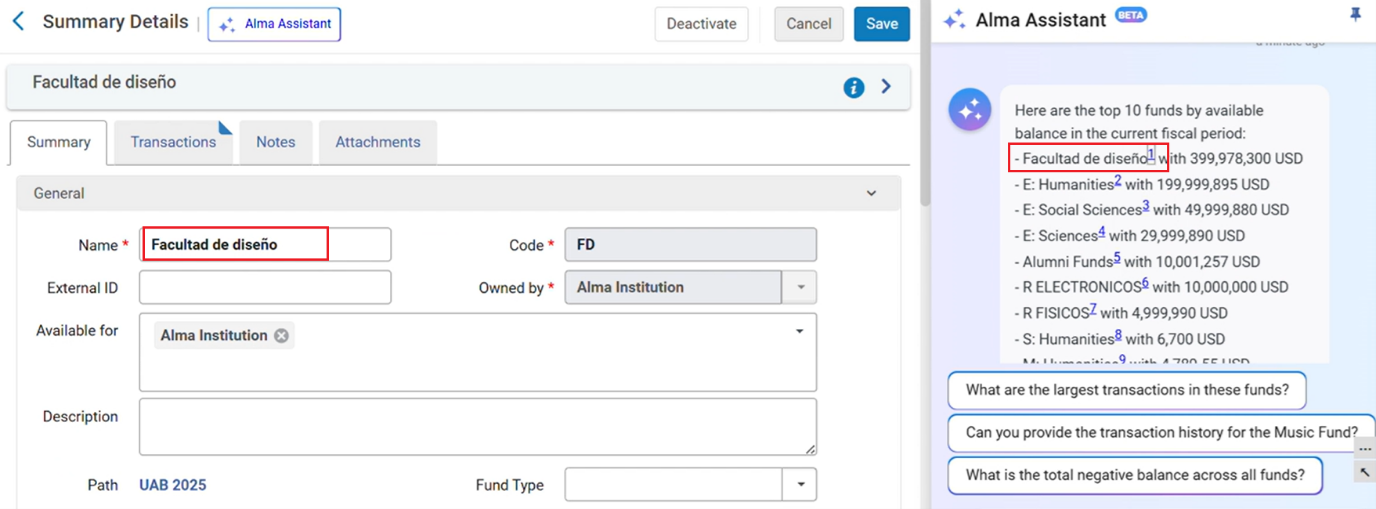
We recommend pinning the Alma AI Assistant before selecting the link so the navigation does not lose the conversation.
Alma AIアシスタント回答できるのは、一度に1つの質問のみです。
ベストプラクティス
- 一度に1つ質問をしてください。
- アシスタントはあなたに関するデータをよく知りません。そのため、分かりやすい質問をしてください。ファンド名やコードを指定する場合は、引用符("")で囲みます。
例えば、次のように質問します:
「メインライブラリ資金」という名前が付いている資金で使える残高はいくらか。
次のように質問するのは避けてください:
メインライブラリ資金で使えるのはいくらか
2つ目の例では、アシスタントは名前を「メインライブラリ」または「メインライブラリ資金」と理解する可能性があります。また、「メイン」ライブラリが所有者として定義されている資金について質問していると理解してしまう可能性があります。
質問の例
- 機関で使える合計金額はいくらですか?
- ファンドxにはいくらの資金がありますか?
- 赤字になっているのはどの資金ですか?
- 支出がない資金はどれですか?
- 2025年の負担額は何ですか?
- 資金xで一番支出が多いのはどの取引ですか?
- 年間8,387.00ドルのサブスクリプションパッケージを追加するのに十分な資金にはありますか?
- さまざまな資金の支出を示すグラフを作成してください。
- 資金xからいくら使いましたか?現在のレートでは、いつ資金を使い切ってしまいますか?
今後の計画
Future phase plans include support the following:
- 英語以外の言語での会話
- アクションの実行
- 特定の取引について、IDの代わりに発注明細番号と請求書番号を返す
機能と制限
大規模言語モデル生成AIツールは俊敏であり、その応答は用途によって異なり、時間の経過とともに進化します。私たちは、返されるデータの有用性と正確性を最大限に高め、プロンプトとデータ処理の効率を維持するためにコミュニティと継続して協力しています。
プロンプトの表現には慎重を期していますが、AIが不正確なデータや一般的なデータを返すケースがあります。
これらの制限を緩和するために私たちが行っていること
- Almaコミュニティと連携して、質問されている内容の種類を把握する
- さまざまなタイプの質問の正確性を検証する
- さまざまな言語に段階的に対応できるようにする
- Monitoring feedback and updating our prompts periodically using a new scheduled job,Synchronize AI settings
使用中の環境で資金および元帳用にAImaアシスタントを有効にする
AImaアシスタントを有効にするには、以下のロールが必要です:
- 統括管理者
- 受入管理者
資金と元帳用のAlmaアシスタントは、すべての機関においてデフォルトでは無効になっています。
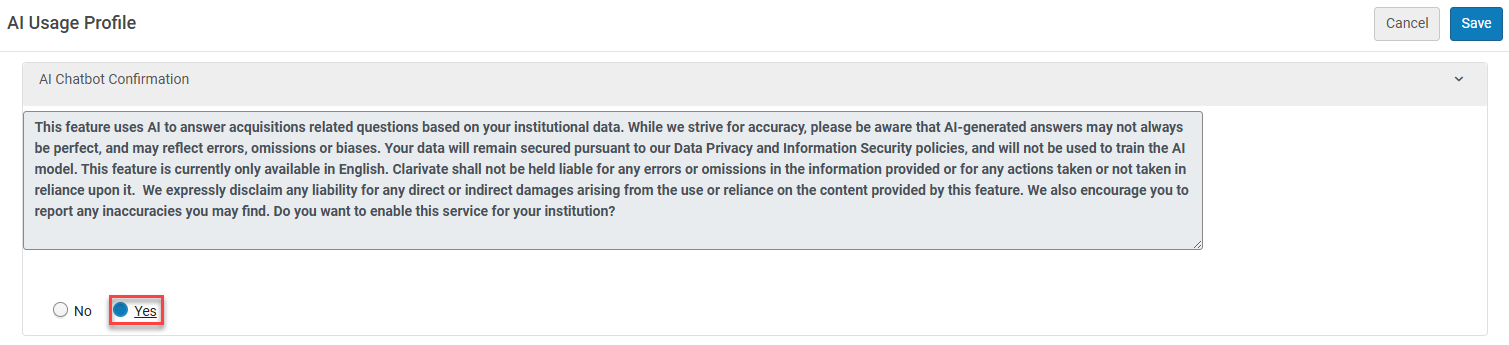
Once administrators review this generative AI tool’s advantages and limitations, understand the risks and decide if and how their library works with it.They can accept the disclaimer in Configuration Menu > Acquisitions > AI Features > AI Usage Profile.
はいを選択してください。
[保存]を選択します。
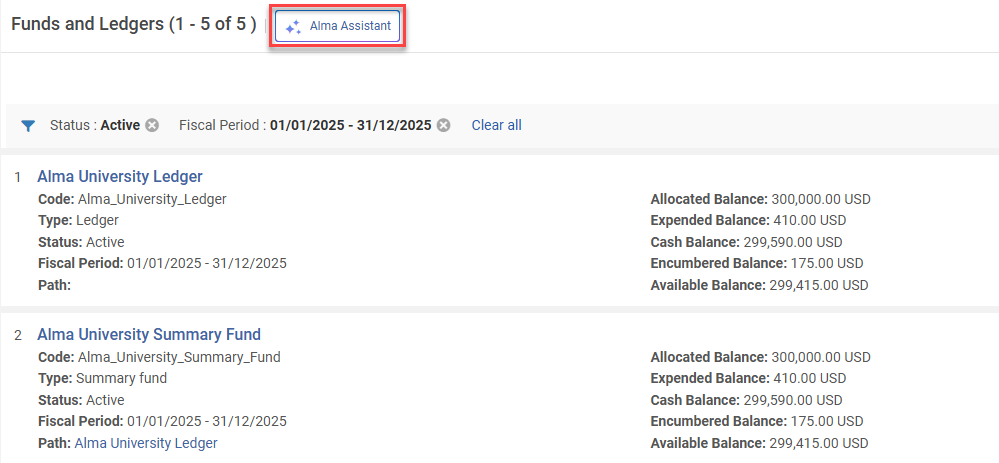
The new assistant is then visible on the Funds and Ledgers page.
サンドボックス環境でのテスト
The AI Alma Assistant settings are periodically updated using the Synchronize AI settings job.This ensures that the AI prompt remains effective and up-to-date as AI models evolve and change.
As scheduled jobs are disabled in Sandbox environments, before testing the AI Metadata Assistant, run the Synchronize AI settings to test with current settings.
- Select Monitor Jobs > Scheduled tab.
- Filter by Job Category = Data services.
- Select Run Now(available in Sandbox environments) from the Synchronize AI settings row actions.
ジョブが完了すると、適切な役割を持つユーザーは、資金と元帳ページでAlmaアシスタントをテストできます。
Enabling the AI Alma Assistant in the AI Usage Profile configuration page may need to be reset after the sandbox is refreshed.
フィードバックの提供
The Preview Mode(beta) is an early iteration designed to give libraries the opportunity to explore the feature, understand its potential, and actively contribute feedback that will guide future development.今後のリリースでは、ワークフローや応答に対するAlma AIアシスタントフローの一環としてアクションを実行する機能など、追加の機能強化が計画されています。
フィードバックはこのフェーズの重要な要素です。You can share your input directly within the Assistant using the thumbs up/thumbs down options on each response, or by contacting us directly at tamar.fuches@clarivate.com.
Alma AIアシスタントに関するよくある質問
- 私たちの分析データはAIの訓練に使用されますか?A: No – The AI is not trained on your data, and in fact does not even see it.データ取得用のクエリを生成するだけで、そのデータはその後Almaが処理します。
- どのLLMで動作していますか?A: Models are subject to change as models and capabilities evolve.As of the February 2026 release, the Alma AI Insights were working with the GPT 4O LLM model.
- AIに関するポリシーはどのような内容ですか?A: Clarivate’s Academia & Government policy for use of generative AI is available in the link:https://clarivate.com/ai/academia/policy/
- 同じ質問に対して、若干異なる回答が返ってくるのはなぜですか?A: Large Language Model generative AI tools are agile, and their responses differ between uses and evolve over time.AIが返す回答は、提供された情報と、AI自身の内部処理によって毎回異なります。
- AIが常に「正しい」答えを出すと信じて良いのでしょうか?A: AI provides data-driven suggestions, not absolute truths.これは人間の判断に取って代わるものではなく、意思決定を支援するために設計されています。AIの回答は、常に情報源の一つとして考慮すべきです。特に、複雑な状況や影響の大きい問題においては、単なる情報源の一つと考えるべきです。
Page tags: article:topic product:alma content:Documentation lang:english
