
割り当て済み資金間で送金する
This page gives instructions for transferring money between allocated funds in Alma.For an overview of working with acquisitions in Alma, including links to relevant sections such as Invoicing, Working with Orders/PO Lines, Renewals, Configuration, etc., see Introduction to Acquisitions.
- 資金マネージャー
割り当て済み資金から別の割り当て済み資金に送金(移動)することができます。これにより、出典資金へのマイナスの割当と対象資金へのプラスの割当が追加されます。
同じ会計期間の資金間でのみ送金できます。Depending on the configuration of the Transfers prior to fiscal period parameter within your ledger, you may be able to transfer money a few days before the fiscal period begins, or may be prevented from transferring money for a few days after the fiscal period starts; see Adding a Ledger.
Note that this only works for funds where the current fiscal year matches the calendar dates or the future fiscal year if you have grace days.過去に終了日があった会計年度には機能しません。
You transfer funds on the Funds Transfer page (Acquisitions > Acquisitions Infrastructure > Transfer Funds) or on a fund's Transaction tab (see Performing Fund Transactions).
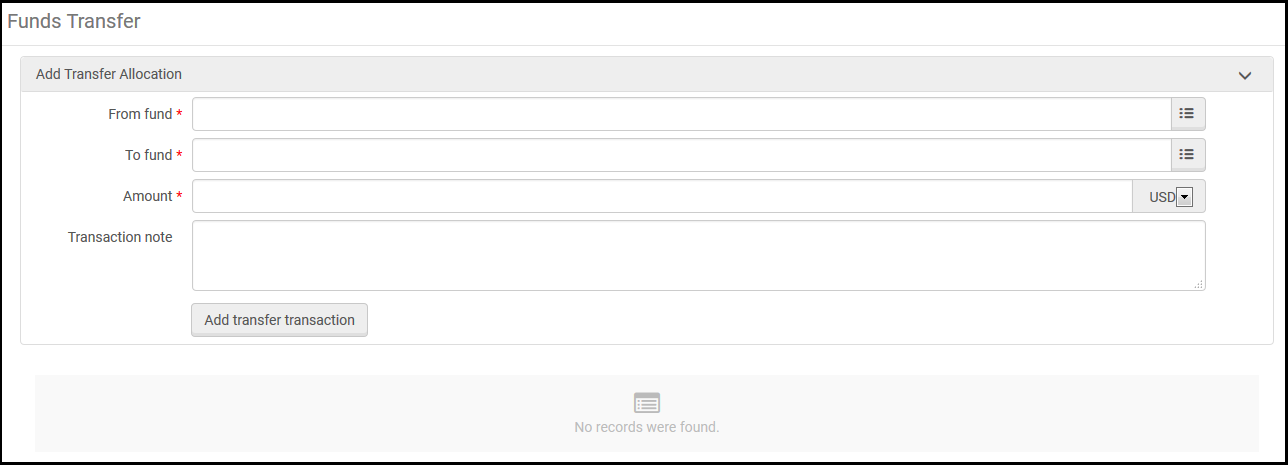
- 資金移動ページのこの資金からで送金元の資金を選択します。
- この資金へで、送金先の資金を選択します。
- 金額で、送金する金額を入力します。
- 取引ノートに、送金で含めておきたいメモを入力します。
- 送金取引を追加を選択肢、確認ダイアログボックスで確認を選択します。取引の詳細は、ページに表示されるほか、関連する資金の取引タブにも表示されます。
- 送金取引に誤りがあった場合は、キャンセルすることができます。To do so, delete the transaction from both funds: delete the positive transfer from the source fund, and delete the negative transfer from the target fund.
振替を取り消すには、両方の資金の取引を削除する必要があります。一方を削除しても、もう一方は削除されません。
Page tags: article:topicproduct:almacontent:Documentationlang:englishfund transfertransferring funds
