
資金と元帳を管理
予算には、資料を購入するためのお金が含まれています。予算は元帳に属し、特定の会計期間に利用可能です。予算は階層に編成でき、予算一覧には他の予算が含まれます。
This page describes how to manage funds and ledgers including basic terms, ledger and fund ownership/availability and working with exchange rates.予算や元帳の追加と削除、およびそれらを有効化/無効化する手順も含まれています。For information on moving funds see Moving Funds and for transferring allocations between funds see Transferring Money Between Allocated Funds.For an overview of working with acquisitions in Alma, including links to relevant sections such as Invoicing, Working with Orders/PO Lines, Renewals, Configuration, etc., see Introduction to Acquisitions.
- 予算マネージャー
- 予算・元帳ビューア(表示のみ)
- 元帳マネージャー
- 予算・元帳ビューア(表示のみ)
予算はアカウントのお金を表します。元帳は基本的に予算の集まりです。元帳は、今年の9月1日から来年の8月31日など、特定の日付範囲について定義されます。予算と元帳は、[予算と元帳]ページ(受入 > 受入インフラストラクチャ > 予算と元帳)で管理します。
For more information, watch Ledgers and Funds(5:58 min)
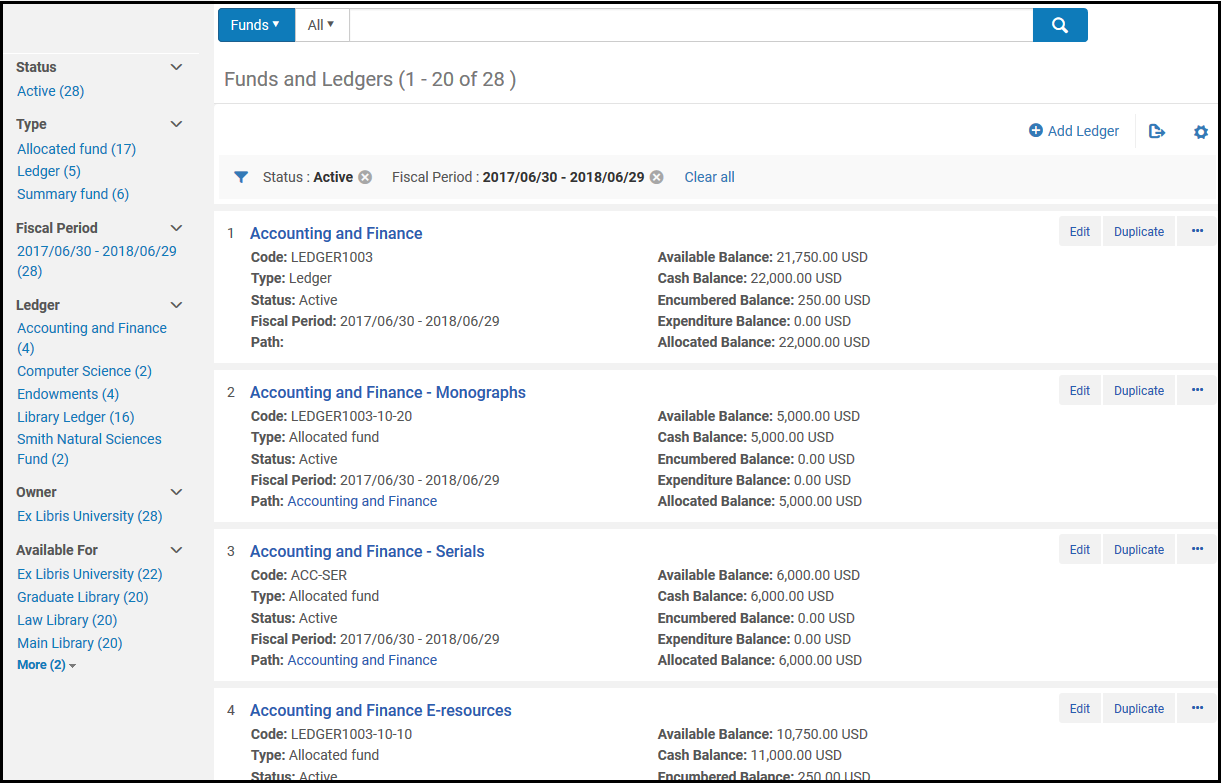
The items in this page appear in a record list; for information about configuring the list, see Record Lists.レコードはASCII順(アルファベット順で大文字、次にアルファベット順で小文字)で並べ替えられます。このページの各アイテム(予算または元帳)のフィールドは次のとおりです。See Fund Transaction Terminology for more information about fund and balance types.
- Name- The fund or ledger name
- Code- The fund or ledger code
- Type-Ledger,Allocated fund, or Summary fund
- Status-Active(operational),Draft(not yet active), and Inactive(no longer active)
- Fiscal Period- The financial year to which the ledger applies.See Configuring Fund and Ledger Fiscal Periods.
- Path- The ledger / summary funds to which this fund belongs.パス内のアイテムを選択して、元帳/予算一覧を表示します。元帳の場合、このフィールドは空です。
- Available Balance- See Fund Transaction Terminology
- Cash Balance- See Fund Transaction Terminology
- Encumbered Balance- See Fund Transaction Terminology
- Expenditure Balance- See Fund Transaction Terminology
- Allocated Balance- See Fund Transaction Terminology
- 行アクション:
- Edit- See Editing a Ledger and Editing a Fund.
- Duplicate- Add a ledger or fund by duplicating it; see Adding a Ledger and Adding a Fund.
- Deactivate / Activate- See Activating and Deactivating Funds and Ledgers.
- Delete- See Deleting Funds and Ledgers.
- Move Fund(fund only) - See Moving Funds.
To transfer allocations between funds, see Managing Fund Allocation Transfer.
予算取引の用語
- 予算は、割り当てまたは要約することができます。
- 一覧予算は注文や請求に使用されませんが、下位予算に関する集計レポートを提供します。このタイプの予算に他の予算を追加できます。
- 割り当て済み予算には、購入用に支払われてたお金または予約されたお金が含まれています。元帳予算は、予算一覧または割り当て予算に関連付けることができます。A Summary Fund can only be associated with an Allocated Fund.A specific Allocated Fund (i.e. Allocated Fund 101) can only be associated with only one Ledger or Summary Fund, but not both.
- 取引は、割り当て、負債、負債の除去、または支出の場合があります:
- 割り当て予算は、予算にお金を追加し、利用可能な残高を増やします。
- 負債は、注文明細の結果として、支払われると想定されるお金を指します。これにより、利用可能な残高が減少します。同じ注文明細にリンクされている同額の負債がある場合、負債はクローズされます。
- 支出は、予算からお金を差し引き、利用可能な残高を減らします。注文明細にリンクされている支出を追加すると、その注文明細にリンクされている負債の額が高くなります。
- 負債は、負債として同じ注文明細にリンクされている支出を追加すると、追加または増加します。負債について複数の負債が発生することはありません。例えば:
- 予算の注文明細に100ドルの負債がある場合。その注文明細にリンクされた50ドルの請求書を受け取ります。負債額は100ドルのままで、50ドルの支出が追加され、50ドルの負債額が追加されます。
- 注文明細について別の50ドルの請求書を受け取った後、2つの支出(それぞれ50ドル):負債額100ドル、および負債取消額100ドルがあります。現在、負債は全額支払済とみなされており、クローズされています。
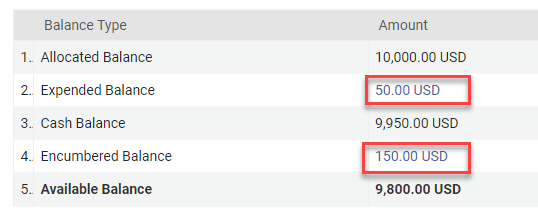
- 予算の利用可能残高は、割り当て済み残高から、(負債から負債取消を差し引いたもの)を差し引き、支出を差し引いたものです。
- 予算の現金残高は、割り当て済み残高から支出を差し引いたものです。
- 予算の割り当て済み残高は、その合計割り当てで、支出や負債/負債取消は含まれません。
- 予算の負債残高は、その負債額から負債取消額を差し引いたものです。This field links to the list of all purchase order lines that have an encumbrance transaction on the fund (even if the purchase order line already has an invoice and is fully dis-encumbered).
- 予算の支出残高(出費残高)は、その支出の合計です。このフィールドは、資金の支出取引があるすべての発注書明細のリストにリンクします。
Ledger and Fund Ownership and Availability
元帳は、機関または図書館が所有しています。元帳に追加された予算はすべて、元帳を所有する同じエンティティによって所有されます。予算が図書館に所有されている場合、その図書館でのみ利用できます。予算が機関によって所有されている場合、その機関のすべての図書館、機関の図書館グループ、または機関の単一の図書館が利用できるようにすることができます。This applies to both allocated and summary funds.
元帳を作成するときに、元帳の所有権を図書館に設定できます(機関はデフォルトで選択されています)。A user with a role with an institution scope can later change the ownership of a ledger from the library to the institution, but not the reverse (the user cannot change the ledger from being owned by the institution to now be owned by a library).元帳の所有権を変更すると、元帳の利用可能範囲とすべての予算の所有権が変更されますが、予算の利用可能範囲は変更されません。
When creating the ledger, you can restrict the availability of the ledger to one or more libraries within the institution.The availability of the Fund must be within the Ledger's availability (it is highly recommended to save the ledger before adding its funds - in this way the Fund's availability is taken from the ledger's).To view or manage a ledger or fund available to a particular library, a user must have the relevant role with a scope of an institution or that library.
特定の図書館に範囲が限定された役職のユーザーは、その機関が所有する資金と元帳を表示することはできません(資金と元帳が特定の図書館で「利用可能」とマークされている場合であっても表示できません)。ユーザーが対象となる図書館(および機関が所有する図書館)で「利用可能」な予算・元帳をユーザーが表示できるようにするため、専用の権限を有効にするオプションがあります(利用可能な予算・元帳ビュー)。関連する役割に対し、この権限を有効にするには、蔵書サポートチームにお問い合わせください。
機関範囲がある役割を持つユーザーは、元帳または予算の利用可否を変更して、より多くのまたはより少ない図書館を含めることができます。1つ以上の図書館から元帳の利用可否を削除すると、関連する予算もこれらの図書館で利用できなくなります。1つ以上の図書館の元帳に利用可否を追加すると、それらも追加しない限り、予算は図書館で使用できないままになります。
元帳間で予算を移動する場合、予算の移動元と完全に同じ利用可否を持つ元帳にのみ予算を移動できます。
予算の為替レート処理
注文明細が予算の通貨とは異なる通貨で負債を作成する場合、利用可能な残高は2つの通貨間の為替レートに基づいて計算されます。The exchange rates and calculated values of open encumbrances in a foreign currency are recalculated weekly by the Recalculate PO Line Encumbrances Based on Current Exchange Rate job (see Viewing Scheduled Jobs).負債の換算レートと換算レート日付は、関連する負債と常に同じです。
次の例では、木曜日に米ドルで購入し、日曜日と火曜日に請求書を受け取ります。予算はユーロ建てで、購入前の残高は1,000(千)ユーロでした。使用可能な残高は常に、その合計配分より少なく(計算された負債額から算出された負債取消額を差し引いたもの)、支出が少なくなります。
| 日時 | イベント | 為替レートEUR / USD | 負債 | 支出 | 負債取消 | 利用可能残高 |
|---|---|---|---|---|---|---|
| 木曜日 | 100USドルの注文明細が送信され、EUR予算から支払われます | 0.91 | 値:100 USドル計算:91ユーロ為替レート日付:木曜日ステータス:オープン |
909 ユーロ:
1000
-91負債
|
||
| 金曜日 | 0.92 | 値:100 USドル計算:91ユーロ為替レート日付:木曜日ステータス:オープン |
909 ユーロ:
1000
-91負債
|
|||
| 土曜日 | 再計算ジョブが実行されます | 0.93 | 値:100 USドル計算:ユーロ 93為替レート日付:土曜日ステータス:オープン |
907 ユーロ :
1000
-93負債
|
||
| 日曜日 | この注文明細に関連付けられた50ドルの請求書が届きます | 0.94 | 値:100 USドル計算:ユーロ 93為替レート日付:土曜日ステータス:オープン | 1:47 ユーロ(日曜日の為替レートの日付に基づいて50 USドル) | 値:50 USドル計算:46.50ユーロ(0.93 ユーロで50 USドル計算) 為替レート日付:土曜日 |
906.50ユーロ:
1000
- (93負債- 46.50 負債取消)
-47支出
|
| 月曜日 | 0.92 | 値:100 USドル計算:ユーロ 93為替レート日付:土曜日ステータス:オープン | 1:47ユーロ | 値:50 USドル計算:46.50ユーロ(0.93 ユーロで50 USドル計算) 為替レート日付:土曜日 |
906.50ユーロ:
1000
- (93負債- 46.50 負債取消)
-47支出
|
|
| 火曜日 | この発注明細に関連付けられた50ドルの請求書が届きます注文明細は全額支払われ、負債はクローズされます。 | 0.90 | 値:100 USドル計算済み:ユーロ 93為替レート日付:土曜日ステータス:クローズ | 1:47 ユーロ2 :45 ユーロ(火曜日の為替レートに基づいて50 USドル) | 値:100 USドル(50 USドル + 50 USドル) 計算:ユーロ 93(50 USドルは0.93 ユーロで計算+ 50 USドルは0.93 ユーロで計算) 為替レート日付:土曜日 |
908 ユーロ:
1000
- (93負債-93負債取消)
-47支出
-45支出
|
明示的な為替レート
For institutions that purchase resources with a different currency than the default currency and have agreements on specific exchange rates, you can define a fixed exchange rate in the Explicit Exchange Rates code table (Configuration Menu > Acquisitions > Invoices > Explicit Exchange Rates), for more information see:Configuring Explicit Exchange Rates.明示的な為替レートの設定は、為替レートが作成時に発注明細に適用され、承認されると請求書に適用されるため、予算に関連付けられた負債(発注明細)と支出(請求書)に影響を与えます。
Adding a Ledger
元帳を追加し、[予算と元帳]ページからこの元帳に予算を追加します。
- 予算と元帳ページ(受入 > 受入インフラストラクチャ > 予算と元帳)で、元帳を追加を選択します。[概要の詳細]ページが表示されます。
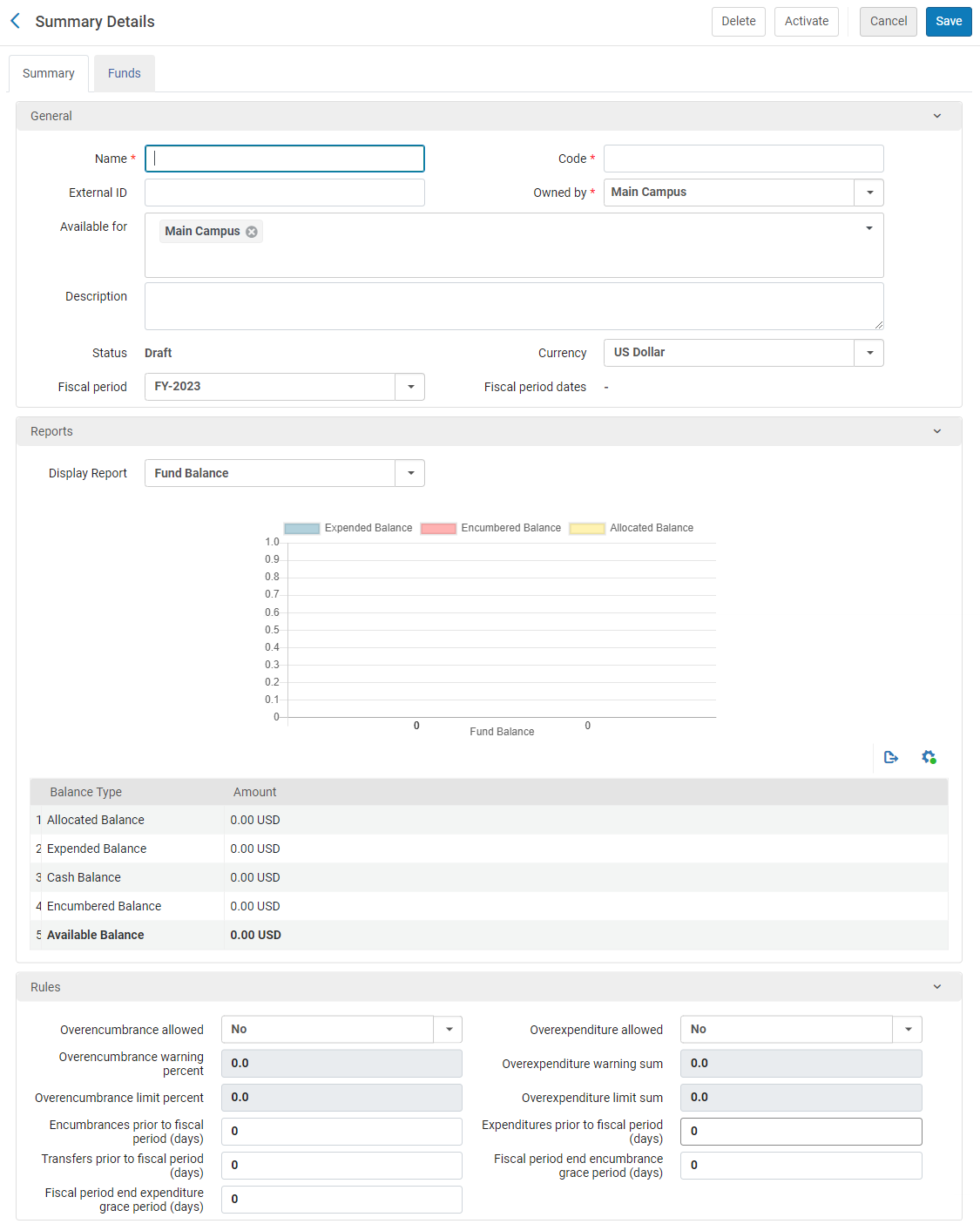 元帳の追加 - 概要の詳細元帳のコピーを作成するには、予算と元帳ページ上の元帳行のアクションリストで重複を選択します。元帳をコピーした後、必要に応じて元帳を変更します。
- 概要タブで、元帳(必須)の名前とコードを入力します。The code is reused when you roll over the ledger to a new fiscal period, so don't use a year-based code, such as MAIN LEDGER 2015.元帳の名前は、新しい会計年度にロールオーバーされるときに変更できます。フィールドの制限は 255 文字です (コードと名前の両方に適用されます)。
- 一般セクションで元帳のオプションのフィールドを設定します。
総勘定元帳の詳細 フィールド 説明 外部ID このIDは、他のシステムキーにリンクするために使用されます。フィールドの文字数制限は255文字です。 所有者 所有機関または図書館。元帳の所有者は 1 人だけです。デフォルトでは、これは機関であり、機関内のすべての図書館が元帳を利用できるようにします。元帳が機関内の複数の図書館で利用可能であるが、すべての図書館では利用できない場合、所有者で機関を選択し、以下に利用可で、それを使用できるすべてのライブラリを選択します。所有者をいずれかの図書館に変更すると、その図書館でのみ元帳が利用できるようになります。後でこれを変更する場合、所有権を図書館から機関に変更できますが、所有権を図書館から別の図書館に、または機関から図書館に変更することはできません。利用可 この元帳の資金を使用できる図書館。By default, this matches the selection under Owned by: either the institution or a single library.単一の図書館の場合、このフィールドは変更できません。機関の場合、機関内のすべての図書館が台帳を使用できますが、特定の図書館のみが使用できるようにフィールドを変更できます。
台帳の使用を特定の図書館に制限するには:
- Select the field to open a dropdown list of the institution and all of its libraries.
- Clear the institution checkmark, and select all of the libraries for which the ledger should be made available.The selected libraries are added to the field.For example, in the illustration below, the institution, Main Campus, is the owner of the fund, but it is cleared from the Available for field, while three specific libraries are added to the field; the ledger is thus available only to the three selected libraries.
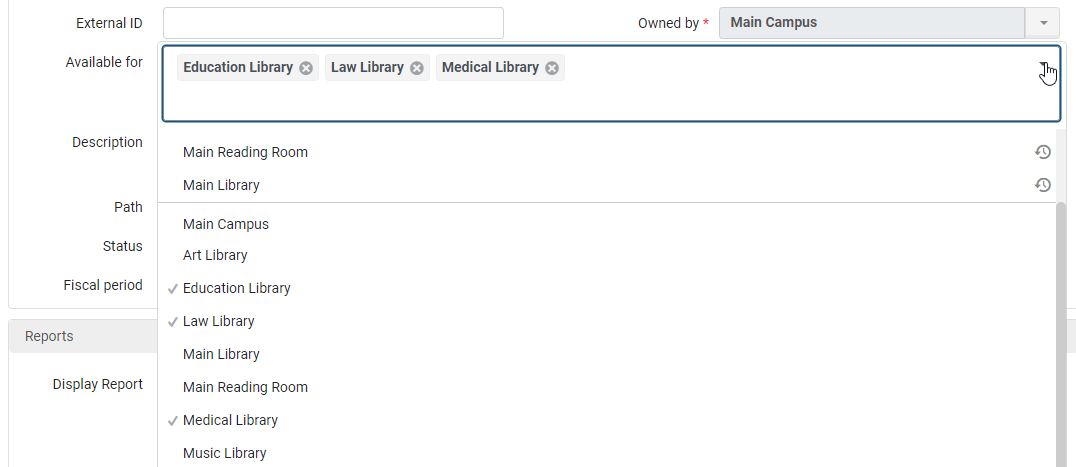
元帳へのアクセスを特定の図書館に制限したい場合は、必ず機関の選択をクリアしてください。そうしないと、元帳を保存する際、すべての図書館の選択が削除され、その機関のみが残ります。
説明 The ledger's description. ステータス The ledger's status: - 有効 – システムで操作可能
- 下書き – システムで設定されているが、まだ動作していません
- 無効 – システムで動作していません(以前に有効になった後)
通貨 元帳のデフォルトの通貨単位。To configure currencies, see Configuring Currencies. 会計期間 元帳が適用される会計年度。リストには有効な会計期間のみが表示されます。To configure these options, see Configuring Fund and Ledger Fiscal Periods.Also, for more information on fiscal periods, see Fiscal Period Closure. 会計期間の日付 元帳が適用される決算日。For information, see Configuring Fund and Ledger Fiscal Periods. - レポートセクションで、レポートを表示フィールドから、表示するレポートのタイプを選択します。
- 予算残高 – 以前にラベル付けされた残高レポートを表示します
- 予算バーンダウン – Almaアナリティックスで設定された予算バーンダウンレポートを表示します
- ルールセクションで、この元帳の負債と支出の動作方針動作に関連するフィールドを設定します。
元帳ルール フィールド 説明 負債が許可されています Whether the fund allows you to add an encumbrance whose amount exceeds the fund's available balance (the allocated balance less any expenditures and encumbrances).有効な値は次のとおりです: - いいえ
- Yes – Alma checks the specified limit in the fund and performs a calculation against the fund's amount.(制限が指定されていない場合、制限は0で、はいはいいえのように機能することを意味します。)
- 制限なし - 制限なしで負債が許可されていることを示します。Almaは、指定された限度額または予算にお金があるかどうかをチェックしません。
超過負担限度の計算:
A + B
- A = 割当済残高
- B = Overencumbrance Limit Percent (The amount of the allowed Overencumbrance is calculated by the percentage from the total allowed Balance, so that if the balance is 100 and the limit percent is 50%, then the Overencumbrance Limit is 150.)
The Overencumbrance Limit takes into account and is compared to (PO line Net Price + Encumbrance Balance) when checking if the fund can be used for a specific PO Line.This depends on its Net Price and the Encumbered Balance.
The Overencumbrance Limit cannot be less than the combined amount of the PO line Net Price + Encumbrance Balance.
過払いが許可されています Whether the fund allows you to add an expenditure whose amount exceeds the fund's available balance.有効な値は次のとおりです: - いいえ
- はい
- 制限なし - 制限なしで過払いが許可されていることを示します。
負債警告割合 The percentage of allowed overencumbrances permitted before the system provides a warning.When that amount is reached, an alert is displayed that the overencumbrance warning threshold has been reached.ユーザーが取引の追加を確認すると、予算取引を作成したエンティティにアラートが追加されます。 過払い警告合計額 システムが警告を提供する前の過払い額。 負債制限割合 The maximum percentage of allowed encumbrances permitted before the system blocks the creation of an encumbrance.When that amount is reached, the transaction creation is blocked. 過払い限度合計額 システムが過払いの作成をブロックする前の過払い額(割り当て残高に対してチェック)。Alma performs the check by adding the amount of overexpenditure to the allocated balance, and then subtracting encumbrances and expenditures from that sum. 会計期間(日)前の負債 会計期間の開始日より前に、新しい負債を作成できる日数 負の場合、会計期間の開始日から指定された日数の間、負債を作成できません。When working with accrual accounting, it is recommended to set this to 365(or as early as required to enter the accrual invoices).See Working with Accrual Accounting.When creating PO lines in a non-manual way (API, EOD etc.): If a fund for the current period is active at the same time as a fund from the next fiscal period, the one from the next fiscal period is used if this value permits it.If you do not want encumbrances added to the fund from the next fiscal period while the fund from the current fiscal period is still active, set this to 0.When creating PO lines manually: When creating a PO line, the user chooses the fund.If there are two funds available, one for the current fiscal period and another for the next fiscal period, the user chooses which fund to use.この場合、負債/支出は選択された資金に対して実行されます。会計期間(日数)以前の支出 会計期間の開始日より前の、新しい支出を作成できる日数。 負の場合、会計期間の開始日から指定された日数の間、支出を作成できません。When working with accrual accounting, it is recommended to set this to 365(or as early as required to enter the accrual invoices).See Working with Accrual Accounting.会計期間(日)前に転送 会計期間の開始日より前に、新しい送金を作成できる日数 負の場合、会計期間の開始日から指定された日数の間、送金がブロックされます。When working with accrual accounting, it is recommended to set this to 365(or as early as required to enter the accrual invoices).See Working with Accrual Accounting.同じ会計期間の予算間でのみ送金できます。For more information, see Managing Fund Allocation Transfer.会計期間末の猶予期間(日数) 会計期間の終了日の後、新しい負債を作成できる日数 負の場合、会計期間の終了前の指定された日数の間、新しい負債がブロックされます。会計期間末の支出猶予期間(日数) 会計期間の終了日の後、新しい支出を作成できる日数 負の場合、システムは会計期間の終了前の指定された日数の間、新しい支出をブロックします。 - 予算タブで、予算を追加を選択して元帳に予算を追加します。For information, see Adding a Fund.このオプションは、既存の元帳を編集するために編集を選択した場合にのみ使用できます。
- 保存を選択て、入力した元帳情報を保管し、予算と元帳ページに戻ります。為替レートの更新により、Almaは負債と支出を再計算する場合があります。
元帳を編集
元帳に入力された情報を更新できます。
- 予算と元帳ページ(受入 > 受入インフラストラクチャ > 予算と元帳)で、情報を更新する元帳の行アクションリストの編集を選択します。[概要の詳細]ページが表示されます。See Adding a Ledger.
- On the Summary Details page, edit the ledger information as required (note that the Code,Currency, and Fiscal Period fields are not editable).For information on this page, see Adding a Ledger.元帳の所有権を変更すると、元帳の利用可能範囲とすべての予算の所有権が変更されますが、予算の利用可能範囲は変更されません。1つ以上の図書館から元帳の利用可否を削除すると、関連する予算もこれらの図書館で利用できなくなります。1つ以上の図書館の元帳に利用可否を追加すると、それらも追加しない限り、予算は図書館で使用できないままになります。
- 予算タブで、必要に応じて、予算を編集、追加、複製、無効化、または移動します。For information on adding funds, see Adding a Fund.
- 注記タブで、元帳を追加、更新、または削除します。See Notes Tab.
- 添付ファイルタブで、元帳の添付ファイルを追加、更新、または削除します。See Attachments Tab
- 変更内容を保存して、元帳を無効にするには、無効化を選択します。元帳を有効にするには、有効化を選択します。それ以外の場合は、保存を選択して変更内容を保存します。
Adding a Fund
ルールは元帳から自動的に継承されます。元帳のルールに適用されたすべての変更は、それらに関連付けられた予算で自動的に確認できます(たとえば、猶予期間)。[予算]タブに何も設定されていない場合、継承は機能します。
Thus, if you configure extra fund rules, which causes the Ledger Rules to be overridden and the inheritance to be annulled, the tab Restore Rules Information will appear.You need to select Restore Rules Information, and then restore each one individually.予算ごとに特定のルールを設定するか、各予算が一般元帳からすべてのルールを継承します。
In the Fund tab, in the Rules section, if there is a tab Restore Rules Information, it indicates that the rules have been customized for the fund.If you select Restore Rules Information, the values will be inherited from the upper level of the hierarchy.
Once the rules are restored, the tab Override Rules Information will appear, which enables you to define your own rules for the fund.
したがって、次のタブが表示された場合は、次のことを示しています:
-
Override Rules Information- that the current values are inherited and have not yet been customized.
-
Restore Rules Information- that the current values have been customized.
元帳または予算一覧に予算を追加できます。次の場合にのみ、予算または元帳の会計期間に負債を追加できます。
-
会計期間は有効です
-
会計期間の日付範囲には現在の日付が含まれます
Alternatively, you can add encumbrances to a fund's fiscal period prior to or after the actual fiscal period, provided the relevant fields are configured in the Rules section of the Summary Details page (select Add Ledger).For details on the fields in the Rules section, see Adding a Ledger.
- 予算と元帳ページ(受入 > 受入インフラストラクチャ > 予算と元帳)で、予算を追加する元帳または予算一覧の行アクションリストの編集を選択します。
- 予算タブを選択します。予算リストページが表示されます。
- 予算を追加を選択肢、割り当て予算または予算一覧のいずれかを選択します。[概要の詳細]ページが表示されます。
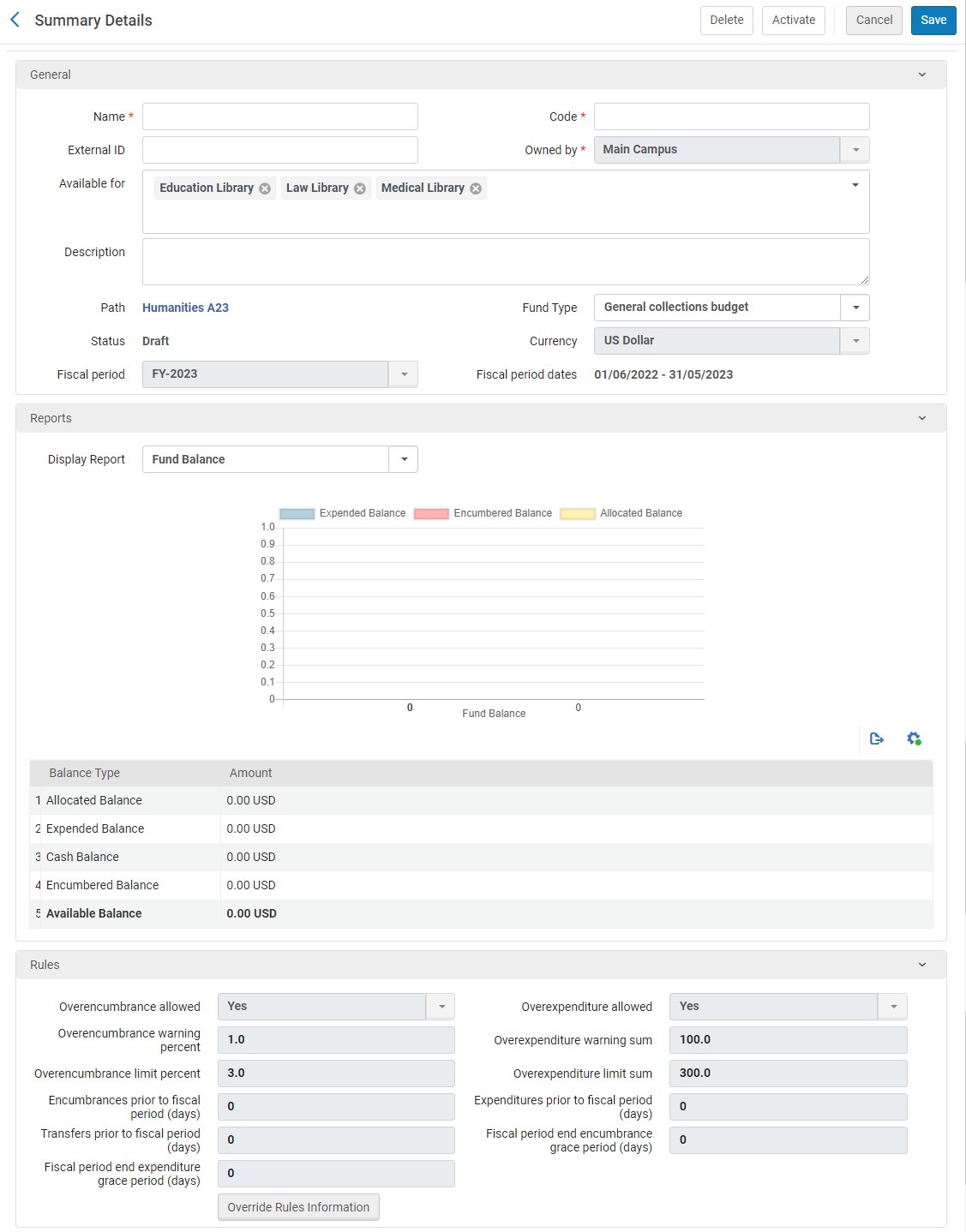 予算を追加 - 概要の詳細予算のコピーを作成する場合は、コピーする予算の行アクションリストで重複を選択します。予算をコピーしたら、必要に応じて修正できます。
- 予算名とコードを入力します(必須)。The code is reused when you roll over the ledger to a new fiscal period, so don't use a year-based code, such as MAIN FUND 2015.予算の名前は、新しい会計年度にロールオーバーされるときに変更できます。If you are working with accrual accounting (see Working With Accrual Accounting), do not change the name of the fund in the new fiscal period.The field limit is 255 characters (applies to the code and the name).コードに特殊文字を含めないことをお勧めします。
- オプションで、他のシステムキーへのリンクに使用できる予算の外部IDと、ファンドの説明を入力します。Owned by,Path, Currency,Fiscal period, and Fiscal period dates are inherited from the ledger and cannot be modified.Available for is also inherited, but you can remove libraries to make it more restrictive in the next step.
- 予算の親元帳/予算一覧が複数の図書館で利用可能な場合、利用可能でこの予算が利用できる図書館を選択します。予算の利用可否を親よりも制限することができます。
- オプションで、予算タイプを入力します。To configure fund types, see Configuring Fund Types.この予算をリソース共有リクエストに添付できるようにするには、予算タイプがリソース共有でなければなりません。See Borrowing Requests Associated with Funds.
- 元帳で設定されたルールを上書きするには、ルール領域のルールの情報を上書きを選択し、この予算の負債と支出の動作方針に関連するフィールドを設定します。For an explanation of these fields, see Adding a Ledger.
- 予算一覧の場合:
- レポートセクションで、次のようにレポートを表示フィールドから、表示するレポートのタイプを選択します。
- 予算残高 – 以前にラベル付けされた残高レポートを表示します。
- 予算バーンダウン – Almaアナリティックスで設定された予算バーンダウンレポートを表示します。
- 予算タブで、予算を追加を選択して元帳に予算を追加します(このプロセスのステップ1から始めます)。
- レポートセクションで、次のようにレポートを表示フィールドから、表示するレポートのタイプを選択します。
- 保存を選択して予算情報を保存します。
予算が保存されると、予算コードは変更できません。
予算を編集
予算に入力された情報を更新できます。
- 予算と元帳ページ(受入 > 受入インフラストラクチャ > 予算と元帳)で、情報を更新する予算の行アクションリストの編集を選択します。
- [概要の詳細]ページで、必要に応じて予算情報を編集します。For more information on this page, see Adding a Fund.Note that the fund's code is not editable.
- 割り当て予算については、取引タブを選択して、予算の取引を実行します。For more information on transferring and allocating funds, see Performing Fund Transactions.
- 注記タブで、予算に関する注記を追加、更新、または削除します。See Notes Tab.
- 添付ファイルタブで、予算の添付ファイルを追加、更新、または削除します。See Attachments Tab.
- 変更内容を保存して、予算を無効にするには、無効化を選択します。予算を有効にするには、有効を選択します。それ以外の場合は、保存を選択して変更内容を保存します。
For funds with 10 or more PO lines, when updating the fund name/code, the related PO lines are re-indexed.This is done by a background job that appears in the Monitor Jobs page.この再インデックスをトリガーした更新を行ったユーザーがオペレーターとして表示されます。
予算と元帳の有効化と無効化
予算を使用するには、有効化する必要があります。
元帳に必要な予算をすべて割り当てた後、元帳を有効化して使用する必要があります。
現在必要のない予算または元帳を無効にすることができますが、後で必要になる場合があります。You also must deactivate a fund or ledger before it can be deleted (see Deleting Funds and Ledgers).
予算と元帳ページ(受入 > 受入インフラストラクチャ > 予算と元帳)で、有効化または無効化する元帳または予算の行アクションリストで有効化または無効化を選択します。
- You can also activate a fund while adding or editing it by selecting the Activate link on the Funds List page, or by selecting Activate in any of the fund's tabs, after you have configured the fund.You can also activate a ledger while editing it by selecting Activate in any of the ledger's tabs.
- You can also deactivate a fund by selecting the Deactivate link on the Funds List page, or by selecting Deactivate in any of the fund's tabs.また、元帳のタブで無効化を選択して、編集中に元帳を無効化することもできます。
- 元帳または予算一覧を無効にすると、元帳または予算一覧に関連付けられた予算を無効にするよう求められます。元帳または予算一覧を無効にするには、元帳または予算一覧を無効にする必要があります。
予算と元帳を削除
元帳または予算が会計期間で不要になった場合、システムから削除できます。予算/元帳が無効であるか、下書きが削除されている必要があることに注意してください。
On the Funds and Ledgers page (Acquisitions > Acquisitions Infrastructure > Funds and Ledgers), select Delete in the row actions list for a fund or ledger.予算(または元帳に関連付けられている予算)に関連付けられている取引(負債、支出、または割当)がない場合、その予算は削除されます。元帳が削除されると、元帳に関連付けられているすべての予算も削除されます。
予算(または元帳に関連付けられている予算)に取引が関連付けられている場合は、取引を削除できるように、予算を有効化して[取引]タブを表示する必要があります。すべての取引が削除されたら、予算を非有効化して削除します。
Performing Fund Transactions
予算の取引は、予算と元帳ページの割り当て予算に関する行アクションリストで編集を選択することでアクセス可能な、取引タブで実行できます(受入 > 受入インフラストラクチャ > 予算と元帳)。取引タブには、割り当て予算で実行されたすべての取引が一覧表示されます。
このタブでは、次のことができます:
- 取引の詳細を表示する
- 割り当て予算にお金を割り当てる
- 割り当て予算から別の予算に送金する。送金もできます
- To reduce a fund's allocation, you allocate money using a negative number.
- Any change of PO line fields related to an existing transaction (for example PO line price,Reporting codes etc.) will re-create the transaction and the recreated transaction will display in the Transactions tab.The user who performed the field change displays as the Creator in the transaction.
- ファンドの取引タブでの検索では、大文字と小文字が区別されます。
取引タブで、取引の行アクションリストの表示を選択します。[取引の詳細]ページが表示され、指定した取引の詳細が示されます。
- 取引タブで、予算を割り当てを選択します。
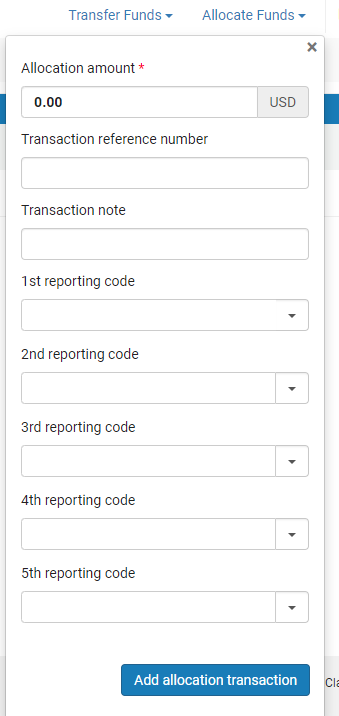 [割り当取引]ページ
- 配分額を入力し、次のオプションフィールドに入力します。
- 取引リファレンス番号 – 予算への特定の配分を参照するために使用される番号
- 取引注記 - 取引の説明
- Reporting codes(s)- A code that can be used for analyzing acquisitions in subsequent reporting.For more information, see Configuring Reporting Codes.
- 割り当て取引を追加を選択し、確認ダイアログボックスで確認を選択します。
- 保存を選択します。
- 取引タブで、送金するを選択します。この予算からフィールドには、変更できない現在の予算の値が含まれています。
- Continue as described in Transferring Money Between Allocated Funds, starting from step 2.
Page tags: article:topicledgerproduct:almacontent:Documentationlang:englishencumbrancefundadd fundadd ledgeredit fundedit ledgeractivate fundactivate ledgerdeactivate funddeactivate ledgerfund transactionavailable balancecash balanceallocated balanceexpenditure balanceencumbered balancedisencumbrancetransactionsummary fundallocated fundexpendituredisemcumbrancefund ownerledger owneravailable fundexchange rateexchange rate recalculationoverencumbranceoverexpenditurefund balancefund burn down
