
追加IDリクエストの設定
- 一般システム管理者 - 有効化、無効化、編集
- フルフィルメント管理者 - 有効化、無効化、編集
概要
図書館は、取り置きリクエストに割り当てられる追加 ID の接頭辞と最大値を設定できます。To access this page, navigate to Configuration > Fulfillment > Request Additional ID Configuration.
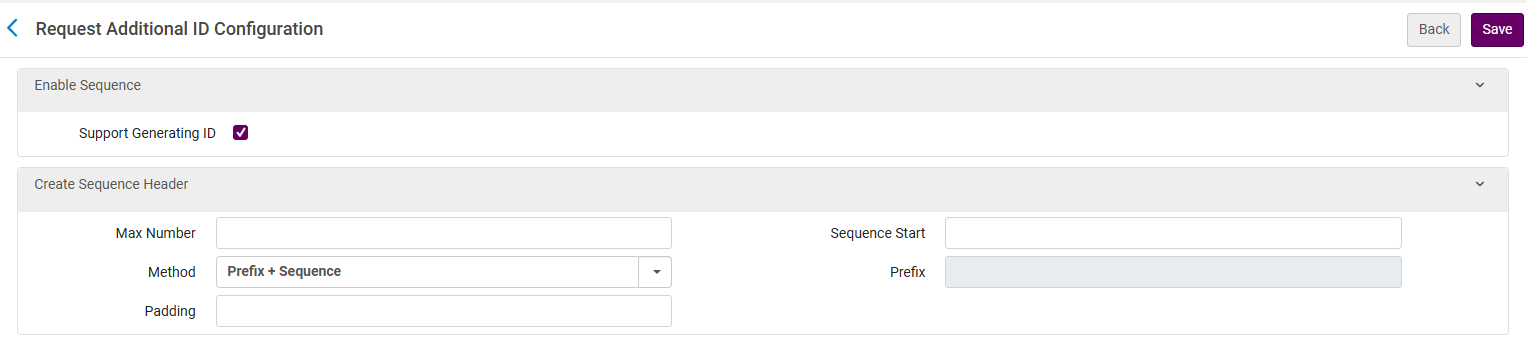
追加IDリクエストの設定
シーケンス、つまり最大数まで続く実行番号を設定できます。Once the Max Number is reached, the sequence returns to the start (see Sequence Start below).
-
ID生成のサポート - ID 生成を有効化します。デフォルトでは無効化されています。
-
Max Number - Set the Max number of the numerical sequence.Once the sequence reaches the max number, it will automatically reset to the Sequence Start value (unless there is a manual reset).最大数値の例は - 9999 です。
-
Method - Sets the method to use for the sequence.
-
接頭辞 + シーケンス - これを選択すると、シーケンスの前に含める接頭辞 (以下の接頭辞を参照) を追加できます。
-
なし - これを選択すると、接頭辞フィールドは無効化されます。
-
-
Padding - The maximum number of digits (numbers only) allowed in the numerical part of the sequence.If Padding = 5, then the number will contain five digits.
-
Example 1: If Max Number is set to 999 and the padding is 3, then after 999 comes 001.
-
Example 2: If Max Number is set to 9999 and the padding is 5, then after 09999 comes 00001.
-
Example 3: If Max Number is set to 9999 and the padding is 3, then after 999 comes 001.
-
-
シーケンス開始 - シーケンスの初期値です。
-
Prefix - This is available only if the prefix method is selected.It can either be a number, letter or symbol (-, /, #, etc.).
パディングは最大数の桁数以上にすることをお勧めします。
例
シーケンス
-
方法 : 接頭辞 + シーケンス
-
接頭辞 : REQ-
-
Max number: 9999
-
Sequence Start: 1000
-
パディング: 5
追加IDの出力
-
REQ-01000
-
REQ-01001
-
REQ-01002
-
....003
Page tags: article:topicproduct:almacontent:Documentationlang:english
