
リクエストの設定
冊子フルフィルメントルールを設定します。
This page covers the configuration of requests including request pickup rules, request type priorities, additional personal delivery locations, etc. For links to all the main fulfillment documentation pages see Fulfillment.
Configuring Request Task Names
- 一般システム管理者
- フルフィルメント管理者
[リクエストタスク名ユーザー表示コードテーブル]ページ(設定メニュー>フルフィルメント>冊子フルフィルメント>リクエストタスク名)を使用して、Primoマイアカウントのリクエストステータスの名前をカスタマイズできます。
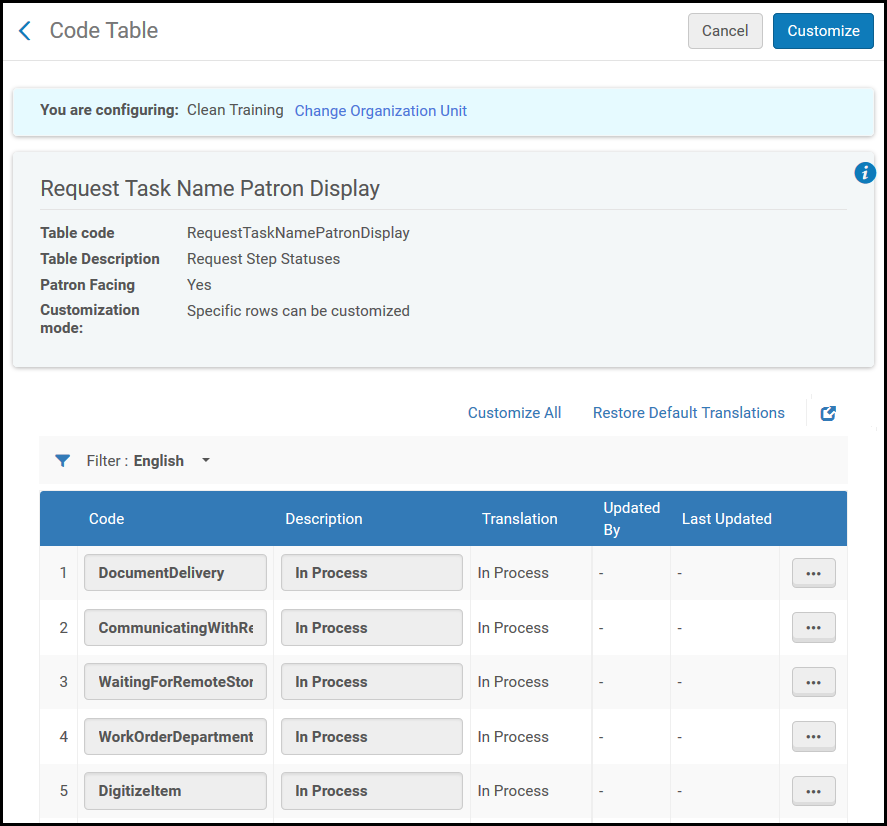
- [リクエストタスク名ユーザー表示コードテーブル]ページ(設定メニュー>フルフィルメント>冊子フルフィルメント>リクエストタスク名)で、リクエストステップステータステーブルの関連ステータスのコードおよび説明フィールドの値を変更します。
- カスタマイズを選択します。
Configuring Request Pickup Rules
- 一般システム管理者
- フルフィルメント管理者
図書館は、リクエストワークフローのさまざまな側面を管理する方法を決定するルールを設定できます。図書館は、これらのルールを使用して、リクエストの有効期限と日時、受け取りシェルフでの表示方法、指定した日数以内にアイテムが満たされない場合にアイテムを行方不明と見なすかをより適切に制御できます。
- [受け取り設定のリクエスト]ページ([設定メニュー]> [フルフィルメント]> [冊子フルフィルメント]> [受け取り設定のリクエスト])で、ルールの追加を選択します。[受け取り設定のリクエスト]ページが表示されます。
受け取り設定ページのリクエスト - 名前フィールドに、リクエスト受け取り設定ルールの名前を入力します。
- In the Input Parameters section, specify the components of the input parameters (Name,Operator, and Value).A set of input parameters may look like this:User Group = Graduate student.使用可能な名前入力パラメータは次のとおりです。
- ロケーション
- リクエストタイプ
- ユーザーグループ
- In the Output Parameters section, specify the following parameters that are to apply to the indicated Location,Request Type, or User Group:
- Consider as missing when expired- Whether the requested item is considered missing if it is not fulfilled within a specified number of days.
- Only when expired not due to Date Needed by- Relevant if the rule is set so that the expiry of the request will also trigger marking the item as lost.The expiry of the request can happen either because the defined period of time has elapsed (default is a week) or because the last interest time arrived - the shorter of the two.In the first case, it means that the library has tried to fulfill the request for some time but could not find it.後者の場合、利用者が関心を失ったという理由だけでリクエストが期限切れになったことを意味しますが、図書館がリクエストを実行できた可能性があります。The Only when expired not due to Date Needed by option can be used to say that an item should be considered lost only in the first case (which indicates the library could not find the item) but not in the second.
- Only when expired not due to Date Needed by- Relevant if the rule is set so that the expiry of the request will also trigger marking the item as lost.The expiry of the request can happen either because the defined period of time has elapsed (default is a week) or because the last interest time arrived - the shorter of the two.In the first case, it means that the library has tried to fulfill the request for some time but could not find it.後者の場合、利用者が関心を失ったという理由だけでリクエストが期限切れになったことを意味しますが、図書館がリクエストを実行できた可能性があります。
- Show in 'Pick From Shelf' list- Whether the requested item appears on the Pick From Shelf list.
- Expiry time for 'Pick From Shelf' (in days)- The number of days after which the request is considered expired.たとえば、このフィールドに5を指定した場合、リクエストされたアイテムが5日以内に受け取りされないと、リクエストは期限切れと見なされます。有効期限を指定しない場合、デフォルトは7日間です。
- Calculate expiry time in open days- allows the number of days before a request is expired to be calculated for open days only.たとえば、ルールが7日間であるが、その計算された日付が閉館日であり、チェックボックスがオンの場合、取り置き棚から得るタスクは次の開館日に期限切れになります。チェックボックスがオフになっている場合(デフォルト)、棚から取り置き棚から得るタスクは閉館日に失効します。
When the item's expiration time arrives, the Requests – Handle Expiration Step job cancels the requests (see Viewing All Scheduled Jobs). - Consider as missing when expired- Whether the requested item is considered missing if it is not fulfilled within a specified number of days.
- 保存を選択します。ルールが[受け取り設定のリクエスト]ページに表示されます。
-
複数のルールを定義した場合、[上に移動]および[下に移動]矢印を使用して、ルールのオーダーを設定します。Almaは、有効な最初の(そして最初の)適切なルールを適用するため、ルールのオーダーは重要です。
-
ルールは有効列で有効または無効にできます。
- 既存のリクエストを遡及的に計算を選択します。Almaは、既存のリクエストにルールを遡及的に適用します。それ以外の場合、ルールは、ルールが有効にされた後に作成されたリクエストにのみ適用されます。
ルールが設定されていない場合、アイテムは有効期限が切れると常に行方不明と見なされます。
リクエストタイプの優先順位の設定
- 一般システム管理者
- フルフィルメント アドミン
リクエストの優先順位マッピングテーブルを使用すると、さまざまな図書館リクエストタイプごとに優先順位を設定できます。これは[設定メニュー]> [フルフィルメント]> [冊子フルフィルメント]> [優先度のリクエスト]からアクセスします。
- [優先順位のリクエスト]ページで、設定するメッセージの行アクションリストからカスタマイズを選択します。
- Select the new priority in the Priority field.設定するすべてのメッセージで、この2つのステップを繰り返します。
- 完了したら、保存を選択して変更を保存します。
使用可能なリクエストタイプは次のとおりです:
|
リクエストタイプ |
意味 |
|---|---|
|
図書館冊子デジタル化リクエスト |
リーディングリストからのデジタル化リクエスト |
|
恒久的に移動する |
物的アイテムを新しい場所に移動するリクエスト |
|
一時的に移動する |
物的アイテムを一時的に新しい場所に移動するリクエスト |
|
デジタルに発送 |
リソースシェアスタッフによる内部デジタル化リクエスト |
|
物理的に発送 |
リソースシェアスタッフによる内部物的アイテムリクエスト |
|
復元アイテム |
一時的な場所からアイテムを復元する |
|
スタッフデジタル化リクエスト |
スタッフデジタル化リクエスト |
|
ワークオーダー |
ワークオーダーリクエスト |
Configuring Additional Personal Delivery Locations
- 一般システム管理者
- フルフィルメント管理者
個人配送の対象となる利用者は、登録済みのご自宅/事業所の住所以外の住所でのリソースの受け取りをリクエストできます。これにより、ご自宅やオフィスの住所がシステムにアップロードされていない場合であっても、個人配送サービスが利用可能になります。
- 設定 > フルフィルメント > 利用者設定 > 追加の個人配送先住所タイプを選択します。
- Enable the relevant delivery location and update the description.

- The new delivery location appears in the Pickup At field on the Create Request page (see Supporting Personal Delivery Requests) if the patron is eligible for personal delivery.
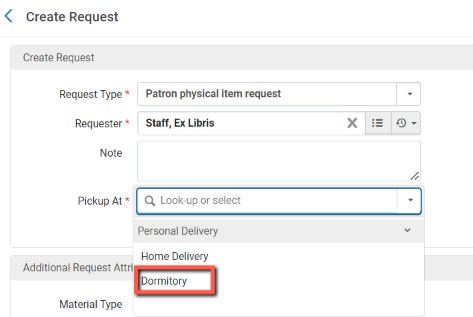
また、個人配送をリクエストする場合、利用者はPrimoVEに登録されているご自宅・オフィスの住所を簡単に変更できます。See Setting Personal Delivery Locations from Hold Request Form for more information.
Page tags: article:topicFulfillmentproduct:almacontent:Documentationlang:englishFulfillment policiesTerms of UseConfigure FulfillmentItem PoliciesFulfillment UnitBlock preferencesAutomatic loan renewal rulesOverdue and lost loan profileloan recall requestsconfigure request pickup rule
