
貸与の設定
冊子フルフィルメントルールを設定します。
This page describes how to configure loans including automatic loan renewal rules, overdue and lost loan profiles, etc. For links to all the main fulfillment documentation pages see Fulfillment.
Configuring Block Preferences
- 一般システム管理者
- フルフィルメント アドミン
Watch the Overdue and Lost Loan Profiles video.
ブロックプレファレンスでは、アイテムまたはユーザーのステータスに基づいて、機関内の貸出・返却受付でさまざまなシナリオを処理する方法を制御できます。For more information on blocking users, see Blocking and Unblocking Users.When an item is blocked it can't be loaned to (or requested by) the user; see Creating a Request from the Institution.For details on policies for loan recall requests, see here.
典型的なシナリオは次のとおりです。
ユーザーが本を貸出・返却受付に持ってきて、その本を借りようとします。When the circulation desk operator enters the book's ID into the system, it is discovered that the book was requested by another patron, preventing the user from borrowing it.Depending on the block preferences and the staff member's permissions, the block may be overridden.
For configuring user blocks including demerits, consortial blocks, overdue loans, etc., see Configuring User Blocks.
機関で定義されているブロックプレファレンスは、[ブロックプレファレンス]ページ([設定メニュー] > [フルフィルメント] > [物的フルフィルメント] > [ブロックプレファレンス])に表示されます。
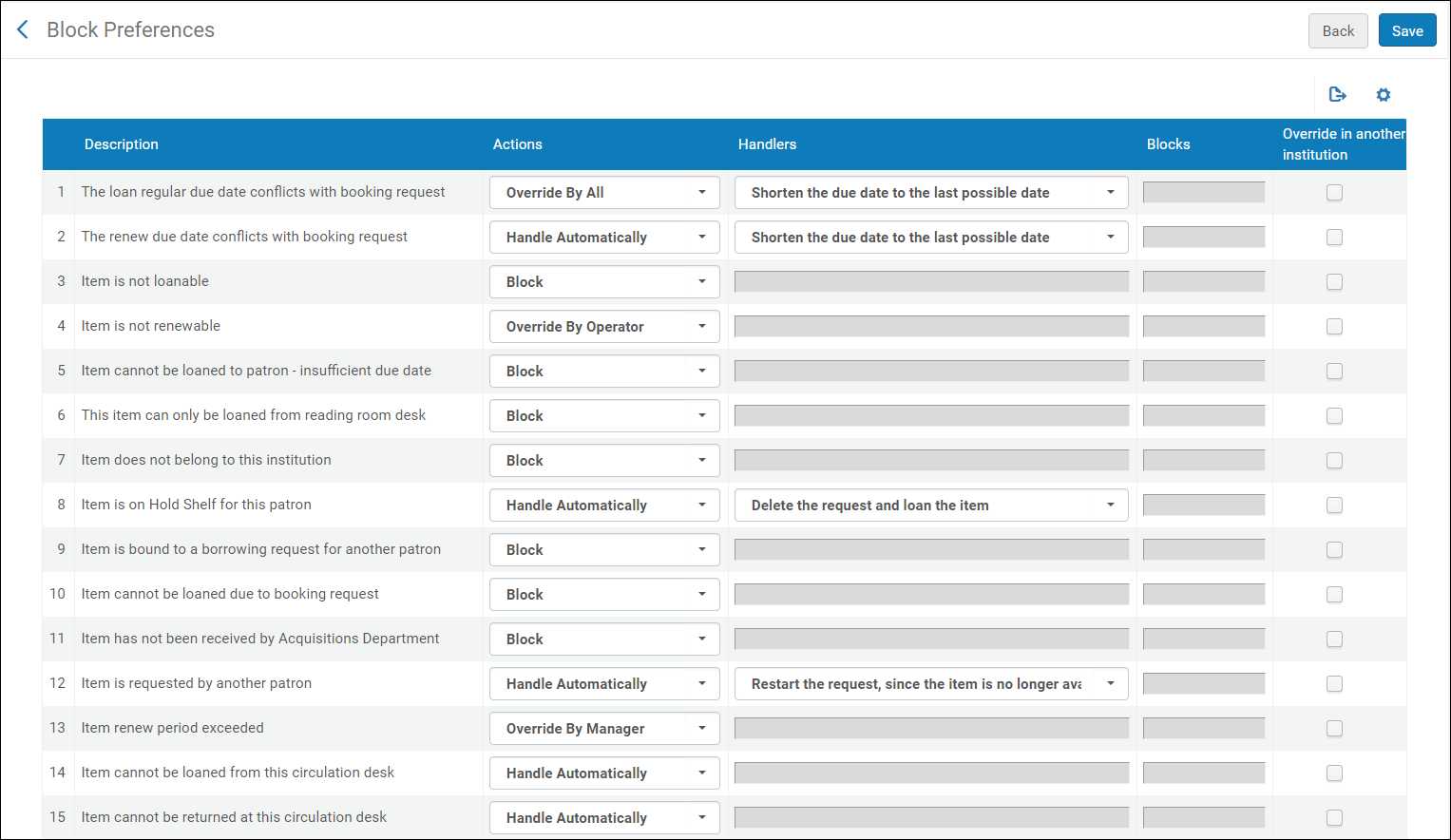
- ブロックプレファレンスは、機関レベルでのみ設定できます。フルフィルメント設定ページの設定フィルタから必要な機関を選択します。
- 更新不可-アイテムにリクエストがありますエントリは、更新されたアイテムにタイトルレベルのリクエストがある場合のシステムの動作を示します。更新中の貸与アイテムにタイトルレベルのリクエストが存在する場合、リクエストの更新を許可するには、自動処理を選択します。他のオプションを選択して、更新中の貸与アイテムに対するタイトルレベルのリクエストが存在する場合に、貸与更新を拒否します。また、このパラメータは、貸出リソース共有リクエストで配送された資料を更新しようとする場合(リソース共有リクエスト更新を使用)、かつ当該資源に対してタイトルレベルのリクエストが存在する場合のシステム動作も制御します。自動処理を選択すると、そのリソースに対してタイトルレベルの予約がある場合でも、更新リクエストが自動的に受理され、貸出資料の返却期限日が、リクエストされた新しい返却期限日に自動的に更新されます。他のオプションいずれかを選択して、更新リクエストを拒否します。
- アイテムをユーザーに貸すことはできません - 期日が不十分ブロックは、期日が返却できないためにアイテムを貸すことができないことを示します。For example, this block appears when an item's due date is in the past, or when an item is due tomorrow but delivery of the item cannot be completed for three days.
ブロックプレファレンスのリストは事前定義されています。You cannot add or delete a block preference, but you can modify a block preference's settings.設定は、機関内のすべての図書館に適用されます。
ブロックプレファレンスの編集
変更可能な詳細については、、ワークベンチプレファレンスページの次のフィールドで設定されます。
Actions – Defines the global action to perform in a given scenario
- ハンドラ – アクションフィールドが自動処理または上書きオプションのいずれかに設定されている場合に自動的に実行するアクションを定義しますハンドラは、アクションに対して選択するオプションが複数ある場合にのみ編集できます。
- Blocks – Defines which types of transactions to block (Loan,Renew, or Both)
実行可能なアクションは次のとおりです。
- ブロック – 資料はブロックされ、ユーザーは資料を借りることができません。
- マネージャによる上書き – アイテムのブロックは、現在の貸出・返却受付で貸出・返却受付マネージャの役職を持つスタッフメンバーのみが上書きできます。
- オペレータによる上書き - アイテム上のブロックは、現在の貸出・返却受付で貸出・返却受付マネージャまたは貸出・返却受付オペレータの役職を持つスタッフメンバーが上書きできます。
- Override by All – The block on the item can be overridden by any staff member with either the Circulation Desk Manager, Circulation Desk Operator, or Circulation Desk Operator –Limited role at the current circulation desk.
- Override in Another Institution- This option may be used by Fulfillment Network members to configure whether the block may be overridden by staff in another institution if the block happens when the member's item is being loaned at the circulation desk of another member institution.
- 自動処理 - 特定のアクションはAlmaによって実行されます。In some cases, these actions are specified in the Handler field, and are predefined by Ex Libris.Handler options can be configured only if you select Handle Automatically or one of the Override by options.In other cases, such as for block descriptions “Item cannot be loaned from this circulation desk” and “Item cannot be returned at this circulation desk”, the Handler field is empty.When the Handler field is empty, choosing Handle Automatically enables the activity to occur with no block.For example, if “Item cannot be loaned from this circulation desk” is defined with the Handle Automatically action, then an item from Library B which is not defined as “Circulate For” in Library A can be loaned (with no block) while at a circulation desk of Library A.
- The block preferences Item has not been received by Acquisitions Department,Item cannot be loaned due to booking request,Item cannot be loaned to patron - insufficient due date,A resource sharing request must be renewed by the resource sharing library, and Item does not belong to this institution contain only a single Action (Block), which cannot be overridden.
- The block preference Not Renewable - Item has Requests is relevant only if PATRON_PHYSICAL = Yes on the Loan Recalls Mapping Table page (see Configuring Loan Recall Requests).
- 外部ユーザーとジョブする場合、ブロックプレファレンスユーザーは期限切れですは、外部システムでユーザーが期限切れになったことを示し、ブロックプレファレンスユーザーはアクティブではありませんは、外部システムでユーザーがアクティブでないことを示します。
- When selecting Item cannot be loaned from this circulation desk,Item cannot be returned at this circulation desk, or Not Renewable – Item has Requests, no Handler options are available when Handle automatically is selected.これらの場合、Almaはブロックを無視し、アイテムは貸し出し可能となります。
- アイテムは更新不可設定の上書きアクションを選択すると、ユーザーサービスの管理貸与タブのアクションボタンにある更新オプションの警告ボックスに上書きボタンが表示されます。これは選択の更新ボタンまたはすべて更新ボタンには影響しません。
ブロックプレファレンスの説明は次のとおりです。
| ブロック名 | 説明 | 実行可能なアクション | ハンドラ |
|---|---|---|---|
|
通常の返却期日と予約リクエストが競合しています
|
通常の期日(例えば、TOUが決定する)が既存の予約リクエストの開始と競合する場合、チェックアウトはブロックされます。
|
|
期日を可能な最後の日付まで短縮する
|
|
更新期日と予約リクエストとが競合しています
|
既存の貸与の更新は、通常の更新期日(TOUによって決定されるなど)が既存の予約リクエストの開始と競合する場合にブロックされます。
|
|
期日を可能な最後の日付まで短縮する
|
|
アイテムは貸与不可
|
フルフィルメント設定により、アイテムのチェックアウトはブロックされます。適用される利用規約には、Falseの貸与可ポリシーが含まれています。
|
|
|
|
アイテムは更新できません
|
フルフィルメント設定の結果、貸与の更新がブロックされます。適用される利用規約には、値がFalseの更新可能なポリシーが含まれています。
|
|
|
|
アイテムはユーザーに貸与できません - 期日不足
|
ブロック
|
||
|
アイテムはリーディングルーム受付からのみ貸与されます
|
アイテムの[貸与可]ポリシーの値が[リーディングルームのみ]で、リーディングルームの受付として定義されていない貸出・返却受付から貸与が試行された場合、チェックアウトはブロックされます。
|
|
|
|
アイテムはこの機関に属していません
|
ブロック
|
||
|
アイテムはこのユーザーのために取り置き棚に置かれています
|
アイテムが取り置き棚にある場合、アイテムのチェックアウトはブロックされます。
|
|
リクエストを削除してアイテムを貸与します
|
|
アイテムは別のユーザーの取寄せリクエストにバインドされています
|
Checkout is blocked for an item because it was already requested by a different patron via Resource Sharing.
|
|
|
|
予約リクエストが入っているためアイテムは貸与できません
|
ブロック
|
||
|
受入部署がアイテムを受領していません
|
ブロック
|
||
|
アイテムは別のユーザーからリクエストされています
|
別のユーザーによるアイテムのアクティブなリクエストがある場合、ユーザーへのアイテムのチェックアウトはブロックされます。リクエストがアクティブでない場合、ブロックは効果がありません。The block also has no effect if the item is in another process, for example, a loan.
|
|
アイテムが使用できなくなったため、リクエストを再開します。
|
|
アイテムは図書館からリクエストされています
|
図書館内部のプロセスで要求されたアイテムのチェックアウトはブロックされます。
|
|
アイテムが利用できなくなったため、リクエストを再開します
|
|
アイテム更新期間超過
|
フルフィルメント設定の結果、貸与の更新がブロックされます。適用される利用規約には、この貸与が達した最長更新期間ポリシーの値が含まれています。
|
|
|
|
この貸出・返却受付からアイテムを貸与できません
|
|
|
|
|
この貸出・返却受付ではアイテムを返却できません。
|
|
|
|
|
同じタイトルの資料(同じ書誌レコードに紐づけされた資料)がこのユーザーに最近貸出されました
|
フルフィルメント設定の結果、再貸与がブロックされます。適用される利用規約には、値がOtherのの再貸与制限ポリシーが含まれています。
|
|
|
|
Item of the same title (items attached to the same bib record) is already on loan for this patron
|
フルフィルメント設定の結果、アイテムの貸与がブロックされます。適用される利用規約には、値がOtherのの再貸与制限ポリシーが含まれています。
|
|
|
|
貸与は貸与ステータスのため更新できません
|
貸与ステータスが紛失、返却された、リコールの場合、貸与の更新はブロックされます。紛失したアイテムのブロックは上書きできないことに注意してください。
|
|
|
|
アイテムは他のユーザーのために取り置き棚に置かれています
|
別のユーザーの取り置き棚に現在あるアイテムのチェックアウトはブロックされます。リクエストの「取り置き棚」ワークフローステップの有効期限がすでに切れている場合、そのリクエストはキャンセルされ(キャンセル理由は「取り置き棚からのリソース受け取り期限が過ぎた」となります)、そのアイテムは新しい利用者に貸し出されます。
|
|
アイテムが利用できなくなったため、リクエストを再開します
|
|
Item is on expired hold shelf for another patron'
|
現在、別のユーザーの取り置き棚にあるアイテムについては、有効期限が切れても、チェックアウトがブロックされます。
|
|
期限切れのリクエストをキャンセルして貸し出しを有効にする
|
|
同じタイトルの資料はすでにこのユーザーに貸し出されています。並行貸出は禁止されています。
|
フルフィルメント設定の結果、アイテムの貸与がブロックされます。適用される利用規約には、値がParallelの再貸与制限ポリシーが含まれています。
|
|
アイテムが利用できなくなったため、リクエストをキャンセルします
|
|
貸し手ポリシーは更新をサポートしていません
|
Resource sharing loan cannot be renewed because the lender's policy does not allow renewals.
|
|
|
|
ユーザー現金限度超過
|
現在の請求金額がそのユーザーグループの許容限度を超えるユーザーに対してアイテムの貸与および/または更新がブロックされます([ユーザー]タブで設定)。[ブロック]列からブロックするアクション(貸与、更新、または両方)を選択します。
|
|
|
|
ユーザーカードが期限切れです
|
期限切れのユーザーレコードを持つユーザーのアイテムの貸し出しはブロックされます。
|
|
|
|
ユーザーはアクティブではありません
|
非アクティブなユーザーレコードを持つユーザーに対するアイテムの貸し出しはブロックされます。
|
|
|
|
ユーザー貸与限度超過
|
そのユーザーグループで許可されている数を超える貸与を現在持つユーザーに対するアイテムの貸与はブロックされます([ユーザー]タブで設定)。
|
|
|
|
ユーザー延滞限度超過
|
そのユーザーグループで許可されている延滞を超える貸与を持つユーザーに対するアイテムの貸与および/または更新はブロックされます([ユーザー]タブで設定)。[ブロック]列からブロックするアクション(貸与、更新、または両方)を選択します。
|
|
|
|
ユーザー延滞リコール限度超過
|
延滞中の返却請求件数が、そのユーザーグループに対して許可されている上限数(「ユーザー」タブで設定)を超えている場合、ユーザーへの貸出および/または貸出延長をブロックします。[ブロック]列からブロックするアクション(貸与、更新、または両方)を選択します。
|
|
|
|
更新不可 - アイテムがリクエストされています
|
返却請求された資料の追加コピーの更新をブロックします。
|
|
|
|
アイテムは現在他のユーザーに貸与中です。
|
|
For self-check machines, the loan is blocked as if the block preference is set to block.
See also Waiving Fines and Fees.
|
|
|
リソースシェアリクエストの更新はリソースシェア図書館が行う必要があります
|
ブロック
|
||
|
リソースシェアオペレータがアイテムを受領していません
|
|
自動リソースシェア受領を実行します
|
|
|
貸出更新が許可される時間枠
|
更新はブロックされています。The ‘Time frame when loan renewal is allowed' policy allows renewals only when near the due date.
|
|
|
|
ユーザーの役職がないか、役職の有効期限が切れています
|
|
Note that requests are not blocked in Alma.The rationale behind this is to allow patrons to place the request, but when they come to pick up the item, to force them to pay/return/solve the reason for their blockage before receiving the requested item.However, you can still create blocks on requests by creating blocks manually: when configuring a block manually, you choose which actions are blocked.
The Block Preferences page contains the following similar settings:
- The loan cannot be renewed due to the loan status – Used when an item's status is Lost,Claimed Returned, or Recalled.
- 更新不可-アイテムにリクエストがある - アイテムの複数のコピーがチェックアウトされ、リコールリクエストがアイテム1つのみをリコールする場合、リコールされていない他のアイテムは更新できません。
- On the Block Preferences page (Configuration Menu > Fulfillment > Physical Fulfillment > Block Preferences), locate the block preference that you want to edit.
- アクション列で、必要に応じて別のアクションを選択します。使用可能なアクションのリストは事前定義されており、シナリオごとに異なります。Note that many scenarios have only one action,Block.
- ハンドラ列で、必要に応じて別のハンドラを選択します。使用可能なハンドラのリストは事前に定義されており、シナリオごとに異なります。すべてのシナリオにハンドラオプションがあるわけではないことに注意してください。ハンドラが表示されるのは、自動処理アクションまたは上書きアクションのいずれかが選択されている場合のみです。
- In the Blocks column, select the type of transactions that you want to block (Loan,Renew, or Both).多くのシナリオにおいてこのオプションは許可されておらず、ブロックは貸出と更新の両方に適用されることに注意してください。
- 保存を選択して、変更したブロックプレファレンスをシステムに保存します。
Configuring Automatic Loan-Renewal Rules
- 一般システム管理者
- フルフィルメント管理者
自動貸与更新ルールは、通知 - 臨時通知の送信と貸与更新の取り扱いジョブによってアイテムが更新される条件を定義します。Also see the parameter auto_renew_loan_days(see Configuring Other Settings), which sets the number of days before a loan is due that an automatic renewal attempt triggers.
通知 - 臨時通知の送信と貸与更新の取り扱いジョブは、定義された自動更新ルールに従って貸与を更新することを試みます。貸与が正常に更新されるかは、使用条件や既存のリコールなどの追加条件によります。
If the Notify Automatic Renewals checkbox (Configuration > Fulfillment > Fulfillment Jobs Configuration) is marked, then the Automatic Loans Renew Notice is sent for the renewals (see Letters).
ルールで更新が許可されている場合でも、次のような状況では更新が妨げられる可能性があります:
- ユーザーに役割がないか、役割の有効期限が切れています。
- ユーザーレコードが更新日より前に期限切れになります。
- 返却期日日がすでに更新された返却期日日に設定されている。
- ユーザーが匿名化されている。
- ユーザーカードが期限切れである。
- ユーザーが延滞のリコールの制限を超えた。
- ユーザーが現金の限度を超えた。
- アイテムが更新できない。
- アイテムに更新を妨げるステータスがある。
- アイテムの更新期間を超過した。
- 更新リクエストが予約リクエストと矛盾するため、返却期限が短くなります。
- 予約リクエストが入っているためアイテムは貸与できない。
- アイテムリクエストにより、アイテムを更新できない。
- 自動更新ルールは偽に設定されている。
- 一般的なエラーにより、更新が失敗した。
図書館の規定およびユーザーステータスが更新を許可している場合、保留中のリクエストにより更新されない貸出資料は、保留リクエストが解除されるか、別の資料によって処理された時点で自動的に更新されます。リソースシェアの取寄せリクエストの結果である貸与は、このジョブを使用して更新できません。
貸与がこのジョブで処理されたが、上記の他の理由のいずれかにより更新が妨げられた場合、期日が変更されない限り、通知 - 臨時通知の送信と貸与更新の取り扱いジョブの将来のインスタンスには含まれません。
For details, see Notifications – Send Courtesy Notices and Handle Loan Renewals.
自動貸与更新ルールは、[自動貸与更新ルール]ページ([設定メニュー]> [フルフィルメント]> [冊子フルフィルメント]> [自動貸与更新ルール])から設定します。
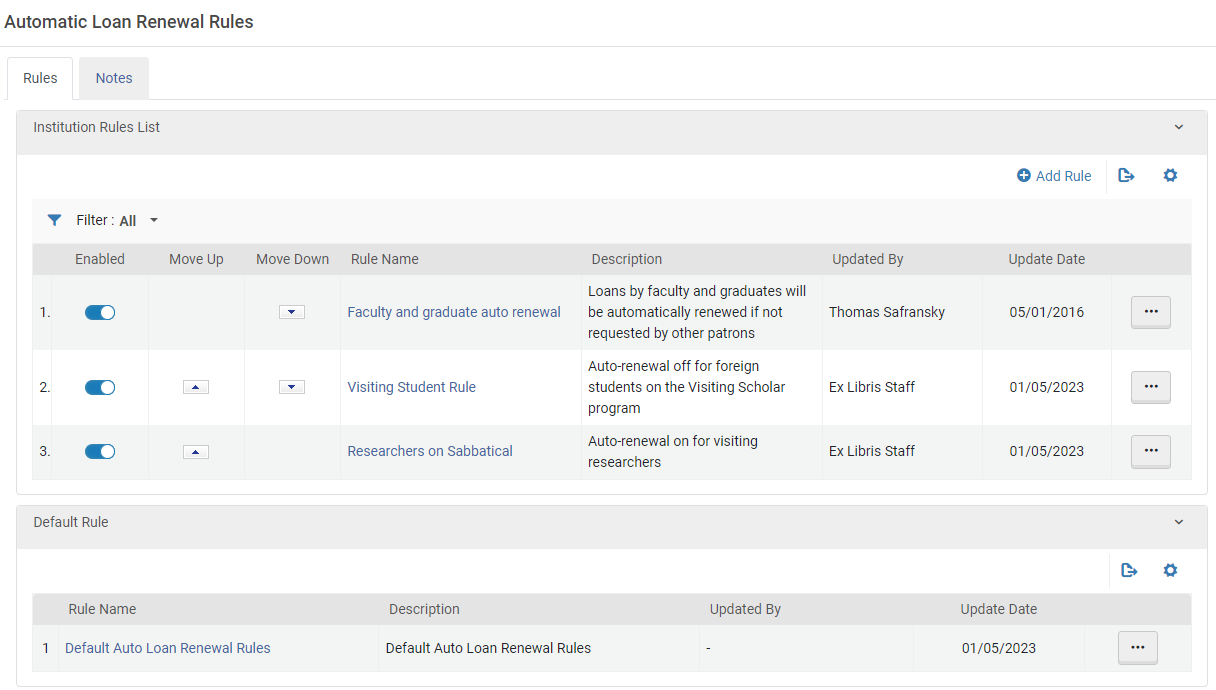
このページでは、次のアクションを実行できます。
- Adding automatic loan-renewal rules (see Adding Automatic Loan-Renewal Rules, below)
- Editing automatic loan-renewal rules (select Edit from the row actions).
- Enabling or disabling loan-renewal rules
- Duplicating automatic loan-renewal rules (select Duplicate from the row actions and modify the relevant fields)
- Deleting automatic loan-renewal rules (select Delete from the row actions).デフォルトの自動貸与更新ルールを削除または無効にすることはできません。
自動貸与更新ルールの追加
機関に新しい自動貸与更新ルール定義を追加できます。これらは、機関内のすべての図書館に適用されます。
Alternatively, select Duplicate in the row actions list to duplicate an existing rule and then edit it (select Edit from the row actions).
- [自動貸与更新ルール]ページ([設定メニュー]> [フルフィルメント]> [冊子フルフィルメント]> [自動貸与更新ルール])で、ルールの追加を選択します。The Automatic Loan Renewal Rule Editor page appears.
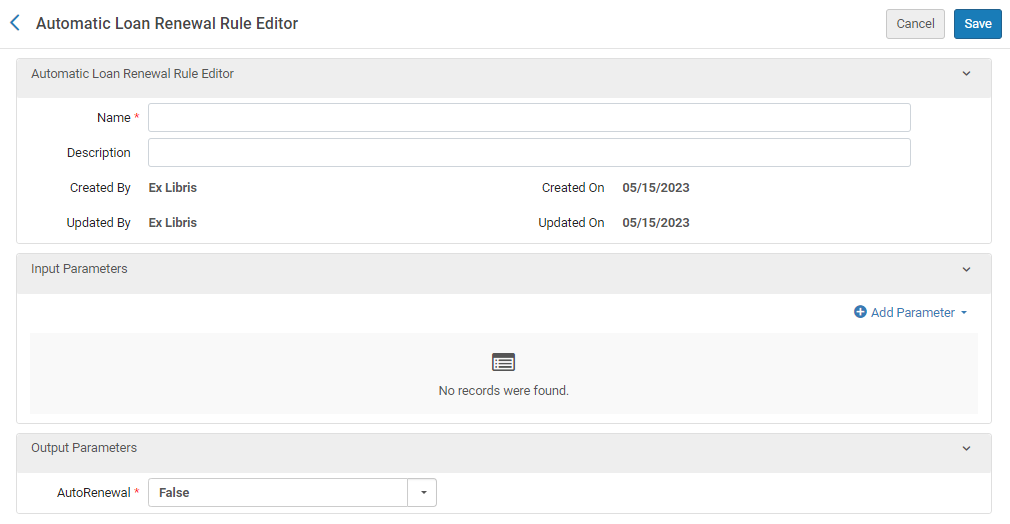
- 新しいルールの名前(必須)と説明(オプション)を入力します。
- In the Input Parameters section, select Add Parameter.A parameter-configuration box opens.
- 名前の下で、このルールを適用するために満たす必要がある条件を指定する入力パラメーターのカテゴリの 1 つを選択します。入力パラメータのカテゴリごとに作成できる条件セットは 1 つだけですが、パラメータごとに多数の値を含めることができます。たとえば、ロケーションパラメータの場合、様々な図書館で複数の場所を選択したり、あるいは、法律図書館と美術図書館以外のすべての場所を含めることを選択したりできます。The following parameter categories are available:
- 図書館 - アイテムを所有する図書館
- Location – The location of the item within the library, such as the Asian collection or the multimedia center
- User Group – The user group of the patron who has the item on loan
- User Statistical Category – A statistical category that is attached to the user (see Managing Users)
- Under Operator, select the required Operator.(Select InList or NotInList if you want to select multiple values for the parameter.)
- If the Value field appears, select the value or values of the parameter that define the condition that must be met.
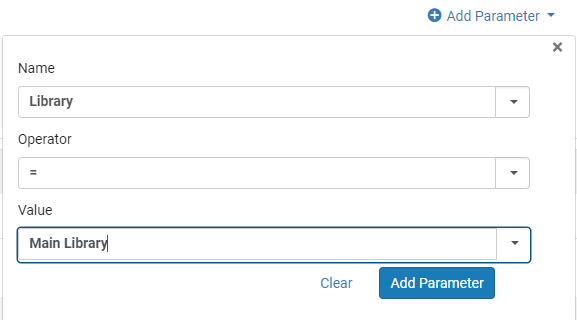
- パラメータを追加を選択します。パラメータがアクセス権ルールのパラメータのリストに追加されます。
- ルールに入力パラメーターを追加するには、入力パラメーター セクションでパラメーターの追加を選択し、前の手順を繰り返します。When you are finished, a set is created between one and four parameters.For example, a set of input parameters may look like this:Item owner = Art Library; User group = Graduate student.この場合、自動更新ルールは、大学院生に貸与されている美術図書館のアイテムにのみ適用されます。ルールを適用するには、すべての入力パラメータが満たされている必要があります。そうでない場合、デフォルトのルールが適用されます。
- Under Output Parameters, select whether auto renewal should be implemented (True) or not (False).
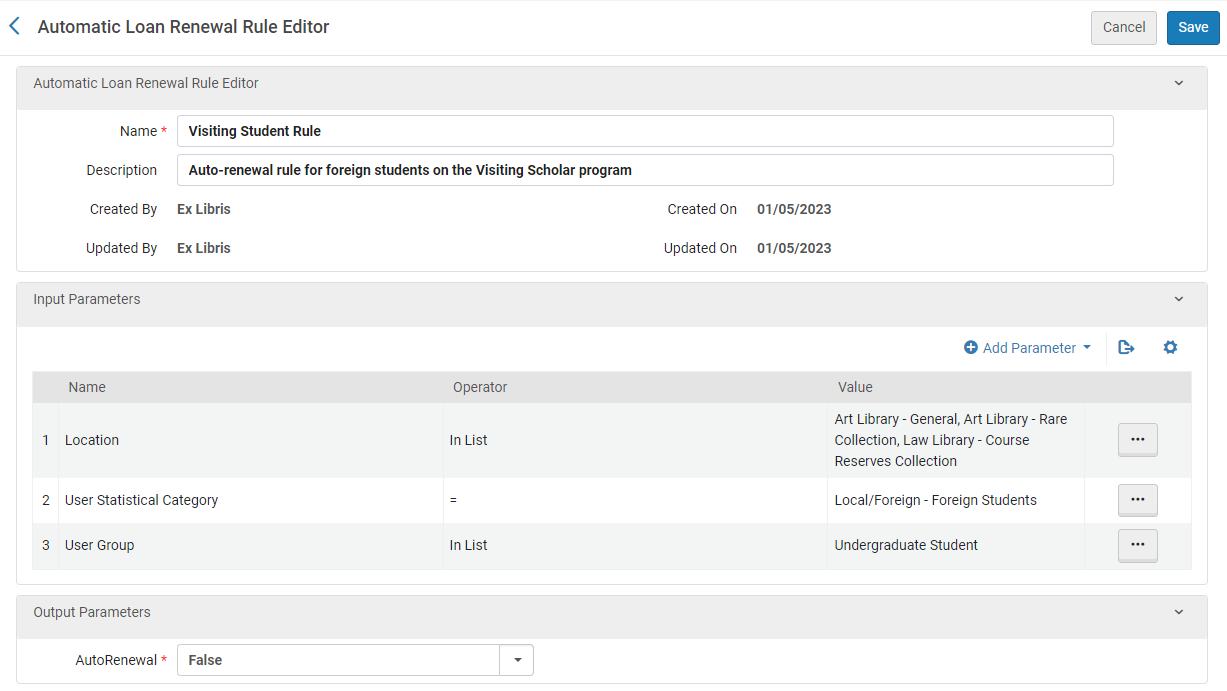
- 保存を選択します。
- 複数のルールを定義した場合は、[自動貸与更新ルール]ページで、上に移動および下に移動矢印を使用してルールのオーダーを設定します。ルールの順序は、システムが妥当で有効な最初の(しかも、最初のみ)ルールを適用するという点で、関連性があります。適切なルールが見つからない場合、システムはデフォルトのルールを使用します。
Configuring Overdue and Lost Loan Profiles
- 一般システム管理者
- フルフィルメント管理者
この構成は機関に適用できます!
延滞および紛失した貸与のプロファイルは、長期延滞貸与をモニタし、該当する場合にそれらを紛失貸与に変換します。このプロファイルは、ユーザーにプログレッシブリマインダーを送信し、手数料とユーザーブロックを作成します。プロファイルのセットアップにより、貸与のタイプと貸与の延滞時間に基づいてルールを柔軟に適用できます。通知は、プロファイル内で最大5つの異なるレターを簡単に作成できるように設定できます。罰金を作成するようにプロファイルが設定されている場合、罰金の額はプロファイルタイプと適用される利用規約ポリシーによって設定されます。
プロファイルは、次のオプションの1つ以上で設定できます。
- 実行は、期日または特定のステータスの変更後の日数に基づいています。
- 貸与は、特定のステータス、資料、またはロケーションのタイプによって選択できます。
- 送信される通知は、レター送信フォーマットによって決定されます。
- デフォルトでは最大5つの通知タイプを送信できますが、必要に応じてさらに多くの通知タイプを作成できます。
For more information on use cases and configuration options for overdue and lost loans, see Managing Patron Services at a Circulation Desk.
Almaに応じて基準を設定できます。
- 延滞貸与があることをユーザーに警告
- 延滞の貸与を紛失としてマーク
プロファイルを使用して、これらの基準とそれに関連するアクションを設定します。Almaは毎日のジョブ(貸与 - 延滞と紛失アイテム)を実行して、延滞および紛失した貸与を処理します。これは、プロファイルのリストに従って、警告が送信される貸与と紛失として定義される貸与を決定します。
The letter sent depends on the setting of the switch_to_overdue_and_lost_loan_new_job customer parameter.true に設定する場合、送信される通知は、Ful延滞および紛失貸与通知レターです。In this case, a single notification is sent to each patron for all overdue items whose criteria match a particular profile, listing all of the overdue items in that profile.例:
- 通知プロファイル1は、3日延滞しているすべての資料について通知メッセージを送信します。
- 通知プロファイル2は、5日延滞しているすべての資料について通知メッセージを送信します。
When the Loans - Overdue and Lost Item job runs, the notification is sent, once after three days and again after five days (once for each matching profile).
If the switch_to_overdue_and_lost_loan_new_job customer parameter is set to false, the notification sent is the Ful Lost Loan Letter, and a separate letter is sent for each overdue item.
The switch_to_overdue_and_lost_loan_new_job customer parameter must be set to true for user blocks to be applied.For more information, see Configuring Other Settings.
For information about configuring these letters, see Configuring Alma Letters.
延滞および紛失した貸与のプロファイルは、[延滞および紛失した貸与のプロファイルリスト]ページ([設定メニュー]>[フルフィルメント]>[冊子フルフィルメント]>[延滞および紛失した貸与のプロファイル])で設定します。
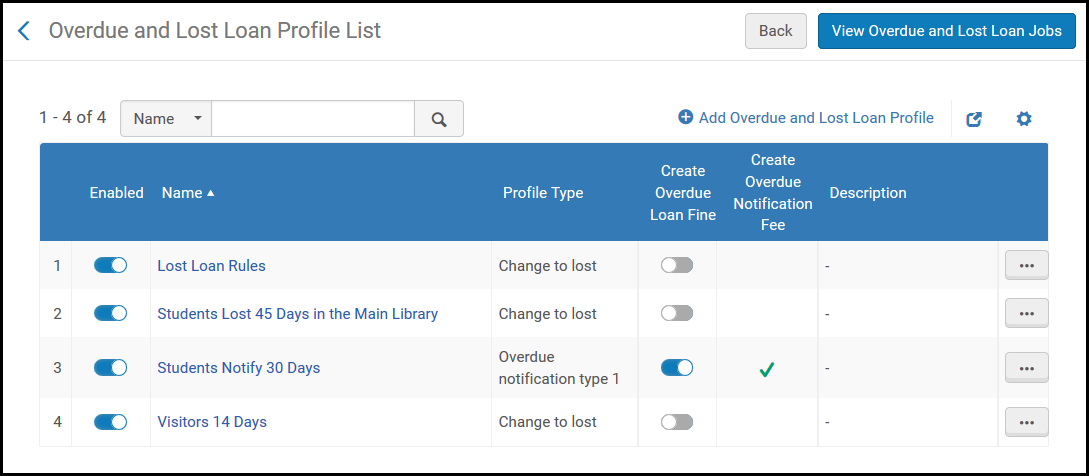
このページでは、次のアクションを実行できます。
- Add an Overdue and Lost Loan Profile (see Adding an Overdue and Lost Loan Profile).
- Add an Overdue and Lost Loan Notification Profile (see Adding an Overdue and Lost Loan Notification).
- プロファイルの編集(行アクションリストから編集を選択)。
- プロファイルの重複(行アクションリストから重複を選択し、関連するフィールドを変更)。
- プロファイルの削除(行アクションリストから削除を選択)。
- プロファイルを実行し(行アクションリストから今すぐ実行を選択)、延滞または紛失した貸与通知をオンデマンドで作成する。
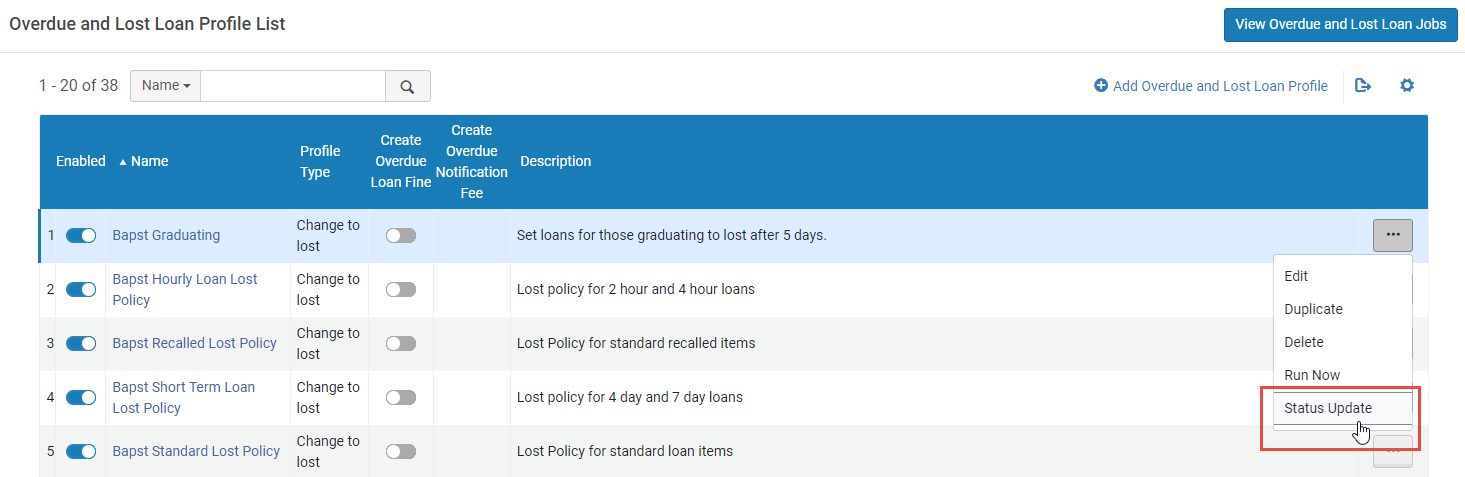
- ステータスアップデートの実行(アクションリストからステータスのアップデートを選択)。このプロセスは、通知を送信せずに、手数料やブロックを適用せずにプロファイルを実行します。これはAlmaへの移行時、または新しい延滞・紛失貸出資料プロファイルステップを追加する際に使用されます。The status update does not mark any loans as lost.別のシステムから通知が送信された移行の場合、影響を受けた貸出がマークされ、ジョブが再度実行された際に、同じ通知が二重に送信されるのを防ぎます。例えば、3日延滞中の貸出に通知を送信する新しいルールを作成すると、新しいプロファイルは、30日以上延滞している貸出を含め、すでに3日以上延滞しているすべての貸出を取り込みます。To prevent this and ensure the profile sends notices only for loans that become three days overdue after the profile has been created, use this option when defining the new profile.(See also Loans Overdue Notification Status Update below.)
- 延滞および紛失した貸与プロファイルを有効または無効にします。
Adding an Overdue and Lost Loan Notification
延滞および紛失した貸与警告プロファイルを機関に追加できます。これらのプロファイルは、システムが貸与の延滞警告を送信する基準を決定します。警告は貸与状態に影響しません。これらは貸与が紛失したとみなされる日数をユーザーに通知します。通知タイプごとに1つの延滞または紛失したアイテムの通知を、ユーザーに送信して、ユーザーの延滞または紛失した貸与をすべてリスト表示できます。
5タイプの通知とそれに対応するレターを設定できます。通知タイプを設定したら、これらの通知タイプを発動させるプロファイルを設定します。
- [利用規約の管理]ページ([設定メニュー]> [フルフィルメント]> [冊子フルフィルメント]> [利用規約とポリシー])で、利用規約タイプ = 貸与でフィルタ処理します。
- 関連する利用規約の行アクションリストから編集を選択します。利用規約の詳細ページが表示されます。
- ページの下部で関連する延滞通知の詳細タイプのエントリを見つけ、行アクションリストからポリシーの追加を選択します。[ポリシーの詳細]ページが表示されます。
- 関連するフィールドに名前と値を入力し、値のタイプ = その他であることを確認します。
- 保存を選択します。このポリシーは、利用規約の詳細ページの通知罰金タイプに追加されます。さらに、ユーザー識別子とアイテムバーコードを入力すると、設定された利用規約がフルフィルメント設定ユーティリティページ([フルフィルメント]>[アドバンスツール]>[フルフィルメント設定ユーティリティ])に表示されます。延滞通知罰金タイプ1で設定されたプロファイルがトリガーされると、延滞通知罰金タイプ1に設定された金額が課金されます。同じことが他の罰金タイプにも当てはまります。For details on configuring the Overdue and Lost Loan Notification Letter that is sent to patrons, see Configuring Letter Labels.Modify the fields additional_info_*_type1,inform_you_item_below_type1, and charged_with_fines_fees_type1 to change overdue notification type 1, and so forth.
Adding an Overdue and Lost Loan Profile
延滞および紛失した貸与プロファイルを機関に追加できます。このプロファイルは、貸与が紛失したとみなされる基準を決定します。これらの貸与の場合、Almaはステータスを紛失に変更し、関連する罰金および手数料を作成し、取寄せユーザーに請求書(交換手数料)を送信します。
- [延滞および紛失した貸与のプロファイルリスト]ページ([設定メニュー]> [フルフィルメント]> [冊子フルフィルメント]> [延滞および紛失した貸与のプロファイル])で、延滞および紛失した貸与のプロファイルを追加を選択します。延滞および紛失した貸与プロファイルレコードページが表示されます。既存の延滞および紛失した貸与プロファイルのコピーを作成する場合は、行アクションリストから重複を選択します。プロファイルをコピーしたら、必要に応じて変更できます。
延滞および紛失貸与プロファイルレコードページ - プロファイル名とプロファイルの説明(必要な場合)を入力し、延滞の貸与を紛失貸与とみなす基準を指定します。特定のステータス、ユーザーグループ、図書館、場所、資料ポリシー、および/または資料タイプを選択しない場合、プロファイルは上記のすべてに適用されることに注意してください。
- [貸与ステータス] フィールドの場合、貸与ステータスは使用しないでください。The Normal status applies to a regular loan.For more information on loan statuses, see Viewing Loan History.
- The profile is activated for loans that meet all the conditions specified in the profile (that is, a Boolean AND operator operates between fields).
- 貸与を紛失貸与としてマークするようにプロファイルが設定されている場合、貸与は紛失貸与と見なされます。If the profile is set to mark the loan as overdue, then a notice is sent and blocks/fines are created, as per the profile configuration.
- The Library field refers to the item's current location.アイテムが一時的なロケーションにある場合、これは一時的なロケーションになります。アイテムが一時的なロケーションにない場合、恒久的なロケーションにあります。
- If a due date is changed on an already overdue loan, an overdue fine is created before the due date is updated (similar to the renewal process) to make sure that a potential overdue fine is not automatically dropped.This behavior is determined by the overdue_at_change_due_date parameter.See Configuring Other Settings.
- デフォルトでは、[延滞および紛失貸与プロファイル]は、貸与の時点で[ユーザーグループ]でフィルタリングします。ジョブがユーザーの現ユーザーグループを使用することを希望する場合は、Ex Librisサポートまでご連絡ください。
- プロファイルを有効にするには、有効チェックボックスをオンにします。失った貸借ジョブは、アクティブなプロファイルのみを処理します。延滞および紛失した貸与のプロファイルリストページで、いつでもプロファイルを無効/有効にできます。延滞および紛失した貸与プロファイルが有効になっていない場合でも、行アクションリストから今すぐ実行を選択して実行できます。
- 紛失プロファイルの基準を設定するには、プロファイルタイプフィールドで紛失に変更を選択します。The Send Notification,Create Fine and Create Block fields disappear (they are not relevant for this selection).通知プロファイルの基準を設定するには、プロファイルタイプフィールドで、延滞通知タイプ(1~5)を選択します。
- 延滞の通知については、通知の送信を選択して、選択したプロファイルタイプに一致する通知レターをユーザーに送信します。
- 延滞で返却されていないアイテムの延滞通知については、ジョブの実行時に延滞の罰金をアイテムに適用するには、延滞貸与の罰金を作成を選択します。For the notification to be generated, the fine must also be created in the Terms of Use, under the relevant Overdue Notification type (1 through 5) policy.
これは、貸出されたアイテムの返金貸出時に適用される延滞罰金ポリシーとは別の罰金です。
- 延滞通知と紛失通知の両方について、延滞通知手数料の作成を選択して、通知手数料を有効にします。This field is only visible and applicable when using the aggregated notification method (i.e. the switch_to_overdue_and_lost_loan_new_job parameter in the customer parameters mapping table is set to true).このチェックボックスを選択すると、所属機関は貸出ごとではなく、警告レターごとに手数料を請求できるようになります。
- 延滞通知と紛失通知の両方について、延滞通知手数料額を入力して通知手数料を設定します。このフィールドは、延滞通知手数料の作成チェックボックスが選択されている場合にのみ表示されます。表示される場合、これは必須フィールドです。
- 延滞の通知については、ブロックの作成を選択して、貸与の延滞中にユーザーブロックを強制します。ブロックの作成を選択すると、ブロックタイプが表示されます。The values in this drop down are defined in the User Block Description page (see Configuring User Blocks Due to Overdue Loans).アイテムが返却または紛失されるか、貸与が削除されると、ブロックは削除されます。紛失ステータスのローンに対してブロックを作成することはできないことに注意してください。
- 期日後の日数フィールドに、警告通知メッセージを送信する期日後の日数を入力します。日数または開館日を選択して、日数が暦日によって計算されるか、図書館が開いている日によって計算されるかを決定します。For example, if an item's due date is March 1,Days After Due Date= 14, and Days is selected, the item is considered lost on March 15.Keep in mind that 1 day = 24 hours, so that if an item's due date is March 1, Days After Due Date = 0, and Days is selected, the item is considered lost on March 2.
- ステータス日付後の日数フィールドに、アイテムが失われたと見なされるローン状況フィールドの値のアップデート後の日数を示します。The Loan Status field refers to values such as Normal,Renewed,Automatic Renewal, and Overdue Notification.日数は暦日によって計算されます。For example, if Loan Status is defined as Claim Returned and Days After Status Date is 5, then Alma checks that the current loan status is Claim Returned and that the last change of the item loan was to Claim Returned and more than five days have passed since the last item loan change.Therefore, if an item's loan status is updated on April 1 and Days After Status Date = 5, the item is considered lost on April 6.(値が0の場合は、フィールドを空のままにすることと同じであることに注意してください。)The value of this field also applies to migrated loans, according to the loan's creation date.
- 完了したら、保存を選択します。プロファイルは、延滞および紛失した貸与のプロファイルページに表示されます。
すべてのアクティブな延滞および紛失貸与プロファイルは、延滞および紛失アイテムジョブによって処理されます。See Viewing All Scheduled Jobs.延滞のプロファイルに延滞通知手数料が含まれている場合、その手数料はプロファイルタイプごとに記録され、集計対象となった全プロファイルの名称が記載されます。同じ延滞プロファイルタイプのプロファイルで、通知手数料額が異なる場合、それらはまとめられません。2つのレターに分割されます。これらのレターはそれぞれ、延滞通知手数料を作成します。
新しいプロファイルを追加する場合や、プロファイル名を変更する場合、ステータス更新を実行するようユーザーに促すメッセージが表示されます。It is recommended to run Status Update for the updated profile.
延滞貸与通知ステータスアップデート
The Loans Overdue Notification Status Update page (Fulfillment > Advanced Tools > Loans Overdue Notification Status Update) allows the user to run the Overdue and Lost Loan job without creating blocks or fines and fees, without changing the loan to lost, and without generating notifications.The affected loans are marked to prevent the overdue and lost loan profiles from being handled again - meaning a loan fitting the criteria of lost and/or overdue notification profiles at the time of the status update do not become lost by them or trigger their notifications when the Overdue and Lost Loan job runs again.このジョブを実行すると、貸出レコードにマークが付けられるため、それ以降マッチングプロファイルによって処理されなくなります。このマークを変更することはできません。
The Loans Overdue Notification Status Update page is only available in Alma if the 'switch_to_overdue_and_lost_loan_new_job' parameter is set to true.
ジョブを実行すると、貸出レコードが変更されるという警告が表示されます。[確認]を選択して配布ジョブを実行します。

If you want to run a status update only for a specific profile (e.g. notification profiles, but not profiles that set loans to lost), it is possible to apply the status update per profile from the Overdue and Lost Loan Profile List page (Configuration Menu > Fulfillment > Physical Fulfillment > Overdue and Lost Loan Profile) instead of using the job, which runs all profiles.To do so, in the row actions of the profile, select Status Update.(See also the list of profile actions above.)
The status update job is designed mostly for post-migration handling, so when it runs it runs for all days, even if it's configured to run for open days only.The reason is that Alma doesn't have the calendar of the past for the newly migrated account.
延滞および紛失した貸与通知レターXSLに関する考慮事項
Ful延滞および紛失貸与通知レター内で使用できる通知タイプは最大5つまであります。ひとつのレターフォーマットには5つのシナリオがすべて含まれているため、XSL if句を使用してレターをカスタマイズする必要がある場合があります。例えば、
- inform_you_item_below_type1は、延滞通知タイプ1に属する
- inform_you_item_below_type2は、延滞通知タイプ2に属する
- inform_you_item_below_type3は、延滞通知タイプ3に属する
- inform_you_item_below_type4は、延滞通知タイプ4に属する
- inform_you_item_below_type5は、延滞通知タイプ5に属する
これらのタイプをレターに正しく実装するには、レターの次のセクションを置き換えます。
→
additional_info_ <1-5>についても同様に、次を置き換えます。
@@additional_info_1@@
<br />
@@additional_info_2@@→
<table>
<xsl:choose>
<xsl:when test="notification_data/notification_type = 'OverdueNotificationType1' ">
<tr>
<td>
<font size="5">@@additional_info_1_type1@@</font><p><font size="2">@@additional_info_2_type1@@</font></p>
</td>
</tr>
</xsl:when>
<xsl:when test="notification_data/notification_type = 'OverdueNotificationType2' ">
<tr>
<td>
<font size="5">@@additional_info_1_type2@@</font><p><font size="2">@@additional_info_2_type2@@</font></p>
</td>
</tr>
</xsl:when>
<xsl:when test="notification_data/notification_type = 'OverdueNotificationType3' ">
<tr>
<td>
<font size="5">@@additional_info_1_type3@@</font><p><font size="2">@@additional_info_2_type3@@</font></p>
</td>
</tr>
</xsl:when>
<xsl:when test="notification_data/notification_type = 'OverdueNotificationType4' ">
<tr>
<td>
<font size="5">@@additional_info_1_type4@@</font><p><font size="2">@@additional_info_2_type4@@</font></p>
</td>
</tr>
</xsl:when>
<xsl:when test="notification_data/notification_type = 'OverdueNotificationType5' ">
<tr>
<td>
<font size="5">@@additional_info_1_type5@@</font><p><font size="2">@@additional_info_2_type5@@</font></p>
</td>
</tr>
</xsl:when>
</xsl:choose>
</table>
Configuring Short Loan Reminders and Blocks
短期貸与は、分または時間で定義された期日ポリシーを持つ貸与です。短期ローンは通常のローンと同じように機能しますが、以下に説明されるいくつかの違いがあります。
短期ローンリマインダー
短期ローンには2つの特定のリマインダーがあります。つまり、念の為のリマインダーと延滞リマインダーです。これらのリマインダーの動作は、次のパラメーターの設定によって制御されます。
- short_loan_courtesy_reminder- If this parameter is set, a courtesy reminder is triggered.このリマインダーの送信時間は、期日からパラメーターの値を差し引いた時間に基づいています。It uses the existing FulUserLoansCourtesyLetter letter (see Courtesy Letter).
- short_loan_overdue_reminder- If this parameter is set, an overdue reminder is triggered.このリマインダーの送信時間は、期日にパラメーターの値を足した時間に基づいています。It uses the Ful Overdue And Lost Loan Notification Letter.
どちらの通知でも、資料が返却されておらず、紛失または返却請求ステータスにない場合、レターが送信されます。貸出資料の返却期日は、更新、リコール、または返却期日を手動で変更することにより変わる可能性があります。返却期限が変更された場合は、新しい期限日が通知プロセスを開始します。リマインダーは 1 回送信されます (貸与が作成された後)。You can configure the courtesy letter with the short_loans_message label (see Configuring Alma Letters).

The letter templates include indicators for short term loans as shown in the example below (see Configuring Letter Templates).
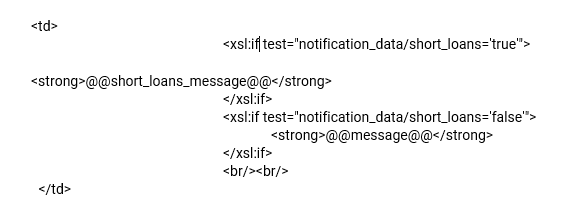
See also the Short Loan Letter that is sent to a patron when loaning an item for a short period.
短期ローンのブロックポリシー
When an overdue letter is issued, if the short_loan_overdue_block parameter is set to true, and a blocking policy is configured, an overdue block is set for the patron.For information on creating a blocking policy, see Configuring a Blocking Policy.
短期ローンの紛失
Short term loans are changed to Lost after running the relevant Overdue and Lost Loan profile (Configuration > Fulfillment > Physical Fulfillment > Overdue and Lost Loan Profile), in the same way as for a regular loan.
Configuring Loan Recall Requests
- 一般システム管理者
- フルフィルメント管理者
システムアクション中に貸与リコールリクエストを送信するかを設定できます。デフォルトでは、リコールリクエストはすべてのアクションに対して有効になっています。For an overview of recall requests in Alma, see Recall Requests.
貸与リコールのリクエスト設定マッピングテーブルで貸与リコールリクエストを設定します(設定メニュー>フルフィルメント>冊子フルフィルメント>貸与リコール設定)。For more information about mapping tables, see Mapping Tables.
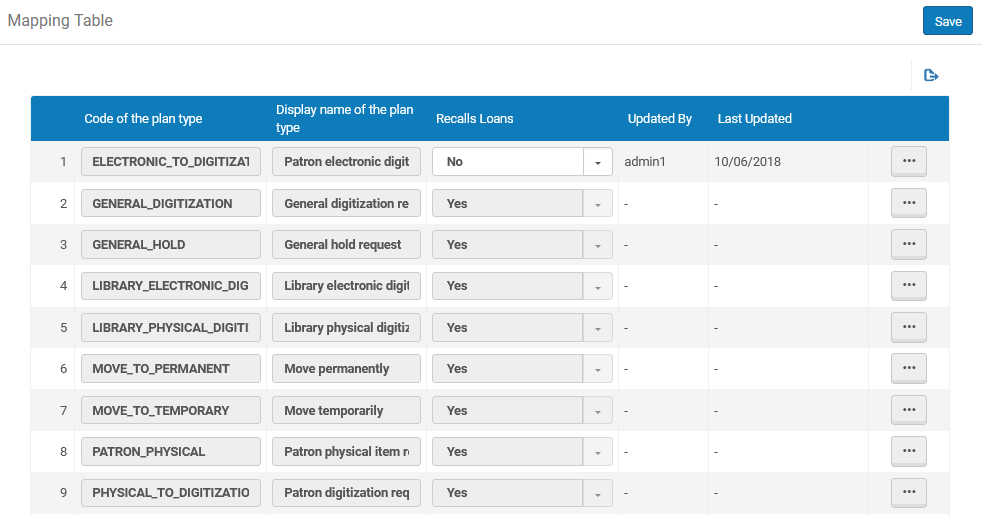
さまざまなタイプの定義は次のとおりです:
|
コード |
タイプ |
意味 |
|---|---|---|
|
BOOKING |
予約リクエスト |
ユーザー予約リスエスト |
|
ELECTRONIC_TO_DIGITIZATION |
ユーザーの電子デジタル化リクエスト |
Patron digitization request for electronic resource |
|
GENERAL_DIGITIZATION |
全般デジタル化リクエスト |
Patron digitization request for item that is not catalogued |
|
GENERAL_HOLD |
一般取り置きリクエスト |
Patron physical item request for item that is not catalogued |
|
LIBRARY_ELECTRONIC_DIGITIZATION |
図書館電子デジタル化リクエスト |
Digitization request from reading list for electronic resource |
|
LIBRARY_PHYSICAL_DIGITIZATION |
図書館冊子デジタル化リクエスト |
Digitization request from reading list for physical resource |
|
MOVE_TO_PERMANENT |
恒久的に移動する |
Request for physical item to be moved to new location |
|
MOVE_TO_TEMPORARY |
一時的に移動する |
Request for physical item to be temporarily moved to new location |
|
PATRON_PHYSICAL |
ユーザー冊子アイテムリクエスト |
ユーザー冊子アイテムリクエストSee the Note below for some important points regarding このパラメータ。 |
|
PHYSICAL_TO_DIGITIZATION |
ユーザーデジタル化リクエスト |
Patron digitization request for physical resource |
|
RESOURCE_SHARING_E2D_SHIPMENT |
電子からデジタルに送信 |
Internal digitization request by resource sharing staff for electronic resource |
|
RESOURCE_SHARING_P2D_SHIPMENT |
デジタルに発送 |
Internal digitization request by resource sharing staff for physical resource |
|
RESOURCE_SHARING_PHYSICAL_SHIPMENT |
物理的に発送 |
リソースシェアスタッフによる内部の物的アイテムリクエスト |
|
RESTORE |
復元アイテム |
Restore an item from temporary location |
|
STAFF_ELECTRONIC_DIGITIZATION |
スタッフ電子デジタル化リクエスト |
Staff digitization request for electronic resource |
|
STAFF_PHYSICAL_DIGITIZATION |
スタッフデジタル化リクエスト |
Staff digitization request for physical resource |
|
TRANSIT_FOR_RESHELVING |
再棚上げのための通過 |
再棚上げのための通過物的アイテム |
- If the Recalls Loans value is set as No in this table for the PATRON_PHYSICAL type of request and the applicable loan Terms of Use has Is Recallable defined as Yes, the loan is not recalled.リコール貸与=はいの場合のみ、利用規約ポリシーが適用されます。
- PATRON_PHYSICAL = はいで、利用規約のフルフィルメントポリシーがリコールでない場合、更新を防ぐために、アイテムはリコールとしてマークされます(ただし、貸与の期日は変更されません)。
- The block preference Not Renewable - Item has Requests is relevant only if PATRON_PHYSICAL = Yes(see Configuring Block Preferences).
- 貸与リコールリクエストは、機関レベルでのみ設定できます。フルフィルメント設定ページの設定フィルタから必要な機関を選択します。
- On the Request Configuration Mapping Table page for loan recalls (Configuration Menu > Fulfillment > Physical Fulfillment > Loan Recalls Configuration), select Customize from the row actions list for the relevant action.Customize is changed to Restore, and the Recalls Loans column is enabled for editing.
- [リコール貸与]列でいいえを選択して、指定したアクションの貸与リコールリクエストを無効にします。
- 保存を選択します。貸与リコールリクエストは、指定されたアクション中に送信されません。アクションの貸与リコールリクエストを再度有効にするには、復元を選択します。
After configuring a loan recall request for a specified action, ensure that the institution/library's Terms of Use has set the loan policy Is Recallable = True for requested items to be recalled (see Adding Fulfillment Policies).
Configuring Loan Process Status Names
- 一般システム管理者
- フルフィルメント アドミン
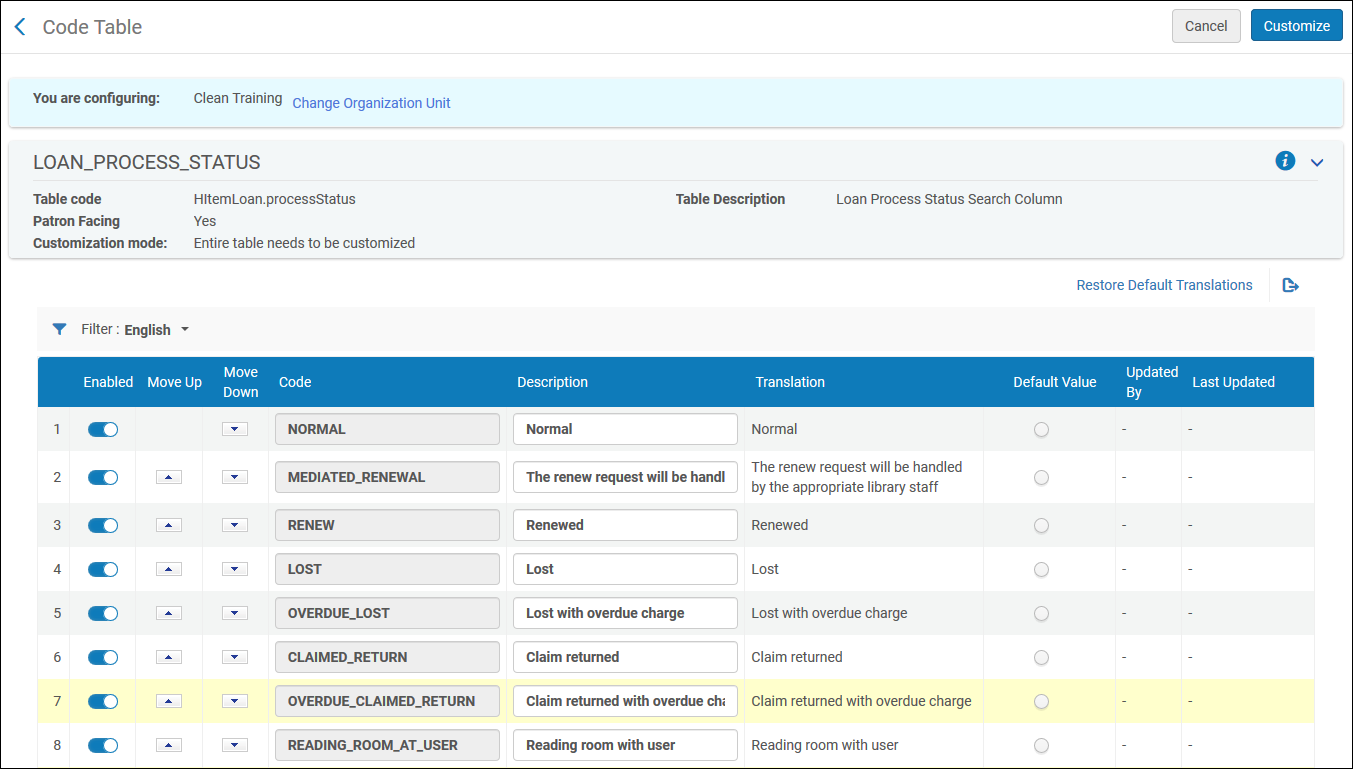
You can configure the loan process statuses that are displayed in Alma.これを行うには、[貸与ステータス名]マッピングテーブルを開きます([設定メニュー]> [フルフィルメント]> [冊子フルフィルメント]> [貸与ステータス名])。For more information about mapping tables, see Mapping Tables.You can edit the description.これは、さまざまな貸与表示でAlma全体に表示される説明です。
Page tags: article:topicFulfillmentproduct:almacontent:Documentationlang:englishFulfillment policiesTerms of UseConfigure FulfillmentItem PoliciesFulfillment UnitBlock preferencesAutomatic loan renewal rulesOverdue and lost loan profileloan recall requestsconfigure request pickup rule
