
ユーザーブロックの設定
ユーザーのフルフィルメントルールを設定します。
This page describes how to configure user blocks including demerits, consortial blocks, overdue loans, etc. For configuring block preferences see Loans.For links to all the main fulfillment documentation pages see Fulfillment.
Configuring User Block Descriptions and Definitions
For the how-to that guides you through the process of setting up librarian- and system-assigned blocks to patrons, see How To Set Up Blocks to Prevent Loaning, Renewing and Hold Requests for Patrons.
For details on assigning user blocks to a user, see Blocking and Unblocking Users.These tables are also used when configuring user blocks due to overdue loans (Configuring User Blocks Due to Overdue Loans).
ユーザーブロック定義を設定するには、最初にユーザーブロックの説明を設定する必要があります(定義を設定するときに説明を選択する必要があります)。User block descriptions also appear in the drop-down list when blocking a user (see Blocking and Unblocking Users).
ユーザーブロックの説明にアクセスするには、[設定メニュー]> [フルフィルメント]> [ユーザー設定]> [ユーザーブロックの説明]のページにアクセスします
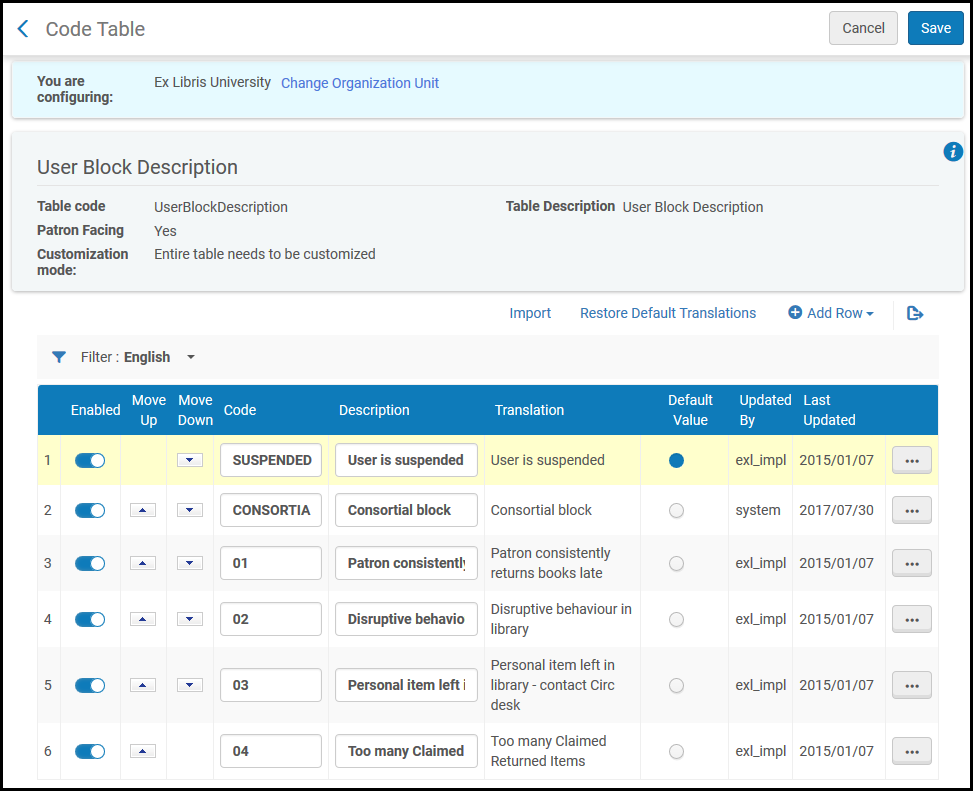
このページでは、次のアクションを実行できます。
- ユーザーブロックの説明のリストをファイルからインポートする
- 新しいユーザーブロックの説明を追加する
- ユーザーブロックの説明を削除する
- ユーザーブロックの説明を有効/無効にする
- ユーザーブロックの説明のリストを並べ替える
- コードまたは説明フィールドを変更する
- リストのデフォルト値にする説明を1つ選択する
ユーザーブロック定義は、[ユーザーブロック定義マッピングテーブル]ページ([設定メニュー]> [フルフィルメント]> [ユーザー設定]> [ユーザーブロック定義])で設定します。
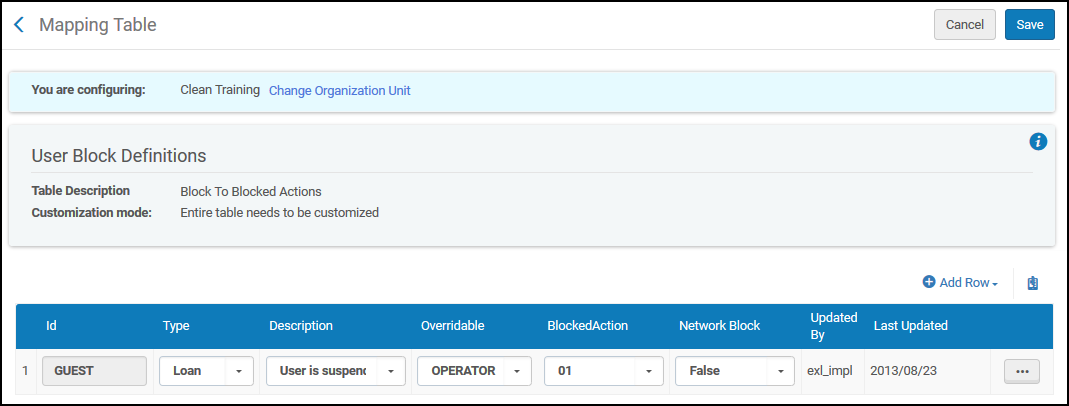
このページでは、次のアクションを実行できます。
- Add a set of user block definitions (see Adding User Block Definitions)
- 一連のユーザーブロック定義を編集します([ユーザーブロック定義マッピングテーブル]ページで設定を変更します)。ユーザーグループ定義に定義されているIDは変更できません)。
- 一連のユーザーブロック定義を削除します(削除を選択)
ユーザーブロック定義の追加
定義したユーザーブロック定義は、機関内のすべての図書館に適用されます。
- [ユーザーブロック定義のマッピングテーブル]ページで、行の追加を選択し、IDフィールドに新しいユーザーブロック定義のIDを入力します。
[マッピングテーブル]ページの新しいマッピング行セクションの作成 - それぞれのドロップダウンリストから次の情報を選択します。
- 説明 - ブロックアクションを説明します。ブロックの理由。このリストには、すべてのユーザーブロックの説明が含まれます。上記の説明の定義については、ユーザーブロックの説明のコードテーブルを参照してください。
- ブロックされたアクション-次のいずれかからブロックされたアクションを選択します。これらのブロックされたアクションは、Almaで事前に設定されています。保留リクエストおよび/またはリソース シェア リクエストのブロックなど、追加のブロック アクションを設定するには、Ex Librisサポートにお問い合わせください。
- 01 – 貸与
- 02 – 貸与、更新
- 03 – 貸与、更新、取り置き
- タイプ–次のいずれかからブロックのタイプを選択します。The Type value is for information only and does not impact the system, with the exception of the Demerit and Consortial Block type, whose values should not be changed.For information on configuring demerits, see Configuring Demerits.For information on configuring consortial blocks, see Configuring Consortial Blocks.
- 現金
- コンソーシャルブロック
- デメリット
- 一般
- 貸与
- リソースシェアリクエスト
- ユーザー
- 上書き可能 - ブロックが次のいずれかから上書き可能かを選択します。
- すべて – ブロックは、貸出・返却受付オペレータによって上書き可能です。
- なし – ブロックは上書きできません
- 貸出・返却受付 – ブロックは、貸出・返却受付マネージャによってのみ上書き可能です。
- オペレータ –ブロックは、貸出・返却受付マネージャまたは貸出・返却受付オペレータによって上書き可能です(貸出・返却受付オペレータのユーザーは上書き不可とする制限された権限)。
- Network Block- Select whether the block will be copied when creating or refreshing a linked account.
- 真 - ブロックをコピーします
- 偽 - ブロックをコピーしません。これがデフォルトです。
- 行を追加を選択します。新しいユーザーブロック定義は、定義されたユーザーブロック定義のリストの下部に表示されます。
- 保存を選択して、ユーザーブロック定義の新しいセットを保存します。
Configuring Demerits
- 一般システム管理者
- フルフィルメント管理者
Almaを使用すると、設定された時間内に発生したデメリットの数に基づいて、ユーザーブロック(貸与など)を適用するデメリットシステムを設定できます。ブロックが適用されると、機関は設定された日数の間ユーザーを一時停止し、ユーザーレコードから使用されたデメリットポイントを差し引きます。一時停止中にユーザーにデメリットポイントが追加された場合、これらのポイントとユーザーの残りのポイントにより、一時停止期間終了後に、別の一時停止につながる可能性があります。
デメリットシステムの有効化
Configure the following parameters (see Configuring Other Settings):
- demerit_enable – デメリット機能を有効にするには、このフィールドを真に設定します。
- demerit_history_days – デメリット追跡期間の長さを日数で指定します。ユーザーのデメリットポイントがデメリット追跡期間(つまり、このパラメータで指定された最後の日数)の間にdemerit_maximum_thresholdパラメータで指定された値を超える場合、システムはユーザーをブロックします。
- demerit_maximum_threshold – 追跡期間中に許容される最大ポイント数を指定します。
- demerit_suspension_days – ユーザーの停止期間の長さを日数で指定します。
デメリットポイントの設定
デメリットポイントマッピングテーブルは、ユーザーのタイプと返却される資料タイプに与えられるデメリットポイントを定義します。また、リコールされた延滞の資料にさまざまなポイントを適用することもできます。
-
[デメリットポイントマッピングテーブル]ページ([設定メニュー]> [フルフィルメント]> [ユーザー設定]> [ユーザーデメリット])で、[行の追加]に次のフィールドを入力して、ユーザーグループと資料タイプに割り当てるポイントを定義します。
DemeritPointsマッピングテーブル - ユーザーグループ – 特定のユーザーグループまたはすべてを選択します。
- 資料タイプ – 特定の資料タイプまたはすべてを選択します。
- レギュラー延滞ポイント – 延滞アイテム(リコールされた延滞アイテムではない)に適用するデメリットポイントの数を入力します。
- リコール延滞ポイント – リコールされた延滞アイテムに適用するデメリットポイントの数を入力します。
- 行を追加を選択します。Almaは、次の優先順位を使用して、デメリットポイントをユーザーに割り当てるときに使用するマッピング行を決定します。
- ユーザーのグループと返却される資料の両方がテーブルの値と一致します。
- ユーザーのグループはテーブルの値と一致し、資料タイプはテーブルですべてに設定されます。
- 返却されたアイテムはテーブル内の資料タイプの値と一致し、テーブル内のユーザーグループはすべてに設定されます。
- テーブルでは、ユーザーグループと資料タイプの両方がすべてに設定されています。
- 一致が見つからない場合、デメリットは割り当てられません。たとえば、次のデメリット行が定義されており、卒業生がリコールされていない原稿を延滞して返却する場合、システムはデメリットポイント1点を卒業生に割り当てます。
デメリットポイントマッピング行の例 ユーザーグループ 資料タイプ レギュラー延滞ポイント リコール延滞ポイント 大学生 図書 3 5 すべて 原稿 3 6 卒業生 すべて 1 2
- すべてのデメリットポイント定義を追加したら、カスタマイズを選択してテーブルへの変更を保存します。
ユーザーがデメリットの閾値に達すると、システムはユーザーレコードにデメリットブロックを適用します。
デメリットブロックの設定
ユーザーブロック定義マッピングテーブルは、デメリット履歴閾値で定義された連続日数の間にデメリットポイント閾値に達したユーザーに与えられるデメリットブロックを定義します。
For more information, see Configuring User Block Descriptions and Definitions.
ブロックジョブのモニタ
ユーザー-ブロックの解除ジョブは毎日実行され、一時停止中のユーザーが一時停止期間を満了し、一時停止中に設定されたデメリット閾値を超えていないかを判断します。超えていなければ、ユーザーのブロックは解除されます。
For more information, see Viewing Job Reports.
Configuring Consortial Blocks
- 一般システム管理者
- フルフィルメント アドミン
Consortial blocks are user blocks in a fulfillment network that are copied from a source institution, or from another target institution, to a target institution when their linked account is created or refreshed.They are a specific type of block configured to be shared within a consortium, appearing on a patron's record at the receiving institution with the designation "Consortial block".They enable a consortium to enforce consistent user restrictions across member libraries based on rules set at the institutional or network level.
In this context, the source institution is the patron's home institution, while the target institution refers to the institutions where the patron receives services as a guest patron.
ユーザーがネットワークゾーンで管理されるネットワークでは、貸出機関はユーザーの所属機関であり、ネットワークゾーンはターゲット機関です。Blocks are copied from the patron's home institution to the Network Zone, and blocks from the Network Zone are copied to the other institutions.
In a Fulfillment Network, the patrons' information is copied from the source institution to the target institution when the patron receives fulfillment services at an institution that is not their home institution.
ソースからターゲットへのブロックのコピー
A consortial block which is copied from the source institution to the target institution, refers to the incoming block at the target institution.The block is copied when the linked account is initially created or when the target record is refreshed.The copied block appears as a consortial block rather than the original block type from the source, though a block note indicates the original block type as it appeared in the source institution.
ソース側でコンソーシャルブロックをアクティブにする場合:
- Set up any blocks that will be sent to the target in the User Block Definition table with the Network Block field set to True.See Configuring User Block Descriptions and Definitions.
To activate consortial blocks on the target side:
- ネットワークブロックのコピーフィールドをはいに設定して、リンクアカウントルールを設定します。See Configuring Linked Account Rules.
- In the User Block Description table, create a record if one does not already exist with code CONSORTIA.Enter CONSORTIA in the Code field and Consortial block in the Description field.
- In the User Block Definitions table, create a record with Type and Description fields set to Consortial block.To ensure that this block is not copied back to the source, set the Network Block field to False.See Configuring User Block Descriptions and Definitions.
ターゲットからソースへのブロックのコピー
Blocks are copied from a target institution to a source institution when creating, updating or deleting a block on the target side.The copied block appears at the source institution as a consortial block rather than the original block type from the target, though a block note indicates the original block type as it appeared in the target institution.
Once copied to the source institution, the block may further propagate to the other target institutions based on the above-described configuration for Copying Blocks from Source to Target.
ソース側:
-
ユーザーブロックの説明に新しい行を追加します([設定] > [フルフィルメント] > [ユーザーブロックの説明])
-
Set the Code to be FROM_TARGET.
-
Add a description (not mandatory), for example,Block from the target institution for linked account users.
-
Add a new row in the User Block Definitions page (Configuration > Fulfillment > User Block Definitions).
-
IDをFROM_TARGETに設定します。
-
タイプをコンソーシアムブロックに設定します。
-
ドロップダウン リストから説明を追加します (必須ではありません)。
-
ネットワーク ブロックを True に設定すると、ブロックがネットワーク内の他のすべてのターゲットに配布されます。この配布は自動的には行われません。It only happens when the patron enters another target institution; in that case the block is copied to this institution only.
このフィールドを False のままにすると、ソースはターゲットからブロックを受信するだけで、他のターゲットに配布しません。
ターゲット側:
-
For any block which the institution would like to copy to the source institution, configure the Network Block in the User Block Definitions page (Configuration > Fulfillment > User Block Definitions) to be True.
延滞の貸与によるユーザーブロックの設定
ブロックポリシーを実装できます。これにより、貸出期限を過ぎて返却された貸出があった場合に、定義された延滞によるブロックポリシーに従い、ユーザーが延滞した貸出を返却した後にユーザーレコードにブロックが発生するように、ブロックポリシーを実装できます。ブロックポリシーは、利用規約ごとに個別に設定できます。デフォルトでは、ポリシーは保留、リソースシェアリクエスト、貸与、更新をブロックします。As noted in the configuration procedure below, the User Block Definitions mapping table and User Block Descriptions code table (see Configuring User Block Descriptions and Definitions) must be configured in order to create overdue blocks.The maximum_overdue_block_per_block parameter should also be configured to define whether the policy is applied to each block individually or to all the blocks in total.See Configuring Other Settings (Fulfillment).
ブロックは、貸与の延滞時間に応じて一定期間(開館日またはすべての日に基づいて)指定されるか、固定期間に指定されます。ユーザー-ブロックの解除ジョブの一部として、設定された有効期限が過ぎると、ブロックは自動的に解除されます。期限切れのアイテムが更新されるか紛失としてマークされた場合も、ブロックは自動的に解除されます。
ブロックは、短期貸与用にも構成できます。構成するには、short_loan_overdue_blockパラメータをtrueに設定します。For more information, see Configuring Short Loan Reminders.
Configuring an Overdue-Loan Blocking Policy
- Access the User Block Description table (Configuration Menu > Fulfillment > Patron Configurations > User Block Description).Add a new row with code OVERDUE(see Configuring User Block Descriptions and Definitions).
- Access the User Block Definitions table (Configuration Menu > Fulfillment > Patron Configurations > User Block Definitions).Add a new row of type Loan using the overdue loan block that was created in the prior step.
- Access the Fulfillment Terms of Use (Configuration Menu > Fulfillment > Physical Fulfillment > Terms of Use and Policies).Add a new loan Terms of Use or edit an existing one (see Configuring Terms of Use).延滞によるブロックの利用規約はデフォルトではブロックしません。
- ブロックを作成するには、ドロップダウンから空白ラインを選択し、アクションメニューからポリシーの追加を選択します。
ブロックポリシーを追加 - [ポリシーの詳細]ページで、値のタイプのその他を選択します。値フィールドに数値を入力します。次に、測定単位ドロップダウンリストから選択します。延滞ブロックは、複数の貸与で累積された延滞日数に基づいて(累積)、または単一の貸与の延滞日数に基づいて(個別)計算されます。適用可能な延滞によるブロックポリシーに累積測定単位がある場合、有効期限は、ポリシーで定義されているように、最新のブロック有効期限と日数として計算されます。If a cumulative value is not chosen, the expiry date will be according to the policy only, without considering existing blocks.Overdue blocks are calculated based on full 24 hour days.測定単位が日数の場合、ブロックは1日(返却日と期日の間の24時間)に適用されます。
- For cumulative, inactive blocks are considered when calculating the expiry date of newly created blocks.
- 延滞日あたりの日数 - 個別または延滞日あたりの開館日数 - 個別が測定単位として選択されている場合、<Overdue/Open overdue days> * <Value>で計算されます。
延滞したらブロックで利用可能な値は次のとおりです。- すべての日付 - 累積
- すべての日付 - 個別
- 延滞日あたりの日数 - 累積
- 延滞日あたりの日数 - 個別
- 月 - 累積
- 月 - 個別
- 開館日数 - 累積
- 開館日数 - 個別
- 開館延滞日数あたりの開館日 - 累積
- 開館延滞日数あたりの開館日 - 個別
- 週 - 累積
- 週 - 個別
- なし
- 保存を選択します。
- [利用規約の詳細]ページで、延滞ブロックの最大期間を選択します。最大延滞ブロック期間ポリシーは、延滞貸与ブロックの有効期限の計算に影響します。ブロックの有効期限が最大値よりも遅いと計算された場合、ブロックは制限に合わせて短縮されます。デフォルトのポリシーでは、最大延滞ブロック期間は設定されません。
- 最大ブロックポリシーを作成するには、ドロップダウンから空白ラインを選択し、アクションメニューからポリシーの追加を選択します。
ユーザー ブロックの表示
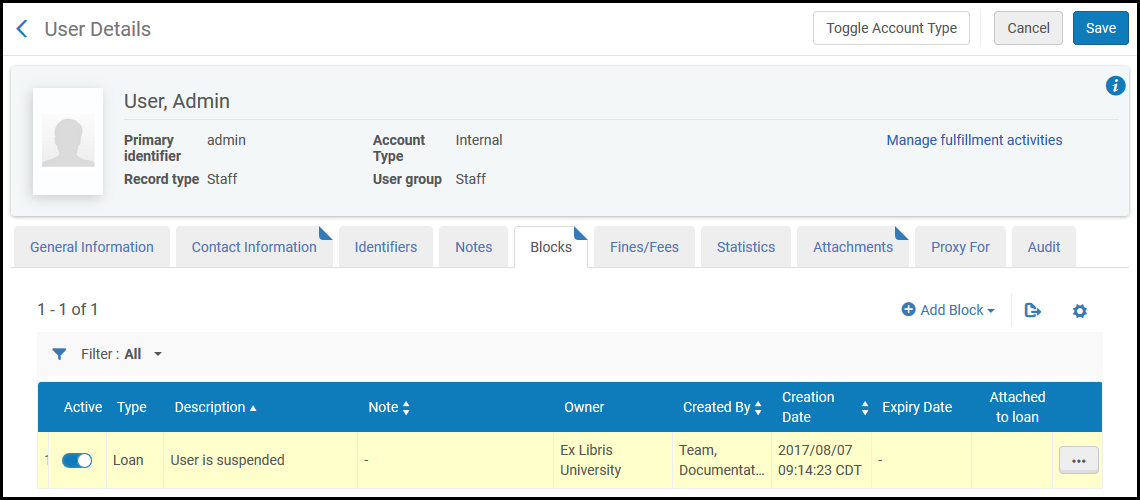
ユーザー レコードには、ユーザーのアクティブなブロックに関する情報が含まれています。
- In the persistent search box, search for the user (see Searching in Alma).[ユーザーの検索と管理] ページのユーザーリストにユーザーアカウントが表示されます。ユーザーにブロックが存在する場合は、その行のブロックの下にチェックマークが表示されます。
- To see details about the blocks, select the user.[ユーザー詳細]ページが開きます。
- ユーザーに有効なブロックの詳細を見るには、ブロックタブを選択してください。
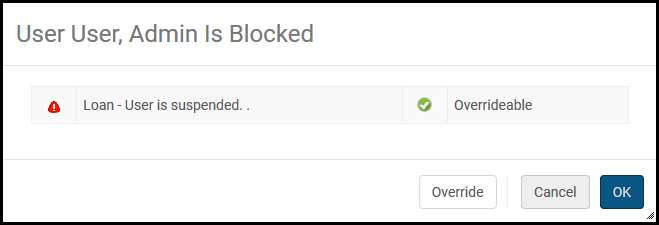
Notification of a block also appears when you attempt to perform certain actions, such as loaning an item:
自動的に削除されたユーザー ブロック
有効期限を過ぎたユーザーブロックは、ユーザー-ブロックの解除ジョブの実行時に自動的に解除されます。Overdue blocks that were previously created by the Overdue and Lost Loan Profiles job are removed automatically when the loan is renewed or marked as lost.
- ジョブの監視にアクセスします。ユーザー-ブロックの解除ジョブを見つけます。
- リポート内で、ユーザーの延滞貸与ブロックの削除リンクを選択します。For more information about patron blocking due to overdue loans, see the Patron blocking due to overdue loans video (11:22 mins).
Page tags: article:topicproduct:almacontent:Documentationlang:englishUser groupsadd currencyConfigure patron fulfillment rulesConfigure patronPatron user groupspatron limitsloan limitsuser block definitionsadd user block definitiondemeritsdemerit blockdemerit pointsuser authentication
