
ユーザーアカウント設定
ユーザーのフルフィルメントルールを設定します。
このページでは、ユーザーグループ、利用者制限、ユーザー認証、貸出制限などの利用者アカウントを構成する方法について説明します。
For information on configuring demerits see Configuring User Blocks.For links to all the main fulfillment documentation pages see Fulfillment.
ユーザーグループの設定
- 一般システム管理者
- フルフィルメント アドミン
このページでは、ユーザー制限とユーザー グループの認証要件を構成する方法について説明します。
- Watch the Configure User Blocks video.
- Watch the Configure Patron and Loan Limits video.
The patron user-groups themselves are created and configured on the User Groups Code Table page (Configuration Menu > Fulfillment > Patron Configurations > Patron Groups).For details, see Configuring User Groups.
蓄積された減点または延滞貸与に基づいて、個々の利用者に対するブロックを作成することもできます。For details, see Configuring User Blocks.
If your institution is using user groups as fulfillment parameters (e.g., in Fulfillment Unit Rules,Display Logic Rules, etc.), you will need to update the rules with the new user group in order for them to take effect for users in the group.
Configuring Patron Limits
- 一般システム管理者
- フルフィルメント アドミン
For the how-to that guides you through the process of setting up librarian- and system-assigned blocks to patrons, see How To Set Up Blocks to Prevent Loaning, Renewing and Hold Requests for Patrons.
Almaを使用すると、機関およびその機関内の図書館のサービスを利用するユーザーに適用されるさまざまな制限を定義できます。ユーザーが図書館からリソースを借入または更新しようとすると、ユーザーの制限がチェックされ、適用されます。When a patron reaches one of the defined limits, the patron's account is blocked.The patron limits are calculated in real-time during fulfillment activities (similar to loan limits) and do not appear in the user's "Blocks" tab.For example, you can specify that the patron's account is blocked when the patron reaches 10 overdue items.The patron will not be able to borrow additional resources from the library until the number of overdue loans on their account is below the configured limit.
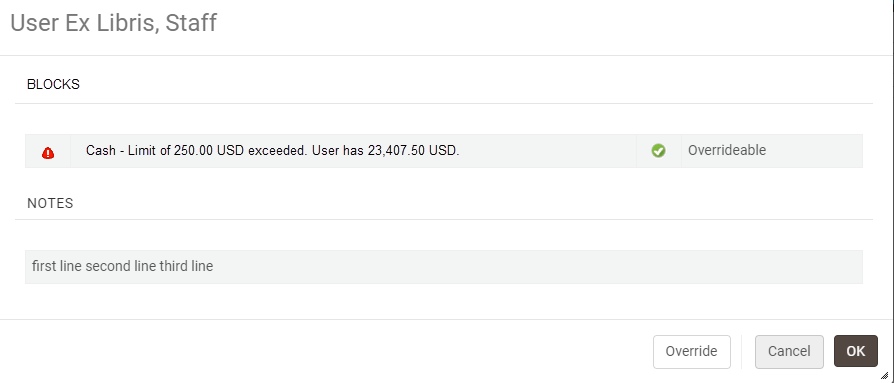
Selecting OK continues the flow and the user will be prompted with the block message where relevant when loaning or renewing an item.Selecting Override causes the blocks to be overridden i.e., the user will not be prompted with this message for loans.
ユーザーの制限は、ユーザーが属するユーザーグループに基づいて定義されます。たとえば、大学院生ユーザーグループに属するすべてのユーザーに一連の制限を定義できます。For each user group, you can define limits that may block a patron's account, such as:
延滞アイテムの最大数
- ユーザーが支払うことができる現金の最大額
- 予約の最大数(リソースシェアリクエストは含まれない)
- 延滞のリコールされたアイテムの最大数
これらの制限は、ユーザー制限定義マッピングテーブルを使用して機関レベルで設定されます。制限の各セットは、有効または無効にできます。デフォルトでは、新しいユーザー制限の各セットは有効になっています。定義した制限は、機関内のすべての図書館に適用されます。
ユーザー制限は、ユーザー制限マッピングテーブルページで設定します([設定メニュー]> [フルフィルメント]> [ユーザー設定]> [ユーザー制限])。
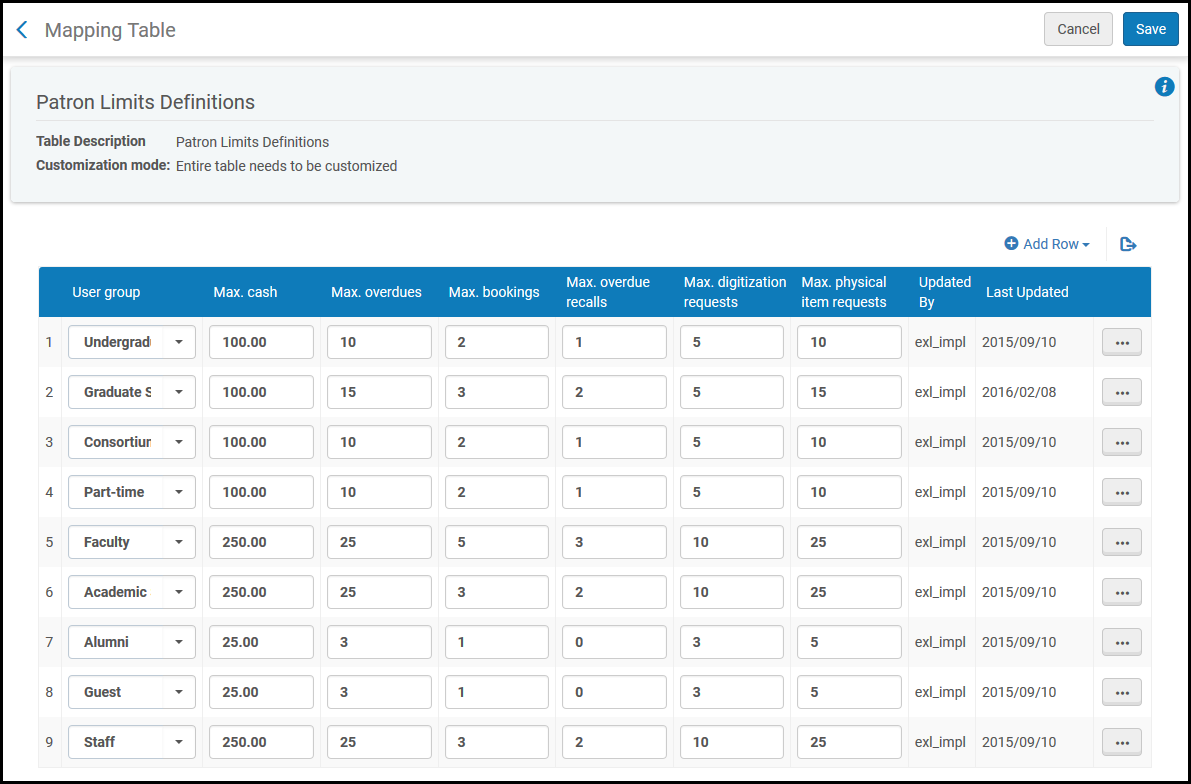
ユーザーの制限は、機関レベルでのみ設定できます。フルフィルメント設定ページの設定フィルタから必要な機関を選択します。
このページでは、次のアクションを実行できます。
- Add a set of patron limits (see Adding a Set of Patron Limits)
- ユーザーの制限のセットを編集します(編集を選択)
- ユーザーの制限のセットを削除します(削除を選択)
ユーザー制限のセットを追加する
機関に新しいユーザー制限のセットを追加できます。When you add a set of patron limits for a specific user group (for example,Alumni), ensure that there is only one enabled set of limits for this user group.
機関レベルでユーザーの制限を定義します。定義した制限は、機関内のすべての図書館に適用されます。
- [ユーザー制限マッピングテーブル]ページ([設定メニュー]> [フルフィルメント]> [ユーザー設定]> [ユーザー制限])で、行を追加を選択し、新しい制限セットを作成するユーザーグループを選択します。新しいユーザー制限を作成する
- 次の情報を入力してください。
- Max. cash – Maximum amount of cash that can be owed by the patron before the patron's account is blocked.最大現金は必須フィールドです。
- 最大延滞–ユーザーのアカウントがブロックされるまでの最大許容延滞貸与。最大延滞 = 1と定義する場合、ユーザーのアカウントは、延滞の貸与が複数ある場合にのみブロックされます。最大延滞を0に設定すると、延滞貸与1回でユーザーをブロックします。
- Max. bookings – Maximum number of bookings allowed before the patron's account is blocked.この値には、リソースシェアリクエストは含まれません。
- Max. overdue recalls – Maximum number of overdue recalled items allowed before the patron's account is blocked.最大延滞リコール数を 0 に設定すると、1 件の延滞貸出がある利用者はブロックされることに注意してください。
- Max. digitization requests – Maximum number of digital item hold requests allowed before the patron's account is blocked
- Max. physical item requests – Maximum number of concurrent active physical item hold requests allowed before the patron's account is blocked
上記のボックスのいずれかを空白のままにすると、このエリアに制限は適用されません。 - Max. cash – Maximum amount of cash that can be owed by the patron before the patron's account is blocked.
- 行を追加を選択します。定義されたユーザー制限のリストの下部に、新しい制限のセットが表示されます。
- 保存を選択して、ユーザー制限の新しいセットを保存します。
Configuring Patron User Authentication
Primo VE環境の場合、Primo VEセッションのユーザー認証も設定する必要があります。For more information, see Configuring User Authentication for Primo VE.
- 一般システム管理者
- フルフィルメント管理者
[ユーザー認証]ページ([設定]> [フルフィルメント]> [ユーザー設定])から、Almaデジタルビューアに表示されるログインオプションを設定できます。
- [ユーザー認証]ページ([設定]> [フルフィルメント]> [ユーザー設定]> [ユーザーユーザー認証])を開きます。
- プロファイルタブの認証プロファイルセクションで、Almaデジタルビューアに表示するプロファイルをアクティブにします。ここに表示されるプロファイルは、SAML、LDAP、CAS、ソーシャル/Eメールログインの統合タイプで設定された統合プロファイルです。For more information, see Configuring Integration Profiles.
- ログインページのヘルプリンクセクションで、ユーザーがビューアのログインページでこのページのヘルプが必要リンク(設定可能)をクリックしたときに表示されるリンクをアクティブにして編集します。
- Almaがタイムアウトしたときにビューアをサインアウトさせるには、タイムアウトによる単一のログアウトを選択します。
- ログインラベルタブを選択します。以下が表示されます。
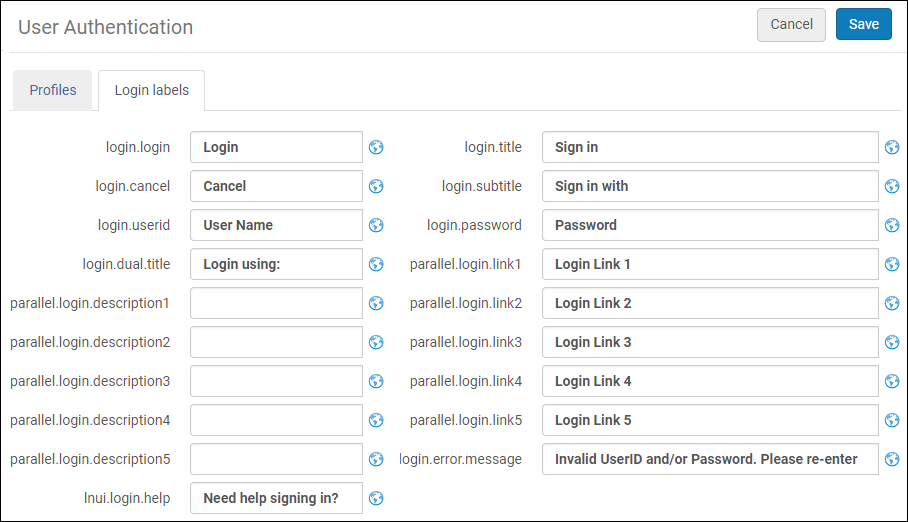
ログインラベル ビューアのログインページに表示されるラベルを編集します。 - 保存をクリックします。
Configuring Loan Limit Rules
- 一般システム管理者
- フルフィルメント管理者
ユーザーが同時にチェックアウトできるアイテムの数を制限するには、貸与制限ルールを追加します。The rule can be applied according to library, location, item policy, material type, and user group.
貸与制限ルールは、[貸与制限ルール]ページ([設定メニュー]> [フルフィルメント]> [ユーザー設定]> [貸与制限])から設定します。
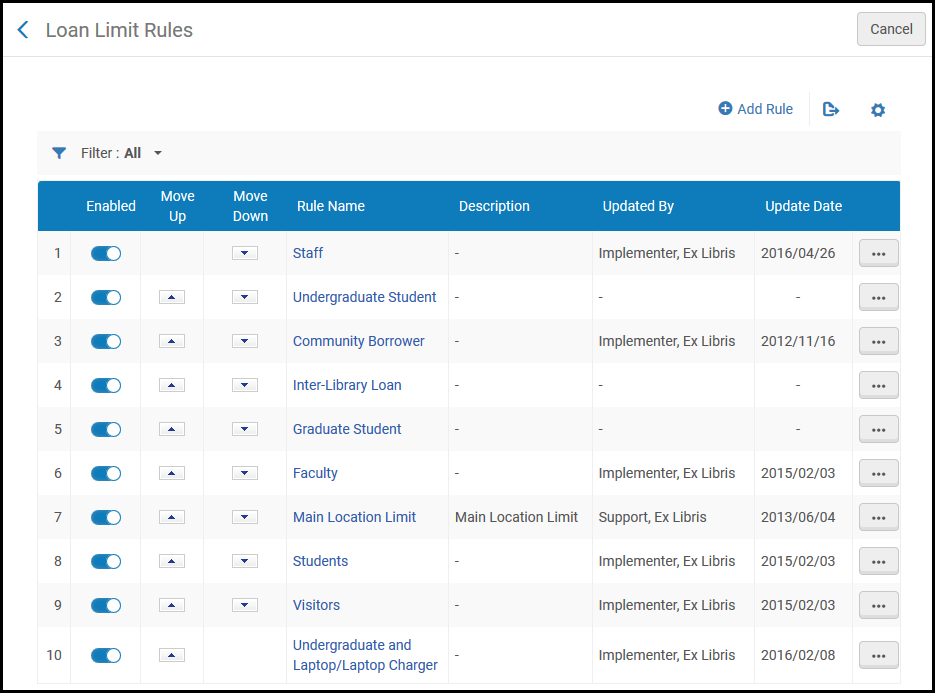
このページでは、次のアクションを実行できます。
- Add Loan Limit Rules (see Adding Loan Limit Rules).
- Edit Loan Limit Rules (select Edit from the row actions list).
- 貸与制限ルールの重複(行アクションリストから重複を選択し、関連するフィールドを変更)。
- 貸与制限ルールを削除します(行アクションリストから削除を選択)。
Adding Loan Limit Rules
貸与制限ルールを追加できます。定義したルールは、機関内のすべての図書館に適用されます。
- [貸与制限ルール]ページ([設定メニュー]> [フルフィルメント]> [ユーザー設定]> [貸与制限])で、ルールの追加を選択します。[貸与制限]ページが開きます。既存の貸与制限ルールのコピーを作成する場合は、行アクションから重複を選択します。貸与制限ルールをコピーしたら、必要に応じて変更できます。
貸与制限ページ - 入力パラメータで、貸与制限ルールの名前と説明を入力します。
- Under Input Parameters, specify the components of the input parameter (Name,Operator, and Value).A set of input parameters may look like this:Library=ArtLibrary.
- パラメータを追加を選択します。入力パラメータのセットが、貸与制限ルールのパラメータのリストに追加されます。
- 前の2つのステップを繰り返して、ルールに必要なパラメータをすべて追加します。At least one input parameter must be fulfilled for the rule to be applied.
- 出力パラメータで、貸与限度-ユーザーが貸与限度ルールに従って借りることができるアイテムの最大数を入力します。0を入力すると、すべての貸与がブロックされます。
- 新しいルールを保存するために保存を選択します。
- ルールのオーダーは重要ではありません。基準に一致するすべてのルールがシステムによってチェックされます。いずれかのルールで定義された制限を超えた場合、新しい貸与は作成されません。
- 無制限の貸与の場合、貸与に適用される貸与制限ルールを作成しないでください。
Page tags: article:topicproduct:almacontent:Documentationlang:englishUser groupsadd currencyConfigure patron fulfillment rulesConfigure patronPatron user groupspatron limitsloan limitsuser block definitionsadd user block definitiondemeritsdemerit blockdemerit pointsuser authentication
