
Locating Items for Resource Sharing
このページでは、取寄せの検索プロセス、貸出の検索プロセス、自己所有など、リソースシェアのためのアイテムを検索する方法について説明します。For more information on the various workflows for resource sharing, including broker and peer to peer based, managing resource sharing partners, borrowing/lending requests and contributing to the resource sharing directory, see Resource Sharing.
リソースシェアアイテムを見つけるのは、次のいずれかの役職でなければなりません。
- フルフィルメントサービスオペレータ(リソースシェア図書館用)
- フルフィルメントサービス管理者(リソースシェア図書館用)
見つけるプロセスでは、リソースシェアリクエストのメタデータを目録リソースと照合します。
The locate process creates a rota list of potential lending partners that are searched to fulfill the sharing request.The rota list is created based on rota templates (see Configuring Rota Templates).
このプロセスは、次のようにピアツーピアのリソースシェアの一部として実行されます。
-
取寄せを見つける-パートナー目録で取寄せリクエストを検索します。Almaはすべての勤務表パートナーの目録を検索して、パートナーがリクエストされた記録を所有しているかどうかを判断します。リクエストされたリソースを所有するパートナーのみがリソースをリクエストされます。見つけるのに失敗した場合、パートナーは勤務表から削除されます。取寄せリクエストは、リクエストされた資料と一致するものがローカルで存在する場合、貸し手への送信をブロックします。
[リソース共有パートナー]ページ([フルフィルメント]>[リソースシェア]>[パートナー])の所蔵コードフィールドの値を構成する場合、ISOパートナーの行アクションリストから編集を選択します。所蔵コード値で指定された図書館でリソースが見つかった場合にのみ、見つけるプロセスが正常に完了します。(For details, see Resource Sharing Partners).
Alternatively, you can assign multiple libraries to a holdings code so that the locate process completes successfully when the item is found for any of the assigned libraries.詳細については、Ex Librisサポートにお問い合わせください。
For details on the borrowing locate process, see Borrowing Locate Process.
-
Lending Locate – Locates a lending request in the lender's catalog.Alma searches the local catalog to find a local repository match for the metadata of a request from an external requester.貸し手は、リクエストされたリソースを所有しているかを自動的に把握し、関連する目録のステータスを一目で確認できます。
For details on the lending locate process, see Lending Locate Process.
-
自己所有–パートナーにリクエストを送信する前に、借り手の目録で取寄せリクエストを見つけます。このタイプの検索は、ユーザーのリソースリクエストがローカル目録で満たされるか、またはリクエストを取寄せを見つけるプロセスの一部として外部リソース共有パートナーに送信する必要があるかを決定します。
For details on self ownership, see Self Ownership.
このセクションでは、見つけるプロセスのさまざまな段階、モニタツール、プロセスの設定方法について説明します。
rs_uresolver_locate パラメータが true に設定されている場合、電子リソースは ISSN を必要とする OpenURL のようなリンク解決に基づいて検索されます。If the parameter is set to false, the regular metadata search works without mandating an ISSN.
取寄せを見つけるプロセス
The Borrowing Locate process is configured as part of the Locate Profiles (Configuration > Fulfillment > Resource Sharing > Locate Profiles) as described in Configuring Locate Profiles.ロケーションプロファイルは、次のタイプのいずれかです。
-
Z39.50 –見つけるターゲットがAlma機関ではない場合、Z39.50プロトコルを使用してAlmaでその目録を検索できます。ターゲットパートナーは、オープンにアクセス可能なZ39.50サーバーを運営している必要があります。検索クエリは、リクエストのタイトル、著者、ISSN/ISBN、年(発行日)を検索します。複数のクエリフィールドが指定されている場合、正常な結果を返すには、それらすべてがtrueでなければなりません。1つ以上のパートナーデータベースで検索が成功すれば成功と見なされます。
Almaは、見つけるターゲットがAlmaの検索可能な外部ターゲットの一部である場合にのみ、このタイプの見つけるターゲットを定義できます。この方法でパートナーを検索できるが、パートナーの目録がAlmaの検索可能な外部ターゲットのリストにない場合は、Ex Librisデータサービスに連絡して、その目録を検索可能なターゲットにします。
-
Alma –見つける対象がAlma機関の場合、Alma APIを使用して目録を検索できます。これにより、より正確な見つけるオプションがサポートされます。
メンバー機関がフルフィルメントネットワークのメンバーまたはネットワークゾーンのメンバー機関である場合、見つけるプロセスではリクエストメタデータではなく、Alma内部記録IDを使用します。そのため、このステータスでは、フィールドで見つけるを設定する必要はありません。他の機関では、Almaのロケーションプロファイルを使用する場合、貸し手と依頼者が同じネットワークゾーンまたはフルフィルメントネットワークを共有していない場合、見つけるプロセスはロケーションプロファイルの設定によります。
- If the Locate by Fields checkbox is selected on the Locate Profile Details page, the locate process proceeds based on the selected subfields (Title,Author,ISBN/ISSN,Edition,System Control Number,LCCN, Other Standard ID, Barcode, DOI).
- If Locate only if all fields match is set to “Yes”, locate will find a match only when all selected fields (which exist in the request metadata) match.「いいえ」に設定すると、選択した識別子フィールドのいずれかが一致する場合、ロケーションは一致を見つけます (リクエストに識別子フィールドが存在しない場合、他のすべての選択したフィールドが一致する場合にのみロケーションは成功します)。貸出を見つけるプロセスは、一致する結果が1つでもあれば成功し、一致する結果がなければ失敗します。If there is more than one match, the rs_fail_locate_multiple_results parameter dictates the behavior (see Configuring Other Settings (Fulfillment).
-
If the Locate by Fields checkbox is not selected on the Locate Profile Details page, or if none of the subfields have been selected, the locate process proceeds based on the following criteria: LCCN, System Control Number, Title, and ISBN/ISSN.
検索結果に基づいてリクエストを行う際、「システム制御番号」は、OCLC プレフィックスが付いている場合に限り、035 フィールドから抽出されます。The control number is normalized, and the prefix is removed.したがって、検索プロセスは、プレフィックスに続く番号の部分に対してのみ動作します。
You can specify whether the locate process will check physical resources and/or electronic and digital resources as follows:
- 冊子リソースを無視するが選択されておらず、電子およびデジタルリソースを無視するが選択されている場合、Almaは書誌レコードに基づいて冊子リソースに対してのみ見つけるプロセスを実行します。
- 冊子リソースを無視するが選択され、電子およびデジタルリソースを無視するが選択されていない場合、Almaはリンクリゾルバーと同様にリクエストの巻/発行情報と貸し手のカバレッジデータを使用して電子リソースに対してのみ見つけるプロセスを実行します。
- 冊子リソースを無視すると電子およびデジタルリソースを無視するの両方が選択されていない場合、Almaは書誌レコードに基づいて冊子リソースの検索プロセスを実行し、また、リンクリゾルバーと同様にリクエストの巻/発行情報情報と貸し手のカバレッジデータを使用して、電子リソースを提供します。最初に電子で見つける確認が実行されます。
The Ignore Physical Resources field appears only if the rs_uresolver_locate parameter is set to TRUE.
The final locate behavior is also affected by the rs_ignore_electronic_for_physical_reques t parameter (Configuration > Fulfillment > General > Other Settings) and allow other formats field (Fulfillment > Borrowing Requests > Create Request > Request Attributes), as seen below.This table describes how the locate process runs with regard to the possible combinations.
| 他のフォーマットを許可するが選択されていません | 他のフォーマットを許可するが選択されています | ||
|
rs_ignore_electronic_for_physical_request=false If the checkbox Ignore electronic resources for physical-only requests is unchecked in the library Details, when selecting the Locate resource action, the New All titles search will still find electronic resources. |
Ignore Electronic and Digital Resources is not selected in Locate Profile Details |
フォーマットに関係なく電子を許可する |
フォーマットに関係なく電子を許可する |
|
Ignore Electronic and Digital Resources is selected in Locate Profile Details |
フォーマットに関係なく電子リソースを無視する |
フォーマットに関係なく電子リソースを無視する
|
|
|
rs_ignore_electronic_for_physical_request=true |
Ignore Electronic and Digital Resources is not selected in Locate Profile Details |
物理的または返却不可の物理的アイテムの場合は電子リソースを無視する |
フォーマットに関係なく電子を許可する |
|
Ignore Electronic and Digital Resources is selected in Locate Profile Details |
フォーマットに関係なく電子リソースを無視する |
フォーマットに関係なく電子リソースを無視する |
Use the rs_uresolver_locate parameter to indicate that the locate process should consider volume/issue information for electronic resources, similar to how the link resolver would search the rota members' e-inventory.See Configuring Other Settings (Fulfillment).
- BLDSS – A locate may be performed using the British Library Document Supply Service.For more information on the BLDSS locate profile parameters, see Adding Locate Profiles.
-
Fulfillment Network – If the lender and requester share the same fulfillment network, there is no locate process, since Alma knows which partner owns the requested title.見つけるリクエストは、次のように処理されます。
- リクエストは、リソースを所有するフルフィルメントネットワークメンバーのリストとともにAlmaに保存されます。
-
機関IDが依頼者と同じフルフィルメントネットワークの一部であるパートナーの場合:
–機関IDが依頼者にリンクされている場合、リクエストされた記録は見つけられたと見なされます。
–機関IDが依頼者にリンクされていない場合、リクエストされた記録は見つけられなかったと見なされます。
You can configure an Alma locate profile to test for requestability and availability by selecting the Check item availability and Check item requestability checkboxes on the Locate Profile Details page (see Configuring Locate Profiles).アイテムの利用可能性を確認を選択すると、パートナーで記録が見つかり、少なくとも1つのアイテムが利用可能(ステータス配置済み)である場合にのみ、見つけるプロセスが成功します。When selecting Check item requestability, the locate process succeeds only if the item is requestable (the Is Requestable for Resource Sharing policy =True).
アイテムの利用可否およびリクエスト可否の確認は、一致した書誌レコードに直接リンクされているアイテムのみが対象となります。一致した書誌レコードに、関連レコードのいずれかにリンクされている物理的所蔵がある場合、それらのアイテムは検索処理の対象にはなりません。
Attach the relevant locate profile to a resource sharing partner (see Resource Sharing Partners).
The rs_do_not_send_request_when_locate_fails parameter (Configuration > Fulfillment > Other Settings) enables automatic removal of the lending partner from the rota in the case of a technical error such as a connection issue.This parameter will exclude partners for whom the system encountered a technical error or did not receive a response when attempting to locate information from the lender's repository.Examples of such issues could include connection failure, incorrect credentials, or attempting to search by fields that are not supported by the lender.Please note that partners without a locate profile will not be affected.
次の手順で説明するように、ロケーションプロファイルを設定するときに関連する設定を選択することで、取寄せを見つけるプロセスを自動的にアクティブ化できます。
- On the Organization Unit Details page (see Configuring Parameters of a Resource Sharing Library), select the Cancel request on locate failure checkbox for Alma to automatically cancel a request for which the locate process did not find any potential partner.
-
Alma、Primo、APIのいずれかのインターフェイスから貸出リクエストが作成されたときに貸出検索プロセスが自動的に開始されるようにするには、場所プロファイルを自動的にアクティブにするチェックボックスをオンにします。
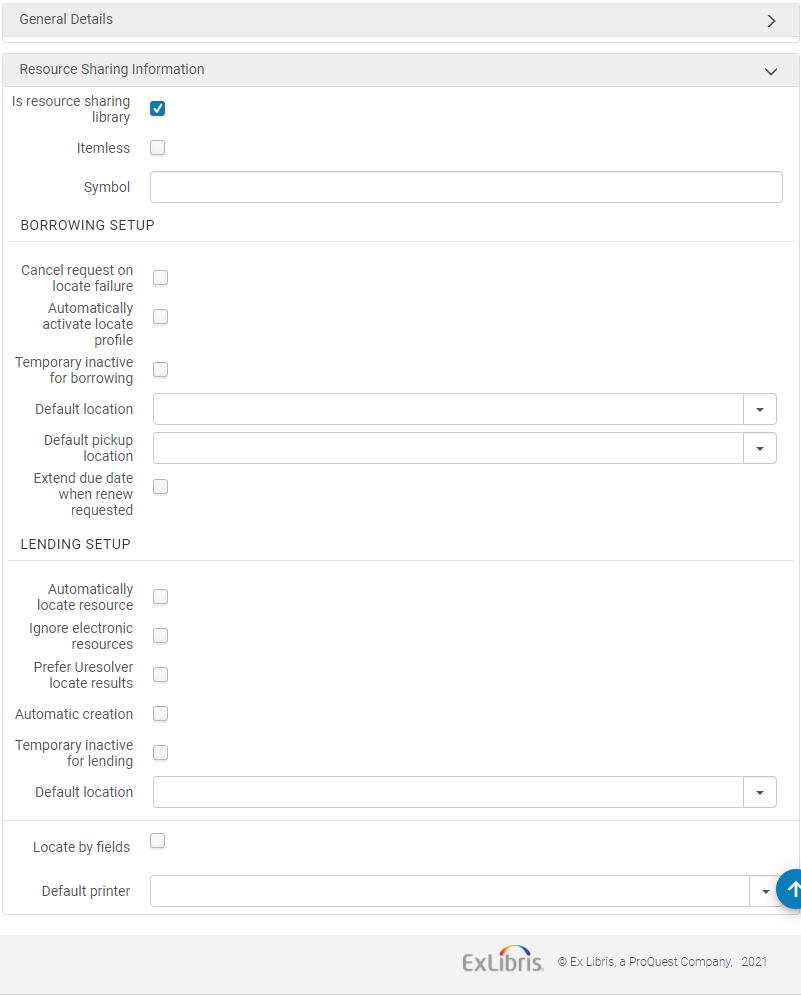
自動見つけるプロセスは、勤務表をリクエストに自動的に添付する自動勤務表割り当てルールが有効になっている場合にのみアクティブにできます。次に、自動的に接続された勤務表で見つけるプロセスが実行されます。
-
On the Resource Sharing Borrowing Request page (Fulfillment > Resource Sharing > Borrowing Requests, select Edit for a request), select the Locate button.
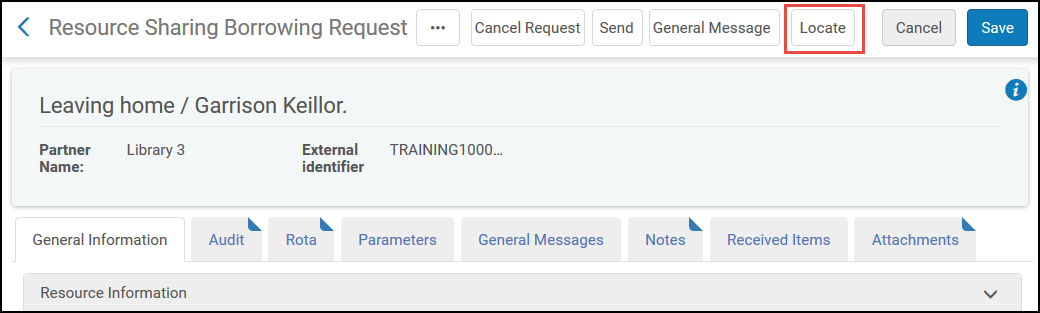
-
On the Resource Sharing Borrowing Requests page (Fulfillment > Resource Sharing > Borrowing Requests), select the Locate Resource action.このリンクは、リクエストにパートナーまたは勤務表が割り当てられている場合にのみ表示されます。
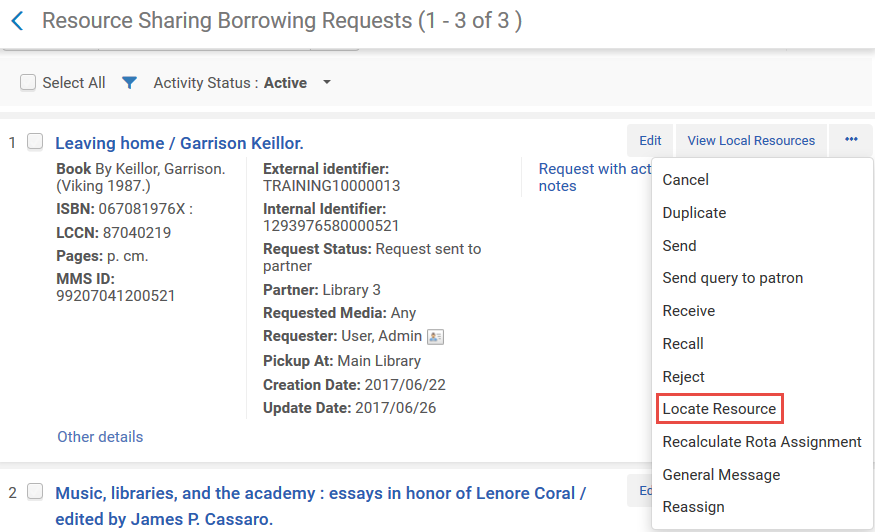
貸出を見つけるプロセス
貸出を見つけるプロセスは、ILL(受付)の作成後に自動または手動でアクティブ化できます。
- To automatically activate the Lending Locate process, on the Organization Unit Details page (see To automatically activate the borrowing locate process above), select the Automatically locate resource checkbox.ILL(受付)が作成されると、リソースが自動的に検索されます。
- 貸出を見つけるプロセスを手動でアクティブにするには、[リソースシェアILL(受付)タスクリスト]ページ([フルフィルメント]> [リソースシェア]> [ILL(受付)])で、行アクションリストから検索を選択します。
貸出を見つけるプロセスは、一致する結果が1つでもあれば成功し、一致する結果がない場合や、複数の一致が見つかった場合は失敗します。タイトルに複数のアイテムがある場合、探すプロセスで利用可否と「リクエスト可能性」の確認はされないため、リクエストは手動で処理する必要があります。どちらの失敗の場合でも、検索クエリは[リポジトリ検索]ページに表示され、オペレータはILL(受付)をローカルリポジトリに手動で添付するか、クエリの変更リンクを選択して検索クエリを変更できます。
リソースシェア図書館は、リクエストされたタイトルに利用可能なアイテムがない場合、受領リクエストを自動的に拒否するように設定できます。This can be done by selecting the Reject request when no available item, the Reject request when no requestable items and the Automatically Locate Resource switches in the Lending Setup of the Resource Sharing Library.スイッチがオンになっていない場合、貸し手側のオペレータは、リクエストされたアイテムが利用できない場合、リクエストを拒否するかを手動で決定できます。
アイテムの利用可否およびリクエスト可否の確認は、一致した書誌レコードに直接リンクされているアイテムのみが対象となります。一致した書誌レコードに、関連レコードのいずれかにリンクされている物理的所蔵がある場合、それらのアイテムは検索処理の対象にはなりません。
貸出を見つけるプロセスは、リクエストで使用可能なメタデータに基づいて処理されます。
- リクエストが記録IDとともに受領された場合、ILL(受付)は識別された記録に自動的にリンクされます。A request can be received with a record ID by ISO ILL if the requester and borrower are part of the same fulfillment network and the request has been placed using the Network Zone record or a Primo deduplicated record.If the two records are deduplicated in Primo and the request is placed from Primo, the locate process will consider all inventory as candidates for fulfilling the request, and will access any inventory that is requestable for resource sharing.リクエストがAlmaから送信された場合、重複排除は関連せず、リクエストに対して選択された記録が使用されます。
- If the request has been received without a record ID, the record is located based on the selected Locate by Fields values on the Organization Unit Details page (Configuration Menu > General > Libraries > Add a Library or Edit Library Information select the Libraries tab and edit the resource sharing library).If Locate only if all fields match is set to “Yes”, locate will find a match only when all selected fields (which exist in the request metadata) match.「いいえ」に設定した場合、時間所蔵確認は選択された識別子フィールド(例:ISBN、ISSN、LCCN、OCLC番号)のいずれかが一致すれば一致と見なします。リクエストに識別子フィールドが存在しない場合、時間所蔵確認は他の選択されたフィールドがすべて一致した場合にのみ成功します。
- If the Locate by Fields checkbox is not selected, or if none of the subfields have been selected, the locate process proceeds based on the following criteria (in the indicated order): LCCN, System Control Number, Title, and ISBN/ISSN.
- リクエストでリモート記録IDが指定された場合、見つけるプロセスはリモート記録IDでのみ実行されます。
Almaは、ジャーナル記事や書籍の章のデジタルコピーのILL(受付)を処理する際、ILL(受付)に一致する既存の書誌レコードのチェックを行います。書籍の章については、この目的でデジタル化できる書籍の物理コピーのチェックも行います。記事の場合、デジタル化できる雑誌の物理的なコピーのチェックは行いません。
自己所有
自己所有チェックは、リクエストされたリソースが依頼者の機関でローカルに所有されているかを判断します。Almaで新しい取寄せリクエストを作成するときに、リクエストされたリソースがローカル機関によって所有されている場合、警告メッセージ(機関目録にはリクエストされたタイトルのサービスがあります)が表示されます。
自己所有チェックは次のように処理されます。
- The record is located based on the selected Locate by Fields values on the Organization Unit Details page (Configuration Menu > General > Libraries > Add a Library or Edit Library Information select the Libraries tab and edit the resource sharing library).See To automatically activate the borrowing locate process above.
- If the Locate by Fields checkbox is not selected, or if none of the subfields have been selected, the locate process proceeds based on the following criteria (in the indicated order): LCCN, System Control Number, Title, and ISBN/ISSN.
[Primo取得する]タブで実行すると、自己所有は受領OpenURLを既存のリソースでリゾルブすることで決定されるため、上記の設定ではなくリゾルバーの一致メカニズムに基づいています。
