
リソース共有パートナー
リソース共有パートナーのパラメータを構成します。
このページでは、ディレクトリからのダウンロード、パートナーの設定、リポジトリへの情報提供など、リソース共有パートナーとの連携について説明します。See also British Library Document Supply Service (BLDSS),Configuring Alma/Broker Integration and Configuring Rota Templates.
For more information on resource sharing including locating items for resource sharing, managing borrowing and lending requests and contributing to the resource sharing directory, see Resource Sharing.
- リソース共有パートナー管理者
リソースシェアパートナーを作成して、Almaとリソースシェアシステムの間で発生する可能性のあるリクエスト通信または受信通信のタイプを定義できます。
- NCIP–AlmaとOCLC Navigator、OCLC iLLiad、VDX、Relaisなどのリソース共有システム間のNCIP 2.0メッセージを介した通信。Note that Alma supports the OCLC CIRC ILL and Relais application profiles for both borrowing and lending, as well as the responder role for the following NCIP messages:RequestItem,CheckOutItem,CheckInItem,AcceptItem,LookupUser.
- Alma notifies the partner when an item renewal is requested by sending a RenewItem message to the partner with item information and a desired due date.パートナーは、保留中ステータスと、場合によってはDateOfExpectedReplyで応答します 。パートナーシステムは、更新リクエストのステータスについてAlmaに通知することもできます。Alma receives an NCIP CirculationStatusUpdated message with a circulation status of
- Renew Still Pending- Marks the request as Renew Requested.
- Item Not Renewed- Manages the request as it does when a renew request is rejected.
- 複数のアイテムに対して単一のリクエストをすると、各アイテムごとにCheckInItemリクエストを作成します。
- When using an NCIP Partner, all actions such as recallitem need to be preformed in the external system and not from Alma.
- Alma notifies the partner when an item renewal is requested by sending a RenewItem message to the partner with item information and a desired due date.パートナーは、保留中ステータスと、場合によってはDateOfExpectedReplyで応答します 。パートナーシステムは、更新リクエストのステータスについてAlmaに通知することもできます。Alma receives an NCIP CirculationStatusUpdated message with a circulation status of
- ARTEmail - Almaと大英図書館リソース共有システム間の通信。
- ISO - Alma と、別の(Almaまたは非Almaの)リソース共有システムとの間の通信。
- Eメール – Alma取寄せパートナーによる、Eメールを介した取寄せリクエストの送信。EメールリクエストはXSLフォーマットで送信されます。The XSL used for formatting the email is FulOutGoingEmailLetter.xsl and is configurable on the Configuration Files page (see Customizing Letter XSL Style Sheets).
- SLNP - Almaと、ドイツのリソース共有ワークフローのZFLサーバー間の通信。Full integration details with this partner are available in the Alma Developer Network at https://developers.exlibrisgroup.com/alma/integrations/resource_sharing/broker/SLNP.
- BLDSS - Almaと大英図書館リソース共有システム間の通信。For more information, see British Library Document Supply Service.
- CreateOrderメッセージのサービス/スピード要素は、サービステーブルのレベルにマッピングされます。BLDSSマッピングレベルは次のとおりです:
- EXPRESS_LOCAL - 即時ダウンロード
- RUSH_LOCAL - 2時間
- PRIORITY_LOCAL - 24時間
- NORMAL_LOCAL - 4日以内
BLDSSサービスレベルは、次のようにAlmaのサービスレベルにマッピングされます:BLDSSメッセージマッピング BLDSSメッセージ Almaメッセージ(単数または複数) 即時ダウンロード 速達(ローカル) 2時間 急ぎ (ローカル) 急ぎ(延長)24時間 優先 (ローカル) 優先(延長)4日間以内 通常(フル) 通常(ローカル)都合のよい時間
For more information on levels of service, see Configuring Levels of Service - CreateOrderメッセージのサービス/スピード要素は、サービステーブルのレベルにマッピングされます。BLDSSマッピングレベルは次のとおりです:
- External Systems- Used to receive a resource through the CCC GetItNow service.
- RapidILL- Used to create borrowing requests in RapidILL using the InsertRequest RapidILL API.
- Fulfillment Network- For institutions configured as a fulfillment network, a partner record is entered in order to use the resource sharing framework for the fulfillment network request.For more information, see Automated Fulfillment Network Requests (AFN).
- NACSIS- Used to create borrowing and lending requests in NACSIS-ILL system.For details, see Private - Integration with NACSIS-CAT/ILL.
For detailed information on broker-based resource sharing between Alma and various systems, see https://developers.exlibrisgroup.com/alma/integrations/resource_sharing/broker.
After a partner is created, the partner can only be deleted if it has no requests associated with it.All requests that are associated with the partner even if the requests are cancelled or rejected are still applicable since they can be reactivated.All requests associated with the partner in the rota, even if they are not the active partner, are still applicable since the request may reach the partner.
Downloading a Resource Sharing Partner from the Directory
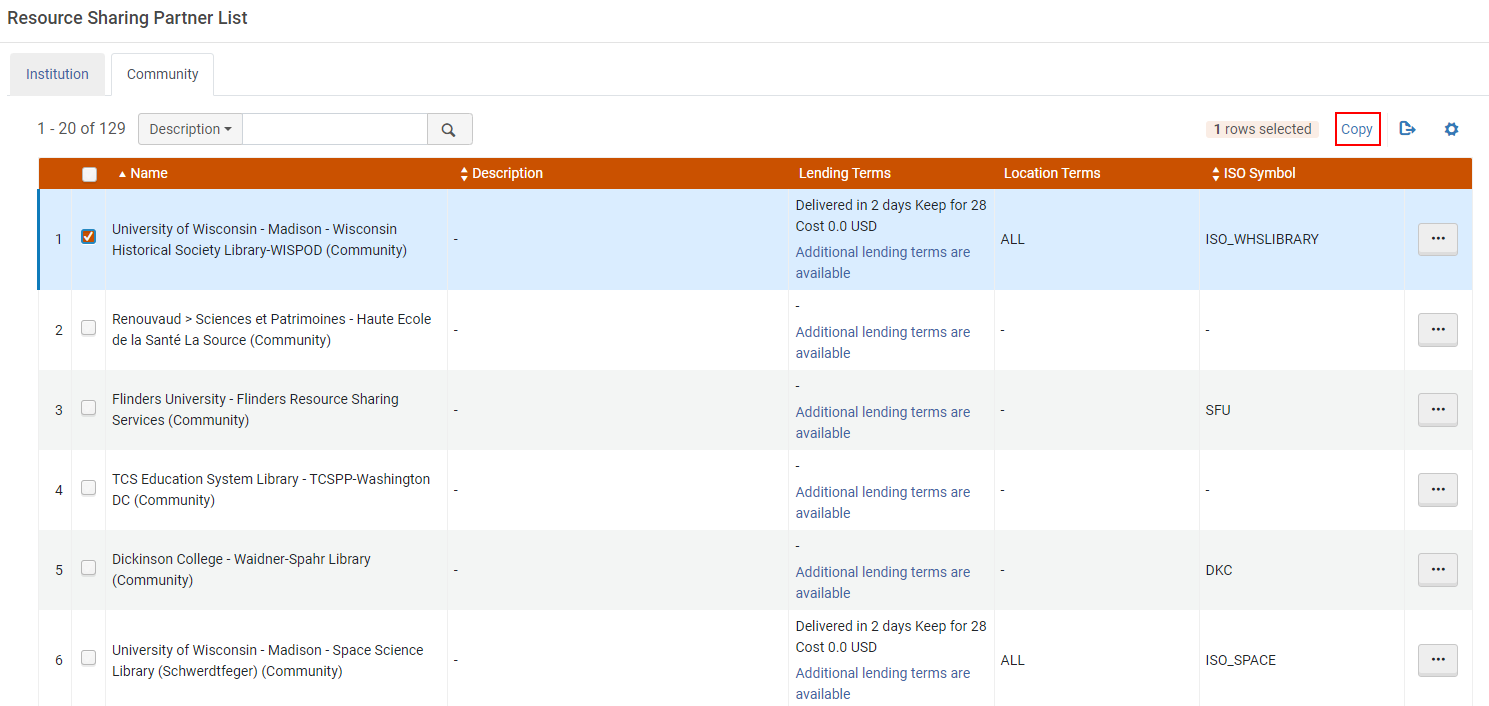
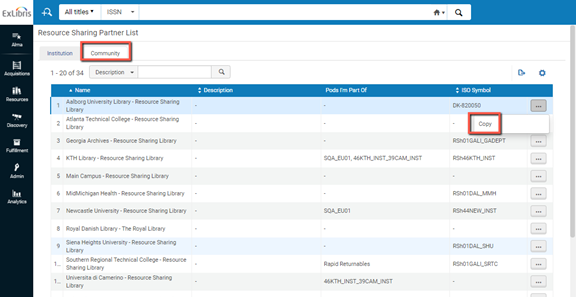
If the partner exists in the resource sharing directory (Fulfillment > Resource Sharing > Partners > Community tab), you can add a member to your institution by selecting the member and selecting Copy.メンバーとその詳細がパートナーリストに追加されます。
The column Pods I'm Part Of is only displayed if you select it in the Manage column display list.
Configuring a Resource Sharing Partner
- リソース共有パートナーリストページ(フルフィルメント > リソースの共有 > パートナー)で、 パートナーを追加を選択します。リソース共有パートナーページが開き、一般情報タブが表示されます。To be able to add partners of type 'Fulfillment Network', you have to add a dummy entry to the Fulfillment Members table (Configuration > General > Network Groups > Fulfillment Member).Only then can you add the partners to the Fulfillment Networks Groups page (Configuration Menu > General > Network Groups > Fulfillment Network Groups).Once you have set up all the Partners in the Network Zone, you can either leave that dummy entry in the Fulfillment Members table in the Network Zone or delete it.If you decide to delete it, the partners show as Profile Type 'Fulfillment Network (Not Listed)' in the Fulfillment Partners table, but they are still functional as Fulfillment Network partners.リソース共有パートナーページ - 一般情報
-
リソース共有パートナーのコードと名前を入力します。コードに含めることができるのは英数字のみであることに留意してください。
-
プロファイルタイプフィールドで、作成するプロトコルのタイプを選択します。オプションは次のとおりです:
-
ARTEmail
-
BLDSS
-
Eメール
-
外部システム
-
フルフィルメントネットワーク
-
Inn-Reach API
-
ISO
-
ISO 18626
-
KERIS
-
NACSIS
-
NCIP
-
NCIP-P2P
-
RapidILL
-
SLNP
-
ISOパラメータは、ISO ILL 10160/10161とISO 18626で同じです。
-
パートナーをアクティブにしたくない場合は、ステータスドロップダウンリストから非アクティブを選択することもできます。
The status affects only peer-to-peer requests, such as ISO, but does not affect broker managed requests, such as NCIP.NCIP requests are still received, even if an NCIP type profile is marked inactive.
-
Select the resource sharing system with which you are integrating from the System type dropdown list (for Ex Libris' informational purposes).これは必須です。
外部システムのプロファイルタイプとプロファイルには、システムタイプとしてCCC GetItNowを選択します(これがデフォルトです)。
When an NCIP profile is configured, the indicated broker types must be configured with the following NCIP parameters in the Parameters tab of the partner:
Additional Configurations 説明 Relais プッシュ方式のリクエスト = OpenURL The URL is defined as follows, where the XXX and YYY values are provided to each institution by Relais:https://h7.relais-host.com/<XXX>/loginRFT.jsp?LS=<YYY>
ログインにユーザーを追加 = はい
ゲストユーザーのためのサービスを有効化する = いいえ
Loan Period= <Free text, which is displayed in the Get It tab>
OCLC Navigator プッシュ方式のリクエスト = リンク Navigatorシステムは、OpenURLを入力としては受け入れられません。設定可能なリンクは静的リンクのみです。To configure a dynamic link to the Navigator system, use General Electronic Services (see Adding a General Electronic Service).
ゲストユーザーへのサービスを有効にする = はいNavigatorにアクセスする場合、新しいログインが必要です。
ローン期間 = <フリーテキスト、[Get It]タブに表示されます>INN リーチ プッシュ方式のリクエスト = リンク A link is created by a General Electronic Service with an OpenURL template, as described in Adding a General Electronic Service.
ゲストユーザーのためのサービスを有効化する = いいえINN Reachは、INN Reachリクエストフォームにアクセスする前に認証が行われることが予想されるため、認証プロセスをトリガーしません。
ローン期間 = <フリーテキスト、[Get It]タブに表示されます>ILLiad プッシュ方式のリクエスト = リンク A link is created by a General Electronic Service with an OpenURL template, as described in Adding a General Electronic Service.
URLへのユーザーログインの追加 = いいえILLiadは再度のログインを必要とします
Enable service for guest user = YesLoan Period = <Free text, which is displayed in the Get It tab>構成されたブローカーは、Primo Get Itタブにリンクとして表示されます。For more information about brokers in the Get It tab, see More Information About Resource Sharing Broker in Get It.
General Electronic Services - Displays a Primo link to an external service (such as Amazon), as an additional way to retrieve resources.さまざまなリソース(書籍やDOIなど)に使用されるさまざまなリンクを割り当てるルールを作成することもできます。For details, see Adding a General Electronic Service.
Display Logic Rules - Indicates when a certain broker link will display or be hidden in Primo (see Configuring Display Logic Rules).
- Enter values in the Average supply time (in days),Delivery delay, and Currency fields.
- Select the Supports borrowing and/or Supports lending checkboxes.ここで選択されたワークフローは、定義されたパートナーのILL(依頼)およびILL(受付)のタスクリストで実行できるアクションを制御します。Choose one of the workflows from the dropdown list predefined by an administrator (in Configuration Menu > Fulfillment > Resource Sharing > Workflow Profiles).For details on configuring workflow profiles, see Configuring Workflow Profiles.
- (New for February 2026) Additional fields can be configured that allow libraries to customize and expand the partner information:
Alternate Account Number – Free text field that, in addition to an alternate symbol, enables additional information to be stored on the partner record.
Account Allowances – Populated by customizable drop down options.複数の選択を行って追加のパートナー情報を指定できます。
Sector – Populated by customizable drop down options to enable additional information to be stored on the partner record.
Send Communications Allowed – The value is checked/unchecked.マーケティング資料をパートナーに配布できるかどうかを明記したい図書館もあります。
Organization Type – Populated by customizable drop down options to enable additional information to be stored on the partner record
- 配達遅延フィールドに、アイテムの配達に必要な日数を入力します。受入したアイテムを、リクエストしているユーザーに貸出するときに計算される期日は、このフィールドに示されている日数分だけ自動的に繰り上げられます。
例えば、アイテムの受け取る期日が2013年6月5日であり、 配送遅延 = 4である場合、 期日 の値は、ユーザーサービスページに2013年6月1日として表示され、アイテムが「実際の」期日である6月5日のまでに到着するようにします。
For more information about managing the due date for an interlibrary loan, see the Interlibrary Loan With Due Date video (7:01 mins). - The symbol added to the Alternate Symbol field can be outputted on the Ful Incoming Slip Letter, Resource Sharing Shipping Slip Letter, and Resource Sharing Return Slip Letter.
- ネットワークゾーンでパートナーレコードを集中管理する機関の場合、ローカルステータスフィールドが表示されます。それによって、たとえパートナーが共同ネットワークでアクティブであっても、個々の機関がパートナーレコードをローカルで非アクティブ化できるようになります。
- In the Locate profile field, select a locate profile to determine how the partner's catalog is to be searched.The Holding code and Institution Code fields appear.Institution Code is a display field that shows the Alma institution code that is configured for the selected locate profile.This field must be populated in order to use links (rather than attachments) for the digital shipment of a resource sharing request if the institutions are not part of the same network zone.For details on locate profiles, see Configuring Locate Profiles and Configuring Copyright Management.
- If an incoming NCIP message cannot identify the partner, the NCIP partner that has the Default Partner check box selected is used.
- 所蔵コードフィールドに、図書館またはキャンパスコードを入力します。パートナーの検索プロセスは、このフィールドの値で示される図書館/キャンパスを検索します。所蔵コードを指定すると、以下が可能となります。
- リクエストされたリソースが潜在的な供給機関の特定のキャンパスで利用可能かどうかを判断します。
- リクエストされたリソースがそのキャンパスで所有されている場合にのみ、その貸し手にリソースをリクエストします。
- For peer-to-peer partners, selecting the Automatic Claim field enables the Time to Claim (days) field.This triggers an automatic claim letter (RSBorrowerClaimEmailLetter) when a configured period of time is reached.For example, when the Automatic Claim check box is selected and the Time to Claim (days) field is set to 7, if a request was sent 7 days ago and the request's status is still Sent, a claim letter is automatically triggered and the request status is set to Claimed.
キャンセル メッセージを送信して勤務表を続行するオプションを設定することもできます。電子メール/SLNP パートナーの場合、レターは電子メールで送信されます。For ISO requests, the notice is sent in a General Message.メッセージのテキストは設定できます。
- For peer-to-peer partners, selecting the Automatic Cancel field enables the Time to Cancel (days) and Cancellation Reason fields.The cancelation uses the same workflow as the manual cancel partner option and sends an automatic cancelation notification to the partner and continues through the rota.キャンセルおよびクレームアクションを実行するには、[フルフィルメントジョブの設定]ページを使用して、リソースシェアのクレームおよびキャンセルジョブを有効化する必要があります。See Configuring Fulfillment Jobs.
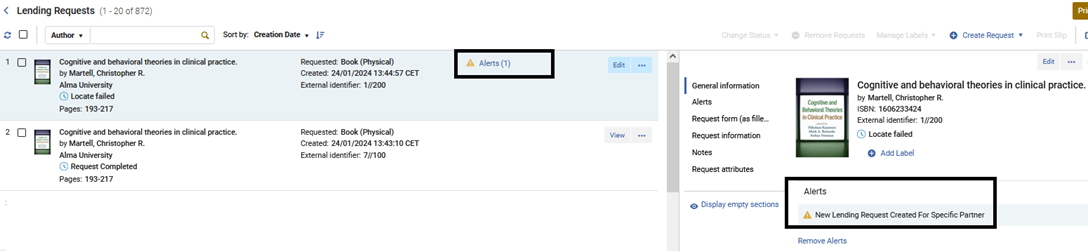
- Setting the New Request Alert checkbox will cause every lending request that is created for this partner to have a facetable alert.
- In the Contact Information tab, add address, phone number, and email information for the resource sharing partner (for informational purposes only; information for sending the resource sharing request is entered in the Parameters tab – see the following step).For instructions, see Adding User Contact Information.
- パラメータタブでは、リソースの共有パラメータを設定します。For more information, see Partner Parameters below.
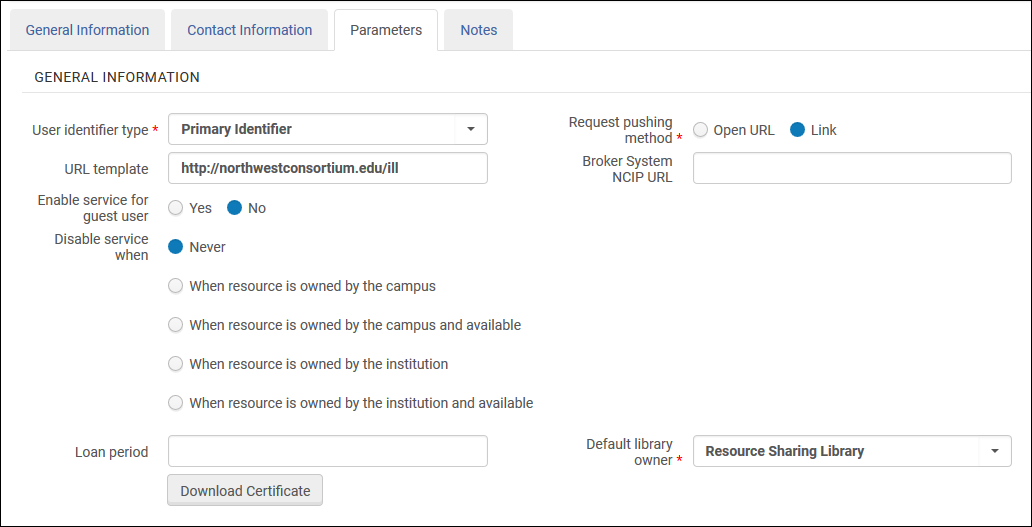 Resource Sharing Partner Page –Parameters Tab
- [保存]を選択します。リソース共有パートナーが作成され、[リソース共有パートナーリスト]ページに表示されます。
The partner can then be selected from the Partner dropdown list (accessible when selecting the Edit,Duplicate, or Send options on the Resource Sharing Borrowing Requests page) or Supplied to drop-down list (accessible when selecting the Edit or Duplicate options on the Resource Sharing Lending Requests Task List page).
メモ タブは、リソース共有パートナーを編集するときに使用可能です(アクション > 編集)。
パートナーパラメータ
ARTEmailパラメータ
ARTEmailのメールアドレスを入力します。また、追加する顧客IDごとに、コードとパスワードを入力する必要があります。Optionally, if you want to enable the ability to send requests to an alternate physical location or email address (which you can select to do in the Request Attribute section of the Creating a Borrowing Request page), you may select the Supports ADD request check box.You may also select keyword codes –that is, request values –to include.(Refer to the British Library's Guide to ARTEmail for an explanation of these values.) These define the communication that is possible vis-a-vis the resource sharing partner.
See also Alma Resource Sharing ARTEmail and Email.
NCIPパラメータ
次の表の説明に従ってパラメータを設定します:
| セクション | フィールド | 説明 |
|---|---|---|
| 一般情報 | ユーザーIDタイプ(必須) | メッセージにユーザーIDが含まれる場合にユーザーの照合に使用される識別タイプ。管理者が事前定義したオプションのいずれかを選択します。See Viewing Additional User Identifier Types. |
| プッシュ方式のリクエスト(必須) |
NCIP パートナーは Primo にサービスとして表示されます。このフィールドを設定して、Primo のサービスによってトリガーされるリンクを決定します。
|
|
| URLテンプレート | The URL that is used to send patrons from Primo to the resource sharing library's Web site. | |
| ブローカー・システムNCIP URL | NCIPブローカーと通信するためのURL。 | |
| URLにユーザー自動ログインを追加 | Select Yes to add a user's login credentials to the URL, thereby logging the user in automatically upon accessing the URL.This field displays only when Request pushing method = OpenURL.
Select Yes when configuring integration with a Relais system (see Configuring Alma/Broker Integration). |
|
| ゲストユーザーのためのサービスを有効化する | ユーザーがログインしていないときに、パートナーへのリンクをPrimoに表示するかどうかを示します。 | |
| サービスを無効にするとき | サービスを無効にするパラメータを選択します。可能な値は以下の通りです:
ゲストユーザーまたはキャンパスが設定されていないユーザーがキャンパスレベルの無効化アクティビティを実行すると、Almaは機関レベルで行われた自己所有権チェックに基づいてサービスを無効/非表示にします。 |
|
| 貸出期間 | ユーザーがアイテムをリソース共有図書館に戻す期限までの時間。(これは、Primoのユーザーには閲覧可能です。) | |
| デフォルト図書館所有者 | このプロファイルによって作成された取寄せリクエストを管理するリソース共有図書館。 | |
| 証明書ダウンロードボタン |
このボタンは、SLNPプロトコルを使用してAlmaに送信された暗号化メッセージのTCP通信を認証するために使用されます。パートナーが初めて保存された後、NCIPパートナーのボタンが表示されます。
このボタンをクリックするたびに「新しい」証明書が作成されるため、その新しい証明書がパートナー側にすぐにインストールされない場合、暗号化が破られる可能性があります。
For more information on the certificate, see the Developer Network.
|
|
| リクエストアイテム
取寄せ側でILL(受付)が登録されると、NCIPメッセージが送信されます。 |
リソース共有図書館 | すべてのアクションでサポートされる単一のリソース共有図書館。管理者が事前定義したリストから選択します。 |
| 書誌レコードIDタイプ | リソース共有リクエストを検索するパラメータを選択します。可能性のある値は以下の通りです:
|
|
| サポート借用 | Use if the broker system notifies Alma about new borrowing requests at the time they are created using the Request Item NCIP messages.Most broker systems do not use this message to notify a borrower about a new borrowing request.むしろ、AcceptItemメッセージは、アイテムが受入された時点で使用されます。Leave the checkbox unselected, unless you are sure that your broker system also uses the Request Item message for notifying about new borrower requests. | |
| アイテムを貸出
アイテムが貸出側から取寄せ側に出荷されるときにNCIPメッセージが送信されます。 |
デフォルトの図書館(必須) | 複数のリソース共有図書館がある場合、デフォルトとして使用されるリソース共有図書館。 |
| デフォルトの場所
(必須) |
リソース共有をする借り手に出荷されるアイテムに割り当てられるリソース共有図書館上での一時的な場所。管理者が事前定義したリストから選択します。 | |
| デフォルトアイテムポリシー
(必須) |
リソース共有の借り手に出荷されるアイテムに添付されるポリシー。管理者が事前定義したリストから選択します。 | |
| アイテムの受け入れ
アイテムの到着が借入側で登録されると、NCIPメッセージが送信されます。 |
デフォルトの場所(必須) | 受入図書館の一時的な配架場所。管理者が事前定義したリストから選択します。
この場所は、一時的なアイテム作成ルールによって別の場所が割り当てられていない限り、リソース共有の借り手に出荷されるアイテムに割り当てられます。 |
| リソース共有図書館 | リソース共有図書館(複数のリソース共有図書館がある場合)。 | |
| デフォルト受取図書館 | 取寄せリクエストされたアイテムが到着したときに、一時アイテムが転送されるデフォルトの受取場所。管理者が事前定義した図書館のリストから選択します。 | |
| 自動受入 |
リソース共有アイテムの自動受入を有効にする場合に選択します。自動受入により、スタッフは、Almaで受入アクションを繰り返す必要なく、ブローカーシステムに受入アクションを登録できます。
このオプションを有効にすると、単一の複数アイテム取寄せリクエストに対して複数のAcceptItemリクエストを処理できます。これは、リクエストに同じリクエストIDが含まれるが異なるバーコードが含まれていて、リクエストIDがアクティブな場合に適用されます。このオプションが有効になっていない場合、同じリクエストIDで複数のリクエストが作成されます。
|
|
| 受入デスク | アイテムを受入するデスクを選択します。The available options are the desks of the library that is specified in the Default library owner field.選択した値は、AcceptItemメッセージを受信したときにアイテムが到着する場所を示します。
This field displays only when Automatic receive is selected. |
|
| ユーザーを検索する
ユーザーがリソース共有システムでリクエストを作成しようとすると、NCIPメッセージが送信されます。 |
認証が必要です | Select whether authentication should or should not be required for the resource sharing library's Web site.When working with a Relais broker, select No. |
| 第三者にエクスポートする | 第三者にエクスポートする | ILLiad、Tipasa、Worldshare ILL、Relaisに使用されます。See ILLiad parameters; Tipasa, Worldshare ILL, and Relais Parameters below. |
|
ユーザー財務取引を作成 A received NCIP message can create a request fee. |
次のいずれかで料金を作成 |
|
- The NCIP URL, in the following format:https://<Alma domain>/view/NCIPServlet
- AgencyID(Alma機関コード)
- The ApplicationProfileType, which is the code defined on the Resource Sharing Partner page (see step 2 above)
NCIPピアツーピア(P2P)パラメータ
- Supports ADD request – Select this box if you want to enable the ability to send requests to an alternate physical location or email address (which you can select to do in the Request Attribute section of the Creating a Borrowing Request page).
- ユーザーIDタイプ – メッセージにユーザーIDが含まれる場合にユーザーを照合するために使用されるIDタイプ。管理者が事前定義したオプションのいずれかを選択します。See Managing User Identifiers.
- Server – Enter the partner's server name (or IP address).
- Username – Enter the username.両方のパートナーが同じユーザー名を入力する必要があります。
- Password – Enter the password.両方のパートナーが同じパスワードを入力する必要があります。
- 機関コード – パートナーのAlma機関コードを入力します。
- パートナーシンボル – ILLパートナーが参照されるシンボル。シンボルは、他のすべてのパートナーおよびISOシンボルに対して一意である必要があります。これには、NCIP-P2P、SLNP、およびISOパートナーが含まれます。
- Request Expiry – Configure when the partner's lending settings expire.以下から選択します:
- 有効期限なし - リクエストは期限切れになりません
- 利息支払い日までに期限切れ - [リソースシェア取寄せリクエスト]ページ(取寄せリクエストの作成時に表示される)のこの日までに必要フィールドで指定された日付でリクエストの有効期限が切れます。
- 有効期限日数 - 有効期限日数フィールドが表示され、そこに数字を入力します。この値は、リクエストが貸し手に送信されてからそれが期限切れになるまでの日数を示します。
- Send requester information – Select this option to enable requests sent via the specified partner to contain information about the requesting patron, such as their name and email.It is recommended to select this option only if the third-party system requires this information in order to properly handle the request.
- 共有バーコード – 貸出機関と取寄せ機関の間でアイテムバーコードを共有できるようにする場合に選択します。
- Eメールアドレス – 延滞通知の送信に使用されます。
- 延滞通知の再送日間隔 – 延滞通知の繰り返し日数の間隔を示す整数。
ISOパラメータ
- Alma supports the following ISO Resource Sharing messages:ILL Request,Shipped,Received,Returned,Checked-In, Answer – Unfilled, Cancel/Cancel Reply, and General Messages.
- ISOパートナーは、リンクドキュメントデリバリーオプションを使用して、デジタルリソース共有のリクエストを満たすことができます。
- ISOパラメータは、ISO ILL 10160/10161とISO 18626でほぼ同じです。
- Supports ADD Address – Select to include the requester's email in the ILL request, enabling the lending partner to send the shipped resource directly to the requester.
- Server – the partner's server or IP address.If the partner also uses Alma, use the Alma domain (see Logging Into and Out of the User Interface) as the server.
- Port – the partner's ILL port number.パートナーもAlmaを使用している場合、これはポート9001です。
- ISOシンボル – ILLパートナーが参照されるシンボル。シンボルは、他のすべてのパートナーおよびISOシンボルに対して一意である必要があります。これには、NCIP-P2P、SLNP、およびISOパートナーが含まれます。
- Request Expiry – configure when the partner's lending settings expire.以下から選択します:
- 有効期限なし - リクエストは期限切れになりません
- 利息支払い日までに期限切れ - [リソースシェア取寄せリクエスト]ページ(取寄せリクエストの作成時に表示される)のこの日までに必要フィールドで指定された日付でリクエストの有効期限が切れます。
- 有効期限日数 - 有効期限日数フィールドが表示され、そこに数字を入力します。この値は、リクエストが貸し手に送信されてからそれが期限切れになるまでの日数を示します。
- Send requester information – Select this option to enable requests sent via the specified partner to contain information about the requesting patron, such as their name and email.It is recommended to select this option only if the third-party system requires this information in order to properly handle the request.
- 共有バーコード – 貸出機関と取寄せ機関の間でアイテムバーコードを共有できるようにする場合に選択します。貸出パートナーと取寄せパートナーの両方でこのオプションが選択されている場合、貸出図書館は 発送メッセージを含むバーコードを送信し、取寄せ図書館は発送メッセージを使って、貸出アイテムのバーコードを決定します。The barcode displays as the Temporary Barcode value on the Receiving Items page (displayed when selecting Receive for a borrowing request), and can be used for identifying the received item when accessing the Received Items page (see Receiving Items).
- Send ReturnInfo(relevant for ISO18626) – Select this to include the information for the originating lending library instead of the resource sharing library.貸出図書館の ISIL コードが入力されている場合は、リソース共有リクエストにそのコードが含まれます。The ISIL code is presented on the Resource Sharing Borrowing Task List as Return Information.It is also available in the XML for the Resource Sharing Return Slip Letter (see Configuring Letters).フィールドが入力されると、レター内に表示されます。レターがカスタマイズされている場合は、フィールドを XML に手動で追加して入力する必要があります。スキャンインインターフェースを通じてアイテムをスキャンすると、各行に送信先情報が追加されることに注意してください。When returning through Returns, it is added to the pop-up display.
- 貸主の配送費用を無視 - 借主の設定費用を使用するには、このチェックボックスを選択します。チェックボックスが選択されていない場合、貸し手側の費用が借り手の費用を上書きします。チェックボックスが選択されていない場合、貸し手がコスト値を通知していなくても、取寄せ機関のコストが上書きされることに注意してください。(つまり、貸し手のコストは借り手にとってゼロと見なされます。)
- 延滞通知の再送日間隔 – 延滞通知の繰り返し日数の間隔を示す整数。
Eメールパラメータ
- Email address- The email address to which resource sharing borrowing requests are to be sent.サンドボックス環境または「実稼働前」環境で作業している場合、入力したアドレスを[Eメール含めリストマッピングテーブル]([一般設定] > [設定]メニュー > [外部システム] > [許可Eメール])に追加する必要があることに注意してください。For details, see Configuring Allowed Emails).
- 延滞通知の再送日間隔 – 延滞通知の繰り返し日数の間隔を示す整数。
ILLiadパラメータ
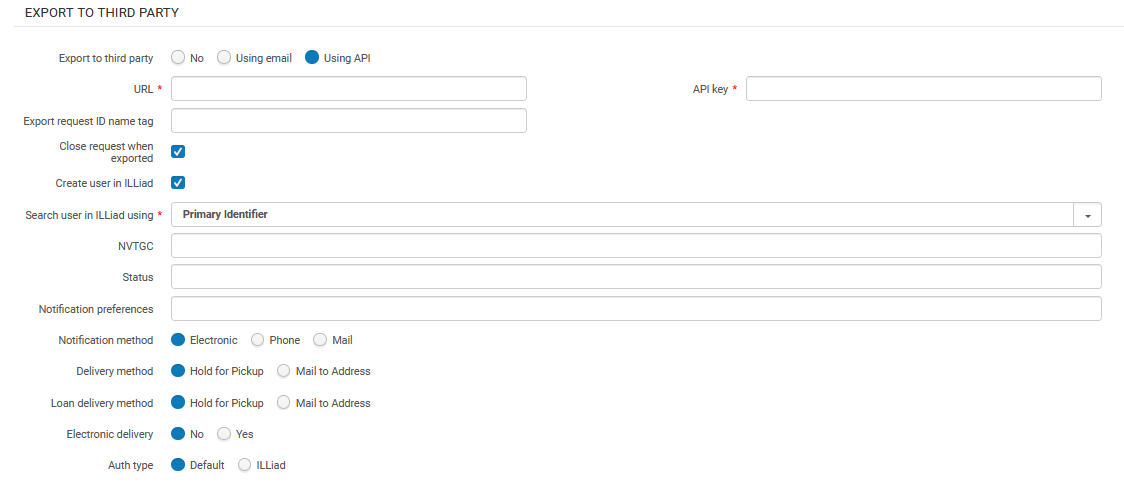
ILLiad can be set up in Alma in a peer-to-peer rota as a supplier of last resort (see Peer-to-Peer Resource Sharing in the Resource Sharing Guide), Configure this in the Export to Third Party section, at the bottom of the Parameters tab.
For the Export to Third Party radio button, select either Using API or Using email.
If you select Using email, enter the email address for ILLiad request notifications in Export email address.
ILLiadは、設定されたアドレスに送信された電子メールをアップロードし、それらを使用して内部借用リクエストを作成するように設定する必要があります。
If you are using the API to export borrowing requests to ILLiad, enter the URL and API key as supplied by ILLiad.Additionally, enter the name of the XML tag to populate with the external request ID in Export request ID name tag.
Enter the name of the tag to populate with the external request ID.ILLiad can use this request ID for further NCIP communications with Alma.Using this option enables you to continue receiving updates using NCIP.The value of this tag must be coordinated with ILLiad.
Select Create user in ILLiad if you want to use the API to push user records to ILLiad.The push only occurs if the user does not already exist in ILLiad: Before pushing a request to ILLiad, Alma checks if an account exists and creates a new user account if not.
If selected, the following API values appear (to be filled according to ILLiad's requirements):- Search user in ILLiad using – the value that Alma uses to locate/create a user in ILLiad (user identifier or preferred email)
- NVTGC – free string
- Status – free string
- Notification preferences – repeatable free text field with two comma-separated values.1つ目はActivityTypeとして送信され、2つ目はNotificationTypeとして送信されます。For example,{RequestPickup,Email},{RequestOverdue,Email}
- Notification method –Electronic,Phone, or Mail
- Delivery Method –Hold for Pickup or Mail to Address
- Loan Delivery Method –Hold for Pickup or Mail to Address
- Electronic Delivery –No,Yes
- Authtype –Default,ILLiad
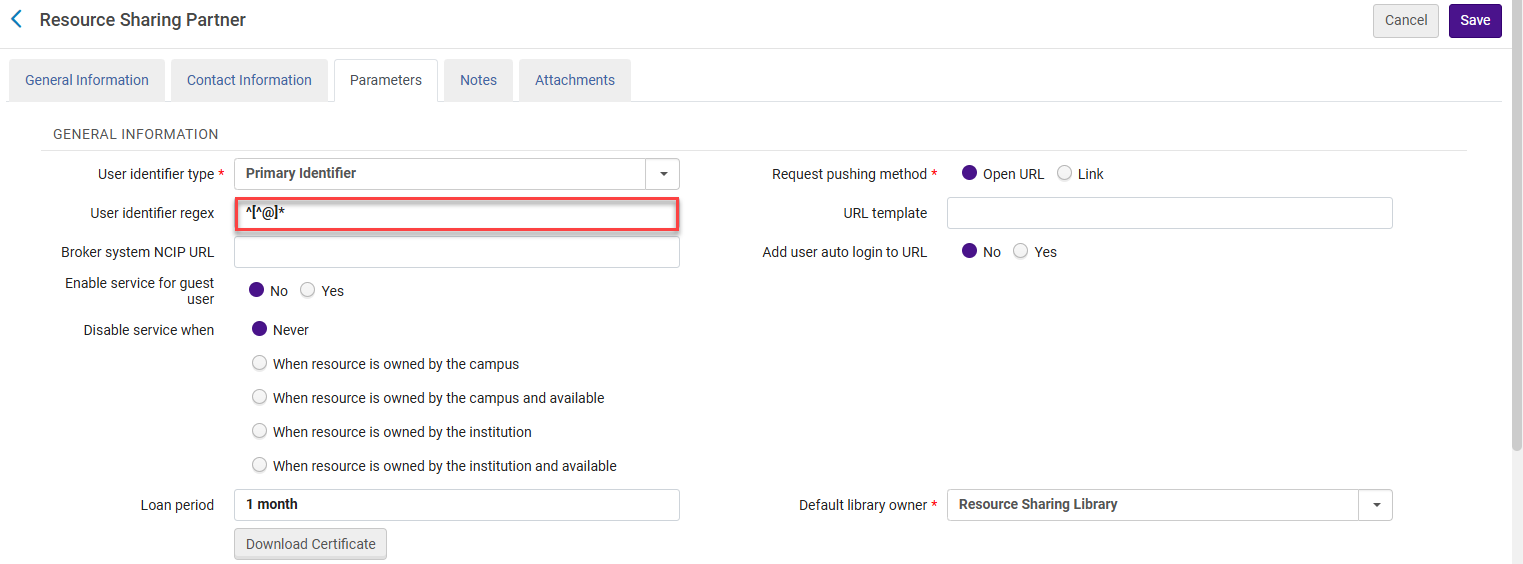
If you want to manipulate the user ID exported in the request, configure the User identifier regex field.For example, if the library wants to use the email as the identifier, but only wants to send the part before the @ sign, the library must define the following as the regular expression:^[^@]* This means that all characters until the first occurrence of @ are used as user ID.For example, if the email address is joe@clarivate.com and the User identifier regex field contains ^[^@]*, then the identifier isjoe.
Also see the Developer Network blog entry.
SLNPパラメータ
- Supports ADD Address – Select to include the requester's email in the ILL request, enabling the lending partner to send the shipped resource directly to the requester.
- Server – The partner's server name (or IP address)
- Port – The partner's ILL port number
- パートナーシンボル – 図書館Sigelを表します。シンボルは、他のすべてのパートナーおよびISOシンボルに対して一意である必要があります。これには、NCIP-P2P、SLNP、およびISOパートナーが含まれます。
- Request Expiry – configure when the partner's lending settings expire.以下から選択します:
- 有効期限なし - リクエストは期限切れになりません
- 利息支払い日までに期限切れ - [リソースシェア取寄せリクエスト]ページ(取寄せリクエストの作成時に表示される)のこの日までに必要フィールドで指定された日付でリクエストの有効期限が切れます。
- 有効期限日数 - 有効期限日数フィールドが表示され、そこに数字を入力します。この値は、リクエストが貸し手に送信されてからそれが期限切れになるまでの日数を示します。
- Send requester information – Select this option to enable requests sent via the specified partner to contain information about the requesting patron, such as their name and email.It is recommended to select this option only if the third-party system requires this information in order to properly handle the request.
- 共有バーコード – 貸出機関と取寄せ機関の間でアイテムバーコードを共有できるようにする場合に選択します。貸出パートナーと取寄せパートナーの両方でこのオプションが選択されている場合、貸出図書館は 発送メッセージを含むバーコードを送信し、取寄せ図書館は発送メッセージを使って、貸出アイテムのバーコードを決定します。The barcode displays as the Temporary Barcode value on the Receiving Items page (displayed when selecting Receive for a borrowing request), and can be used for identifying the received item when accessing the Received Items page (see Receiving Items).
- Eメールアドレス – 延滞およびリコール通知を送信するためのメールアドレス
- 延滞通知の再送日間隔 – 延滞通知の繰り返し日数の間隔を示す整数。
フルフィルメントネットワークパラメータ
- Customer Code- The Alma customer code of the fulfillment network partner.
- URL- The Alma URL of the fulfillment network partner.
- Request Expiry- configure when the partner's lending settings expire.以下から選択します:
- 有効期限なし - リクエストは期限切れになりません
- 利息支払い日までに期限切れ - [リソースシェア取寄せリクエスト]ページ(取寄せリクエストの作成時に表示される)のこの日までに必要フィールドで指定された日付でリクエストの有効期限が切れます。
- 有効期限日数 - 有効期限日数フィールドが表示され、そこに数字を入力します。この値は、リクエストが貸し手に送信されてからそれが期限切れになるまでの日数を示します。
To be able to add partners (Fulfillment > Partners) of type 'Fulfillment Network', you have to add a dummy entry to the Fulfillment Members table (Configuration > General > Network Groups > Fulfillment Member).Only then can you add the partners to the Fulfillment Networks Groups page (Configuration Menu > General > Network Groups > Fulfillment Network Groups).Once you have set up all the Partners in the Network Zone, you can either leave that dummy entry in the Fulfillment Members table in the Network Zone or delete it.If you decide to delete it, the partners will show as Profile Type 'Fulfillment Network (Not Listed)' in the Fulfillment Partners table, but they will still be functional as Fulfillment Network partners.
BLDSS Parameters
- Base URL – Enter the partner's URL.
- Account – The account number supplied by the British Library.
- パスワード – アカウントのパスワードを入力します。
- Digital Format – Select the type of file transfer.
- Send requester information – Select this option to enable requests sent via the specified partner to contain information about the requesting patron, such as their name and email.It is recommended to select this option only if the third-party system requires this information in order to properly handle the request.
- 非同期リクエストを許可 – 貸出機関と取寄せ機関の間でアイテムバーコードを共有できるようにします。
RapidILL Parameters
専用のRapidILLパートナーを設定することが可能です。If configured, Alma will automatically export borrowing requests that have been assigned to the RapidILL partner and create an equivalent borrowing request in RapidILL.The export action takes place when the Send action is triggered (manually or automatically) for the request with the active RapidILL partner.
If the request cannot be fulfilled by RapidILL, for example in the case where the requested resource is not lendable in RapidILL, then the Send action will be rejected and the request will automatically move on to the next partner on the rota, or get canceled when there are no other partners that can fulfill the request.
これによって、図書館はRapidILLをパートナーの当番表に組み入れることができ、全てのリクエストが自動的にRapidILLを介してフルフィルメントのためにエクスポートされるようになります。ただし、RapidILLによってこのリクエストが実現できない場合をのぞきます。その場合、リクエストはAlmaの勤務表を通じて伝搬されます。
- URL – Mandatory – The URL defaults to https://rapid.exlibrisgroup.com/rapid5api/apiservice.asmx, which is the RapidILL production server.
- Username – Mandatory
- Password – Mandatory
- Requesting Rapid Code – Mandatory -- also known in RapidILL as Rapid Site Code.これはユーザー名と同じである可能性があります。その場合は、両方のフィールドに同じ値を入力します。
- Requesting Branch Name – Mandatory – If your institution has multiple RapidILL branches, each branch needs a different partner.
これらのフィールドを設定するための値はRapidILLによって提供されています
- Close Request when Exported- When selected, the request is closed when exported and the request status is updated to Exported to 3rd party.これがデフォルトです。チェックボックスがオフの場合、リクエストはRapidにエクスポートされた後もアクティブのままとなり、リクエストのステータスはパートナーに送信済みに更新されます。This allows the request to remain viewable in Primo even though it has been exported.Requests that are left open must be manually closed.
NACSISパラメータ
次のパラメータを入力します:
- Code- NACSIS
- Name- NACSIS
- Profile Type- NACSIS
- Status- Active
- System Type- NACSIS
- Supports borrowing- Select the suitable workflow profile.
- Supports lending- Select the suitable workflow profile.
For additional details about NACSIS, see Integration with NACSIS-CAT/ILL.
Tipasa, WorldShare ILL, and Relais Parameters
ラストリゾートブローカーのサプライヤー
Tipasa, WorldShare ILL, and Relais may be set up in Alma in a peer-to-peer rota as a supplier of last resort.In this case, Alma will push a borrower request to these systems, where the request lifecycle will proceed as a broker managed request (see Broker-Based Resource Sharing).
To do so, when the partner record's Profile Type is NCIP, and the System Type is Tipasa,WorldShare ILL,Relais D2D, or Relais ILL, find the section Export to Third Party at the bottom of the Parameters tab.
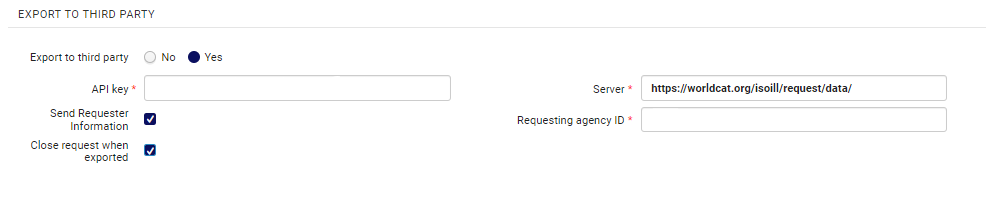
第三者へのエクスポートラジオボタンではいを選択します。Tipasa/WorldShare ILL が提供したAPI キーとサーバーURL、および図書館を識別するために提供されたリクエスト機関 ID(例えば、OCLC-XXX 形式の機関の OCLC記号)を入力します。
Send requester information – Select this option to enable requests sent via the specified partner to contain information about the requesting patron, such as their name and email.It is recommended to select this option only if the third-party system requires this information in order to properly handle the request.
The Close request when exported option defines whether the borrowing request is closed after export or is managed under the same borrowing request.Since these systems are not able to use the exported request's ID to further send NCIP messages that hook up to the existing request, it is recommended to enable this option, resulting in the request being closed in Alma when it is exported.他のNCIPブローカーシステムと同様に、パートナーがアイテムを受信すると、異なるIDの新しいリクエストが作成されます。
ピアツーピアパートナー
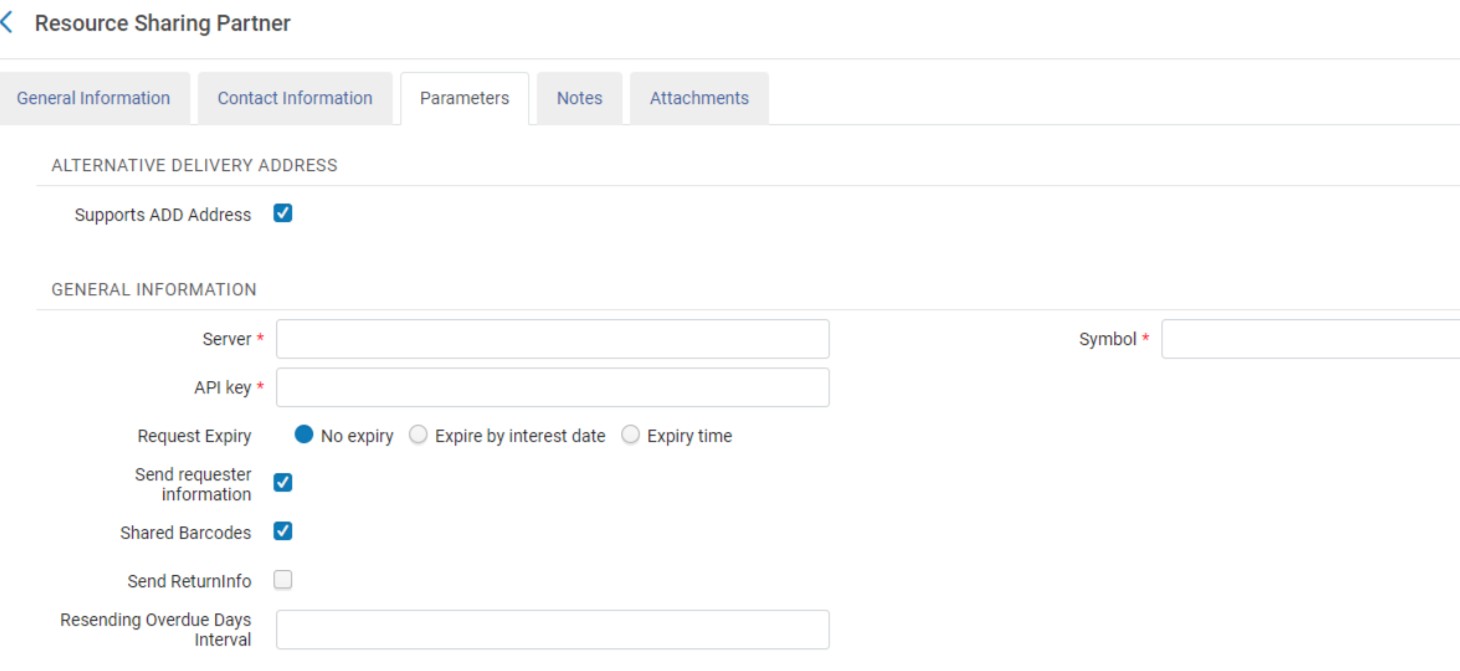
Once enabled by OCLC, Tipasa and WorldShare ILL can be set up as peer to peer partners using the ISO 18626 protocol.In this case, the request lifecycle will be managed as a peer to peer request (see Peer-to-Peer Resource Sharing).
To set this up, create a partner record with the Profile TypeISO 18626 and System TypeTipasa or WorldShare ILL.In the Parameters tab of the partner record, configure the following parameters:
- The partner's symbol in the Symbol field
- サーバーフィールドにあるサーバーURL
- An API key in the API key field
This feature is not currently supported by OCLC.
Inn-Reach API
See more information of the configuration and workflow of the API based InnReach requests, in the InnReach API Implementation Guide.
Libraries currently integrated with InnReach using NCIP and the InnReach DCB should contact Innovative in order to set up an implementation project with Innovative.
ReShareパラメータ
Alma enables you to push user borrowing requests to ReShare (Fulfillment > Resource Sharing > Partners).Almaは、リソースがReShareネットワーク内にあるかどうかを確認できます。
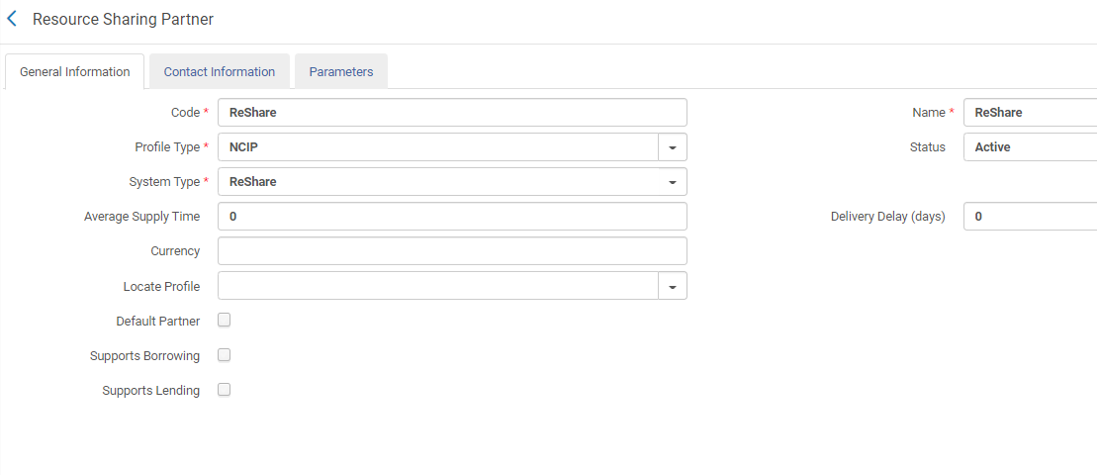
Enter the ReShare credentials on the Parameters tab.
The ReShare SHARED INVENTORY CONFIGURATION section is used for searching on the ReShare network.ReShare OPENURL CONFIGURATION セクションは、貸出リクエストをプッシュするために使用されます。
Contributing Information to the Repository
図書館は、独自の情報をリポジトリに提供できます。
You can contribute your own resource sharing library information to the repository , see Contributing to the Resource Sharing Directory for details.
Page tags: article:topicresource sharingNCIPcontent:DocumentationILLiadlang:englishresource sharing partnerISOARTEmailPartner parametersNCIP parametersNCIP peer-to-peer parametersISO parametersEmail parametersILLiad parametersSLNP parametersARTEmail parametersNCIP peer-to-peerSLNPproduct:alma_specto
