
リソースシェア図書館のパラメータの設定
このページでは、アイテムのないリソース共有ライブラリを含む、リソースシェアライブラリのパラメータを構成する方法について説明します。For links to all the main fulfillment documentation pages see Fulfillment.
For a list of links to the main resource sharing online help pages, see Resource Sharing.
リソースシェア図書館のパラメータの設定
- 一般システム管理者
機関内またはキャンパス内の図書館は、ユーザーが別のロケーションでリソースをチェックインまたはチェックアウトしたり、アイテムを相互に送信したり、相互に代わってアイテムを取得(購入)したりできる関係を持つように設定できます。ある図書館が他の機関の図書館に対して(機関内だけでなく)これを行うように設定されている場合、リソースシェア図書館と呼ばれます。
A resource sharing library must have its own Fulfillment Unit (see Configuring Fulfillment Units) in order to be able to configure the Borrowing Request Rules and the Lending Request Rules with the relevant Borrowing Resource Sharing Terms of Use and the Lending Resource Sharing Terms of Use.
See Adding a Library for more information about configuring libraries.
- Navigate to the Summary tab page (Configuration Menu > Fulfillment > Library Management > Opening Hours).
- Set the Configuring filter (top left of the page) to the scope of the resource sharing library.
- Modify the Organization Unit Name and Description fields, as necessary (see Configuring the Institution and it's Libraries).
- Enter your ISIL code (see ISIL Code for more information).
- [リソースシェア情報]セクションで、リソースシェア図書館を選択します。[リソースシェア情報]セクションフィールドが表示されます。
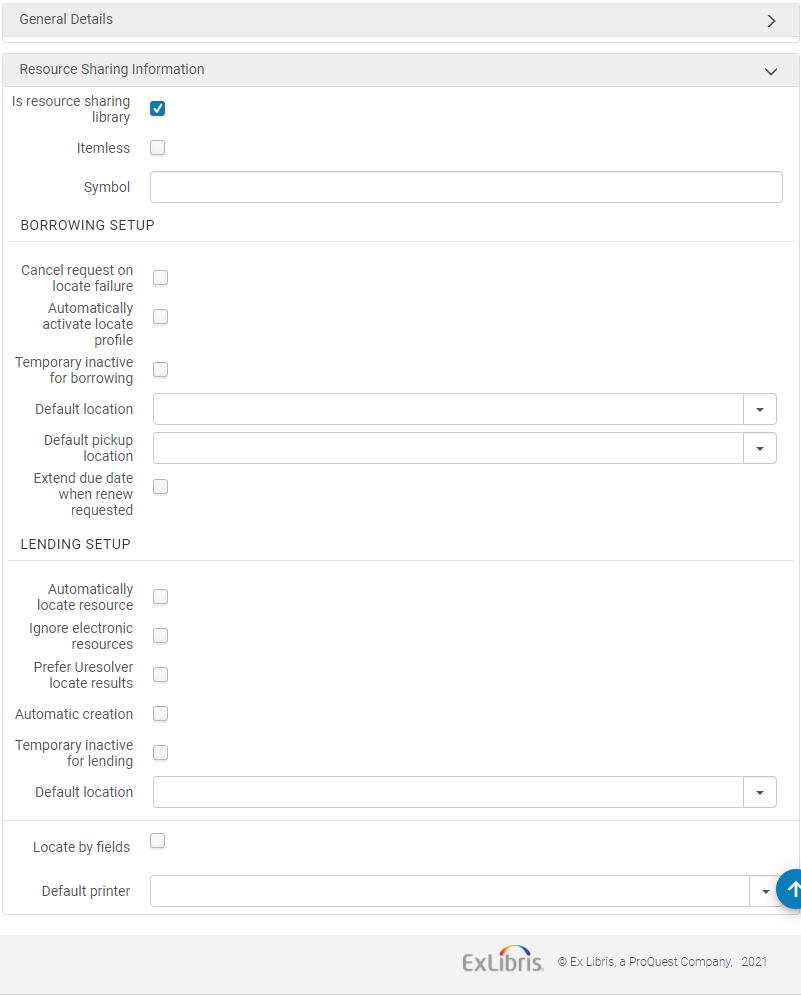 組織単位の詳細ページ-リソースシェア情報フィールド
- Select Itemless to designate the library as an itemless resource sharing library (see Configuring an Itemless Resource Sharing Library).
- 図書館がISOで動作できる場合に、[ISOシンボル]フィールドにリソースシェア図書館のISOシンボルを入力します。
- 取寄せリクエストをセットアップする場合:
- When Cancel request on locate failure is selected, Alma automatically cancels requests for which the borrowing locate process was not able to find a potential partner (see Borrowing Locate Process).
- ジョブ表割当ルールが満たされると、ジョブ表割当ルールに基づいて、アクティブ化された勤務表にロケーションプロファイルが割り当てられることを示すには、ロケーションプロファイルを自動的にアクティブにするを選択します。For details on rota assignment rules, see Configuring Rota Assignment Rules.When selecting this option, the borrowing locate process is automatically triggered when a borrowing request is created from any interface – Alma, Primo or API (see Borrowing Locate Process).自動検索は、勤務表をリクエストに自動的に添付するために自動ジョブ表割当ルールもアクティブにされている場合にのみアクティブにできます。次に、自動的に接続された勤務表で見つけるプロセスが実行されます。
- この図書館がリクエストの取寄せに対してブロックされていることを示すには、取寄せ一時停止中を選択します。
- When selected, the field,Inactive dates range, is displayed.日付レンジを選択して、指定した期間のみブロックが適用されるようにします。日付の範囲を空欄のままにすると、図書館は取り寄せ一時停止中のチェックボックスがオフになるまで、アクティブされないままになります。この非アクティブステータスにより、この図書館に対する貸出リクエストは、UI経由、API経由、またはPrimo内で作成されたものに関わらずブロックされます。For Primo users, the resource sharing request link is hidden.For Alma UI users and API processes, when requesting an item, a block message is displayed.ブロックメッセージは、Alma UIで上書きできます。
- デフォルトの場所フィールドでは、デフォルトの一時的な場所を選択します。これは、取寄せリクエスト実行のために指定されたインベントリが配送される場所です。
- デフォルトの受け取りロケーションフィールドで、リソースシェアリクエストのデフォルトの受け取りロケーションとなる図書館を選択します。デフォルトの受け取り場所が空白のままだある場合、リソース共有フォームの受け取り場所フィールドは空になります。
-
To extend the loan due date of an RS loan: When a lender is asked to renew an RS loan that is about to become overdue, the loan due date can be extended by a configurable short period (up to nine days after the request renew date).This prevents the loan from becoming overdue and accruing fines while the lender is contacted to arrange a renewal and a new due date.Once the renewal is confirmed with the lender, the loan and the borrowing request are renewed on the agreed upon due date (using the existing workflow).
-
Activate this option by selecting the "Extend due date when renew requested" checkbox and populating the new ''Extend due date by (days)' field on the resource sharing library configuration page.オペレーターが手動で「伝票印刷」ボタンをクリックした場合、「自動印刷ルール」は考慮されません。
-
-
ILL(受付)をセットアップする場合:
- Almaのリソースを自動的に見つけるを選択して、リクエストされたリソースをローカルで見つけようとします。(For more information on this process, see Lending Locate Process.)このチェックボックスを選択すると、さらに4つのチェックボックスが表示されます:
- 見つけられなかった場合に貸出リクエストを拒否するチェックボックスを選択すると、一致する資料が見つからない場合に貸出リクエストを拒否します。
- 利用できるな資料がない場合に貸出リクエストを拒否するチェックボックスを選択すると、利用できる資料がない場合に貸出リクエストを拒否します。。
- 適用可能なポリシーに従って、リソースシェア用のリクエスト可能なアイテムがない場合に、ILL(受付)を拒否するには、リクエスト可能なアイテムがないときにリクエストを拒否するというチェックボックスをオンにします。
- 電子版のみ利用可能なアイテムを自動的に拒否するには、電子版のみ利用可能な場合にリクエストを拒否するというチェックボックスをオンにします。When Reject request when only electronicavailable is selected, set the Electronic Rejection Rules to control automatic rejection rules based on the resource's license terms.To customize the description and translation text of request reject reasons when received (and recorded as a request note) on the borrower side, see Configuring Request Reject Reasons.
- 電子拒否ルールを使用すると、次のいずれかの条件を含むライセンスにリンクされている電子リソースのリクエストを自動的に拒否します。
- 電子ILL
- プリントまたはファックスILL
- ILL記録保管要求表示
- 安全な電子送信ILL上記いずれかの条件が付与されたライセンスに紐づくリソースへのリクエストを拒否するルールを設定した場合、そのリクエストは拒否されます。この自動拒否に関しては、いずれかのライセンス条件に特別な意味はありません。Watch the Electronic Rejection Rules video (5:27 min).
-
冊子アイテムのみを考慮するには、見つけるプロセスの電子リソースを無視を選択します。
- Ignore electronic resources for physical-only requests- If selected, then the lender locate ignores electronic matches when the lending request is for a physical resource.
-
配送アイテムページに表示されるパートナーフィールドの自動作成を選択します。For details on automatic creation of lending requests from shipping items, see Shipping Items.Almaは、貸し手側の検索プロセスで電子フォーマットの記事を優先的に表示するように設定できます。リクエストされた資料が電子形式で見つかった場合、その資料は貸出図書館にとって唯一のオプションであると見なされます。電子リソースが見つからない場合に限り、その他の物理的オプションが検討されます。This behavior is activated by the "Prefer Uresolver locate results" option which can be selected from the Lending Setup section of the resource sharing library.Electronic resources are considered a match only if their coverage matches the details of the request.これは、貸出図書館の自動および手動の検索プロセスの両方に影響します。
- この図書館がリクエストの取寄せに対してブロックされていることを示すには、貸出一時停止中 を選択します。これを選択すると、次の2つのオプションが表示されます:
- Inactive dates range – Select a date range to specify that the block is only applicable during the specified time period.日付の範囲を空欄のままにすると、図書館は取り寄せ一時停止中のチェックボックスがオフになるまで、アクティブされないままになります。この非アクティブステータスにより、この図書館に対する貸出リクエストはブロックされます。
- (New for February 2026)Turn off lending for – Enables you to selectively deactivate specific lending services, rather than deactivating all services.You can deactivate Everything, temporarily deactivate Physical lending while keeping digital services active, or temporarily deactivate Digital from Physical lending while continuing physical shipping or electronic lending.
-
デフォルトの場所フィールドでは、デフォルトの一時的な場所を選択します。これは、貸出リクエスト実行のために指定されたインベントリが配送される場所です。
- Almaのリソースを自動的に見つけるを選択して、リクエストされたリソースをローカルで見つけようとします。(For more information on this process, see Lending Locate Process.)
- Select the Locate by Fields checkbox to filter the search in the resource sharing library.このプロセスは、見つけるプロセスで利用可能な結果を絞り込みます。ページが更新され、新しい検索フィールドが表示されます。検索フィールドは次のようにページに表示されます。リソースシェア図書館でリソースを検索するフィールドを選択します。
- タイトル
- 著者
- ISBN/ISSN
- システムコントロール番号
- 版
- LCCN
- その他 標準ID
- バーコード
- DOI
- Select Yes in the Locate only if all fields match field if you want the locate to be successful only when all selected fields match.If set to No, then:
- If the request has identifiers (such as ISBN, OCLC number, or LCCN), locate is successful if any of the selected identifier fields find a match.Other fields, such as Title and Author, are not used for the match.
- If no identifier fields exist on the request, locate is only successful if all of the other selected fields match.
- デフォルトのプリンターを選択して、ユーザーが受付にいない間に行えるアクション(配送など)を実行する際に、このリソース共有図書館で使用されるプリンターを定義します。ユーザーが受付にいるとき、デフォルトのプリンターは受付に基づいています。
- [保存]を選択します。
アイテムなしのリソースシェア図書館の設定
- 一般システム管理者
- システム管理者
- フルフィルメントサービスオペレータ(リソースシェア図書館用)
- フルフィルメントサービス管理者(リソースシェア図書館用)
アイテムなしのリソースシェア図書館はアイテムを処理しません。この図書館は、他のリソースシェア図書館のブローカーとして機能し、アイテムの実際の目録を持たず、リクエストを貸出図書館から受入図書館に送ります。
アイテムなしのリソースシェア図書館によって管理されるリソースシェアプロセスには、次の特別な属性があります。
- リソースシェアリクエストプロセスの一部として受入したアイテムは、一時的なアイテムとして目録化されません。
- 発送されたリクエストに実際の目録アイテムを添付することなく、ILL(受付)を発送できます。
取寄せ図書館と貸出図書館間のメッセージ交換など、リソースシェアプロセスの他のすべての側面は、レギュラーリソースシェア図書館によって管理されるプロセスと同じです。
To designate a resource sharing library as itemless, select the Itemless checkbox on the Organization Unit Details page (see step 3 in To configure resource sharing library information:).
- リソースシェア取寄せリクエストを作成します([フルフィルメント]>[リソースシェア]>[取寄せリクエスト]、[追加]>[検索から]、または[追加]>[手動]を選択)。受け取りロケーション = リソースシェア図書館を選択し、パートナーをリクエストに割り当てていることを確認してください。
- 送信を選択します。リクエストステータス=パートナーに送信されたリクエスト。
- リクエストされたリソースを受入するには、リクエストの受入を選択します。[受入アイテム]ページが表示されます。
- 内部ノートフィールドに、リソースをリクエストする目的を説明する情報を示すノートを入力します。The request's status changes to Physically Received by Library.
When shipping an itemless lending request, ensure that the Scan Item Barcode field is blank on the Shipping Items page (see Shipping Items).
