
目録権限
This page provides an overview of cataloging privileges and instructions for configuring permissions levels, assigning permission levels to users, assigning cataloging levels to individual records and a set of records, and searching for records by cataloging level.
- MDエディタ
- メタデータのインポート (新しいレコードは最下層レベルでインポートされます)
- クイック目録
- 正規化/管理をセット (レコードの集まりにコードレベルのバッチジョブを割り当て)
Creating Cataloging Permission Levels
- Ex Librisスタッフが所属機関/コンソーシアムの目録許可を有効にしていることを確認してください。
- On the Cataloger Permission Level code table (Configuration Menu > Resources > Cataloging > Cataloger Permission Level), select Add Row to add levels.Changing the 'Default' value in the Cataloger Permission Level table is not supported.デフォルトは、それが存在する限り00レベルのままです。

目録者のアクセス許可レベルコードテーブル - 完了したら、[カスタマイズ]を選択します。共同ネットワークでは、ネットワークゾーン管理者が目録許可レベルの入力を完了した後、[ネットワークでテーブルを管理]および[保存して配布]を選択して、変更を機関メンバーに共有することができます。これらのセッティングを機関メンバーに配布するジョブが送信されます。In a member institution, these distributed settings appear where the cataloging levels are used such as the MD Editor (see Using Cataloging Permission Levels in the MD Editor) and user management (see Assigning Cataloging Permission Levels).ネットワークゾーンの機関メンバーでは、目録許可レベルはネットワークゾーンでのみ有効にできることに注意してください。


目録許可レベルの保存と配布
Assigning Cataloging Permission Levels
- アップデートするユーザーレコードにアクセスします ([管理 > ユーザー管理 > ユーザーを管理する])。
- アップデートするユーザーレコードの行アクションから[編集]を選択します。[ユーザー詳細]ページが表示されます。
- Select the level from the Cataloger level drop down list.

- [保存]を選択します。
Using Cataloging Permission Levels in the MD Editor
If your cataloging permission level is lower than the cataloging level assigned to the record, you can only view the record and perform a set of limited functions (see below).However, in a collaborative network, you can add and remove local fields, even with a lower cataloging permission level than the cataloging level assigned to the record in the Network catalog.
-
MDエディターで書誌レコードを開きます([リソース] > [目録] > [メタデータエディタを開く])。MDエディタには現在アクセスしている目録レベルが表示されます。この目録レベルまたはそれ以上の目録レベルを割り当てられたユーザーは、レコードを編集できます。In addition, you can change the cataloging level for the record.You can set any cataloging level equal to or below your cataloging level as the cataloging level for the record.
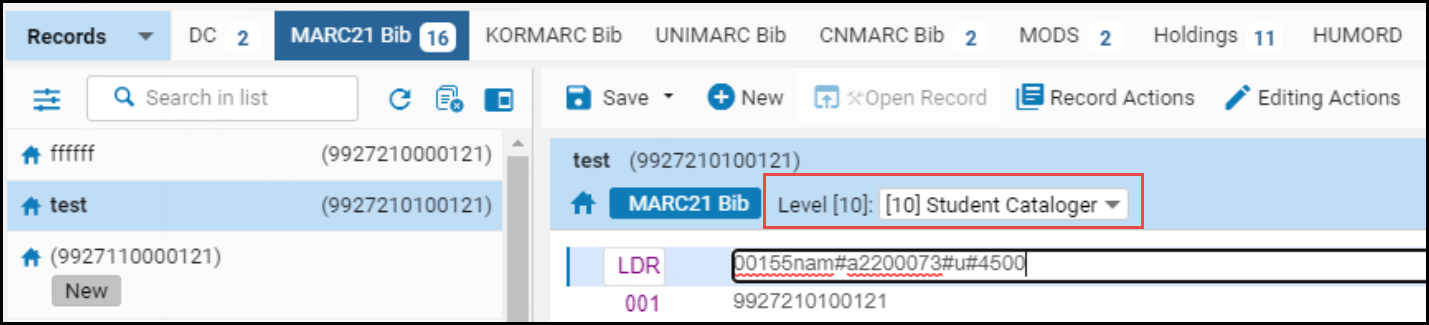 MDエディタでの目録許可レベル
- ドロップダウンリストから、レコードの新しい目録レベルを選択します。
- 保存を選択します。レコードの現在の目録レベルが変更を反映してアップデートされます。
| ドロップダウンに表示するには: | 次を行います: |
|---|---|
| 目録のアクセス許可レベル。 | use_record_cataloging_level_by_default顧客パラメーターをFalse(デフォルト)に設定します。 |
| レコードの現在の目録レベル。 | use_record_cataloging_level_by_default顧客パラメーターをTrueに設定します。When this is set to True, an overt action on your part is required to change the cataloging level to a different level.目録レベルに影響しないレコードの変更を行っている場合は、このオプションを選択できます。See use_record_cataloging_level_by_default for more information. |
| レコードに対して最後に選択した目録レベル。 | Set the cataloging_level_user_preferences customer parameter to True. |
Working in the MD Editor with Cataloger Privileges Lower than the Bibliographic Record

- 所蔵を追加
- 注文明細を作成
- 検出から非公開にする
- 外部検索からの抑制
- 管理タグの設定
- バージョン情報を表示する
- 書誌標目をブラウズする
- メモを表示する
- 目録の表示
- 所蔵を追加
- 注文明細を作成
- 検出から非公開にする
- 外部検索からの抑制
- 管理タグの設定
- バージョン情報を表示する
- 書誌標目をブラウズする
- メモを表示する
- 目録の表示
- 上記のすべて(検出から抑制、外部検索から抑制、管理タグの設定を除く)
- ローカルフィールドを追加 (および保存オプション)
- 目録にコピーする
- ネットワークで共有
When the customer parameter use_record_cataloging_level_by_default is set to True, the record's level is defaulted to basic level (00) when the record is copied to catalog or shared with Network.
目録レベルを使用したレコードの検索
- Select
 Advanced Search.
- ドロップダウンリストから[タイトル]を選択します。
- 展開されたドロップダウンリストから[目録者レベル]を選択します。
 目録レベルの詳細検索
- [条件の追加]を選択します。
- 目録レベルの条件を選択します。

目録レベルの検索条件 - [実行]を選択します。検索結果には、選択した条件に一致する目録レベルの割り当てを有するレコードのリストが表示されます。
レコードのセットに目録レベルを割り当てる
- 書誌レコードの目録レベルをセットする
- 典拠レコードの目録レベルを設定する
目録レベルのユーザー設定のセッティング
Page tags: article:topicproduct:almacontent:Documentationlang:englishcataloger permission levelcataloger levelcatalog record levelcataloger privilegecatalog level search
