
リンクされたデータのエンリッチメント設定
Organizations can customize linked data enrichment for MARC records by selecting the authorities they wish to enrich and designate the appropriate subfield ($0/$1).Additionally, they can opt to incorporate Virtual International Authority File (VIAF) URIs and include supplementary authorities for enrichment, such as local authorities supporting URIs (Uniform Resource Identifiers).これにより、機関はMARCレコードのリンクデータ拡充プロセスに対する制御を強化できるようになります。
リンクされたデータをエンリッチメントするには、次の役職のいずれかが必要です。
- リソース管理者
- リポジトリ管理者
- 目録管理者
- 一般システム管理者
The enrichment process is configured in an editable mapping table (Configuration > Resources > General > Linked Data Enrichment Configuration) for name and subject authorities that enable the following configurations:
- Enable/Disable VIAF for name authorities, as a second URI for authorities that are mapped in VIAF and displayed in the enrichment table.
- 各URIに対してサブフィールド$0または$1を選択します。VIAFにはサブフィールド$1を使用することが強く推奨され、これは、ベストプラクティスと見なされています。
- エンリッチメントのタイプ (オンザフライまたは永続) を選択します。
- エンリッチメント設定で典拠に対して永続的な URI エンリッチメントが有効化されている場合、選択したサブフィールドのレコードに URI が永続的に追加されます。
- Priority is given to URIs added manually in the Metadata Editor and/or with Alma Refine.
- Users can add rows for additional authorities (local or Community Zone) where they manually add the Alma source code and the VIAF source code.
Configuring Linked Data Enrichment for Name Authorities
手動方法に加えて、オンザフライまたは永続的なエンリッチメントのプロセスを設定できます。
ID ベースのリンクの挙動では、現在、MARC フィールドに単一の $0 を持てるようサポートされています。永続的なリンクデータのエンリッチメントは、このリンク戦略と互換性がありません。We understand the need to support multiple $0s in an ID-based linking strategy and will consider this for further enhancements.Currently, if you are interested in permanent URI enrichment using an ID-based linking strategy, we suggest configuring the linked data enrichment configuration to add the URI to $1.
- Access the Linked Data Enrichment Configuration page (Configuration > Resources > General > Linked Data Enrichment Configuration).
- Select Linked Data Enrichment - Names.A list of Name authorities is displayed.
- Almaの名前典拠のリストを表示する画面で、ユーザーは次の操作を実行できます。語彙ソースコードと典拠URIフィールドはリスト内で編集できません。これらのフィールドを変更する場合は、既存の行を削除し、別の行を手動で追加する必要があります。
フィールド 説明 有効化済み Enable (  ) or Disable (
 ) the enrichment of the specified Name authority.URIおよびVIAFリンク(追加されている場合)の指定されたサブフィールドは、有効になっている場合は考慮され、無効になっている場合は破棄されます。
Subfield for URI 指定された名前典拠に対して、URIの指定されたサブフィールド($0または$1)を選択します。 Add VIAF Link Indicate (True or False) whether to "add/not add" VIAF Links to the specified Name authority. Adding a VIAF Link enables users to add a second URI for authorities that are mapped in VIAF.
Subfield for VIAF For the specified Name authority, select the designated subfield ($0 or $1) for the VIAF URI. VIAFにはサブフィールド$1を使用することが強く推奨され、これは、ベストプラクティスと見なされています。
エンリッチメントタイプAbility to select the level of enrichment of MARC records as part of the linked data configuration.選択できるオプションは次のとおりです。- エンリッチメントなし - この典拠は強化されていません。
- On-the-Fly URI Enrichment— Temporarily adds a URI of the linked authority (General publishing or API).
- Permanent URI Enrichment— The URI is added permanently to records.
エンリッチメント設定で典拠に対して永続的な URI エンリッチメントが有効化されている場合、選択したサブフィールド ($$0 または $$1) のレコードに URI が永続的に追加されます。権限レコードに表示される URI- ローカル機関のURIの追加は、機関が設定マッピング テーブルに追加されている限りサポートされます。
- A local URI is generated for local extensions of Community Zone authorities.
- 各URIは、設定に基づいて個別のサブフィールドに保持されます。
- URIの追加はMARC21ベースのレコードにのみ適用され、BIBFRAME などの他のメタデータ形式には適用されません。
以下で更新 Authority URIを最後に更新したユーザーの名前を示します。 最終更新 機関URIが最後に更新された最新の日付を示します。  ユーザーがURIをサポートする機関をリストに手動で追加できるようにします。In this manner, users can add support for additional authorities used in the bibliographic heading if they are not part of the existing list.リストに行を追加するには:
- If a user adds an additional URI for an existing vocabulary source code that is active, they receive an error message.Conditions for Error Message: If the source code is enabled in the mapping table, the error message is displayed.If the source code is disabled in the mapping table, allow adding the new row.
- 表示されたダイアログウィンドウで、次のフィールドを定義します。
- Vocabulary Source Code— Identifies databases and lists containing standard names of persons, organizations, families, meetings, and standard titles for resources and assigns a code to each database or list.For more information, see Name and Title Authority Source Codes.
- Authority URI— The structure of the URI for the selected vocabulary, which is constant for all entities that are part of the vocabulary.これは通常、DNS ホスト名 (プレフィックス) です。To define where to add the entity ID in the URI structure, add a "{0}" in the relevant place in the URI structure.
- Subfield for URI— see Subfield for URI
- Add VIAF Links— see Add VIAF Links
- Subfield for VIAF— see Subfield for VIAF
- 行を追加を選択します。
- In the Linked Data Enrichment - Names page, select Save.
Add Row dialog window - [保存]を選択します。
Configuring Linked Data Enrichment for Subject Authorities
Catalogers can add URIs manually using Alma Refine, the Metadata Editor, or by adding them on-the-fly when publishing or using the API.オンザフライまたは永続的なエンリッチメントのプロセスも設定可能です。
- Access the Linked Data Enrichment Configuration page (Configuration > Resources > Linked Data Enrichment Configuration).
- Select Linked Data Enrichment - Subjects.A list of Subject authorities is displayed.
- Almaの主題典拠のリストを表示する画面で、ユーザーは次の操作を実行できます。典拠ソースコードと典拠URIリスト内のフィールドは編集できません。
フィールド 説明 有効化済み Enable ( ) or Disable () the enrichment of the specified Name authority.URIおよびVIAFリンク(追加されている場合)の指定されたサブフィールドは、有効になっている場合は考慮され、無効になっている場合は破棄されます。Subfield for URI 指定された名前典拠に対して、URIの指定されたサブフィールド($0または$1)を選択します。 以下で更新 Authority URIを最後に更新したユーザーの名前を示します。 最終更新 機関URIが最後に更新された最新の日付を示します。 エンリッチメントタイプAbility to select the level of enrichment of MARC records as part of the linked data configuration.利用可能なオプションは次のとおりです:- エンリッチメントなし - この典拠は強化されていません。
- On-the-Fly URI Enrichment— Temporarily adds a URI of the linked authority (General publishing or API).
- Permanent URI Enrichment— The URI is added permanently to records.
エンリッチメント設定で権限に対して永続的な URI エンリッチメントが有効化されている場合、選択したサブフィールド ($$0 または $$1) のレコードに URI が永続的に追加されます。権限レコードに表示される URI- ローカル機関のURIの追加は、機関が設定マッピング テーブルに追加されている限りサポートされます。
- A local URI is generated for local extensions of Community Zone authorities.
- 各URIは、設定に基づいて個別のサブフィールドに保持されます。
- URIの追加はMARC21ベースのレコードにのみ適用され、BIBFRAME などの他のメタデータ形式には適用されません。
Add RowユーザーがリストにURIを手動で追加できるようにします。In this manner, users select to enrich MARC records if there is already a URI in the $0/$1. リストに行を追加するには:- SelectAdd Row.If a user adds an additional URI for an existing vocabulary source code that is active, they receive an error message.Conditions for Error Message: If the source code is enabled in the mapping table, the error message is displayed.If the source code is disabled in the mapping table, allow adding the new row.
- 表示されたダイアログウィンドウで、次のフィールドを定義します。
- Vocabulary Source Code- Identifies databases and lists containing standard names of persons, organizations, families, meetings, and standard titles for resources and assigns a code to each database or list.For more information, see Name and Title Authority Source Codes.
- Authority URI— The structure of the URI for the selected vocabulary that is constant for all entities that are part of the vocabulary.これは通常、DNS ホスト名 (プレフィックス) です。To define where to add the entity ID in the URI structure, add a "{0}" in the relevant place in the URI structure.
- Subfield for URI— see Subfield for URI
- 行を追加を選択します。
- In the Linked Data Enrichment - Names page, select Save.
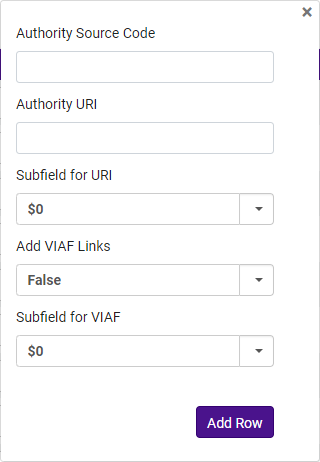 Add Row dialog window
- [保存]を選択します。
Configuring Linked Open Data for Local Authorities
Configuration is available only for institutions with MARC 21 record format activated in the active registry.
Alma introduces the ability to extract a global authority ID from authority headings to enhance linked data capabilities, URI enrichment, and integration with resources such as Wikidata and VIAF.各機関は、各典拠語彙からどのグローバルIDを抽出するかを設定し、ローカルの典拠からグローバルIDを抽出ジョブを実行して、その設定に基づいてこのフィールドに値を入力する必要があります。このジョブは、選択したセットまたはすべてのローカル典拠レコードに対して実行でき、公開などの追加プロセスはトリガーされません。グローバル識別子を抽出し、プレフィックスなしで挿入することで、外部サービスとの互換性を確保します。If the global ID vocabulary differs from the authority vocabulary, the configured global vocabulary defined in the configuration is used for matching; otherwise, the authority vocabulary code applies.Global_Auth_ID フィールドは、典拠レコードの作成またはインポート中に入力され、関連するフィールドが変更されるたびに更新されます。グローバル ID のないレコードは、コミュニティゾーンの典拠見出しを含め、典拠見出しに null 値が設定されます。
-
グローバルIDの抽出と構成
- The new job extracts global identifiers from local authority records to be used in linked data workflows.
- If the authority's global vocabulary differs from its local vocabulary, enrichment tools (VIAF, Wikidata) use the configured global vocabulary for matching.
- リンクされたデータのエンリッチメント設定
- If VIAF is activated for the URI enrichment of the local authority, the system uses the Global_Auth_ID to match to the VIAF ID.
- When enrichment is configured for records copied locally from the CZ, Alma generates a global URI instead of a local URI.
- If no Global_Auth_ID exists or the authority vocabulary is not in the linked data for local authorities enrichment configuration, a local URI is generated.
- Wikidataワークフローの更新
- If an authority heading is based on LC (Library of Congress) Names Authority, it is directly sent to Wikidata.
- If it is a local authority, the system looks for Global_Auth_ID and checks if the vocabulary is LCNAMES.
- If the Global_Auth_ID is not LCNAMES, the system searches VIAF to extract the corresponding LCNAMES before sending it to Wikidata.
- Recommended Best Practices & Linked Data Integration
- Institutions should only create local copies from the CZ when necessary to support linked data functionalities.
- When defining prefixes for global identifiers, institutions must ensure the complete expression is properly formatted.
- If multiple prefixes exist for a vocabulary, priority must be assigned, as only one global identifier per authority record can be extracted.
- After configuring the Global ID extraction (as described below), institutions must run the Extract Global Id From Local Authorities job to integrate data into Alma's workflows.
- If your institution maps a local authority code to VIAF, contact support to configure and upload the corresponding vocabulary.
- AlmaのVIAFアップデートは毎月行われますが、2024年8月現在、OCLCは追って通知があるまでアップデートを一時停止しています。Ex Libris cannot make any updates within Alma until updates are resumed in VIAF.(https://viaf.org/viaf/data).
- Access the Linked Data Enrichment Configuration page (Configuration > Resources > General > Linked Data Enrichment Configuration).
- Select Linked Open Data for Local Authorities.
- The following screen may display a list of Local authorities in Alma.ユーザーは次のことを行うことができます。デフォルトでは、メタデータ設定で「ローカル管理」として設定されている語彙がこのリストに表示されます。
フィールド 説明 有効化済み If a list of local authorities is displayed, users can Enable ( ) or Disable () the enrichment of the specified Local authority.The designated subfields for URIs and VIAF Links (if added) are accounted for when enabled and discarded when disabled.
Alternatively, if there are numerous Local authorities listed, users can enable or disable All(Yes/No) the authorities in the list.
検索 検索フィールドを使用すると、ユーザーは自分の語彙に応じて地方自治体をすばやく検索できます。 - 地方自治体の全リストを語彙別に検索するには、ドロップダウン メニューで語彙を選択します。
- 特定の地方自治体を検索するには、テキスト フィールドに検索する自治体を入力します。
Add RowEnables users to manually add a Local Authority to the list.In this manner, users can add support for additional authorities used in the bibliographic heading if they are not part of the existing list. リストに行を追加するには:- SelectAdd Row.
- 表示されたダイアログウィンドウで、次のフィールドを定義します。
- Authority Vocabulary Code— configured drop down list of MARC21 Authority codes activated in Metadata configuration.
- Field with Global Identifier— Presents a drop down list with the options: 035 / 024 / 001 / 010 / 065.
- Subfield with Global Identifier— Text field that can allow the institution to define the subfield.
- Prefix— Text field to identify which identifier to extract when there are multiple similar fields.For more information, see Defining the Prefix for the Configuration.
- Priority— If there are multiple prefixes per vocabulary, a priority for which ID to extract.Insert only consecutive numbers where "1" is the topmost priority.
- Global Vocabulary Code— If the Global ID being extracted is not in the same vocabulary as the target code.
- [行の追加]を選択します。
- In the Linked Open Data for Local Authorities page, select Customize.
構成のプレフィックスの定義
抽出されるプレフィックスは、次のように、標準の定義に従って MARC フィールドに依存します。
- For the 001/010 fields, as per the MARC 21 standard definition (https://www.loc.gov/marc/authority/ad010.html), do not add a prefix.
- 065/024 フィールド:
- If in the configuration the defined subfield is a, the prefix is extracted and compared from $2 or from $a.
- If in the configuration the defined subfield is any other subfield (for example,0/1), the subfield itself should contain the prefix.(In the case of $0 or $1, the prefix is a URI.)
- 035 フィールドの場合、プレフィックスはサブフィールド自体から抽出されます。
永続的なエンリッチメント
リンクされたデータ設定のエンリッチメント タイプから永続的なエンリッチメントを選択すると、永続的なエンリッチメントが可能になります。The permanent enrichment adds the URIs to the record and runs as part of the linking job and the preferred term correction job. Therefore, if linking to authorities and the preferred term correction is not enabled in your environment, permanent enrichment is not possible.
優先語の修正が有効になっていて、URIを永続的に追加するように設定されている場合は、次の 2 つのオプションがあります。
-
手動リンク (F3) :
- During the manual linking process in F3, a subfield based on the configuration is added to the record.
- 関連する機関のURIが追加され、ユーザーはレコードを保存する前に、レコード編集プロセスの一部としてそれを表示できるようになります。
-
自動リンク:
- URIエンリッチメントが永続的に有効になっている場合、リンクジョブとPTCジョブは既存の夜間ジョブ中にURIを自動的に追加します。
- The URIs are added to the record if they do not already exist.
- 関連するレコードのセットを作成します。
- Run the Unlink bib records from authority records job.
- Wait for the Authorities - Link BIB Headings and Authorities - Preferred Term Correction scheduled jobs to complete.
- If the customer parameter for partial linking,lod_uri_enrichment_for_partial_match, is not activated (meaning partial linking is not desired by the institution), then the URI is not inserted when the match is partial.For more information, see Configuring Other Settings - Resource Management.
- ユーザーがメタデータエディタでレコードを保存すると、これはレコードがリンクされるべきであることを示すだけです。The actual linking and URI enrichment happen as part of the linking and preferred term correction nightly jobs.
典拠管理タスク リスト: レコードへのリンクと URI の追加を監視するための関連レポートが追加されました。For more information, see Reporting in the Authority Control Task List.
URIの上書き
レコードに、同じ権限と同じサブフィールドのURIが既にあるが、サフィックスが異なる場合 (つまり、権限は同じだがレコードIDが異なる場合)、次のルールが適用されます。
-
既存のURIを上書きする:
- レコードに同じプレフィックスを持つが、異なる権限レコードを持つ既存のURIがある場合は、上書きされます。
- This happens when a record is linked to one authority, unlinked, and then linked to another record from the same authority.以前のURIは削除され、新しいURIのみが保持されます。
- 有効になっている場合は、VIAF URIにも同じルールが適用されます。
-
非エンリッチメントサブフィールドを保持する:
- レコードにエンリッチメントの一部ではないサブフィールド (ORCIDサブフィールドなど) がある場合、このサブフィールドは削除されません。
- たとえば、レコードにORCID URIとLibrary of Congress権限URIの両方がある場合、ORCID URIはレコードに残ります。
-
上書きの条件:
- 既存のURIは、選択した設定と同じサブフィールドとプレフィックスを共有し、サフィックスが異なる場合にのみ上書きされます。
- 既存のURIがこれらの基準を満たしていない場合、そのURIは上書きされず、既存のURIの横に新しい URI が追加されます。
正規化ルールを実行してURIを削除する
サブフィールドを削除する正規化ルールを作成できます。たとえば、削除する必要がある URI を追加した場合や、レコードから他の既存のURIを削除する場合は、正規化ルールを使用してこれを実行できます。For more information, see Working with Normalization Rules.
インポートリスト
A common cataloging workflow involves exporting (see Export List) a list from Alma, working on the list (for instance, adding local authority source codes) and importing the list back to Alma.エクスポートされたリストは、ユーザーが編集できるExcel形式です。リストが更新されると、Almaに再度インポートできます。
- インポートを選択します。The Import dialog window is displayed.
- In the File field, select the file folder button (
 ).
- エクスプローラーウィンドウで、更新してインポートするExcelファイルに移動して選択します。
- ファイルをアップロードを選択します。The file is imported into Alma, and the list is updated in the Names or Subjects Linked Data Enrichment pages.

エクスポートリスト
スタッフユーザーは、エントリのリスト(名前または主題)をExcelスプレッドシートにエクスポートできます。作成されたExcelは、ユーザー定義のディレクトリにダウンロードできます。
- Select the Export list icon (
 ).
- Excelを選択します。The file is generated by Alma and a "Save As" explorer window is displayed requiring the user to select a directory to save the file.
- [保存]を選択します。

行ディスプレーの管理
ユーザーはリストに表示する列を決定できます。
- Select the Manage column display icon (
 ).
- In the pop-up window, select(
 ) or deselect(
 ) the desired columns to display.
- [完了]を選択します。If changes were made (a column was removed or included), the Manage display icon is altered to include a green dot (
 ) to indicate the change.ユーザーが再度列を追加したい場合、削除された列はリストの下部に表示されます。

Page tags: article:topicproduct:almacontent:Documentationlang:english
