
campusM 2026 September Release Notes
Developments
Home Page List View
In an effort to improve adherence to WCAG 2.2 AA standards, the campusM Home Page can now also be viewed as a list of items. When viewing the Home Page in List View, Reflow is now fully supported. Users can switch their Home Page to List View and back to Grid View through the web header menu or in the mobile settings page. CAM-29003
.png "Home page list view (web)")
Home page list view (web)
App Builder Updated to Match React Native UI
Previews of mobile configuration in App Builder now match the React Native UI in the published campusM application. CAM-25779
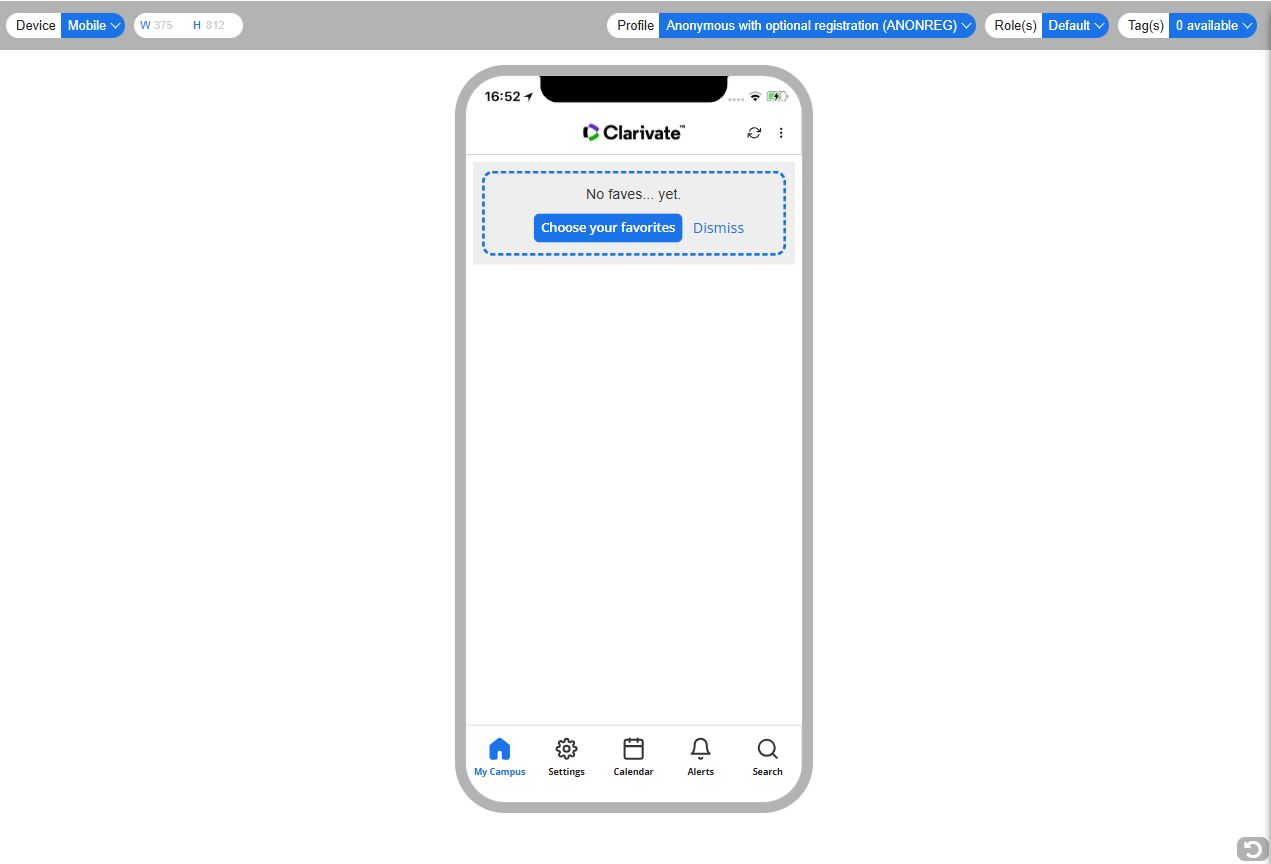
Updated React Native UI in the App Builder
Bug Fixes
| SF number | Platform | Description |
|---|---|---|
| 08369196 |
iOS |
When configuring tiles in App Builder, Overrides applied to iOS devices were ignored on iPads. This was fixed. CAM-28924 |
| N/A | Web | When a snackbar/toast message appeared, it was not keyboard navigable. This was fixed. CAM-29007 |
| N/A | Mobile | The Notification Actions feature did not work as expected. This was fixed. CAM-29621 |
| N/A | All | When using a screen reader in the List View of the Arrange functionality, focusing on the the favorite button on each tile did not announce if the tile was already favorited or not. This was fixed. CAM-28746 |
| N/A | Web | When navigating via keyboard, focus could sometimes be placed on items in RSS Feed tiles that are no longer visible. This was fixed. CAM-29228 |
| N/A | Web | When using Search, Banner tiles were included in the results. As Banner tiles have no consistent URL to lead to, they were not clickable in the search result. This was fixed, and Banner tiles no longer appear in search. CAM-29408 |
| N/A | Android | Sometimes, using the built-in back button on Android when viewing a bottom-sheet modal, the modal remained open and the page behind it navigated back instead. This was fixed. CAM-29395 |
| N/A | All | In Task Board, the filter button did not indicate that it was active to users who use a screen reader. This was fixed. CAM-29105 |
| N/A | Mobile | In the Calendar Event Details page, when the user selected the location link that led to the campusM Maps feature, the map opened very zoomed out, and not focused on said location. This was fixed, and the location now opens on the campusM Map as expected. CAM-29516 |
| N/A | iOS | When using VoiceOver on iOS, opening the kebab menu in the header of the app sometimes caused all the menu items to be read at once. This was fixed. CAM-27539 |
| N/A | iOS | When using VoiceOver on iOS, users were not able to select Banner Items on Banner Tiles. This was fixed. CAM-29615 |
| N/A | All | The reminder option labels for the Task Board Product Integration were missing from the configuration page, and were therefore not translatable. This was fixed, and they can now be translated or changed in the Task Board configuration page. CAM-29587 |
| 08229003 | Web | In some cases, alerts sent via BCC email did not retain their original formatting well. This was fixed. CAM-28283 |
| 10716126 | Web | Previously, some of the labels in the Alternative Lecturer Check In were not configurable. This was fixed. CAM-29747 |
| N/A | Web | Screen reader behavior was improved for the web app when announcing the breadcrumbs on the tops of pages. CAM-29718 |
| N/A | All | There were several instances of nested controls in both the web and mobile apps, which are not accessible to users who navigate with keyboard and screen readers. This was fixed. CAM-29009 |
| N/A | All | In the Self-Checkout product integration, some modals were not announced as expected when using a screen reader. This was fixed. CAM-29719 |
| N/A | Web | Navigation on the web app for screen reader users was improved by the addition of ARIA landmarks to indicate regions on the page. CAM-29001 |
| 10568464 | Web | When using the Banner vendor for the Timetable PI, classes that had a start time earlier than their term's start time were not displayed. This was fixed. CAM-29386 |
| N/A | Web | The top-right menu in the Web application was not accessible for users who use screen readers and keyboard navigation. This was fixed.CAM-29013 CAM-29137 CAM-29142 |
| N/A | Web | An error appeared when trying to open an attachment in the Outlook PI, instead of opening the Outlook mobile or web app. This was fixed. CAM-29554 |
| 08434645 | Web | In some cases, the Databee vendor for the Timetable PI did not behave as expected. This was resolved. CAM-29265 |
| N/A | Web | Various accessibility fixes were made to the Alerts page on the web app. CAM-28242 |
