
Checking Out OverDrive Items
If you have enabled the OverDrive availability and checkout behavior, users can check out or place holds on locally-cataloged OverDrive ebooks, audiobooks, and videos in the Encore system.
Existing OverDrive Patron API Settings
If your library has existing patron API settings established with OverDrive, you can use those settings for validation with OverDrive through Encore.
Checking Out OverDrive Items
To check out OverDrive items:
- From the record entry, click the Check Out with OverDrive icon.
- If you are not already logged in, validate against the patron record.
- Click Check Out to check out the item or Cancel to cancel the action.
When you are ready to access the checked out item, click Get eContent. Encore opens a browser window and displays OverDrive's fulfillment page. This page lists the formats in which the title is available. For example:
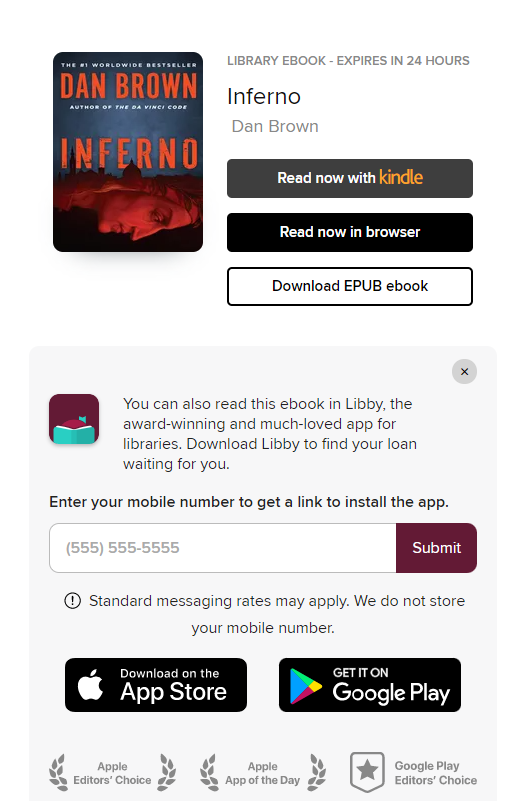
After choosing a format, OverDrive either downloads the content to the user's device or streams the content using the OverDrive interface. In order to access some items, users might need to download OverDrive's app. For more information, see the OverDrive help link accessible from the patron's account page.
Choosing a Format
Once you select a format, the item is "locked" into that format for as long as the item is checked-out. For example, if you choose to read an eBook with Kindle, you cannot download an EPUB version of the eBook later. However, you can read the eBook in the browser at any time if that option is offered.
Placing Holds on OverDrive Items
If the OverDrive item is unavailable, users can place a hold on the item through Encore:
- Click the Place Hold with OverDrive icon in the record entry.
- Validate against the patron record.
- At the prompt, submit an email address to OverDrive.
Encore displays held items in the display of eBooks checkouts and holds.
When the item is ready for fulfillment, OverDrive notifies the patron via email. From the display of ebooks checkouts and holds, patrons can find the item listed under Reserves. From this list, the patron can check out the item.
"Always Available" Items
OverDrive offers some ebooks with unlimited copies. These items display in Encore as "always available" and never have to be placed on hold.
OverDrive Formats
Encore users may encounter the following special behavior with OverDrive item formats.
Item Formats and Mobile Devices
OverDrive supports the following formats in mobile devices:
- DRM protected Adobe EPUB eBook
- DRM free Open EPUB eBook
- DRM free MP3 audiobook
- Kindle Book
- OverDrive Read eBook
If the item format is not supported, OverDrive might not offer the format through a mobile device, and the item format might not open or display correctly in all mobile devices. The list of formats that appears is generated based on the user device. As a result, a list of OverDrive items viewed in a browser through a PC may differ from a list of items that displays in a smartphone.
Kindle Formats
With Kindle formatted ebooks, Encore redirects the user to Amazon to complete the Amazon downloading process for Kindle items.
