
Perform Exact Match Searches Using the Initial Article Table
When performing exact match searches, you can set Leap to omit the words defined in the Initial article table from the beginning of the search string. For example, if you search for "The Shining", which is indexed as "Shining", you will get results when typing both "Shining" and "The Shining", because "the" is ignored in the search.
Note:
To specify the words that you want Leap to omit from the search string go to Polaris System Administration (Web-Based) > Tables > Initial Articles.
This section covers the following topics:
- Excluding initial articles when performing exact match searches
-
Exact match searches affected by the Use initial article table setting
Excluding initial articles when performing exact match searches
To set Leap to exclude initial articles when performing exact match searches
-
In the Leap header, select your username.
-
Select Settings.
The Settings page opens.
-
Select the Workform User Defaults tab.
-
Select the Use initial article table checkbox.
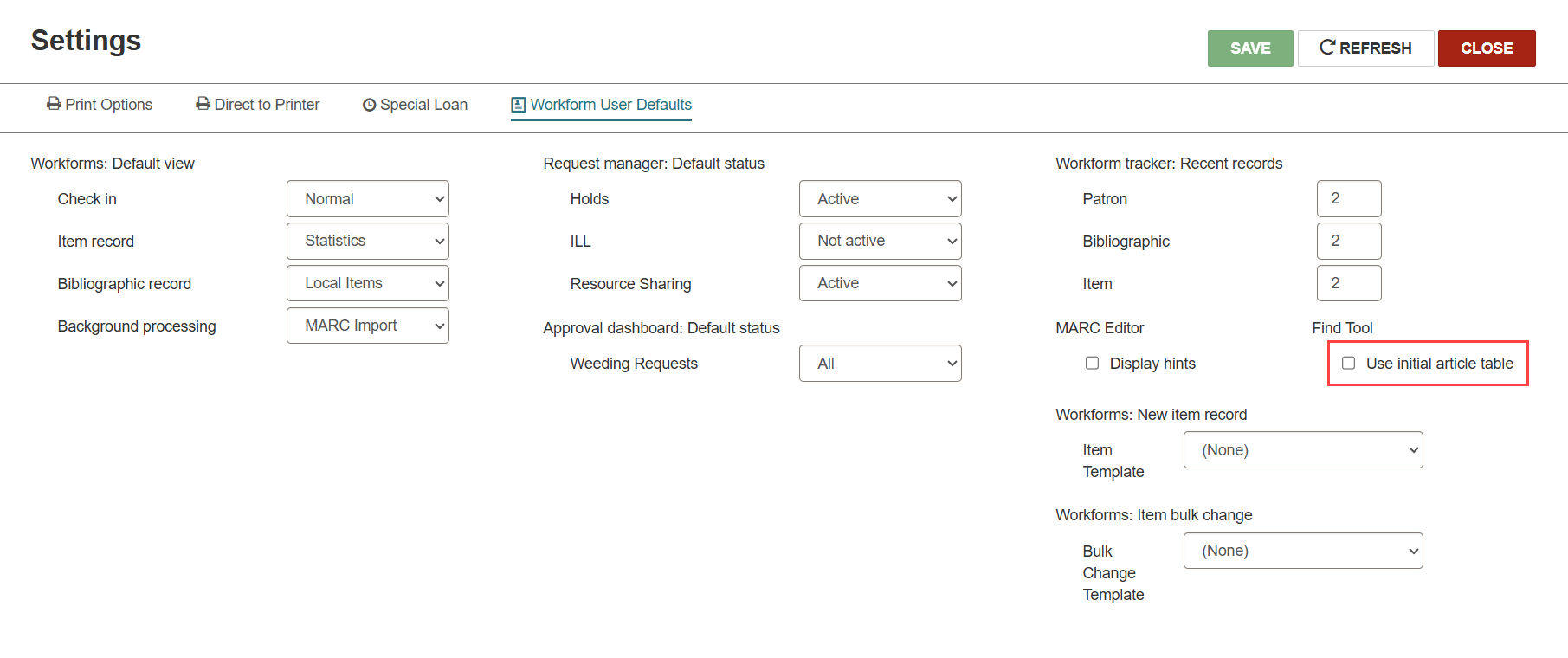
-
Select SAVE.
Note:
You may need to refresh your browser to view changes to this setting in the Find Tool.
Exact match searches affected by the Use initial article table setting
The Use initial article table setting applies to the following exact match searches:
-
Authority Record (Heading and Tracing/Reference)
-
Bibliographic Record (Title and Series)
-
Hold Request (Title)
-
ILL Request (Title)
-
Invoice Line Item (Title)
-
Item Record (Title)
-
Purchase Order Line Item (Title)
-
Serial Holdings Record (Title)
-
Serial Issue/Part Record (Title)
