
Basic Export Queries
To perform basic export queries, click the Basic Export Queries tab (see Export Tool Overview). This section contains a number of predefined SQL scripts that can be used to retrieve information from the SFX database in a tab-delimited .txt format.
To perform a basic export query, select one of the following predefined export scripts:
- Export object portfolio entries from specific target services:
It is not possible to export the complete KnowledgeBase by selecting All portfolios from All target services. You can only export Active portfolios from All target services.
- Export object portfolio entries from specific target services that contain local thresholds:
- Export locally created object portfolio entries from specific target services.
For each of the above export scripts, the following options are available:
- From the drop-down list, select All, Active, or Inactive.
- Select the target from which you want to export the data.
- For Current field selection, select one of the following:
- Default – to have the default fields exported (all except INTERNAL_DESCRIPTION)
- Custom – a dialog box appears:
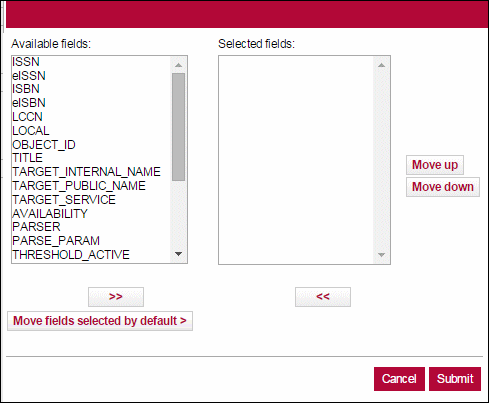 Custom Field Selection
Select the fields you want to export in the left pane and click the right arrow to move them to the right pane. Click the Move Up and Move Down buttons to arrange the order of the fields and click Save.
Click Move fields selected by default to move all of the fields selected by default (all except INTERNAL_DESCRIPTION) to the right pane.
If you select Default for the above scripts, the following fields are exported:
- ISSN
- eISSN
- ISBN
- eISBN
- LCCN
- LOCAL
- OBJECT_ID
- TITLE
- TARGET_INTERNAL_NAME
- TARGET_PUBLIC_NAME
- TARGET_SERVICE
- AVAILABILITY
- PARSER
- PARSE_PARAM
- THRESHOLD_ACTIVE
- THRESHOLD_GLOBAL
- CATEGORIES
- PUBLISHER
- NOTE
- AUTHENTICATION
- LANGUAGE
- TITLE_MAIN
- INSTITUTE (contains the relevant institute name. If empty, the row is relevant for the DEFAULT instance)
- LOCAL_THRESHOLD (if empty, the active threshold for the row is the GLOBAL threshold)
- TARGET_INTERNAL_DESC
- Export SOURCES/TARGETS:
- From the drop-down list, select All, Active, or Inactive.
- From the drop-down list, select Link targets, Link and search targets, or Search targets
- From the drop-down list, select SOURCES or TARGETS.
For this query, the following fields are exported:
- Target Name
- Target Services
- Note
- Authentication
- Proxy (Possible values: Y/N)
- Free (Possible values: Y/N)
- Local (Possible values: Y/N)
- CDI Search Activation Status (Possible values: Active / Inactive)
- CDI Search Rights (Possible values: Free / Subscription)
- CDI Fulltext rights (Possible values: OpenAccess / Subscription (Title Level) / Subscription (Target))
- CDI Linking (Possible values: be Linkresolver / Link in record)
- Export – ALL targets available for CDI discovery/search activation
- ACTIVE for Discovery/Search
- ACTIVE for full text
- ACTIVE for either full text or Discovery/Search
For this query, the following fields are exported:
- Target Name
- Target Services
- Note
- Authentication
- Proxy (Possible values: Y/N)
- Free (Possible values: Y/N)
- Local (Possible values: Y/N)
- CDI Target Type (Possible values: Abstracting & Indexing database or Full
- Text Collection)
- Full text Activation status (Possible values: Active / Inactive)
- CDI Search Activation Status (Possible values: Active / Inactive)
- CDI Search Rights (Possible values: Free / Subscription)
- CDI Fulltext Rights (Possible values: OpenAccess / Subscription (Title Level) / Subscription (Target))
- CDI Linking (Possible values: Linkresolver / Link in record)
- Contains Newspapers in CDI (Possible values: No / Yes / Yes, Newspapers Search only)
- CDI Number of records (The number of records currently indexed in CDI)
- CDI Resource Types (Lists up to 5 of the most frequently index resource
- types for the target)
- CDI Update frequency (Possible values: Weekly / Monthly / Quarterly / Yearly)
- CDI DB ID (CDI identifier)
- CDI Last Market update (Last update date for this target in CDI)
- Count the number of active portfolios per target service in which both the target service and target are active.
For this query, the following fields are exported:
- Target Name
- Target Service
- Count
- Export URLs from active targets/target services (and active object portfolios they may contain).
For this query, the following fields are exported:
- Target Service
- URL
The following configuration file lists the keys that determine what information is treated as a URL to be exported from the PARSE_PARAM fields of the target service and object portfolio tables:
- /exlibris/sfx_ver/sfx_version_3/<local_instance>/config/parse_param_url_keys.config
- /exlibris/sfx_ver/sfx4_1/<local_instance>/config/parse_param_url_keys.config
The following three types of parse_param keys exist:
- Parse param keys of type URL. (These are listed in the file and are exported.)
- Parse param keys that can be either URL or not (for example – jkey). For these, SFX checks if the value starts with http to determine if the value is a URL or not.
- Parse param keys of type not URL. (These are not listed in the file and are not exported.)
When creating local target services or portfolios that include URL information in theparse_param field to be exported in the export query, make sure to use a key listed in the configuration file, or add the key to the configuration file. - Export objects with local attributes.
For this query, the following fields are exported:
- ISSN
- eISSN
- ISBN
- eISBN
- LCCN
- OBJECT_ID
- LOCAL_ATTRIBUTE
- LOCAL_TITLE
- LANGUAGE
- TITLE_MAIN
- Export objects with local titles.
For this query, the following fields are exported:
- ISSN
- eISSN
- ISBN
- eISBN
- LCCN
- OBJECT_ID
- LOCAL_TITLE
- Export local objects.
For this query, the following fields are exported:
- OBJECT_ID
- ISSN
- eISSN
- ISBN
- eISBN
- TITLE
- CATEGORIES
- PUBLISHER
- LOCAL_ATTRIBUTE
- LANGUAGE
- TITLE_MAIN
- Sub-type PRINT_HBK, where identifiers with the highest object_identifier_id come first.
- Sub-type PRINT_PBK, where identifiers with the highest object_identifier_id come first.
- Sub-type ELECTRONIC, where identifiers with the highest object_identifier_id come first.
If institutes have been defined, it is possible to filter the export query results by institutes or groups. (For more information about institutes, refer to the Institute Feature section of the SFX Advanced User's Guide.) Select an institute from the Restrict to the following institutes/groups (optional) text box. If you do not select an institute from this text box, the basic export includes all objects that have at least one active portfolio (if the target and target service are also active) from DEFAULT and all institutes and groups.
If you select only one institute, institute inheritance is used. Everything either active for the institute or active for the group (and not inactive for the institute), or active for DEFAULT (and not inactive for institute or group) is included.
If you select more than one value from the institute box (for example, an institute and DEFAULT), a boolean OR is assumed between the selections. As a result, anything either active for the institute or DEFAULT is included in the export file. If an export is created for more than one institute/group, the export file contains one row for each institute/group for which a particular activation is relevant.
If Chinese titles are included in the export, select Simplified Chinese Title, Traditional Chinese Title, or Both Simplified and Traditional Chinese Titles to include the type of Chinese titles you want in the title field:
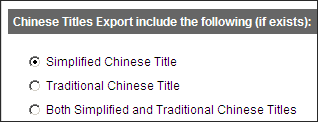
If both are exported, the format is:
|
<Simplified chinese>/#/<Traditional chinese> |
