
DataLoader Overview
DataLoader is a tool to manage and update object portfolios in the SFX database. Additionally, you can use the tool to add local attributes and titles to objects or to add local objects.
While you use the tools in KBManager for the overall management of the SFX database, you typically use DataLoader for batch data loading.
To start DataLoader, from the KBTools section of the Data Management area, click DataLoader. The following window opens:
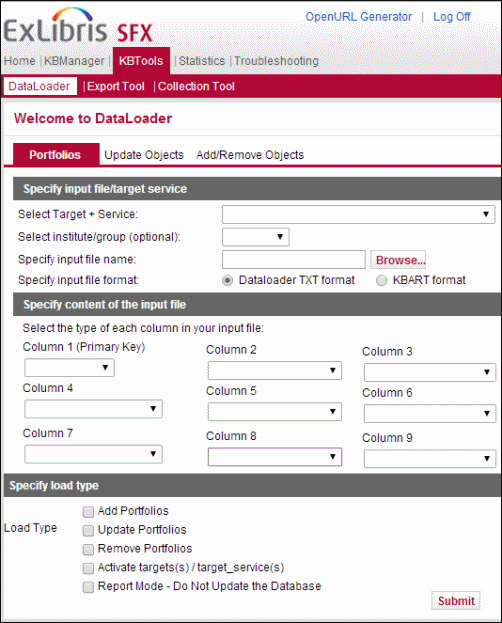
DataLoader contains three sections and can be used for different types of data loading.
- Portfolios
The following activities can be performed from the Portfolios section:
- Activating or deactivating object portfolios
Customization of the SFX database is performed by activating all the sources, targets, services, and object portfolios that are relevant to an institution’s digital library environment. DataLoader can be used to activate or deactivate object portfolios.
- Storing thresholds in the OBJECT_PORTFOLIO table
Thresholds in an object portfolio describe the conditions placed on an SFX request when used to link to a service. Journals, for example, may be available only in electronic form for a specific range of publication years, volumes, and issues. When an SFX request is used to link to these journals, these special conditions apply to the SFX request and are taken into account.
- Creating local object portfolios
An object portfolio links objects to services. SFX scripts use the object portfolios for the object lookup threshold. This threshold causes SFX to not display a journal in the SFX menu when the SFX request does not describe any journal in the collection of a publisher.
- Activating or deactivating object portfolios
- Update Objects
The following local information can be added to the SFX OBJECT tables:
- Local attributes
It is possible to add customer specific, local data to the OBJECT tables by storing local identifiers. Examples of local information that can be useful are EZB numbers, local catalog ID numbers, ERM, and database IDs. These local identifiers can be assigned to all the SFX objects (journals and books) in the SFX KnowledgeBase.
- Local titles
It is possible to override the main Ex Libris title in the SFX database by loading a local title. These local titles can be assigned to all the SFX objects (journals and books) in the SFX KnowledgeBase.
For the local titles, it is possible to load a non-filing character value that is taken into account when sorting the local title in the SFX A-Z list. By default, or when no non-filing character is loaded, the value is 0.
- Local attributes
- Add/remove objects
It is possible to add local objects to the SFX database.
For these local objects, it is possible to load language information, local attributes, local titles, author information, and non-filing characters. Additionally, it is possible to load ISSN, ISBN, DOI, CODEN, and OCLC numbers.
