Release Date May 5, 2026
Daily Room/Equipment Views for Staff
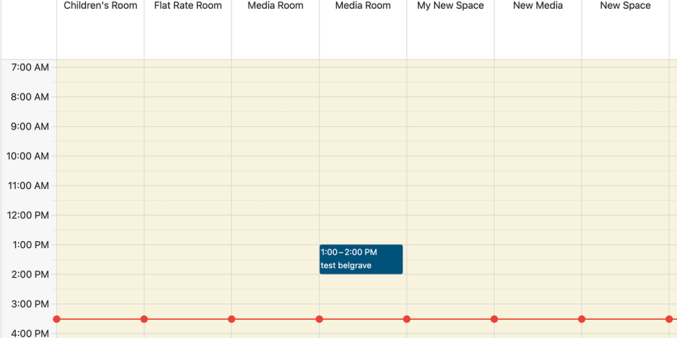
Added new daily room and equipment views to the staff Calendar pages, allowing staff to review availability by day with rooms or equipment displayed horizontally and open hours shown vertically.
Staff have asked to be able to view a grid view of a day with rooms and the particular hours of availability/unavailability with event/booking titles and times listed. This will allow them to do that.
Room Calendar Filters and Unique URLs
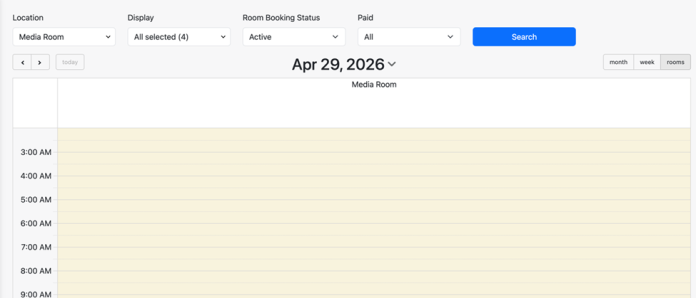
Added support for room calendar filters and selected views to be shared by URL parameters, allowing staff to open the calendar directly with selected rooms, dates, and filters applied.
Certain staff members may be responsible for rooms or groups of rooms rather than entire locations. This will allow them to quickly link to their own part of the platform, including rooms, date, booking type (display), booking status, and payment status (e.g. create a link that displays all unpaid public room bookings for next week).
Custom Default Images
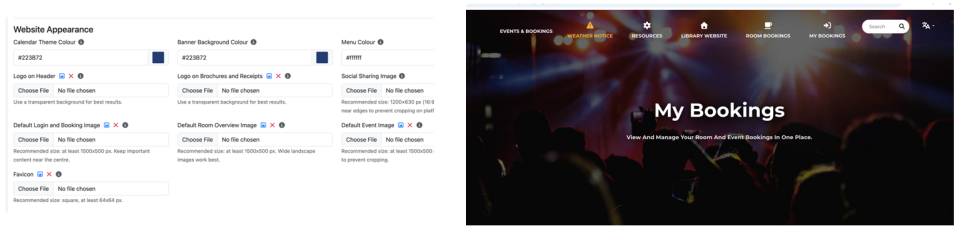
Added the ability to customize default images for login and booking pages, room and resource overview pages, event pages, and the site favicon from the Advanced Settings page.
The library can now manage the placeholder and generic images used for pages across Program, as well as the site favicon.
Refund Event Ticket Options
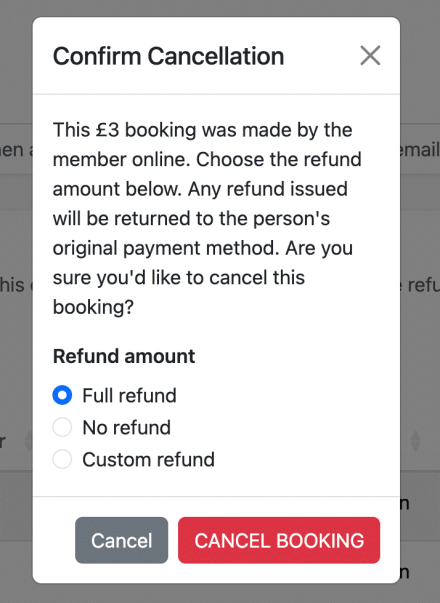
Added refund options when staff cancel an individual’s paid event bookings, allowing staff to issue a full refund, no refund, or a custom refund amount. Staff will also have the option to automatically issue a refund to all users (or not) when an event is cancelled by the library.
This will allow for more granularity in how refunds are processed from the staff perspective. Existing patron refund rules will remain unchanged.