Configurar las normas de revisión de facturas.
Translatable
Para configurar reglas de revisión de facturas se debe tener uno de los siguientes roles:
- Administrador de adquisiciones
- Administrador general del sistema
Las reglas de revisión de facturas determinan si las facturas se envían a revisión manual. See Reviewing Invoices. Las reglas se aplican a facturas creadas en forma automática que pasaron una validación inicial pero que generaron una alerta. Las reglas se aplican a todas las bibliotecas en la institución.
Watch the Configure Purchasing and Invoice Rules video.
You configure invoice review rules on the Invoice Review Rules rules table (Configuration Menu > Acquisitions > Invoices > Invoice Review Rules). For more information about rules tables, see Rules Tables.
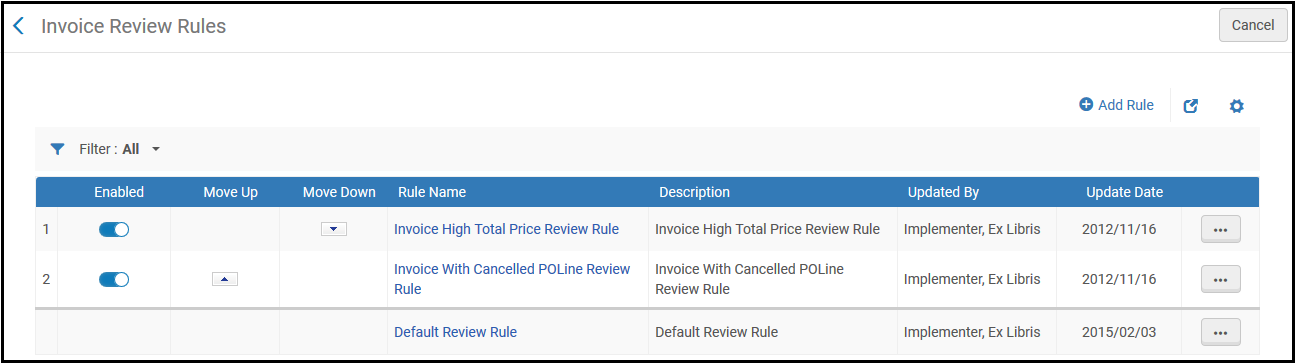
Página de reglas de revisión de facturas
The default rule has no configuration parameters and can only be set to True or False, as follows:
- True – Send for review.
- False – Don’t send for review and proceed to approval. Este es el ajuste por defecto.
Add or edit rules on the Invoice Review Rules page (select Add Rule or select Edit in the row actions list).
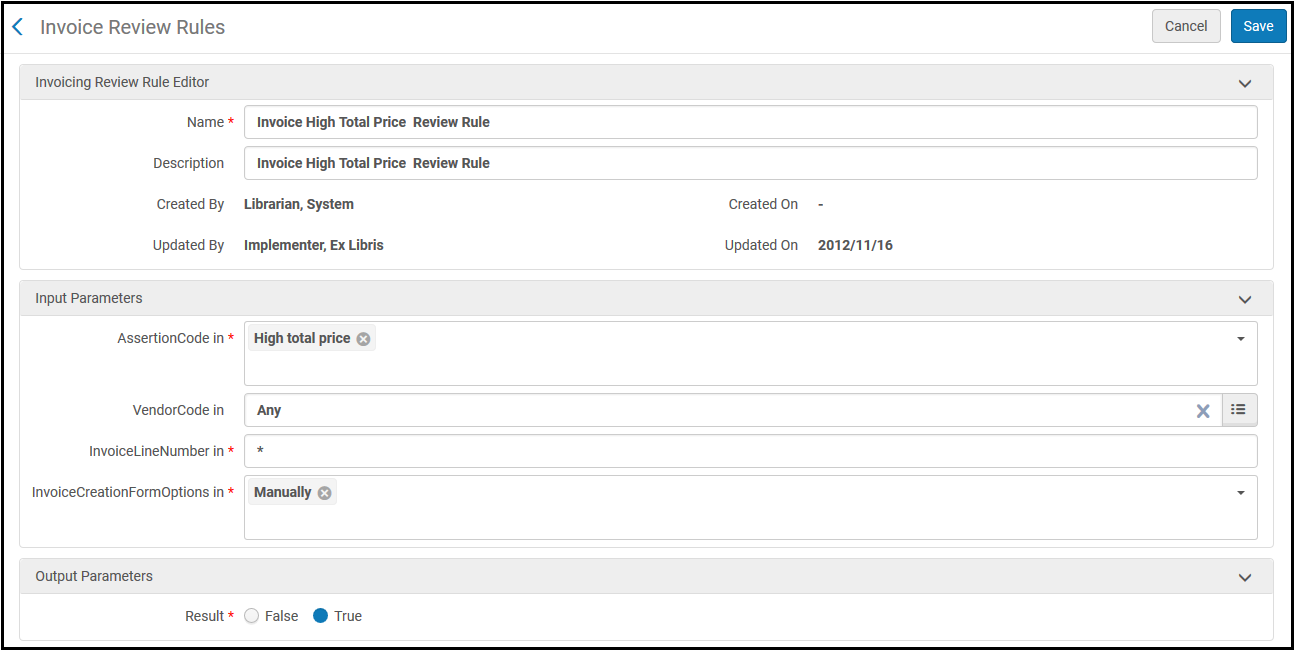
Página Reglas de revisión de facturas (Añadir/Editar)
Ver la siguiente tabla para conocer los criterios (parámetros de entrada). For Result,True indicates that the invoice is sent for review.False indicates that the invoice is not sent for review and is sent for approval.
Parámetros de entrada de Reglas de revisión de facturas
| Parámetro |
Descripción |
| AssertionCode |
El tipo de alerta generada. Los posibles valores son:
- Additional invoice lines are linked to the same PO line– The invoice contains multiple invoice lines that are linked to the same PO line.
- Currency different from PO– The currency of the invoice is different than the currency of the linked PO lines.
- Fund is over expended - Invoice line links to a Fund that is over expended (The fund allows to be over-expended but an assertion is added).
- High total price – The invoice total price is greater than the value in the PO Line Price Threshold configuration table (Configuration Menu > Acquisitions > Purchase Orders). For details, see Manage Price and Amount Thresholds.
- High total price use currency – The invoice total price, after being converted to the local currency, is greater than the value in the PO Line Price Threshold configuration table (Configuration Menu > Acquisitions > Purchase Orders). To use this option, set the Convert PO line price to system’s local currency field at the top of the page. For details, see Manage Price and Amount Thresholds.
- Invoice holds vendor account different than some of the linked PO lines – The vendor account of the invoice is different than the vendor accounts of the linked PO lines.
- Invoice includes negative discount – The invoice’s discount value is negative, thereby raising the invoice price.
- Invoice Line is linked to an evaluated PO line – The invoice line is linked to a PO line under evaluation (part of a trial).
- Invoice using different vendor than PO line– The vendor linked to the invoice is different than the vendor linked to the PO line(s).
- Invoice was disapproved by your manager - When the invoice is in Waiting for approval and the invoice manager rejects it.
- Invoice was rejected by external finance system – The invoice was rejected by an external finance system. Las facturas pueden ser rechazadas si falta información o si esta es incorrecta. A rejected invoice is sent for review, to be attended to by a library staff person (see Reviewing Invoices).
- Invoice with a canceled PO line – The invoice contains an invoice line that is linked to a canceled PO line.
- Invoice with the same number exists – Other invoices exist with the same number.
- Invoiced after cancellation – Not in use.
- Lines not linked – The invoice contains invoice lines not linked to PO lines.
- Lines not ready – The invoice contains invoice lines with status not ready.
- Previous Invoice of subscription order of invoice line- A line in the invoice is already linked to a PO line that has a different invoice line linked to it.
- Some invoice lines differ in price from their linked PO line – There are invoice lines that have different prices from their linked PO lines.
- Some linked PO lines’ payment method is different than invoice – The payment method of the invoice is different than the payment methods of the linked PO lines.
- The invoice was created by an external system and need to be reviewed - Alert sent when an invoice is created by an external system.
- The Payment method is not supported by the selected Vendor Account – The selected payment method of the invoice does not match the selected payment methods in the vendor account.
- Total amount of discrepancy – The invoice’s total price is different than the calculated total price of the invoice lines.
- Vendor is liable, but VAT is missing – The vendor is liable for VAT, but no VAT is specified in the invoice.
- Vendor is not liable, but VAT exists – The vendor is not liable for VAT, but the invoice specifies a VAT amount.
|
| Código Vendedor |
El vendedor. |
| InvoiceLineNumber |
El número de línea de factura. To match all invoice line numbers, enter an asterisk (*) in this field. |
| InvoiceCreationFormOptions |
El proceso que creó la factura. Las opciones son:
- EDIteur Invoice Message
- Desde la API
- Desde la orden de compra
- Cargador
- Manualmente (ignorar esta opción; no debería aparecer aquí)
- Cualquiera
|
Page tags: article:topicproduct:almacontent:Documentationlang:englishinvoice review ruleadd invoice review ruleedit invoice review ruleautomatic invoice processinginvoice alertinvoice assertion codeautomatic invoice review

