
Configurar otros ajustes (Adquisiciones)
Para configurar otros ajustes se debe tener el siguiente rol:
- Administrador de adquisiciones
- Administrador general del sistema
You can customize additional settings on the Customer Parameters mapping table (Configuration Menu > Acquisitions > General > Other Settings). For more information about mapping tables, see Mapping Tables.
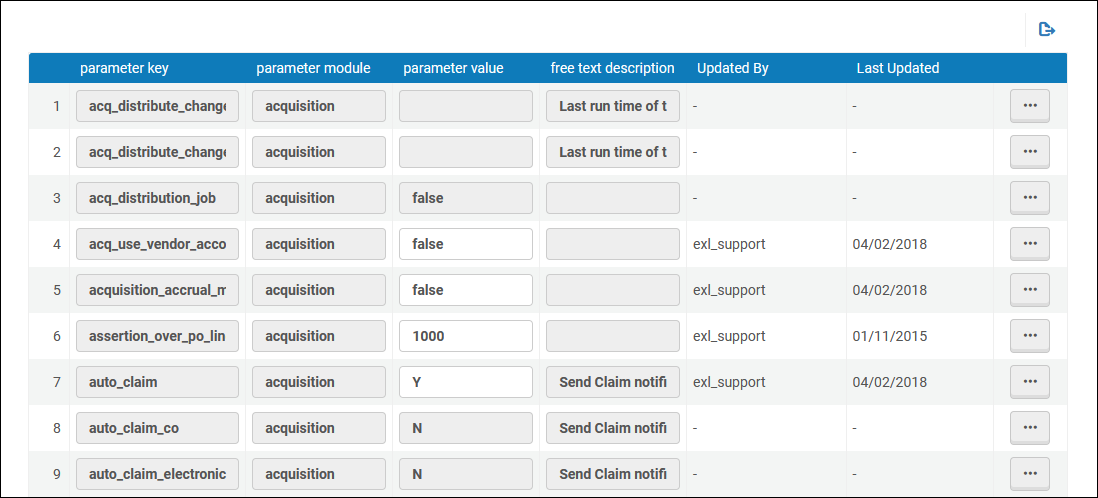
Se puede modificar o restaurar cualquier parámetro. Remember to select Save to store your changes. La siguiente tabla describe los parámetros disponibles en la página de la tabla de mapeo Parámetros del cliente.
| Parámetro | Descripción |
|---|---|
| acq_activate_portfolio_from_API |
This parameter configures whether API orders sent from OASIS/GOBI for portfolios that are matched to Alma Community Zone will set the portfolio as 'available' (parameter=True) or 'not available' (parameter=False)" in case the parameter was set to true and the resource did not have a Community Zone match, the portfolio will not be set as "Available" and an electronic activation task list will be created (as the local – non CZ linked portfolio – has no URL information). See more information in January release notes and in the Real-Time Ordering page. |
| acq_distribute_changes_last_run | The last date that the Distribute Network Acquisition Changes to Members job ran to distribute vendor information. La tarea copia a todos los proveedores que se agregaron a la Zona de red desde esa fecha. For more information, see Sharing Vendor Information in a Network Zone.
The format is YYYYMMDD(or YYYYMMDD_hhmmss). |
| acq_distribute_changes_last_run_license | The last date that the Distribute Network Acquisition Changes to Members job ran to distribute license information. La tarea copia todas las licencias gestionadas de forma centralizada que se agregaron a la Zona de red desde esa fecha. For more information, see Sharing Vendor Information in a Network Zone.
The format is YYYYMMDD(or YYYYMMDD_hhmmss). |
| acq_distribution_job | Whether the Distribute Network Acquisition Changes to Members job is active (true) or not (false). For more information, see Sharing Vendor Information in a Network Zone. |
| acq_use_vendor_account_email | Whether to send vendor-related emails to the email defined for the vendor account (true) or for the vendor (false). The default is false.
This parameter is relevant only for emails sent for the following letters: Order List Letter, PO Line Cancellation Letter, PO Line Claim Letter, PO Line Aggregated Claim Letter, PO Line Renewal Letter. Esto no afecta a los correos electrónicos enviados a través de la pestaña Comunicaciones. |
| acquisition_accrual_mode | Whether the institution can work with accrual accounting (true) or not (false). See Working with Accrual Accounting. |
| allow_edit_closed_invoice_line |
Whether to enable the option to edit fields of invoice lines that are in closed invoices (true) or disable it (false). Cuando este parámetro se establece en verdadero, los siguientes campos se pueden editar en facturas cerradas:
For additional information, see Creating Invoices. |
| auto_claim (para líneas de orden de compra físicas de una vez) |
Controls whether a Claim notification is sent to vendor in case the PO Line is set to claim task list. Valores posibles:
For additional details, see Processing Claims. |
| auto_claim_co (para líneas de orden de compra físicas continuas) | |
| auto_claim_electronic (para líneas de orden de compra electrónicas, de una vez y continuas) | |
| block_mms_creation_multi_thread | El propósito de este parámetro es evitar que se creen líneas de orden de compra duplicadas al utilizar la API de nueva orden. |
| claim_aggregated_letter |
Controla si se combinan varias reclamaciones para un solo proveedor en una única carta de reclamación:
For additional details, see Processing Claims. |
|
claim_continuous_item_level |
Cuando se envíe una carta de reclamación para un mes determinado y aún no se haya devuelto el ejemplar, si el ejemplar del mes siguiente también se somete a una reclamación, se puede enviar una carta de reclamación con los detalles de los dos meses. To enable this option, set the parameter to true. Default is false. See Processing Claims. |
| conversation_send_from_logged_in_user_address |
Configures that conversation letter emails will go out from the logged in user's email (as addressed "From") or the library's. This is configured by setting the customer parameter:conversation_send_from_logged_in_user_address to be equal to "true". The parameter is relevant only for Alma letter type:ConversationLetter. |
| copy_POL_price_to_item | Si el precio de lista de la línea de orden de compra se copia al campo de precio de inventario del ejemplar para órdenes físicas únicas, cuando el precio de la línea de orden de compra cambia. Set this parameter to true to copy the price. Additionally, when set to true and the PO line is saved, if the currency is not the local currency, the total is recalculated for the item. The parameter defaults to false, which does not copy the price to the item. |
|
currency_exchange_use_explicit_ratio |
Cuando está establecido en verdadero, se habilita la función para definir tipos de cambio explícitos al crear órdenes de compra. See Configuring Explicit Exchange Rates. |
| delete_linked_portfolio_upon_pol_cancellation (New for February 2026) | Si se establece en verdadero (por defecto es falso), al cancelar una línea de orden de compra, se borrarán tanto los portafolios locales inactivos como los portafolios inactivos enlazados a la Zona de la Comunidad o que formen parte de una colección electrónica. |
| eod_match_holdings_by_call_number (New for February 2026) |
Cuando es verdadero, el número de clasificación/signatura se tiene en cuenta para la coincidencia de existencias al crear ejemplares como parte del nuevo perfil de importación de órdenes. When the call number is different from the one of an existing holding for the matched bibliographic record, a new holding is created. For more information, see Managing Import Profiles. Si se encuentra más de una existencia coincidente, se crea una nueva existencia, ya que el sistema no puede determinar cuál utilizar. Este es el comportamiento actual cuando se encuentran múltiples coincidencias basadas en la biblioteca y la ubicación.
|
| expended_from_fund_default | The default value of whether VAT is expended from the invoice line's fund (true or false). |
| exportPrepaidInv | Whether the Export to ERP check box is displayed when you select Prepaid on the Invoice Details page (true or false). |
| handle_invoice_payment |
Define lo que sucede con una factura después de aprobarse:
For details, see Invoicing Workflow and Working with Invoices Waiting for Payment. |
| include_library_closing_days_in_digital_lending_grace_period | When set to true, the digital lending grace period includes the closed library days in the grace period. When set to false the closed library days are not included in the grace period. |
| invoice_allow_vat_in_line_level | Whether VAT can be configured for an invoice on the invoice line level (true) or not (false). |
| invoice_export_xml_dates_format | Define si el formato de fecha en el xml de exportación de la factura será en función del formato de fecha del sistema.
The possible values are:True or False.True means that the dates format in the exported invoice xml will be as defined in the system.False means that the dates format in the exported invoice xml will be yyyymmdd. El valor por defecto es Falso. |
| invoice_not_unique | Whether you can save non-unique invoice numbers that have the same vendor in the inventory database (true) or not (false). When true, this enables you to uniquely identify records with the same invoice number and the same vendor. See Creating Invoices. |
| invoice_prefix | No está en uso. |
| invoice_skip_erp | Whether the invoice workflow skips the step where the invoice is sent to an external ERP system for payment (true), or the step is performed and invoices are sent to an external ERP system for payment (false).
For details on how this setting affects the invoicing workflow, see Invoicing Workflow. |
| Invoice_split_additional_charges |
Whether it is possible to itemize non-standard additional charges of different types in an invoice. El término "cargos adicionales" se refiere a todos los cargos no fiscales que no sean el costo del ejemplar en sí. Standard additional charges are: Discount, Insurance, Overhead, Shipment, and Other. Supported non-standard additional-charge types are those that appear in the Invoice Line Types code table (Configuration menu > Acquisitions > Invoices > Invoice Line Types), and are available only if they are enabled in that table. Note that this table is only available when this parameter is set to true. For additional information, see Creating Invoices.
Para las facturas que se generan a partir de EDI, este parámetro también define cómo Alma gestiona los cargos adicionales que se agregan a las líneas de factura individuales:
|
| invoice_subscription_overlap | Whether the Check subscription date overlap check box is displayed on the Invoice Line Details page (true or false). If this parameter set to true and the check box is selected, Alma checks all invoice lines associated with the PO line to determine whether there is an overlap of invoice dates for continuous subscriptions and if there is, issues an alert to this effect. |
| invoice_use_pro_rata | Whether the Use pro rata setting is selected by default when creating new invoices (true or false). |
| no_e-task_on_close_po_line | Whether a task is created when an electronic PO line is closed (the task reminds the user to deactivate the resource). true indicates that the task is NOT created; false indicates that the task is created. The default is false. |
| orderit_login_new_tab |
Cómo abrir la ventana de inicio de sesión cuando se utiliza OrderIt (Ordenarlo) como invitado. Los valores posibles son:
|
| po_line_calc_co_next_step_on_receive | Set to true to calculate a PO line's next step and put the item in transit, if needed, when receiving a continuous PO line for other departments. When false, which is the default, the item will not be put into transit when receiving a continuous PO line for other departments. |
| po_line_hold_item_for_interested_users | Controls whether the "Hold Item" option is selected in the Interested Users tab of the Purchase Order Line Detail page of an automatically generated PO line (i.e., a PO line that is created from a patron Purchase Request, from an EOD process, or from an automated job). The default is False. For additional information about the "Hold Item" option, see Manually Creating a PO Line. |
| po_line_notify_interested_users_upon_cancellation | Controls whether the "Notify upon cancellation" option is selected in the Interested Users tab of the Purchase Order Line Detail page of an automatically generated PO line (i.e., a PO line that is created from a patron Purchase Request, from an EOD process, or from an automated job). The default is True. For additional information about the "Notify upon cancellation" option, see Manually Creating a PO Line. |
| po_line_notify_interested_users_upon_receiving_activation | Controls whether the "Notify user upon receiving/activation" option is selected in the Interested Users tab of the Purchase Order Line Detail page of an automatically generated PO line (i.e., a PO line that is created from a patron Purchase Request, from an EOD process, or from an automated job). The default is True. For additional information about the "Notify user upon receiving/activation" option, see Manually Creating a PO Line. |
| po_line_notify_interested_users_upon_renewal | Controls whether the "Notify upon renewal" option is selected in the Interested Users tab of the Purchase Order Line Detail page of an automatically generated PO line (i.e., a PO line that is created from a patron Purchase Request, from an EOD process, or from an automated job). The default is False. For additional information about the "Notify upon renewal" option, see Manually Creating a PO Line. |
| po_line_prefix | El prefijo que debe utilizarse para todas las líneas de orden de compra. The default is POL- . |
| po_line_quantity_updated_with_items_number | Habilitado por defecto cuando se crean nuevas líneas de orden de compra. This parameter enables the Update Net Price according to item quantity checkbox to be displayed. The checkbox reflects the number of ordered items within the Quantity for pricing field.
When the checkbox is enabled, the Quantity for pricing amount is updated automatically once the user adds/removes items, and as a result, the Net Price field is also updated. |
| po_line_remove_interested_users | Configurar como"verdadero" para indicar que todos los usuarios interesados en las líneas de orden de compra cerradas o canceladas deben borrarse cuando se ejecuta la tarea semanal de línea de orden de compra-eliminar usuarios interesados. See Manually Creating a PO Line. |
| po_line_send_notification_to_vendor_on_renewal | Whether the PO Line Renewal Letter (see Configuring Alma Letters) should be sent to vendors when a subscription is renewed. Note that the vendor's preferred email address is used (true or false). For an overview of the renew process see Renewal Workflow. |
| po_packed_by_fund | Whether PO lines are automatically packaged into POs according to funds (true or false). If set to true, institutions working with functional funds are able to locate all the POs associated with a specific fund and manage PO approval more efficiently. For more information, see Packaging PO Lines into a PO. |
| po_prefix | El prefijo que debe utilizarse para todas las órdenes de compra. The default is PO- . |
|
pol_electronic_process_type_acq |
When an electronic resource is created via the regular PO Line creation process, or when manually associated to a PO Line, the Process type of the resource is set to Acquisition. When set to true (default), the process type of the electronic resource is set to Acquisition. Si el usuario no desea que se modifique el tipo de proceso del recurso, el parámetro debe establecerse en falso. |
|
pol_handle_bib_record_without_inventory |
Define cómo se gestionará un registro bibliográfico sin ejemplares cuando se cancele una línea de orden de compra y, como resultado, se elimine el ejemplar para solicitar y su registro de existencias. Los posibles valores son:
Estos valores deben introducirse en la tabla de mapeo en TODAS MAYÚSCULAS, como aparecen arriba. For example,MANUAL, not Manual or manual. See Canceling PO Lines. |
|
PR_indicate_for_primo_if_ISBN_is_exist |
Habilita una alerta en el formulario de Solicitud de Compra de Primo. Cuando se ajusta en verdadero, que es el valor por defecto, si se introduce un número de ISBN/ISBN electrónico en un formulario en blanco, la alerta se muestra en la página si el recurso ya es propiedad de la biblioteca. After entering the identifier, when applicable, a message displays and indicates whether there is a resource for the identifier or not.
Se trata de algo que también es relevante para redes y campus múltiples. No se aplica a revistas. For more information see Configuring Request Forms for Primo VE and Configuring Display Labels for Primo VE. |
| purchase_request_import_profile | Almacena el nombre del perfil de importación que se utilizará para las solicitudes de compra coincidentes. Si se deja este parámetro en blanco, significa que el proceso de búsqueda de coincidencia de solicitudes de compra utilizará la coincidencia por defecto de los números de ISBN/ISSN. For more information, see Creating a Purchase Request. |
| recalculate_fund_transaction_with_explicit_exchange_rate |
This is only relevant for institutions that use the "Explicit Exchange Rate" functionality (see Configuring Explicit Exchange Rates). When this parameter is set to "false" (by default), Alma calculates calculates the explicit exchange rate on the fund associated with the PO line ,once only, and marks the transaction on the fund as "Explicit exchange rate = Yes". When the Recalculate PO Line Encumbrances Based on Current Exchange Rates job is run (see Scheduled Jobs), Alma does not recalculate the transaction again, according to the explicit exchange rate. Esto se hace para mantener el valor del tipo de cambio del día en que se aplicó. Tenga en cuenta que, por defecto, esta tarea está inactiva y debe ponerse en contacto con el servicio de asistencia para activarla. When the recalculate_fund_transaction_with_explicit_exchange_rate customer parameter is set to "true", Alma recalculates the explicit exchange rate on the fund associated with the PO line,every time that the Recalculate PO Line Encumbrances Based on Current Exchange Rates job is run. Alma hace este recálculo, incluso si la transacción en el fondo está marcada como "Tipo de cambio explícito = Sí" y el tipo de cambio explícito se aplicó previamente. The Recalculate PO Line Encumbrances Based on Current Exchange Rates job is inactive by default. Institutions can enable it by accessing Admin->Monitor Jobs -> Scheduled (see Scheduled Jobs). |
| release_remaining_encumbrance_for_edi | Whether encumbrances are released for continuous order PO lines in invoices that are created using EDI (true or false). |
| replacement_cost_calc_update |
Whether to add or reduce the amount to the PO line price being copied to the item's Replacement cost field (see replacement_cost_calc_update). El importe se convierte a la moneda local. To add an amount use a numeric value+A, for example 5A. The numeric range is unlimited. To add a percentage of the price, use a numeric value+P, for example 5P. The numeric range is 0-100. Para reducir el importe o el porcentaje, añada un guion antes del valor, por ejemplo, -5A. The addition to or removal from the replacement cost is in local currency. |
| replacement_cost_copied_from_POL |
Whether the PO line price is copied to the Replacement cost field in the item for physical one time orders. Los valores posibles son:
Si la moneda de la línea de orden de compra no es la moneda local, el total se recalcula y se guarda en el ejemplar en la moneda definida por la institución. The Replacement cost field is updated upon creation of a new PO line, when changing the PO line's price and saving the PO line, and when adding/removing items and saving the PO line. See also Replacement Cost. |
| temp_calculate_fund_balance_at_end_job |
Si se debe calcular el saldo de fondos al final de la tarea. Los valores posibles son:
|
| temp_debug_log_for_OCLC_client | Imprimir en el registro de depuración en código de cliente de OCLC. |
| temp_po_by_index_xml | |
| trial_notification_before_start_date | No está en uso. See the job Trials – Start and Notify Participants in Viewing Scheduled Jobs. |
| po_line_description_update_upon_bib_change |
Controla si la descripción de la línea de orden de compra y la sección "Descripción del bib" de la línea de orden de compra se actualizan cuando ocurren cambios en el registro bibliográfico. Los valores posibles son: false(default) - The PO line is not updated when the related bibliographic record is updated. true - All of the PO line description fields and the "Bib Description" section are updated when the bibliographic record is updated. When set to true, any changes to relevant fields in the bibliographic record will update all bibliographic description fields in the PO line. For the list of relevant fields, see Bib Description. If changes are made only to fields that are not listed as relevant, the PO line description is not updated when the related bibliographic record changes. |
| vat_percent_default | El porcentaje de IVA por defecto en la institución. The default is initially 0. |
| view_holding_in_receiving | Whether holdings information is displayed when viewing receiving items (true or false). |
Page tags: article:topicproduct:almacontent:Documentationlang:englishsplit additional charges
