
Configurar reglas de revisión de compras
- Administrador de adquisiciones
- Administrador general del sistema
Purchasing review rules define whether automatically created PO lines (either via API or EOD) undergo manual review or are sent immediately to packaging. Las reglas se aplican a todos los tipos de líneas de orden de compra creadas y a todas las bibliotecas de la institución. For information on reviewing PO lines including available facets, inventory information, updating PO lines, etc., see Reviewing PO Lines.
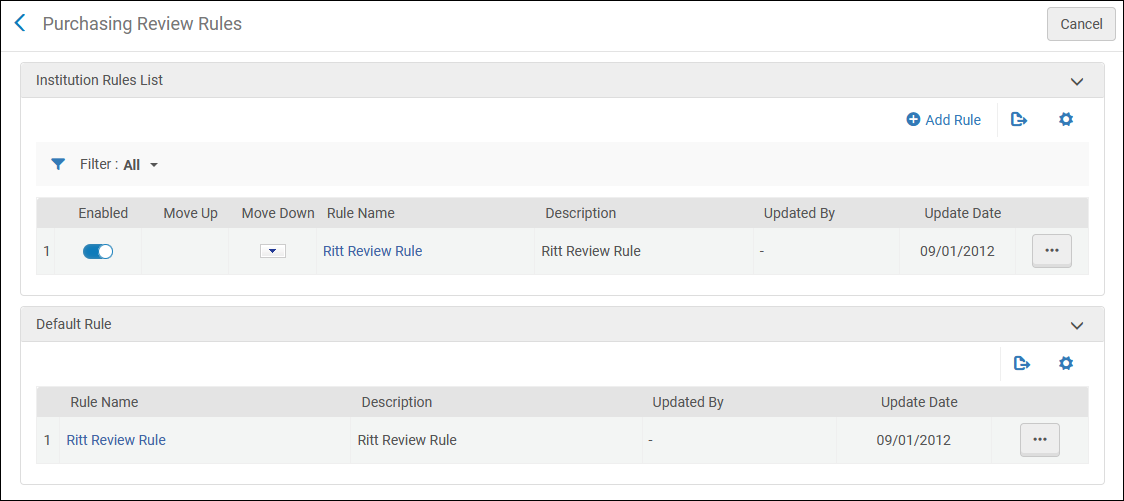
You configure purchasing review rules on the Purchasing Review Rules rules table (Configuration Menu > Acquisitions > Purchase Orders > Purchasing Review Rules). For more information about rules tables, see Rules Tables.
- These rules apply only to PO lines created automatically; manually created PO lines skip the review process if you select Order Now or Save and Continue, or remain In Review if you do not (for example, if you select Save).
- Unlike most rules tables,the default purchasing review rule is checked first.
The rules are checked for each automatically created PO line, as soon as a rule matches the PO line, its Result(Output Parameters) is checked. If the result is True, the PO line is sent for review; otherwise, the PO line continues on to packaging.The default rule is checked first. The default rule has no criteria that can be configured; it can only be True or False, as follows:
- True – All PO lines are sent for review.
- False – The rules are checked to see if the PO line is sent for review. Si no existen otras reglas o ninguna de las reglas coinciden, la línea de orden de compra no se envía a revisión y pasa a agrupación.
Add or edit rules on the Purchasing Review Rules page (select Add Rule or select Edit in the row actions list).
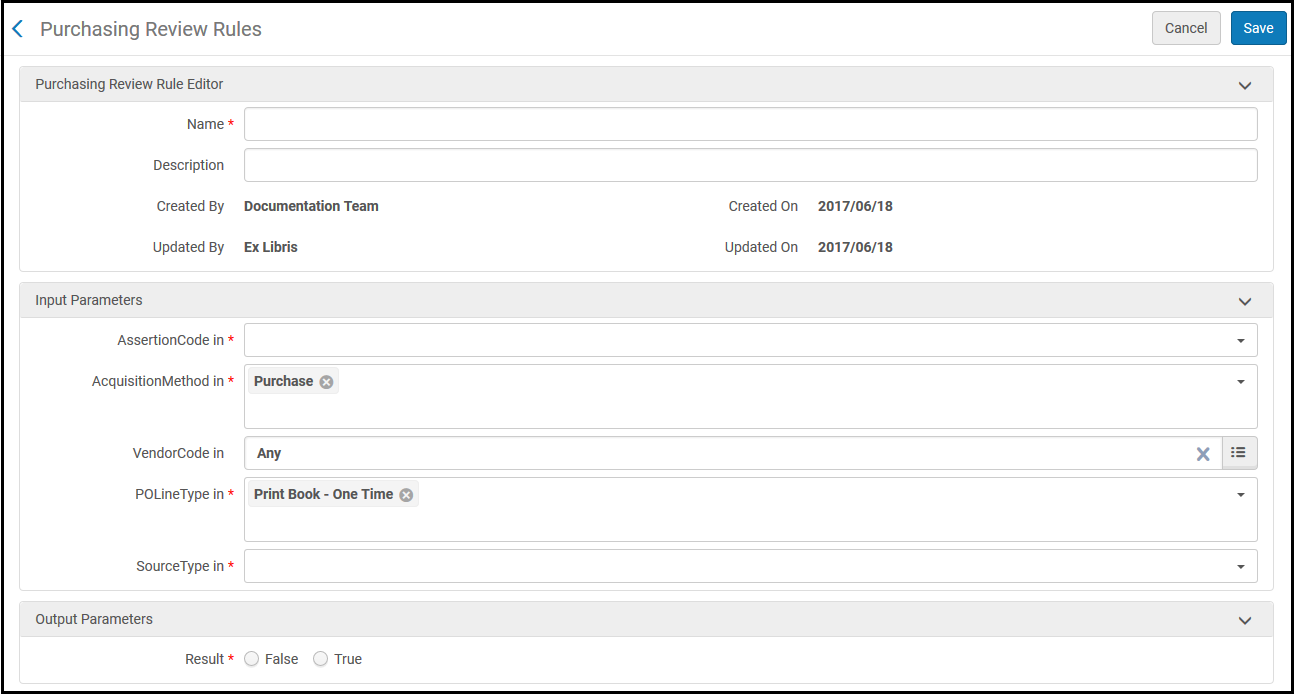
Véase la siguiente tabla para tener una descripción de los criterios (parámetros de entrada). For Result,True indicates that the PO line is sent for review.False indicates that the PO line is not sent for review and proceeds to packaging.
| Parámetro | Descripción |
|---|---|
| AssertionCode |
El tipo de alerta generada. Se debe especificar un código de aserción para que se invoquen las reglas de compra. These alerts may appear when creating or saving a PO line manually (see Manually Creating a PO Line), when importing EOD records (see Importing Records Using an Import Profile), or when using the API (see https://developers.exlibrisgroup.com/alma/apis/acq). For information on enabling/disabling alerts, see Managing Acquisition Alerts. Los posibles valores son:
|
| Método de adquisición | El método usado para adquirir el ejemplar. See Configuring Acquisitions Methods. |
| Código Vendedor |
El vendedor.
|
| Tipo de línea de orden de compra | El tipo de compra (por ejemplo, libro impreso, material audiovisual y demás). See Enabling/Disabling PO Line Types. |
| Tipo de Fuente |
El proceso que creó la línea de orden de compra. Las opciones disponibles son:
|
Page tags: article:topicproduct:almacontent:Documentationlang:englishpurchasing review ruleadd purchasing review ruleedit purchasing review ruledelete purchasing review ruleautomatic PO line processingPO line assertion codePO line alert
