
Buscar facturas
Esta página describe cómo buscar facturas en Alma, incluso buscar por estado de factura, filtrar resultados de búsqueda (con facetas) y una descripción de las columnas y diversas opciones que aparecen en los resultados de la búsqueda. For an overview of the end to end invoice workflow with links to relevant sections for details see Invoicing Workflow.
- Gerente de facturas
- Operador de facturas
- Operador de facturas ampliado
- Gerente de compras
- Operador de compras
You search for invoices using the persistent search box (see Searching in Alma). Solo puede ver las facturas asociadas al ámbito vinculado a su rol.
When performing an Invoice>All searchfrom the persistent search box, only Status, Library, Invoice number, Invoice reference number, Invoice unique ID, Vendor name, and Vendor code are searchable fields. The PO line title, the PO line number, and the PO number are not indexed in the All search. However, if you select one of these fields, instead of All, you can search for specific values of that field.
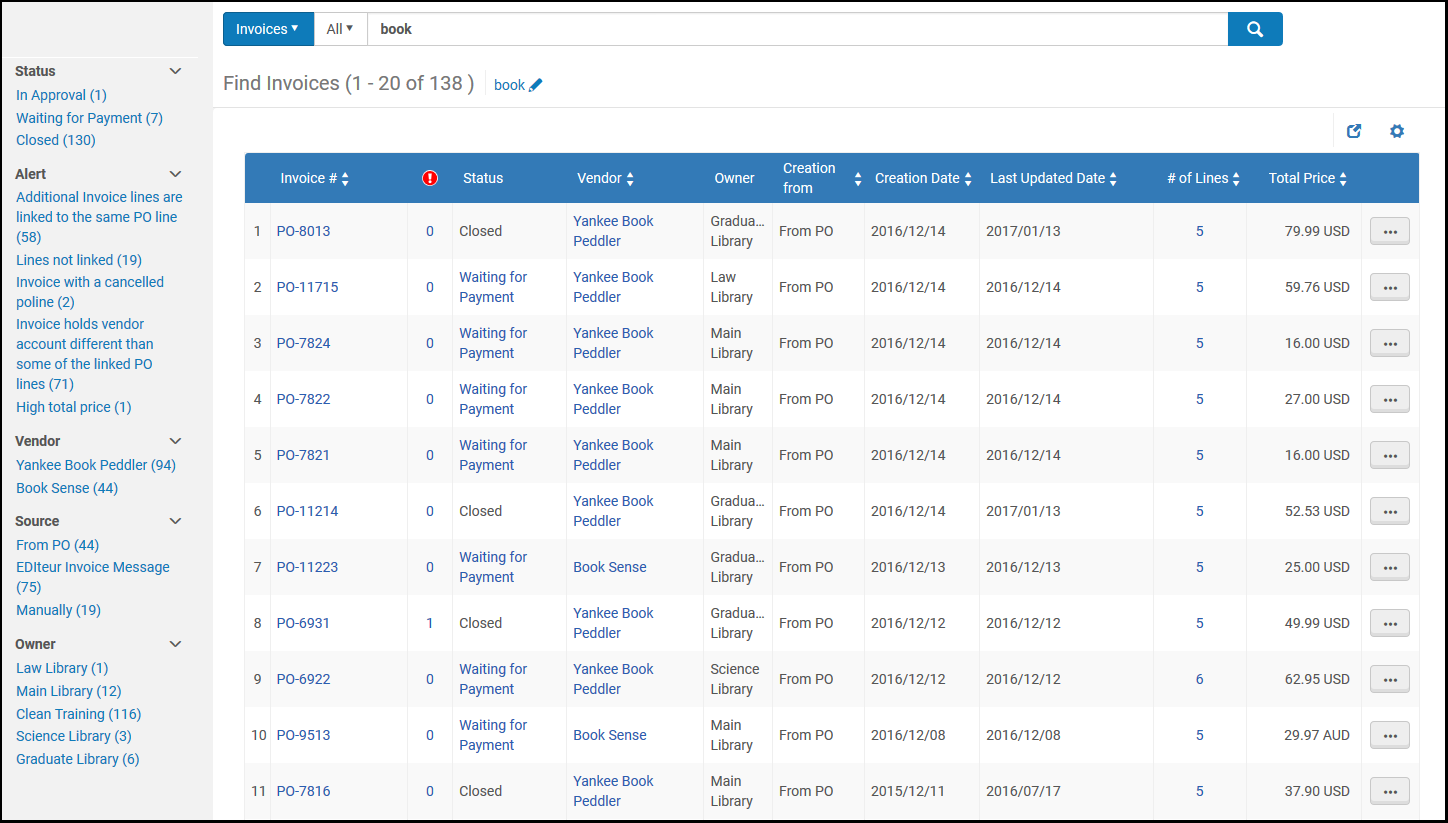
Search results for invoices (see Searching in Alma) appear on a results page.
Buscar facturas por estado
Puede buscar facturas con un estado específico con las siguientes secuencias de búsqueda:
- Closed – Search for closedLas facturas con estado "Cerrada" se muestran como "Aprobada" cuando se abren. This is because the status in "Invoice details" refers to the Approval Status and not the Status of the Invoice.
- In Approval – Search for inapproval
- In Review – Search for inreview
- Ready to be paid – Search for ready to be paidThese invoices will be processed by the next ERP Export job. For more information, see Financial Systems.
- Waiting for Payment – Search for waiting to be sentThese invoices were processed by the ERP Export job and are now waiting for the payment step to be handled.
Usar facetas para filtrar los resultados de búsqueda
Puede usar las Facetas en el lado izquierdo de la página para ayudarle a localizar facturas específicas al filtrar los resultados para mostrar solo los que cumplan con los criterios seleccionados.
Las siguientes facetas están disponibles:
- Status – The status of the invoice
- Alert – The type of alert for the invoice—for example,Additional invoice lines are Linked to the same PO line, Currency different from PO, and Invoice with the same number exists
- Vendor – The vendor to which the invoice must be paid
- Source – The mode by which the invoice was created (from a file, from an EDI, from a PO, or manually)
- Owner – The institution or the library associated with the invoice
Columnas y opciones en los resultados de búsqueda
La página de Buscar facturas muestra las siguientes columnas por cada factura.
| Columna | Descripción |
|---|---|
| Factura # | Número de factura |

|
Número de alertas para la factura
Seleccionar el valor para abrir la página de Detalles de factura y ver las alertas de la factura. |
| Estado | Estado de la factura |
| Proveedor | El proveedor a quien se envía la factura |
| Propietario | Institución o biblioteca asociada a la factura |
| Creado desde | Método por el que se creó la factura |
| Crear | Fecha en la que se creó la factura |
| Fecha de la última actualización | The date of the invoice's most recent update |
| Precio total | Precio total de la factura |
| # de líneas | El número de líneas de orden de compra a incluir en la factura |
To view an invoice, select View in the row actions list. La página de Detalles de Factura de abrirá. Los campos en esta página no pueden editarse.
To navigate to the list of invoices that are in review, select Go to task list in the row actions list. The In Review Invoices page opens (see Reviewing Invoices).
Page tags: article:topicproduct:almacontent:Documentationlang:englishfind invoicesearch for invoice
