
Flujo de trabajo de facturación
Esta página describe el flujo de trabajo de facturación desde la creación hasta el pago y el cierre. For an overview of working with acquisitions in Alma, including links to relevant sections such as Infrastructure, Renewals, Configuration, etc., see Introduction to Acquisitions. For the end to end purchasing worklfow with links to relevant sections for details see Purchasing Workflow.
A continuación hay una ilustración del flujo de trabajo de facturación que especifica cómo se gestiona una factura desde el momento de su creación hasta el momento en el que se cierra la factura. Cuando una línea de Orden de compra está completamente facturada, se cierra su línea de Orden de compra asociada. If, for some reason, you do not require invoices, use a PO line that does not require a price and funds, such as Technical; see Manually Creating a PO Line.
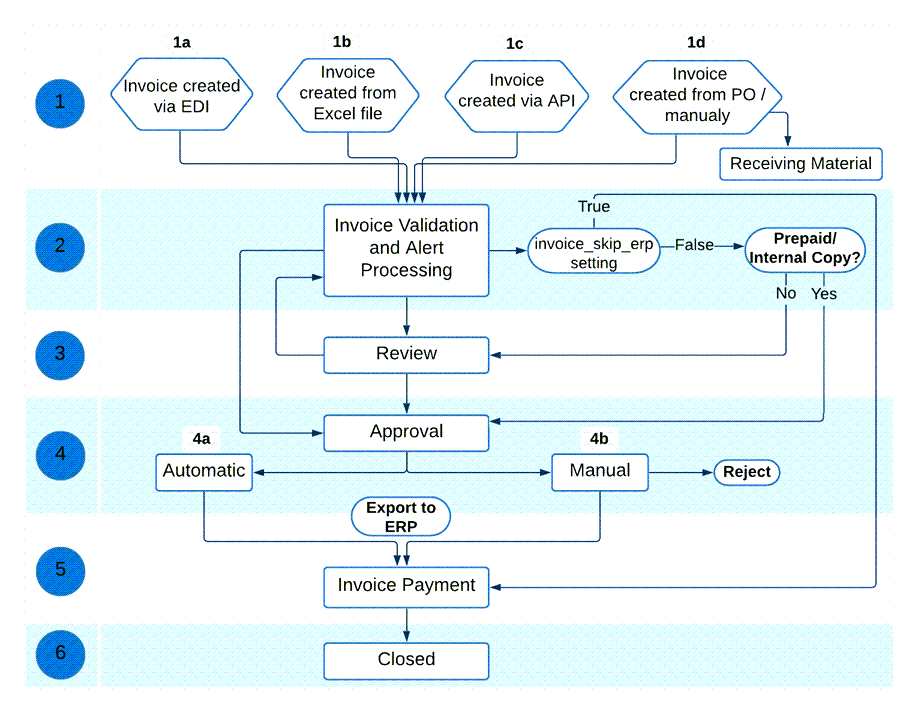
A continuación se encuentra una descripción detallada de los pasos de este flujo de trabajo (con los números que corresponden a los números en el diagrama). For the complete list of invoice statuses, see Invoice Statuses.
- Una factura se crea de una de las siguientes maneras:
- Importing an EDI message from the vendor (see Creating an Invoice by EDI)
- Importing an Excel file (see Creating an Invoice From a File)
- Creating invoices in batch via the Create Invoice API (see Batch invoicing in Alma in the Ex Libris Developer Network)
- Using a PO or manually (see Creating an Invoice From a PO or Manually). After creating an invoice using a PO or manually, you can choose to move directly to the Receive New Material page (see Receiving Material).
For invoices imported using EDI, if all PO lines in the EDI file that are assigned to this invoice are owned by the same library, then that library will be the owner of the invoice. Si todas las líneas de orden de compra asignadas a la institución no son para la misma biblioteca, la factura tendrá a la institución como el propietario.No es posible añadir de forma masiva una factura nueva o ya existente a un conjunto de líneas de orden de compra.After an invoice is created (whether through importing an EDI/Excel file, manually or API), you can change the Owner. - La factura se procesa para determinar si hay elementos que requieren atención especial según las normas preconfiguradas por un administrador. Este proceso lo lleva a cabo el sistema automáticamente.If there are data issues that require attention, the invoice status is set to In Review and the invoice is sent for review (step 3). For information on this manual activity, see Reviewing Invoices. Si no hay problemas de datos y las reglas preconfiguradas determinan que la factura se puede procesar automáticamente, la factura avanza al paso 4.
- If invoice_skip_erp = true on the CustomerParameters Mapping Table page (indicating that the invoice is not to be sent to the ERP; see Configuring Other Settings), the invoice proceeds to the payment stage of the workflow (step 5).
- If invoice_skip_erp = false on the CustomerParameters Mapping Table page (see Configuring Other Settings), the invoice is set to Ready to be Paid and proceeds accordingly in the workflow.
- La fase de revisión en el flujo de trabajo permite al revisor añadir información pendiente a la factura o corregir cualquier información incorrecta en la factura. When the reviewer selects Save and Continue on the Review Invoices page, the invoice returns to step 2 in the workflow, where it is reprocessed to determine whether there are elements that require special attention. Si los problemas de datos siguen presentes, la factura vuelve a revisión. If all data issues have been resolved, the invoice status is set to In Approval and the invoice proceeds to step 4. Invoices that have been closed or sent to the ERP can be sent back to the review stage, to enable editing of the invoice (see Setting Invoices Back to Review).
- Para facturas con 10 o más líneas de orden de compra, al actualizar la factura, se vuelven a indexar las líneas de orden de compra relacionadas. This is done by a background job that appears in the Monitor Jobs page. El usuario que realizó las actualizaciones que desencadenaron esta reindexación aparece como operador.
- También es posible editar ciertos campos en las líneas de facturas cerradas. For more information see Creating Invoices.
- The invoice is either automatically approved and sent to the next stage of the workflow (Ready to be Paid), or awaits the appropriate library staff person's manual approval before continuing with the workflow.
- Si las normas de aprobación preconfiguradas por un administrador determinan que la factura puede aprobarse automáticamente, la factura avanza al paso 5.
- Si las normas de aprobación preconfiguradas por un administrador determinan que es necesaria una aprobación manual, la factura es enviada a aprobación manual. For information on this manual activity, see Approving Invoices. When the person performing the manual approval selects Approve on the Invoice Information page (accessed from the Approve Invoices page), the invoice status is set to Ready to be Paidand the approved invoice is ready to be sent to the payment system or ERP. (Si la persona rechaza la factura, es devuelta a la fase de revisión; véase paso 3).
- The invoice reaches the payment stage, in which the invoice awaits payment processing, either through Alma or through the institution's ERP system. (For information on setting up your external system to receive invoices from Alma and running the job that exports invoices from Alma to this external system, see Financial Systems).
- If the handle_invoice_payment parameter in the Acquisitions Configuration Other Settings menu is set to true, the invoice status is set to Waiting for Payment so that the institution itself can manage the payment of the invoice, either automatically through the import process (see https://developers.exlibrisgroup.com/alma/integrations/finance), or manually by an operator (see Working with Invoices Waiting for Payment).
- If the handle_invoice_payment parameter in the Acquisitions Configuration Other Settings menu is set to false, the invoice is closed (status Closed) without waiting for payment (regardless of whether it is sent to an ERP system or not).
When a negative amount is entered for the invoice's amount, a refund is granted to the user (see theTotal Amount field description in Invoice Details Page Fields). - The invoice is then closed (status Closed). Alma comprueba si las líneas de orden de pago asociadas con la factura están completamente facturadas y pagadas. Las líneas de orden de compra asociadas a la factura se cierran si se reciben/activan y la factura se pagó o envió al sistema ERP. If the PO line's items are not yet received/activated, the PO line remains open.
Invoice Statuses
Una factura puede tener uno de los siguientes estados:
- In Review- The invoice was created but not yet reviewed.
- In Approval- The invoice is waiting for manual approval.
- Ready to be Paid- The invoice was approved and is ready to be sent to the ERP.
- Waiting for Payment- The invoice was approved and sent to the ERP (or skipped the ERP if the institution does not use one).
- Closed- The invoice is paid and closed.
Page tags: article:topicinvoicinginvoiceproduct:almacontent:Documentationlang:englishinvoice statusinvoice stage
