
Contributing to the Resource Sharing Directory
Questa pagina fornisce una panoramica su come contribuire alla directory di Servizi interbibliotecari in Alma, inclusa l'aggiunta di membri, la tab delle policy di prestito di articoli fisici e l'aggiornamento dei dettagli dei membri.
For more information on resource sharing including locating items for resource sharing, working with resource sharing partners, managing borrowing and lending requests and contributing to the resource sharing directory, see Resource Sharing.
Per configurare la directory dei Servizi interbibliotecari, è necessario disporre di una delle seguenti autorizzazioni:
- Amministratore Generale
- Amministratore Servizi
What is the Resource Sharing Directory?
La directory è un luogo centrale con informazioni aggiornate sulle Biblioteche dei Servizi Interbibliotecari in Alma. Le biblioteche scelgono di partecipare e si definiscono nella directory con pochi semplici passaggi. Essere nella directory consentirà ad altre biblioteche di individuare la tua istituzione e instaurare un rapporto di Servizi interbibliotecari con te in modo semplice e con meno comunicazioni avanti e indietro sui dettagli tecnici della connessione.
Nella directory, è possibile definire una connessione Alma o una connessione ILLiad in base all'interfaccia del personale preferita.
For more information, see The Ex Libris Resource Sharing Directory (5:11 min.).
For more information on the various workflows for resource sharing, including broker and peer to peer based, managing resource sharing partners, borrowing/lending requests and contributing to the resource sharing directory, see Resource Sharing.
What are the steps?
- Come prerequisito, dovrai disporre di una Biblioteca dei Servizi Interbibliotecari definita in Alma. Può trattarsi di una biblioteca o di molte, a seconda delle tue esigenze specifiche. Ogni Biblioteca dei Servizi Interbibliotecari in Alma avrà bisogno di un membro corrispondente nella directory.
- Infine, è necessario definire la copia partecipante per ciascun membro.
This content is for institutions that already have their resource sharing libraries defined in Alma.
Add a Member
Se la tua istituzione ha più Campus/biblioteche che gestiscono i loro Servizi interbibliotecari separatamente e in modo indipendente, aggiungi solo un membro per ogni Biblioteca dei Servizi Interbibliotecari.
From the Resource Sharing Members page (Configuration > Resource Sharing > Members), select Add new member either from a New Resource Sharing Library or an Existing Resource Sharing Library.

See Lending Customization for more information about setting up Rapido members.
From the Resource Sharing Members page (Configuration > Fulfillment > Contribute to Resource Sharing Directory > Resource Sharing Directory Member), select Add new member either from a New Resource Sharing Library or an Existing Resource Sharing Library.
Member Attributes Tab
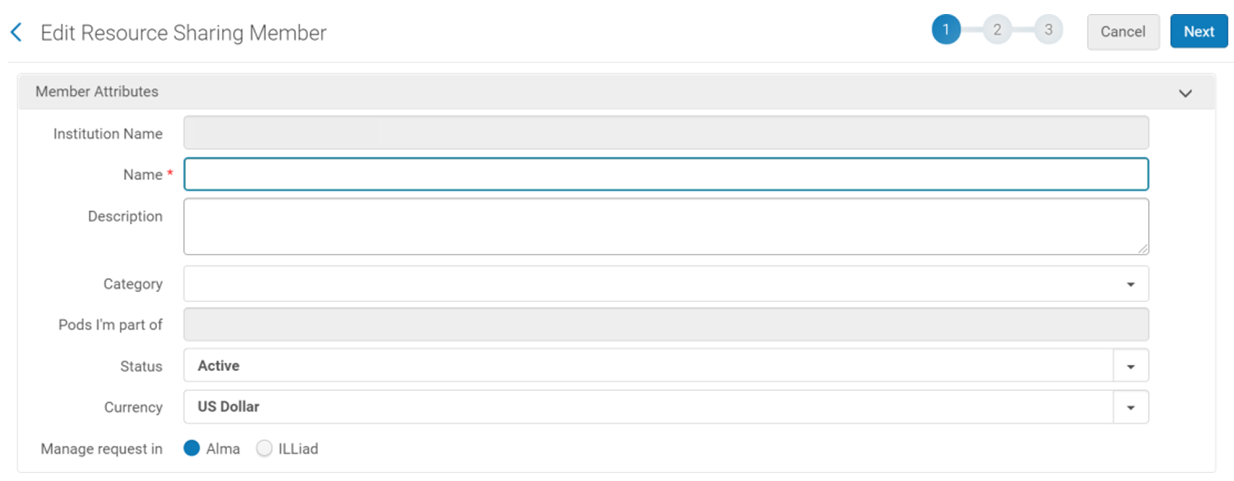
I seguenti campi vengono visualizzati nella directory per aiutare altre istituzioni a trovarLa e identificarLa.
- Nome
- Description – libraries can include instructions on how to communicate with them. This information is displayed on the Resource Sharing Partner List Community tab (Fulfillment > Resource Sharing > Partners).
- Status – refers to the current status of the member (active/inactive).
Pods I'm part of is a field that is configured by the Ex Libris Resource Sharing team based on your participation in pods available in your region. Se desideri unirti a un gruppo, contatta Ex Libris .
La tua istituzione non deve utilizzare Rapido per essere parte di un pod.
Gestisci richieste in ti Abilita a definire se desideri inviare e Ricevere richieste ILL in Alma o ILLiad.
Quando si seleziona ILLiad, è necessario definire ulteriori dettagli di connessione.
Member Address - The address that is used for displaying the shipping address. L'Indirizzo di spedizione è quello Definisci nella tab delle informazioni di contatto della biblioteca RS. L'email e il numero di telefono per la spedizione vengono visualizzati anche quando un'altra istituzione ti seleziona come Biblioteca partner. Note that some information such as the shipping email address and ISIL code/ISO symbol, cannot be updated in this screen. They can be updated in the Contact Information page (Configuration > Fulfillment > Library Details > Contact Information tab), when in the scope of the Resource Sharing library. Una volta aggiunto il membro, è anche possibile selezionare Modifica Biblioteca dei Servizi Interbibliotecari dal menu Azione per modificare le informazioni.
Physical Items Lending Policies Tab
Una volta completati i dettagli del membro, passi alla tab successiva.
Definire gli articoli partecipanti ti consente di indicare quali copie fisiche sei disposto a prestare.
Properly defining participating items cuts down on staff time having to reject requests that are not lendable.
- Se si intende condividere copia fisica, è necessario selezionare la casella Supplies copia fisica.
- Aggiungi copie partecipanti.
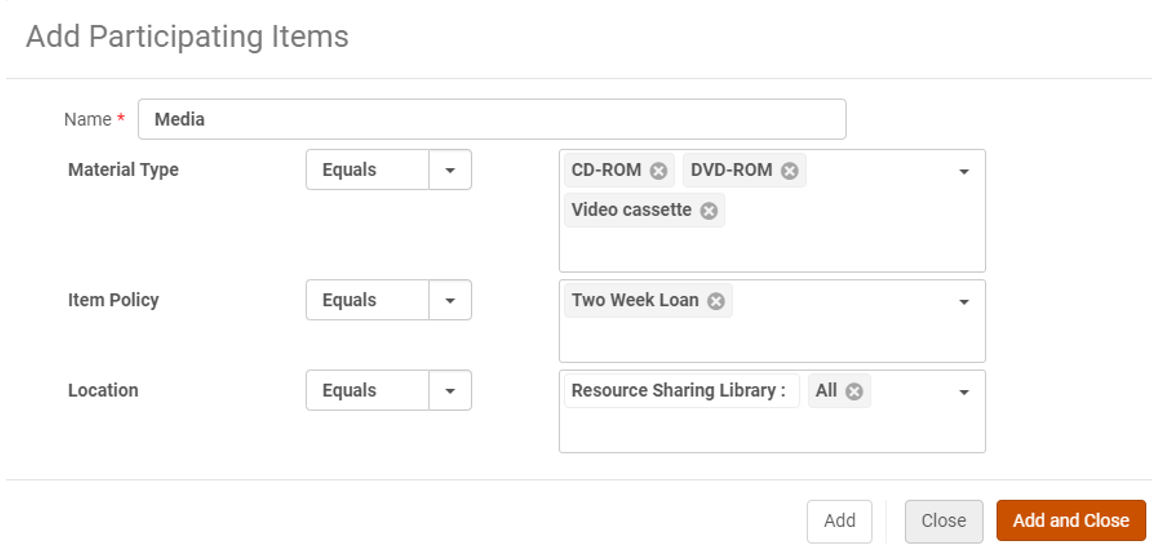
Selecting Add Participating Item opens the screen below. Puoi definire le copie fisiche che hai approvato per i Servizi interbibliotecari in base al Tipo di materiale, alla Policy di copia e alla Localizzazione di biblioteca.
Physical items are only available for lending when Supplies physical items is checked.
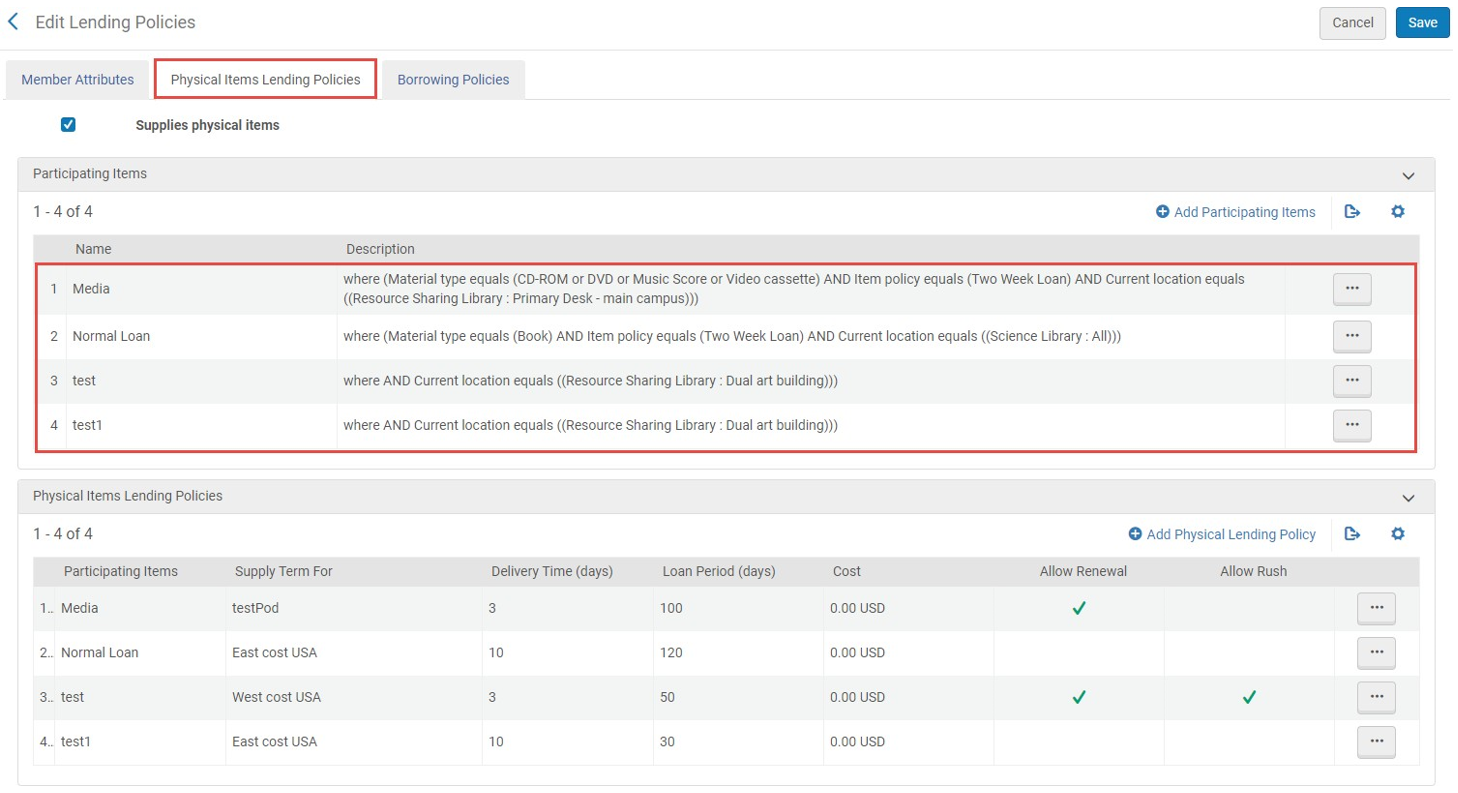
Se hai richiesto e aderito a un pod reciproco, devi collegare le tue copie partecipanti a quel pod. This is complete when the pod appears under Pods I'm part of.
Updating Member Details in the Resource Sharing Directory
Se in qualsiasi momento ha bisogno di modificare le informazioni nell'Archivio, può modificare i suoi dati di iscrizione. The directory automatically updates the following day.
Gli aggiornamenti vengono distribuiti ai Partner scaricati dalla Ex Libris Servizi interbibliotecari Directory. If an institution makes changes that impact the partner information in the Resource Sharing Directory (using the Edit Resource Sharing Library row action), such as email, address, etc., this information is updated on the partner record downloaded by other institutions.
