
機能のロールアウト構成
機関向けの新しい Alma 機能のロールアウトオプションの構成
貴機関のロールアウト設定を構成するには、次の役割が必要です。
- 一般システム管理者
The instructions on this page apply to users with the Staff Record Type (see Managing Users).
Alma の新機能は段階的に展開されます。これにより、Ex Libris のスタッフは、既存のプロセスを完全に置き換える前に、適切に作業していることを確認し、Almaユーザーがそれらに精通することができます。
新機能の展開は、次の段階で進行します。
- Sandbox: Two weeks before its official rollout, a new feature is made available to institutions for preliminary testing purposes in the sandbox environment (see Alma Sandbox Environments).
- Phase 1 (Off by default): The official rollout of the new feature – phase 1 – takes place as part of a quarterly release.このフェーズでは、新機能はデフォルトではアクティブ化されていませんが、機関や個々のユーザーがオンにすることを選択した場合はオンにすることができます。
- Phase 2 (On by default): Some time after the official layout, as part of a later quarterly release, phase 2 of the rollout begins.このフェーズでは、新機能はデフォルトでアクティブ化されますが、機関や個々のユーザーは、必要に応じてオフにすることができます。
- Full implementation: The final stage of a rollout takes place as part of a later quarterly release.このリリースでは、すべてのユーザーに新機能が実装されています。機関も個人ユーザーも、この時点からオプトアウトすることはできません。
During phases 1 and 2, administrators can override the default handling of a rollout in their institution.たとえば、ロールアウトのフェーズ1で、機関でデフォルトで新機能をオンにすることができます。In addition, they can choose to completely opt out of a new feature for their entire institution (although this is not generally recommended; see Turn off and hide, below), and they can monitor the adoption of new features by individual users.
This page explains how to configure the institution-level configuration options.For information about how individual users can manage their own settings, see Opting In or Out of a New Feature.
機関のロールアウト設定の構成
The Feature Rollout Configuration page (Configuration Menu > General > User Interface Settings > Feature Rollout Configuration) lists all of the features that are currently in the process of being rolled out.The list appears in the left panel (#1 in the illustration), along with information about whether each feature is currently globally enabled or disabled in your institution (e.g., #2).For each new feature being rolled out, administrators can choose how the feature is adopted in their institutions during the rollout (#3), and monitor its adoption by users.
This page uses the New Layout that is being rolled out in some Alma pages beginning with the August 2022 release.For information about working with this layout, see New Layout 2022.
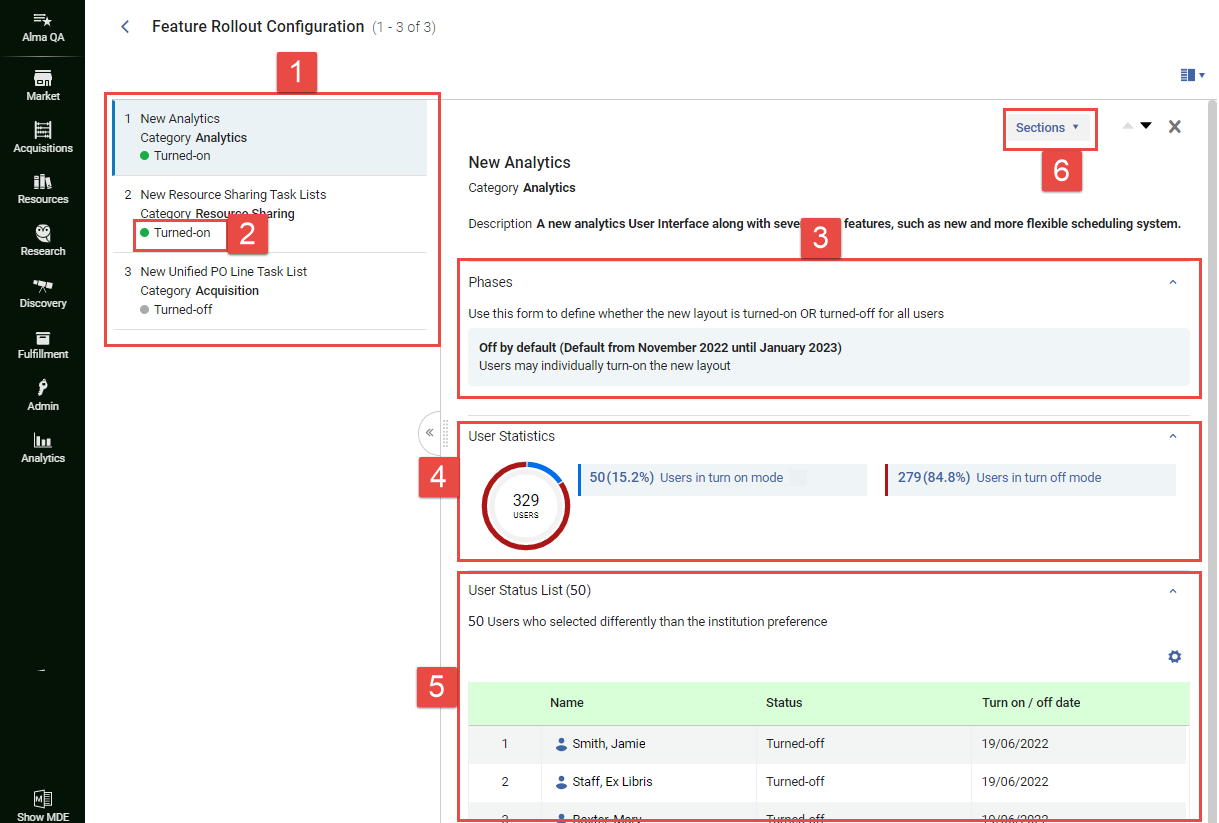
- [機能のロールアウトの構成]ページ([構成]メニュー>[一般]>[ユーザーインターフェイスの設定]>[機能のロールアウトの構成])の左側のパネル(#1)で、機能を選択します。機能の簡単な説明が右側のパネルに表示されます。現在選択されているロールアウト設定がフェーズセクション(#3)に表示されます。For the Off by default and On by default options, the time period in which this option is activated by default is also shown.For example,Off by default (Default from November 2022 until January 2023) indicates that the currently selected option is Off by default, and that this option is selected by default when the November 2022 quarterly release is active.
If the description in the right panel is so long that you cannot see the other sections (Phases,User Statistics, and User Status List), you can navigate quickly to the required section by selecting Sections(#6), and then selecting the section from the menu that opens.
- Select the line in which the currently selected option appears.
 現在選択されているオプションの行を選択するThe Edit Phases box opens and lists the available options.In parentheses beside the Off by default(#7 below) and On by default(#8) options, the time period in which each of these options would be activated by default is also shown.
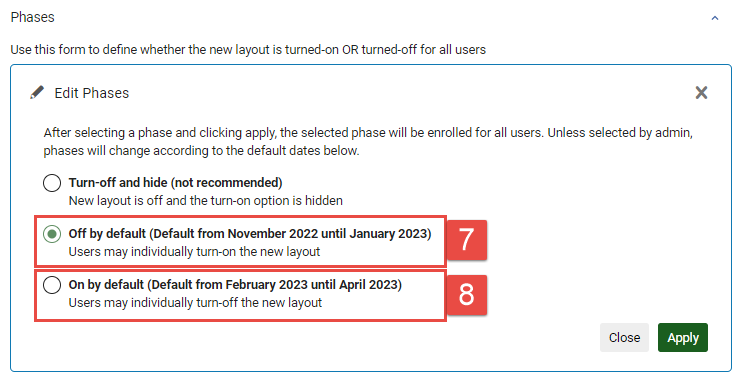 [フェーズの編集]ウィンドウ
- 次のように、必要なオプションを選択します。
- Turn off and hide: Turn the feature off for the entire institution, and do not allow individual users to override this selection.When this option is selected, individual users will not see this feature in the list of features they can choose to turn on or off (see Opting In or Out of a New Feature).このオプションは推奨されていません。新機能が実際にシステムに大きな問題を引き起こしている場合にのみ実装することを目的としています。この場合、このオプションを選択した後、テクニカルサポートに連絡して問題を説明してください。
- デフォルトでオフ:機関全体でこの機能をオフにしますが、必要に応じて個人のユーザーがオンにできるようにします。
- On by default: Turn the feature on for the entire institution, but allow individual users to turn it off if they wish.
- 適用を選択します。選択は機関に実装され、個人のユーザーが選択した既存の設定を上書きします。(デフォルトでオフまたはデフォルトでオンを選択した場合、ユーザーは必要に応じて、以前に選択したオプションを再度選択できます。)「機能のロールアウト構成」ページが閉じ、Alma ホームページが開きます。選択した設定は、手動で変更するか、フェーズの終わりに到達するまで(その時点で、次のステージのデフォルトオプションが実装されます)、機関で引き続き有効です。
新機能の採用の監視
[機能のロールアウト構成]ページには、各新機能を採用した機関のユーザー数、および機関の推奨設定に従わないことを選択したユーザーに関する情報が含まれています。この情報を使用して、新機能で発生した問題を特定し、連絡先のユーザーを特定して、ユーザーが選択した理由を見つけることができます。When a feature is selected in the left panel, this information appears in the User Statistics and User Status List sections of the right panel (#4 and #5).
It may take up to a minute for the user data to load, especially in large institutions with many users.
ユーザー統計情報
Under User Statistics(#4), the breakdown of users who have and have-not retained the institution-default setting is presented in two formats:
- 色分けされた円グラフ
- A key showing which group is represented by each color and presenting more detailed data about each group.
ユーザーステータスリスト
Under User Status List(#5), information is displayed about which users have opted not to retain the institution-default setting.ユーザーの名前を選択して、連絡先情報(電子メールアドレスと電話番号)にアクセスします。
Page tags: article:topicproduct:almacontent:Documentationlang:english
