
物理的なロケーションの設定
アイテムが保管される物理的なロケーション(ロケーション、棚のロケーション、所蔵)を設定します。
このページでは、物理的なロケーションの基本的な構成について説明します。For links to all the main fulfillment documentation pages, see Fulfillment.
- 一般システム管理者
- フルフィルメント管理者
物理的なロケーション(つまり、ロケーション、棚のロケーション、所蔵)は、アイテムが保管される物理的なロケーションです。物理的なロケーションは、機関ではなく図書館に関連付けられています。For more information on the relationship between institutions, libraries (organization units), and physical locations, see Configuring the Institution and Its Libraries.冊子のロケーションは、オフサイトのリモートロケーションにある場合があることに注意してください。For details, see Configuring Remote Storage Facilities.
For information on configuring physical locations, watch Fulfillment Organizational Structure(5:36).See also the Managing Libraries and Locations video.
You configure physical locations from the Physical Location List page (Configuration Menu > Fulfillment > Locations > Physical Locations) or (General System Administrator only)Configuration Menu > General > Locations > Physical Locations).
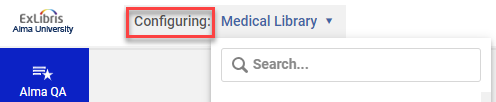
[フルフィルメント設定]ページの設定フィルタから必要な図書館を選択して、物理的なロケーションを設定する図書館のコンテキスト内にいることを確認します。
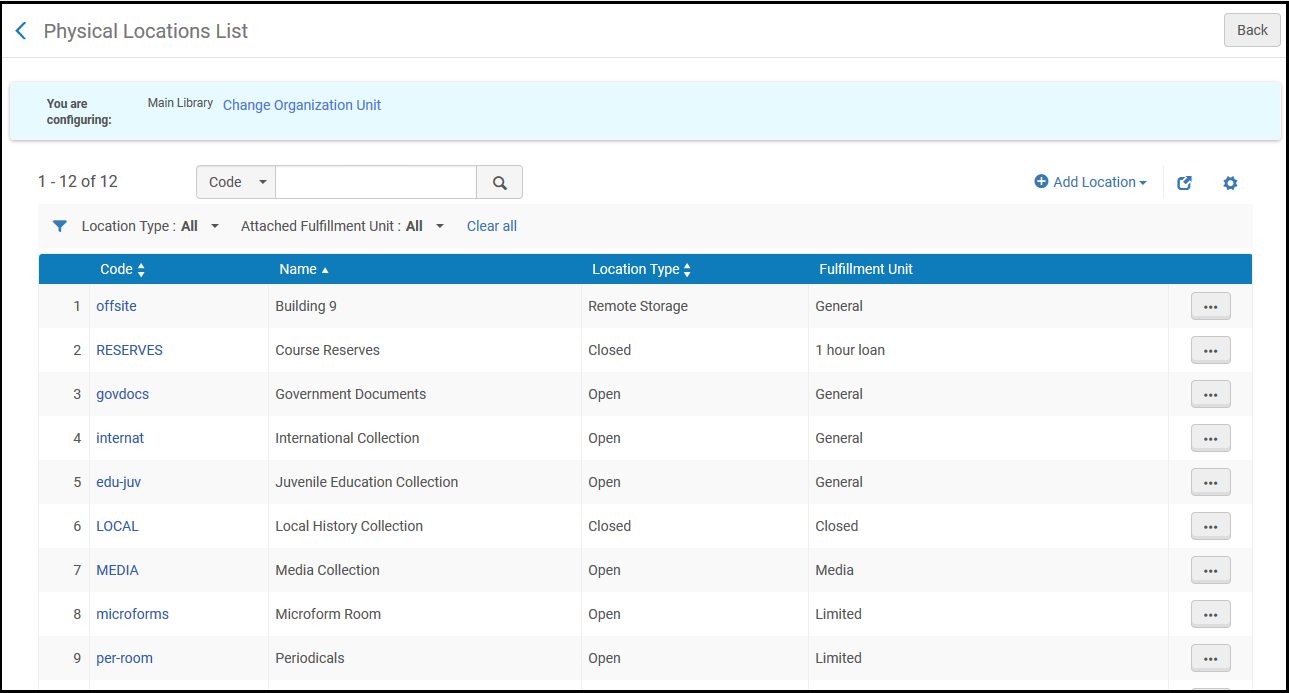
- 物理的なロケーションの重複(行アクションリストで重複させ、関連するフィールドを編集する)
物理的なロケーションの変更は、Almaのいくつかの機能分野に影響を与える可能性があります。行った変更を適切に調整するようにしてください。
物理的なロケーションの追加
以下の手順に従って物理的な場所を追加できます。
- [物理的なロケーションのリスト]ページ([設定メニュー]>[フルフィルメント]>[ロケーション]>[物理的なロケーション])で、ロケーションの追加を選択します。ダイアログボックスが表示されます。
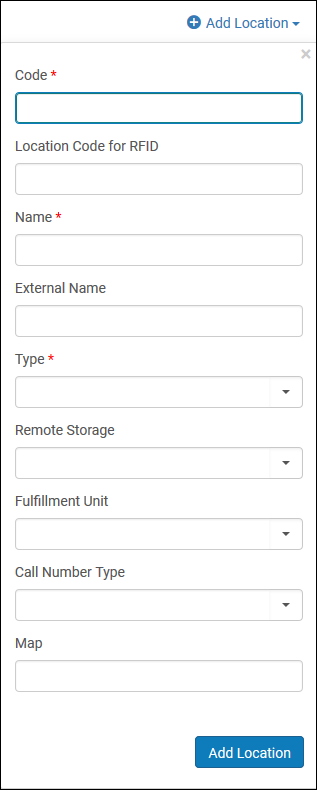 [ロケーションの追加]ダイアログボックス
- Enter the location code (up to 10 characters, no commas allowed) and name, which are both required fields, as well as the external location name, if applicable.External Name is the name to be displayed to patrons in Get It for holdings in the location.空欄の場合、名前フィールドが表示されます。
ロケーションの名前に引用符(')などの特殊文字を含めることはできません。英数字、ハイフン、アンダースコアを使用します。
- タイプリストから、ロケーションのタイプを選択します。さまざまなタイプのロケーションを区別することで、[物理的なロケーションのリスト]ページでロケーションのタイプ別にフィルタ処理できます。
The Remote Storage field only needs to be populated when the Type field is marked as Remote Storage.If you do enter an option into the Remote Storage field, this will change the Workflow steps into Awaiting Remote Storage instead of Pickup from Shelf.
- オープン-ユーザーがアクセスできるロケーション。そのロケーションからアイテムを取り、チェックアウトできます。
- クローズ–図書館職員のみがアクセスすることができ、ユーザーがアクセスすることができないロケーション。
- リモートストレージ–クローズロケーションに似ているが、遠隔地にあるリモートストレージロケーション。リモートストレージのロケーションからアイテムを取得する場合、通常のクローズロケーションからアイテムを取得するよりも時間がかかる場合があります。
- 使用不可– Primoで一般的な電子サービスを計算するためにアイテムが使用不可と見なされるロケーション。このフィールドにはそれ以外の機能的な意味はないことに注意してください。For an understanding of how this selection works in conjunction with general electronic services and an example, see the options described for the Disable service field in the Service Details dialog box (under Configuring General Electronic Services).
- Not in Library – This location indicates that a copy belonging to the instructor is currently in that instructor's possession.後で図書館に持ち込まれます。
- ロケーションにリモートストレージ機能がある場合は、リモートストレージリストから、そのロケーションのリモートストレージオプションを選択します。どのようなタイプのロケーションでもリモートストレージ機能に関連付けられる場合があることに注意してください。
- フルフィルメントユニットリストから、ロケーションのフルフィルメントユニットを選択します。フルフィルメントユニットは、このロケーションからアイテムを貸出・返却するときに適用されるポリシールールを定義します。For details, see Physical Fulfillment.
- From the Call number type list, select the type of call number used for holdings in this location, such as the Library of Congress classification, the Dewey Decimal classification, or the National Library of Medicine classification.The type of call number selected here becomes the default for holdings records attached to this location.If this field is left blank, the value of the call_number_type parameter is used as the default.新しい所蔵レコードがその場所に添付されると、レコードまたはレコードテンプレートで請求番号種類が指定されていない場合は、デフォルトの種類が使用されます。If an item that already has a call-number type defined in its holding record is moved to this location, whether the call-number type is changed depends on the value of the update_call_number_type_upon_item_move parameter.See also,use_space_as_call_number_type;Working with Holdings Records.
- ユーザーがロケーションを見つけるのに役立つマップのURLを指定します。
- ロケーションの追加を選択してロケーションを追加します。
アイテムの取り扱い(棚からのピッキング、チェックインとチェックアウト、再棚上げなど)を可能にするために、新しい場所を貸出・返却受付に取り付けることをお勧めします。これは、場所を編集するか(以下を参照)、関連する貸出・返却受付を編集してから場所をそれに添付することによって行われます。
物理的なロケーションの編集
以下の手順に従って物理的な場所を編集できます。
- [物理的なロケーションのリスト]ページ([設定メニュー]>[フルフィルメント]>[ロケーション]>[物理的なロケーション])で、ロケーションの行アクションリストで編集を選択します。
- [物理的なロケーションの編集]ページの物理的なロケーションの詳細セクションで、必要に応じてロケーションの情報を編集します。For information on this page, see Adding a Physical Location:.
- 物理的なロケーションの貸出・返却受付リストセクションで:
- 新しい貸出・返却受付を作成して物理的なロケーションに関連付けるには、新しい貸出・返却受付を添付を選択します。For additional information, see Adding a Circulation Desk.
- 既存の貸出・返却受付を物理的なロケーションに関連付けるには、ドロップダウンリストから貸出・返却受付を選択し、貸出・返却受付が物理的なロケーションに提供するサービスを選択し、既存の貸出・返却受付を添付を選択します。For additional information, see Adding a Circulation Desk.
- 所蔵設定セクションで:
受入配置で、受入番号に使用するMARCサブフィールドを選択します。When you do this, you make the Accession Number field mandatory when creating a holdings record and cause this subfield to be indexed, and thereby searchable in the repository.オプションは次のとおりです:
- ピース指定(852 $$p)
- 請求番号(852 $$h)
- 棚ロケーション(852 $$j)
- なし(デフォルトオプション)
- 請求番号タイプで、請求番号が生成される方法を選択します。
- このロケーションにあるアイテムのディスカバリーインターフェイス(PrimoまたはLibraries Australia)への発行を抑制するには、ディスカバリーから抑制を選択します。Note that if the suppressed item is the only item linked to the title, the title will be suppressed provided the suppressBibWithSuppressedHol parameter (see Configuring Other Settings (Resource Management)) is set to true.
- レコードに場所レベルで抑制されているアイテムが1つしかない場合でも、そのレコードはネットワーク機関から新規またはアップデートとして公開されますが、AVAフィールドはありません。To make the records not retrievable in Primo, suppress the records manually.
- If the Locations Ordering Profile has been defined to use the Use Custom Sorting option, (see 'Configuring the Order of Locations in Primo Search Results'), the priority of each location within the library can be determined by configuring the 'Discovery Priority' attribute of the location.同じ図書館のすべての「最初に表示」される場所は、同じ図書館の他の場所より先にソートされ、同じ図書館のすべての「通常表示」される場所は、同じ図書館の「最後に表示」される場所より先にソートされます。同じ検出優先度内の場所はアルファベット順にソートされます。
- (New for February 2026) Select Digitization Priority to assign a digitization priority level to a location.デジタル化リクエストが作成され、複数の場所からコピーすることでリクエストを実行できる場合、Almaは優先順位が最も高い場所を選択します。
- The Host Location Configurations section is available only for the Network Zone and its members that work in Network Zone topology.スタンドアロンの機関では、このセクションが有効になっていません。Select this checkbox if you want to configure joint use of inventory in a Consortia, where one institution can order for another institution in the Network Zone.For details, see Joint User of Inventory in Consortia.If you are not interested in configuring this workflow, leave the checkbox clear.
- 保存を選択して、物理的なロケーションに加えた変更を保存します。
If the external location name or Suppress from discovery status has been changed, for Primo a set of physical titles related to this location must be republished.For Primo VE, you need to run indexing on the set of records using the Recalculate Local Resource Types Job (see Manual Jobs).
物理的な場所の複製
以下の手順に従って物理的な場所を複製できます。
- [物理的な場所のリスト]ページ([設定メニュー]>[フルフィルメント]>[場所]>[物理的な場所])で、複製したい物理的な場所の行にあるアクションメニューを選択します。
- 行アクションメニューで複製を選択します。
物理的な場所の削除
以下の手順に従って物理的な場所を削除できます。
- 「物理的な場所のリスト」ページ([設定メニュー] > [フルフィルメント] > [場所] > [物理的な場所])で、場所の追加を選択します。
- 行アクションメニューで削除を選択します。
場所に関連付けられた在庫(つまり、その場所コードを持つアイテム)がある場合、その場所は削除できません。場所を削除する前に、アイテムを別の場所に移動する必要があります。
Page tags: article:topicFulfillmentproduct:almacontent:Documentationlang:englishConfigure FulfillmentAdd physical locationEdit physical location
